
 Bitaigen Research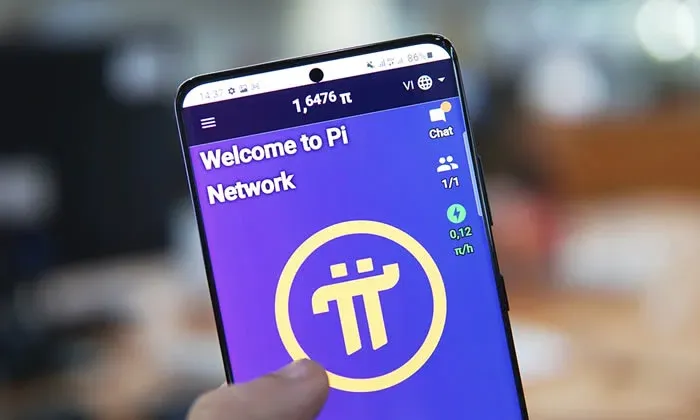
Pi can be “mined” simply by tapping a “Mine” button once a day in the mobile app—no extra hardware is required, just install the Pi Network app and log in.
Pi ( Pi Network ) positions itself as a “mobile‑only mining” project. Users only need to open the official app and tap the mining button once each day to receive token rewards. Below is a complete step‑by‑step guide covering download, registration, and daily mining.
For users who want to try Pi mining on their phones, we have compiled a full‑process guide from installation to daily activation, plus practical tips for iOS account switching and network acceleration. Keep reading to master every essential step.
Detailed Tutorial for Mining Pi on a Mobile Phone
1. Download
- Android: Version 1.34.2 download link
https://shangrong55.lanzoui.com/iulNH0i3a1be
- iOS: Requires an overseas Apple ID (non‑Mainland China). Search “Pi Network” in the App Store and install. Common free acceleration tools include: Summer International, Little Bull Accelerator, QuickMeow VPN, etc.
★ iOS Solution
- Visit www.apple.com.cn and create a Hong Kong Apple ID using an unused QQ email (no credit‑card binding needed).
- Sign out of the current iTunes Store / App Store account and log in with the newly created Hong Kong ID.
- Open the App Store, search for “Pi”, and download the official app with the purple Pi icon. Future updates can be performed under the same ID.
2. Registration
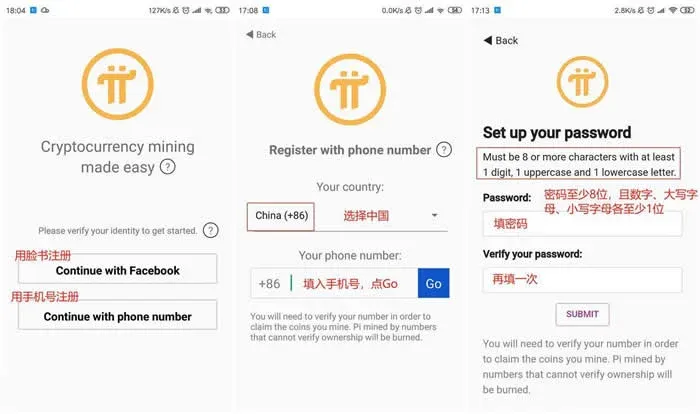
- Choose a registration method
- Phone‑number registration is recommended for smoother subsequent actions.
- Steps: select China region → enter phone number → tap Go → set a password (minimum 8 characters, must include numbers, uppercase and lowercase letters), e.g., `Susan123` → SUBMIT.
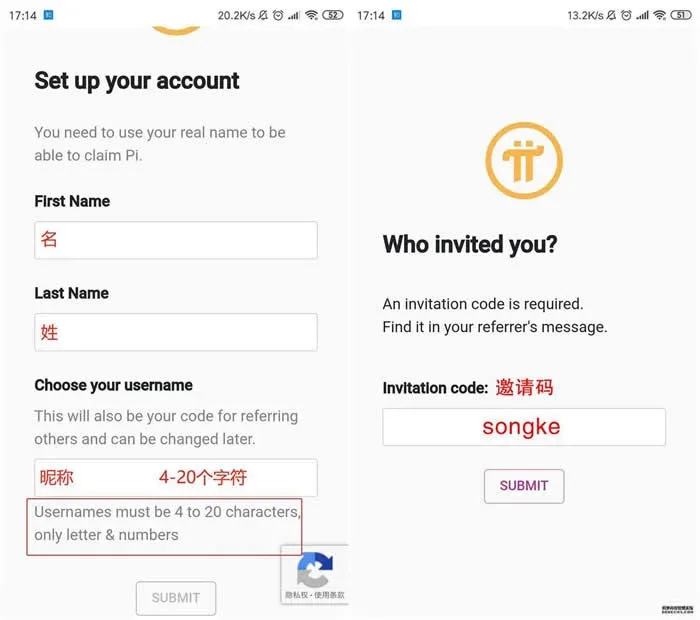
- Fill in personal details
- Enter first name, last name (Chinese characters are acceptable) and a nickname (4‑20 characters), then tap SUBMIT.
- If you have an invitation code, enter it here; you will receive an initial batch of Pi for free and, after three days, be eligible to join a “security circle” that boosts your mining rate.
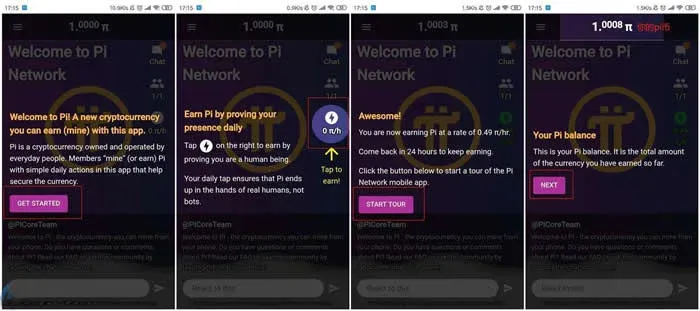
3. Guided Introduction
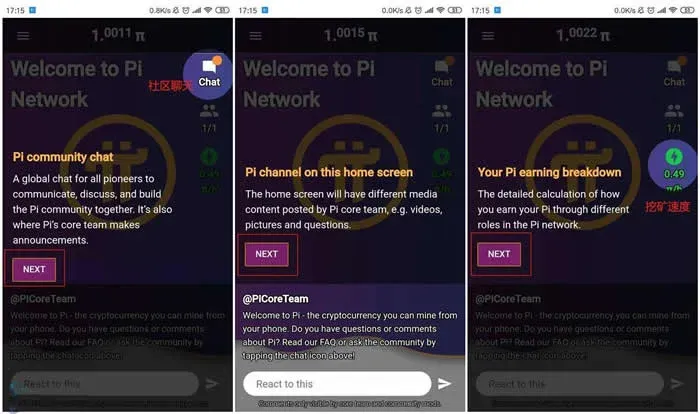
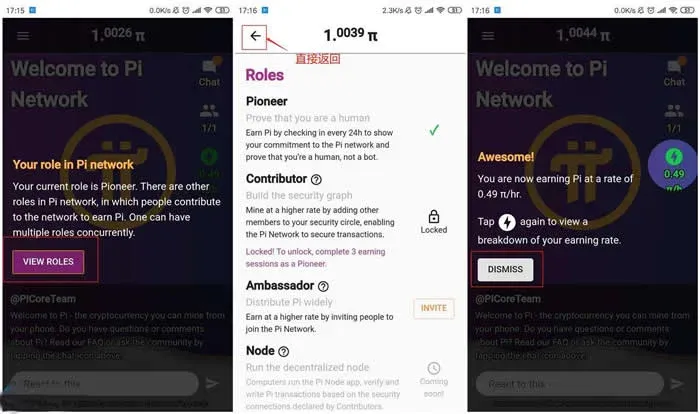
When you open the app for the first time, a step‑by‑step walkthrough appears. Simply keep tapping “Next” as prompted to finish the onboarding. Sample screens are shown below.
4. Identity Verification
The system periodically removes accounts that have not completed verification; unverified mining records become invalid. Therefore SMS verification is a mandatory step.
- Tap the three‑line “hamburger” menu in the top‑left corner → go to Profile → select the second‑last option VERIFY.
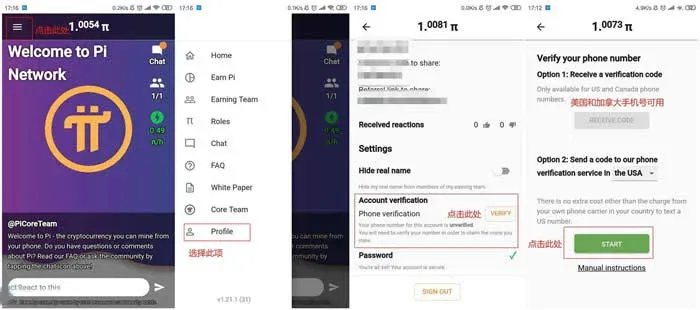
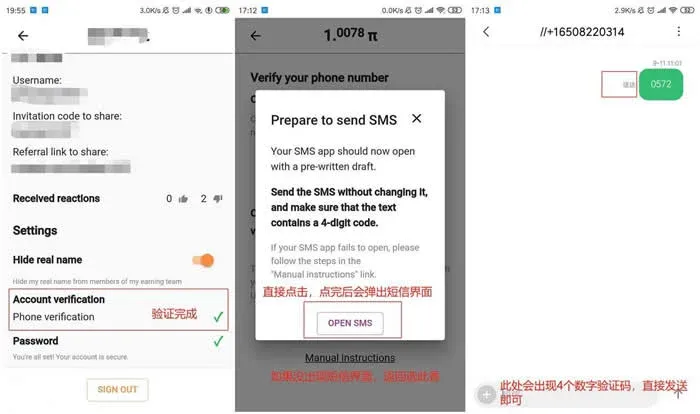
- Press the green START → OPEN SMS, send the international SMS to complete verification (cost ≈ 0.05 USD).
5. How to Mine
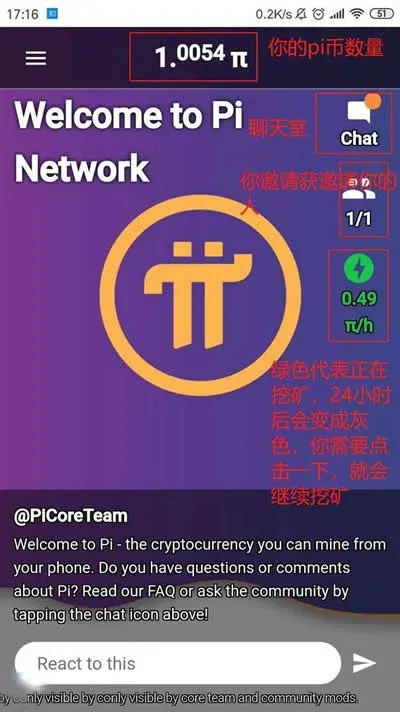
- Daily routine: Open the app every 24 hours and tap the “Mine” button once to claim that day’s reward.
- Security Circle: After accumulating 72 hours of mining, you can apply to join a security circle. When the circle reaches five members, each participant’s mining rate increases by 0.39 Pi per day.
Definition: Pi Network does not use the traditional Proof‑of‑Work (PoW) or Proof‑of‑Stake (PoS) consensus mechanisms. Instead, it is built on the Stellar Consensus Protocol (SCP), originally designed and later refined by Stanford computer‑science professor David Mazières.
- The full source code has not been publicly released to date.
- The current testnet runs on centralized Amazon Web Services servers, so the project is still some distance from its stated decentralization goal.
Why Is Pi Popular?
Several factors have helped Pi quickly amass a large user base:
- Mining with a phone
Compared with Bitcoin, Ethereum and other projects that require expensive hardware, Pi’s mobile‑only approach dramatically lowers the entry barrier.
- Viral referral system
Every time you invite a new user, your mining efficiency receives a boost, incentivising organic promotion.
- Low‑cost experimentation
Because there is virtually no upfront financial commitment, failure of the project would not result in a monetary loss; if the project succeeds, early participants could reap additional rewards.
---
This article provides a complete beginner’s guide to mining Pi. For more practical tips on Pi mining, follow the upcoming posts from Bitaigen.
Note for global users: When converting Pi to fiat currencies, most exchanges support USD withdrawals via SEPA or SWIFT. Residents of the United States should use Binance.US (the US‑specific platform) rather than the global Binance site. Additionally, crypto gains may be subject to taxation in your local jurisdiction; consult a tax professional for guidance.
Related Reading
- Bitcoin Explained: Decentralized Currency, Blockchain & Cypherpunk Roots
- Proof-of-Work Explained: Security, Energy Challenges & Future Trends
- AI Crypto Tokens: Mid-Term Growth Picks & Insights
💡 Register on Binance with referral code B2345 for the maximum trading fee discount. See Binance complete guide.



