
 Bitaigen Research
 Wrapped Solana (WSOL)
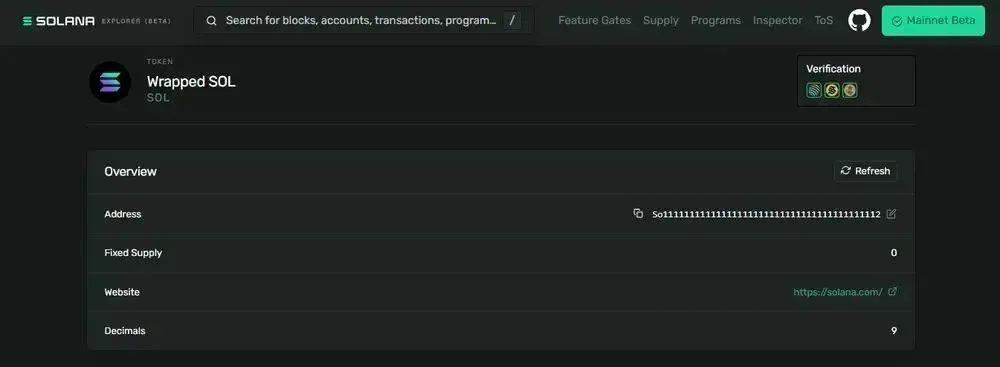
Wrapped Solana (WSOL) is the SPL‑token representation of SOL, pegged 1:1 to the native SOL. It wraps native SOL into a token that conforms to the SPL standard, making it easier to interact with exchanges, liquidity pools, and smart contracts.
In this article we systematically review the concept of WSOL and its fundamental differences from native SOL, and we walk through the complete process of converting SOL → WSOL → SOL. By dissecting the wrapping mechanism, wallet operations, and DeFi use‑cases, we help readers get started quickly while avoiding common pitfalls. Subsequent sections will guide you step‑by‑step through an actual conversion.
What is Wrapped Solana (WSOL)?
Wrapped Solana (commonly written as WSOL or wSOL) is the manifestation of SOL on the Solana network as an SPL token. Through a 1:1 value peg, native SOL can be used within token‑based smart contracts, DeFi applications, and liquidity pools.
- Users lock native SOL in a dedicated smart contract; the contract mints an equivalent amount of WSOL.
- The process preserves value equality while granting the flexibility of a tokenized asset.
- Most wallets and aggregators automatically perform wrapping or unwrapping during a trade, but the underlying asset remains the same SOL.
How to Convert SOL to WSOL
If your wallet already holds native SOL, most aggregators such as Jupiter will wrap the asset automatically, so you generally do not need to intervene manually.
Steps to Use Native SOL on Jupiter
- Connect your wallet – Open Jupiter and connect a Solana wallet that holds SOL, such as Phantom, Solflare, or Backpack.
- Select SOL – In the “Pay Token” field, choose SOL.
- Choose the target token – Specify the token you want to buy, send, or swap to.
- Enter the amount – Fill in the amount of SOL you wish to spend in this transaction.
- Review the route – Confirm the quote and routing details displayed by Jupiter.
- Confirm the swap – Click “Swap” and approve the transaction in your wallet.
- Automatic wrapping – If the selected route requires a tokenized version of SOL, Jupiter will internally wrap SOL into WSOL.
- Automatic unwrapping – If the final route returns native SOL, Jupiter will automatically unwrap WSOL back to SOL.
![Conversion of WSOL to SOL] (https://storage.ghost.io/c/73/14/73143a3d-7eb4-49d9-91c4-38b6bfe75144/content/images/2026/04/1018758-3-88d55cf0.webp)
WSOL Contract Addresses
On Solana mainnet WSOL uses a single mint; on EVM‑compatible chains it is issued via bridge contracts, the most common implementation being Wormhole.
| Chain / Platform | Contract Address | Notes |
|---|---|---|
| Solana (mainnet) | `So11111111111111111111111111111111111111112` | Standard WSOL mint |
| Ethereum (Wormhole) | `0xD31a59c85aE9D8edEFeC411D448f90841571b89c` | Wrapped SOL |
| BNB Chain | `0x570A5D26f7765Ecb712C0924E4De545B89fD43dF` | Wrapped SOL |
| Polygon (Wormhole) | `0xd93f7E271cB87c23AaA73edC008A79646d1F9912` | Wormhole SOL |
| Base | `0xed2a18a533c452293934f5c7a55ebaa5c2b6e6d8` | Generic uSOL |
| Arbitrum | `0x9B8Df6E244526ab5F6e6400d331DB28C8fdDdb55` | Generic uSOL |
Differences Between WSOL and SOL
| Feature | Native **SOL** | **Wrapped Solana (WSOL)** |
|---|---|---|
| Asset type | Native token of the Solana blockchain | SPL‑standard token that represents the native asset |
| Primary use | Paying network gas, basic transfers, staking | DeFi protocols, token swaps, liquidity pools, DApps |
| Value relationship | Underlying network asset | Pegged 1:1 to native SOL |
| Wallet presentation | Main account balance | Token‑account balance |
| Contract compatibility | Directly usable by all Solana contracts | Must follow SPL token transfer rules |
Do I Need to Wrap SOL?
Wrapping is only required when a specific application explicitly asks for an SPL token rather than native SOL. Typical scenarios include:
- Decentralized exchange aggregators
- Lending platforms
- Liquidity mining pools
- Automated vaults or advanced trading interfaces
For everyday transfers, staking, or simply holding SOL, manual wrapping is usually unnecessary; most modern wallets perform the operation behind the scenes.
Are There Fees for Wrapping WSOL?
WSOL itself does not levy additional taxes or fees, but creating, syncing, transferring, or closing a WSOL account incurs the standard Solana network fee. At the time of writing the fee is roughly 0.000005 SOL, which is negligible.
Opening a new token account also requires a rent‑exemption deposit of about 0.002 SOL. When you close an empty token account, the deposit is refunded.
![Wrapped Solana transaction fees] (https://storage.ghost.io/c/73/14/73143a3d-7eb4-49d9-91c4-38b6bfe75144/content/images/2026/04/1018758-4-61376ffe.webp)
Note: While the protocol itself does not charge taxes, crypto gains—including any profit realized from converting WSOL back to SOL or fiat—may be taxable in your jurisdiction. Consult a tax professional for guidance.
Pros and Cons of WSOL
Advantages
- DeFi access – Use SOL in SPL‑based swaps, lending, and liquidity pools.
- Fast execution – Tokenized form enables rapid path changes in high‑frequency trading.
- Broad support – Compatible with major Solana wallets and aggregators, allowing cross‑protocol interaction.
Disadvantages
- Extra steps – Manual wrapping can be a technical hurdle for newcomers.
- Fee exposure – Each wrap or unwrap incurs network fees and possible rent deposits.
- Bridge confusion – Cross‑chain versions rely on different contracts, which can lead to asset‑recognition mistakes.
Frequently Asked Questions
How do I sell WSOV?
On Jupiter or any Solana DEX, swap WSOL for SOL, USDC, or another token, then transfer the resulting asset to a centralized exchange (e.g., Binance.US for U.S. users, or the global Binance for the rest of the world) for withdrawal to USD via SEPA or SWIFT.
Is WSOL completely equivalent to SOL?
On Solana mainnet, WSOL is pegged 1:1 to SOL and is value‑equivalent. Bridge‑derived versions on other chains may exhibit slight price differences, influenced by liquidity and cross‑chain risk.
Can I send WSOL to a Phantom wallet?
Yes. Phantom supports SPL tokens. If WSOL does not appear, refresh the wallet, enable token visibility, or manually add the standard mint address.
Summary
Wrapped Solana (WSOL) is the tokenized implementation of SOL, enabling it to circulate within SPL‑standard DeFi environments. For most users, Jupiter offers the simplest experience because it automatically handles the wrapping and unwrapping of SOL ↔ WSOL, delivering a smoother trading flow.
For deeper details on converting between WSOL and SOL, you can search for previous Bitaigen (比特根) articles or continue reading the related posts below. Thank you for reading, and stay tuned to Bitaigen (比特根) for more updates!
Related Reading
💡 Register on Binance with referral code B2345 for the maximum trading fee discount. See Binance complete guide.



