
 Bitaigen Research
 We systematically outline the complete setup process for Binance C2C (peer‑to‑peer) payment methods in this article, with a focus on compliance points and security safeguards for users in Mainland China. Through clear step‑by‑step guidance and practical risk‑avoidance tips, you will be able to start trading quickly, improve order‑matching rates, and effectively reduce the potential risk of bank‑card freezes.
1. Why It Is Crucial to Set Up Your C2C Payment Method Correctly
1. Preconditions for Trading
In Binance’s peer‑to‑peer (C2C) over‑the‑counter market, buyers and sellers must complete the fiat‑to‑crypto hand‑off via a fiat transfer. If your account has not bound any compliant payment channel, you will be unable to publish buy or sell orders for assets such as USDT, and you will also be unable to match other users’ orders—essentially you lose the eligibility to participate in C2C trading. The payment method is the sole bridge between fiat currency and digital assets.
Note for U.S. users: The global Binance platform is not available in the United States. Please use Binance.US for any C2C activity, and follow the same principles regarding payment‑method configuration.
2. The First Line of Defense for Fund Safety
The platform strictly requires that the linked bank card, Alipay or WeChat account matches the KYC‑verified real‑name information exactly, with the purpose of:
- Preventing malicious actors from hijacking an account and binding their own payment channels for transfers;
- Reducing the possibility of illicit funds flowing into the platform, thereby protecting users from being implicated in money‑laundering or other regulatory violations;
- Making fiat flows traceable, which lowers the risk of scams such as “payment made but no crypto released” or “receipt confirmed but the seller denies the transaction.”
3. Boosting Transaction Efficiency
- Default payment method: Once you set a frequently used account as the default, you no longer need to select it manually when publishing an order—one click completes the process.
- Multi‑channel matching: Adding several options—bank cards, Alipay, WeChat—allows you to cater to different buyers’ payment habits, thereby increasing the likelihood of a successful match.
- Sorting optimization: Payment methods are displayed in order of risk tolerance; lower‑risk channels are shown first, reducing friction during the trade.
4. Reducing the Risk of Bank‑Card Freezes (Specific to Mainland China Users)
Properly managing your payment methods is an important tactic for avoiding bank‑card freezes:
- It is advisable to bind 2–3 cards from different banks, dispersing both the transaction amount per order and the frequency of transactions;
- Prefer banks with relatively looser risk controls, such as joint‑stock banks (e.g., China Merchants Bank, Shanghai Pudong Development Bank), and avoid using the “big four” state‑owned banks for high‑frequency trading;
- By sorting your payment methods, set the low‑risk accounts as the primary option, which lowers the probability that a single account will trigger risk controls.
2. Complete 2026 Binance C2C Payment Method Setup Procedure
Below we use the Binance APP as an example to demonstrate how to add a new payment channel step by step.
1️⃣ Enter the Payment‑Method Settings Page
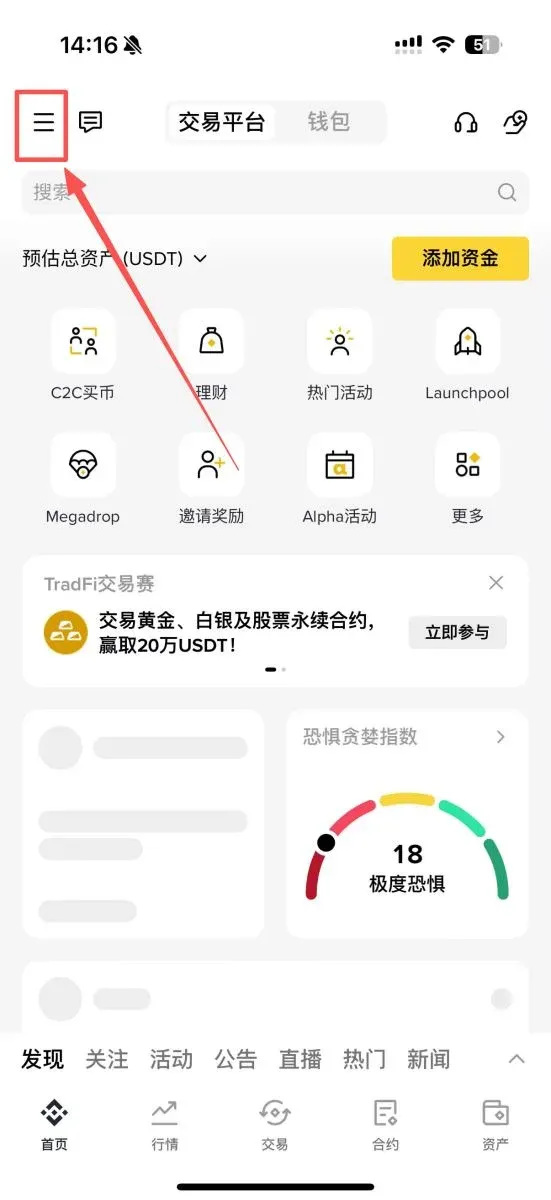
- Open the Binance APP (official registration / official download) and tap the three‑line icon in the top‑left corner to open the side menu.
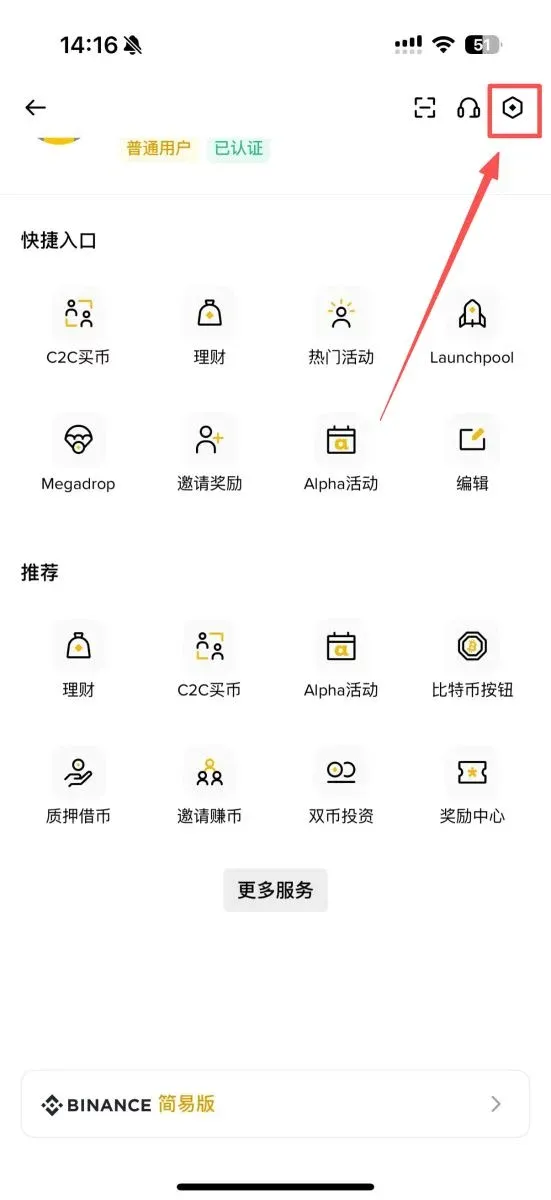
- In the side menu, tap the “gear” icon in the top‑right corner to enter Settings.
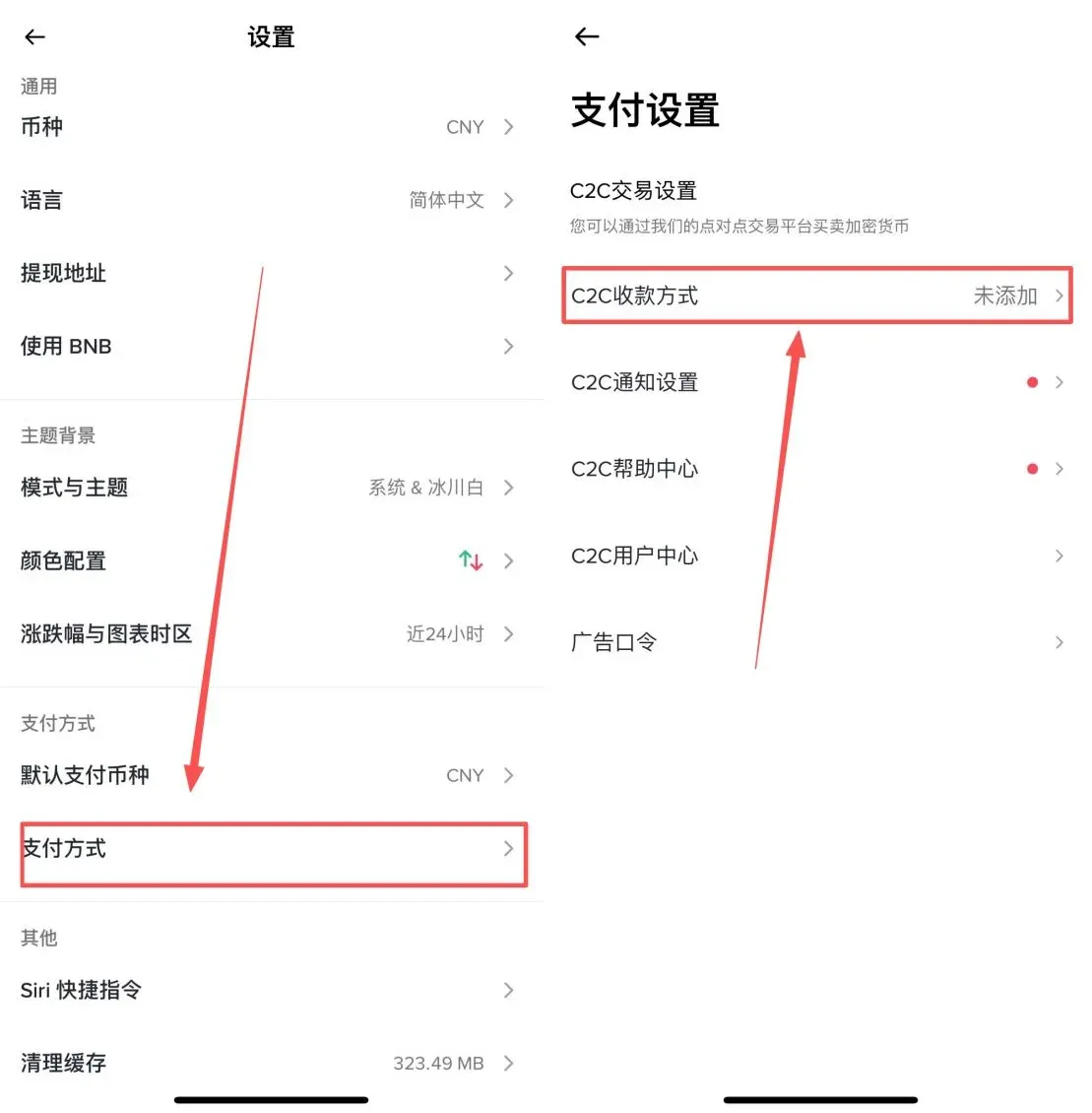
- Scroll down until you find [Payment Methods], then click [C2C Payment Methods].
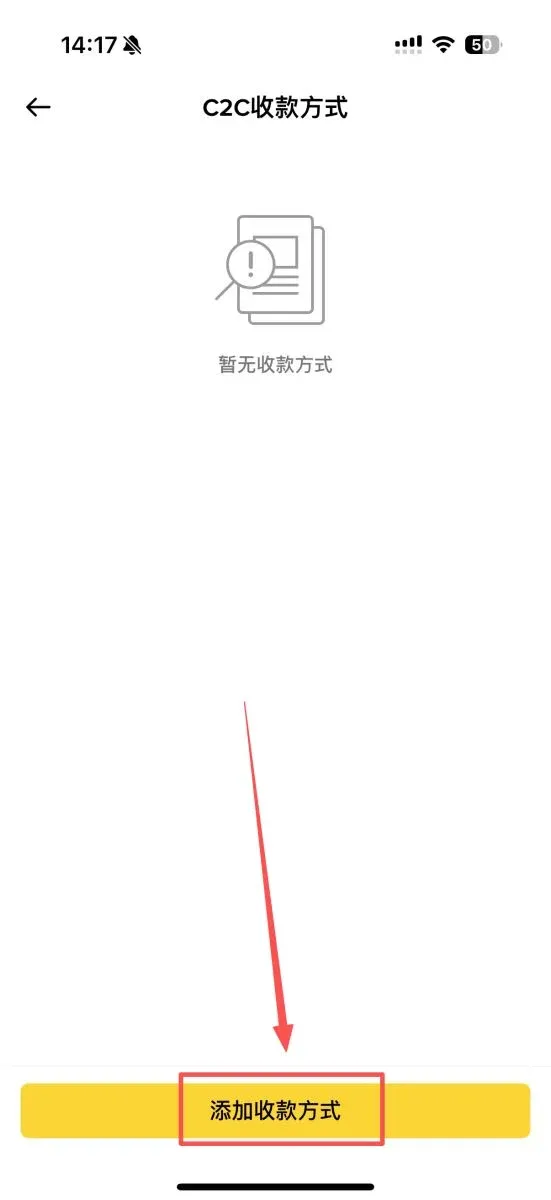
- At the bottom of the page, tap [Add Payment Method].
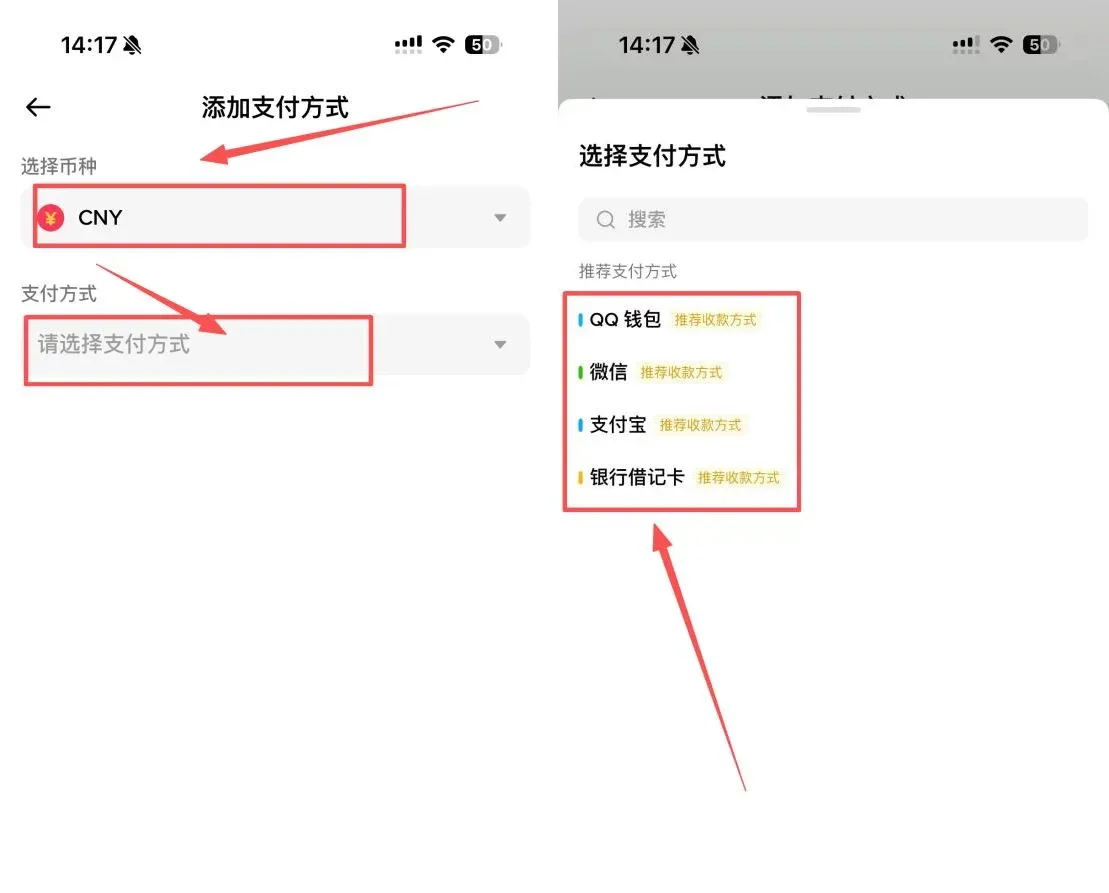
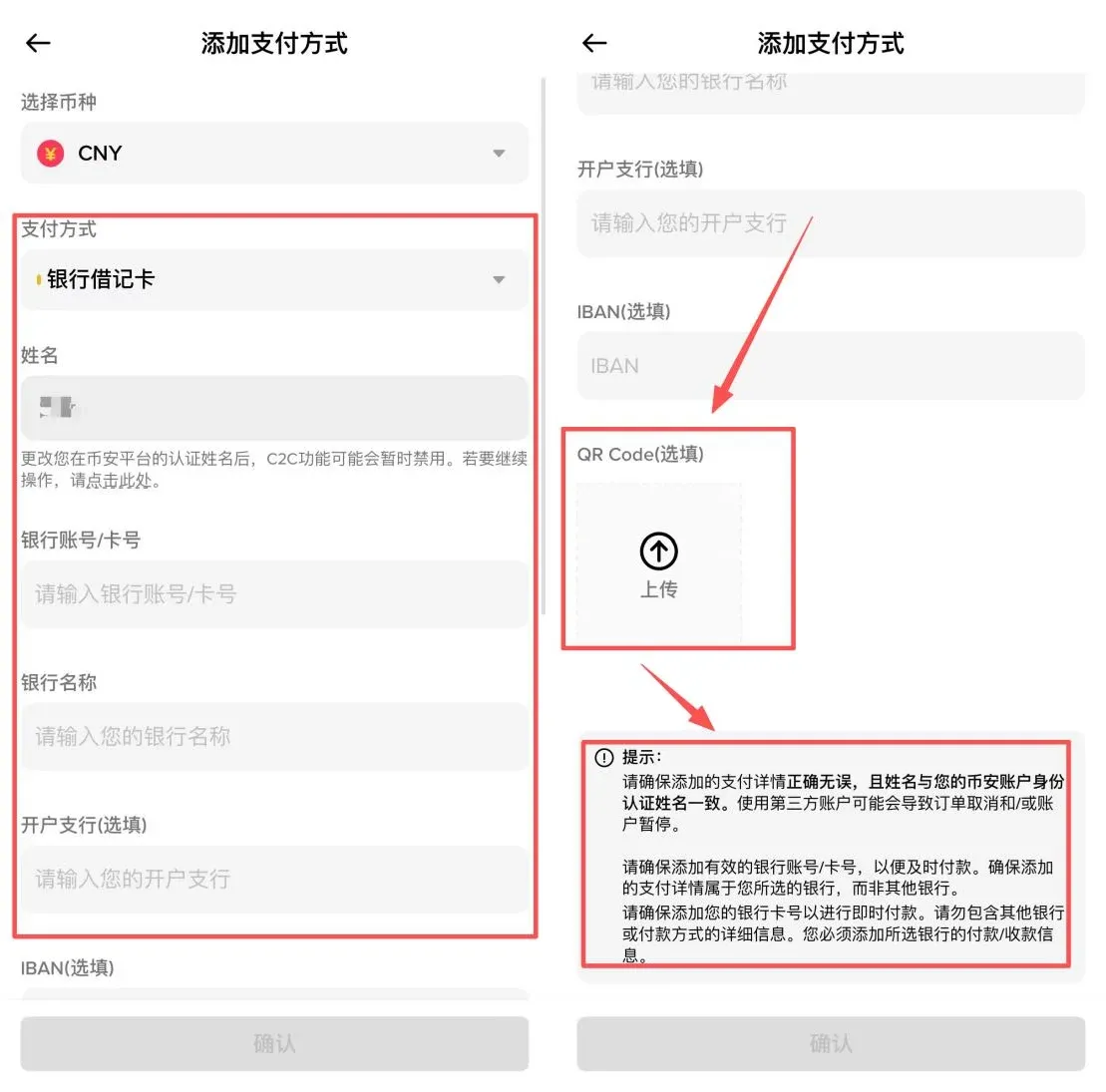
- Choose the trading fiat CNY (Chinese Yuan), then you can select QQ Wallet, WeChat, Alipay, or Bank Debit Card to add.
2️⃣ Detailed Setup Steps for Each Channel
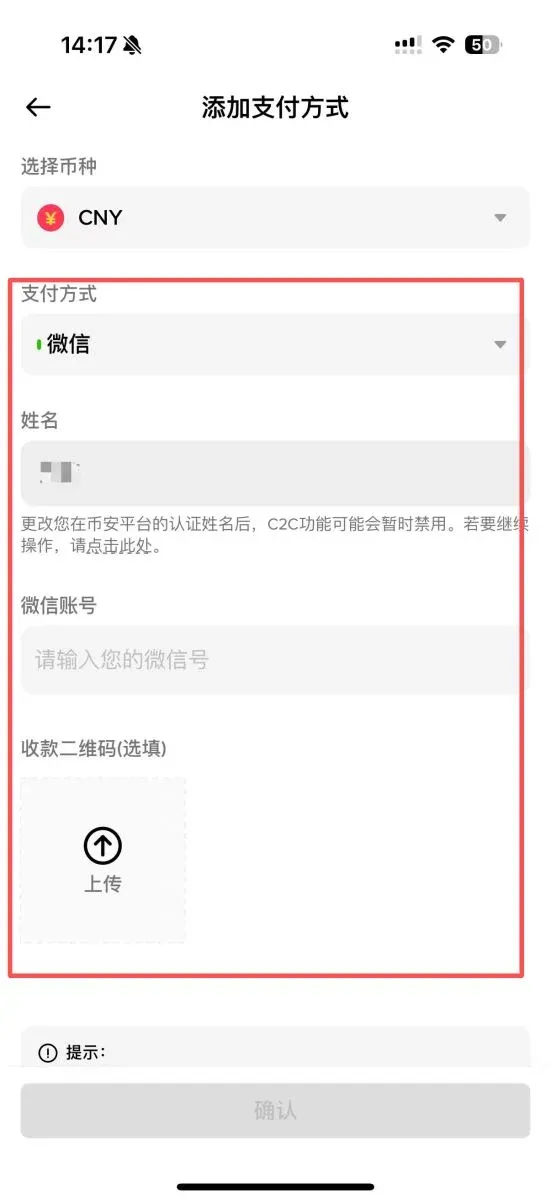
WeChat Pay
- Fill in the real name that matches the KYC record exactly;
- Enter your WeChat ID;
- Upload a screenshot of your WeChat payment QR code, ensuring the code is clear and the name is legible.
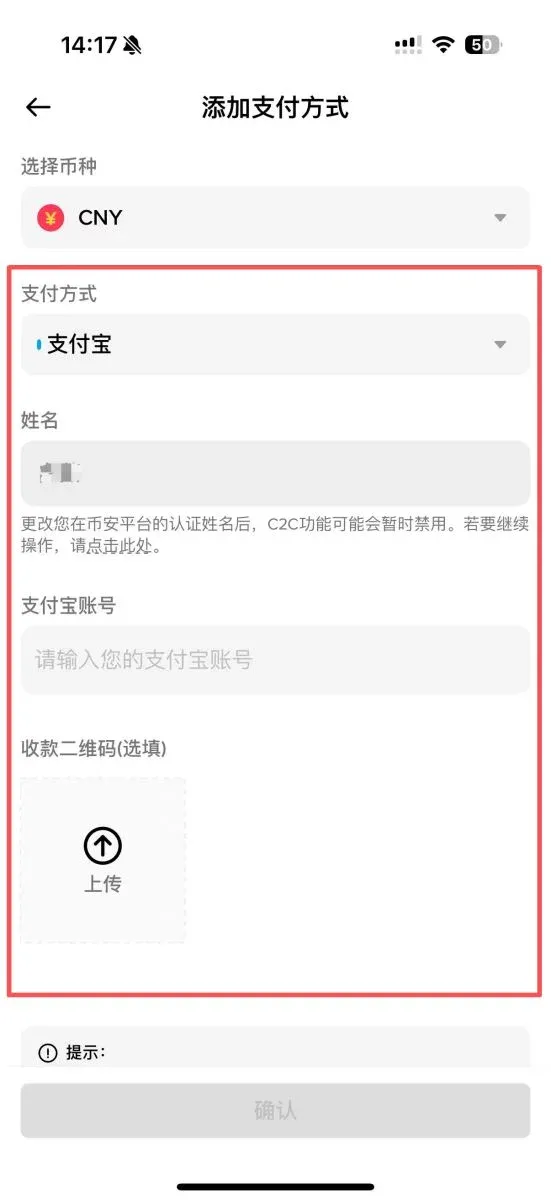
Alipay
- Also fill in the real‑name used for KYC;
- Input the Alipay account (mobile number or email address);
- Upload the Alipay payment QR code, making sure the name information is complete.
Bank Debit Card
- Enter the cardholder’s name (must match KYC);
- Provide the full card number;
- Choose or manually type the bank name and the specific branch;
- Upload a photo of the front side of the bank card, ensuring the card number and name are clearly visible.
3. Comparison of Payment Channels and Usage Recommendations (Key for Mainland China Users)
| Payment Method | Advantages | Disadvantages | Recommended Scenarios |
|---|---|---|---|
| **Bank Card** | Stable for large‑value trades; daily limit 5‑50 万 CNY (≈ $7,200‑$72,000 USD) | Prone to trigger risk controls; higher freeze risk | Use joint‑stock banks (e.g., China Merchants, SPDB); keep each transaction ≤ 5 万 CNY and ≤ 2 trades per day |
| **Alipay** | Near‑instant settlement; relatively lenient risk controls | Single‑transaction cap of 1 万 CNY (≈ $1,440 USD); frequent trades may be restricted | Small‑value trades (≤ 5,000 CNY ≈ $720 USD); ≤ 3 trades per day |
| **WeChat Pay** | Very convenient; suited for high‑frequency low‑value trades | Strict risk controls; large amounts often fail | Emergency or ultra‑small trades (≤ 3,000 CNY ≈ $430 USD); ≤ 2 trades per day |
For users outside Mainland China, the equivalent fiat may be transferred via SEPA (for EUR) or SWIFT (for USD) where supported, and the same principles of matching the verified name to the payment account apply.
4. Hands‑On Demonstration of a C2C Payment Transaction
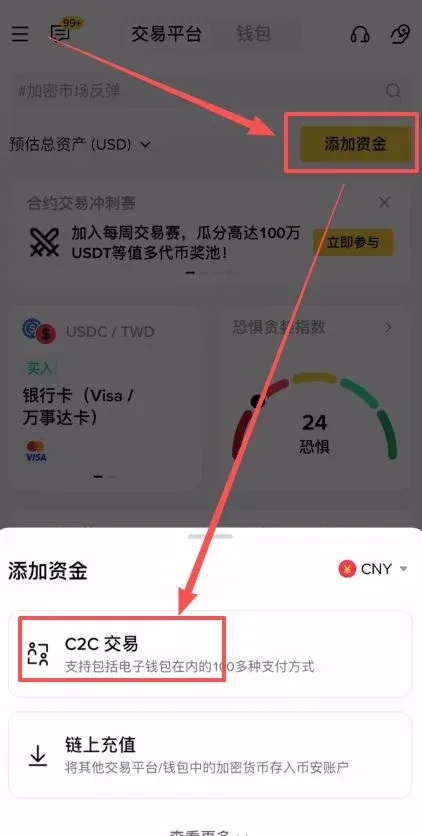
- Open the Binance APP, tap [Add Funds] → [C2C Trade].
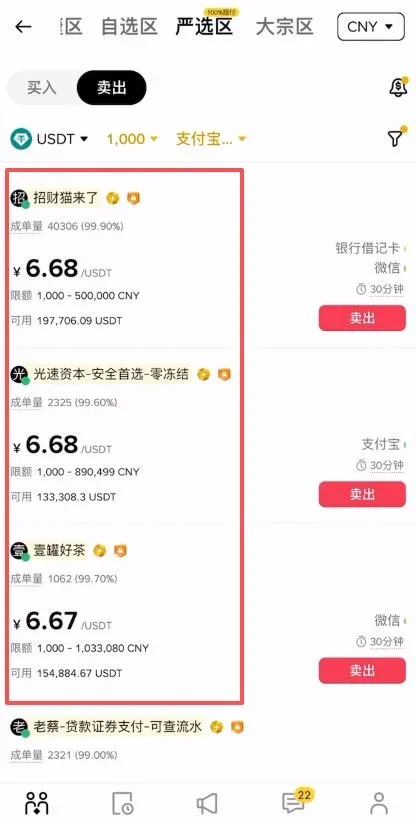
- The upper part of the screen is divided into four sections: Quick Zone, Custom Zone, Strict‑Selection Zone, and Bulk Zone.
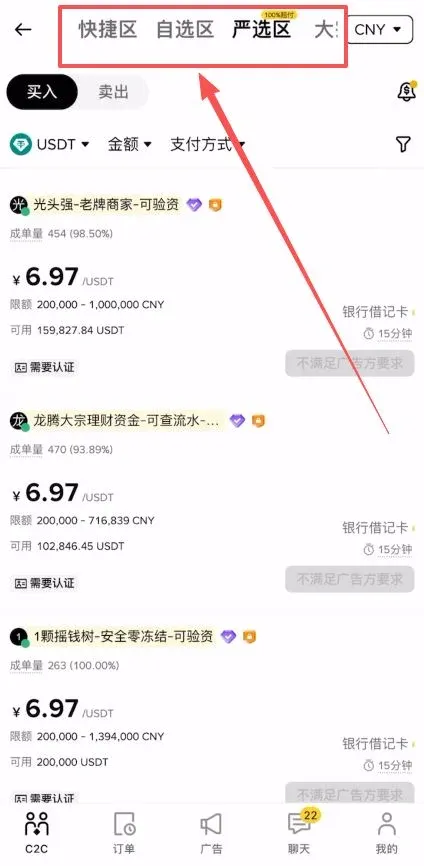
- Avoid the Quick Zone: its matching algorithm prioritizes the highest quoted price, which can be exploited by malicious traders. It is recommended to browse the Custom, Strict‑Selection, or Bulk zones and manually select reputable counterparties.
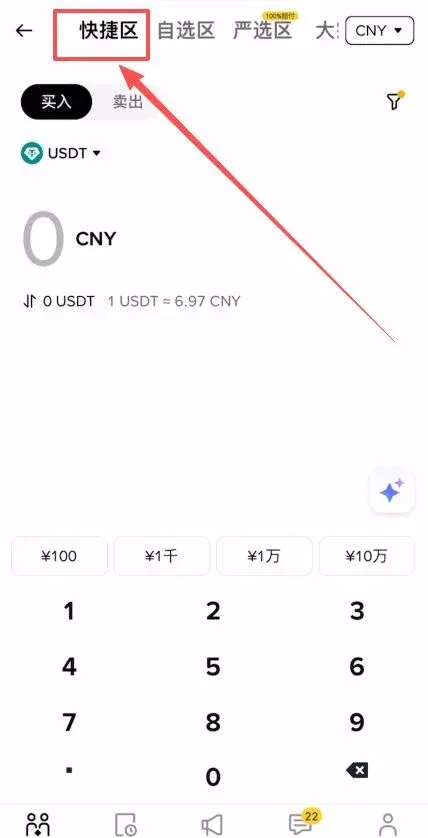
- Explanation of the Zones
- Bulk Zone: Designed for large‑volume trades; higher limits apply;
- Strict‑Selection Zone: Binance provides a 100 % compensation guarantee—if a trade is blocked by risk controls and the account is frozen, Binance will fully reimburse the loss.
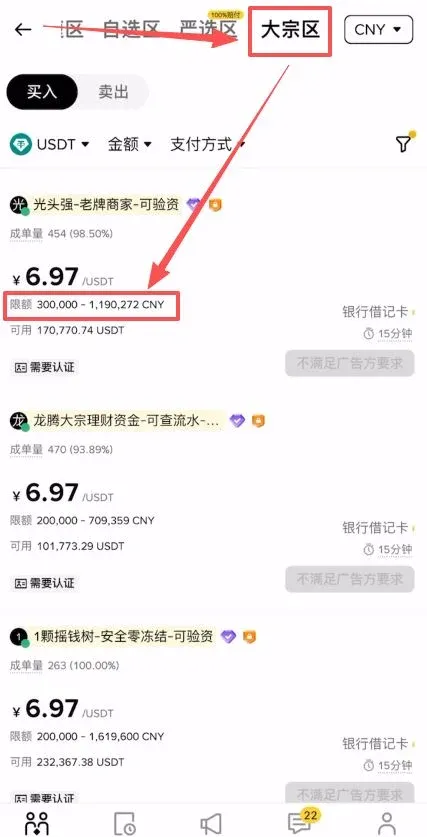
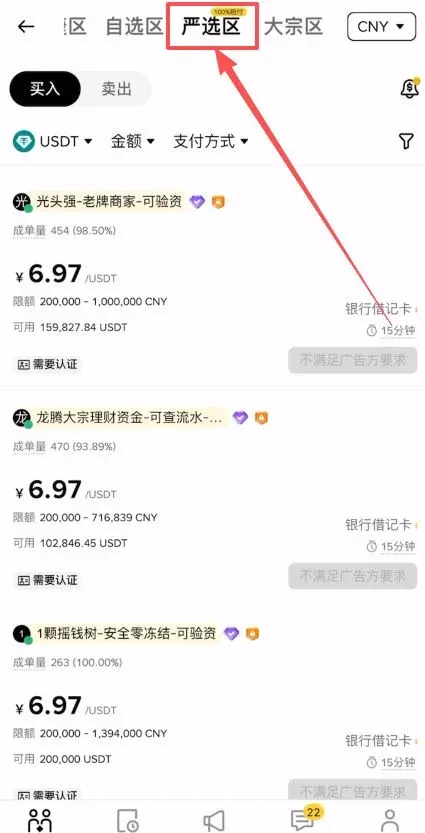
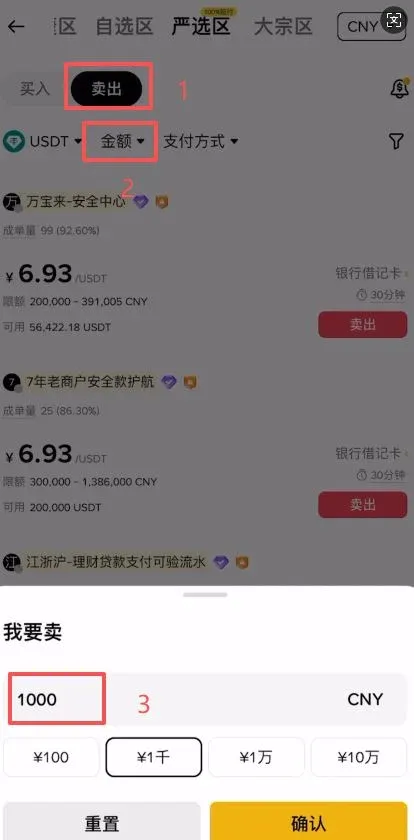
- Choose [Sell], input the amount of fiat you wish to receive (e.g., 1,000 CNY ≈ $145 USD), then tap [Confirm]. For larger withdrawals, it is advisable to complete the transaction in a single step to reduce the risk associated with multiple payouts.
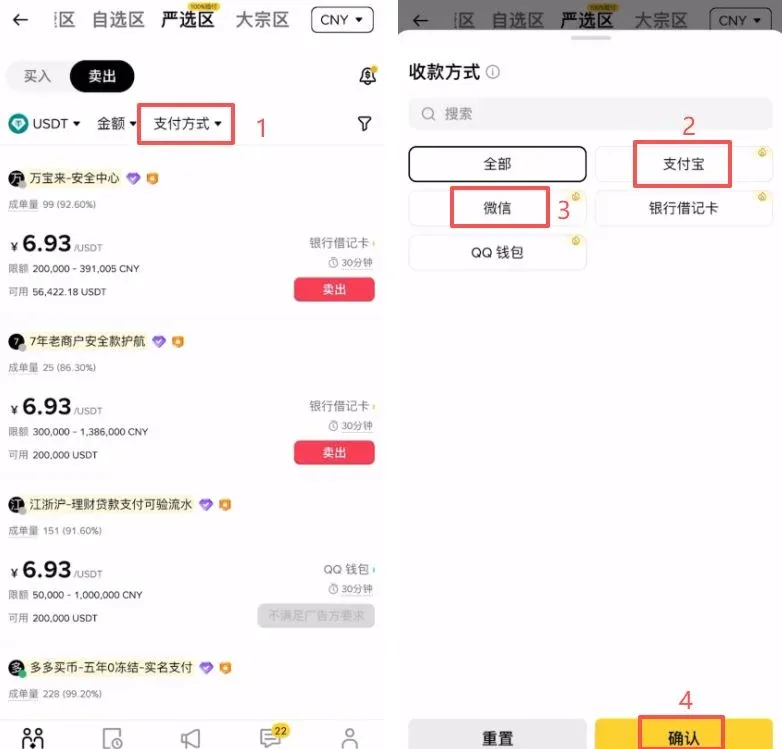
- In the Payment Method filter, select Alipay or WeChat (generally subject to looser risk controls), then tap [Confirm].
- Sort sellers from low to high price, and prioritize those with high trade volume, high completion rate, and an older account creation date—typically a sign of a trustworthy counterparty.
→
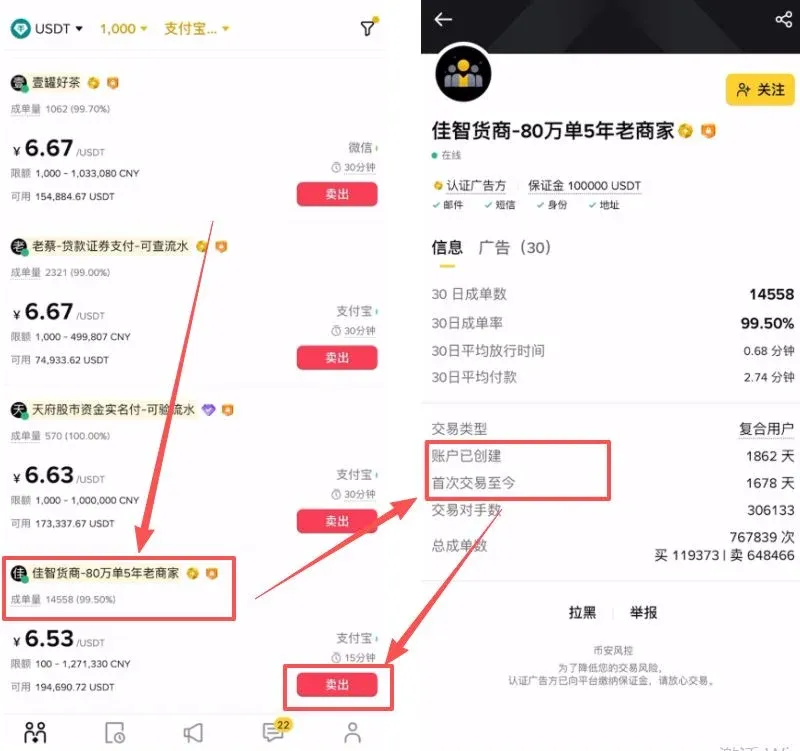
- Enter the amount of fiat or the USDT quantity you wish to sell, click [Select Payment Method], add the appropriate payment channel (e.g., Alipay), fill in the name and account, upload the QR code, and submit the order.
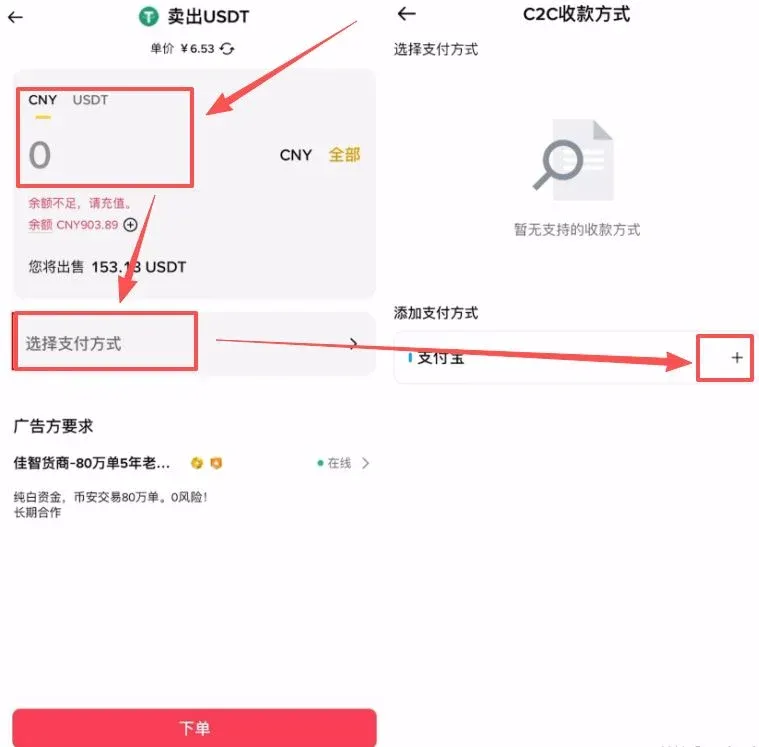
→
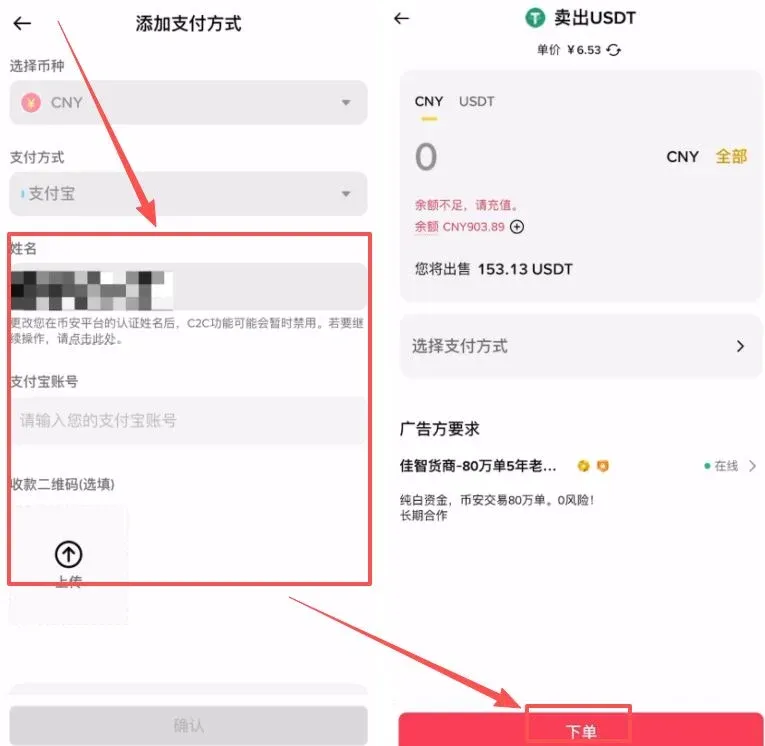
- After the counter‑party has transferred the fiat, first verify that the money has arrived in your bank account, then release the crypto on the platform to complete the trade.
Key Tips to Prevent Account Freezes
- Avoid sensitive keywords in transaction remarks (e.g., “USDT”, “Binance”, “buy crypto”, “sell crypto”). Use neutral terms such as “living expenses” or “payment for goods”.
- Withdraw received fiat promptly to avoid prolonged idle balances that may trigger risk controls.
- Keep transaction evidence (transfer screenshots, order records) in case the account is flagged; these documents can be used to demonstrate legitimacy.
5. Frequently Asked Questions and Corresponding Solutions
1. Adding a Payment Method Fails
- Name mismatch: Ensure the KYC‑verified real name matches the name on the payment account exactly.
- Bank not supported: Switch to a commonly accepted bank (e.g., Industrial and Commercial Bank, Construction Bank, China Merchants, SPDB).
- Incorrect information: Double‑check branch name, card number, etc., and eliminate typographical errors.
- System maintenance: Binance typically performs maintenance between 02:00 – 04:00 UTC; try again later.
2. Unable to Select an Already‑Added Payment Method During a Trade
- Set the desired account as the default payment method;
- Verify that the account has not been frozen or reported lost;
- If you hit a transaction‑limit restriction, you may need to upgrade to Level 2 verification.
3. Account Frozen (High
Related Reading
- How to Configure Binance C2C Payment Methods in 2026
- Official OKX App Download: Stay Safe & Avoid Fakes
- 2026 Top 10 Domestic Crypto Exchanges Trusted by Users
💡 Register on Binance with referral code B2345 for the maximum trading fee discount. See Binance complete guide.



