
 Bitaigen Research
 For investors who are just entering the cryptocurrency market, Binance Spot Trading is the most fundamental and frequently used functional operation.
Binance spot trading refers to the method of buying and selling cryptocurrencies on the Binance platform at the current market price, with immediate settlement: funds are transferred when buying, and the cryptocurrency is transferred when selling.
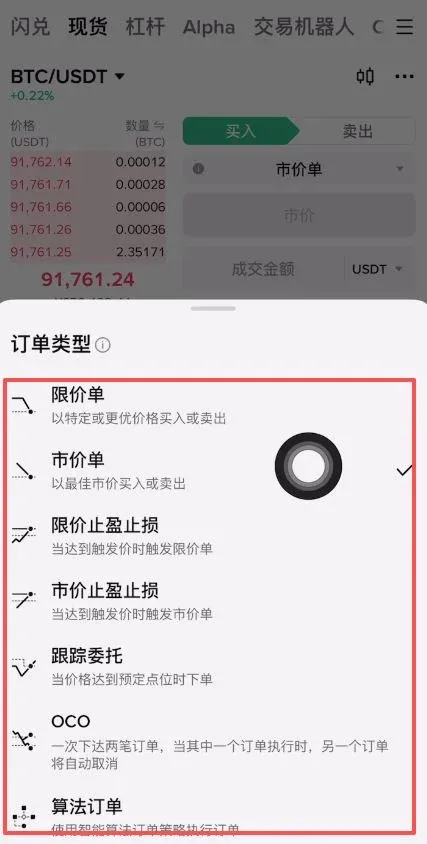
Binance offers three trading interfaces (Basic, Classic, Advanced) and a variety of order‑type options such as *limit order, market order, stop‑loss order, and OCO (One Cancels the Other) dual‑direction orders*, designed for traders of different skill levels and for various market conditions.
This article will provide a complete overview of the concept of Binance spot trading, the step‑by‑step process on the mobile app, and how to use the Instant Swap feature.
Basic Concepts of Spot Trading
Spot trading means that once a match is made, both parties fulfill their obligations immediately, resulting in the instantaneous delivery of the cryptocurrency.
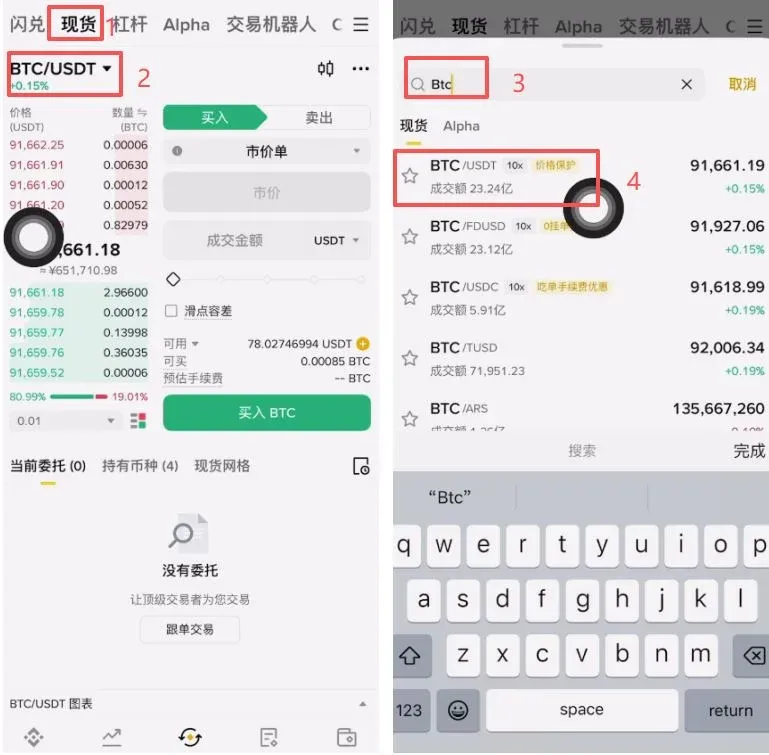
Enter the target coin’s ticker (e.g., “BTC”) in the search box, select the corresponding trading pair (e.g., BTC/USDT), and you can exchange USDT for Bitcoin.
Fee Explanation
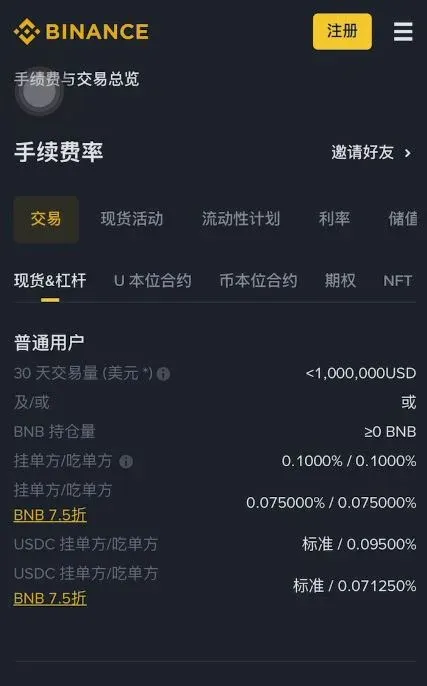
Binance spot‑trading fees are tiered according to the user’s VIP level, with a maximum of 0.1 %. The fee also varies slightly depending on whether the user is a *taker* or a *maker*.
- Taker: a user whose order is filled immediately.
- Maker: a user whose order sits on the order book waiting to be matched.
Before you can trade spot, you must first deposit your crypto assets into your Binance account.
In this article we systematically outline the core concepts and navigation paths of Binance spot trading for beginners, covering platform interface selection, order‑placement tips, and the mobile Instant Swap feature. The goal is to help readers get up to speed quickly while avoiding common pitfalls. Subsequent sections will demonstrate the full workflow step by step, so a careful read is recommended.
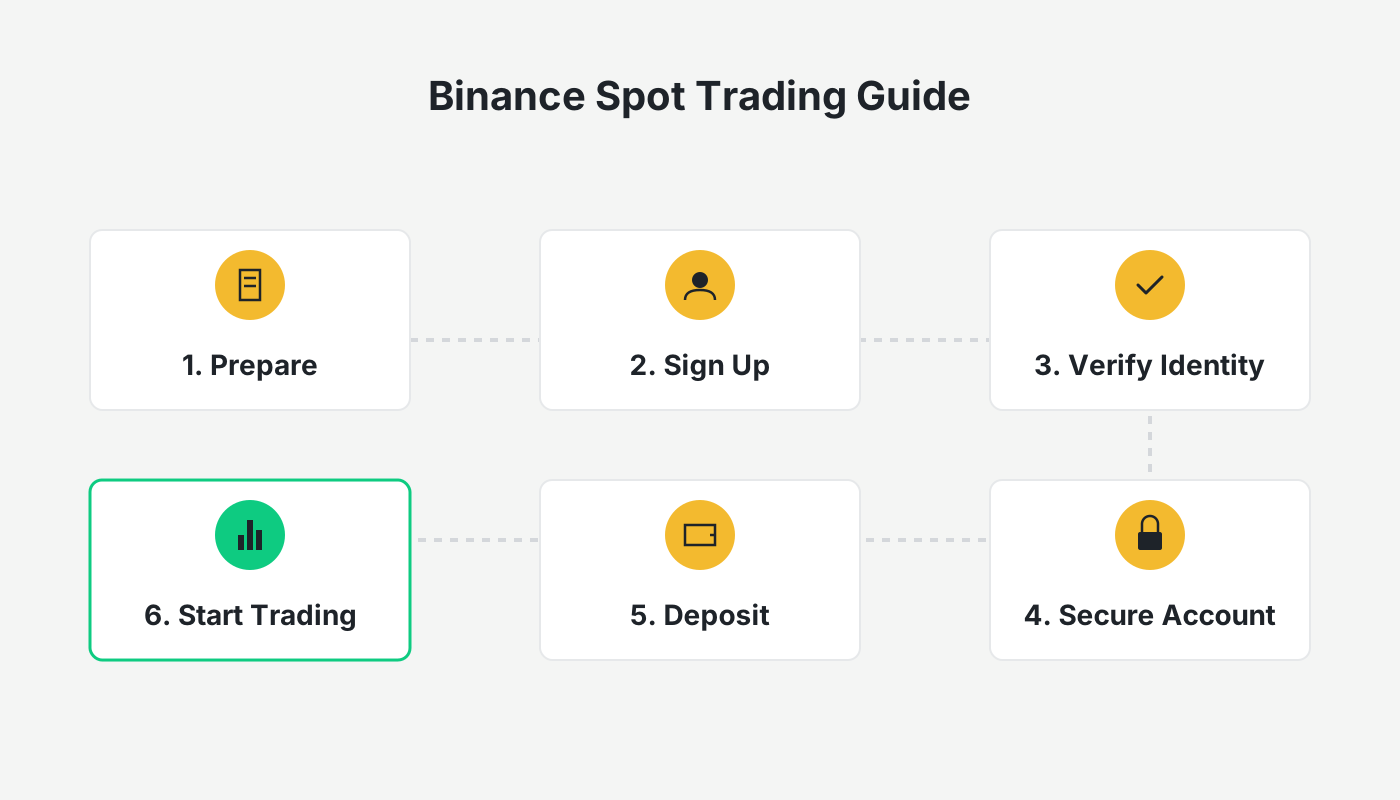
Binance Spot Trading Workflow
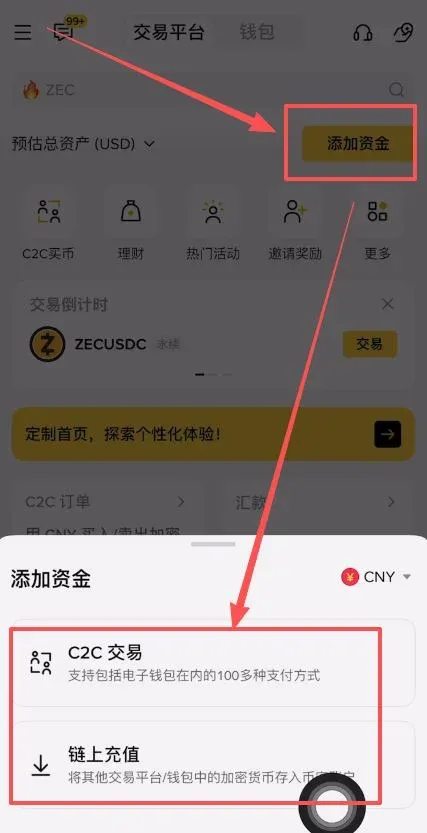
- Add Funds: On the homepage click Add Funds, then choose either a C2C transaction or an on‑chain deposit to fund your account. Detailed tutorials are available in previous posts if you need a deeper dive.
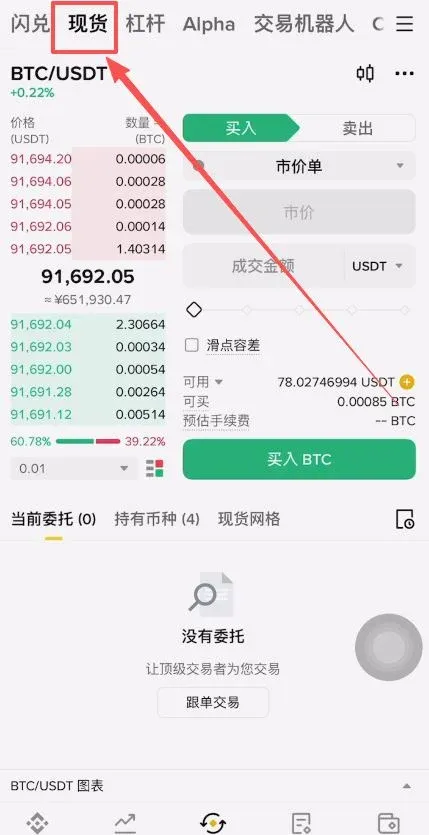
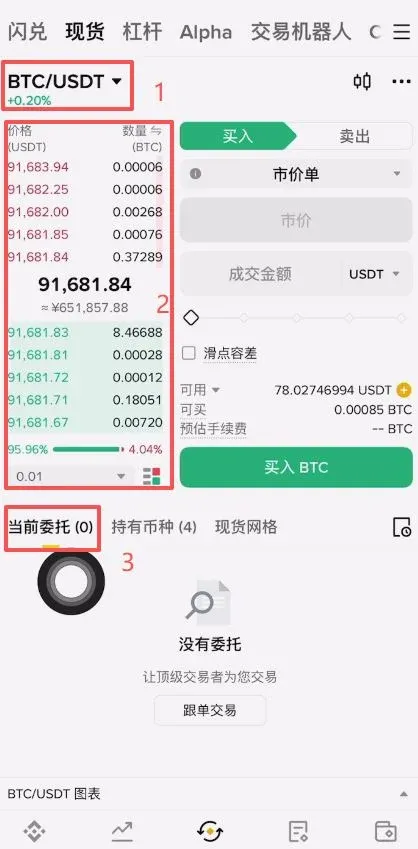
- Select a Trading Pair and View Market Data: After entering the Spot page, pick a pair (e.g., Bitcoin). The left side shows the order book—red entries are sell orders, green entries are buy orders, and the centre displays the latest trade price. The “Current Orders” section below lists any open orders you have.
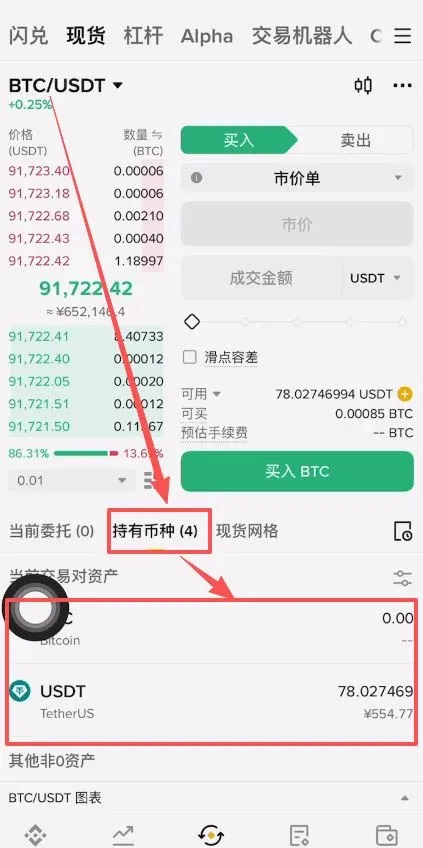
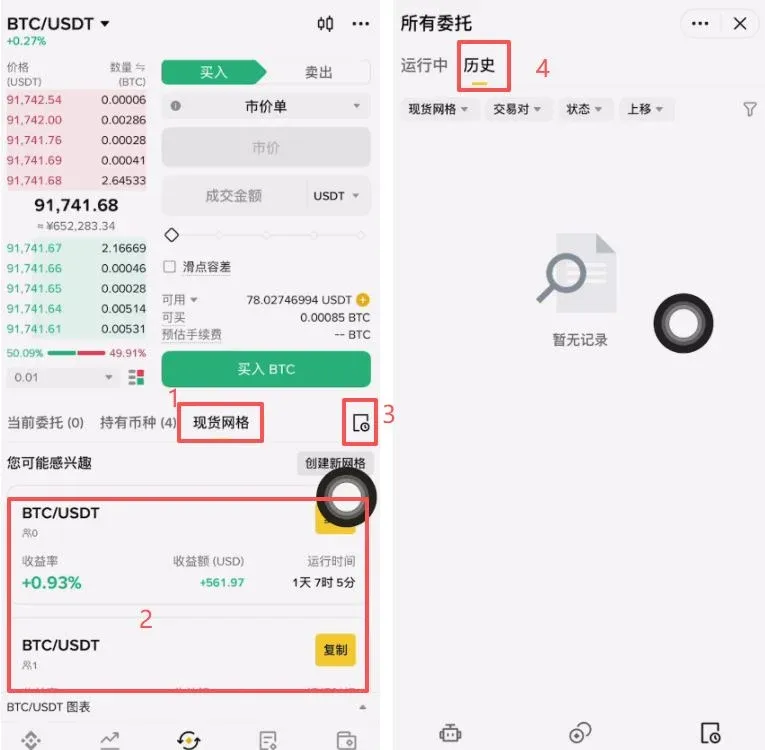
- Positions and History: Assets you have purchased appear in the Holdings tab. Historical trade records can be accessed by tapping the small notebook icon on the right side.
Common Order Types
- Limit Order: buy or sell at a specified price or better.
- Market Order: execute immediately at the best available price.
- Stop‑Limit Take‑Profit / Stop‑Loss: once the trigger price is reached, a limit order is placed.
- Stop‑Market Take‑Profit / Stop‑Loss: once the trigger price is reached, a market order is placed.
- Trailing Order: automatically places an order when the price moves a predefined distance from the market.
- OCO (One Cancels the Other): simultaneously set a limit order and a stop‑loss order; execution of one automatically cancels the other.
In everyday trading, the most frequently used orders are limit and market orders.
Overview of the Instant Swap Feature
Instant Swap is Binance’s quick‑conversion gateway. It is user‑friendly and carries no explicit fee, but the quoted price is usually slightly less favorable than the order‑book price; buyers typically pay a premium over the prevailing market rate.
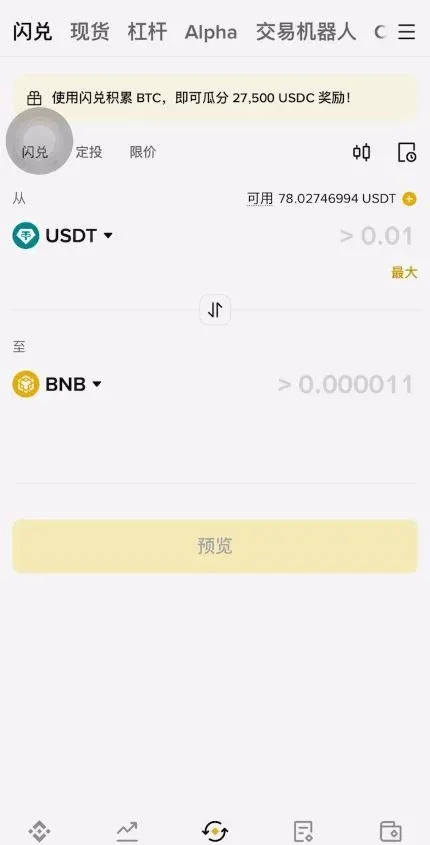
Because cryptocurrency prices can swing dramatically, an Instant Swap quote is only valid for 5 seconds; after that you must refresh to obtain a new quote. Spot trading forms the foundation of crypto investing and is well‑suited for a buy‑and‑hold (HODL) strategy.
How to Set Stop‑Loss on Binance – Practical Use of Stop‑Limit and OCO
Stop‑loss orders are essential tools for protecting capital. Binance spot trading supports both Take‑Profit/Stop‑Loss and OCO mechanisms.
Setting a Stop‑Limit Order
- Trigger Price: the market price at which the stop‑limit order becomes active.
- Limit Price: the price at which the actual limit order is placed; it should be slightly below the trigger price for a sell‑side stop‑loss (or slightly above for a buy‑side take‑profit).
- Amount: it is advisable to use only a portion of your position to avoid liquidating the entire holding in one go.
Desktop Example:
- Log in to Binance → click Trade → select Spot.
- In the order entry panel switch to Stop‑Limit, then fill in:
- Trigger Price: $28,000
- Limit Price: $27,950
- Amount: 0.1 BTC
- Click Sell BTC to confirm. When the market drops below $28,000, the system will automatically place a limit sell order at $27,950.
Tip: For a take‑profit order, set the trigger price a little lower than your target, and for a stop‑loss set the limit price a little lower than the trigger to guard against gaps. Enable “Reminder Notifications” to monitor the order in real time.
OCO Dual‑Direction Order
An OCO order lets you set a take‑profit and a stop‑loss simultaneously; the execution of either order automatically cancels the other, which is handy when you cannot watch the market continuously.
Example: You buy BTC at 70,000 USDT and want to:
- Take profit at 72,000 USDT (limit order)
- Stop‑loss trigger at 68,000 USDT, with a stop‑limit price of 67,950 USDT
App Procedure (2025 version): Open the Binance App → Trade → Spot → tap OCO → input the parameters → confirm. You can also enable “Automatic Notifications” to receive alerts when the trigger fires.
Common Mistakes and Improvement Suggestions
| Common Mistake | Explanation | Remedy |
|---|---|---|
| Setting the price spread too tight | In volatile markets the price can jump over the stop‑loss level | Leave a 0.2 %–0.5 % buffer |
| Full‑position stop‑loss | Increases the risk of slippage | Use partial stops and scale out gradually |
| Trigger price equals limit price | Rapid moves may prevent the limit order from being placed | Set the limit slightly below (sell) or above (buy) the trigger |
| OCO status not confirmed | The opposite leg may remain active, leading to duplicate orders | After setting, check the order list to ensure one leg was cancelled |
Can You Short on Binance Spot?
Binance spot markets do not allow direct short selling. In spot trading you can only sell assets you already own; if the asset is not in your wallet, you cannot sell it first and buy later.
Shorting is achieved by borrowing the asset, selling it, and then buying it back at a lower price to return the loan. This requires margin or lending facilities. To short on Binance you would need to use margin trading, leveraged tokens, or futures/derivatives contracts.
- Spot trading: you must have the asset before you sell.
- Short selling: you borrow the asset first, sell it, and later repurchase at a lower price.
Conclusion
Binance spot trading is the recommended entry point for newcomers; its logic mirrors that of stocks and forex—buy to hold, sell to settle. After reading this guide you should now understand the full process from funding your account, placing orders, configuring stop‑losses, and using Instant Swap. For more practical Binance spot‑trading tips, follow Bitaigen (比特根) and its related columns.
Additional notes for global users
- When depositing fiat, you can use USD via SEPA or SWIFT transfers, depending on your bank’s capabilities.
- U.S. residents must use Binance.US rather than the global Binance platform.
- Cryptocurrency gains may be taxable in your jurisdiction; consult a tax professional to ensure compliance.
Related Reading
- Binance Desktop Client & Mobile App Download Guide 2026
- Binance Tutorial: Deposit USDT, Spot Trade, Withdraw to Fiat
- How to Convert USDT to Bitcoin on Binance in 1 Hour – Guide
💡 Register on Binance with referral code B2345 for the maximum trading fee discount. See Binance complete guide.



