
 Bitaigen Research
 In futures trading, besides market judgment, the level of fees directly determines the final profit or loss. For traders who frequently open and close positions, even a difference of a few basis points can accumulate into a non‑trivial expense. Market volatility remains intense in 2026, and choosing the cost‑effective futures platform between Binance and Bybit has become a focal point for many investors. This article systematically compares the futures fee structures, billing methods, fee‑reduction techniques, and potential hidden costs of the two major platforms, helping you make a more rational choice before trading.
Key Takeaways
- Fee Overview: Quickly grasp the latest futures fee standards of Binance, Bybit, and OKX.
- Billing Principles: Deep dive into the definitions of Maker and Taker and their corresponding fee formulas.
- Fee‑Reduction Techniques: Practical methods such as native‑token discounts and VIP‑level upgrades to lower trading costs with a single click.
- Hidden Costs: Funding rates, slippage and other less obvious fees that can also erode returns.
---
We dissect the fee structure, billing mechanism, and discount tactics from multiple angles, helping you find the more cost‑efficient futures platform between Binance and Bybit, reduce invisible expenses, and present a detailed comparison in the following sections—worth a careful read.
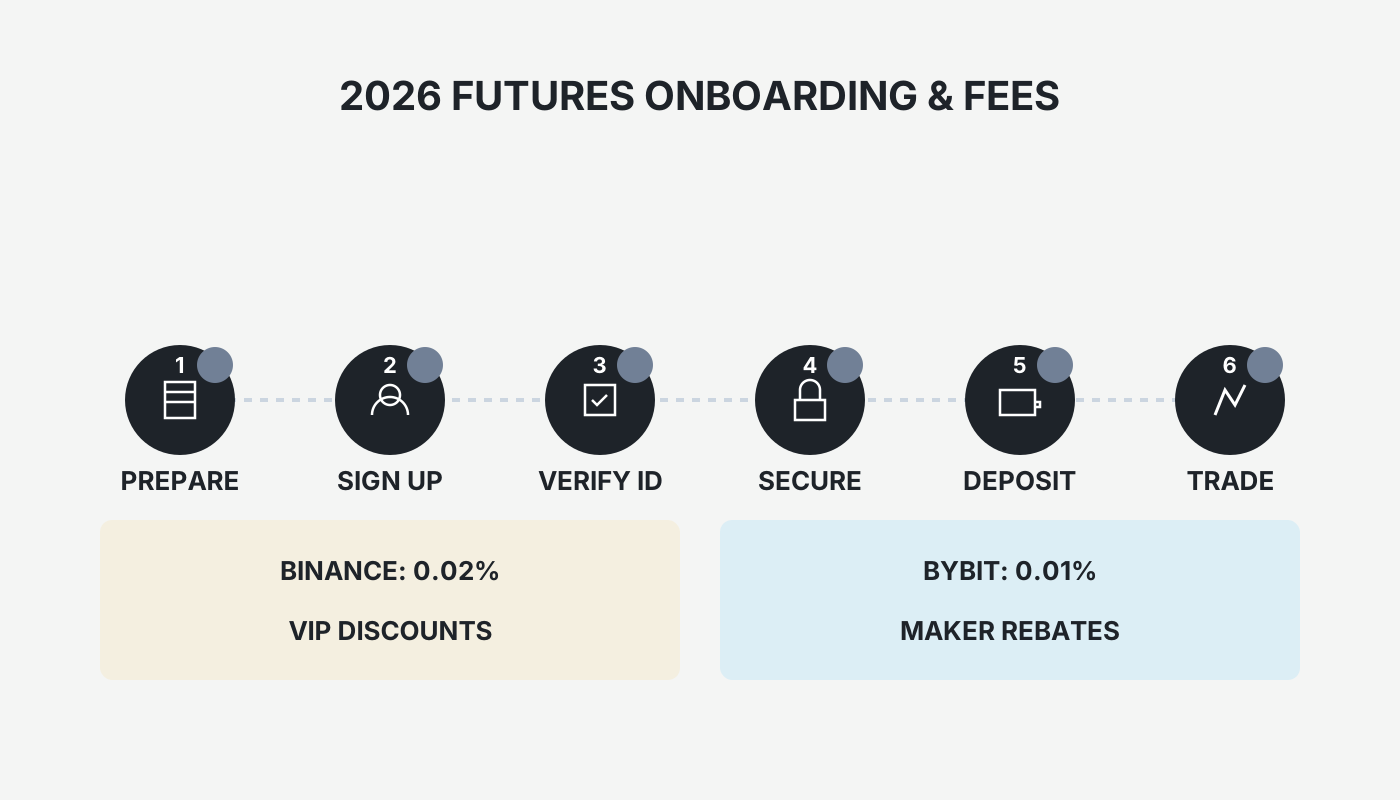
How Futures Fees Are Charged
Before looking at the fee tables, understand how fees are deducted from your account; this is crucial for shaping a trading strategy.
The Fundamental Difference Between Maker and Taker
- Maker (limit order): When you submit a limit order that does not execute immediately, the order sits on the order book awaiting a counter‑party. This provides liquidity to the market, and exchanges typically reward you with a lower fee.
- Taker (market order): Using a market order or a limit order that executes instantly consumes existing liquidity from the order book, and the associated fee is generally higher.
To reduce fees, try to use limit orders whenever possible to act as a Maker; if you need instant execution, you must accept the higher Taker fee.
Fee Calculation Formula
Whether you are a Maker or a Taker, the fee follows a simple formula:
```
Fee = Contract Value × Fee Rate
Contract Value = Entry Price × Contract Quantity
```
Example
Assume you place a market order on Binance to go long 0.5 BTC perpetual futures at a price of $60,000:
- Contract Value = $60,000 × 0.5 = $30,000
- Taker fee rate = 0.05 % (Binance)
- Opening fee = $30,000 × 0.05 % = $15
If you later close the position at $62,000, the calculation is the same:
- Contract Value = $62,000 × 0.5 = $31,000
- Closing fee = $31,000 × 0.05 % = $15.5
Total fees = $30.5, illustrating how even sub‑percent rates can generate noticeable costs on high‑value contracts.
---
Summary of Futures Fees Across Three Major Exchanges
The table below lists the standard rates for regular (non‑VIP) users as of the 2025 update. Rates are for reference only; always verify the latest official announcements on each platform.
| Exchange | User Tier | Maker Fee | Taker Fee | Native‑Token Discount |
|---|---|---|---|---|
| **Binance** (U.S. users should use **Binance.US**) | Regular | 0.02 % | 0.05 % | 10 % discount when paying with BNB |
| **Bybit** | Non‑VIP | 0.02 % | 0.055 % | — |
| **OKX** | Regular | 0.02 % | 0.05 % | Discount when holding OKB |
All three platforms offer identical Maker fees, while Bybit’s Taker fee is slightly higher than Binance and OKX. The actual trading cost also depends on VIP tier, native‑token discounts, and your personal order‑placement habits.
---
Practical Guide to Futures Trading on Binance
1. Register and Complete Identity Verification
If you do not yet have a Binance account, you can register via the following links and download the official client.
- Register on Binance (global) – copy the link into your browser. U.S. residents should use Binance.US instead.
- Download Binance Android App
After completing KYC, you can access the futures trading page.
2. Choose Futures Type and Transfer Funds
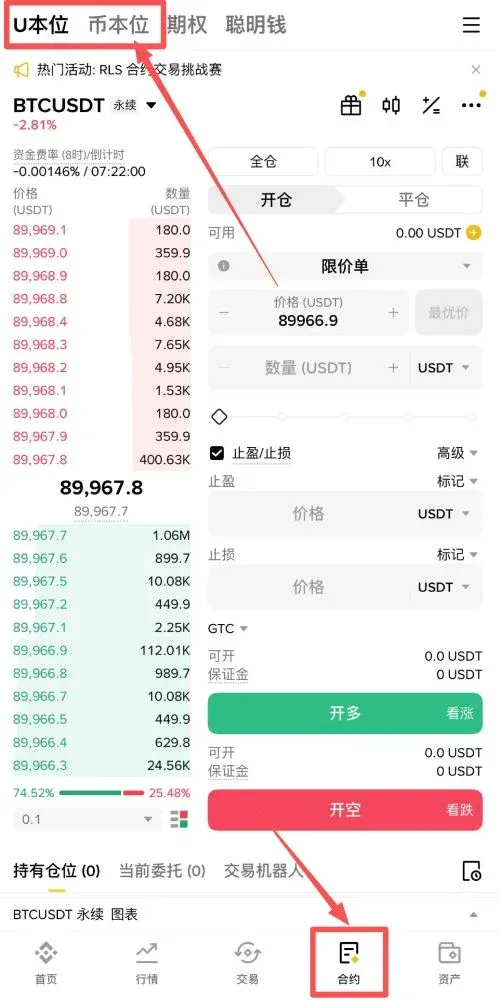
Log in to the app, tap the Futures tab at the bottom. The top of the page shows two modes: USDT‑M (U‑margin) and COIN‑M (Coin‑margin).
- USDT‑M Futures: Margin and settlement are in USDT/BUSD, making P&L calculation straightforward—ideal for beginners.
- COIN‑M Futures: Margin is the underlying cryptocurrency (e.g., BTC, ETH). Suitable for users who have a long‑term bullish view on that asset.
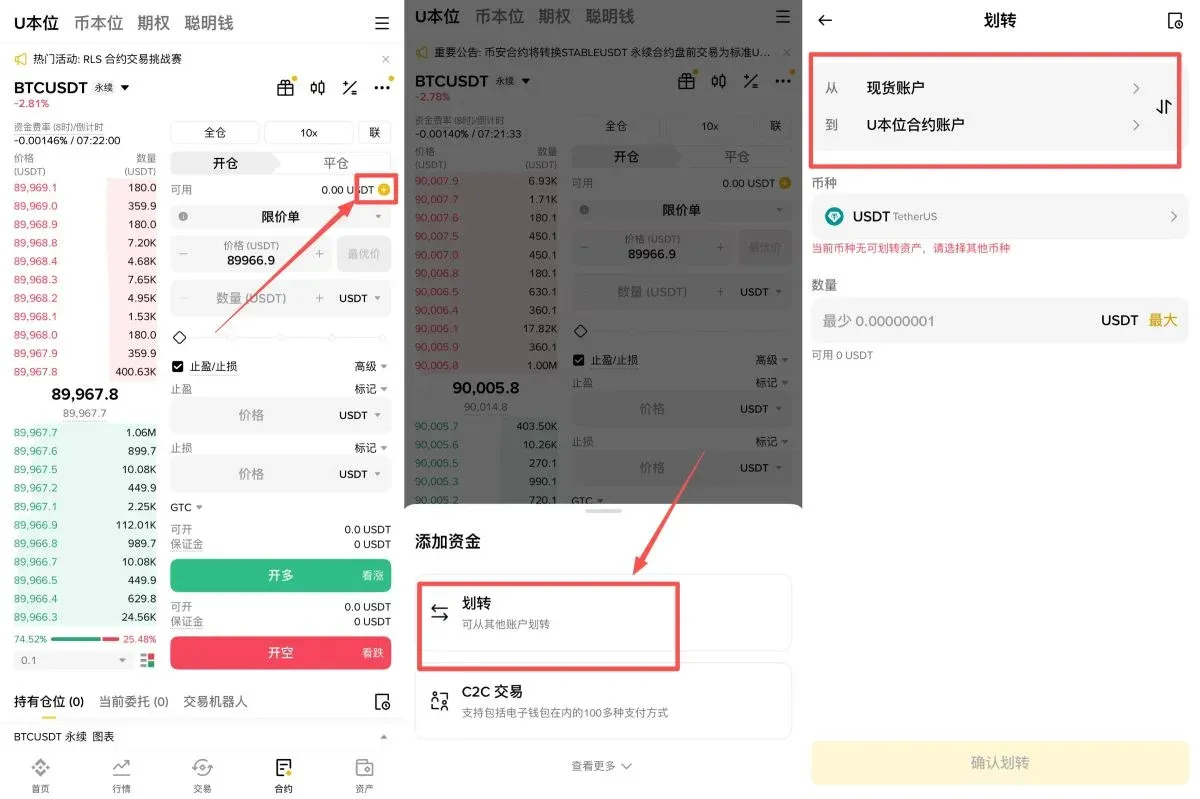
Newcomers are advised to start with USDT‑M Futures. After selecting, tap the Transfer icon in the lower‑right corner and move funds from your Spot wallet to the USDT‑M Futures wallet.
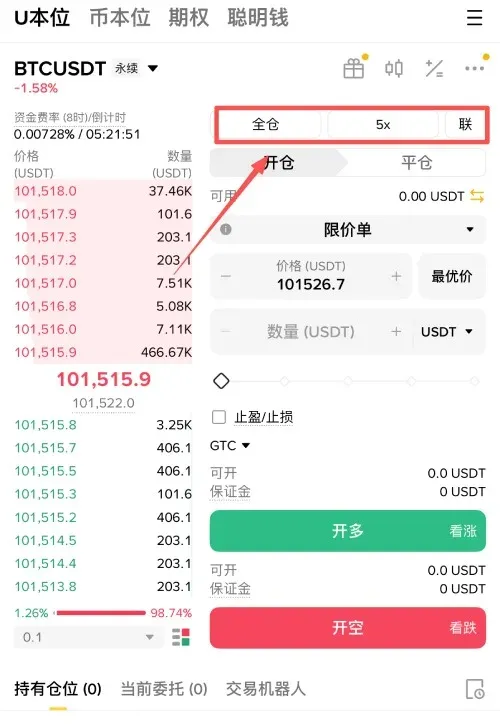
3. Set Margin Mode and Leverage
- Cross (Cross‑margin): All available balance in the account shares the risk of the position; a liquidation could wipe out the entire account.
- Isolated (Isolated‑margin): Margin for each position is independent; the maximum loss is limited to the margin allocated to that specific position, which aids risk control.
For traders with limited experience, Isolated margin is strongly recommended to prevent a single loss from affecting the whole portfolio.
Leverage defaults to 20× but can be adjusted. Beginners should keep leverage below 5× to lower liquidation risk.
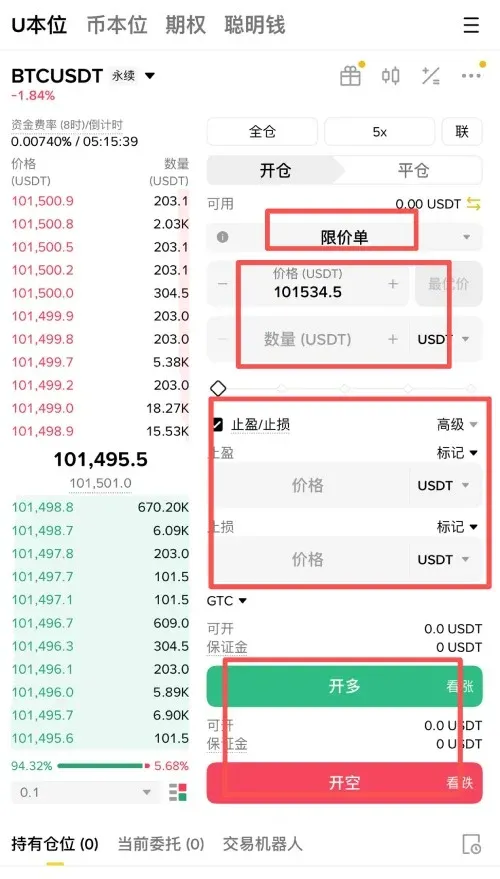
4. Opening a Position (Long / Short)
After deciding the direction, choose either a Limit Order or a Market Order:
- Limit Order: Set your desired price; the order only fills when the market reaches that price, suitable for Maker trades.
- Market Order: Executes instantly at the best available price, classified as a Taker—fast but may incur slippage.
Enter the desired contract quantity, then tap Buy/Long or Sell/Short to open the position.
5. Setting Take‑Profit and Stop‑Loss
Once the position is opened, click the Take‑Profit / Stop‑Loss button in the Current Position area and input your target exit prices. A common risk‑reward ratio is 2:1 (e.g., 10 % stop‑loss paired with a 20 % take‑profit) to achieve a balanced risk‑return profile.
6. Advanced: Using Volume to Gauge Trend
Trading volume is a key indicator of market strength:
- Price ↑ & Volume ↑: Strong buying pressure, trend may continue upward.
- Price ↑ & Volume ↓: Buying pressure wanes, upward momentum could fade.
- Price ↓ & Volume ↑: Aggressive selling, downtrend may persist.
- Price ↓ & Volume ↓: Selling pressure eases, decline may slow.
Combining price‑volume analysis can improve the success rate of futures trades.
---
Practical Guide to Futures Trading on Bybit
Registration and App Download
- Register on Bybit (the link points to the same referral page; copy it into your browser)
- Download Bybit Android App – copy the link into your browser
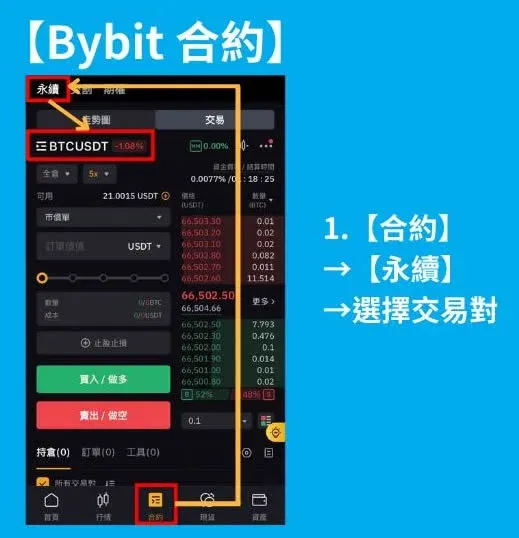
1. Select a Perpetual Futures Pair
Navigate to [Futures] → [Perpetual] and pick the cryptocurrency pair you wish to trade.
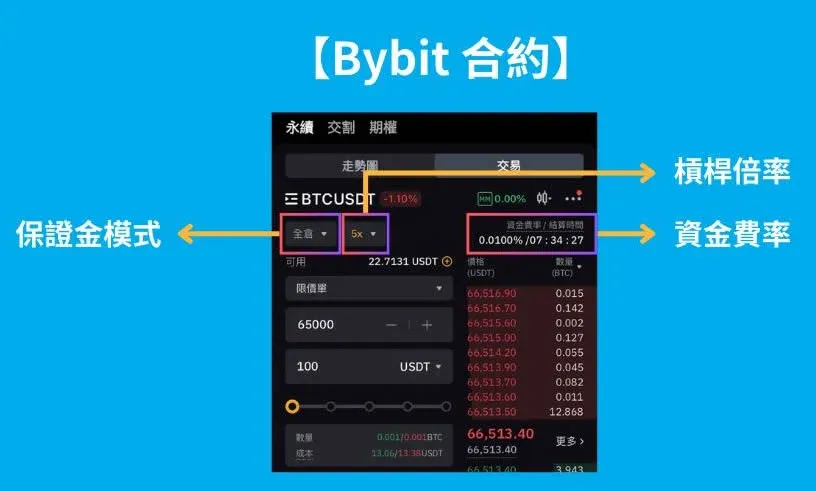
2. Choose Margin Mode
Bybit also offers three margin modes: Cross, Isolated, and Portfolio.
- Cross: All contracts share a single margin pool.
- Isolated: Each contract’s margin is independent, providing risk isolation.
- Portfolio: Spot, borrowing, and futures assets can offset each other, achieving higher capital efficiency.
Switching modes during an open position is restricted; decide in advance based on your strategy.
3. Set Leverage
In Cross and Isolated modes, leverage must be set manually; in Portfolio mode, leverage is derived from the overall margin ratio. Higher leverage amplifies both potential profit and risk, so align it with your risk tolerance.
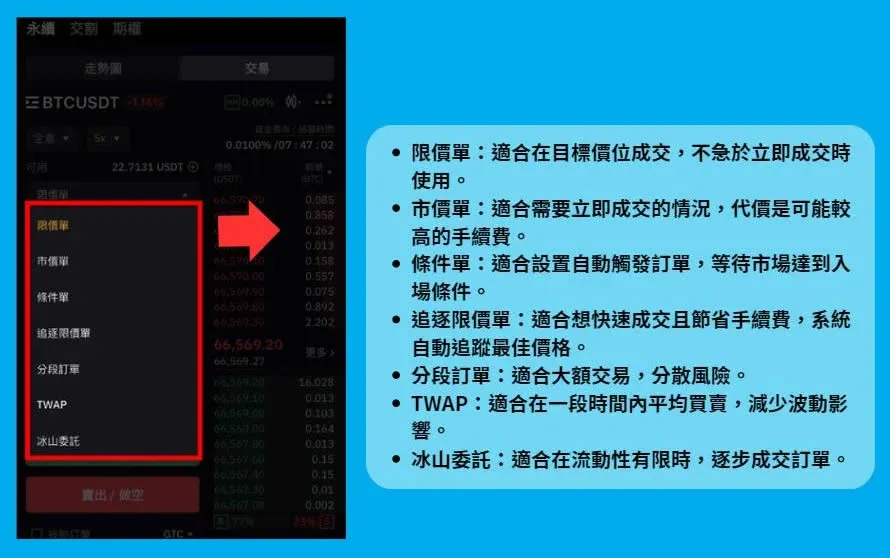
4. Order Types Explained
Bybit provides a variety of order types to match different scenarios:
| Type | Description |
|---|---|
| **Limit Order** | Places an order at a preset price; execution is not guaranteed. |
| **Market Order** | Executes immediately at the best available price. |
| **Trigger‑Limit Order** | Automatically places a limit order when the market reaches a specified entry price, blending limit and market advantages. |
| **Split Orders** | Breaks a large order into several smaller limit orders to reduce market impact. |
| **TWAP** | Executes a series of trades at the time‑weighted average price, suitable for large, smooth transactions. |
| **Iceberg Order** | Hides the true order size by displaying only a portion at a time, reducing the risk of being swept by large counterparties. |
5. Take‑Profit, Stop‑Loss, and Risk Management
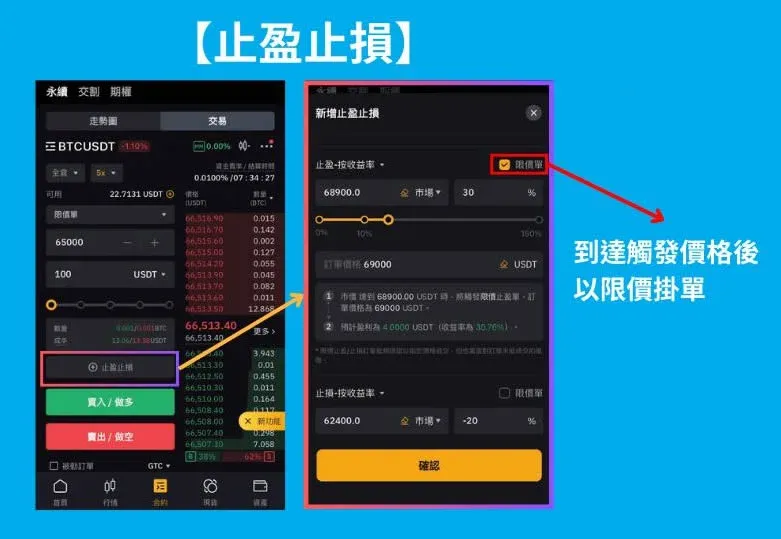
On Bybit, TP/SL can be combined with limit, market, and conditional orders. It is advisable to set a stop‑loss for every position to protect against extreme market moves that could quickly deplete margin.
6. Additional Order Options
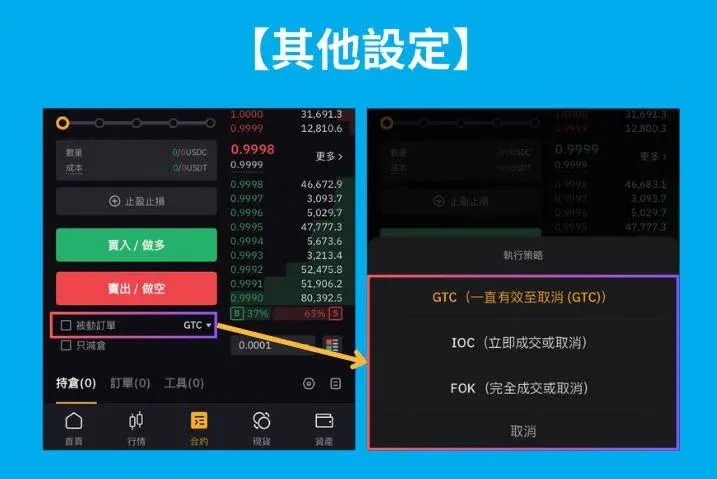
- Reduce‑Only: Places an order that only reduces an existing position, useful for fast exits without creating a new opposite position during high volatility.
- Passive Orders: Support three time‑in‑force settings—GTC (Good‑Till‑Cancelled), IOC (Immediate‑Or‑Cancel), and FOK (Fill‑Or‑Kill)—to adapt to various trading needs.
7. Manual Closing
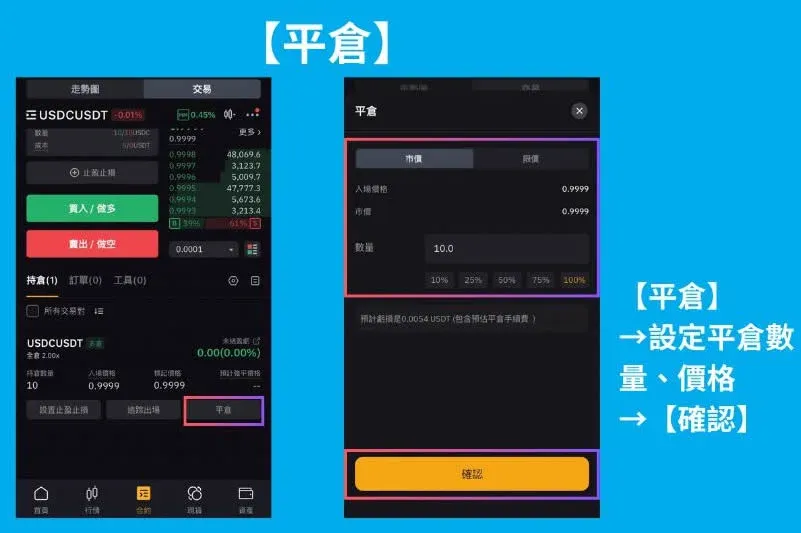
If your pre‑set TP/SL does not trigger, you can manually adjust the closing quantity or set a target price on the Positions page to exit the trade.
---
How to Further Trim Futures Trading Costs?
1. Use Native Tokens for Fee Offsets
On Binance, holding and enabling BNB grants a 10 % fee reduction; Bybit also offers a similar native‑token discount. Frequent traders may keep a modest balance of the platform’s token in their futures wallet to enjoy continuous fee rebates.
2. Upgrade VIP Level
All major exchanges operate a VIP tier system based on 30‑day trading volume or asset holdings. Advancing to a higher tier reduces both Maker and Taker fees. Professional or high‑volume traders should study each platform’s VIP thresholds and strategically climb the ladder to lower long‑term costs.
3. Participate in Referral Commission Programs
Most exchanges provide referral rebates: invite new users who register and generate fees, and you receive a percentage of their fees back. If you are new, you can also obtain an initial‑trade fee discount through a referrer’s link.
---
Hidden Costs: Funding Rates and Slippage
Funding Rate
Perpetual contracts settle a funding rate every 8 hours to keep the contract price aligned with the underlying spot price:
- Positive Funding Rate: Long positions pay short positions, indicating strong bullish sentiment.
- Negative Funding Rate: Shorts pay longs, indicating bearish dominance.
When holding a position for an extended period, these payments accumulate and must be factored into the overall cost.
Slippage
Slippage is the difference between the expected order price and the actual execution price, commonly occurring during rapid market moves or when order‑book depth is insufficient. Selecting an exchange with ample liquidity and deep order books can mitigate the extra cost caused by slippage.
---
Frequently Asked Questions (FAQ)
Q1: What are Binance’s futures fees?
A: For regular users, the USDT‑M perpetual futures fee is Maker 0.02 %, Taker 0.05 %. Enabling the BNB discount provides an additional 10 % reduction.
Q2: Are Bybit’s fees lower than Binance’s?
A: Both platforms charge a Maker fee of 0.02 %. Bybit’s Taker fee is 0.055 %, slightly higher than Binance’s 0.05 %. After VIP upgrades, the relative difference may change depending on the tier.
Q3: Which platform should a beginner start with?
A: Binance is often considered beginner‑friendly due to its large user base, abundant educational resources, and straightforward BNB discount mechanism.
Q4: Can funding rates eat into my profits?
A: Yes. Funding rates are a periodic settlement between long and short sides. If you hold a position that aligns with the prevailing market sentiment (e.g., long during a positive funding
💡 Register on Binance with referral code B2345 for the maximum trading fee discount. See Binance complete guide.



