
 Bitaigen Research
 For newcomers stepping into the world of cryptocurrencies, a common question is: Can I use everyday payment tools—such as a bank card or a popular e‑wallet—to purchase digital assets on the OKX platform?
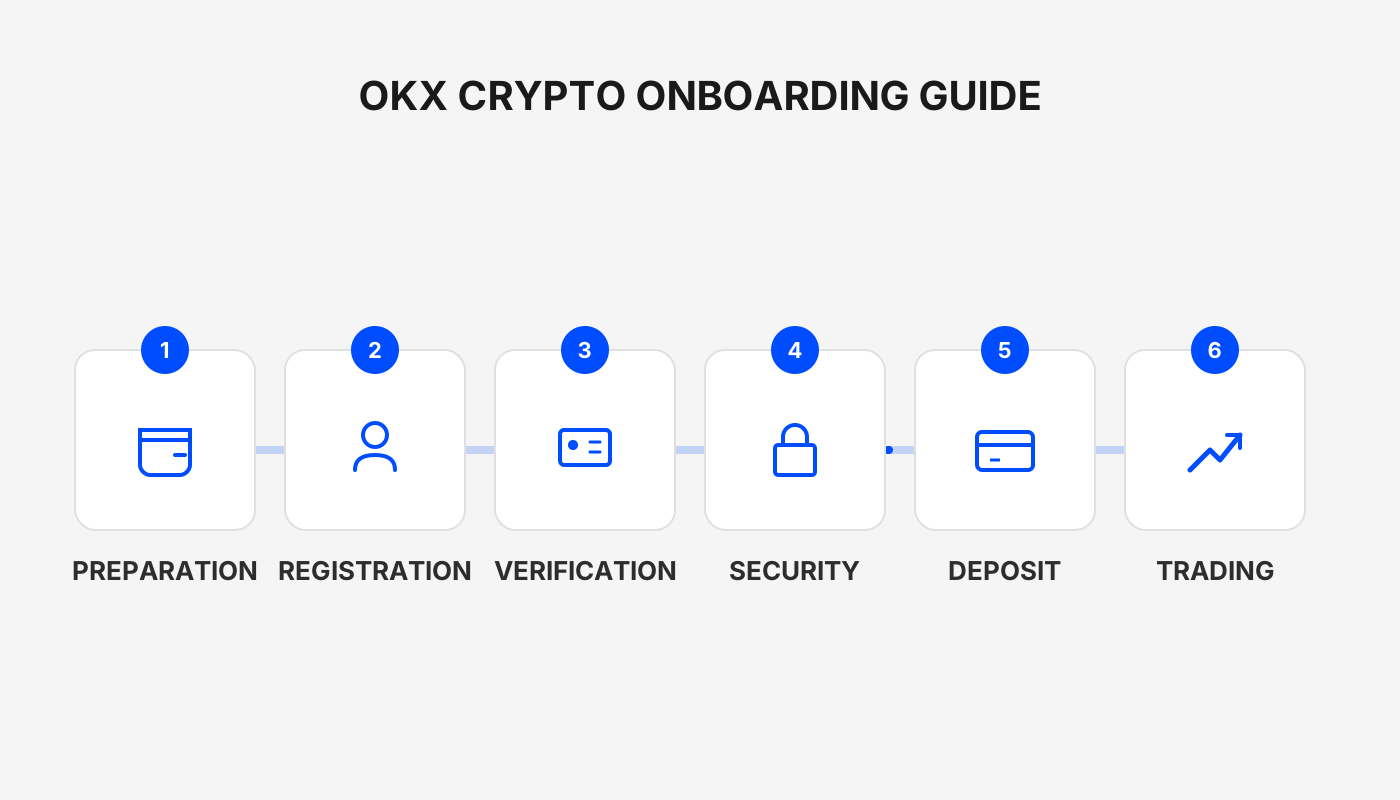
The following illustrated guide walks you through every step, from account registration and linking a payment method to the actual buying process, along with frequently asked questions and safety tips, so you can complete the whole workflow without missing a detail.
Registration and App Download
If you have not yet opened an OKX account, you can register and download the official client via the links below. Use the invitation code `B2345` when you sign up; the system will automatically credit new users with a reward of up to 50 USDT. Be sure to enter the code during registration to claim the bonus.
- Official OKX registration link: <https://www.okx.com/zh-hans/join/B2345>
- OKX APP download URL: <https://www.bitaigen.com/binance/download>
Tip: Make sure you download the app from the official source to avoid phishing sites.
Linking Payment Methods
Before you can start a C2C fiat‑to‑crypto transaction, you must complete identity verification (KYC) and bind a usable payment channel. The process can be done either on the mobile app or on the web portal.
Using the Mobile App
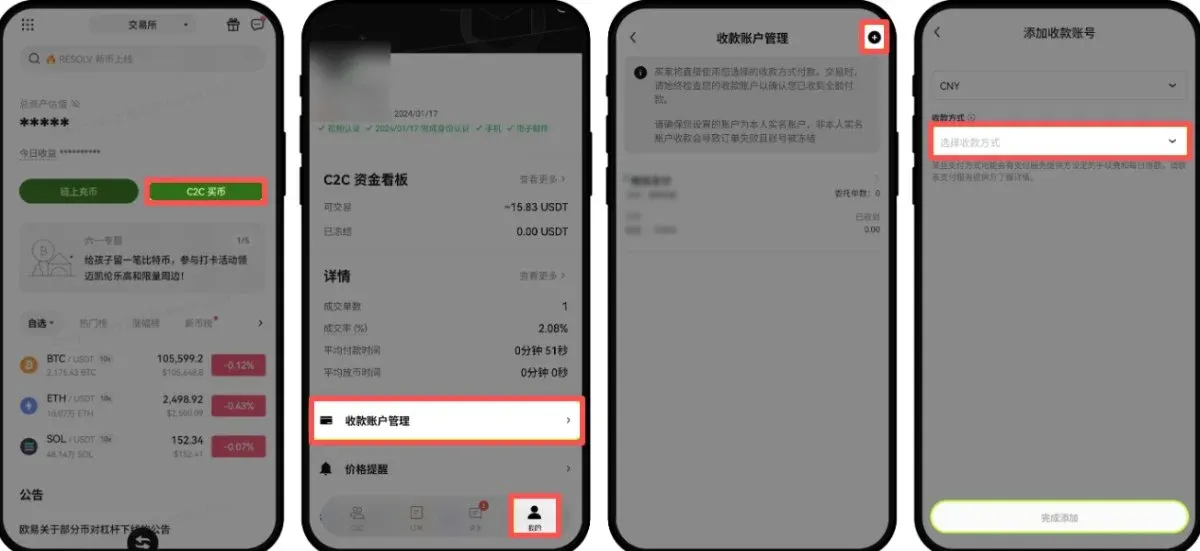
- From the home screen, tap 【C2C Buy】 → 【My】 (bottom right) → 【Payment Account Management】.
- Tap the 【+】 button in the upper‑right corner. In the pop‑up Payment Method list, select Bank Card, Alipay or WeChat Pay, then follow the on‑screen prompts to fill in the required details and finish the binding.
- If you need to add a QR code, you may choose either Add Friend QR or Payment QR.
Using the Web Portal
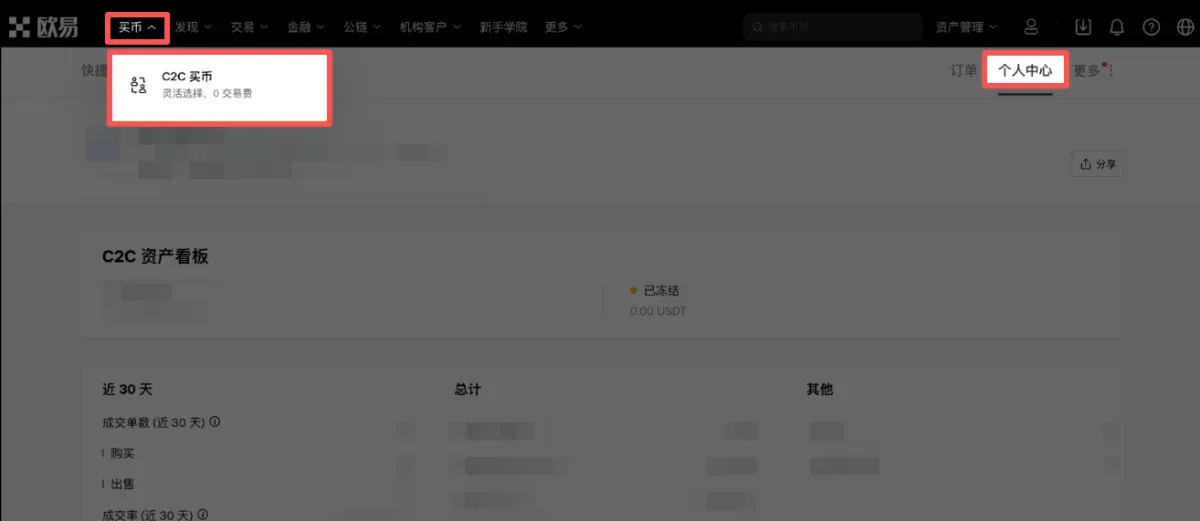
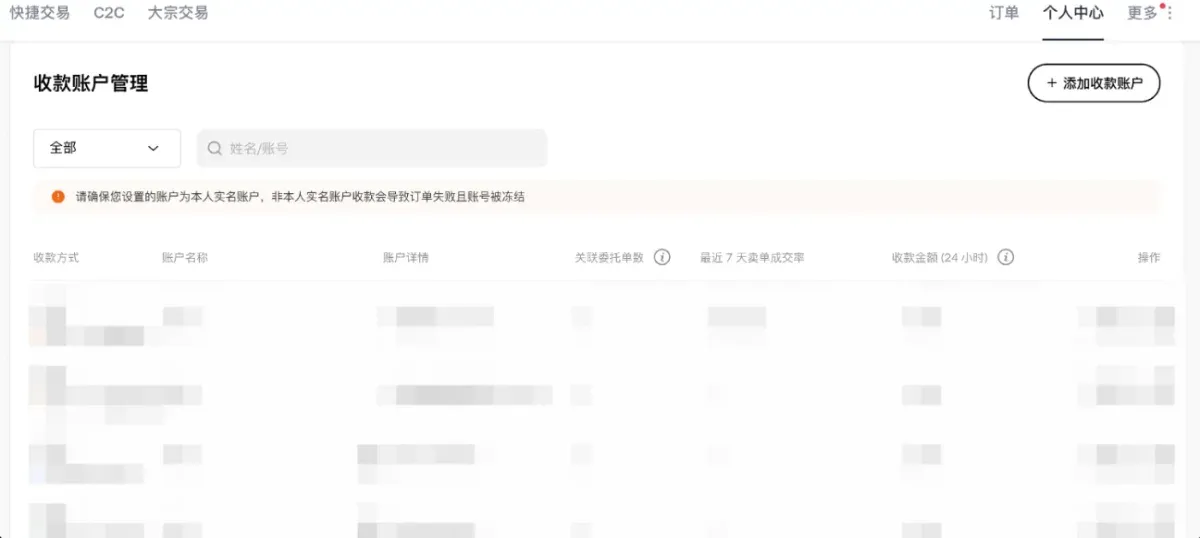
- Open the OKX website and click 【Buy】 → 【C2C Buy】 → 【Personal Center】 in that order.
- Scroll down to 【Payment Account Management】, then click 【Add Payment Account】. The same three channels—bank card, Alipay and WeChat—are available; simply follow the instructions to complete the linking.
---
This article provides a step‑by‑step walkthrough for beginners on how to purchase crypto on OKX using a bank card or Alipay. It covers account creation, KYC, payment‑method binding, the actual buying process, answers to common questions, and safety recommendations, helping you get started quickly and securely in the digital‑asset ecosystem.
Buying Crypto with Alipay
Note for U.S. users: The global OKX platform is not available to residents of the United States. Instead, you should use Binance.US or another U.S.-compliant exchange for fiat on‑ramps.
1. Quick Buy
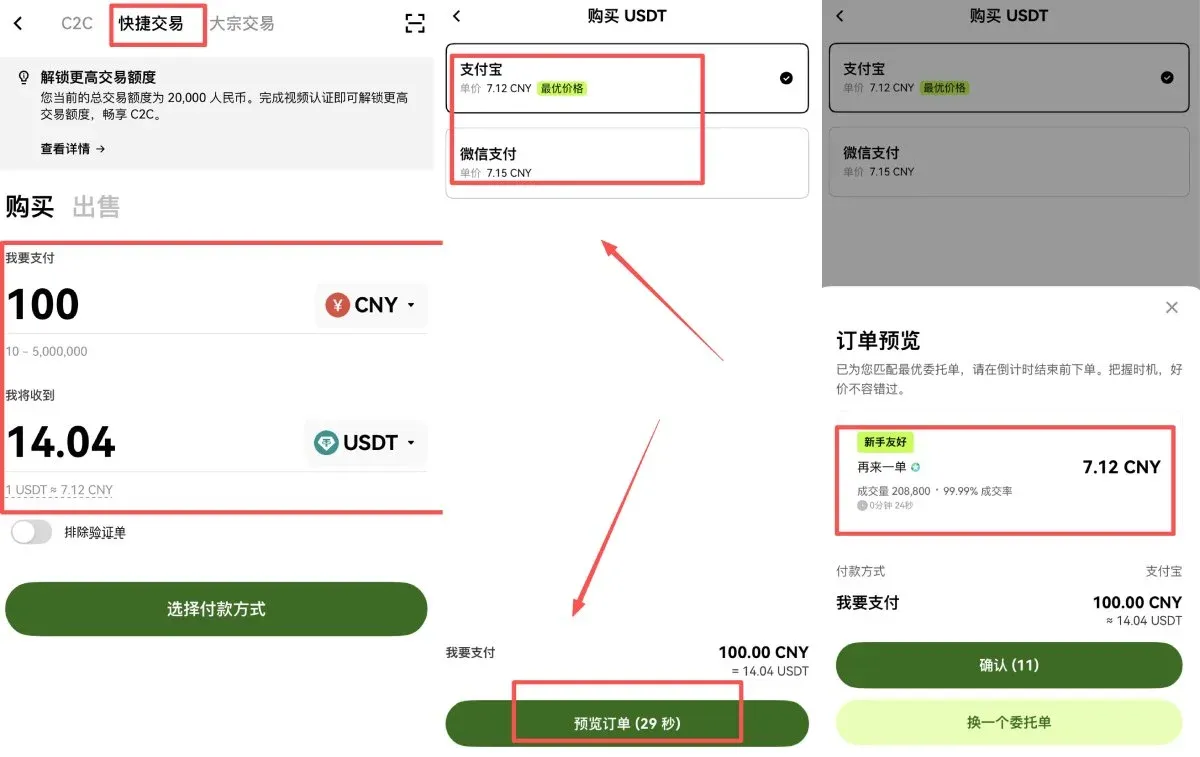
- In the app, select 【Quick Trade】 → 【Buy】, enter the amount and the cryptocurrency you wish to purchase, then tap 【Select Payment Method】 → 【Preview Order】. After confirming the seller’s details, click 【Confirm】.
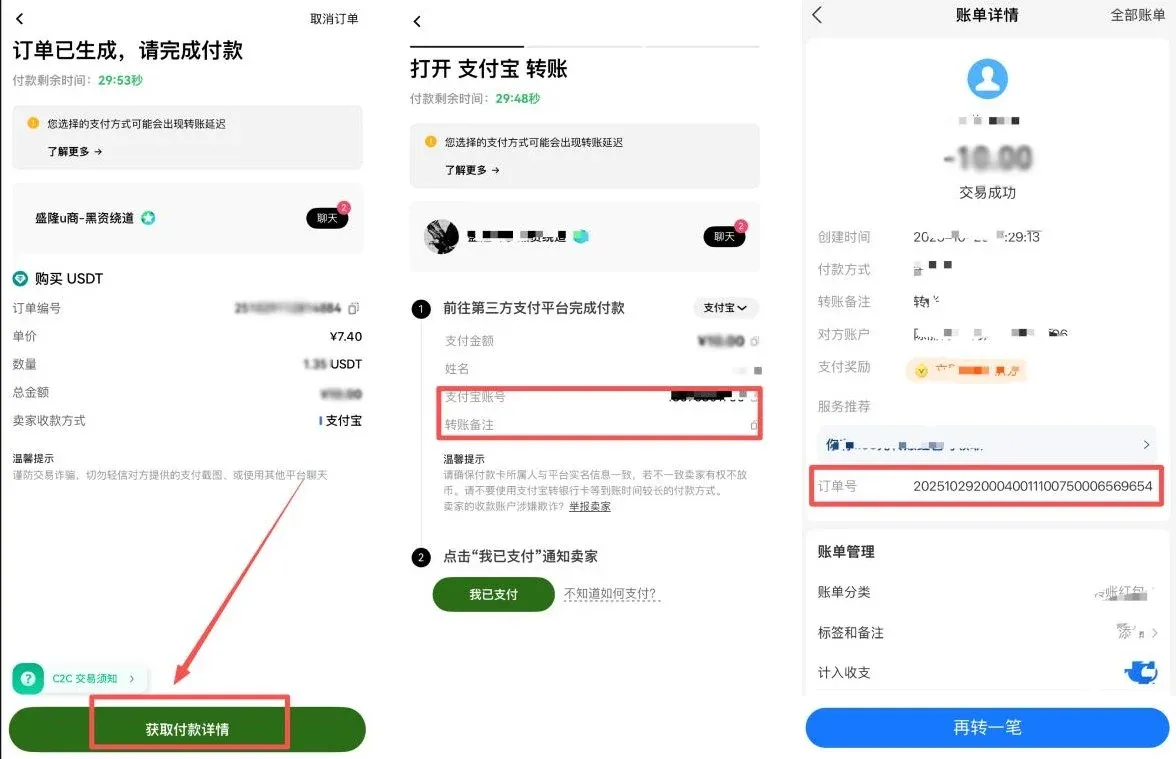
- Once the order is confirmed, tap 【Get Payment Details】 and follow the Alipay account information supplied by the seller to complete the transfer.
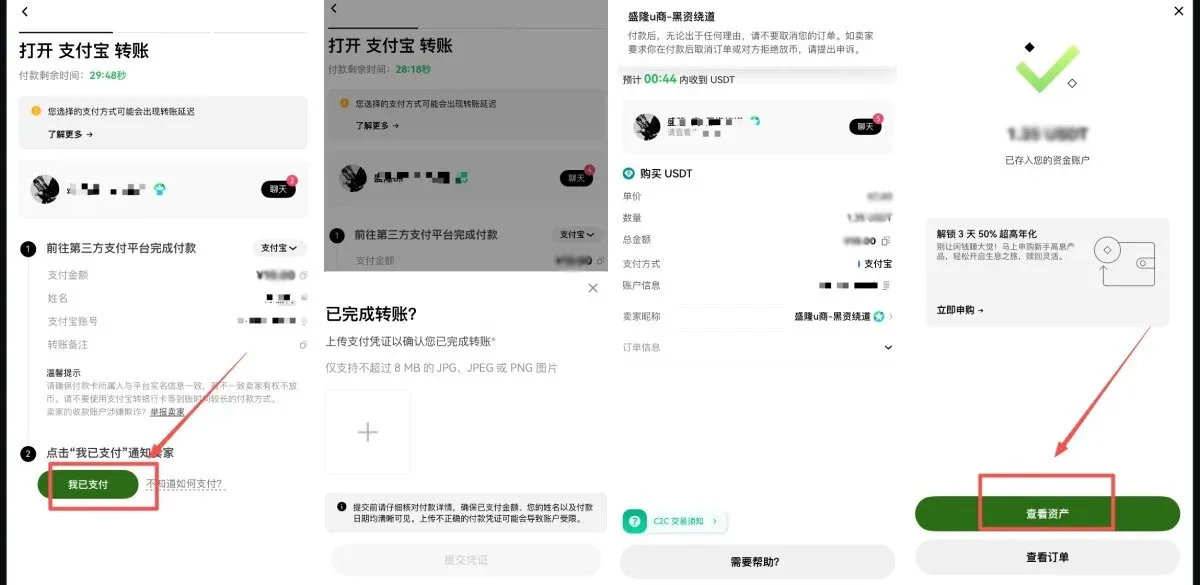
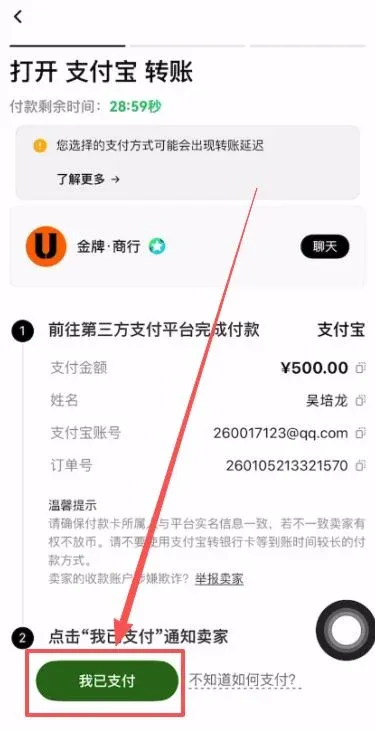
- After the transfer succeeds, return to OKX, tap 【I Have Paid】, and upload a screenshot of the payment receipt. The seller will verify the payment, and the corresponding USDT will be credited to your account.
2. C2C Purchase of USDT
- Navigate to the 【C2C Buy】 section on the home screen. For security, it is advisable to use a secondary bank card (instead of your primary payroll card) or an Alipay account that you do not use for regular payments.
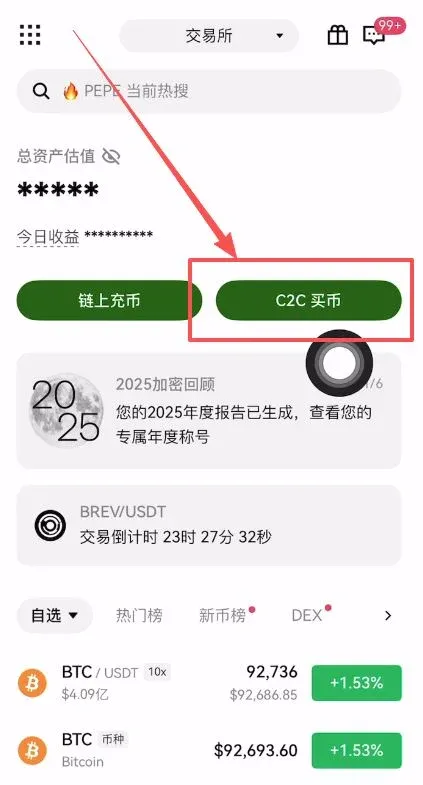
- After entering the amount of fiat you wish to spend (now expressed in USD for the global audience), the system will present two categories of sellers:
- Verified Sellers – higher security, but they may request additional proof such as bank statements or a short video before you can pay.
- Regular Sellers – a more streamlined process; you can disable the “Verified Seller” filter if you prefer a faster experience.
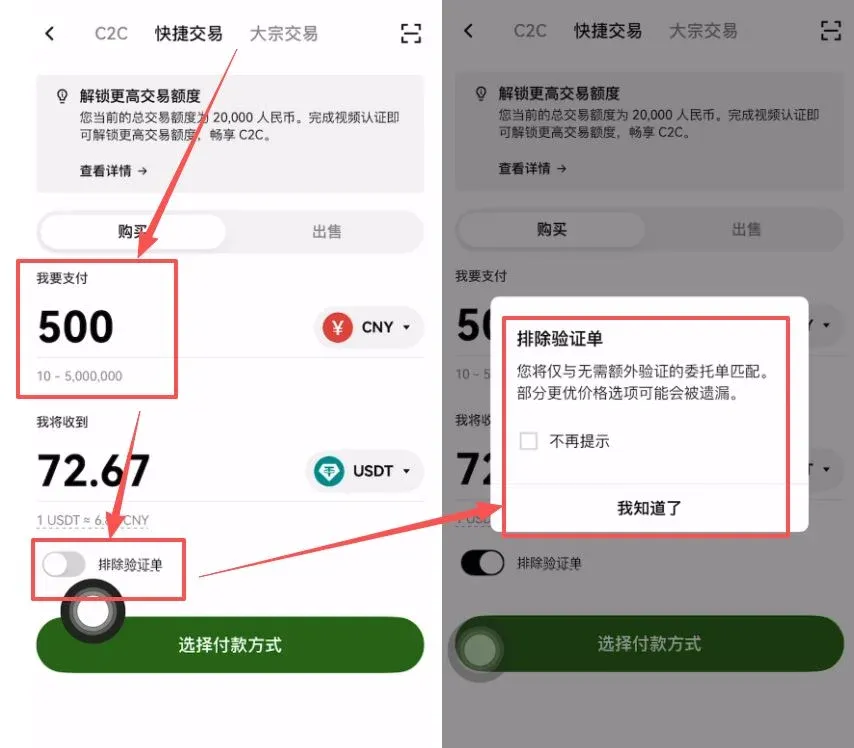
- Choose Alipay as the payment method and tap 【Preview Order】. The platform will automatically match you with sellers that satisfy your criteria. Once a match is found, open the chat window in the top‑right corner and read the seller’s payment instructions carefully:
- The name on the Alipay account must match the real‑name information you provided during KYC.
- Do not include keywords such as “Bitcoin”, “USDT”, or “OKX” in the transfer memo, as doing so may trigger a freeze on your account.
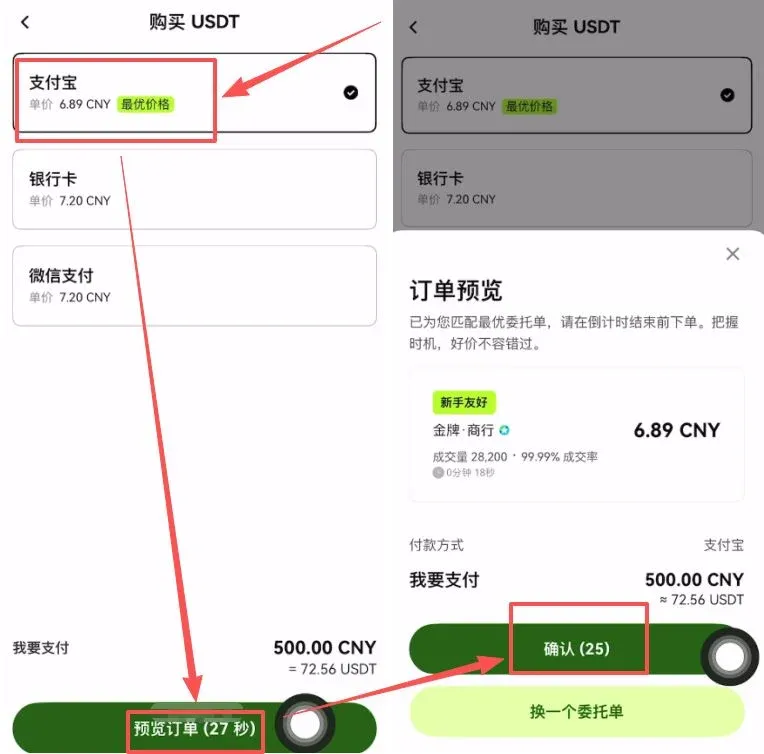
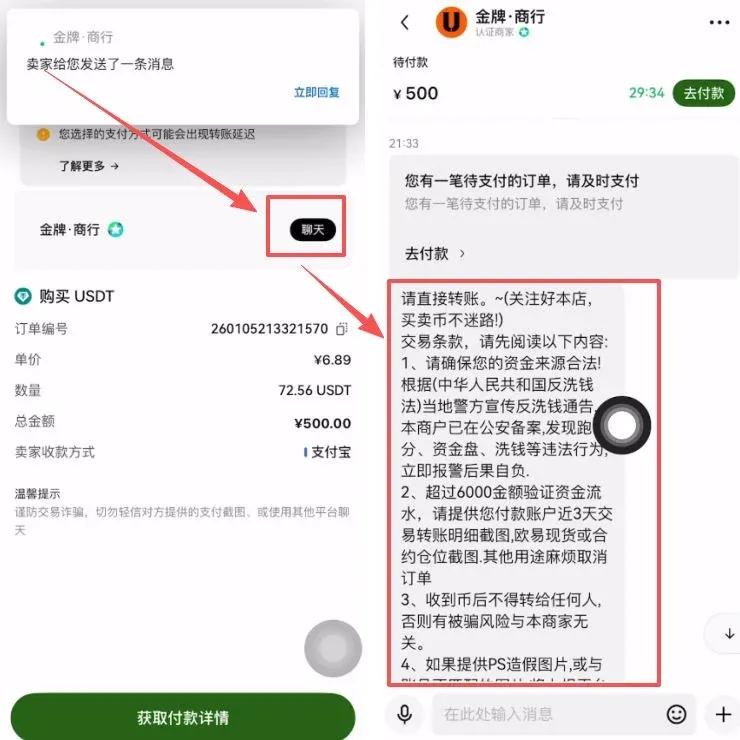
- Tap 【Get Payment Details】 to retrieve the seller’s real name and Alipay account. If the information is masked or contains special notes, ask for clarification directly in the chat. Then leave the OKX app, open Alipay, and transfer the exact amount.
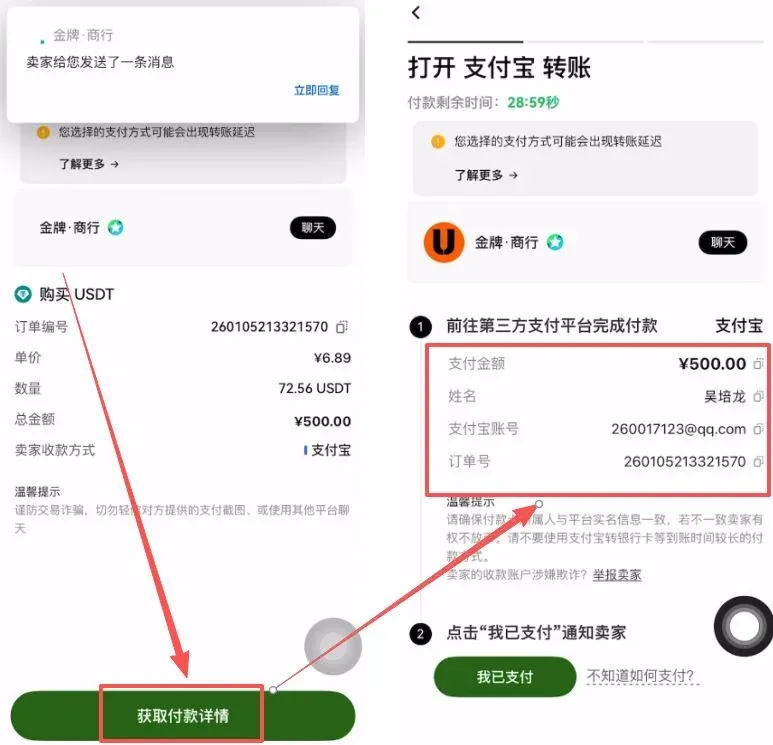
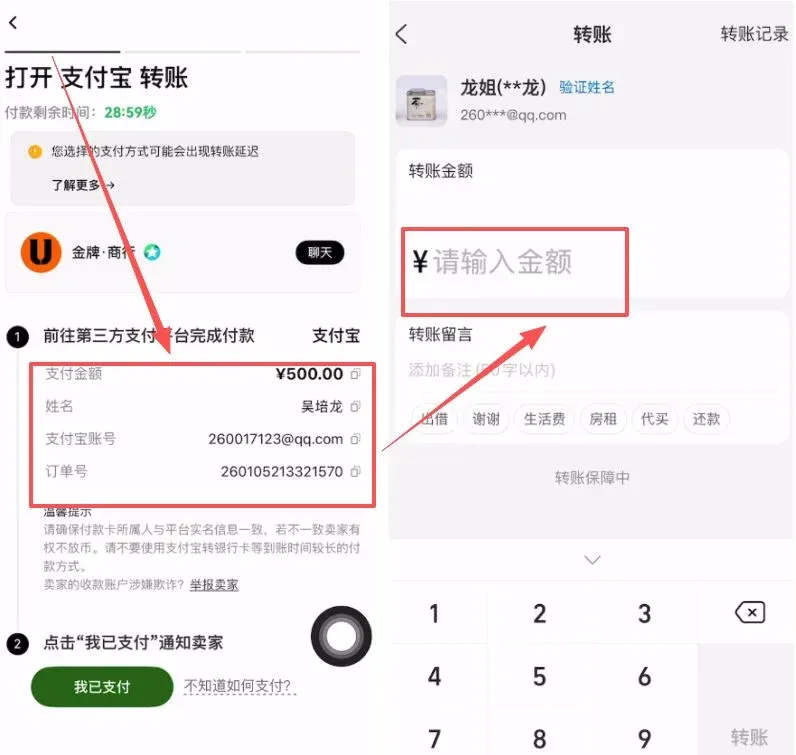
- After the transfer is complete, return to the OKX app and tap 【I Have Paid】. The platform will automatically release the locked USDT into your balance, concluding the transaction.
---
Buying Crypto with a Bank Card
Using a bank card for C2C trades generally offers higher limits, though credit‑card deposits may incur a slightly higher fee and the exchange rate might be less favorable than Alipay. Below are the detailed steps:
- Open the OKX app, tap the 【Assets】 tab at the bottom, then select 【Deposit】 → 【C2C Trade】.
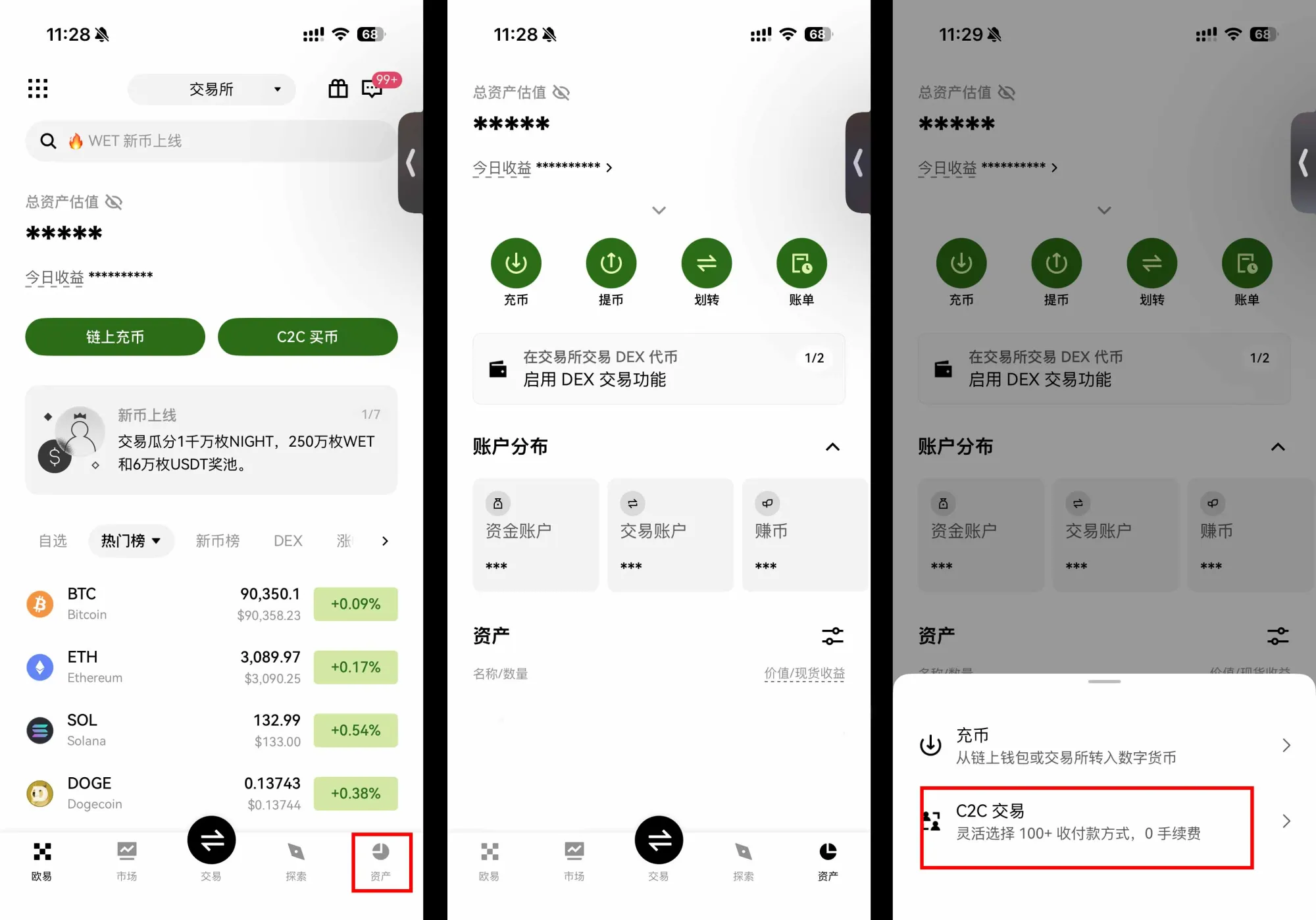
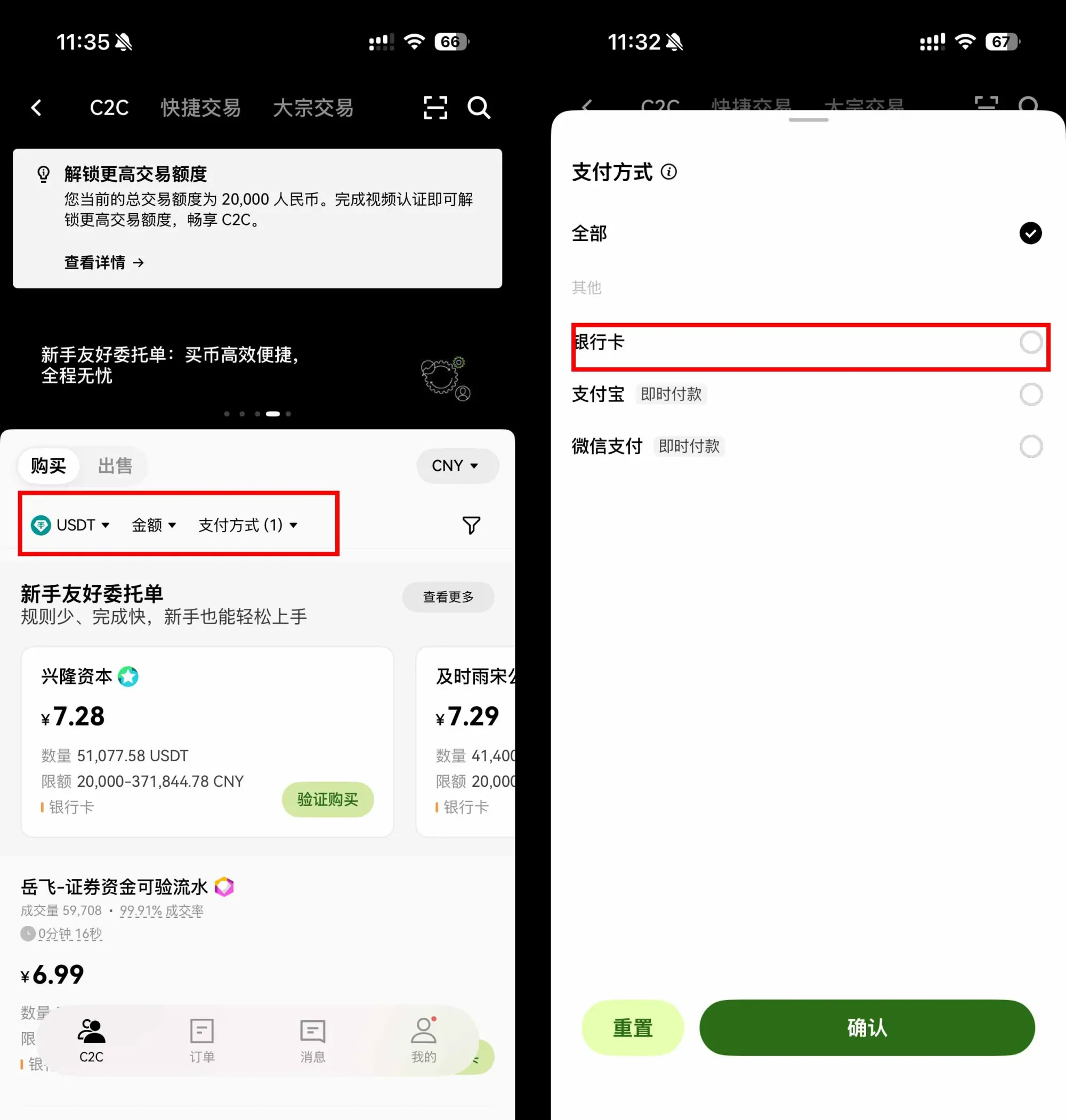
- Choose the cryptocurrency you want to acquire and switch the payment method to Bank Card. A list of eligible sellers will appear.
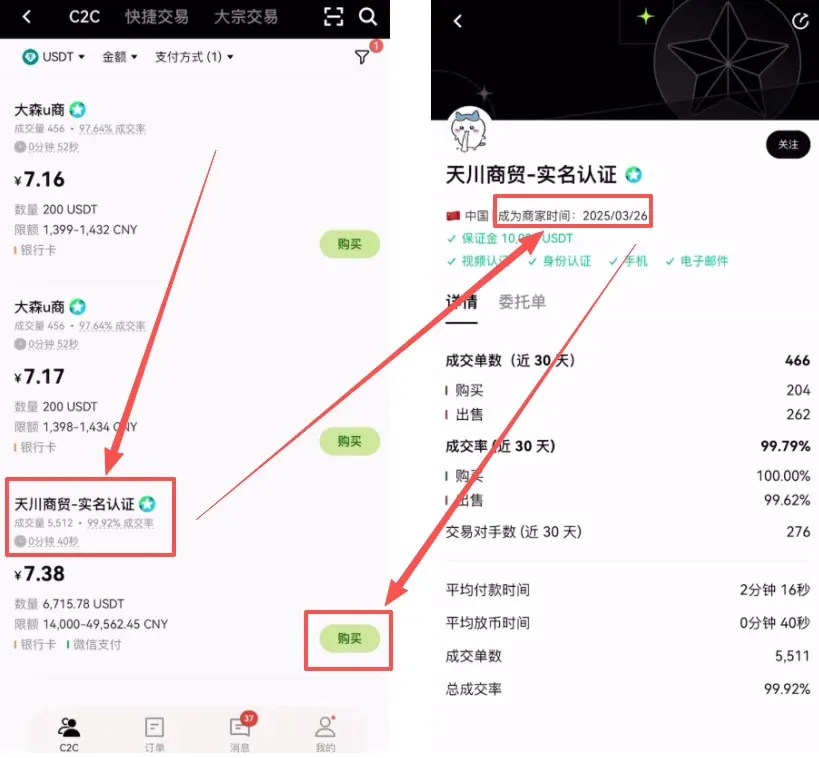
- From the list, select sellers with large transaction volumes, high fulfillment rates, and a registration period of at least six months. Click the seller’s profile for more details, then press 【Buy】 on the right side.
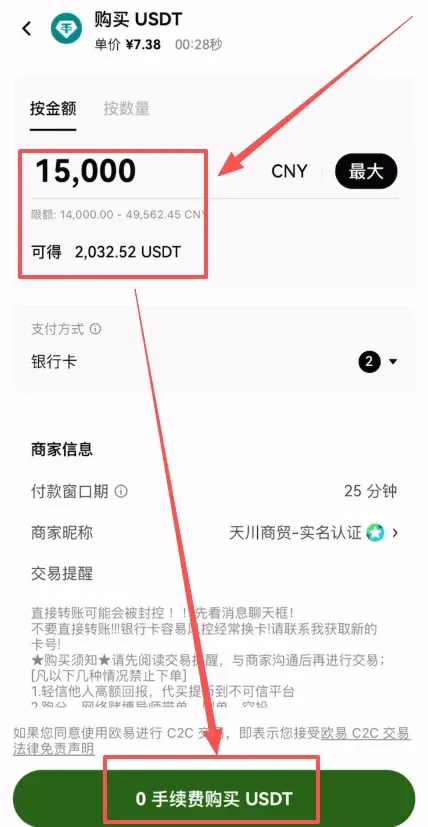
- Enter either the fiat amount (in USD) or the amount of crypto you wish to receive, then click 【0% Fee USDT Purchase】.
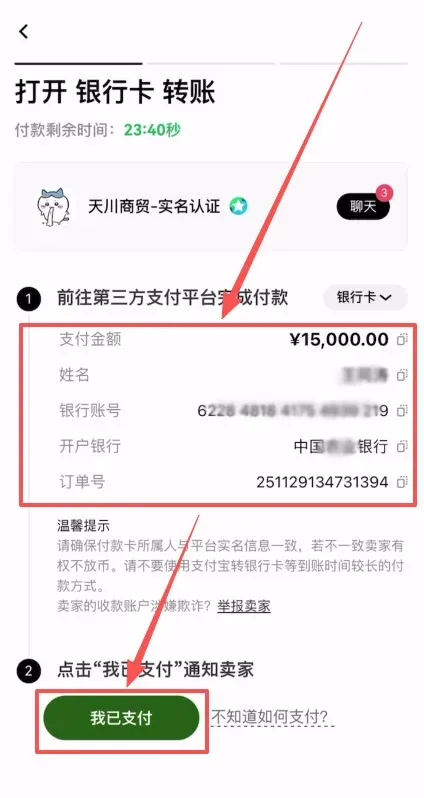
- Once the order is generated, you can tap 【Chat】 to view any specific instructions from the seller, then hit 【Get Payment Details】.
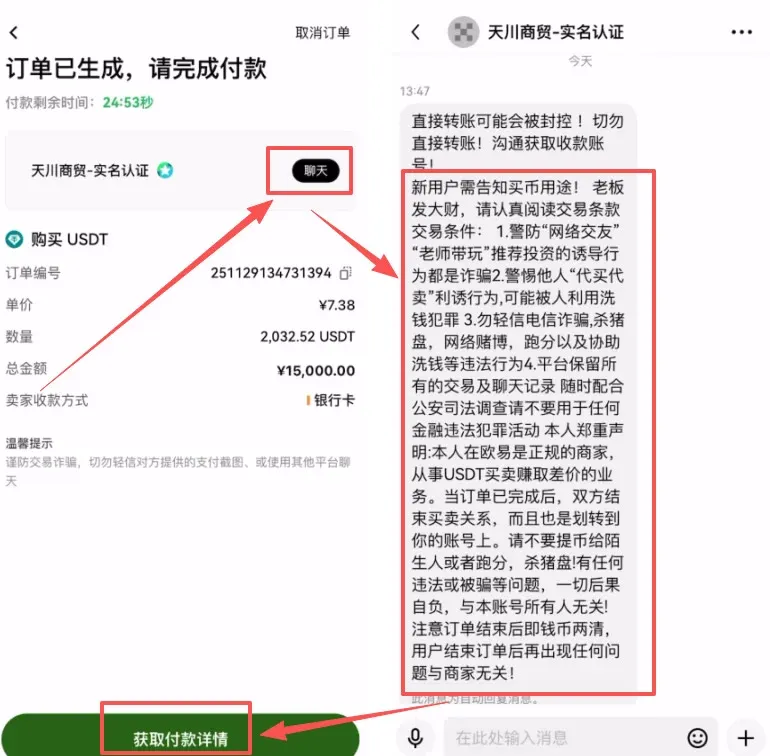
- The seller will display the bank name, account number, and branch details. Leave the app, log in to your online banking or mobile banking app, and transfer the exact amount. After the transfer succeeds, go back to OKX and tap 【I Have Paid】. Once the seller confirms receipt, the USDT will be credited automatically.
---
Bank Card vs. Alipay: Which Should Beginners Choose?
| Payment Method | Advantages | Disadvantages |
|---|---|---|
| **Bank Card** | Higher limits, more stable settlement of funds | Slightly longer initial setup, requires online‑banking environment; fees a bit higher |
| **Alipay** (or comparable e‑wallets) | Fast, mobile‑first experience | Lower per‑transaction limits, less suitable for large one‑off purchases |
Recommendation: If you are trying it for the first time and the amount is modest, Alipay (or an equivalent e‑wallet) offers the most convenient experience. For larger or recurring purchases, binding a bank card is generally the better long‑term choice.
---
Frequently Asked Questions
- What must be completed before I can buy crypto?
You must finish KYC identity verification on OKX; otherwise the fiat‑to‑crypto trading functions remain locked.
- Is the payment process safe?
Accessing the platform through the official registration link provided in this article helps you avoid phishing or spoofed sites.
- Where do the purchased coins go?
After a successful payment, the digital assets are automatically deposited into the corresponding wallet within your OKX account, ready for further trading or withdrawal.
- Registration and download links
- Official OKX registration URL: <https://www.okx.com/zh-hans/join/B2345>
- OKX APP download URL: <https://www.bitaigen.com/binance/download>
---
6. Tips for Beginners
- Start Small: Begin with a modest amount to familiarize yourself with the whole flow before scaling up.
- Boost Security: Enable Google Authenticator, set a withdrawal password, and consider other multi‑factor protections to reduce the risk of account compromise.
- Watch Exchange Rates & Fees: The platform displays real‑time rates and fees; compare a few times before confirming an order to avoid unexpected costs caused by market volatility.
Following the steps above, purchasing crypto on OKX with either a bank card or Alipay is straightforward. Whichever payment method you choose, always use the official entry points or the official app links to ensure a safe and reliable transaction.
Tax Disclaimer: Crypto transactions may be subject to taxation in your jurisdiction. Please consult a tax professional or local regulations to understand any reporting or tax obligations that may arise from gains or losses.
This concludes the guide. For more practical OKX buying tips, visit the Bitaigen (比特根) website or continue reading the related articles below. We appreciate your ongoing interest and support!
Related Reading
- OKX Deposit & Withdrawal Guide: Moving Funds Without CNY
- OKX P2P Trading Guide: Security, Appeals & Fraud Prevention
- Download Binance, OKX, Bitget: Android APK & iOS Guide
💡 Register on Binance with referral code B2345 for the maximum trading fee discount. See Binance complete guide.



