
 Bitaigen Research
 In this article we walk beginners through the complete workflow of using OKX’s Beginner‑Friendly Order to purchase USDT. We focus on how to select trustworthy sellers in the C2C marketplace, avoid account‑related risks, and provide step‑by‑step instructions so you can safely and quickly complete a USDT purchase. The guide is fully illustrated with screenshots to ensure you never fall into a trap.
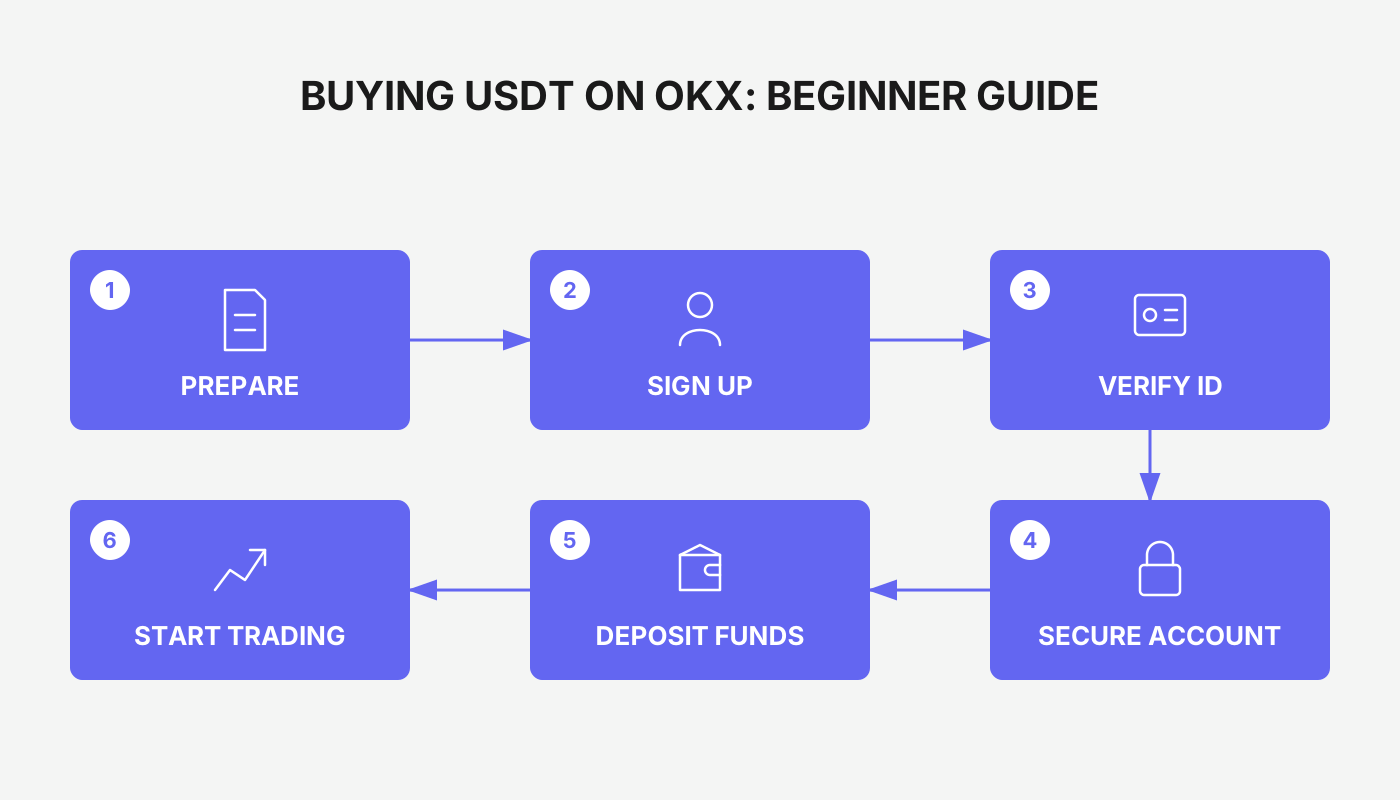
Full End‑to‑End Process for Buying USDT with OKX’s Beginner‑Friendly Order
When you first step into the cryptocurrency world, many newcomers treat buying USDT as the first hurdle. In practice, however, you may worry about questions such as: Which seller should I choose to avoid a frozen account? How long will the funds take to arrive after payment? The interface looks complex—could a small mistake lead to loss of funds?
To address these concerns, OKX (formerly known as OKEx) has introduced a “Beginner‑Friendly Order” specifically designed for new users. This feature belongs to the C2C (person‑to‑person) trading ads and can be quickly located on the C2C homepage, the quick‑trade section, and the filter entry. It helps users complete purchases from vetted, reliable sellers. Below we skip the lengthy theoretical exposition and dive straight into a hands‑on demonstration, showing you how to pick trustworthy merchants like an experienced trader and ensure your assets arrive safely.
1. Preparations: Download, Register, and Complete KYC
- Download the OKX app (available for iOS and Android) and finish the account registration.
- Follow the official instructions to complete identity verification (KYC) so that future trades are not limited.
Reference links:
- 【OKX iOS App Download Guide】
- 【2025 Complete OKX Account Registration + KYC Illustrated Tutorial】
After installation, open the app and navigate to the 【C2C Buy】 page on the home screen.
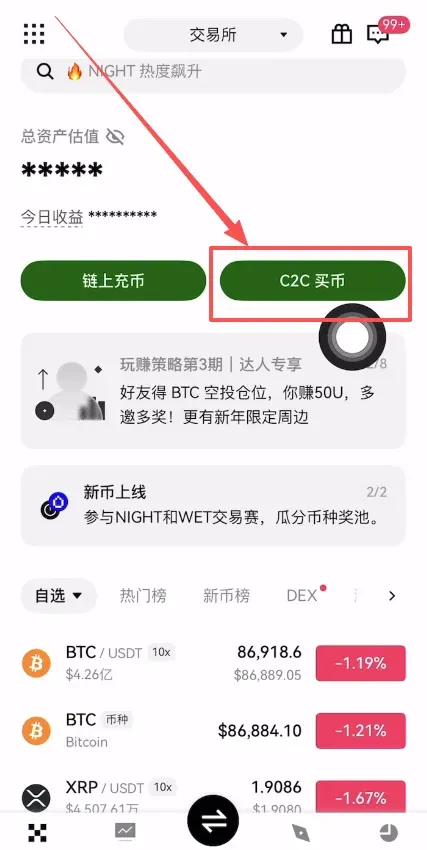
2. Enter the C2C Trading Interface and Select USDT
At the top of the page, switch to “C2C” (person‑to‑person) mode, which allows you to manually pick a counter‑party. Then, under the 【Buy】 tab, select USDT and set the amount you wish to purchase (e.g., USD 500). For global users, a SEPA or SWIFT bank transfer is commonly used; in China, Alipay is recommended for its convenience.
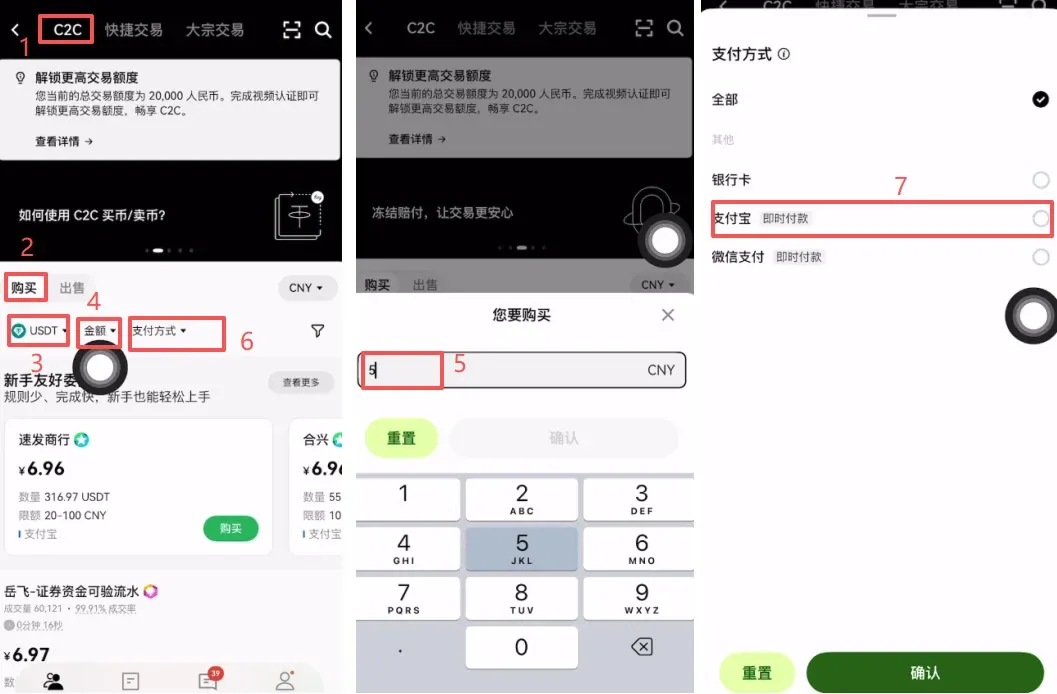
3. Activate the “Beginner‑Friendly Order” Filter
To the right of the search bar there is a small pin icon. Check the box labeled “Beginner‑Friendly Order” and the system will automatically filter out platform‑certified high‑quality sellers, reducing transaction risk.
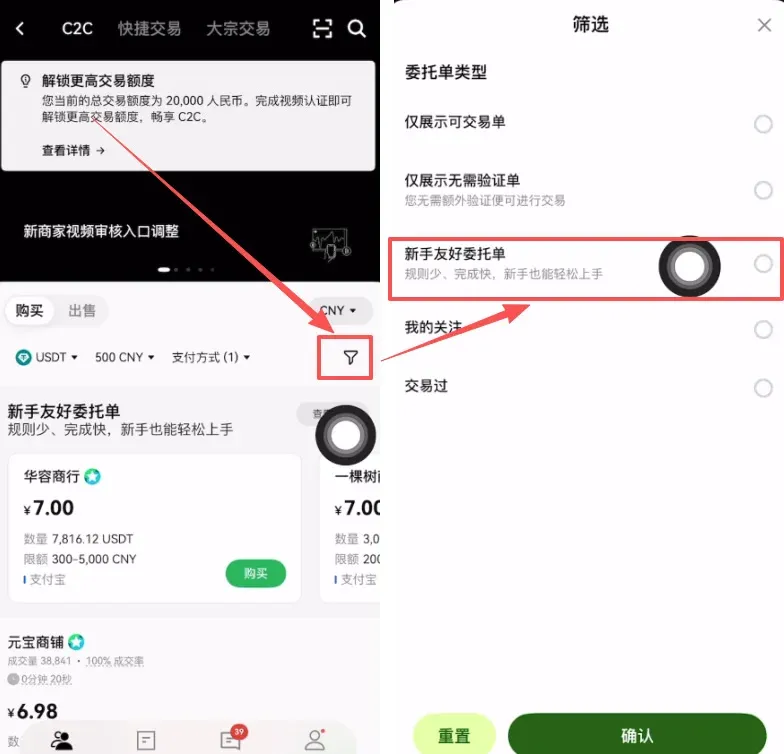
The core purpose of this function is to present strictly screened merchants for newcomers, making the first C2C trade smoother.
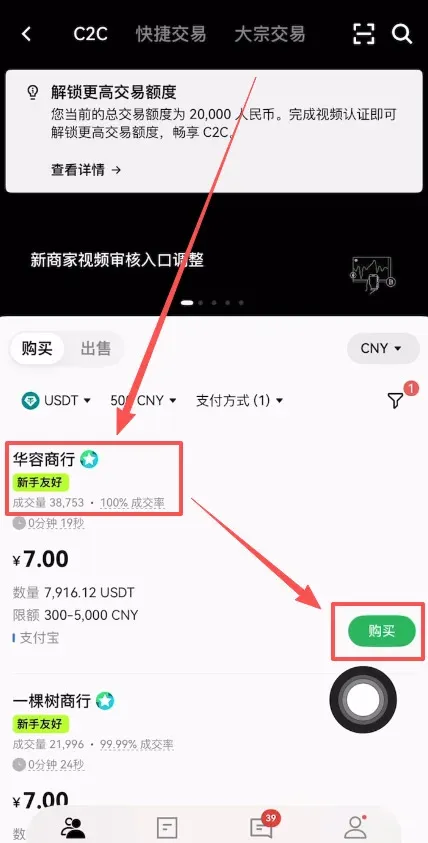
4. Choose Sellers with High Volume and High Ratings
In the filtered results, prioritize trade volume and positive rating. For example, “Huá Róng Trading Co.” shows 38 000 completed orders and a 100 % positive rating, making it a trustworthy option. Click the 【Buy】 button next to the seller to proceed.
5. Confirm the Payment Amount and Complete the Transfer
The system will automatically convert the fiat amount you entered into the corresponding USDT quantity (e.g., USD 500 ≈ 71.42 USDT). Read the seller’s transaction notice carefully: *“You must transfer from a personally verified account, and leave the transfer remark field blank.”* This prevents delays caused by mismatched information. Once everything checks out, press 【0‑Fee Purchase USDT】.
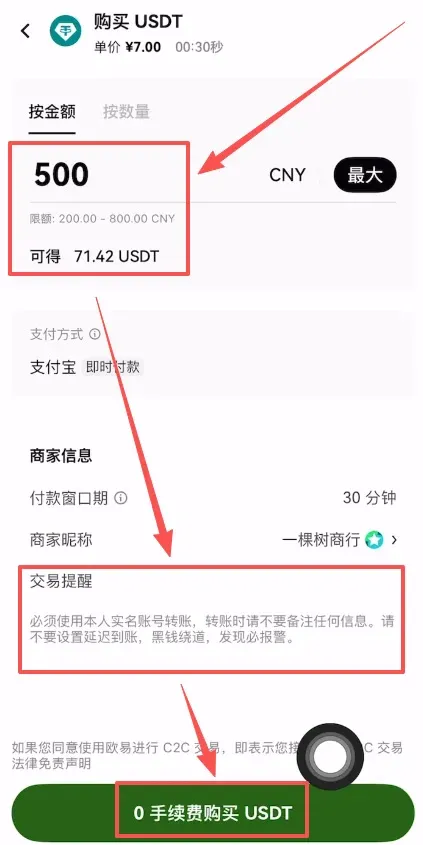
Follow the seller’s listed payment method (e.g., Alipay, or for non‑Chinese users a SEPA/SWIFT bank transfer) to complete the transfer. After the seller confirms receipt, the USDT will be automatically credited to your OKX account.
Note for U.S. residents: OKX services are not available in the United States. U.S. users should conduct similar C2C purchases on platforms that operate under U.S. jurisdiction, such as Binance.US, and follow the respective local guidelines.
Tax reminder: Gains from cryptocurrency transactions may be taxable in your jurisdiction. Consult a tax professional to understand your obligations.
6. Further Reading (Optional)
- How to Sell USDT on OKX and Withdraw to a Bank Card
- Complete Guide to Withdrawing from OKX to WeChat, Alipay, or Bank Card
- Full‑Process Walkthrough from Registration to Trading
- App Installation Guide: Quick Start for Bitcoin Investing (Android / iOS)
- Step‑by‑Step Instructions for Recharging the OKX App via WeChat
- How to Buy Bitcoin? Purchasing Process Using OKX as an Example
---
Core Advantages of OKX’s Beginner‑Friendly Order
- Premium Sellers: Only merchants that have passed rigorous platform scrutiny appear in the “Beginner‑Friendly” ad slot, enhancing transaction safety.
- Full‑Process Guidance: Provides a complete workflow from order placement, payment, to coin release, helping newcomers get up to speed quickly.
- Dedicated Support: A special customer‑service channel for new users answers any questions that arise during the trade.
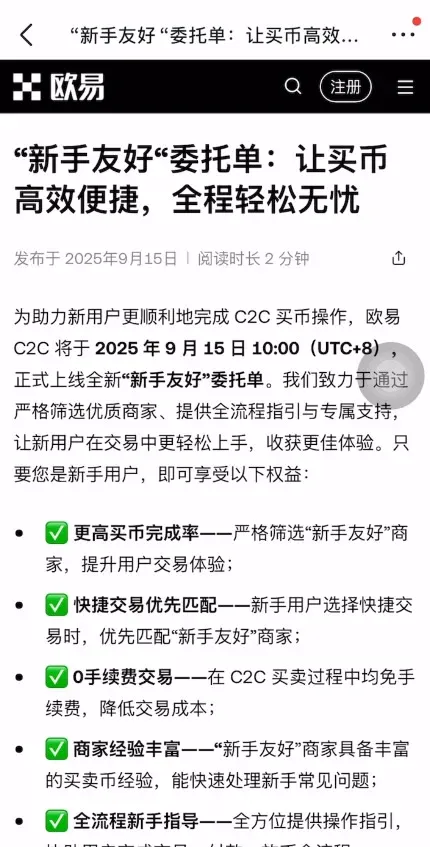
Benefits of Using the Beginner‑Friendly Order (launched 15 Sep 2025)
- Higher Order Completion Rate: Curated merchants improve success chances.
- Priority Matching in Quick‑Trade: When using the quick‑trade feature, the system automatically recommends Beginner‑Friendly sellers first.
- 0 Fee: No transaction fees for the entire C2C buying and selling process, reducing cost.
- Experienced Merchants: Sellers familiar with common newcomer issues respond more quickly.
- Step‑by‑Step Guidance: Real‑time prompts from order creation to coin release.
- High Credit & Efficient Service: Risk‑control systems and merchant quality assessments ensure safe trades.
- Instant Online Communication: You can contact the seller or platform support anytime an issue arises.
Our goal is to enable every first‑time C2C user to purchase USDT in a safe, transparent environment and enjoy a smooth experience.
Frequently Asked Questions
1. What does “Beginner‑Friendly” seller mean?
It is a label granted after multi‑dimensional platform review, indicating that the seller meets standards for transaction safety, responsive service, and experience suitable for newcomers.
2. What privileges do new users receive?
- Higher success rate for buying crypto
- Priority matching with Beginner‑Friendly sellers in quick‑trade mode
- Zero‑fee trades
- Sellers with extensive experience, able to resolve common issues quickly
- Full‑process operational guidance
- High credit and efficient service
- Real‑time online customer support
3. How can I quickly locate “Beginner‑Friendly” sellers?
- Look directly at the top‑most area of the C2C Buy page;
- Use the filter function and tick the “Beginner‑Friendly” option.
4. I want to become a “Beginner‑Friendly” seller—what should I do?
Contact the platform’s dedicated merchant operations manager and complete the multi‑dimensional assessment to obtain certification.
5. Are there any fees when trading with a “Beginner‑Friendly” seller?
All C2C buying and selling activities are fee‑free.
6. Are *all* sellers on the platform marked as “Beginner‑Friendly”?
Only those who have passed the platform’s strict screening and earned the certification carry the “Beginner‑Friendly” tag.
7. What should I do if I encounter problems during a trade?
You can contact the seller directly from the transaction page for assistance; if the issue remains unresolved, reach out to platform customer support.
8. How does a seller publish a “Beginner‑Friendly” order?
Once a seller obtains the “Beginner‑Friendly” qualification, any sell order they publish will automatically display the corresponding label—no extra steps are required.
That concludes the “How to Select a Safe Seller to Purchase USDT? OKX Beginner‑Friendly Order USDT Purchase Tutorial”. For more practical tips on safely buying crypto as a beginner, follow Bitaigen (比特根) for upcoming articles.
Related Reading
- OKX One-Click Copy-Trade: Follow Top Traders & Earn
- Top 10 Beginner‑Friendly Cryptocurrency Exchanges with Strong Security
- OKX Insufficient Balance: Why Funds Lock & How to Fix
💡 Register on Binance with referral code B2345 for the maximum trading fee discount. See Binance complete guide.



