
 Bitaigen Research
 How to Buy Bitcoin: A Step‑by‑Step Guide for Beginners (Global Market)
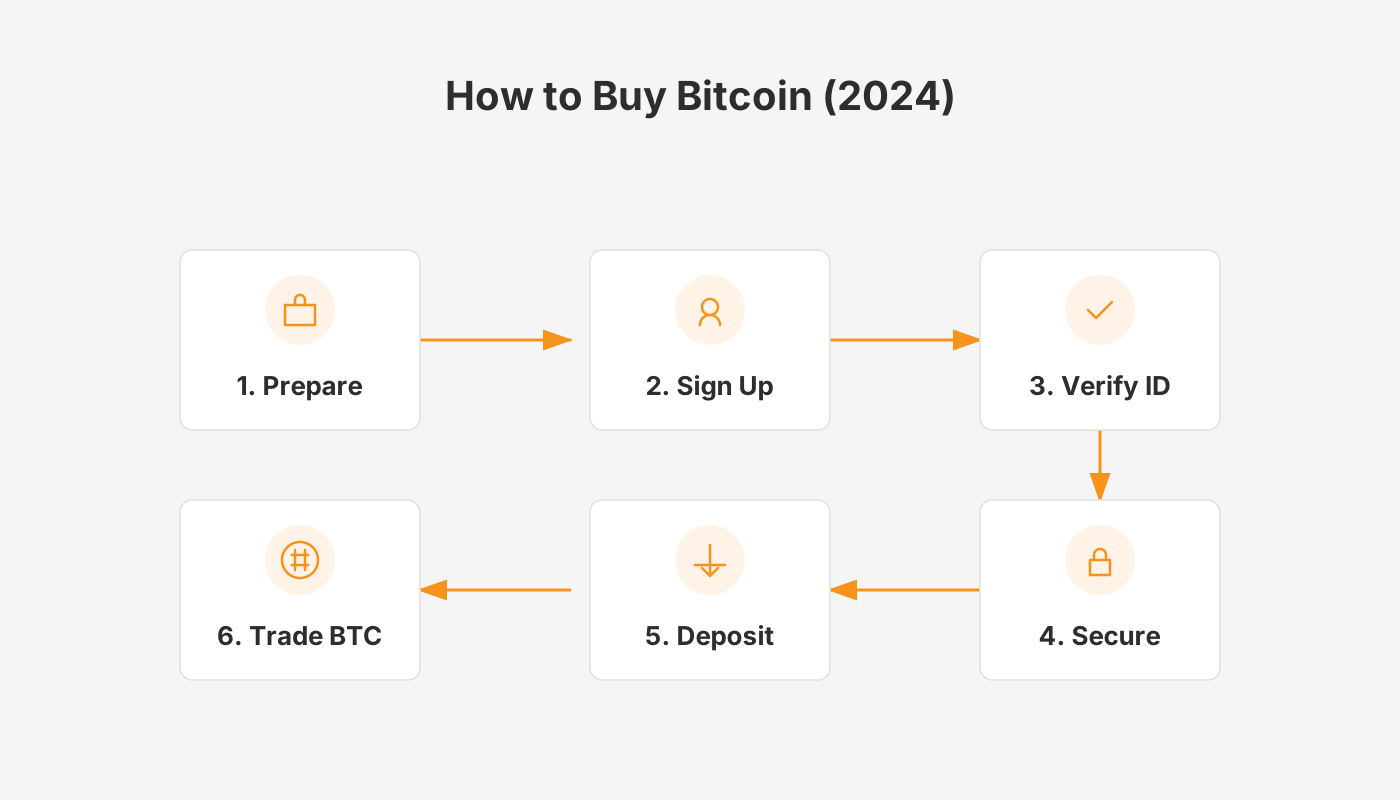
After completing KYC, first purchase USDT on the C2C market, then go to the spot‑trading section, select BTC/USDT and place a market order to buy Bitcoin instantly. This completes your first holding.
In this article we walk crypto newcomers through the entire process—from finishing KYC to acquiring your first Bitcoin on Binance—while comparing the pros and cons of the major purchase channels. Follow the guide to get hands‑on instructions and platform‑selection tips, and avoid common pitfalls.
What Is Bitcoin?
Bitcoin (BTC, Bitcoin) is a decentralized digital currency launched in 2008. It was one of the first cryptocurrencies and remains the largest by market capitalization. Built on blockchain technology, Bitcoin enables peer‑to‑peer transfers and payments without the need for traditional financial intermediaries.
Choose the Right Platform and Assets
For absolute beginners, the primary rule for starting a crypto journey is: use Binance, trade mainstream assets.
- Platform selection: Binance is the world’s largest exchange, offering the deepest liquidity and the highest security standards – often described as the “bank” of the crypto world.
- Important for U.S. residents: Use Binance.US (the U.S.‑compliant version) instead of the global Binance platform.
- Asset selection: New users should stay away from obscure altcoins and focus on three core assets:
- USDT – the “digital dollar” used for value preservation and trading pairs.
- BTC (Bitcoin) – the “digital gold,” the cornerstone of the crypto ecosystem.
- ETH (Ethereum) – the leading smart‑contract platform and application hub.
Comparison of Common Bitcoin Purchase Methods
| Purchase Method | Advantages | Disadvantages |
|---|---|---|
| International exchange (e.g., Binance) | Highest liquidity; trades execute quickly; Binance fees are low (~0.1%); access to Binance Earn and other services | Requires an initial USDT deposit, which may involve a short waiting period |
| Local exchange (e.g., Taiwan‑based) | Direct fiat (TWD) deposit; simple UI; regulated locally, offering added fund protection | Lower liquidity; large orders can move the price; fees are higher (≈0.15%) |
| Credit‑card purchase | Fastest execution, ideal for urgent buys; can buy BTC directly on Binance without a prior USDT transfer | Higher fees (≈2‑5%); some banks block crypto‑related card transactions; exchange‑rate spread roughly 4.43% |
Note: When dealing with fiat on a global scale, use USD transfers via SEPA (for EUR) or SWIFT where applicable. Always check the fee schedule of the chosen method.
Beginner Tutorial: Buying Bitcoin on Binance
If you haven’t created a Binance account yet, register through the links and app download pages below, and follow the accompanying video tutorial.
- Binance Official Registration
- Binance Android App Download: https://www.bitaigen.com/binance/download
Step 1 – C2C Purchase (Convert Local Fiat to USDT)
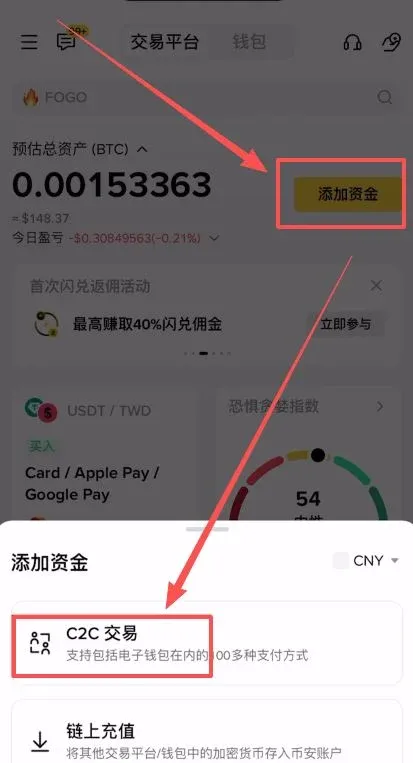
- Open the Binance app (download from the official link above), tap [Add Funds] → select [C2C Trading].
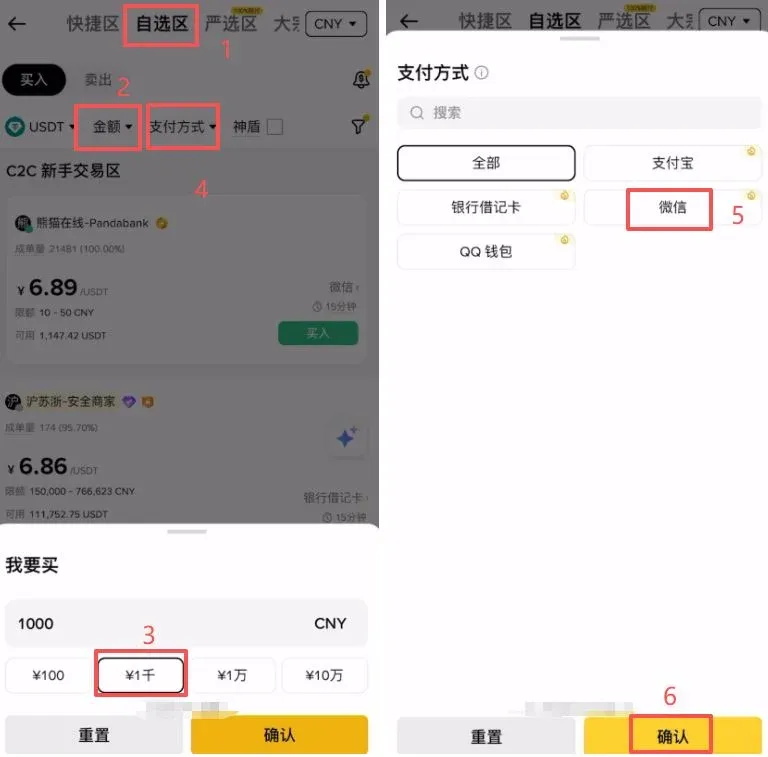
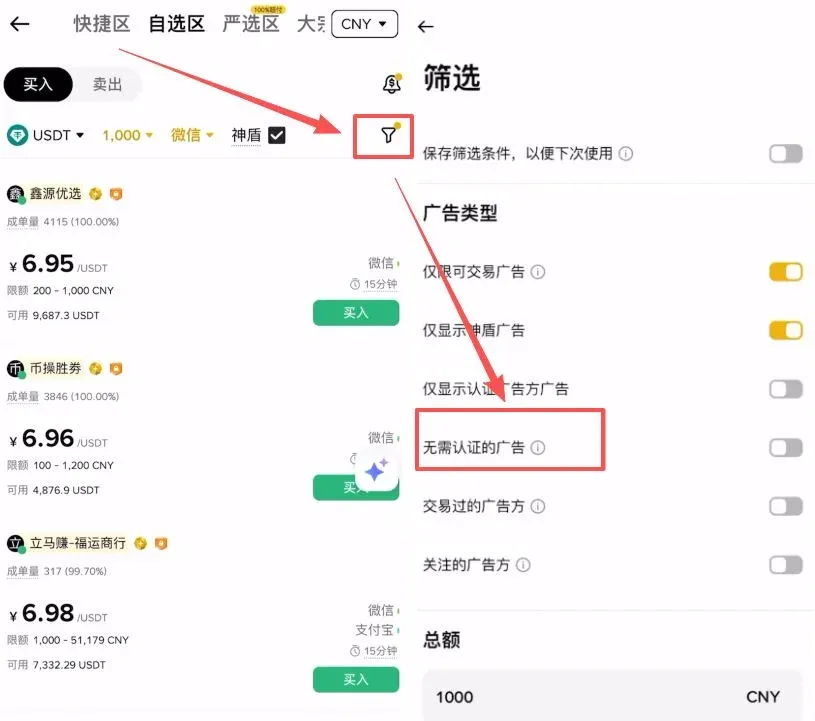
- Filter Settings: Enter the amount you wish to spend (e.g., 1,000 CNY) in the “Preferred” box and choose a payment method (e.g., WeChat).
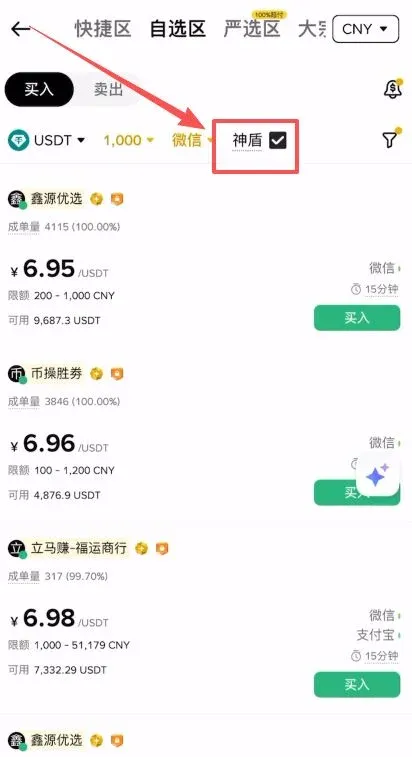
- Security Settings: Make sure to tick the [Shield] (神盾) option. Shield‑verified merchants post large security deposits; if a dispute occurs, Binance compensates the buyer, greatly protecting your funds.
- Filter Ads: Click the funnel icon and enable [Show ads that don’t require verification] to skip lengthy identity checks.
Step 2 – Select a Reliable Merchant
When picking a merchant, follow two main criteria:
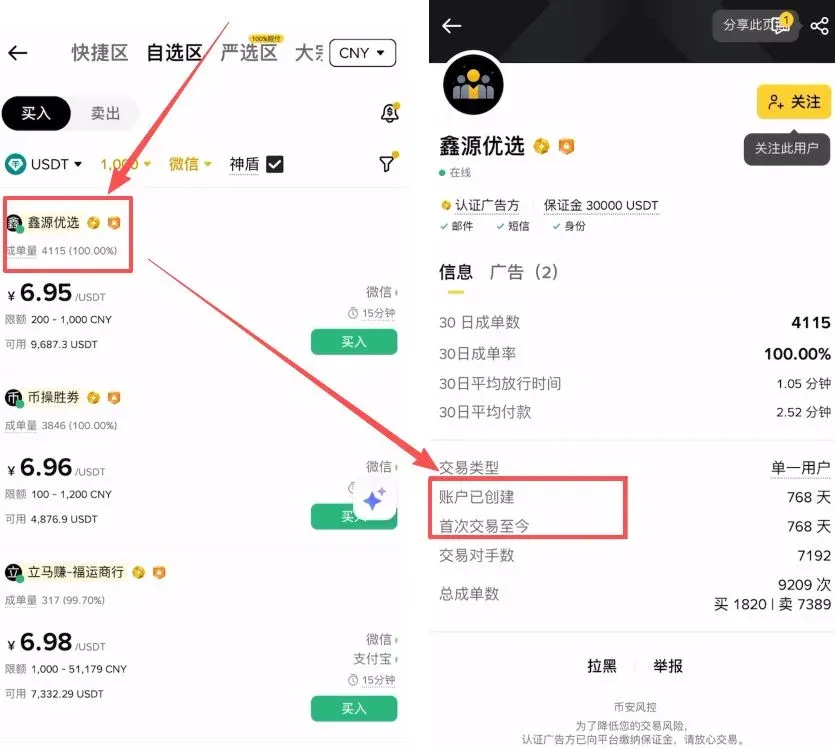
- Transaction Volume: Prioritise sellers with a high number of completed orders and an execution rate close to 100%.
- Account Age: Open the merchant’s profile and check the registration date and the date of their first trade. Older accounts generally indicate cleaner funding sources and higher survivability.
Step 3 – Complete Payment and Release of USDT
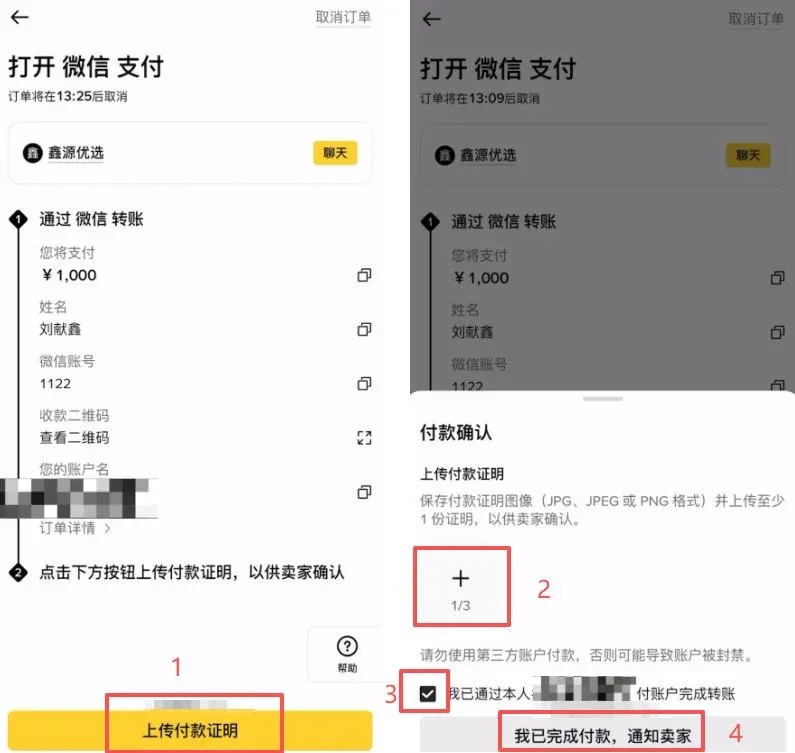
- After confirming the merchant, tap [Buy] to place the order.
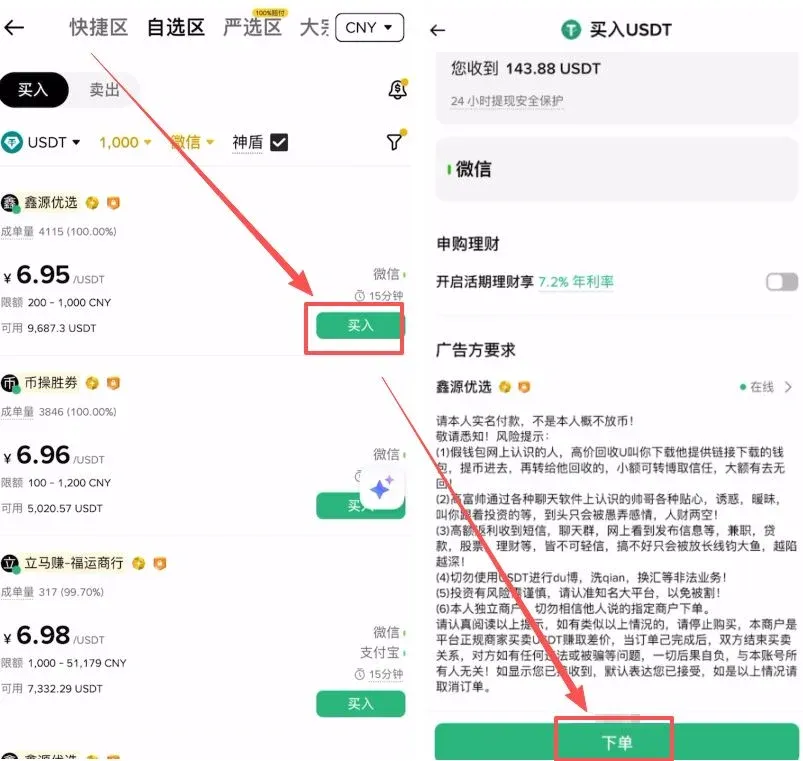
- Payment Process: Binance will display the seller’s QR code or account details. Exit the Binance app and use WeChat Pay, Alipay, or your bank’s online transfer to send the funds.
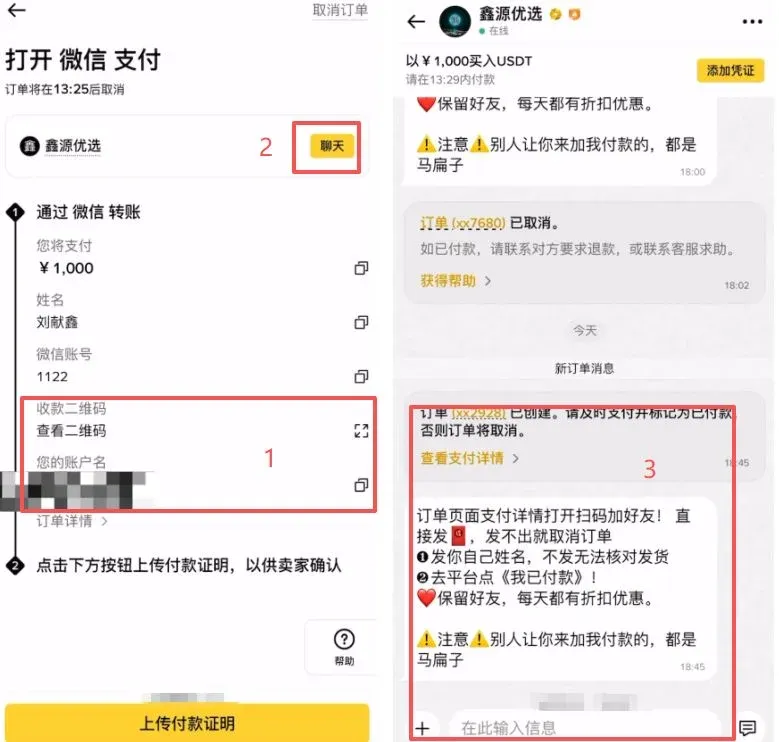
- Keep Proof: Screenshot the successful transfer for your records.
- Confirm Payment: Return to Binance, upload the screenshot, tick the confirmation box, and click [I have completed the payment, notify the seller]. Once the seller verifies receipt, the USDT will be credited to your Binance wallet.
Step 4 – Spot Trading (Buy Bitcoin with USDT)
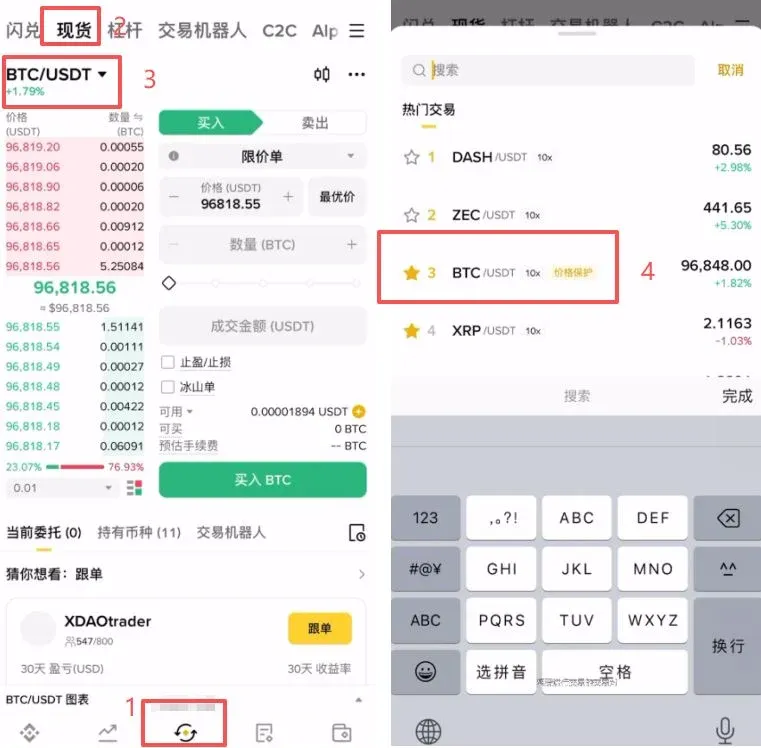
- With USDT in your account, tap the bottom [Trade] button and go to the [Spot] page.
- In the upper‑left corner, select the trading pair BTC/USDT.
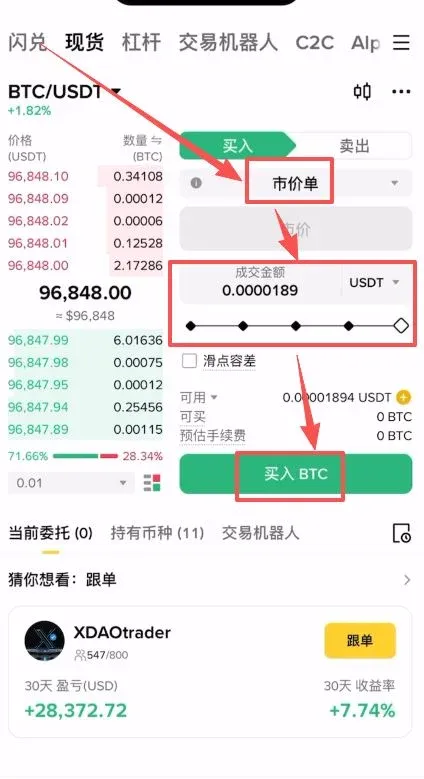
- Place Order: For immediate execution, choose [Market] (buys at the best current price).
- Drag the slider to set the amount you wish to purchase, then click [Buy BTC].
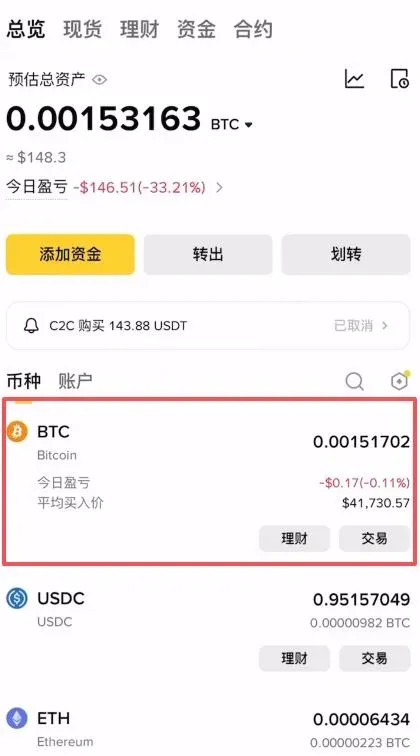
- After the order fills, navigate to [Wallet] → [Fiat & Spot] to see your newly acquired Bitcoin balance.
Investment and Risk Disclaimer
- The cryptocurrency market is highly volatile; prices can swing dramatically within short periods. Investors should only act after fully understanding market dynamics and associated risks.
- Use funds that you can afford to lose. Do not allocate essential living expenses or emergency cash to high‑risk assets.
- When choosing an exchange, prioritize security, regulatory compliance, and reputation. Avoid unverified or illicit platforms.
- Beginners should educate themselves on safe online trading practices and learn how to spot potential scams.
Beginner Benefits & Fee Rebates
Important Reminder: You must complete registration before you can claim any rebate. Below are sample rebate rates and referral links for several exchanges (rates are illustrative; always verify on the official site).
| Exchange | Referral Code | Rebate Rate | Official Sign‑Up |
|---|---|---|---|
| OKX | B2345 | 20% | [Official Sign‑Up](https://www.bitaigen.com/binance) |
| Binance | B2345 | 20% | [Official Sign‑Up](https://www.bitaigen.com/binance) |
| Huobi | b6yq8223 | 20% | [Official Sign‑Up](https://www.bitaigen.com/binance) |
| Gate.io | VLIWUGTFAA | 20% | Official Sign‑Up |
| Bybit | B2345 | 20% | [Official Sign‑Up](https://www.bitaigen.com/binance) |
| Bitget | good9999 | 20% | [Official Sign‑Up](https://www.bitget.org/zh-CN/referral/register?clacCode=NTBZAG9J) |
---
Tax Note: Crypto‑related gains may be taxable in your jurisdiction. Consult a tax professional or local regulations to ensure compliance.
This completes the 2026 beginner’s guide to purchasing your first Bitcoin. For more practical information on buying Bitcoin on Binance and related topics, follow Bitaigen (比特根) and explore its other articles.
Related Reading
- Buy Bitcoin from Your Home Country: Step‑by‑Step Guide
- How to Quickly Buy Bitcoin on OKX – Step‑by‑Step Guide
- Fix Binance Registration Errors with Referral Code B2345
💡 Register on Binance with referral code B2345 for the maximum trading fee discount. See Binance complete guide.



