 Bitaigen Research
 In this article we walk new OKX users through the entire process from identity verification to completing the first USDT purchase, and we provide a detailed analysis of the two main channels—C2C and Instant Buy—including operational tips, merchant‑selection techniques, and common risks, to help you get started quickly and trade securely. To learn the practical details of each step, continue reading below.
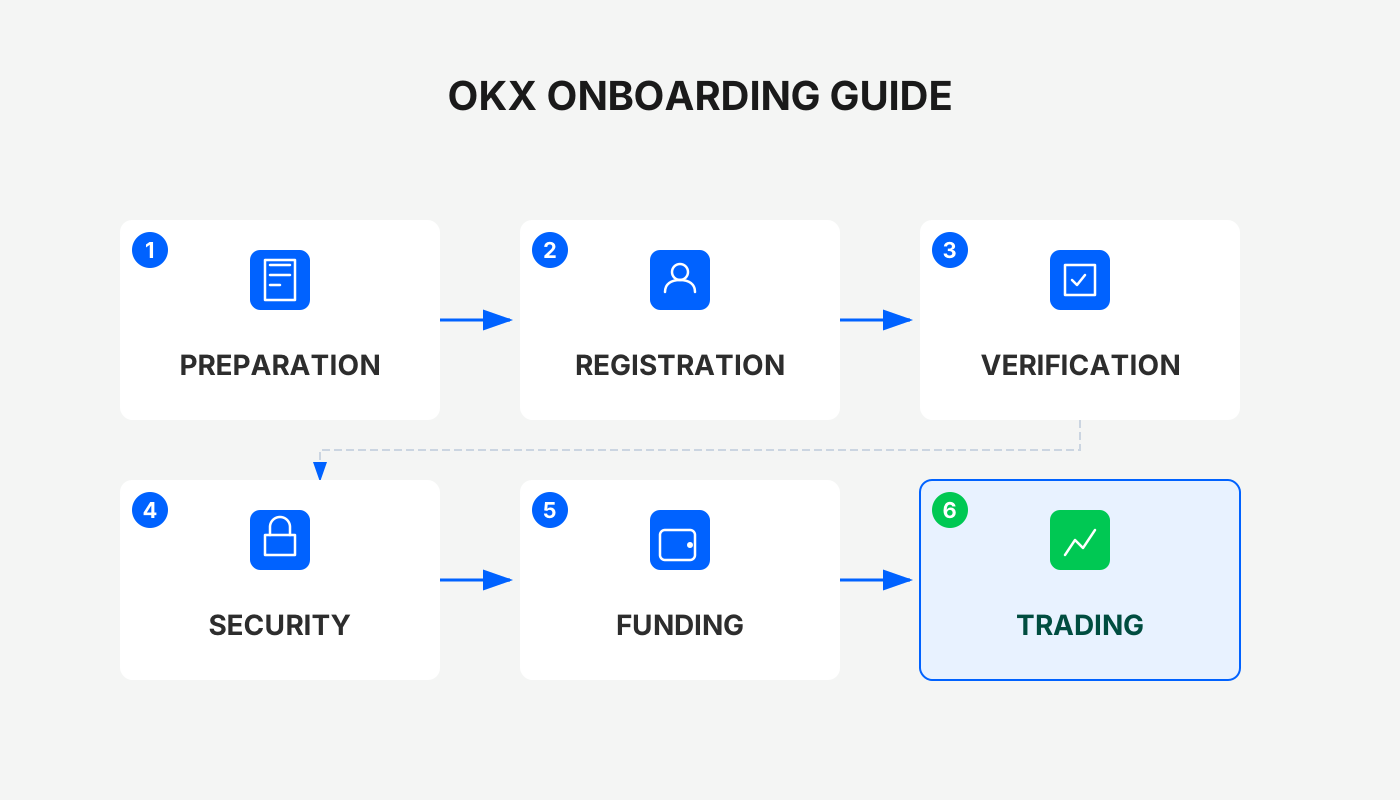
OKX Exchange Beginner Overview
After completing identity verification, users can purchase USDT on the OKX platform and start spot trading. The platform offers two primary channels: C2C Peer‑to‑Peer Buying and Instant Buy. The former uses platform‑escrowed merchants to perform fiat‑to‑crypto conversions and offers higher security; the latter is suited for small‑amount or urgent purchases, with the system automatically matching the best available quote.
1. Two Main Paths to Purchase USDT
1.1 C2C Trading (Fiat → USDT)
- Open the OKX app home screen and tap [C2C Buy], then select USD (or your local fiat) for the transaction.
- Use the filter function (funnel icon) to tick “Show only unverified orders” and “Beginner‑friendly listings” to improve matching efficiency.
- In the payment‑method field, enter the amount you wish to purchase. Common options include credit/debit card, bank transfer (SEPA/SWIFT), PayPal, etc.
Choosing a Reliable Merchant
- Check the merchant’s registration duration; it is advisable to select accounts that have been active for at least six months.
- Refer to the merchant’s trade volume and order‑completion rate, giving priority to sellers with high activity.
Placing the Order and Paying
- After entering the amount, tap “Buy with 0% fee”; the system will generate an order.
- In the chat window, obtain the seller’s payment details, copy them, and complete the transfer via your chosen payment channel (e.g., bank transfer, card payment).
- Once the transfer is complete, return to the OKX page and tap [I Have Paid]. The seller will then confirm receipt and release the USDT.
1.2 Instant Buy (System‑Auto‑Match)
- On the app home screen, locate the Instant Buy section within the [C2C Buy] area.
- Select USDT, enter the purchase amount, and choose a payment method (credit/debit card, bank transfer, PayPal, etc.).
- The system will instantly match you with the merchant offering the best quote; confirm and follow the on‑screen instructions to complete payment.
Safety Tip: Conduct the entire transaction within the platform; do not make off‑platform transfers. Keep screenshots of your payment and the chat logs for future verification.
---
2. Complete Process from Registration to Identity Verification
2.1 Download and Install the OKX App
- Android: Visit the official OKX website (www.okx.com), scan the QR code to obtain the APK, or download it from an official app marketplace. If you see a warning “Allow installation of apps from unknown sources,” grant the permission in your device settings.
- iOS: It is recommended to use an overseas Apple ID to log into the App Store, search for “OKX,” and install the app.
Reference guide: How to Safely Download the Official OKX App? (Essential for users outside mainland China)
2.2 Create an Account
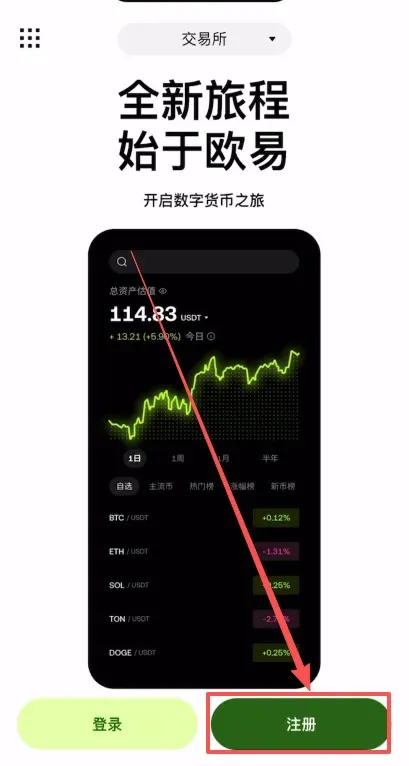
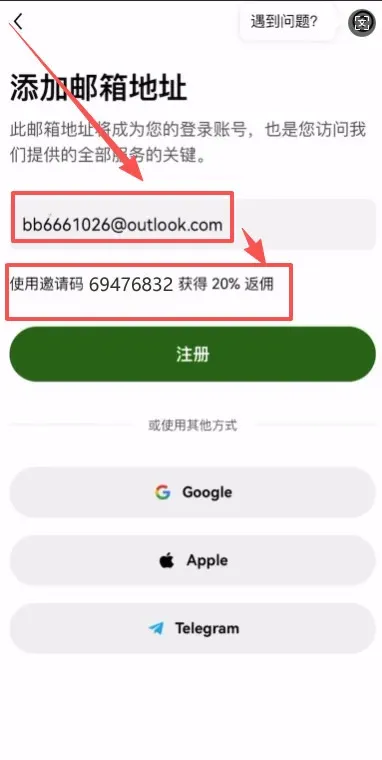
- Open the installed OKX app and tap [Register].
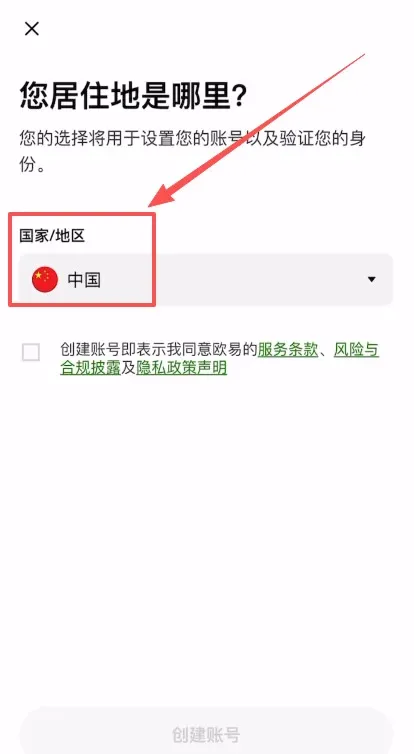
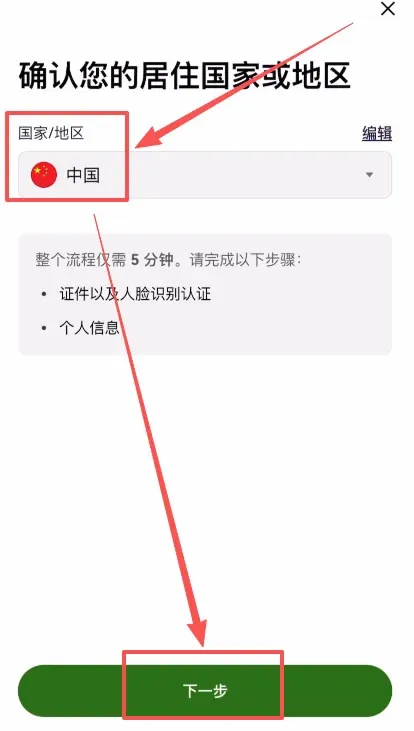
- On the pop‑up region‑selection page, set Country/Region of Residence to China (or your actual location if you are outside China).
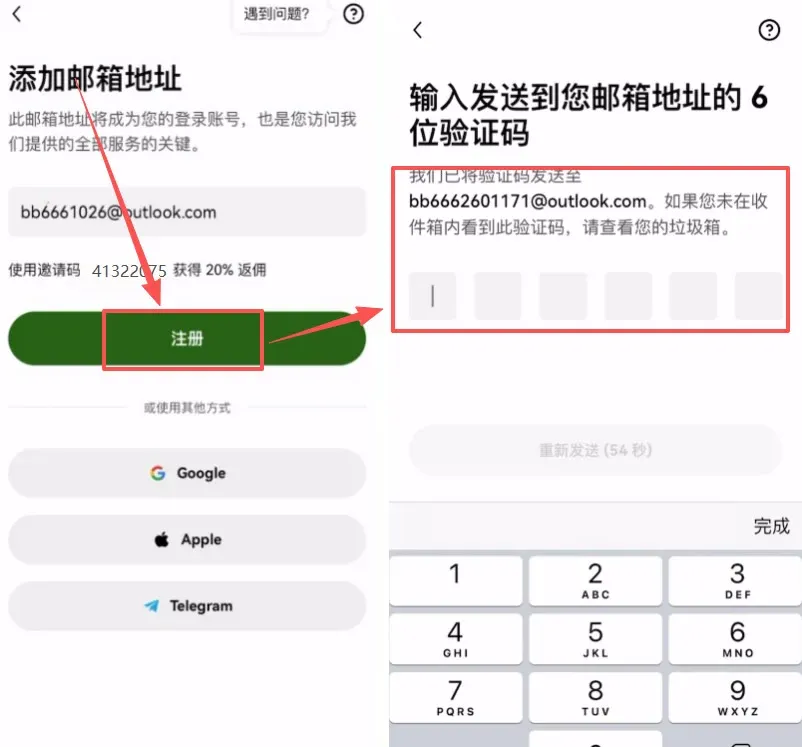
- Enter a valid email address and, in the invitation‑code field, type `B2345` (using this code grants a 20% perpetual fee discount).
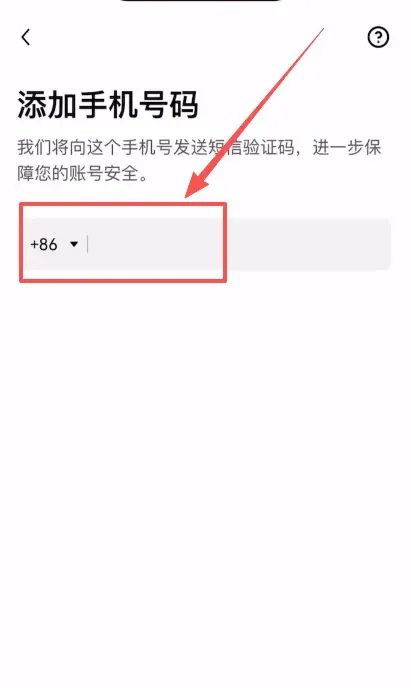
- A verification code will be sent to your email; enter it to complete registration. Afterwards, bind a mobile number (the platform supports the +86 country code for Chinese numbers, or your local mobile code). Once bound, you can proceed to the next step.
2.3 Complete KYC Identity Verification
- After successful registration, the app automatically redirects to the KYC page; first confirm that your residence region is set correctly.
- Choose Identity Document Type → National ID Card (or passport/driver’s license if you are outside China), then proceed.
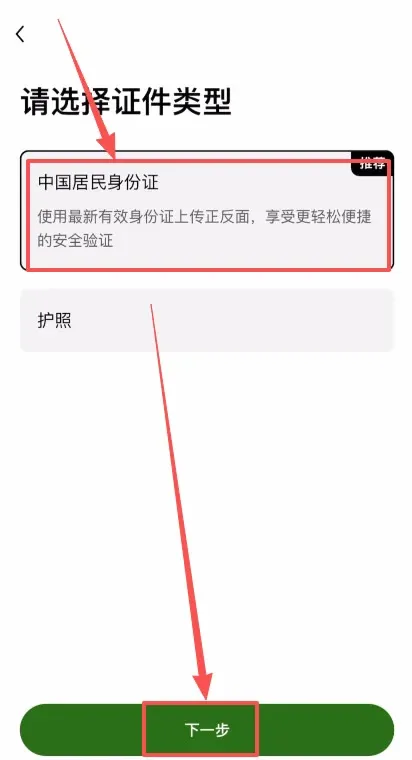
- Capture and upload photos of the front and back of the ID document.
- Perform facial‑recognition verification; after submission the system will review the information within a short period. Once approved, all trading functions are unlocked.
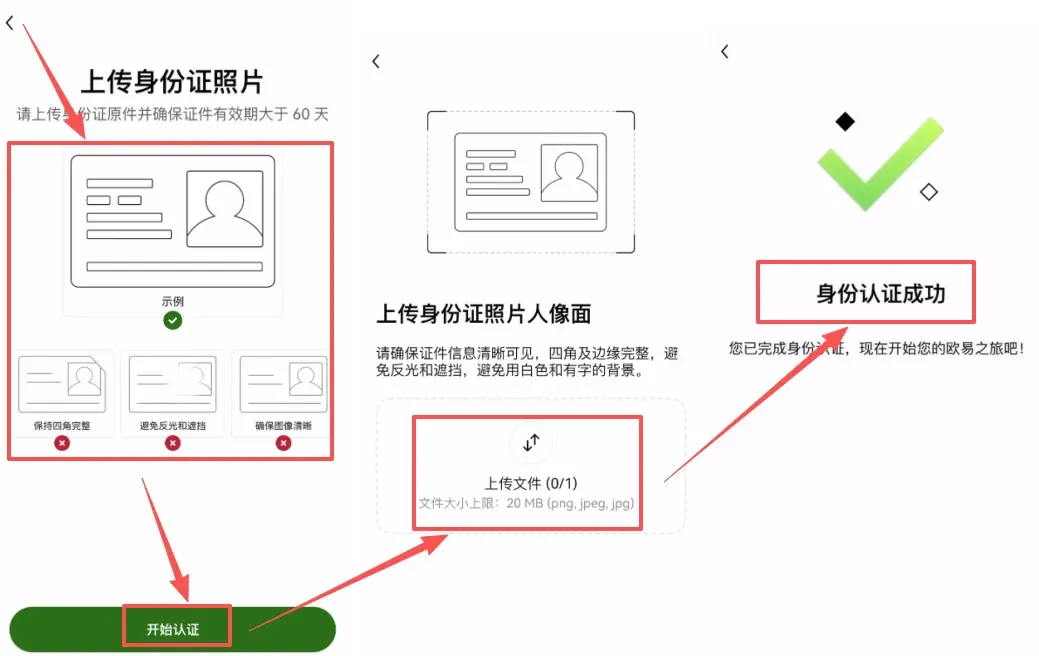
Tip: Leading platforms like OKX employ bank‑grade encryption, so you can safely submit personal documents.
2.4 Enable Two‑Factor Authentication (2FA) for Enhanced Security
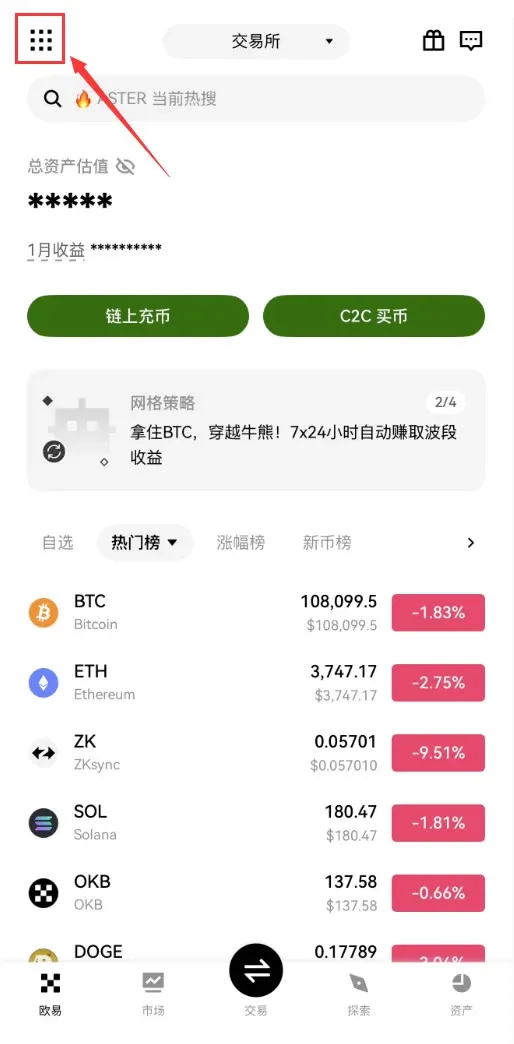
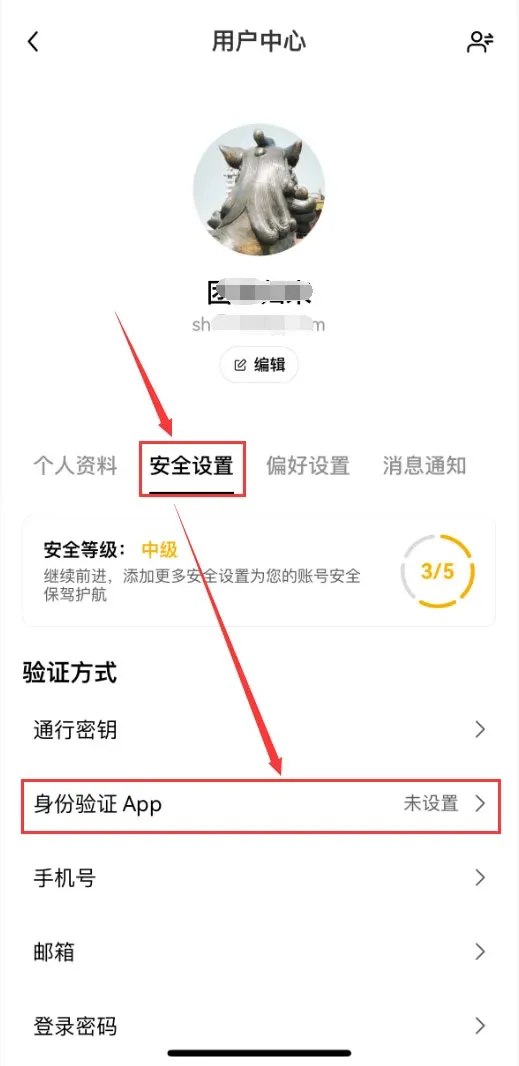
- After logging in, tap the [Full‑Feature] icon at the top‑left, then navigate to [Profile & Settings] → [Security Settings] → [Authentication App].
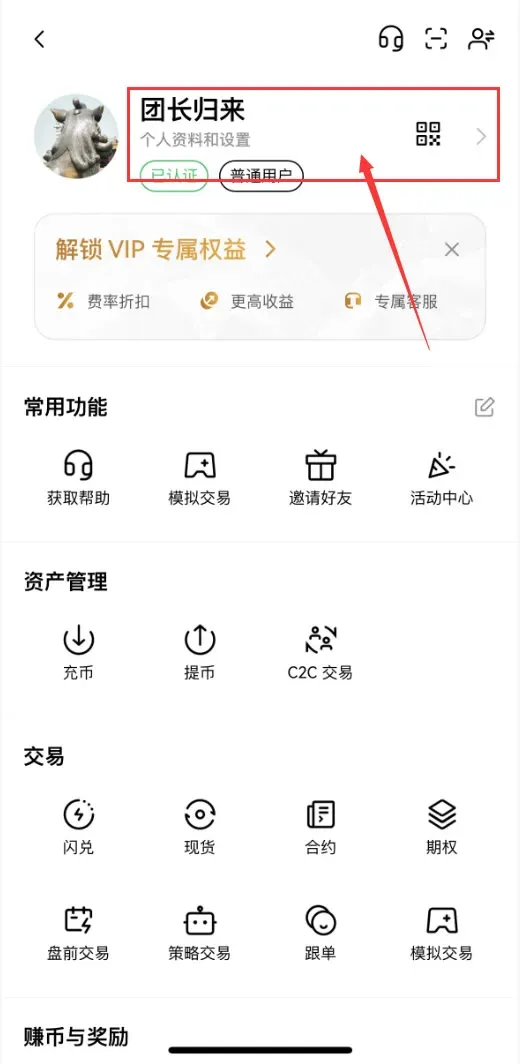
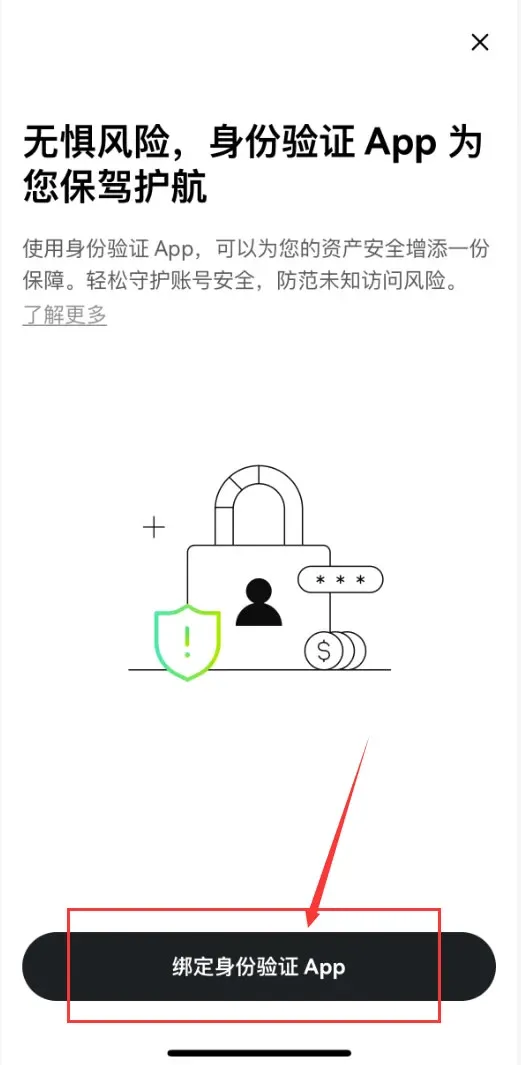
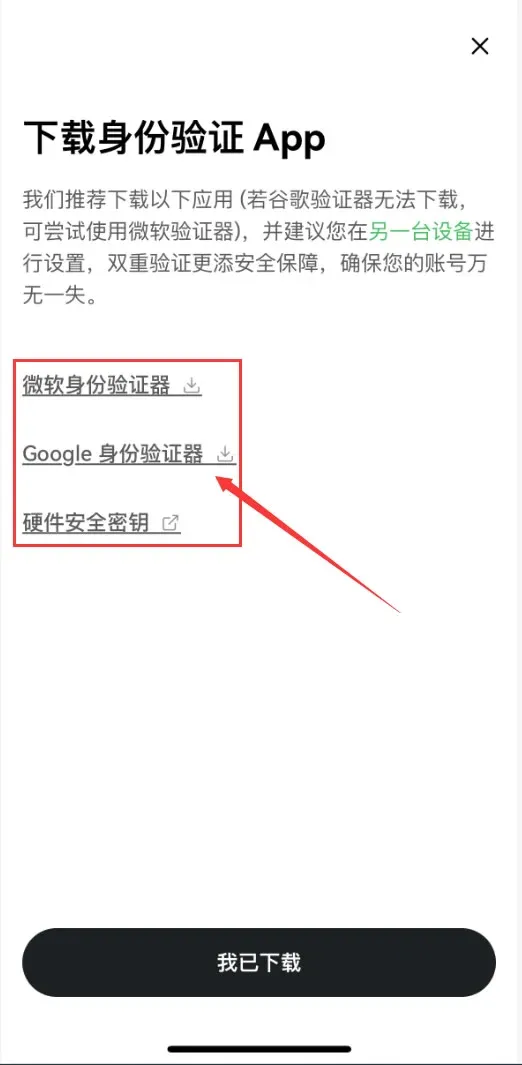
- Choose to download Google Authenticator, Microsoft Authenticator, or a hardware security key; the example below uses Google Authenticator. After downloading, tap [I Have Downloaded].
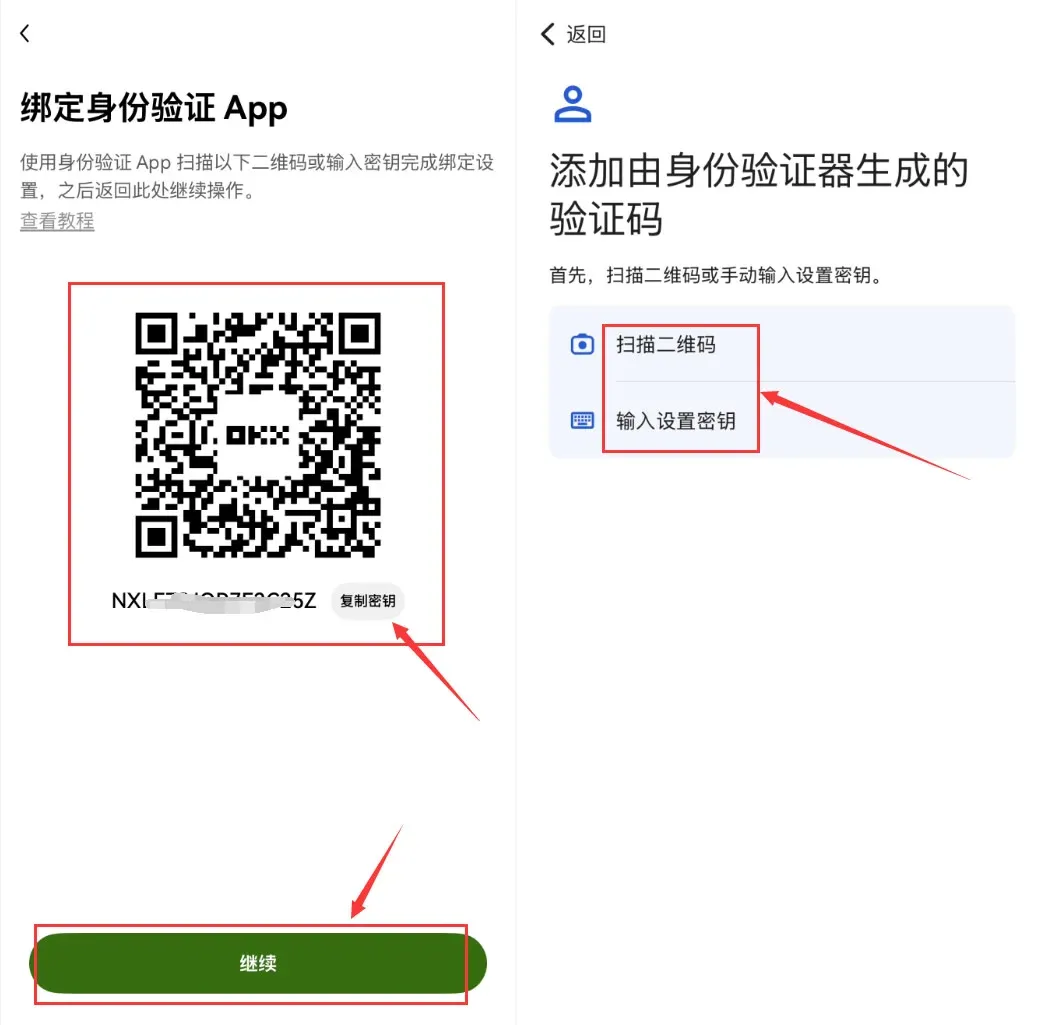
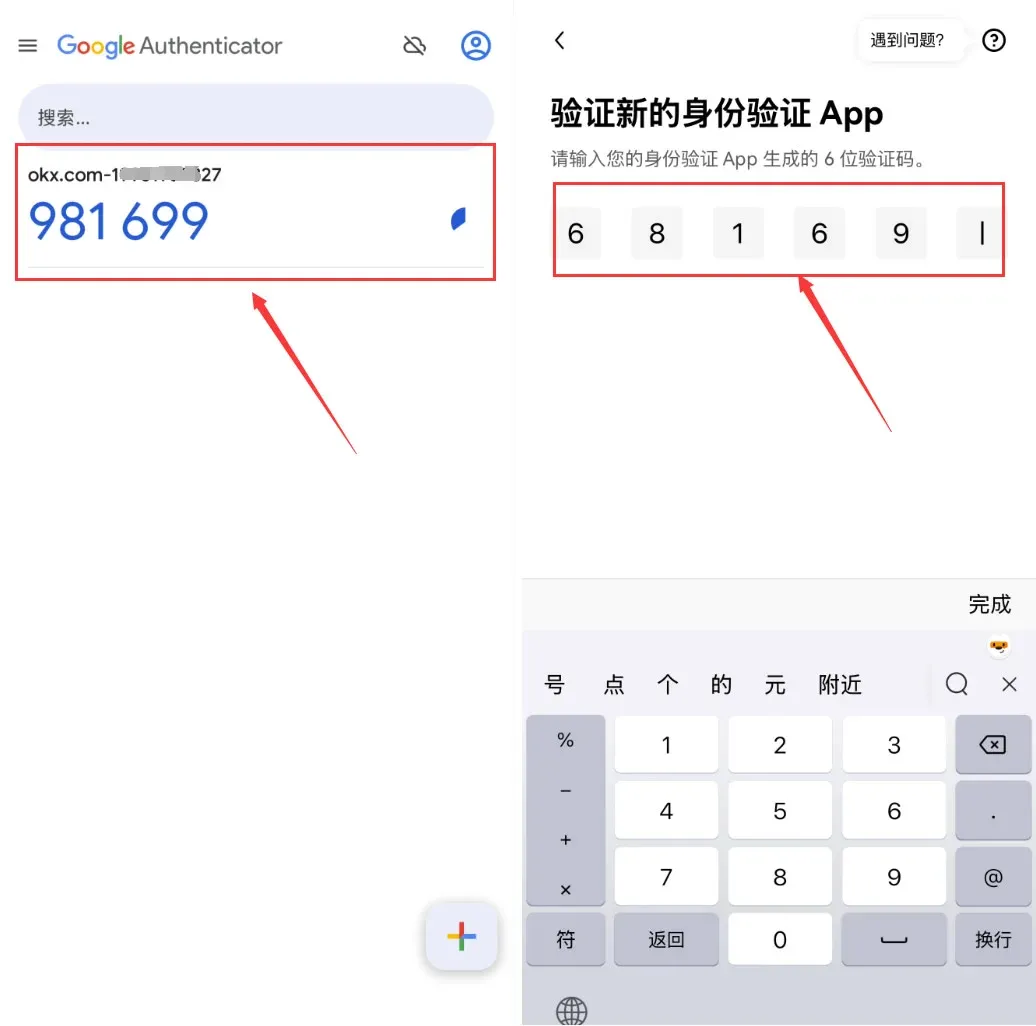
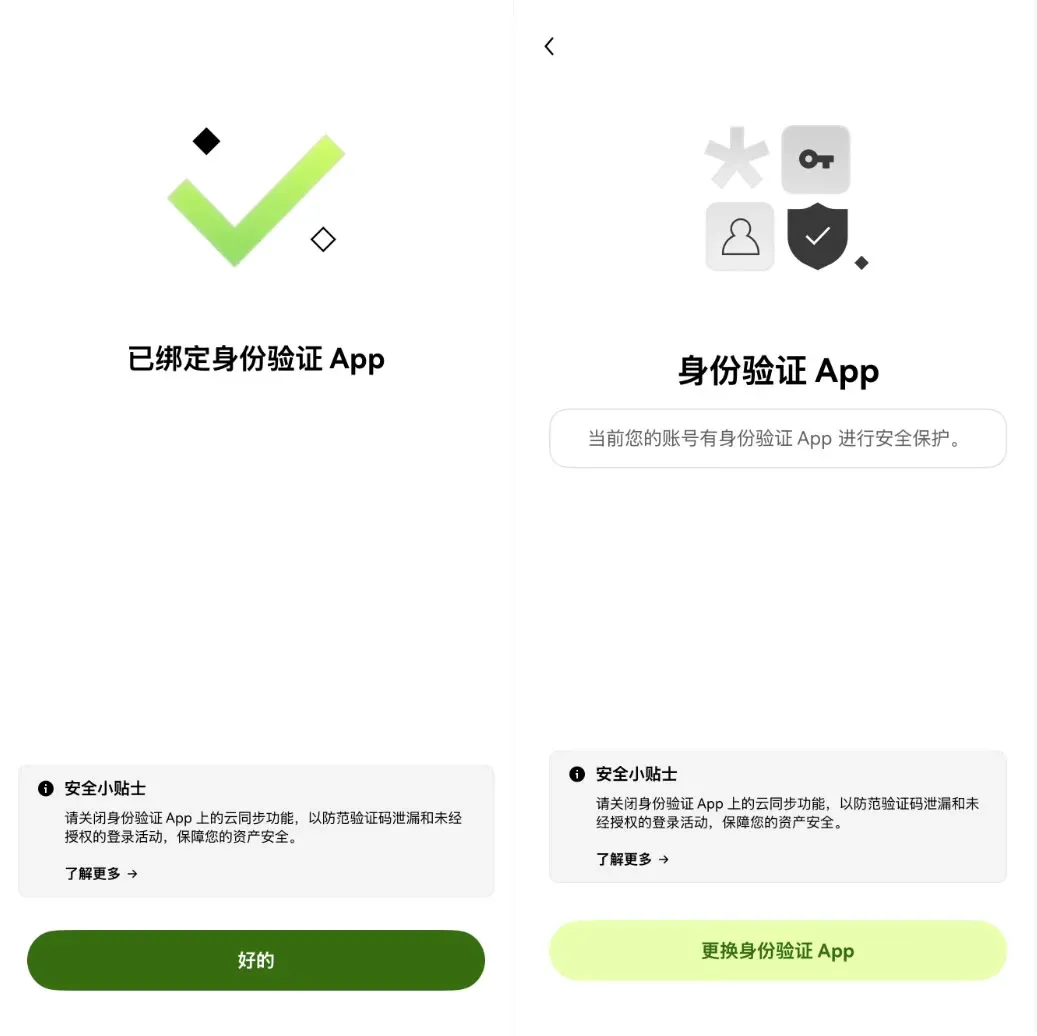
- The page will display a QR code and a secret key. Open Google Authenticator, scan the QR code or manually enter the key. The 6‑digit code generated by the app should then be entered back into the OKX app to complete the binding.
---
3. Asset Transfer and Spot‑Trading Operations
3.1 Transfer USDT from the Funding Wallet to the Spot Wallet
When you purchase USDT, it is initially stored in your Funding Wallet. To trade USDT against other cryptocurrencies, you need to move it to the Spot Wallet:
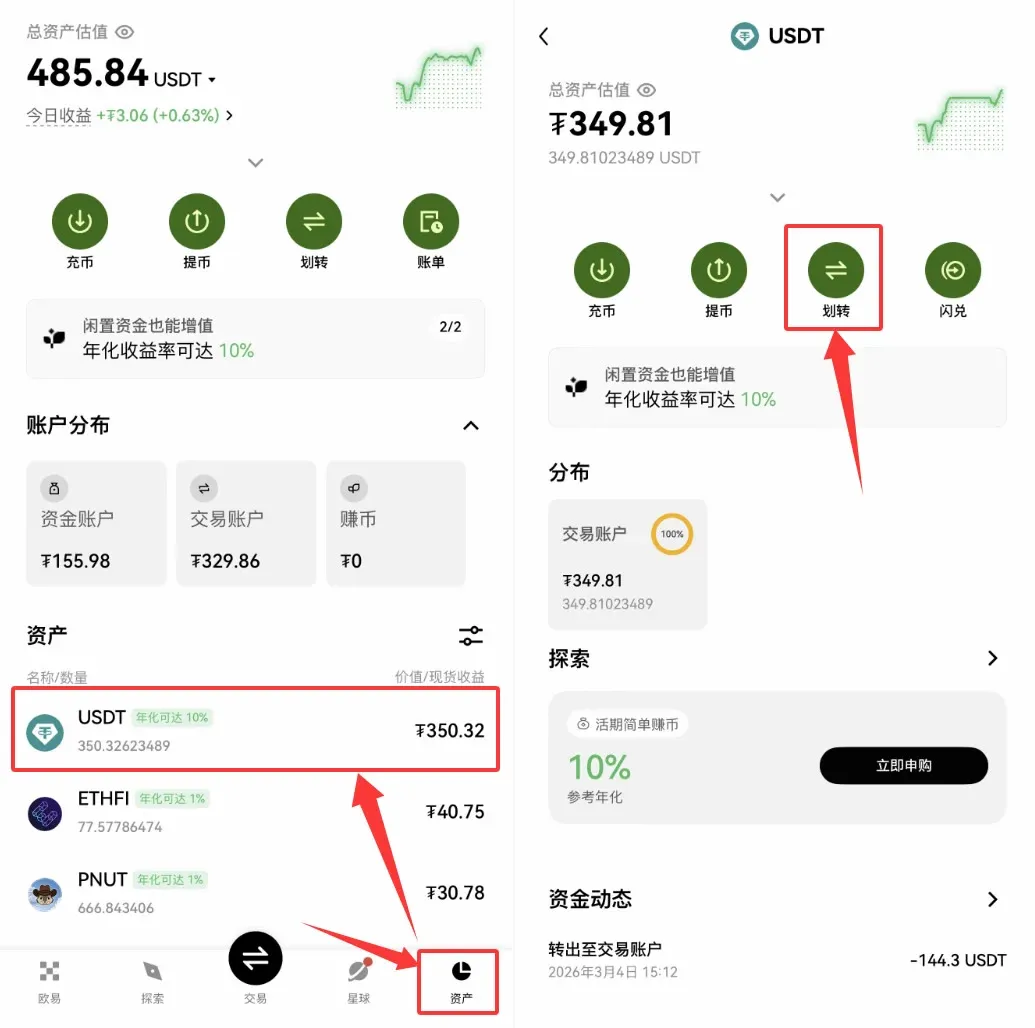
- Go to the [Assets] page, locate USDT, and tap [Transfer].
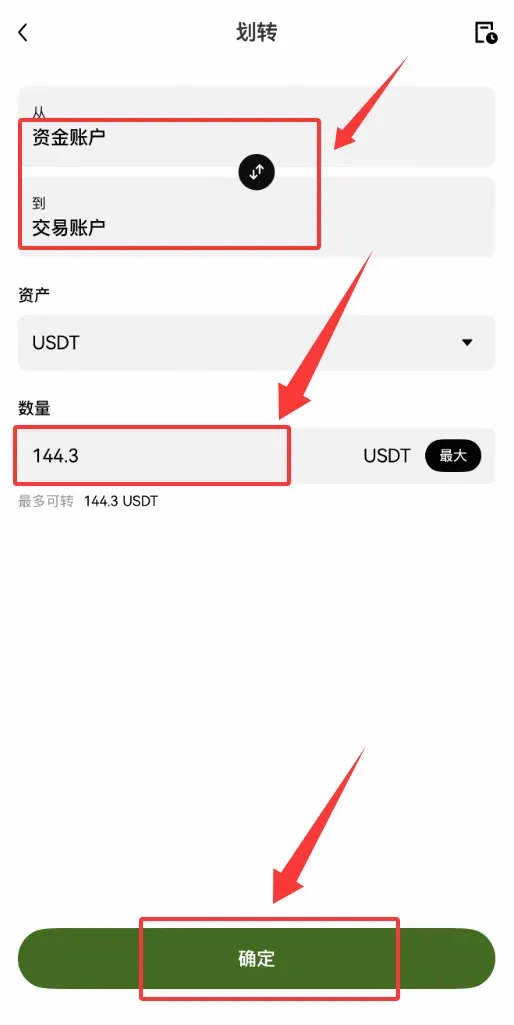
- Choose “From Funding Wallet to Spot Wallet,” enter the amount you wish to move, and confirm. This transfer incurs no fee.
3.2 Use USDT to Spot‑Buy Bitcoin
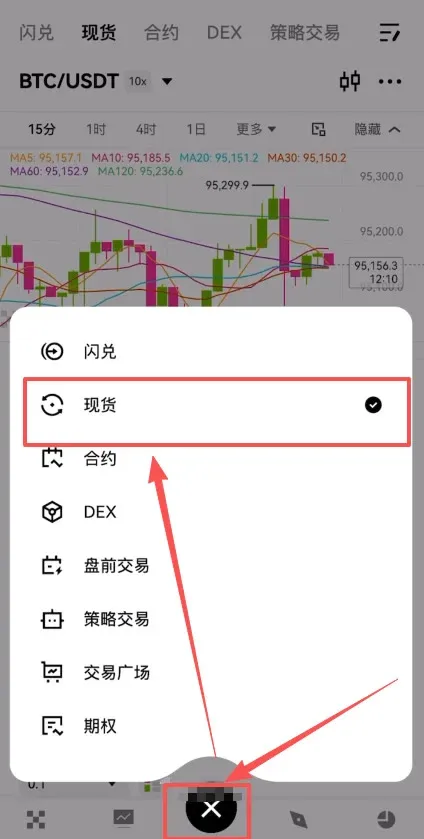
- Tap the [Trade] tab in the bottom navigation bar, then select [Spot].
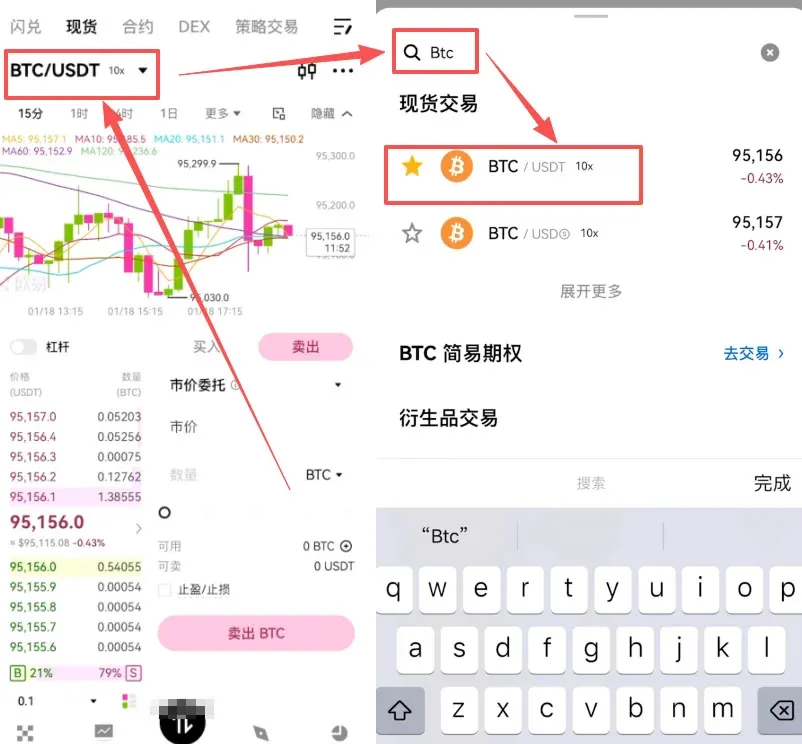
- In the search box at the top‑left, type BTC/USDT and select the corresponding trading pair.
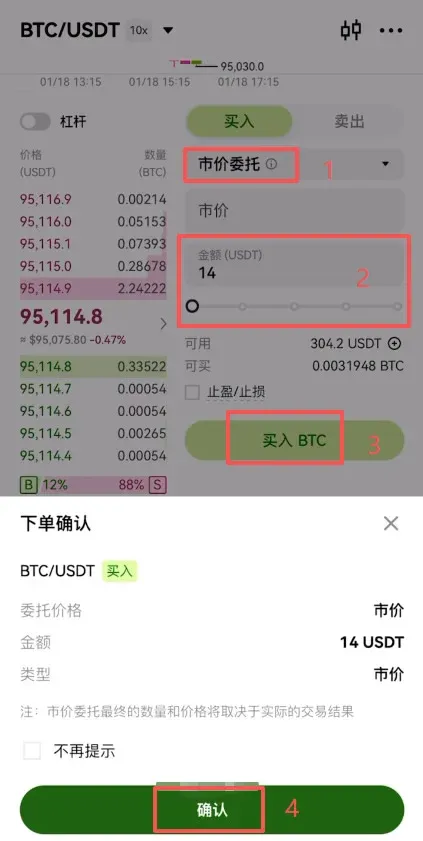
- Beginners are encouraged to use a Market Order; the system will fill the order instantly at the best available price. Enter the amount of USDT you wish to spend, then tap [Buy BTC] to place the order.
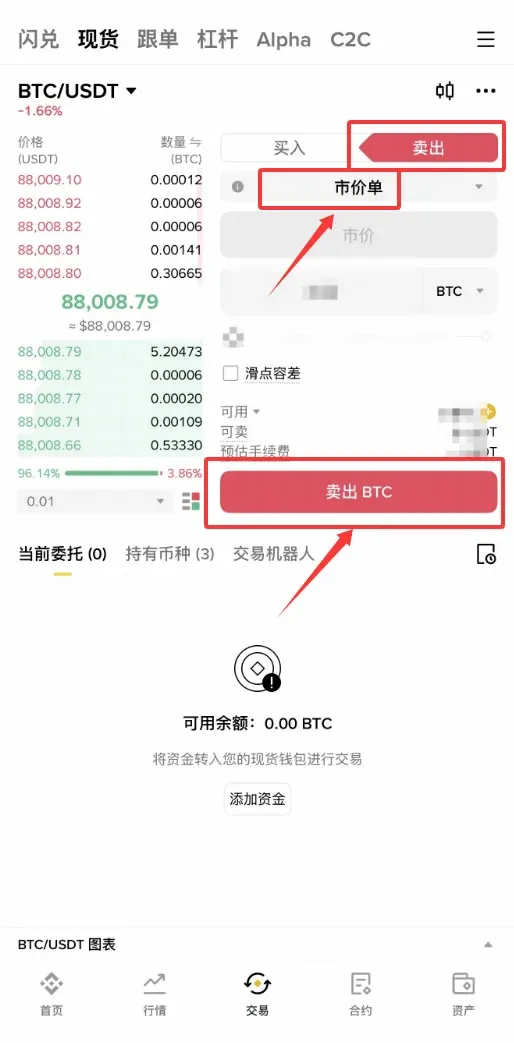
- To sell, simply switch to Sell mode, adjust the quantity, and confirm; the proceeds will be returned to your USDT balance.
---
4. Platform Fee Overview
OKX is known for relatively low trading fees, which are tiered based on the average trading volume over the past 30 days.
- Maker Fee: Ranges from 0.02 % (lowest) to 0.15 % (highest).
- Taker Fee: Ranges from 0.05 % (lowest) to 0.20 % (highest).
The fee schedule is updated daily; users can view a transparent fee table on the official website, which details all costs, including USDT withdrawal fees, perpetual‑contract funding rates, and more.
Regarding deposits and withdrawals, OKX does not accept direct fiat deposits, but it supports the purchase of crypto assets via credit cards, debit cards, bank transfers (including SEPA and SWIFT), Google Pay, PayPal, and other popular channels. Supported fiat currencies include USD, GBP, EUR, among others. While crypto purchases are typically fee‑free, withdrawals incur token‑specific network fees and have minimum/maximum limits; see the official page for exact figures.
OKX serves users in more than 100 countries and regions worldwide, including the Philippines and
Related Reading
- 2022 Top Domestic Bitcoin Platforms: Binance, OKX, Huobi
- Huobi vs OKX vs Binance: Spot, Derivatives & Service Suite Comparison
- Buy Crypto in China via Overseas Exchanges like OKX
💡 Register on Binance with referral code B2345 for the maximum trading fee discount. See Binance complete guide.



