
 Bitaigen Research
OKX C2C Complete Guide: Registration, Buying Crypto, and Withdrawing Funds All in One
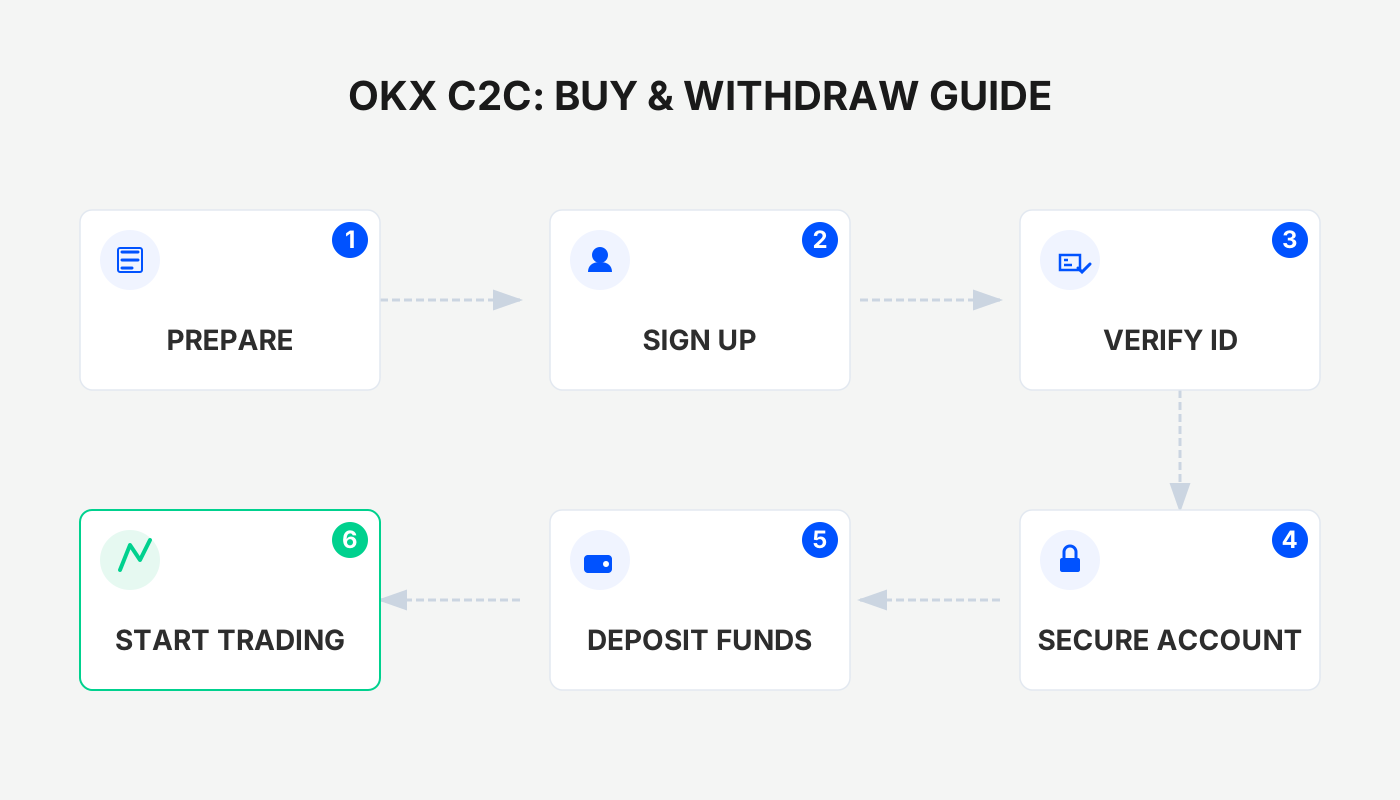
On the OKX platform, first create an account and complete identity verification, then purchase USDT or Bitcoin on the C2C page of the mobile app, and finally sell USDT via C2C to withdraw fiat currency (e.g., USD) to your bank account.
We have compiled a step‑by‑step walkthrough of the entire OKX C2C workflow for both beginners and more experienced users. From account registration and KYC to buying crypto and withdrawing fiat on the app, every step is illustrated with screenshots and explanations. By following this guide you will quickly understand the platform’s dual‑escrow mechanism, avoid common pitfalls, and conduct fiat‑to‑crypto trades with confidence. Continue reading for the details.
1. Creating a C2C Trade Order
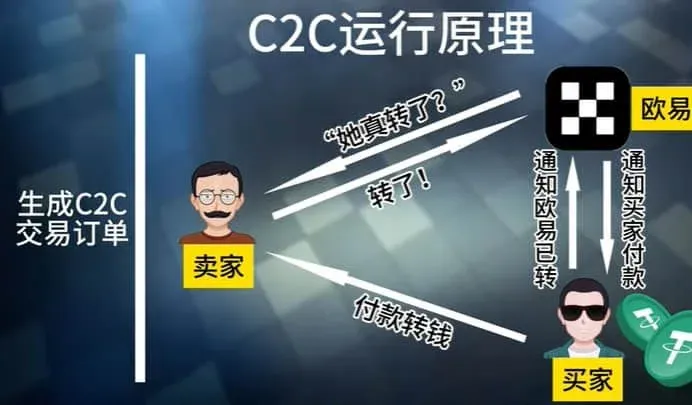
The core of OKX C2C trading is that the buyer places an order with a seller. The system instantly locks the corresponding amount of USDT in an OKX‑controlled account. OKX then notifies the buyer to make the payment. After the buyer transfers funds using the payment details provided in the order, the platform verifies that the seller has received the money before releasing the USDT to the buyer.
- In the whole process OKX acts like a regulator similar to a payment gateway:
- Funds are first handed over to the platform (or the seller) and are held under OKX’s supervision.
- The asset (USDT) is also held by the platform and is only transferred once receipt of payment is confirmed.
- This “dual‑escrow” model ensures that both sides are protected.
In the crypto‑trading scenario, OKX does not directly control the bank‑transfer steps between the buyer and seller; it only oversees the delivery of the token. The following sections demonstrate the complete workflow on the mobile app.
2. Registering an OKX Account
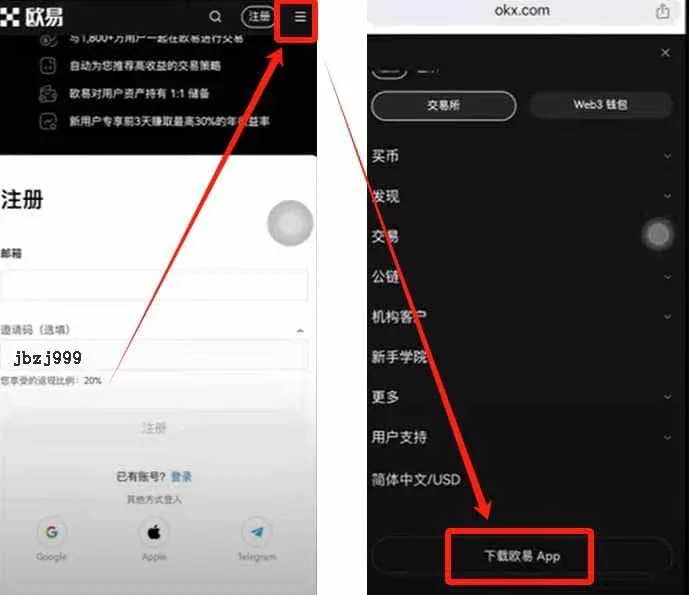
- Click the link below to open the OKX registration page.
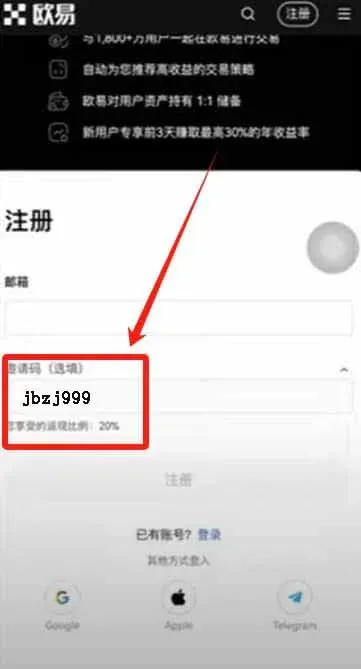
- Use any email address (both domestic and international providers are accepted) to fill in the registration form.
- Enter the referral code `B2345` in the designated field (you will receive a 20 % fee rebate) and accept the Terms of Service before clicking Next.
- Follow the on‑screen instructions to complete identity verification; a standard government‑issued ID (e.g., a passport or national ID) is sufficient.
OKX New‑User Registration: Click to Register
3. Downloading the OKX App and Completing KYC
Android Users
Visit the OKX official website, click the three‑line menu icon at the top‑right, and scroll to the bottom of the page to find the Android download link.
iOS Users
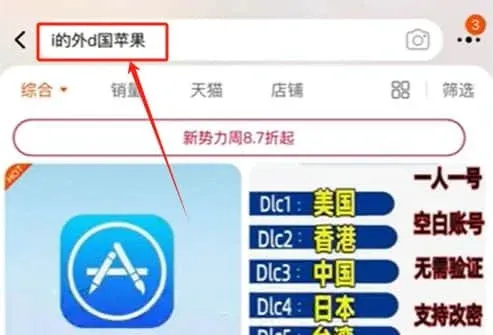
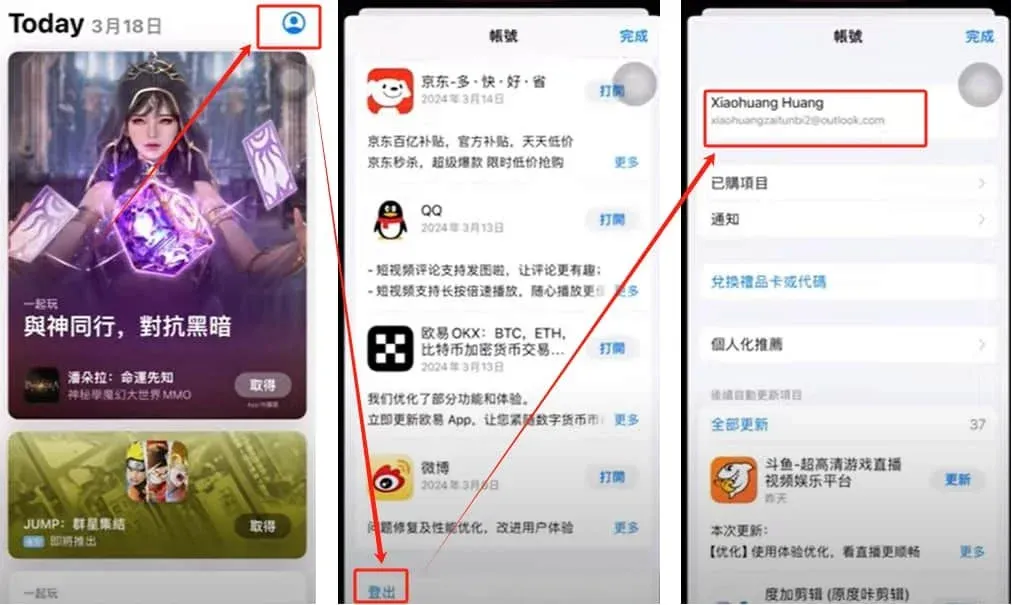
You will need an Apple ID registered outside of the United States (e.g., a Korean or Taiwanese Apple ID) to access the App Store version of OKX. Such accounts can be purchased from third‑party marketplaces (search “OKX Apple ID” on platforms like Taobao) and then switched to on your iPhone’s App Store before downloading.
After installation, open the OKX app. The first login will prompt you to enter the referral code; be sure to input `B2345` or you will miss out on the fee discount. If the prompt does not appear, you can locate the KYC entry point in the middle of the home screen’s rotating banner area.
4. Buying USDT (C2C)
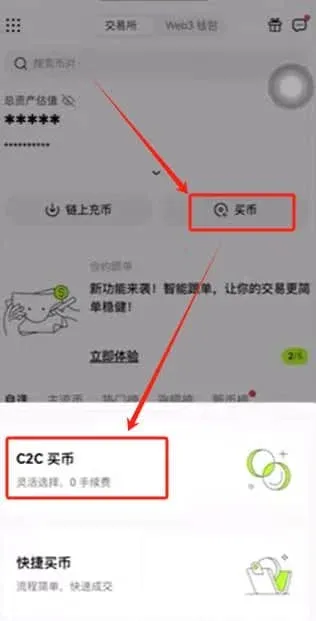
- Open the app and tap the Buy button at the top‑right of the home screen → C2C Buy.
- In Profile → Payment Method Management, add your preferred fiat receipt method (bank transfer, PayPal, or other supported channels).
- Return to the C2C page and verify that the currency displayed at the top‑right is USD (or the fiat currency that matches your region).
Selecting a Trading Mode
- Quick Buy: The system automatically matches you with the seller offering the lowest price, based solely on price.
- Custom Selection (C2C Buy): You manually pick a seller and can filter by payment method, transaction limits, etc.
We recommend using the Custom Selection mode so you can evaluate the seller’s reputation, trade volume, and other risk‑mitigation factors.
Step‑by‑Step Procedure
| Step | Action |
|---|---|
| 1 | Tap **Amount**, enter the fiat amount you wish to spend (e.g., 1000 USD), then confirm. |
| 2 | Use the filter on the right side to choose your preferred payment method (bank transfer, PayPal, etc.). |
| 3 | Sort the list from lowest to highest price and select the top seller, then click **Buy**. |
| 4 | In the pop‑up window, confirm the amount and click **0 % Fee Purchase**. |
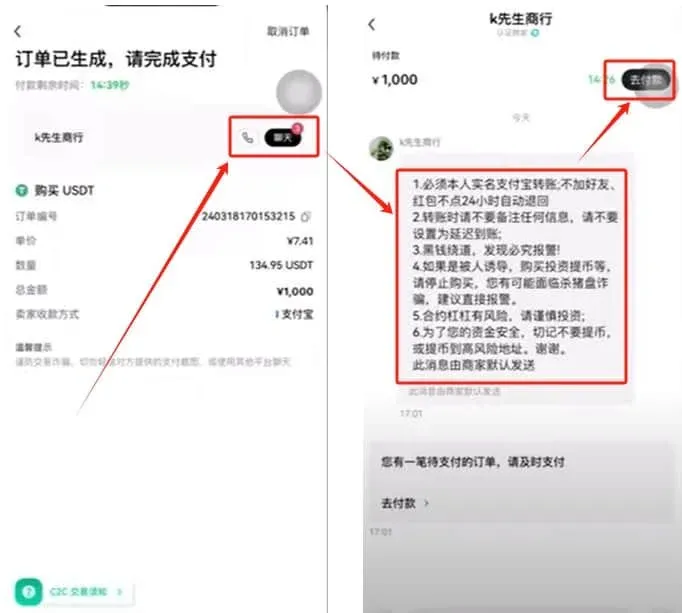
| 5 | After the order is created, tap the **Chat** icon at the top‑right to view the seller’s payment instructions. |
| 6 | Click **Proceed to Payment** or **Get Payment Details** to obtain the seller’s bank account or PayPal address. |
| 7 | Use your own banking app or payment service to transfer the funds, then press **I Have Paid**. |
Once the seller’s receipt of funds is verified, OKX releases the USDT to your account.
Important Reminder
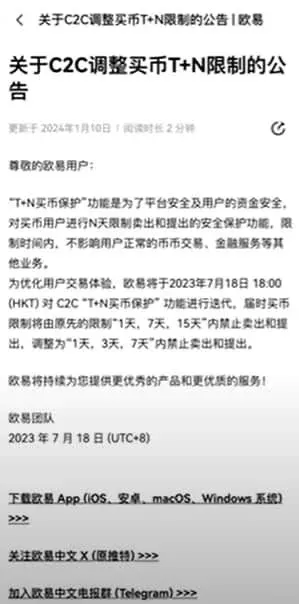
OKX imposes withdrawal windows of T+1, T+3, or T+5 depending on your verification level. The USDT you purchase cannot be withdrawn to an external wallet for the first 24 hours, but it can be used for spot, futures, or other financial products on the platform.
If a seller fails to release the USDT after you have confirmed payment, you can open a dispute with OKX support and provide your payment proof (e.g., a bank statement). The platform will resolve the issue based on the escrow records.
5. Using USDT to Purchase Bitcoin
- From the home screen tap Assets → Funding Account to see the USDT that has arrived.
- Tap Transfer, moving the USDT from the Funding Account to your Spot Trading Account (this transfer is free of charge).
- Switch to the Spot Trading interface and verify that the USDT balance has been credited.
- In the search bar type “BTC”, select the BTC/USDT spot pair, and click Trade.
Order Types
| Order Type | Description |
|---|---|
| Limit Order | Set a target price; the order executes automatically once the market reaches that price. |
| Market Order | Executes instantly at the best available market price (recommended for beginners). |
Choose Market Order → Buy BTC, and the system will complete the purchase immediately.
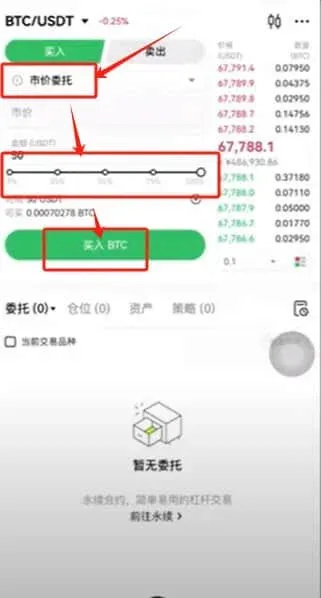
After the trade is filled, you can view the details under Bills to confirm the amount of USDT spent and the amount of BTC received.
6. Withdrawing Fiat (C2C Selling USDT)
- In your Spot Trading account, sell the BTC you just bought (using either market or limit orders) to convert it back to USDT.
- Transfer the USDT back to the Funding Account.
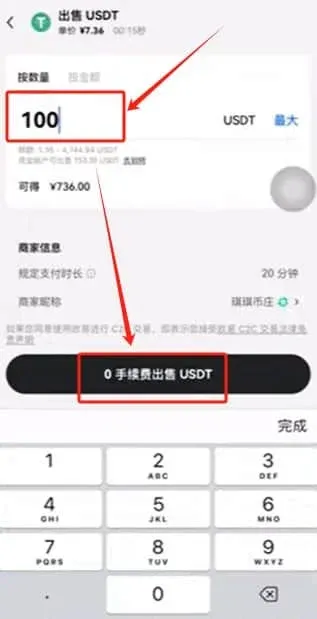
- Return to the home screen and tap Buy → C2C Buy, then switch the tab to Sell.
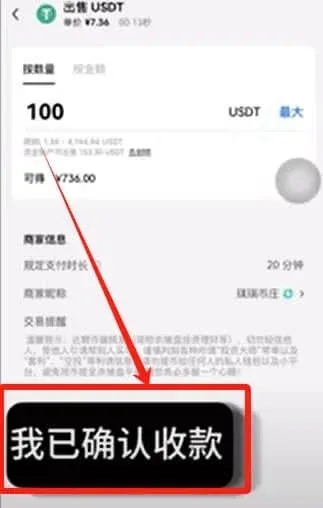
- Enter the amount of USDT you wish to sell and click 0 % Fee Sell.
Choosing a Buyer (Seller in the original sense)
- Prioritize counterparties whose account age is ≥ 1 year and who have a high number of completed trades with a strong success rate.
- If a buyer requests a verification document (e.g., a bank statement showing no incoming transfers within the last three days), this can further reduce counter‑party risk.
After the buyer confirms receipt of your fiat payment, be sure to click I Have Confirmed Receipt on the OKX page; only then will the platform release the USDT to the buyer and finalize the withdrawal.
Key Tips
- After you have transferred fiat to the buyer, double‑check the actual receipt in your bank or payment‑service app. Do not rely solely on screenshots or text messages from the counter‑party.
- To avoid the risk of funds being frozen, it is advisable to use a dedicated receiving account (not a salary or social‑security‑benefit account) and to withdraw or move the money to a secure wallet as soon as possible after confirmation.
---
At this point the OKX C2C Complete Guide has covered all essential stages: account creation, purchasing crypto, and cashing out. For further details you can search for additional articles on platforms such as Bitaigen, or continue exploring the related links below. Happy trading!
Note for U.S. Residents: While OKX is available globally, U.S. users who wish to engage in similar fiat‑to‑crypto C2C transactions should use Binance.US (or another regulated U.S. exchange) instead of the international Binance platform, in order to comply with local regulations.
Tax Reminder: Cryptocurrency transactions may give rise to taxable events in many jurisdictions. Please consult a tax professional or refer to your local tax authority’s guidance to determine whether your gains, losses, or income from crypto activities are subject to tax.
Related Reading
- OKX Contract Copy‑Trading Guide 2025: How to Use the New App
- OKX On-Chain Earn: Register, Get Fee Discounts & Earn Safely
- OKX Guide: Register, Verify KYC & Buy Crypto via C2C
💡 Register on Binance with referral code B2345 for the maximum trading fee discount. See Binance complete guide.



