
 Bitaigen Research
 In today’s environment where account security receives heightened attention, OKX (formerly known as OKEx) has added compatibility with hardware security keys. Users can now leverage a physical key to perform stronger identity verification when logging in or executing critical actions. This article will systematically explain, from concept, advantages, use cases, and step‑by‑step binding procedures, how to configure and use such hardware devices on the OKX platform.
As digital‑asset security becomes increasingly important, OKX introduces hardware security keys to provide users with stronger protection. This guide breaks down the underlying principle, benefits, and full‑process operation, helping you get started quickly and boost account security. If you want to learn how to achieve “person + device” two‑factor authentication on a trading platform, keep reading.
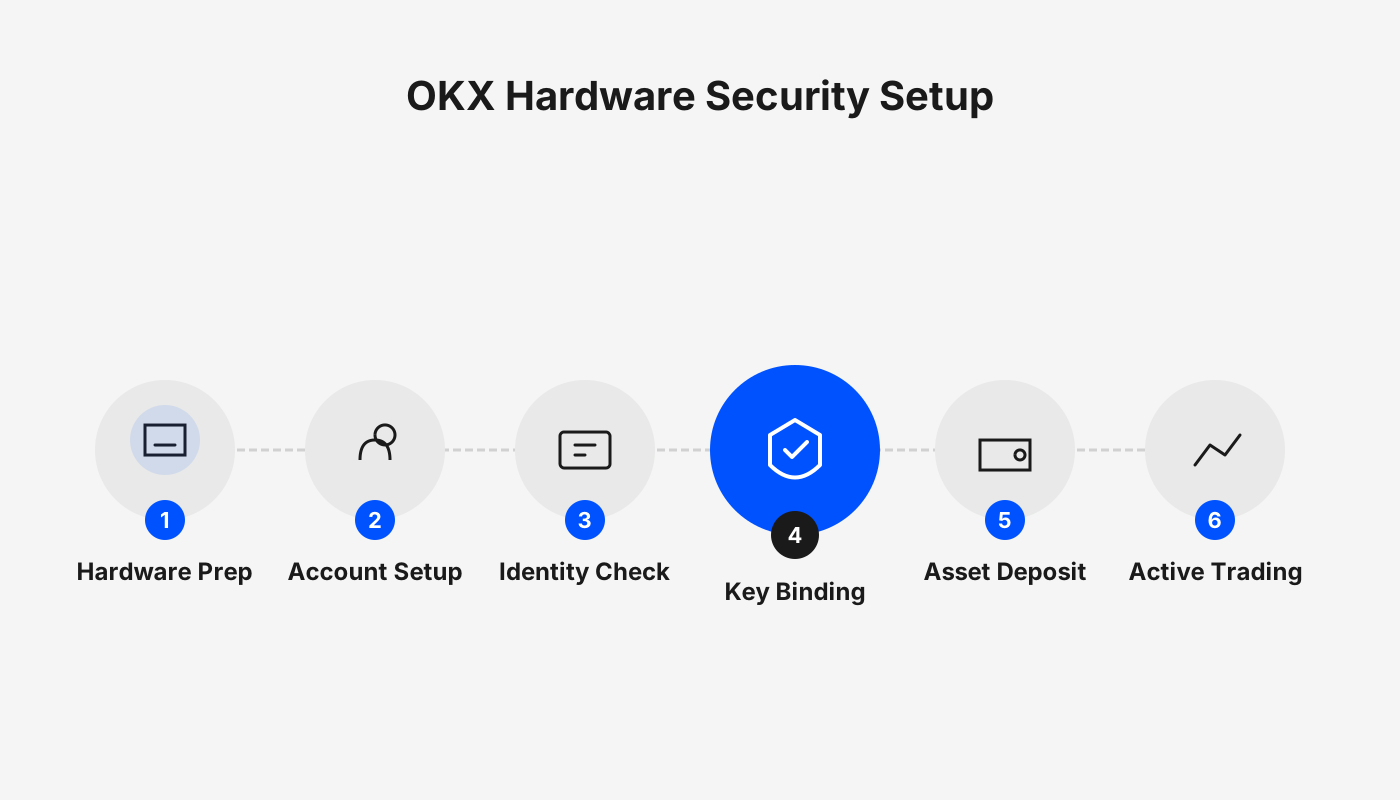
2. What Is a Hardware Security Key?
A hardware security key is a physical authentication tool designed to confirm account access requests or important operations. Unlike software authenticators that rely on cloud‑synchronized data, its operation typically features the following characteristics:
- Completely offline—no continuous internet connection required.
- Verification can only be completed through a physical interaction such as plugging in or touching the device.
- The physical nature cuts off remote‑attack vectors at the hardware layer.
Because it requires the simultaneous presence of “person + device,” this type of key offers a natural defensive advantage against account hijacking.
3. Why Choose a Hardware Security Key?
Most exchanges default to phone‑app‑based verification codes or passkey features. While convenient, they can still present risks under certain circumstances.
Potential Issues with Software Authenticators
- If the authenticator syncs with a cloud account, a compromised cloud account could expose the verification data.
- Losing a device that remains unlocked gives an attacker the opportunity to use the synced codes for impersonation.
Limitations of Passkeys
Passkeys are an emerging authentication method but still depend on a device or third‑party account sync. If a bound device is stolen and successfully unlocked, it can still be used for verification.
Against this backdrop, hardware security keys add an extra layer of protection through physical isolation, making them an attractive option for users with higher security demands.
Advantages
- Security isolation: No network connection, completely avoiding information leakage from online attacks.
- Device separation: Independent from the device running the platform’s app, reducing risk if the phone is lost.
- Cost efficiency: Compared with purchasing a dedicated phone for verification, a hardware key is cheaper and offers better value for money.
Disadvantages
- Learning curve: Requires some technical understanding and practice.
- Convenience limitation: Must be carried at all times; otherwise verification cannot be completed.
- Hardware risk: Losing the physical key or forgetting its PIN can still create security concerns.
7. What Should You Keep in Mind When Using a Hardware Security Key?
Before activating the feature, pay special attention to the following points:
- Store the key securely to prevent loss or theft.
- Verify which interface types (e.g., USB, NFC, Bluetooth) are supported by the OKX platform.
- Keep an alternative verification method handy in case the hardware fails and you cannot log in.
- Regularly log into the Security Center to confirm that bound devices are in a normal state.
4. Which Use Cases Does OKX Support for Hardware Security Keys?
OKX currently offers two hardware‑key‑based verification scenarios:
- Passkey‑based verification: The hardware key directly acts as a physical Passkey.
- One‑time password (OTP) verification: The hardware device generates dynamic codes, replacing the phone app.
Both methods can be used during login or when confirming asset withdrawals and other critical actions, though the binding process differs slightly between them.
5. Method 1: Use a Hardware Security Key as a Passkey
In this mode, the hardware device serves as a physical Passkey, delivering a high level of identity confirmation.
Binding Steps (Web Interface)
- Visit the official OKX website and log into your account.
- Navigate to Profile → Security Center → Passkeys.
- Click Add Passkey, then select Use another device or physical key.
- Follow the on‑screen prompts to enter and confirm a PIN code.
- After completion, you will see a “binding successful” notification.
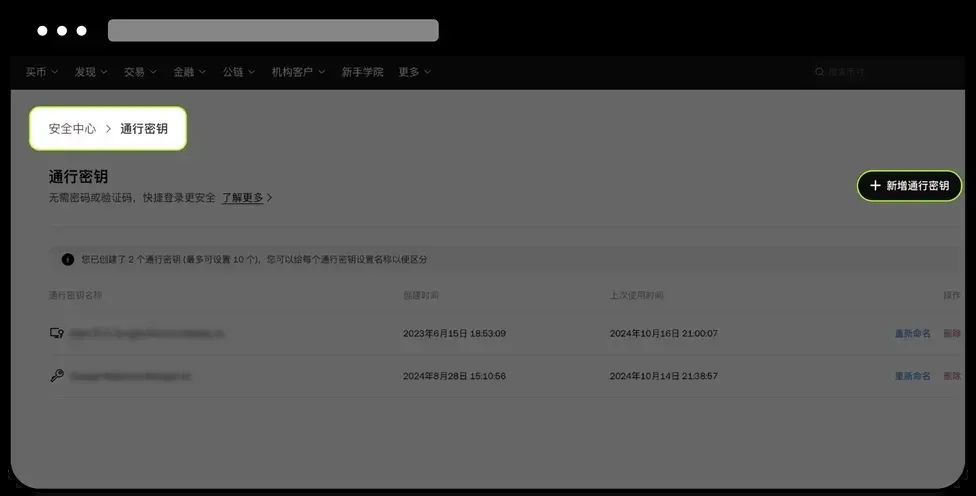
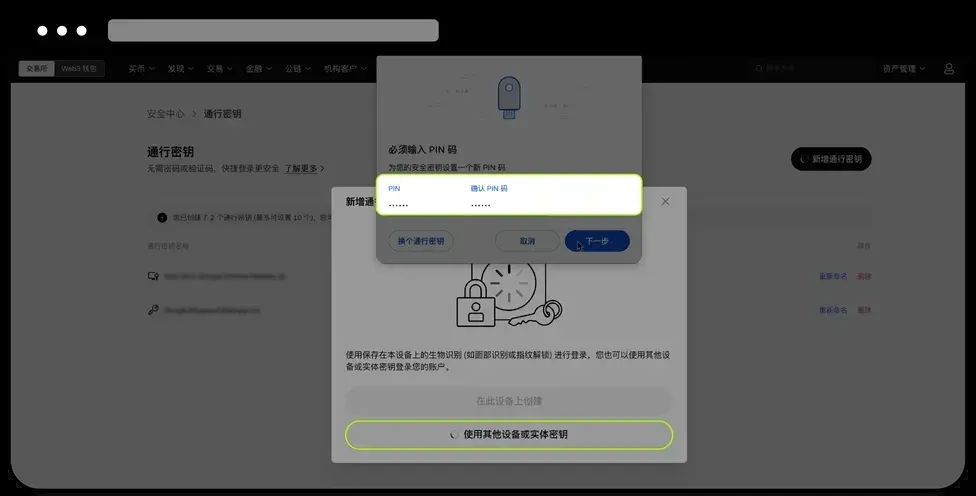
Once bound, every time you log in or perform an operation that requires secondary verification, the system will prompt you to insert or touch the hardware security key to complete the identity check.
6. Method 2: Use a Hardware Security Key as an OTP Generator
This approach works similarly to traditional authenticators, except the task of generating one‑time passwords is handed over to a physical device.
Binding Steps (YubiKey example)
- Log into the OKX website and go to the Security Center.
- On the page for binding an authenticator, copy the secret key provided by the platform.
- Open the official YubiKey management software, paste the copied secret, and assign an easily recognizable name for this account.
- Save the configuration; the hardware device will now generate OTPs whenever a verification code is required.
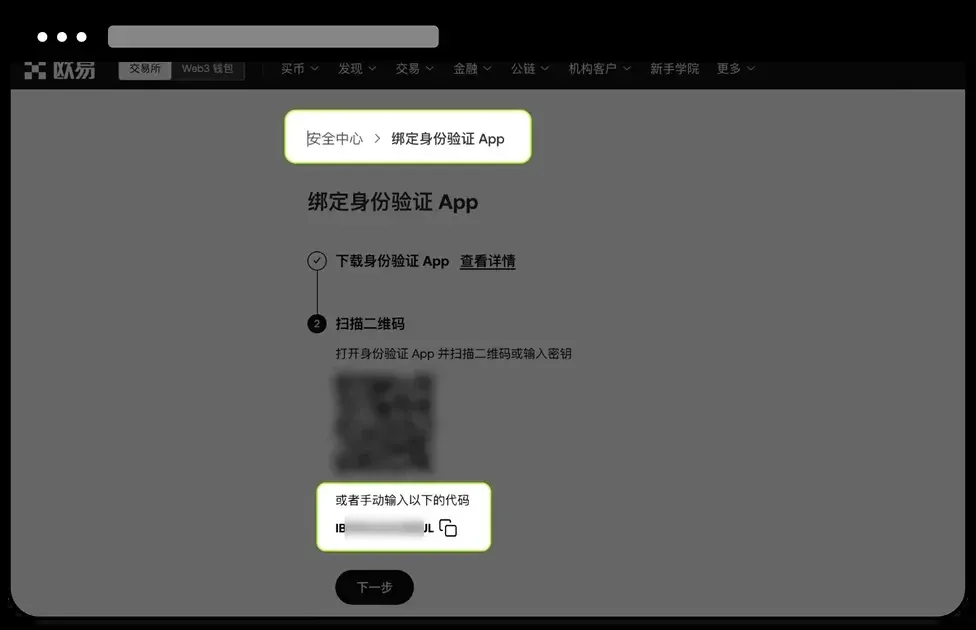
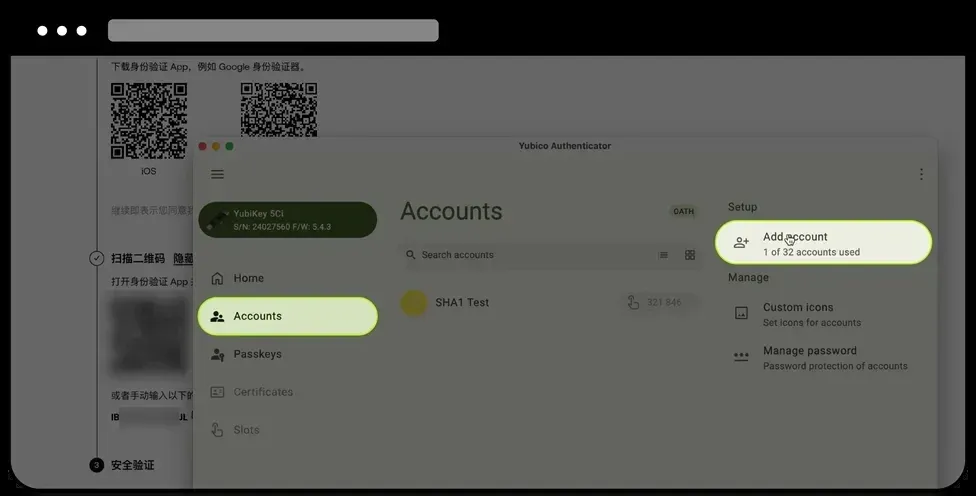
In this mode, the hardware security key functions the same as a phone‑based authenticator, but the carrier is a tangible device rather than software.
1. Before Configuring Security Settings, Enter Through a Trusted Official Entry Point
When dealing with the Security Center, Passkeys, or authenticator binding, always log in via official channels to avoid interruptions caused by fraudulent or compromised pages. Below are verified official entry points and download links:
- OKX Official Registration Page: https://www.bitaigen.com/binance
- OKX App Download Page: https://www.bitaigen.com/binance/download
Important note for U.S. residents: Use Binance.US (or the Binance.US mobile app) instead of the global Binance platform to remain compliant with local regulations.
Referral incentive: Register using the above links (or enter referral code `jbzj999`) and new users can receive up to 50 USD worth of USDT. The referral code must be entered to claim the reward.
These pages automatically switch to a reachable line based on your current network environment, ensuring smooth access to OKX’s official portal for subsequent security configurations.
Tax reminder: Crypto gains may be taxable in your jurisdiction. Consult a tax professional to understand your local obligations, especially when converting to fiat via SEPA, SWIFT, or other banking channels.
Conclusion
The introduction of hardware security keys on OKX offers a high‑level protection method centered on physical participation. Whether used as a Passkey or an OTP generator, the key adds an extra defensive layer during login and critical transactions. For users seeking to further strengthen account security, familiarizing yourself with and correctly configuring this feature is a vital step in building a multi‑layered defense strategy.
This completes the guide “How to Enhance Account Security? A Detailed Tutorial on Adding and Using Hardware Security Keys on OKX.” For more practical information about hardware keys on OKX, follow Bitaigen (比特根) for additional articles.
Related Reading
- How to Quickly Buy Bitcoin on OKX – Step‑by‑Step Guide
- How to Set Up Dollar-Cost Averaging (DCA) on OKX Exchange
- OKX Rapid DCA: Automated Dollar‑Cost Averaging in 4 Steps
💡 Register on Binance with referral code B2345 for the maximum trading fee discount. See Binance complete guide.



