
 Bitaigen Research
 Binance Alpha lets you accumulate points through small‑value trades, claim airdrop tokens for free, and cash them out on the platform. This enables a low‑cost “0‑to‑1” earning path that requires no large capital, is simple to operate, and can be completed in a few minutes each day—making it suitable for beginners.
Binance Alpha is essentially your entry‑level tool for earning crypto. It is part of the “Trading Mining + Points‑for‑Airdrop” activity inside the Binance Web3 wallet: by making tiny trades of Alpha tokens you earn points, which you can later exchange for newly launched project tokens at no cost. Unlike high‑risk speculative trading, the barrier to entry is low and the workflow is straightforward. However, in November the required score spiked to 256 + points, compressing profit margins and prompting many participants to exclaim “I’m out of business”.
Don’t panic. Below, the Bitaigen editorial team walks you through a low‑cost, capital‑preserving strategy that focuses on break‑even + small profit. By following the steps for just one week you should be able to get the hang of the process. All data are based on real‑time community feedback; DYOR (do your own research) is strongly encouraged! If you find the guide useful, feel free to share it with anyone who might benefit.
In this article we systematically outline the entry path for Binance Alpha, focusing on how to use micro‑trades to accumulate points and claim airdrops for free. The goal is to help newcomers achieve a break‑even micro‑profit with minimal capital, clear step‑by‑step instructions, and a daily time commitment of only a few minutes. Let’s dive into the practical details.
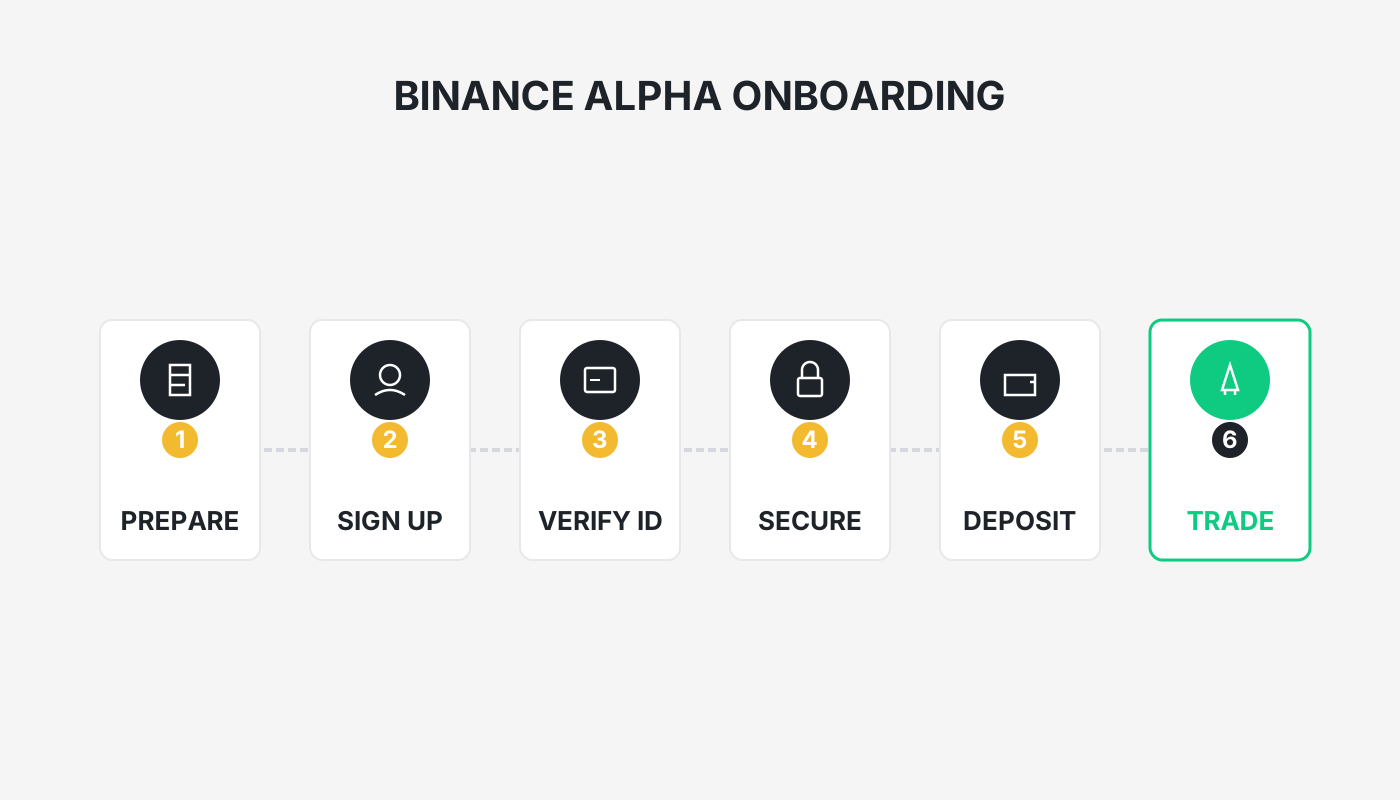
Step 1 – Zero‑Basis Preparation (≈10 minutes, starting capital $50‑$100 USD)
Set up the basic infrastructure first, then fund it. New users can also claim a welcome reward, making the entry truly cost‑free.
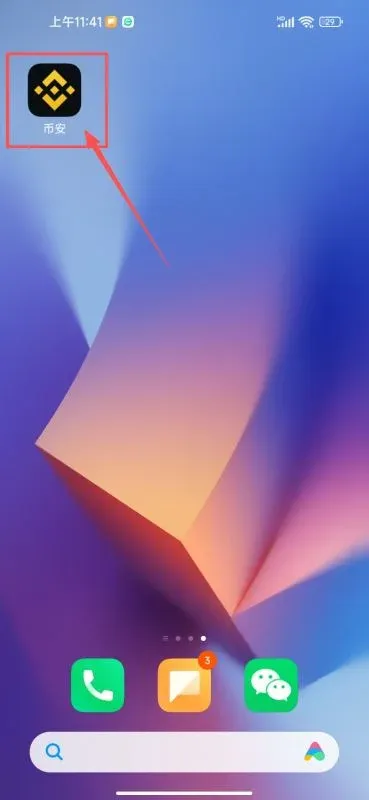
Download & Register the Binance App
- iOS / Android – search for “Binance”, download the latest version (v3.4.0 or newer, which includes Alpha optimizations).
- Registration – use an email address or mobile number, complete KYC Level 1 (upload a government ID; takes about 5 minutes). New accounts receive a $100 USD USDT test‑fund in the “Task Center”, which can be used immediately to earn points.
Create a Web3 Wallet
- Inside the app, locate Web3 Wallet → Create. Back up the 12‑word seed phrase (write it down on paper and store it securely; do not take a screenshot). You may also add a community‑recommended referral code (e.g., `XIAOCC`) to obtain a 30 % discount on transaction fees.
- Fund the wallet – start with a principal of $50‑$100 USD (≈ 300‑700 CNY). Transfer USDT or BNB to the wallet, selecting the BSC (Binance Smart Chain) network for a low fee of about $0.10 USD. Keep the wallet balance above $200 USD to automatically earn an extra 2‑3 points. Do not deposit the entire amount at once; keep a reserve for emergencies.
Pro tip: Cycle the $100 USD test‑fund to generate points with almost zero net loss. Beginners can practice while they learn.
Download the Binance App & Create the Web3 Wallet
The Binance Web3 wallet is built into the mobile app. If you prefer a desktop experience you can access the wallet via the Binance web portal.
Official Binance App Download
- Binance invitation code: `B2345`
- Registration for the China‑region portal: <https://accounts.binance.com/register?ref=B2345>
- Android app download for the China‑region: <https://www.bitaigen.com/binance/download>
The steps below illustrate the iOS flow; Android users can follow analogous steps.
Installing Binance on iPhone
You will need an overseas Apple ID. If you do not wish to create one yourself, you can purchase a pre‑created account on Chinese e‑commerce platforms for a few CNY.
Why an overseas Apple ID?
The App Store restricts certain apps based on the account’s region. Some crypto exchanges are only available in specific territories; using a Taiwan or Hong Kong‑registered Apple ID typically grants access to Binance and other global exchanges.
Safety tips for using an overseas ID
- Prefer creating the account yourself to avoid privacy leaks or device bans caused by shared credentials.
- Sign in to the App Store instead of the device’s system settings to reduce the risk of account suspension.
- If you encounter verification difficulties, you can first register with a domestic Apple ID, then switch the region.
Required registration information
- Email – any common provider (QQ, 163, Gmail, 189, etc.) works.
- Phone number – a Chinese mobile number can receive the SMS verification code.
- Virtual address – generate a Taiwan‑region address with an online tool such as shenfendaquan.com.
Registration workflow (illustrated in the screenshots)
- Generate a Taiwan address.
- Visit Apple’s website to create a new Apple ID, entering surname, given name, region (Taiwan), birthdate, the email you created, a strong password, and the mobile number.
- Verify the email and SMS code.
- Log out of your current App Store account, then sign in with the newly created overseas Apple ID.
- Fill in the address fields using the virtual Taiwan address, complete the profile, and you’re ready to download apps.
Tip: If you see “Your account cannot be created at this time”, try a different email, switch to a different network, or enable a VPN.
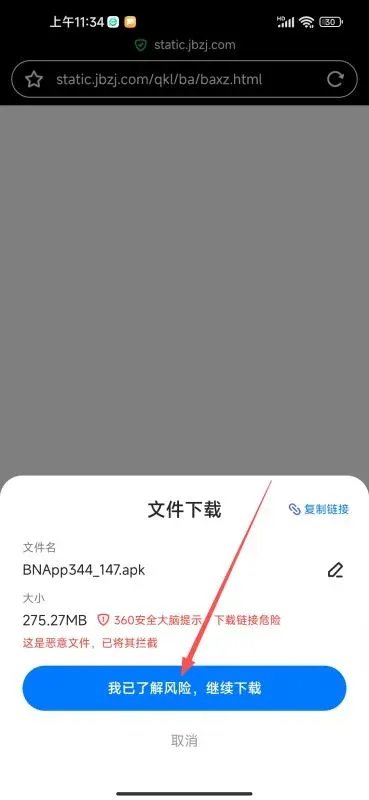
Secure Installation of the Binance App (Android)
- Copy the official download link <https://www.bitaigen.com/binance/download> into your mobile browser.
- When prompted “I understand the risks, continue download”, tap Confirm.
- If you see “Potential risk detected”, tap Continue Download anyway.
- After the file finishes, tap Install and grant the requested permissions.
...
Step 2 – Register on Binance and Complete Identity Verification
- Open the Binance app and select “Experienced User” to unlock the full feature set.
- Register via email or phone number, input the verification code, and set a password (minimum 8 characters, including numbers and an uppercase letter).
- Enter the referral code `B2345` to receive a 20 % fee rebate on future trades.
- Complete Real‑Name Verification: choose “China” as your residence, and submit your official ID information.
- (Optional) Enable “Passkey” for an extra layer of login security.
Secondary Security Measures
On the Account Security page you can bind the following safeguards:
- Passkey (fingerprint/face ID)
- Authenticator app (e.g., Google Authenticator)
- Email, password, phone number (domestic or overseas numbers are accepted)
Step 3 – Create and Back Up Your First Web3 Wallet
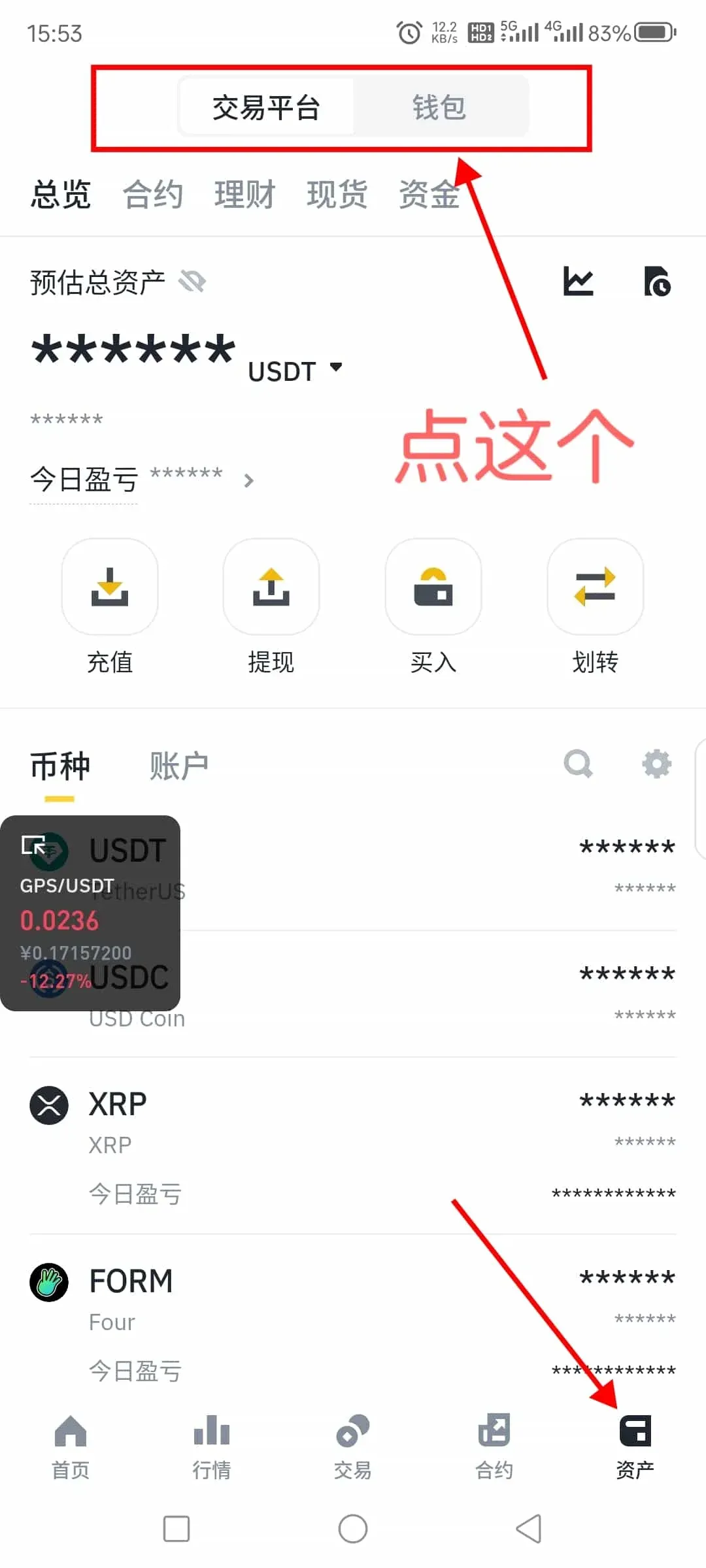
- Tap Wallet on the bottom navigation bar, then open Web3 Wallet.
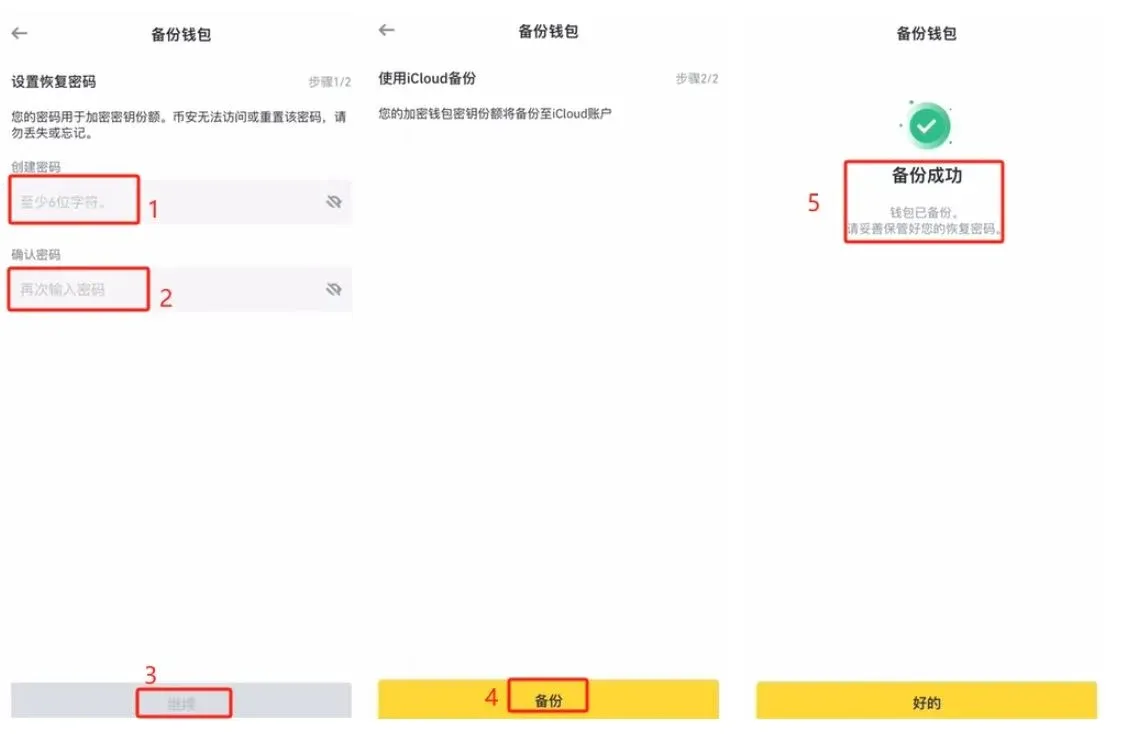
- Choose Create Wallet; the system will guide you to set a wallet password and automatically back up the seed phrase to iCloud. Your private key never leaves the device.
...
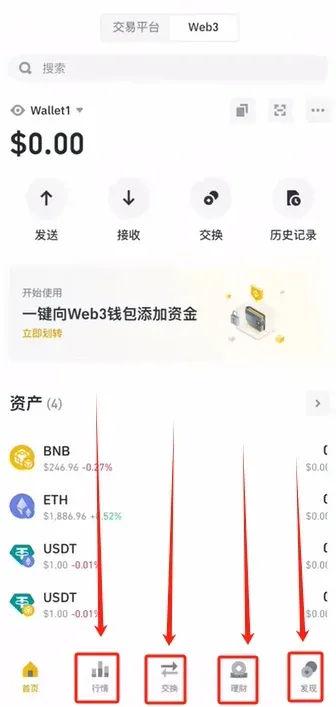
Overview of Wallet Functions
- Market – view price charts for popular coins.
- Swap – use the Oneinch router for the best exchange rates.
- Finance – deposit stablecoins such as USDT, USDC, or TUSD and earn annual yields (e.g., USDC on the Venus protocol yields 6.73 % APY).
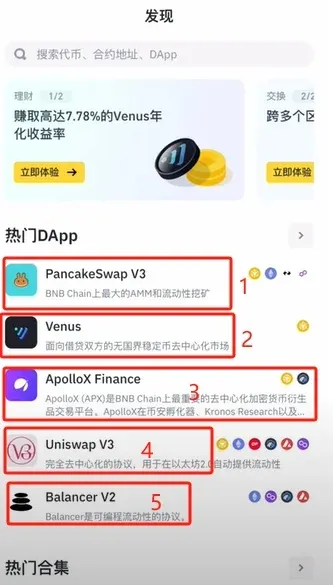
- Discover – access aggregated DApps like PancakeSwap, Venus, Uniswap, etc.
...
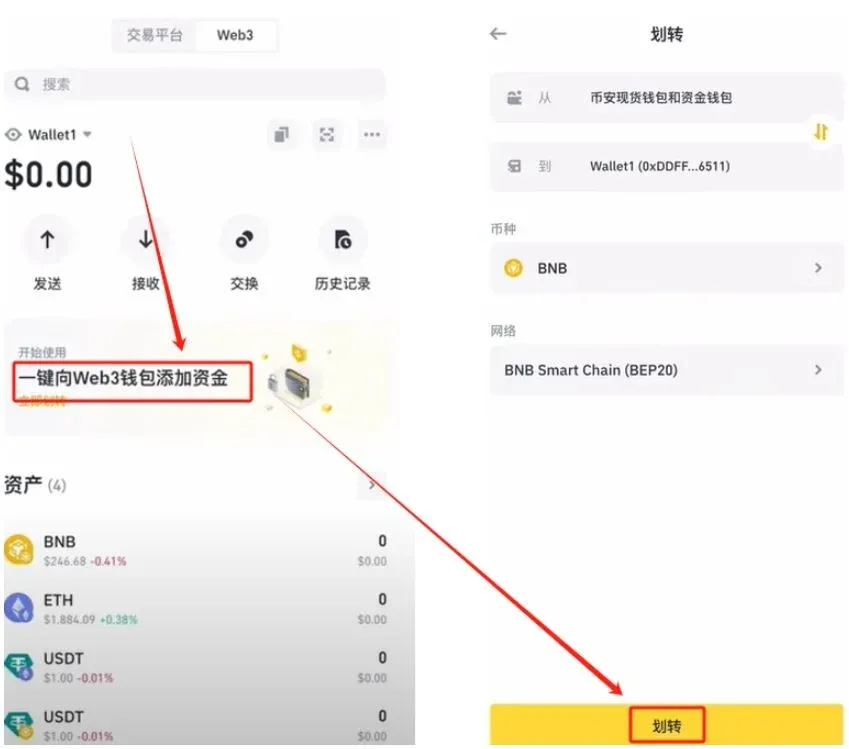
Step 4 – One‑Click Transfer of Funds to Your Web3 Wallet
- From your spot‑trading account on Binance, move a portion of assets (USDC is recommended) into the Web3 wallet.
- Tap “One‑Click Add Funds to Web3 Wallet”, select USDC, and confirm the transfer.
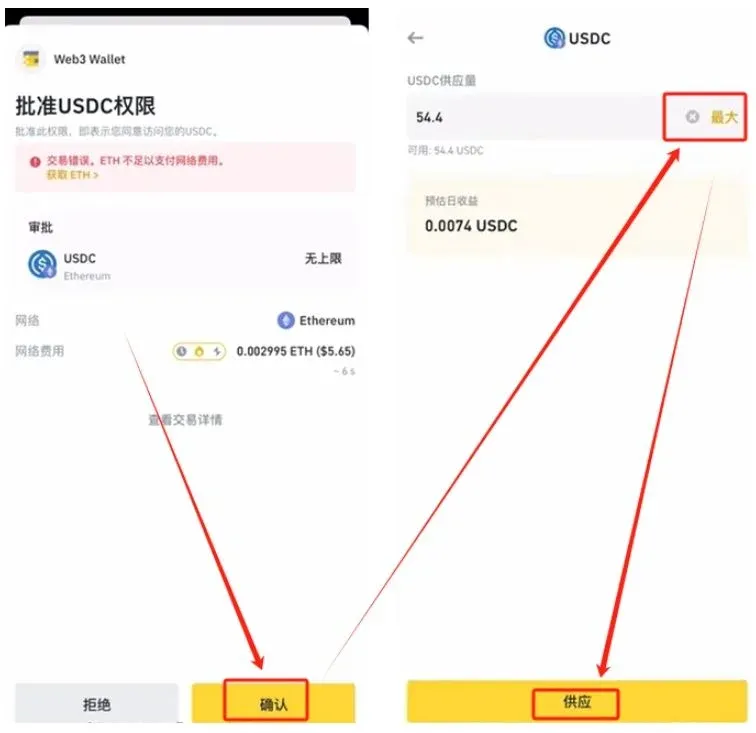
- Navigate to Finance → StableCoins → Supply, and stake the USDC (a minimal gas fee of < $1 USD will be charged).
...
Step 5 – Understanding the Alpha Mechanism (Why Can You Earn Pocket Money?)
Where Points Come From
- Trading Alpha tokens (newly listed Web3 project tokens) automatically generates Alpha Points.
- Formula: Points = Trade Volume × Multiplier (1‑4 ×) – Fee Loss.
Claiming Airdrops
- Once your point total reaches the current threshold (typically 240‑256 points), you can enter the Alpha Events page and claim airdrops from partner projects (e.g., $DIGI, worth $20‑$50 USD). Each claim deducts 15 points from your balance.
Profit Logic
- By earning 10‑15 points per day (costing roughly $1‑$3 USD in fees), you can claim 2‑3 airdrops per week, netting about $50‑$150 USD.
- The low entry barrier (13‑16 points per day) combined with modest airdrop values makes it a feasible daily routine that only requires 5‑10 minutes of attention.
Step 6 – Hands‑On Point‑Grinding (Low Cost, High Safety)
Recommended network: prioritize BSC because of its cheap gas fees and the fact that points are multiplied on this chain.
| Recommended Token (as of 2023‑11‑23) | Chain | Multiplier | Suggested Single‑Trade Size | Estimated Daily Points |
|---|---|---|---|---|
| $BAY | BSC | 4× | $0.5 USD | 10‑14 |
| $BOS | BSC | 4× | $0.5 USD | 8‑12 |
| $COMMON | BSC | 4× | $1 USD | 6‑10 |
| $TIM | BSC | 2× | – | Backup |
Point‑Grinding Procedure (each trade costs $0.05‑$0.10 USD in fees)
- Open Market, search for the target token, and place a tiny buy order (≈ $0.3‑$0.5 USD).
- Once the K‑line stabilizes (1‑2 minutes), place a sell order at the current price + 0.1 % (essentially a “market‑sell” that executes instantly).
- One buy + one sell counts as two trades, yielding roughly 0.8‑1.2 points.
- Execute 30‑40 such trades per day to accumulate 13‑16 points.
Weekly Operation Sheet (total time < 1 hour)
- Monday‑Friday: 10 trades in the morning, 5 at noon, 10 in the evening → about 13 points.
- Weekend: top‑up trades and claim any pending airdrops.
- Keep an eye on the Alpha Daily Report for the latest token recommendations.
Re‑using the test‑fund: after selling an airdropped token, transfer the proceeds back into the wallet and continue grinding. Monthly net fee loss can stay under $50 USD.
Step 7 – Claim Airdrops and Cash Out (Speed + Anticipation)
| Date (MM/DD) | Project | Claim Time (UTC+8) | Required Points | Estimated Value (USD) |
|---|---|---|---|---|
| 11/23 | $KO | 18:00 | 256‑261 | $15‑$30 |
| 11/24 | $SSS | 18:00 | 245‑255 | $25‑$40 |
| 11/25 | $IRYS | 20:00 | 240‑250 | $30‑$50 |
| 11/26 | $ULTI | 18:00 | 235‑245 | $20‑$35 |
| 11/27‑29 | To be announced | – | 240+ | $15‑$40 |
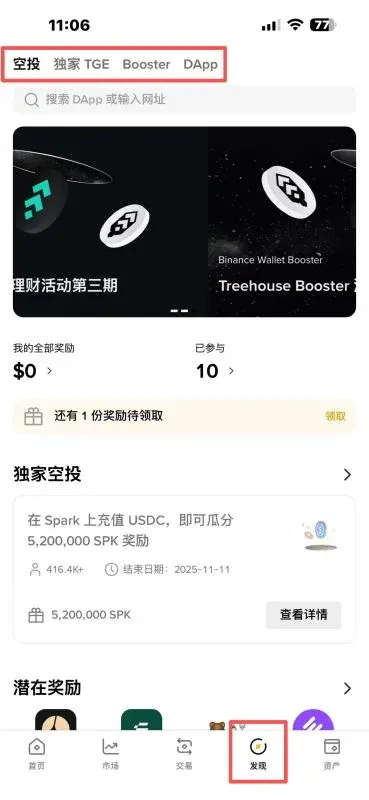
- Claim: Open Alpha Events, verify that your points meet the requirement, then tap Claim. You must confirm within 24 hours.
- Cash‑out: Transfer the received token to a centralized exchange (CEX) and sell it for USD (or stablecoins). If the token shows short‑term upside, you may hold a bit longer; otherwise, sell quickly. Gas fees are typically < $1 USD.
- Tips: Warm‑up 5 minutes before the claim window, avoid changing your device’s system time, and consider using multiple trusted accounts (e.g., family members) to diversify risk. Do not use bots or scripts, as Binance actively penalizes automated activity.
Step 8 – Pocket‑Money Tips & Common Pitfalls
Efficient Earning
- Low‑maintenance grinding: you don’t need to chase the highest possible score. Maintaining 13 + 2 points (trade + balance) is sufficient
Related Reading
- Binance Alpha Points: Rewards for Early‑Stage Trading
- Binance Alpha Points: Trading & Volume‑Doubling Tips
- Binance Alpha: Earn Points, Claim Rewards & Access TGEs
💡 Register on Binance with referral code B2345 for the maximum trading fee discount. See Binance complete guide.



