
 Bitaigen Research
In this article we detail how to obtain a Binance wallet address, and starting from the risks of cross‑chain transfers we provide a complete step‑by‑step guide together with a FAQ. The aim is to help users safely send and receive assets across different chains and get up to speed quickly. In addition, we have compiled a list of common pitfalls and practical tips to help you avoid mistakes. Continue reading to master the whole process.
Is the Binance wallet recommended?
When using various DApps, the first issue you usually face is how to move your assets across chains to the target network. Traditional cross‑chain bridges often carry the risk of an unknown project team and may suffer from slow confirmations, funds getting stuck, or even loss of assets. By contrast, using a large centralized exchange as a hub is generally more reliable. Binance, the world’s highest‑volume cryptocurrency platform, supports deposits and withdrawals on many mainstream blockchains, so many users treat it as a bridge for sending and receiving funds.
Note for U.S. users: Access Binance’s services through Binance.US (the U.S.‑compliant platform) rather than the global Binance website.
What is a Binance wallet address?
A Binance wallet address functions like a bank account number for cryptocurrencies. It consists of a string of letters and numbers and is used to receive or send assets on the Binance platform. Because each coin follows its own blockchain protocol (e.g., Bitcoin uses the BTC chain, Ethereum uses the ETH chain), the address format differs from one asset to another. Before initiating a transfer, always verify the coin, the blockchain network, and the address to ensure that your funds arrive safely.
Binance wallet address lookup tutorial: USDT/TRC20 wallet address
Step 1: Open the Deposit page
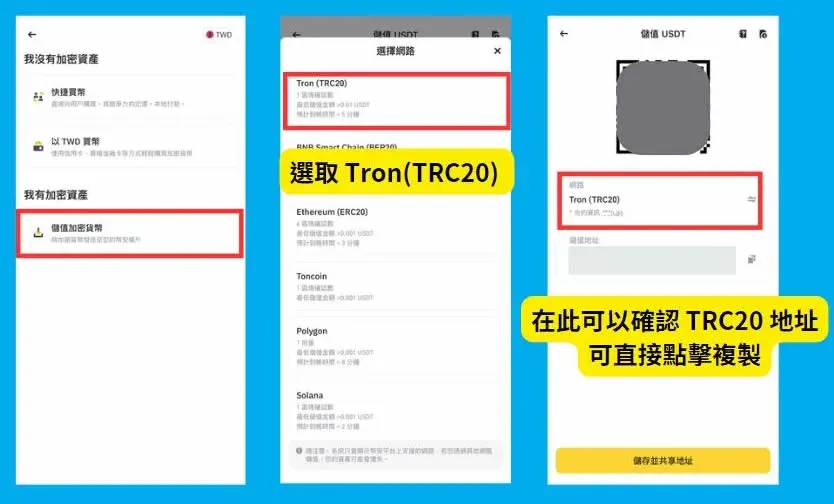
On the homepage click “Add Funds” → “Deposit Crypto”, then in the pop‑up list select USDT and choose the target network (e.g., TRC20, ERC20, etc.).
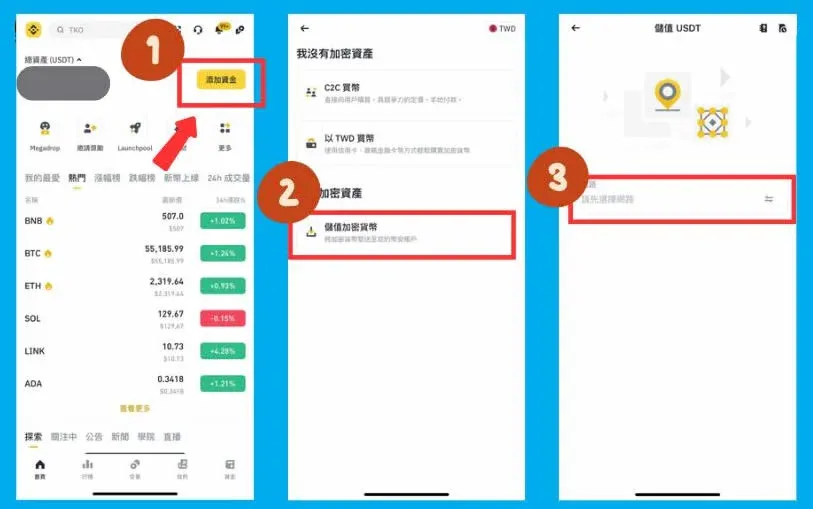
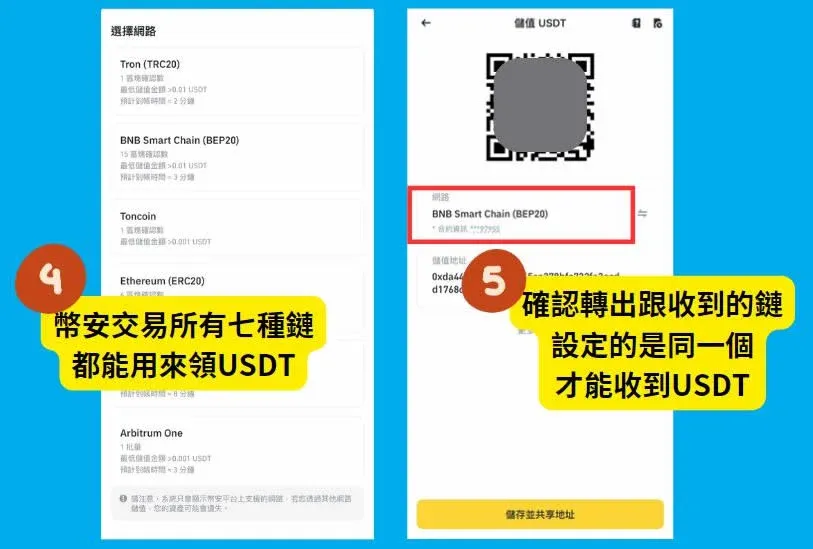
Tip: USDT is available on seven different networks. Choose the one that best matches your fee‑preference. Make sure the withdrawal network you use matches the network shown on Binance, otherwise your funds may become stuck or fail to arrive.
Step 2: Copy the address for the selected network
After confirming the network, the page displays the USDT wallet address for that chain (an alphanumeric string). Click Copy to copy it to your clipboard.
Binance wallet address lookup tutorial: other tokens (example using $PIXEL)
Step 0: Verify which networks the token supports
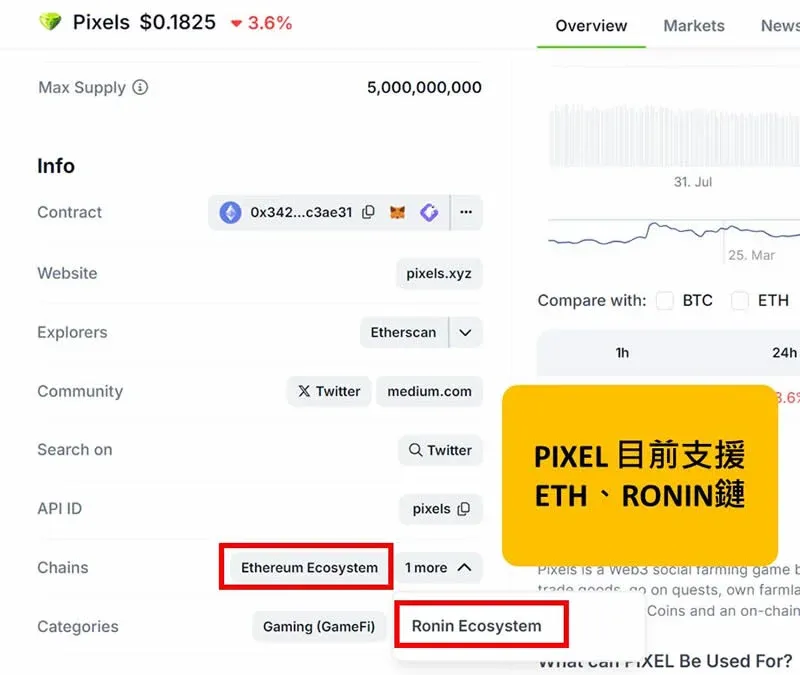
First check on sites such as CoinGecko which chains $PIXEL is issued on. At the time of writing $PIXEL exists on Ethereum and Ronin.
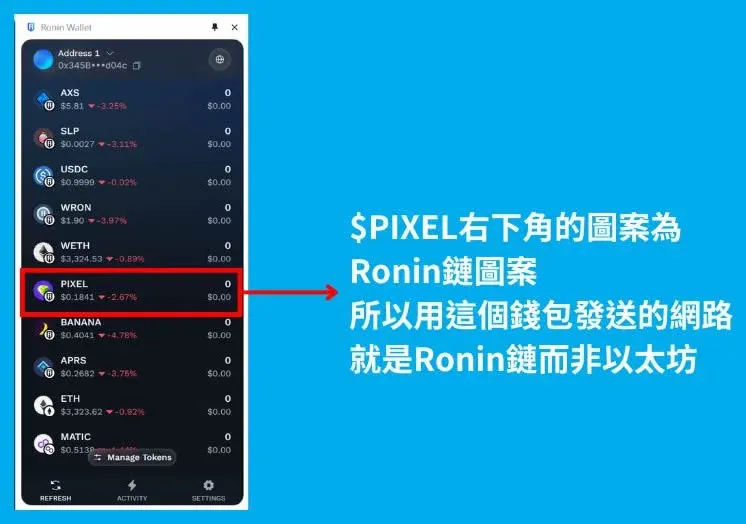
Next, confirm on your wallet which sending network you intend to use, for example the Ronin chain.
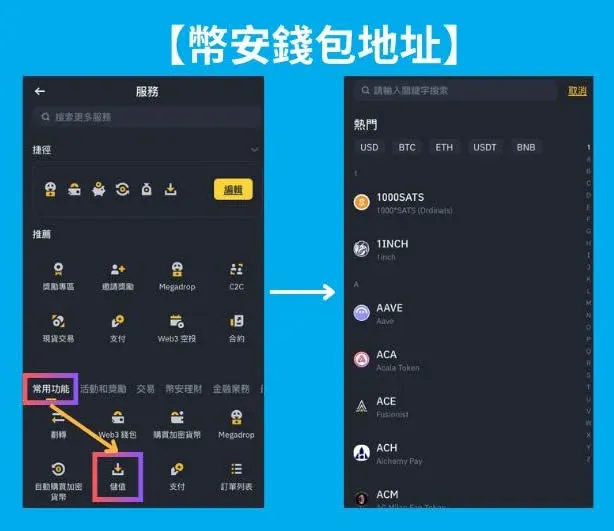
Step 1: Go to the Deposit page
Navigate via [Common Functions] → [Deposit] → [Select Deposit Coin]. On this screen you can pick the $PIXEL token.
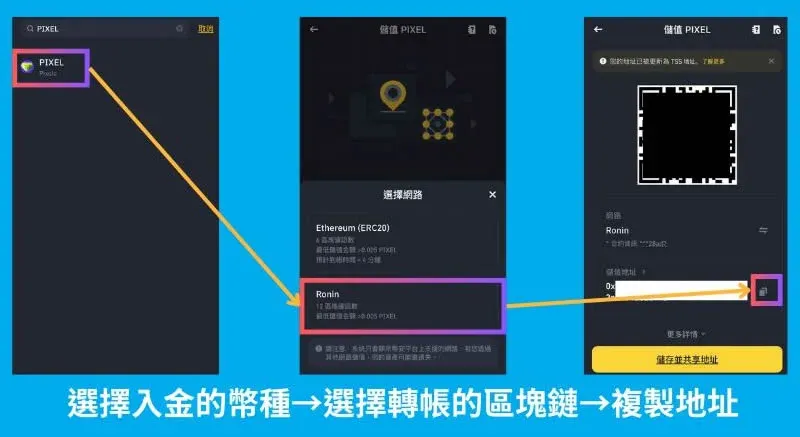
Step 2: Choose the network and copy the address
On the same screen first select the coin, then pick the corresponding blockchain (e.g., Ronin). Click the copy icon on the right to obtain the full address. Paste this address into the “send” field of your external wallet to complete the $PIXEL deposit.
Binance wallet address lookup tutorial: how to find a TRC20 address
Open the Binance APP (official registration: Register here, Download the official app). From the homepage go to “Add Funds” → “Deposit Crypto” and select Tron (TRC20). The address displayed on the next screen is the deposit address for the TRC20 network; copy it for use.
What if I accidentally sent funds to an expired Binance wallet address?
If you mistakenly transferred assets to an address that is no longer active, the funds will not appear in your account balance immediately, but they remain traceable on the blockchain. You can attempt to recover them by following these steps:
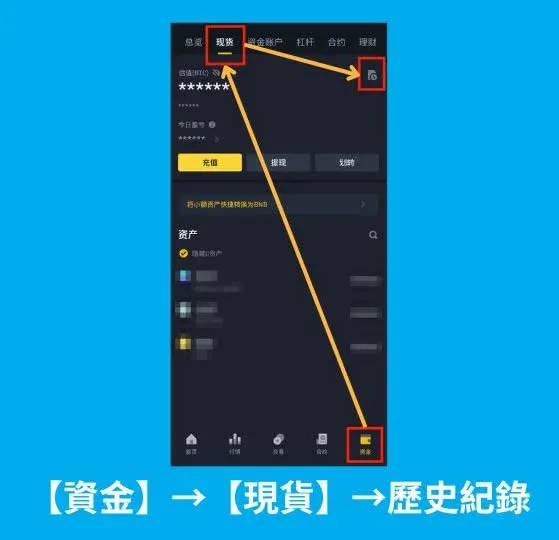
Step 1: Locate the deposit record
Navigate to [Funds] → [Spot] → [History] and find the transaction hash corresponding to the deposit.
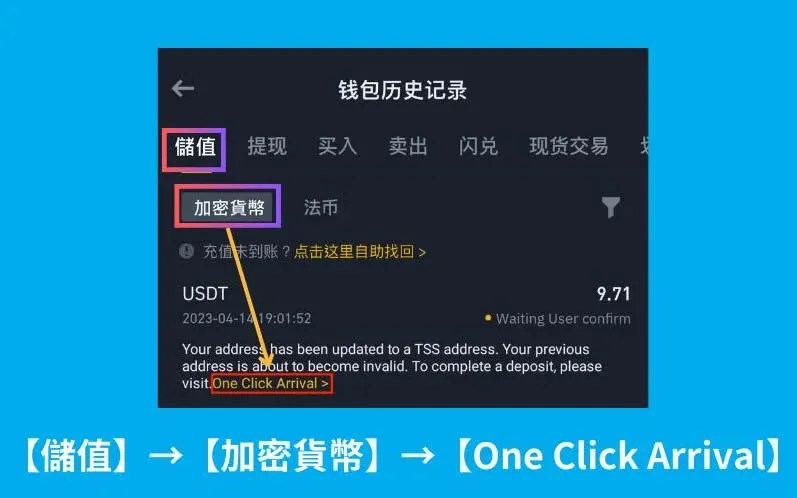
Step 2: Use the “One‑Click Arrival” service
Go to [Deposit] → [Cryptocurrency] → [One‑Click Arrival]. The system will attempt to consolidate the assets to a valid address, typically within about one hour.
Frequently asked questions about Binance wallet addresses
Q1: Can a single Binance wallet address hold multiple types of cryptocurrency?
A: No. Each token has its own address format. Depositing a different coin to the wrong address may result in unrecoverable loss.
Q2: Is it possible to transfer from another wallet to a Binance address?
A: Yes, as long as the blockchain network, the token, and the Binance‑provided address match exactly, the transfer should be safe.
Q3: Can a Binance wallet address be reused?
A: Within the same network and token, the address can receive funds repeatedly. Although most addresses remain static, Binance may change them after platform upgrades or security policy updates. It is advisable to copy the address anew each time you initiate a transfer to avoid typographical errors.
Additional considerations
- Fiat on‑ramps: When moving fiat currency into the crypto ecosystem, Binance accepts deposits in USD via SEPA, SWIFT, or local bank transfers, depending on your jurisdiction.
- Tax compliance: Crypto gains may be taxable in your country of residence. Keep records of all deposits, withdrawals, and trades for accurate reporting to tax authorities.
- Regional restrictions: Users from certain jurisdictions (e.g., the United States) must use the region‑specific platform (Binance.US) and may have a more limited set of supported networks.
The content above provides a comprehensive guide to locating Binance wallet addresses, performing cross‑chain transfers, and handling common issues. For further details and updates, stay tuned to Bitaigen’s upcoming articles.
Related Reading
- Gate.io Transfer Guide: Memo & Tag for XRP, XLM, EOS
- Buy SXP on Binance, Huobi & Bitget – Step-by-Step Guide
- Binance Coin (BNB) Issuance Price & Total Supply Explained – 200 Million Tokens
💡 Register on Binance with referral code B2345 for the maximum trading fee discount. See Binance complete guide.



