
 Bitaigen Research
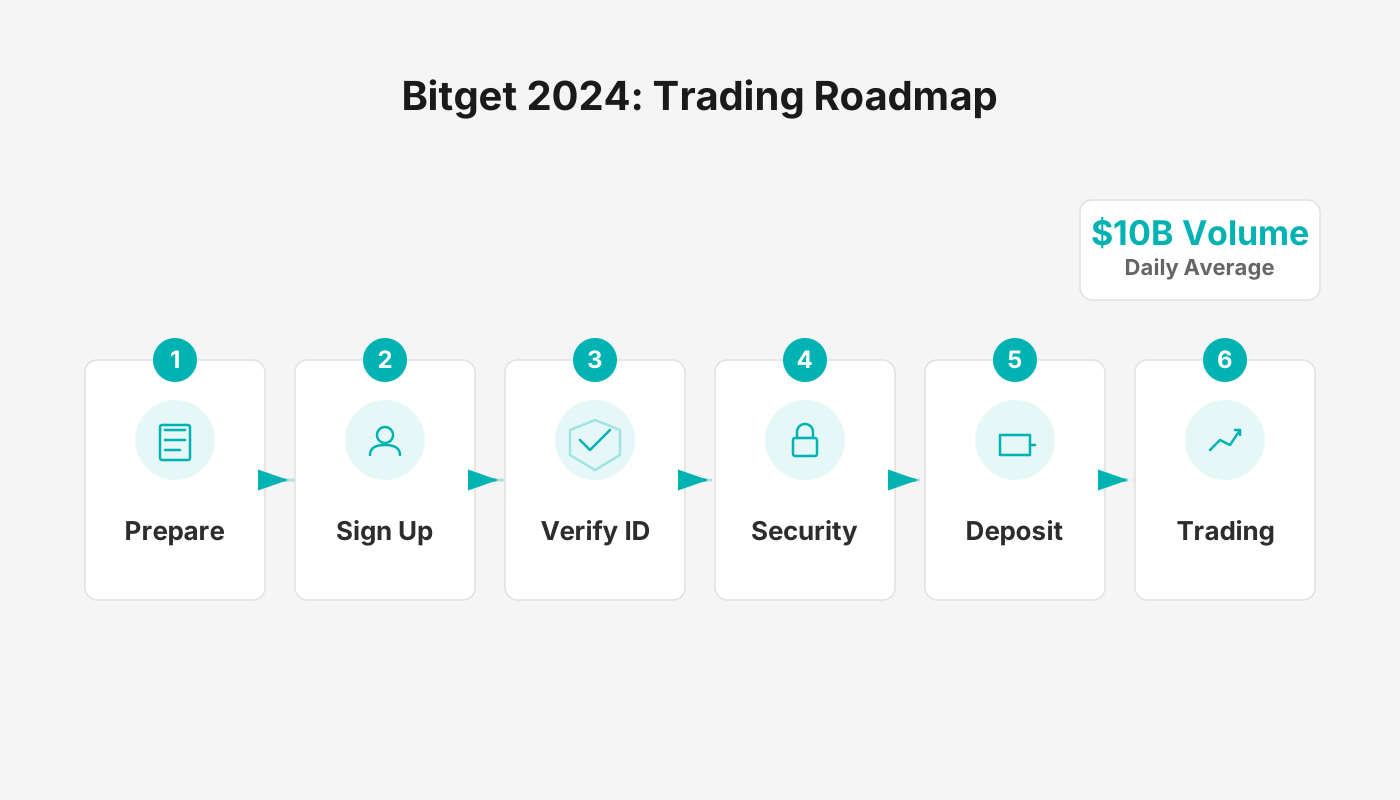
 Bitget was founded in 2018 and is headquartered in Singapore. It is an innovative platform that focuses on cryptocurrency derivatives trading. With a rich selection of contract products and proactive market promotion, it has risen to become one of the top five contract exchanges worldwide. In 2024 its daily average trading volume surpassed US$10 billion, and it boasts more than 8 million registered users. The platform has obtained MSB (Money Services Business) licenses in regions such as Canada and the United States, and it is pursuing compliant operations in Hong Kong, Australia and other jurisdictions. Bitget strictly enforces KYC (Know‑Your‑Customer) and AML (Anti‑Money‑Laundering) policies, aiming to provide a safe and reliable trading environment.
After completing account registration and KYC verification on Bitget, you can fund your account quickly via bank transfer, credit card, or cryptocurrency wallet, and you can withdraw funds from the “Assets” page following the on‑screen prompts.
We have compiled a step‑by‑step guide covering registration, KYC, and both deposits and withdrawals on Bitget. The article highlights the platform’s security measures and practical tips, helping newcomers get started quickly while avoiding common pitfalls. If you want a smooth start in contract trading, keep reading for the detailed tutorial.
Overview of the Bitget Exchange
Bitget (official registration | official download) experienced rapid growth in 2025. In the first quarter it processed US$2.08 trillion in trading volume, achieving a 159 % month‑over‑month increase in spot trading, and its global active user base exceeded 120 million. In the second quarter the exchange burned 30 million BGB tokens (approximately US$138 million), strengthening its deflationary model.
In September 2025 Bitget launched the Universal Exchange (UEX), which consolidates cryptocurrencies, tokenized stocks, ETFs, forex and real‑world assets under a single account. This reduces asset fragmentation and gives traders a one‑stop, cross‑market experience.
To increase the ecological value of BGB, Bitget transferred 440 million BGB to the Morph Foundation; half of these tokens were immediately burned, while the remaining half were locked for ecosystem development, making BGB the gas and governance token of the Morph chain.
In the same month Bitget announced the UEX brand and the “Gear Up to 7” campaign, showcasing its next‑generation vision and expanding the Launchpool project list with offerings such as Falcon Finance, thereby boosting user participation and reward intensity.
Bitget Advantages at a Glance
- Signature Features: Known for “one‑click copy‑trading”, it offers leveraged trading, perpetual contracts, grid trading and other derivative products.
- Trading Variety: Supports 550+ cryptocurrencies and 750+ trading pairs, covering both mainstream coins and altcoins.
- Global Reach: Services are available in 100+ countries/regions, with 8 million+ registered users worldwide.
- Security Architecture: Utilises data encryption, redundant storage and regular security audits to safeguard funds.
- Brand Partnerships: Collaborates with high‑profile brands and personalities such as Lionel Messi and Juventus, enhancing brand visibility.
Creating a Bitget Account
The following steps are based on the mobile app and will help you create an account quickly.
Step 1: Download and Open the Bitget App
- Visit the official Bitget download page.
- Choose the iOS or Android version, or scan the QR code to download.
- After installation, launch the app.
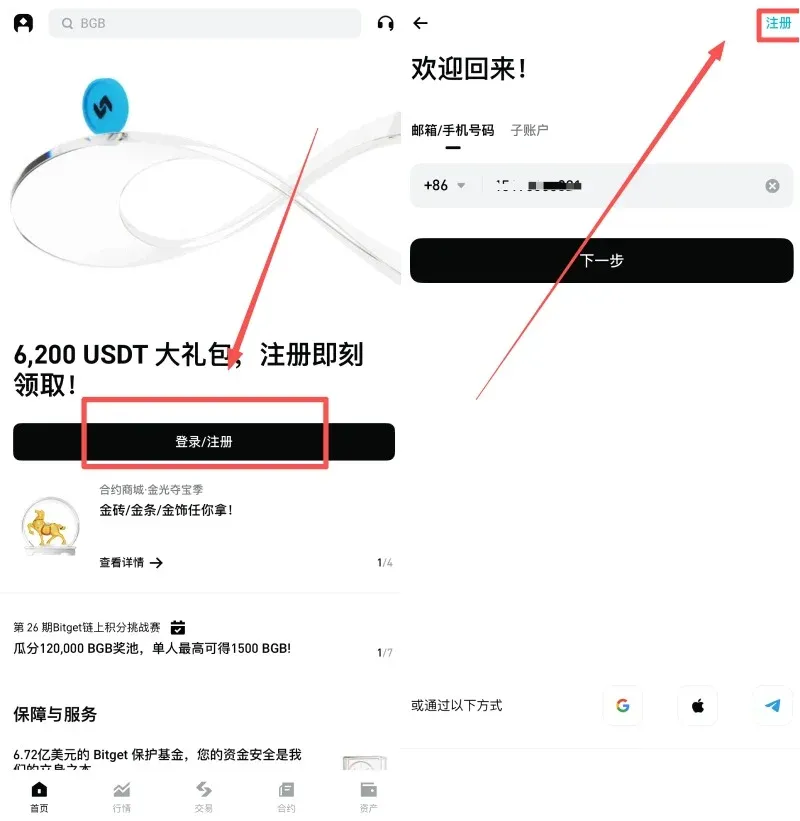
Step 2: Enter the Registration Screen
- Open the app and tap “Get Started” on the welcome page.
- In the pop‑up window, select “Register”.
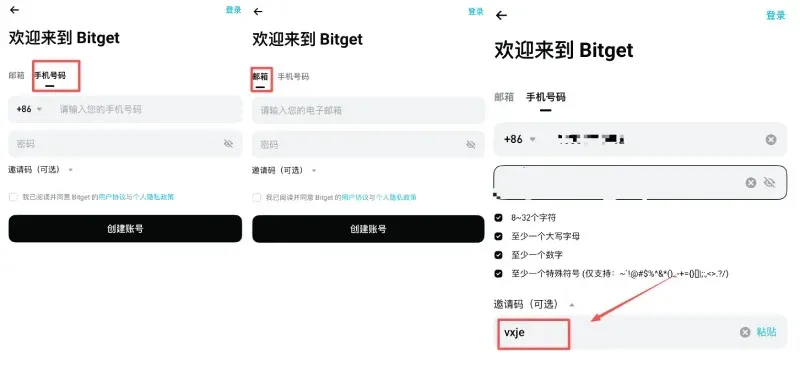
Step 3: Fill in Registration Information
| Registration Method | Description |
|---|---|
| **Email** | Enter a valid email address |
| **Phone** | Enter your mobile phone number |
- Password requirements: 8‑32 characters, containing at least one digit, one uppercase letter and one special character (e.g., `~\`!@#$%^&*()_-+={}[]|;:,<>.?/`).
- Invitation code (optional): Enter `vxje` to receive a permanent 20 % fee rebate.
- Tick the User Agreement and Privacy Policy, then tap “Create Account”.
Step 4: Verify Email or Phone
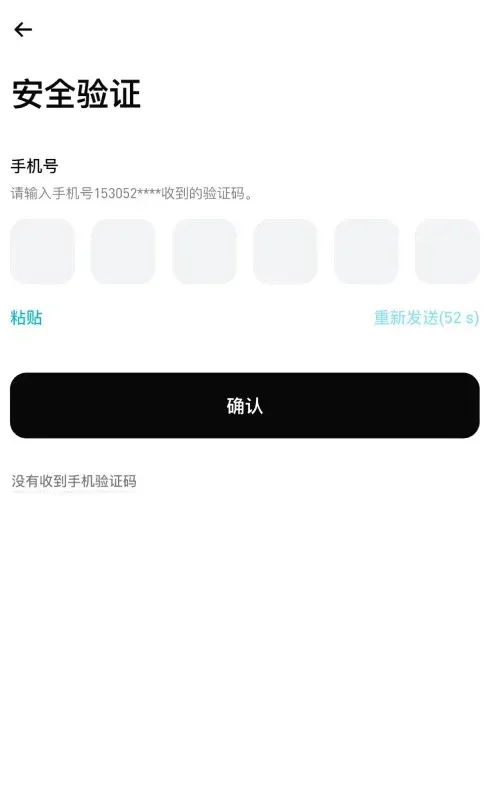
- The system will send a 6‑digit verification code to the email address or phone number you provided.
- Enter the code in the app.
- Tap “Submit” to complete verification.
Step 5: Set Up Security Options (Strongly Recommended)
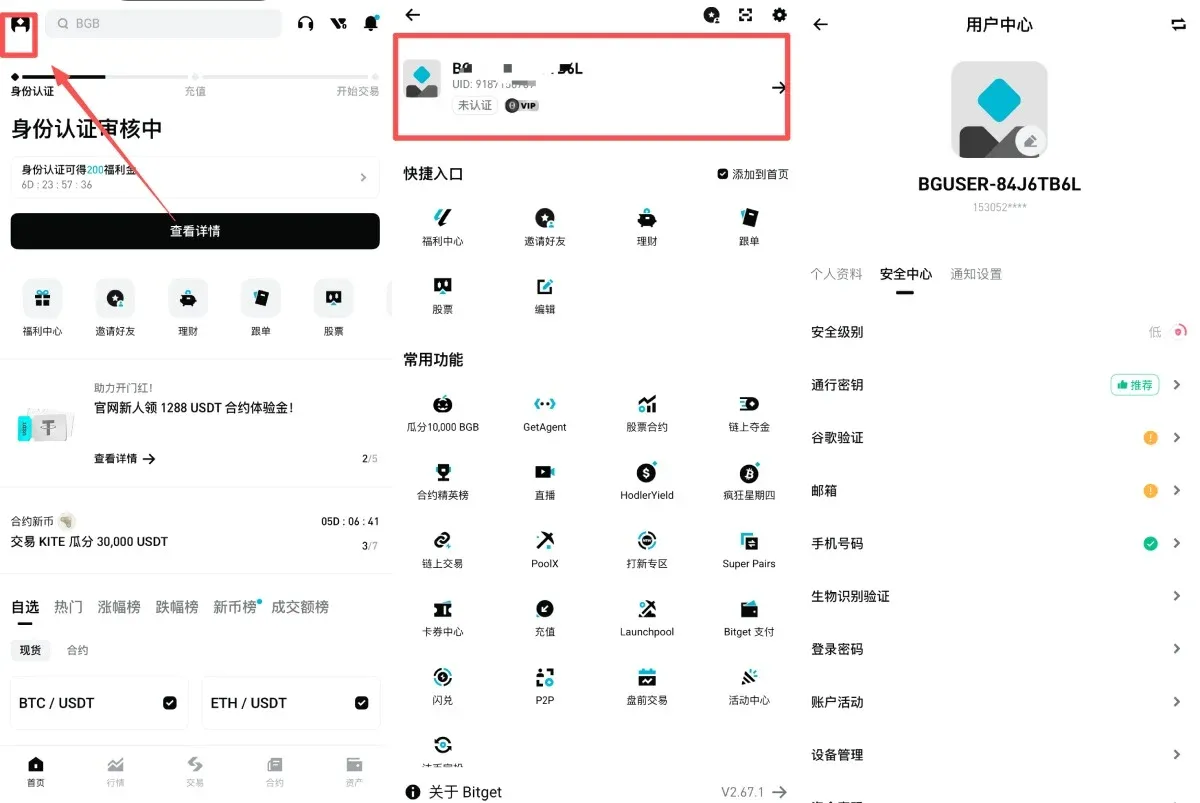
- After logging in to the new account, tap the menu icon at the top‑left corner.
- Navigate to Profile → Security Center.
- Enable Two‑Factor Authentication (2FA) to enhance account protection.
Bitget KYC (Identity Verification)
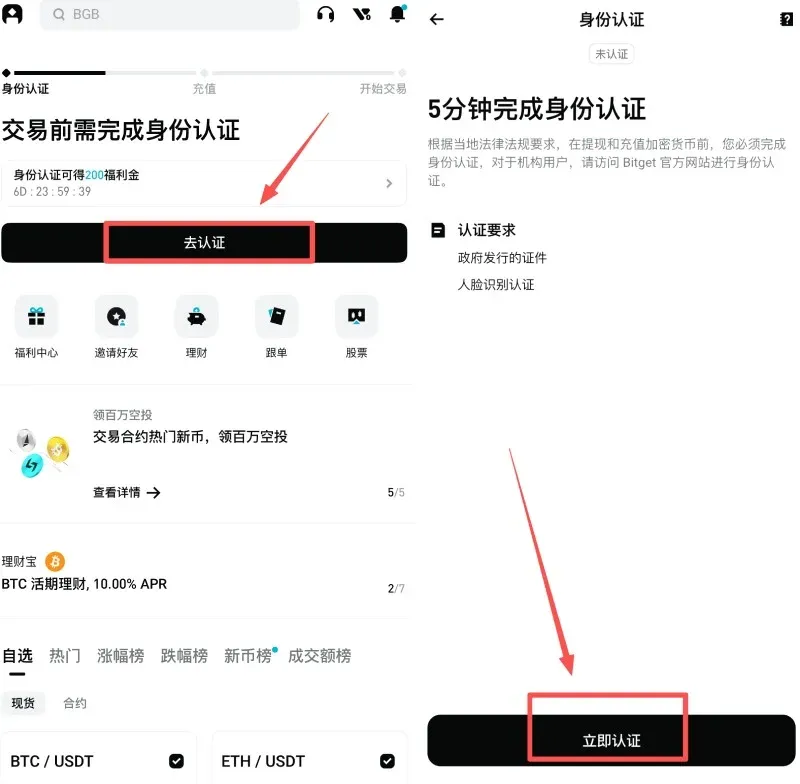
Once registration is complete, go to [Proceed to Verification] → [Verify Now].
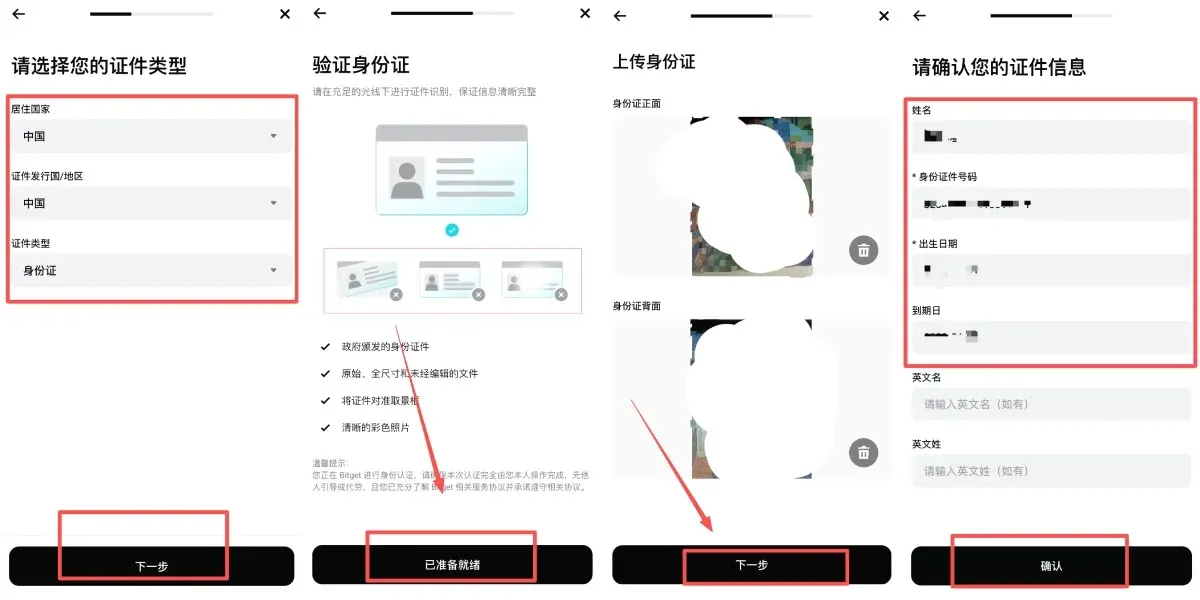
- Follow the prompts to upload clear front‑ and back‑side photos of a government‑issued ID.
- After confirming the information is correct, tap [Confirm].
- The system will perform a facial‑recognition check; follow the on‑screen instructions to complete it.
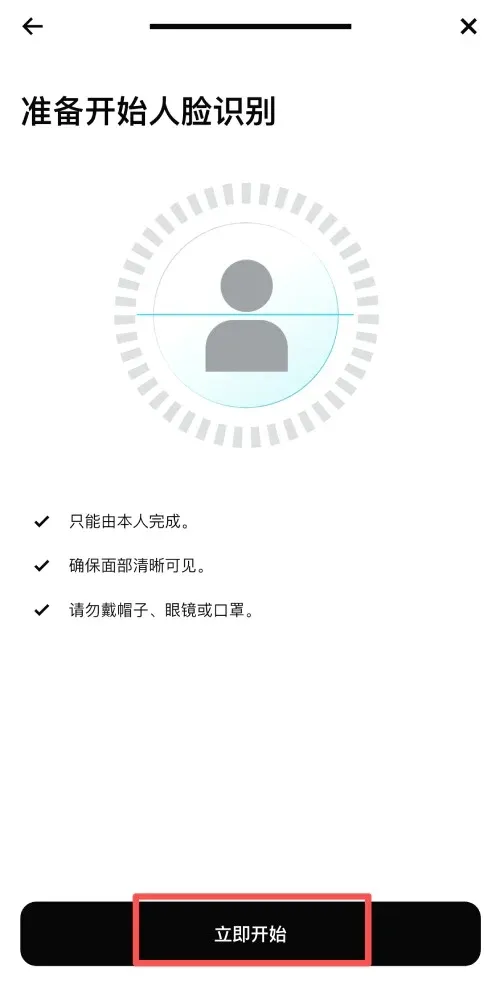
- After submission, the verification will be reviewed. Once approved, you can start trading normally.
How to Deposit Funds into Bitget
Due to regulatory considerations, Bitget currently supports three primary deposit methods. Users can choose the one that best fits their needs.
1. Transfer from Another Exchange (Recommended for Beginners)
Advantages: Secure, low fees, fast arrival.
Procedure (example using OKX):
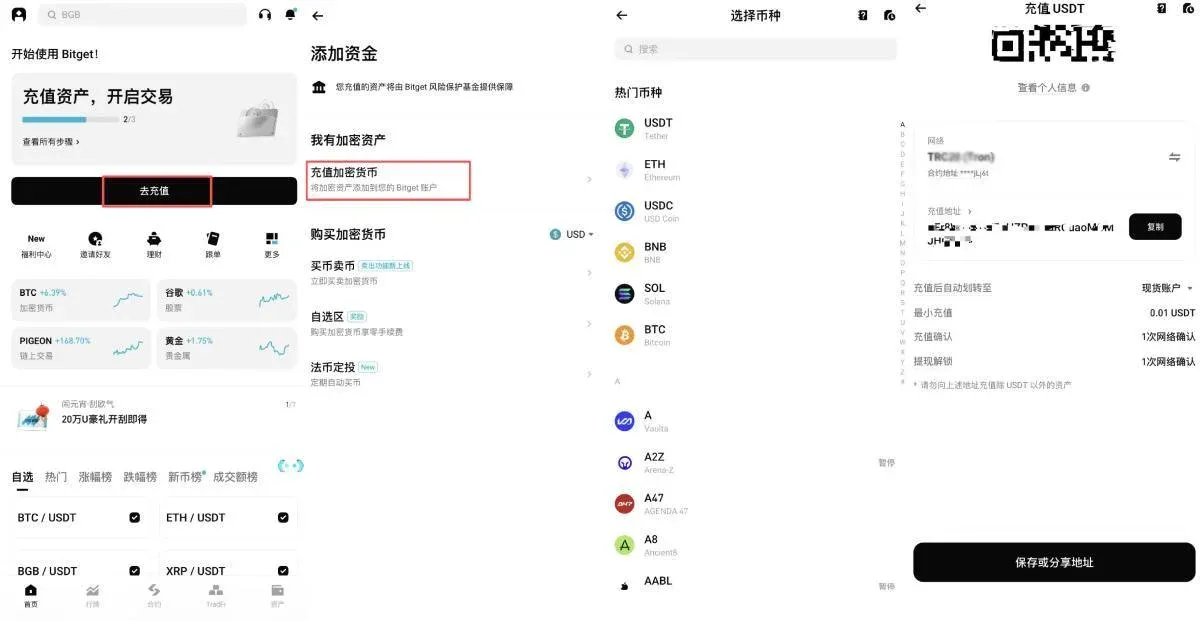
- Log in to Bitget, go to Assets → Deposit, select USDT, and confirm the network.
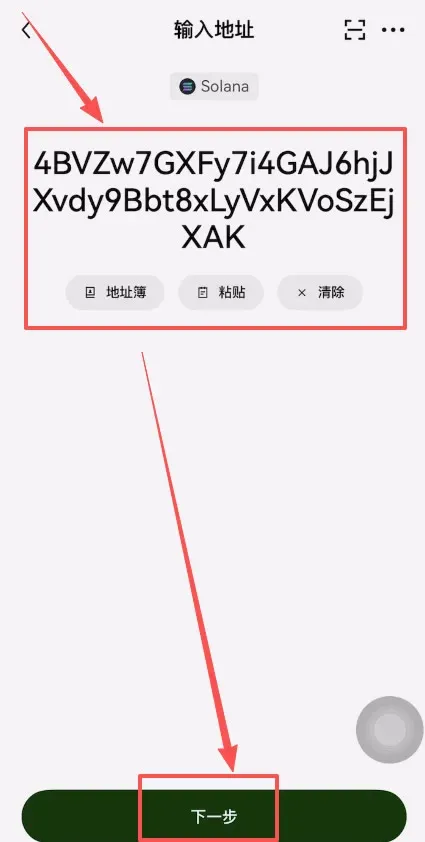
- Copy the USDT deposit address displayed on the page.
- Open OKX, navigate to Assets → Withdraw, choose USDT.
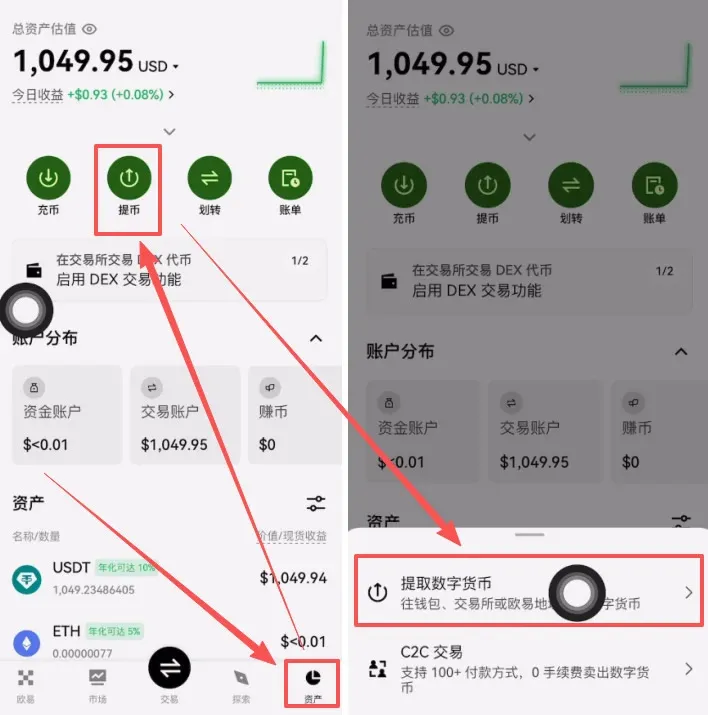
- Set the withdrawal target to Exchange.
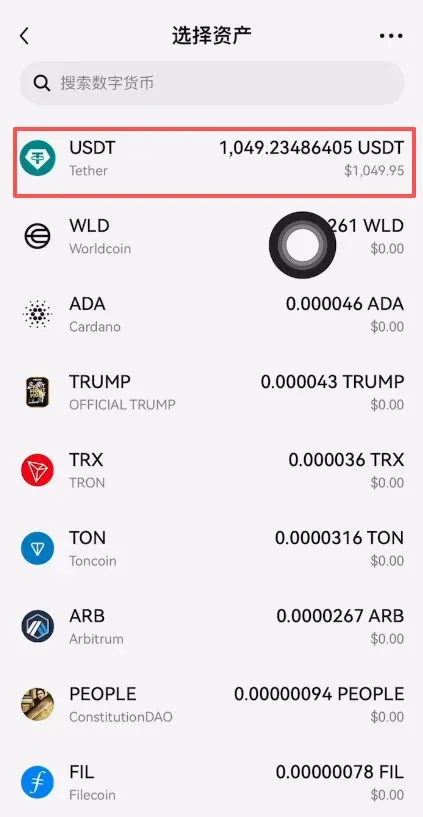
- Choose SOL (Solana) as the network, ensuring it matches the network you selected on Bitget.
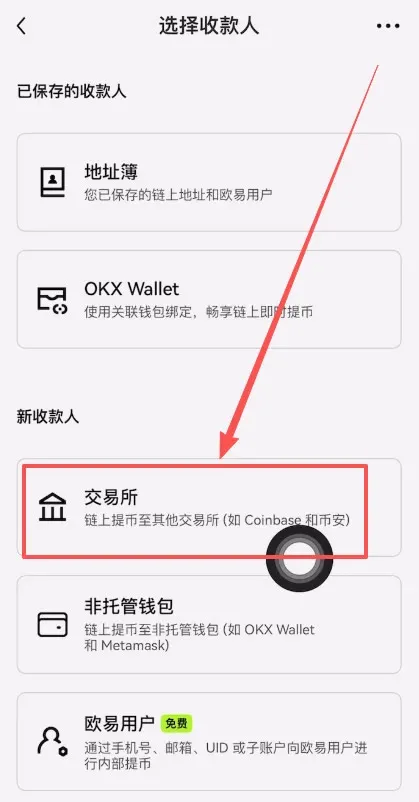
- Paste the Bitget deposit address, then click Next.
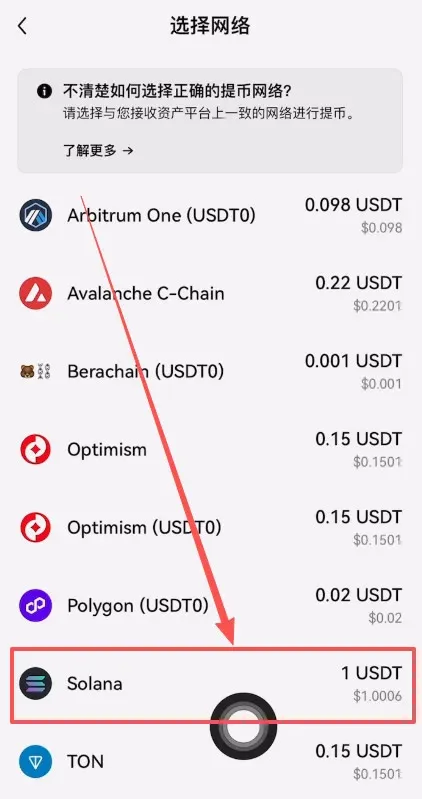
- Enter the withdrawal amount (e.g., 1 002 USDT, which includes a 1 USDT fee), confirm, and submit.
- Once the withdrawal is successful, wait for on‑chain confirmations; the funds usually arrive within 5‑10 minutes.
Typical fee: 0.5‑1 USDT. Arrival time: 5‑10 minutes. This method is suitable for all users, especially newcomers.
2. Quick Purchase with Credit Card
Designed for users who need an instant deposit.
Steps:
- Complete KYC verification first.
- In the app, tap Buy Crypto, select a coin (USDT is recommended), and choose Credit Card as the payment method.
- Enter the amount you wish to purchase, complete any required transaction verification, and the funds will be credited instantly.
This method is convenient but carries a relatively high fee, so it is advisable to use it only in urgent situations.
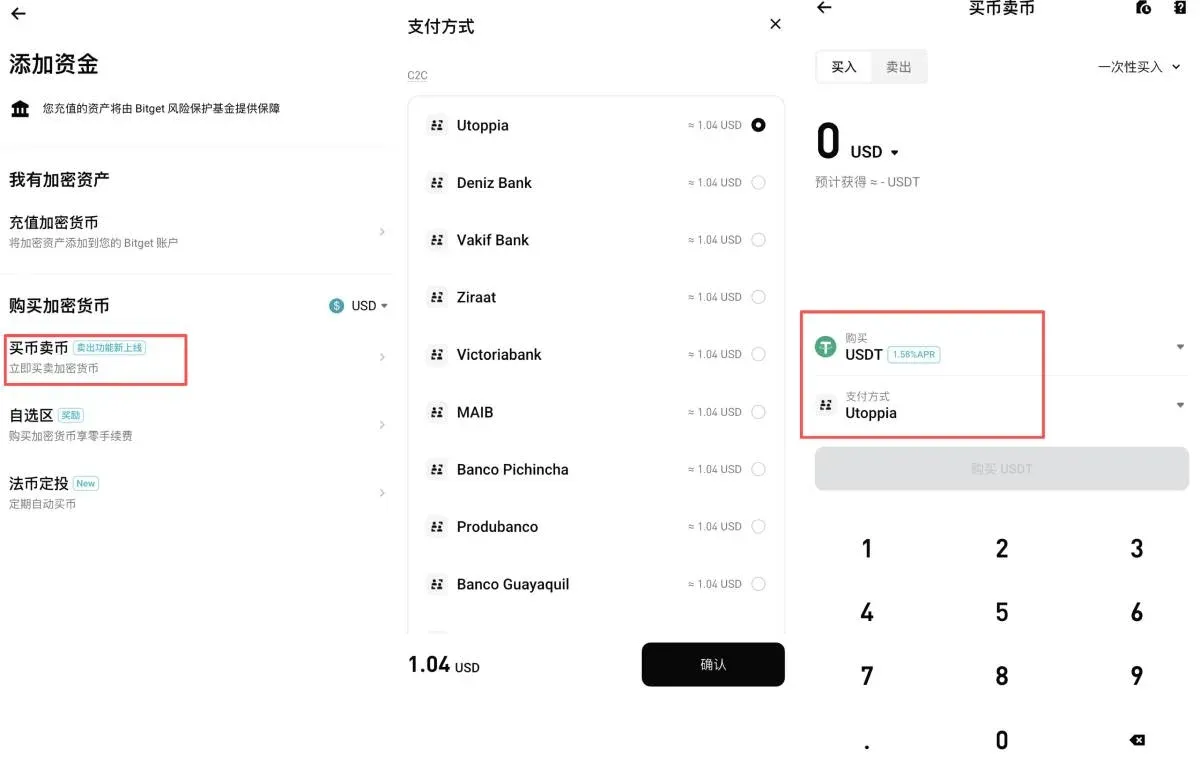
3. Transfer from a Cryptocurrency Wallet
Users who already hold digital assets can move them directly from their personal wallet.
Steps:
- Retrieve the deposit address for the desired token on Bitget.
- Confirm the network type (ERC‑20, TRC‑20, BEP‑20, etc.).
- Initiate a transfer from your wallet, entering the Bitget address and paying the required miner fee.
- After the blockchain confirms the transaction, the funds will appear in your Bitget account.
How to Withdraw Funds from Bitget
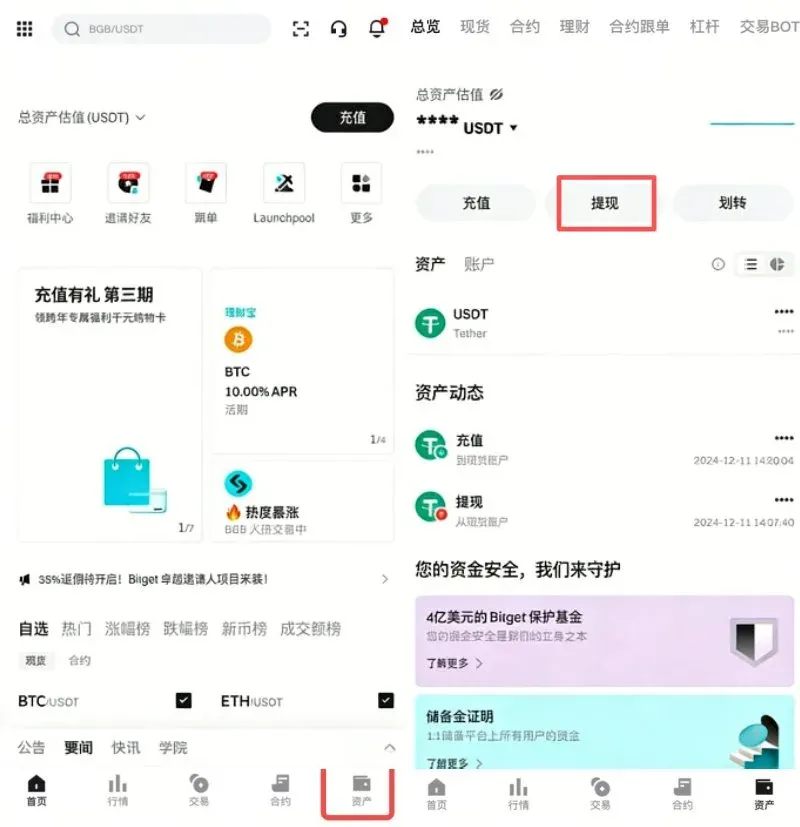
Step 1: Open the Withdrawal Page
- Launch the Bitget app and log in.
- Tap the Assets tab at the bottom, then select Withdraw.
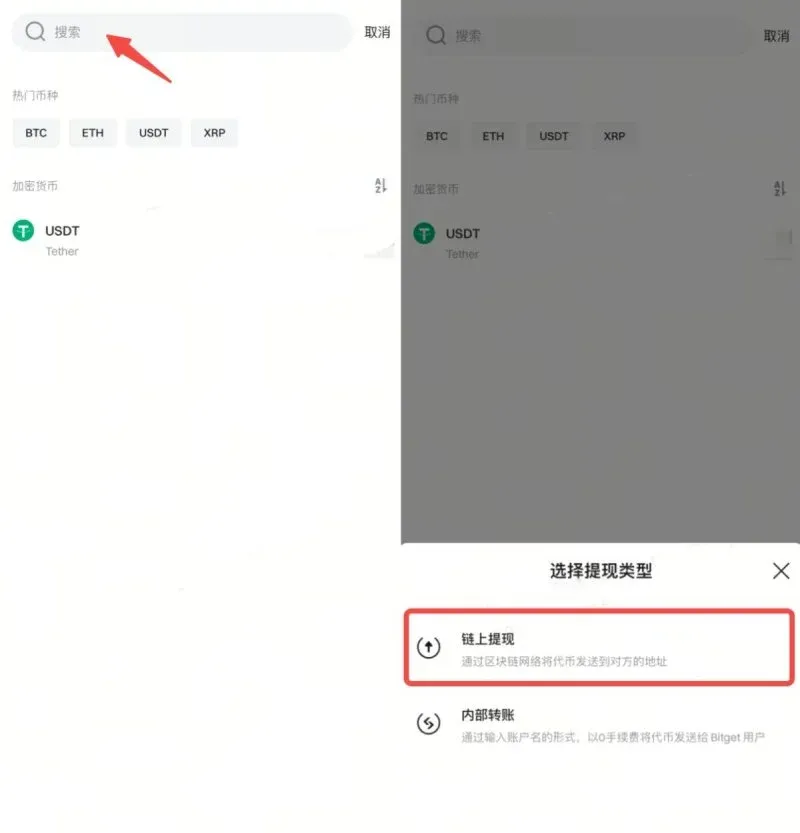
Step 2: Choose the Cryptocurrency to Withdraw
- Use the search bar to locate the coin you wish to withdraw.
- After tapping the coin, select On‑Chain Withdrawal.
Step 3: Enter Withdrawal Details
- Wallet address: Paste or scan the QR code. Ensure the address matches the selected network (e.g., ERC‑20, BEP‑20).
- Network: Verify that the network you choose aligns with the destination wallet.
- Amount: Input the withdrawal quantity; the system will automatically display the fee and the net amount you will receive.
Step 4: Confirm and Complete Security Verification
- After double‑checking all information, tap Withdraw.
- The platform may request additional verification via email, Google Authenticator, or SMS code.
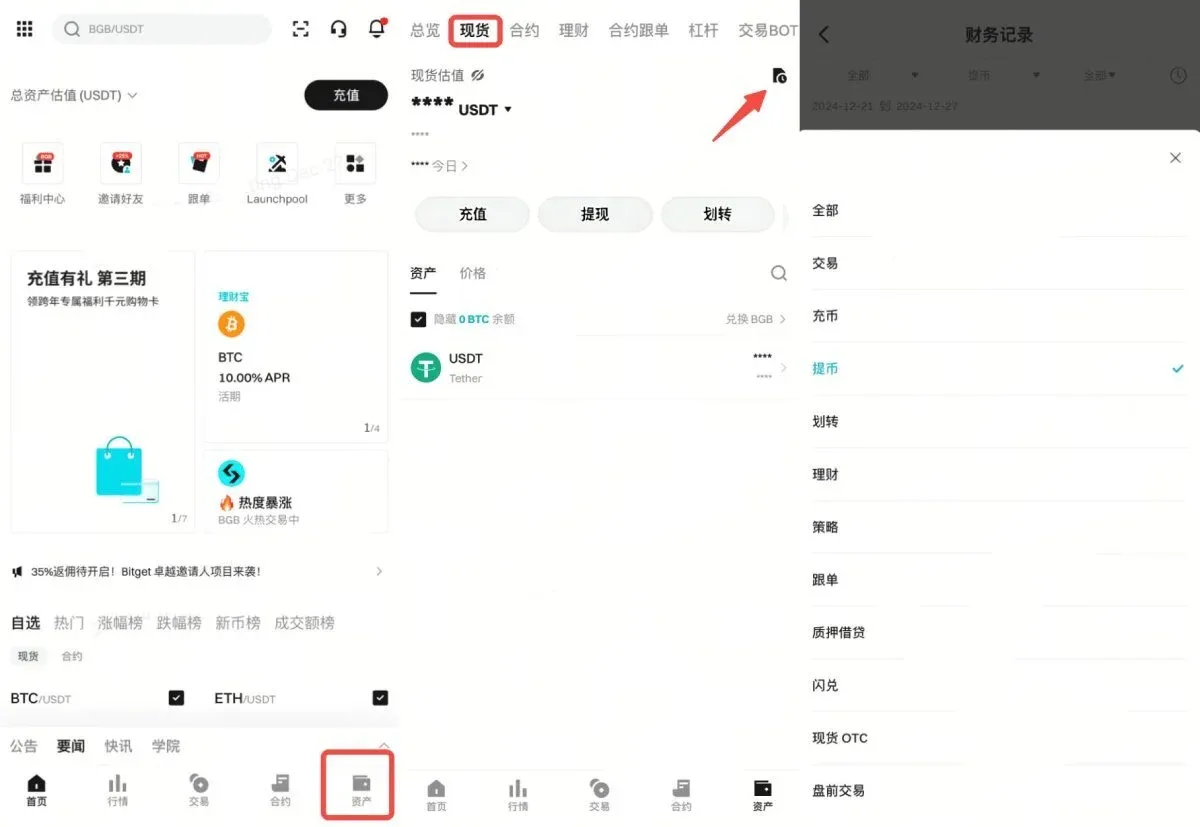
Step 5: Monitor Withdrawal Status
- In the Assets section, tap History at the bottom.
- Choose Withdrawals to view the status of each request (Processing, Completed, Failed).
Tips for Successful Withdrawals
- Verify that the receiving wallet supports the selected coin and network.
- Check the blockchain explorer for network congestion to estimate confirmation times.
- Keep enough balance to cover the withdrawal fee.
Deposit / Withdrawal Considerations and Recommendations
Fee Comparison Table
| Method | Deposit Fee | Withdrawal Fee | Speed | Recommendation |
|---|---|---|---|---|
| Exchange Transfer | 1 USDT | 1 USDT | Fast | ⭐⭐⭐⭐⭐ |
| Credit‑Card Purchase | 2‑5 % | — | Fastest | ⭐⭐⭐⭐ |
- Address Verification: Always double‑check the address and network three times; copy‑paste and compare the first and last few characters.
- Network Choice: Fees vary widely across chains; prioritize low‑cost, widely supported networks such as TRC‑20.
- KYC Completion: Verified accounts enjoy higher withdrawal limits; unverified accounts are limited to US$50 000 per day.
Recommended Workflow for Beginners
- Register & Verify: Use invitation code `vxje` during registration and finish KYC.
- Test with a Small Amount: Perform a low‑value deposit first to confirm the process.
- Prefer TRC‑20: For both deposits and withdrawals, the TRC‑20 network is generally the cheapest and fastest.
- Backup Information: Keep records of transaction IDs, deposit/withdrawal addresses, and screenshots.
- Secure Settings: Enable 2FA, set a withdrawal password, and keep your recovery codes offline.
Common Mistakes and How to Avoid Them
| Mistake | Potential Consequence | Prevention |
|---|---|---|
| Wrong address | Permanent loss of assets | Copy‑paste and verify |
Related Reading
- Binance Review 2024: Features, Security, Fees & BNB Discounts
- OKX Review 2024: Secure Crypto Exchange Features, Trading & Safety
- OKX Exchange Beginner Registration Tutorial – Up to 20% Fee Discount
💡 Register on Binance with referral code B2345 for the maximum trading fee discount. See Binance complete guide.



