
 Bitaigen Research
 Gate.io Withdrawal to Bank Card – Safety, Steps, and Tips
Gate.io is a digital‑asset exchange that offers free conversion between fiat and cryptocurrencies, as well as deposit and withdrawal functions. Many users wonder how to transfer their platform balances to a bank card or other payment channels. This article systematically reviews the process from three perspectives: operational steps, shortcut methods, and security essentials.
The BitRoot editorial team has compiled the full workflow for moving funds from Gate.io to a personal bank account, focusing on the safety points of withdrawing to a bank card, common risks, and practical app‑operation tricks. The guide helps newcomers get started quickly, ensures fund safety, and includes a FAQ section.
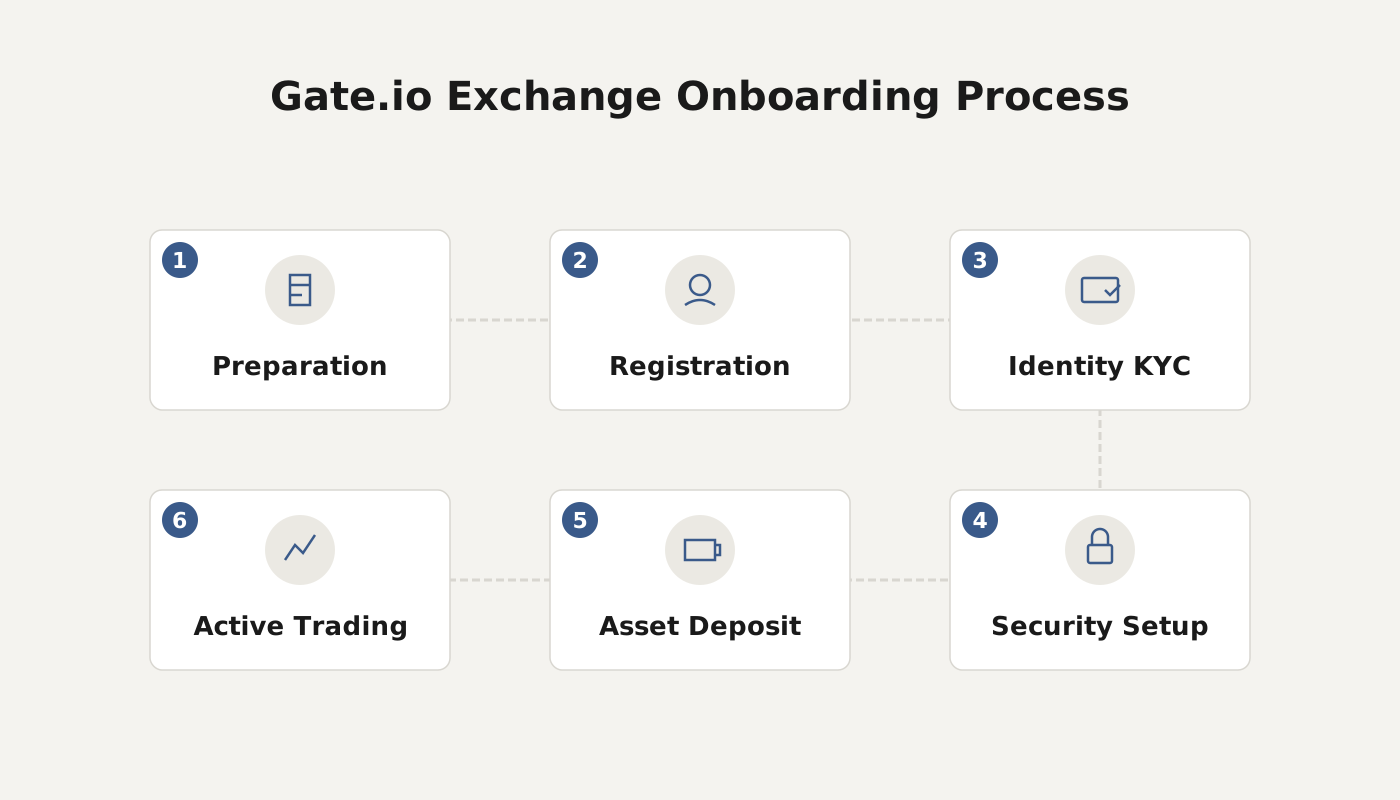
Is Withdrawing from Gate.io to a Bank Card Safe?
Moving assets from Gate.io to a bank card is generally reliable, but safety depends on several factors. Pay attention to the following points:
- Security level of the platform itself
Choose a reputable exchange with a strong historical security record, and enable two‑factor authentication (2FA) on your account. This markedly increases protection against unauthorized access.
- Accuracy of the recipient’s banking information
Double‑check the bank account number, cardholder name, and any other required details before confirming the withdrawal. Typos can cause funds to be delayed or sent to the wrong account.
- Reliability of any third‑party service
If you need an external institution to perform fiat conversion and transfer, verify that the provider holds proper licensing and enjoys a solid reputation.
- Avoiding phishing and scams
Always access Gate.io through the official website or the official mobile app. Do not click on links or open attachments from unknown sources, and never disclose your login password, transaction password, or other sensitive data during the withdrawal process.
Following these principles will generally keep the withdrawal process secure. If you encounter any abnormal behavior, contact Gate.io customer support promptly for assistance.
Gate.io Withdrawal to a Bank Card – Step‑by‑Step Guide (App Version)
Below is a detailed walkthrough using the mobile app to convert USDT into fiat (USD in the global context) and withdraw the proceeds to a bank card via the fiat‑trading feature.
1. Open the Fiat‑Trading Page
Launch the Gate.io official app you have already installed, log in, and tap “Fiat Trading” on the main screen.
2. Choose the Standard Sell Mode
On the fiat‑trading page, switch to “Custom Trading – Standard”, then tap “Sell”. Select the trading pair (this guide uses USDT/USD as an example) and press “Online Merchants” to start the sale.
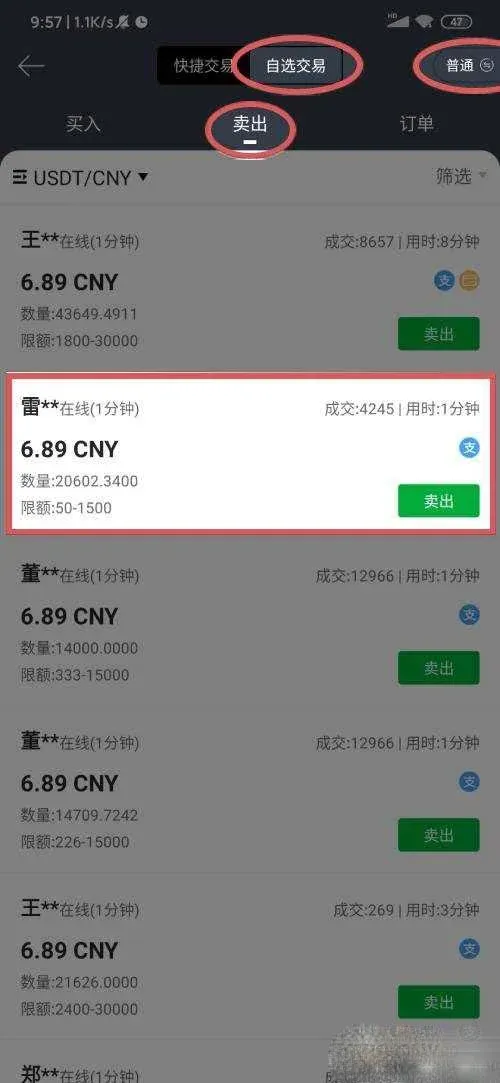
3. Enter the Quantity or Amount to Sell
You may either type the amount of USDT you wish to sell or directly input the desired USD amount you want to receive. After filling in the fields, tap “Sell Now” (if you entered a quantity, click the button after the quantity entry).
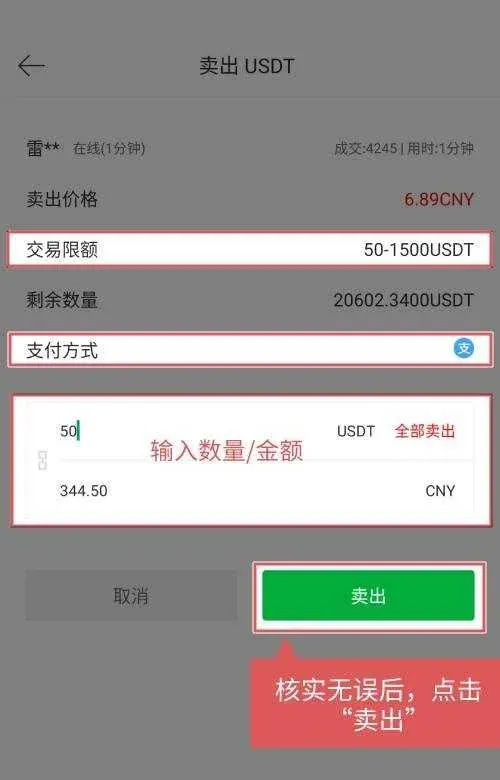
4. Confirm Order Details
The system will display the current exchange rate, the amount of USDT, and the estimated USD you will receive. Verify that everything is correct, then press “Confirm Sell”.
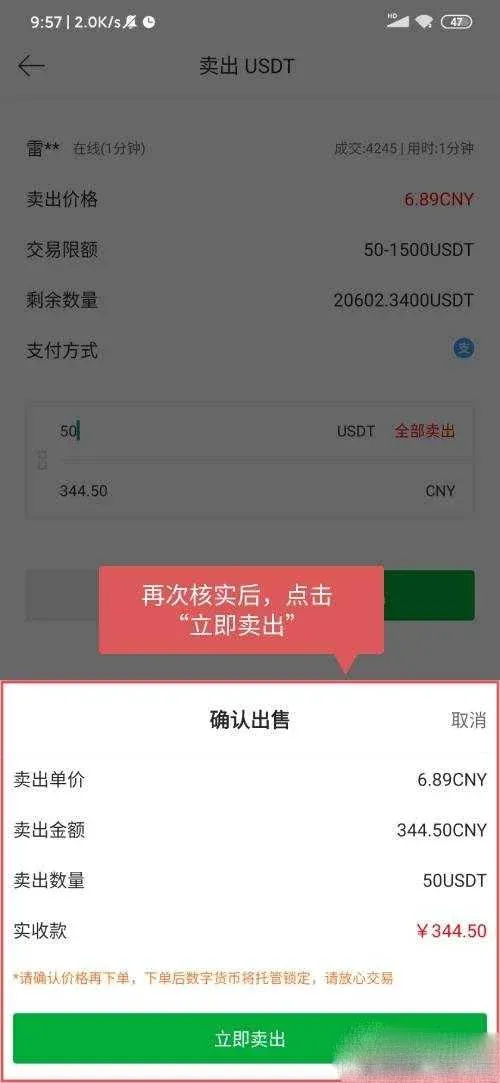
5. Input Your Transaction Password
To protect the transaction, a pop‑up will ask you to enter the transaction password you set in the app.
6. Check the Order Status
After the sell order is submitted successfully, you can view the record under “Orders → Pending/Completed”.
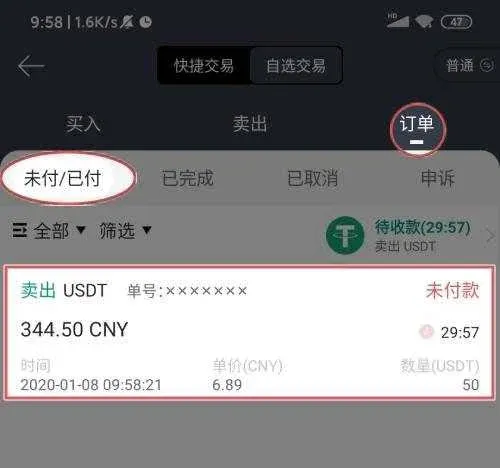
7. Verify the Receiving Bank Information
Tap the specific order to expand “Sell Details.” This section lists the payment method used for this transaction and the corresponding bank‑card details. Make sure the information matches your own card.
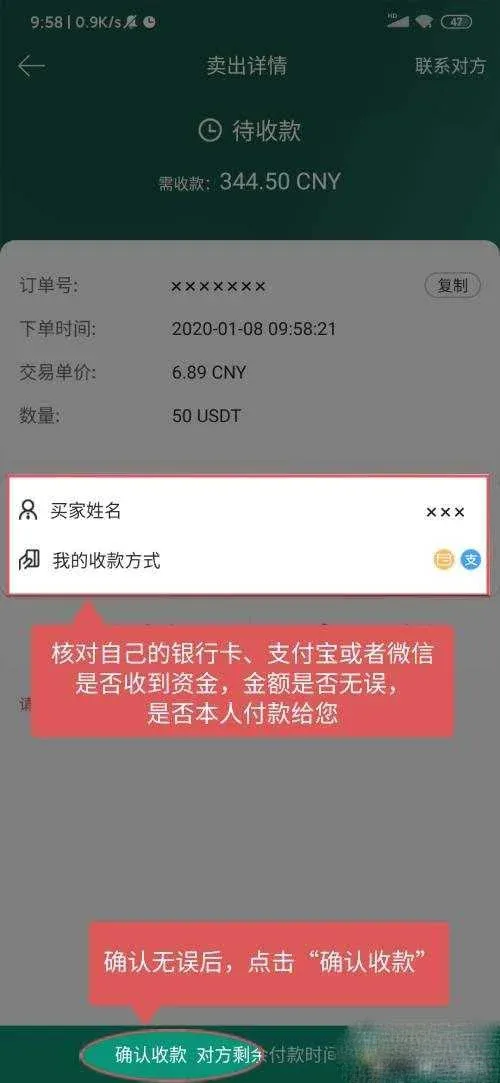
Tip: Only click “Confirm Receipt” after you have actually received the funds in your bank account; otherwise you risk a double‑spending scenario.
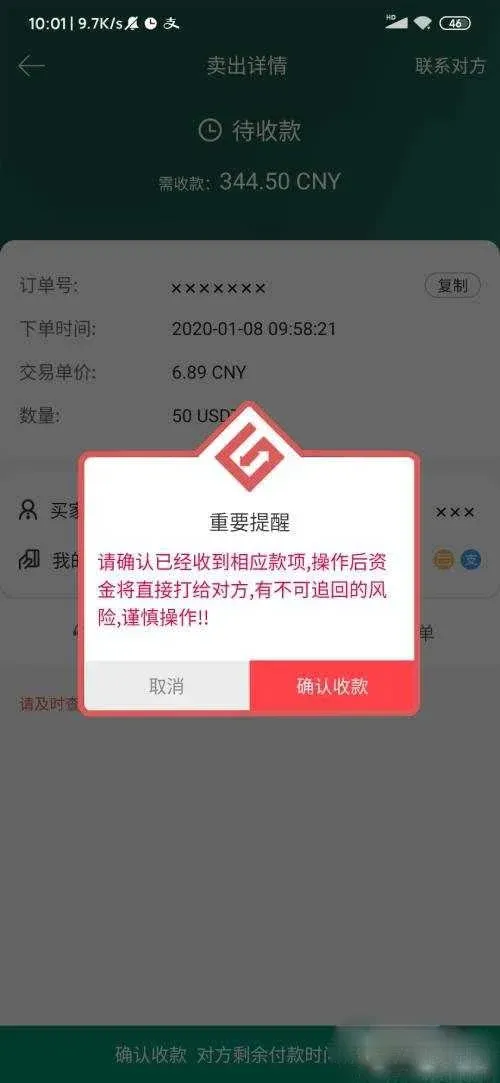
8. Complete the Transaction
Once you tap “Confirm Receipt,” the order status changes to “Completed.” You can double‑check this in “Orders → Completed.”

---
(Alternative) Quick‑Trade Path
If you prefer a more streamlined approach, you can use the Quick Trade feature:
- Go to “Fiat Trading → Quick Trade,” select “Sell.”
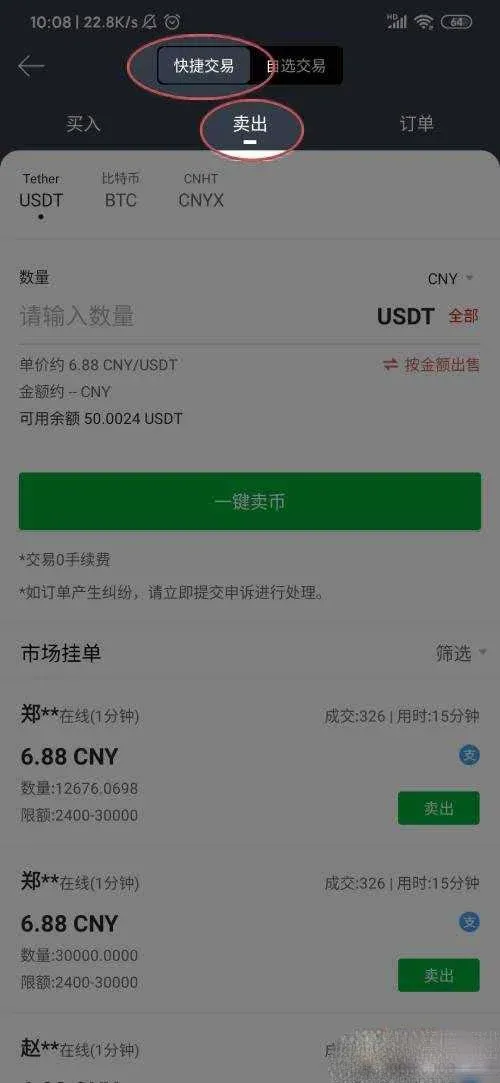
- Using USDT as the example, enter the sell quantity or the USD amount, then tap “One‑Click Sell.”
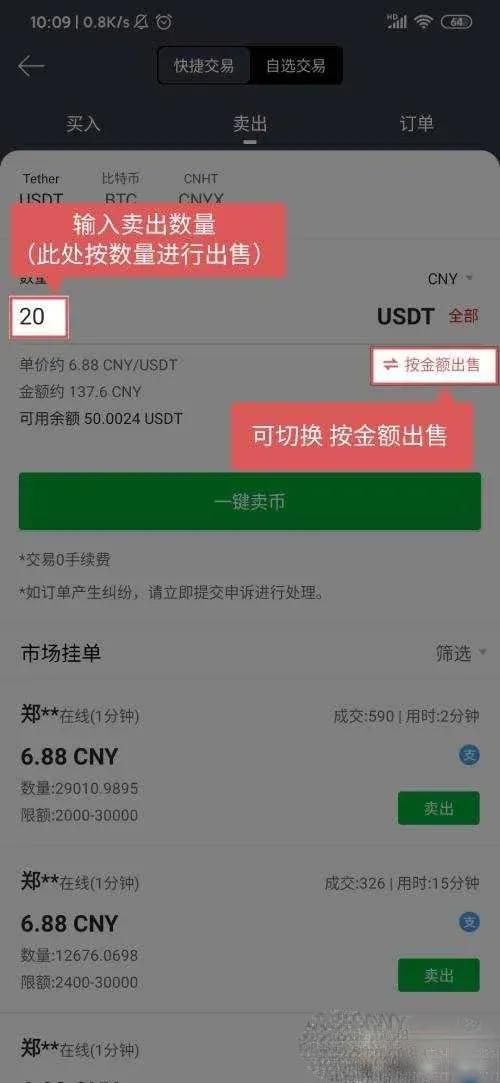
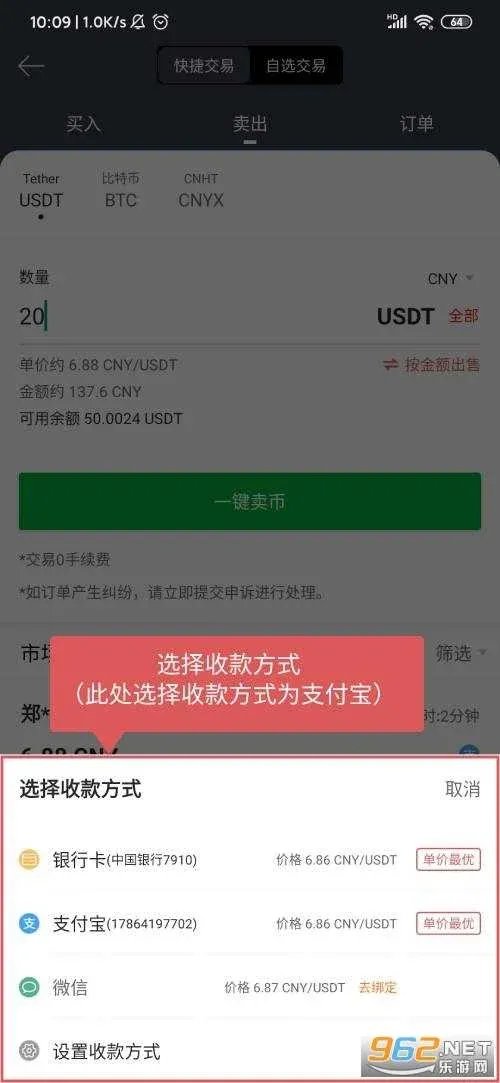
- In the pop‑up list of payment methods, choose Bank Card (or any other accepted channel).
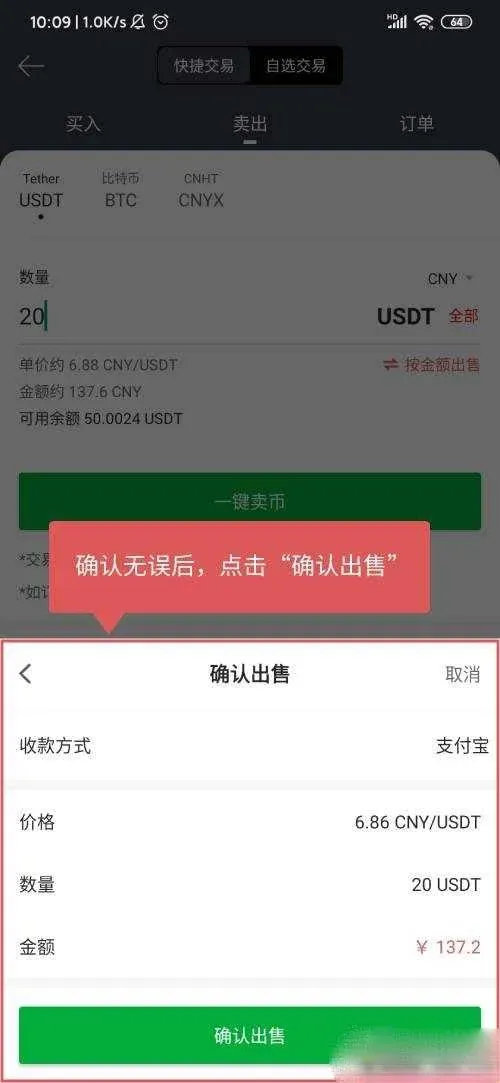
- Review the price, quantity, and payment method once more, then click “Confirm Sale.”
- After entering your transaction password, the system automatically matches you with a suitable buyer. When the match succeeds, a “Pending Receipt” label appears on the right side, and you can also view the order under “Orders → Pending/Completed.”
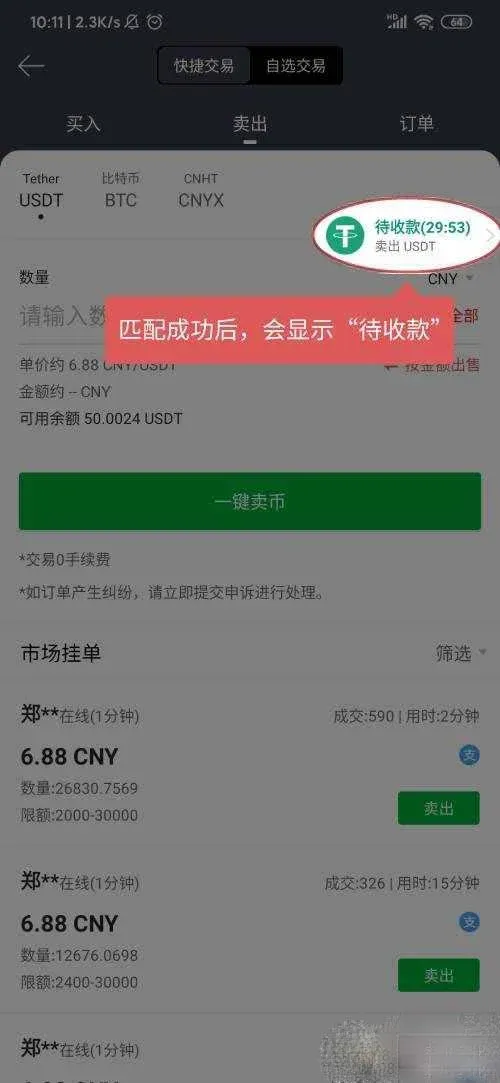
- Tap “Pending Receipt” to see the order details.
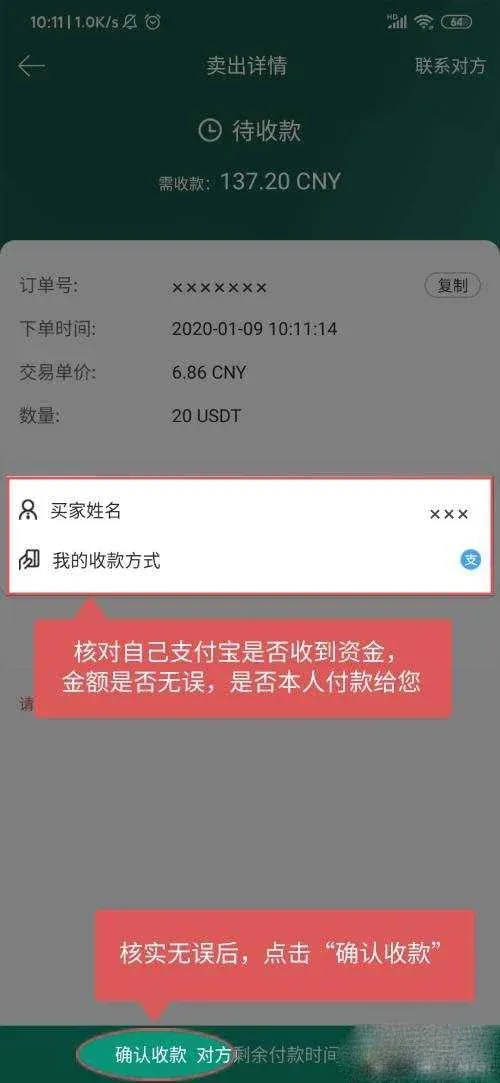
Important: Be sure to click “Confirm Receipt” only after the funds have arrived in your bank account. Confirming prematurely may expose you to a loss of the crypto you sold.
---
Additional Considerations for Global Users
- Fiat Currency Options: While this guide uses USD as the reference fiat currency, Gate.io supports multiple fiat corridors, including SEPA (Euro) and SWIFT (various currencies). Choose the method that aligns with your local banking infrastructure.
- U.S. Residents: If you are located in the United States, you must use a U.S.-compliant platform such as Binance.US for any Binance‑related operations; the global Binance site is not available to U.S. users. This note does not affect Gate.io usage, but it is a reminder when dealing with other exchanges.
- Tax Implications: Cryptocurrency disposals—whether you sell, trade, or withdraw to fiat—may generate taxable events in many jurisdictions. Users should consult a tax professional or refer to local regulations to determine whether capital gains, income, or other taxes apply to their transactions.
---
Frequently Asked Questions (FAQ)
| Question | Answer |
|---|---|
| **Can I withdraw directly to a debit card?** | Yes, Gate.io allows withdrawals to most major debit and credit cards that support the selected fiat corridor (e.g., USD via SWIFT). |
| **How long does a withdrawal take?** | Typical bank transfers via SWIFT take 1–3 business days, while SEPA transfers within the EU are usually completed within 1 business day. Delays may occur due to banking holidays or compliance checks. |
| **What if I entered the wrong bank account?** | Once a withdrawal request is processed, it cannot be altered. Contact Gate.io support immediately; they may be able to halt the transaction if it is still pending. |
| **Is there a fee for withdrawing to a bank card?** | Gate.io charges a small network fee that varies by fiat corridor and the amount withdrawn. The exact fee is displayed on the confirmation screen before you finalize the transaction. |
| **Do I need to verify my identity before withdrawing?** | Yes, KYC (Know‑Your‑Customer) verification is required for fiat withdrawals exceeding the platform’s unverified limits. Complete the identity verification in the app under **“Account → KYC.”** |
---
By following the steps and security tips outlined above, you can confidently move your crypto‑derived funds from Gate.io to a traditional bank account, while staying compliant with global banking standards and local tax obligations.
Related Reading
- Gate.io Transfer Guide: Memo & Tag for XRP, XLM, EOS
- GT Token (GateChain) Overview: Price, Supply, and Use Cases
- DeFi & NFTs: Security, Governance & Innovation Challenges
💡 Register on Binance with referral code B2345 for the maximum trading fee discount. See Binance complete guide.



