
 Bitaigen Research
 The Bitaigen editorial team has prepared a complete OKX registration and deposit guide for beginners. We break down each step—from account creation and identity verification to on‑chain deposits and C2C (peer‑to‑peer) purchases—compare fees and arrival times, and help you quickly choose the method that best fits your needs. Keep reading to finish the whole process with ease.

Overview
Before you start trading digital assets on OKX, the most critical step is moving fiat currency or other on‑chain assets into the platform. This article systematically introduces the two main funding channels on OKX—On‑Chain Deposit and C2C Purchase—and compares their fees, settlement speed, and suitable user groups, helping you quickly decide which option is optimal for you.
---
1. Account Creation and Identity Verification
1.1 Registration Process
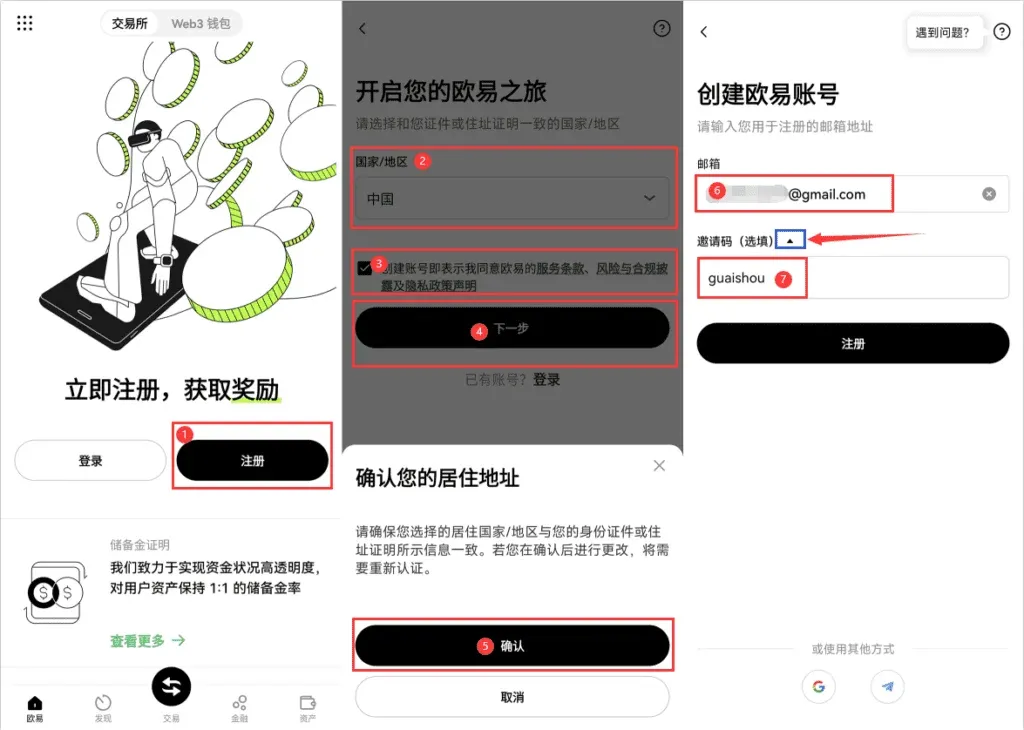
- Download and open the OKX APP (official link: OKX registration | official download), then tap Register.
- On the pop‑up page, select the appropriate Country/Region according to the identification document you hold, read and tick the Terms of Service, and then click Confirm.
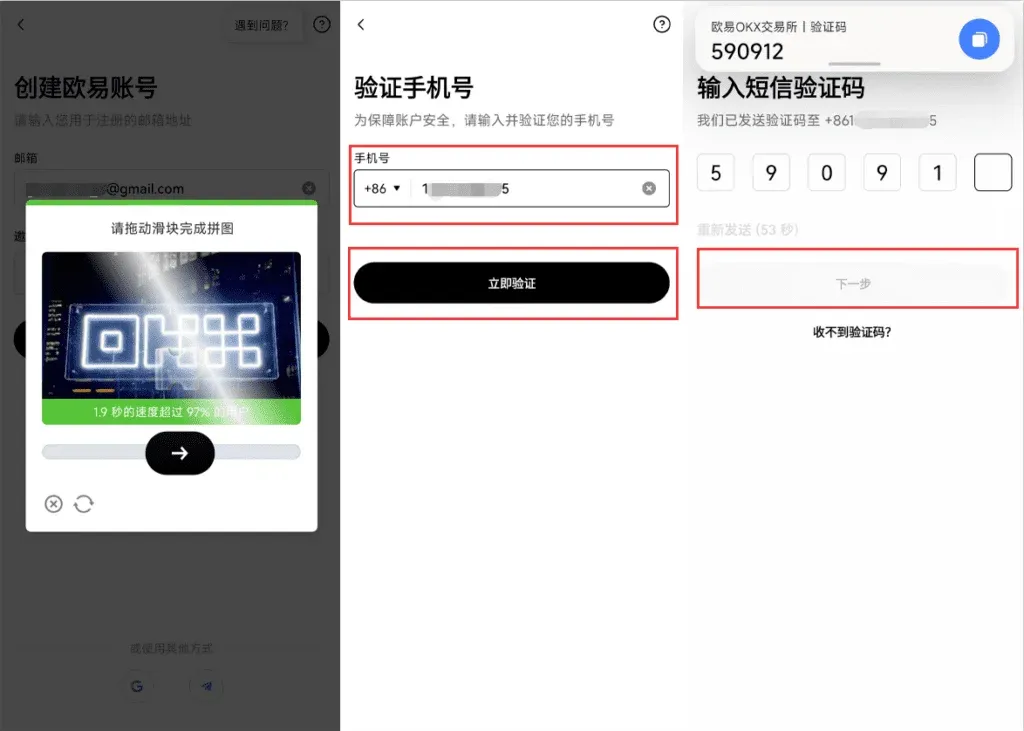
- After solving the graphic captcha, enter your mobile number. Mainland Chinese users should use +86, Hong Kong users +852. Request and input the SMS verification code to proceed to the next step.
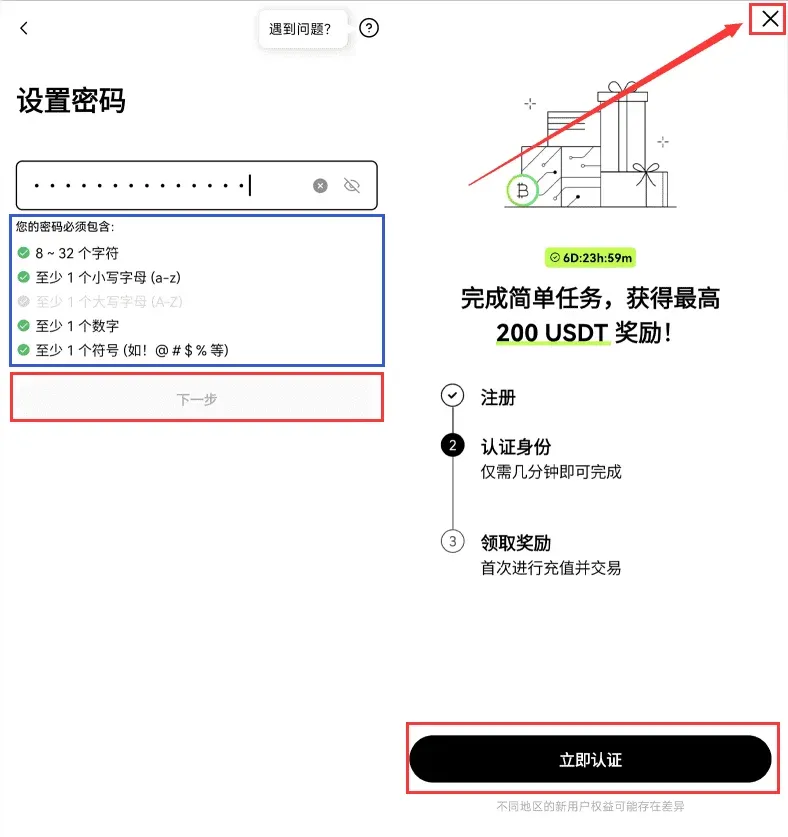
- Set a login password, and the account registration will be complete. At this point you can either start identity verification immediately, or tap the × in the upper‑right corner to do it later.
1.2 KYC Identity Verification
- After logging in, the system will prompt you to verify your identity on the home page or any trading page.
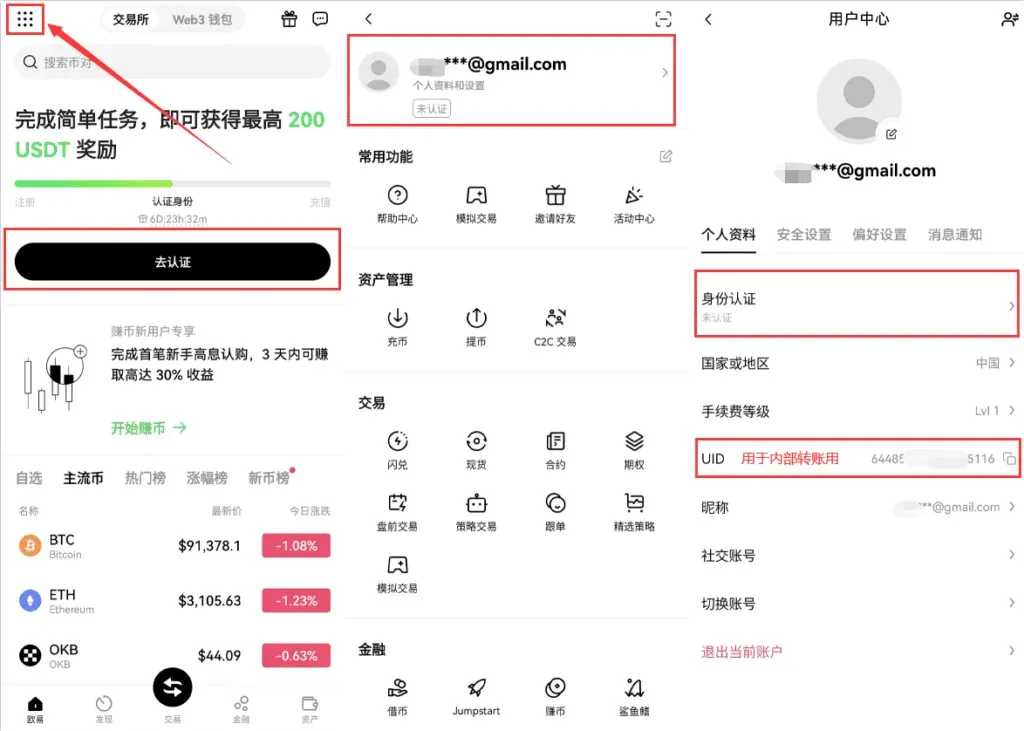
- Open the menu in the top‑left corner and choose Profile & Settings → Identity Verification.
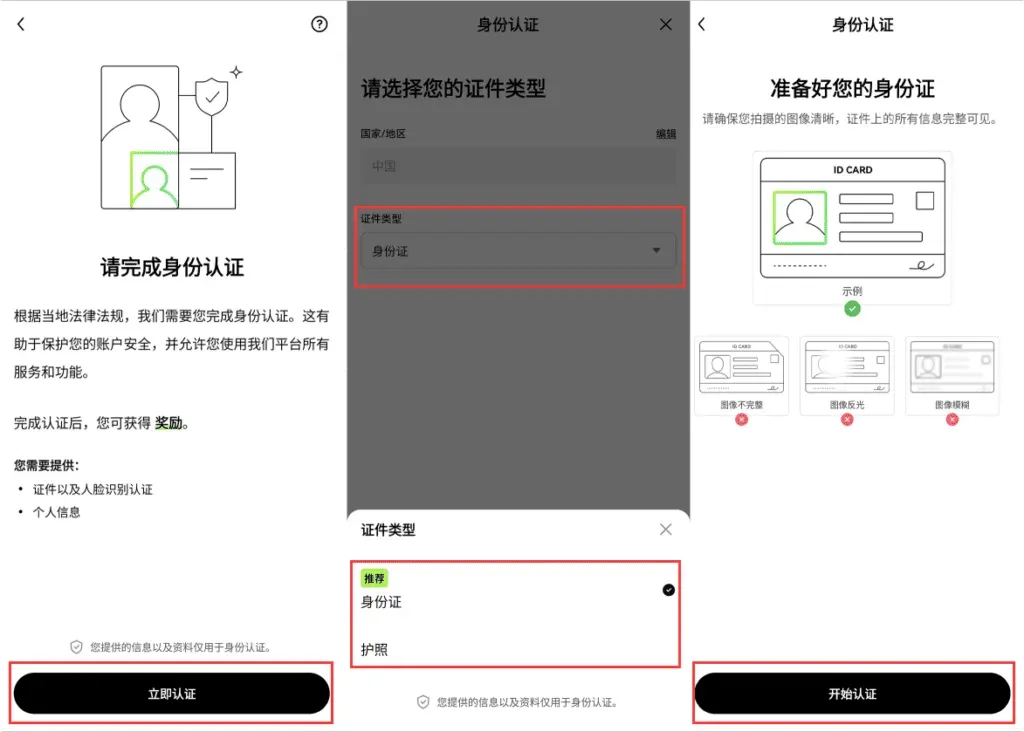
- Tap Start Verification, follow the prompts to upload photos of your identification document and complete facial recognition. Once finished, all KYC steps are done.
Currently OKX no longer distinguishes between verification levels; a completed real‑name verification together with facial recognition is sufficient. If you plan to conduct large‑volume trades, you will see a C2C video verification entry in the menu, but ordinary users do not need to take any extra steps.
---
2. Overview of Deposit Methods
OKX supports two mainstream deposit channels: On‑Chain Deposit and C2C Purchase. The table below compares the key characteristics of each, allowing you to quickly assess which solution matches your situation.
| Method | Fee | Arrival Time | Main Advantages | Main Disadvantages | Ideal Users |
|---|---|---|---|---|---|
| On‑Chain Deposit | 0 (only on‑chain gas fee) | 5‑10 minutes | Low cost, works across many platforms, suitable for long‑term holding | Requires some knowledge of blockchain operations; higher entry barrier for first‑time users | Users who already hold crypto on other exchanges or wallets and want to move them into OKX for deeper engagement |
| C2C Purchase | Approx. 2.5‑5 % (depends on payment method) | Near‑instant (1‑3 minutes) | Simple UI, supports bank cards, Alipay, WeChat Pay, and for global users SEPA/SWIFT transfers | Higher fee, requires trust in the counter‑party | Beginners, users who need fast funding and do not yet have on‑chain assets |
---
3. Recommended Method: On‑Chain Deposit
An on‑chain deposit means transferring existing cryptocurrency from another exchange or wallet into OKX. This method is highly reusable—once you learn it, you can apply the same steps across multiple platforms—and the cost is extremely low (for example, a USDT‑TRC20 transfer typically costs only about 1.2 USDT in network gas).
3.1 Step‑by‑Step Procedure (USDT‑TRC20 example)
| Item | Details |
|---|---|
| Recommended Network | **TRC20** (0 fee, only the sending side pays gas; arrival typically 5‑10 minutes) |
| Minimum Deposit Amount | 10 USDT (may vary slightly across different chains) |
| Key Tips | Keep the network consistent; for first‑time users, perform a small test transfer first |
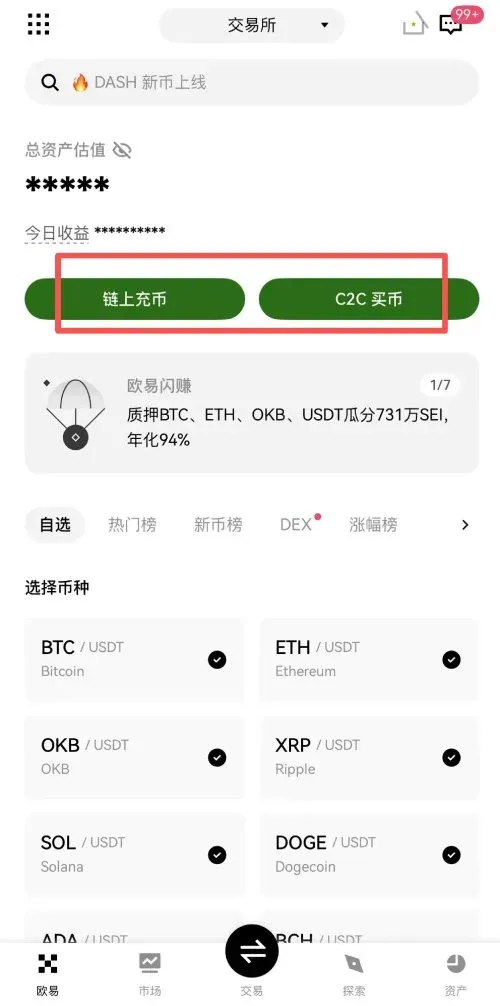
- Log in to the OKX APP, tap On‑Chain Deposit on the home screen, and select USDT from the list of assets. The app will display several network options; we strongly recommend choosing TRC20 because it offers the lowest fee and fast confirmation.
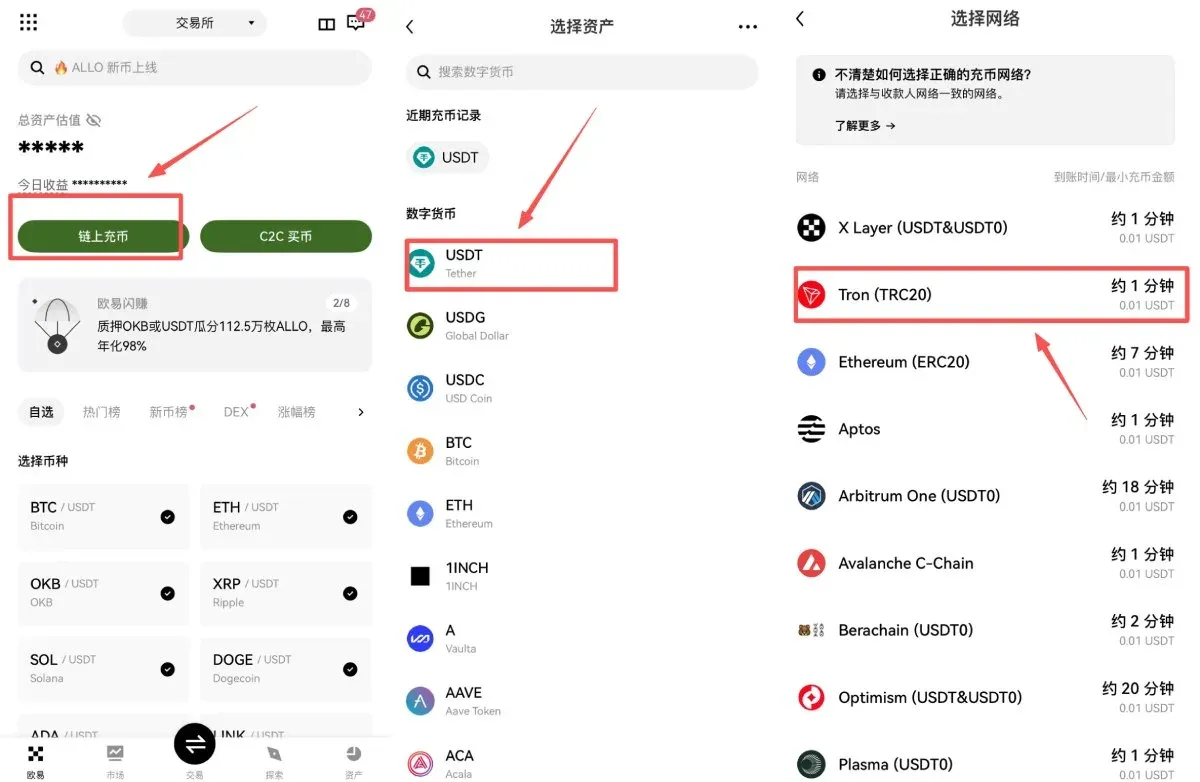
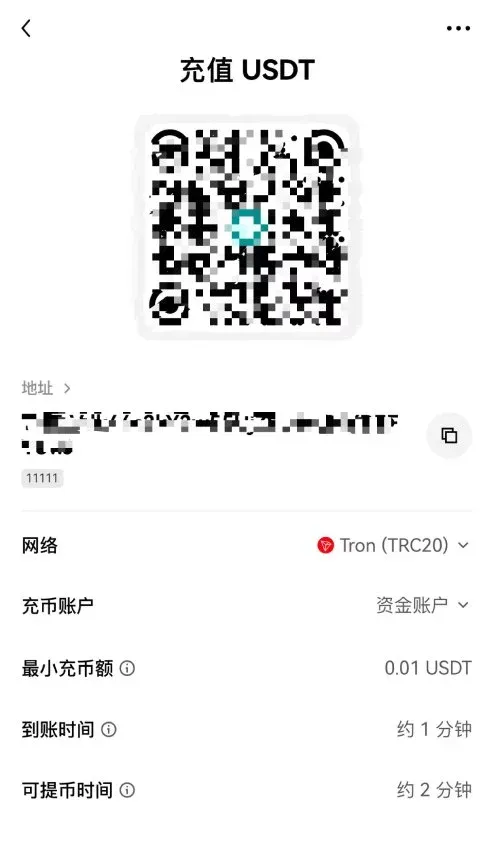
- After selecting TRC20, the page generates a unique deposit address for you (e.g., `TX3abxxxx…`). You can tap Copy or scan the QR code. Double‑check the first and last few characters of the address to avoid accidental mis‑transfer.
Important: Different networks use different address formats. Ensure that the sending platform also selects TRC20; otherwise the assets may be irretrievable.
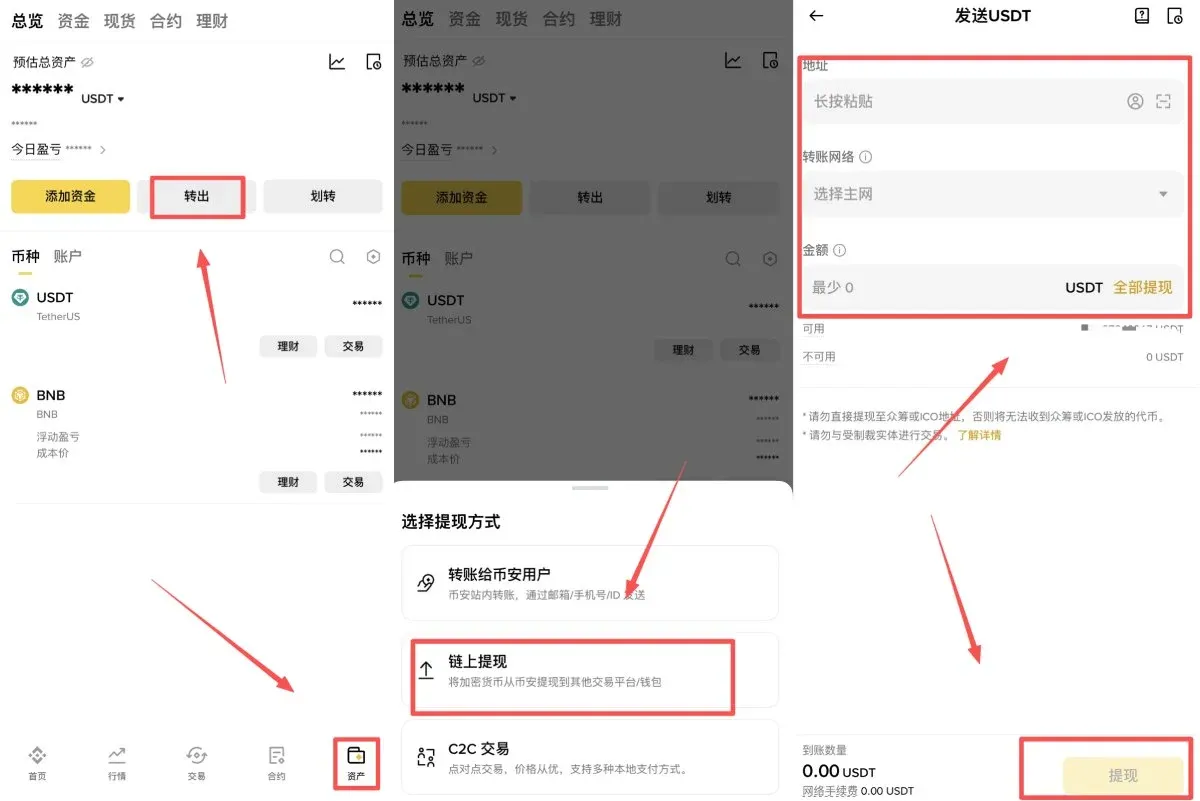
- Open the platform where your USDT is currently held. In this example we use Binance; U.S. users should use Binance.US or any other compliant exchange. Navigate to Wallet → Withdraw → On‑Chain Withdrawal, select USDT, paste the OKX address you just copied, confirm the network is TRC20, enter the amount you wish to transfer, and submit the request.
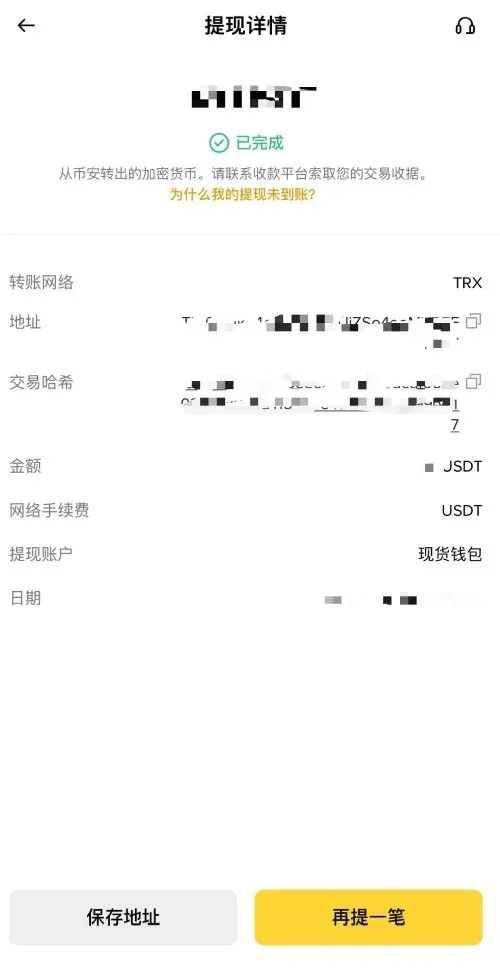
- The TRC20 network typically finalises the transaction within 3‑10 minutes. Once confirmed, you can view the incoming funds under Assets → Spot Account → USDT inside the OKX app.
---
4. Beginner‑Friendly Option: C2C Purchase
If you are using OKX for the first time and currently do not own any cryptocurrency, the C2C Purchase feature provides the most straightforward way to fund your account. This service accepts bank cards, Alipay, WeChat Pay, and for users outside of China, SEPA or SWIFT bank transfers, allowing you to buy USDT, BTC, ETH and other major coins directly with fiat (e.g., USD, EUR, or RMB). The platform automatically compares offers from multiple sellers and highlights the lowest‑cost quote, making the experience similar to a typical e‑commerce checkout—very easy for newcomers.
4.1 Fees and Timing
- Fee: Approximately 3‑5 % (exact percentage depends on the chosen payment channel)
- Arrival Speed: Near‑real‑time (1‑3 minutes)
4.2 Step‑by‑Step Guide
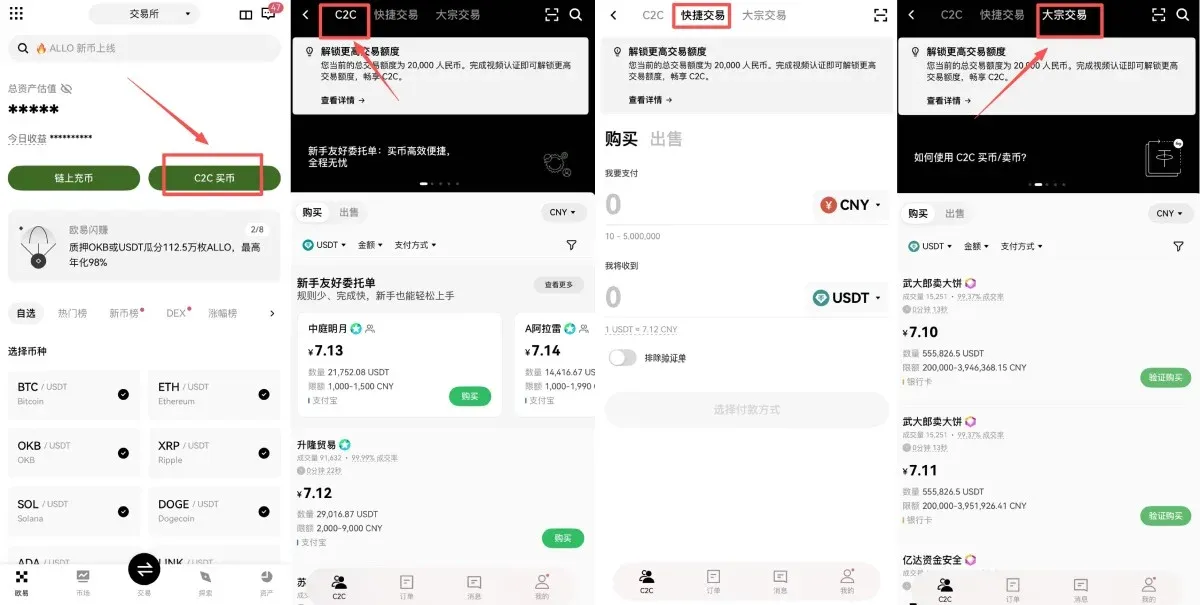
- Open the OKX APP and tap C2C Purchase to enter the trading page. At the top you will see three tabs: C2C, Quick Trade, and Bulk Trade. The sections below explain how each works.
4.2.1 Quick Trade
- Choose Quick Trade → Buy, input the amount you wish to spend and the cryptocurrency you want, then click Select Payment Method → Preview Order.
- After confirming the seller’s information, tap Confirm.
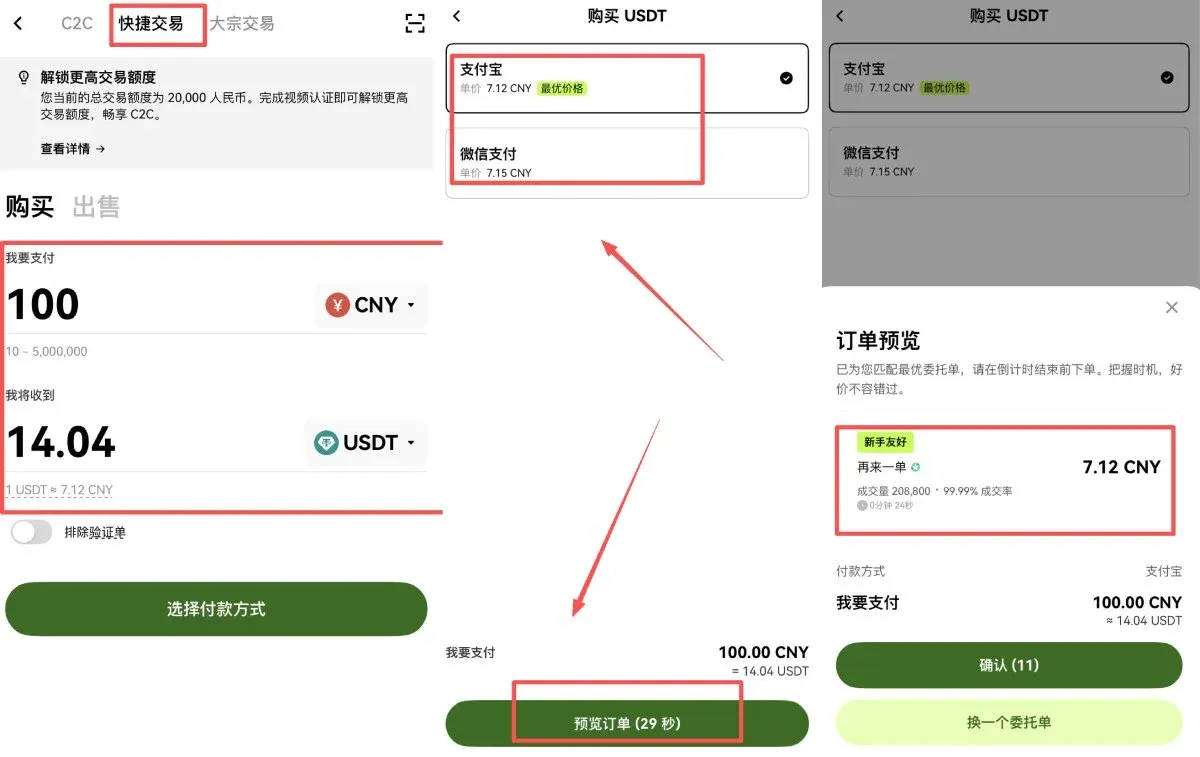
- The system generates payment details; follow the seller’s instructions to complete the transfer.
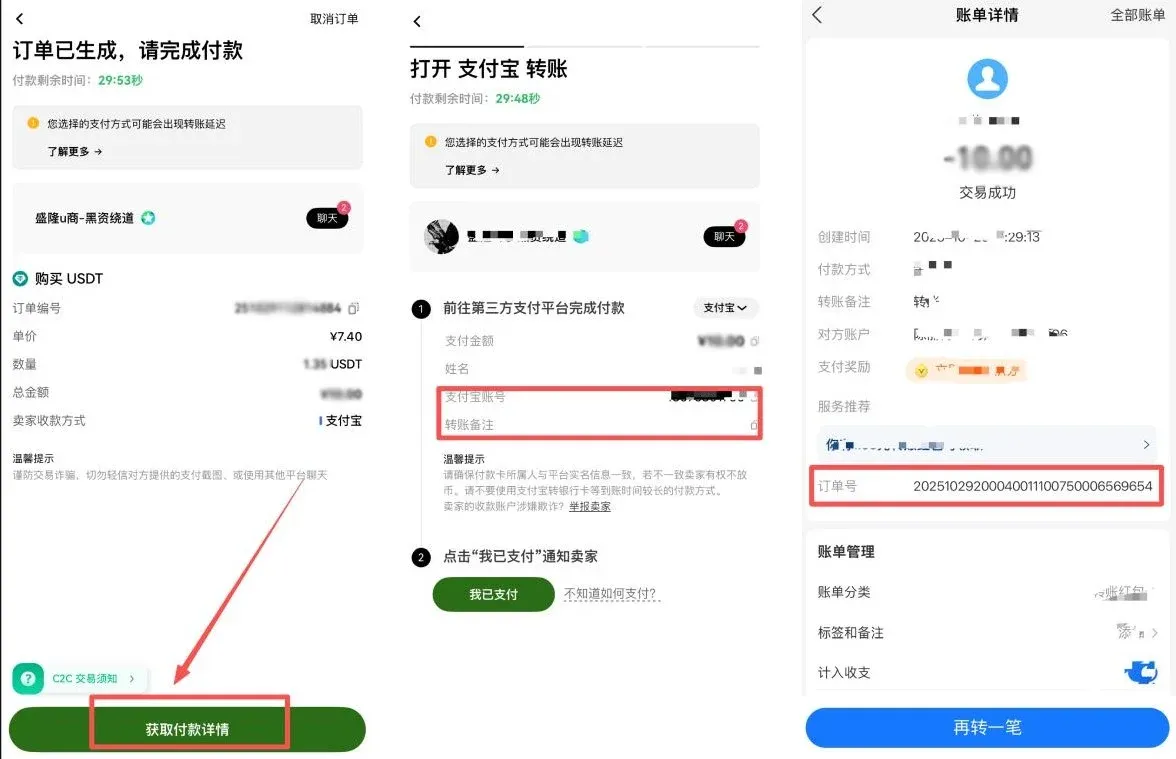
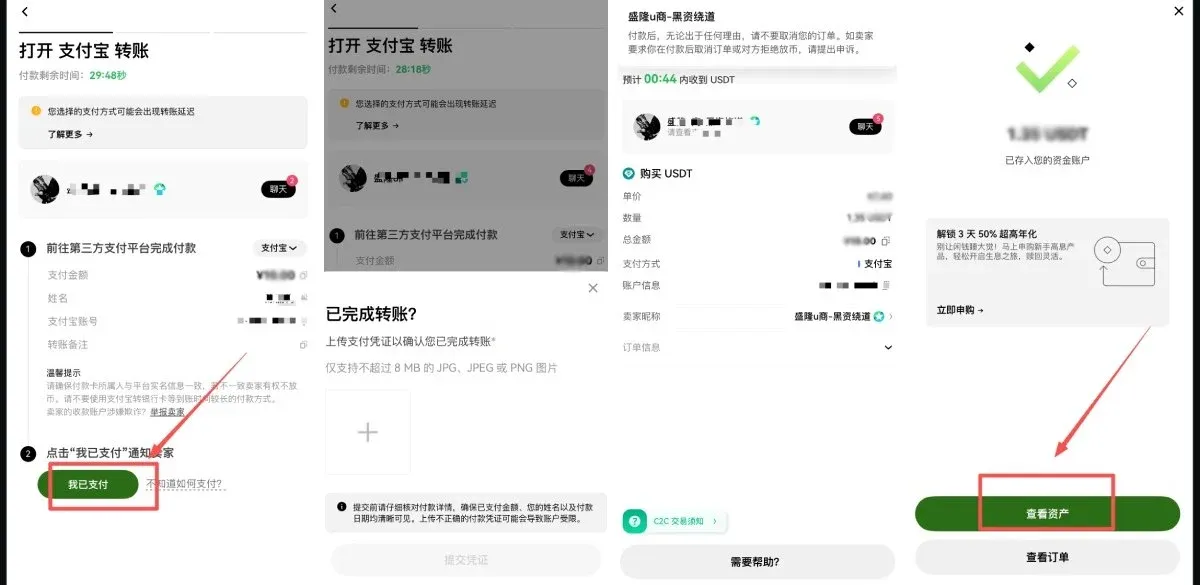
- Once you have paid, return to the OKX APP, tap I have paid, upload a screenshot of the transfer receipt, and wait for the seller to confirm and release the coins.
4.2.2 C2C (Bulk) Trade
- Switch to the C2C tab at the top, select Buy, and the default cryptocurrency will be USDT (pegged 1:1 to the US dollar).
- Enter the fiat amount you want to spend (e.g., 500 USD), then click Confirm. In the payment method list you can tick Bank Card, Alipay, WeChat Pay, or for global users SEPA/SWIFT.
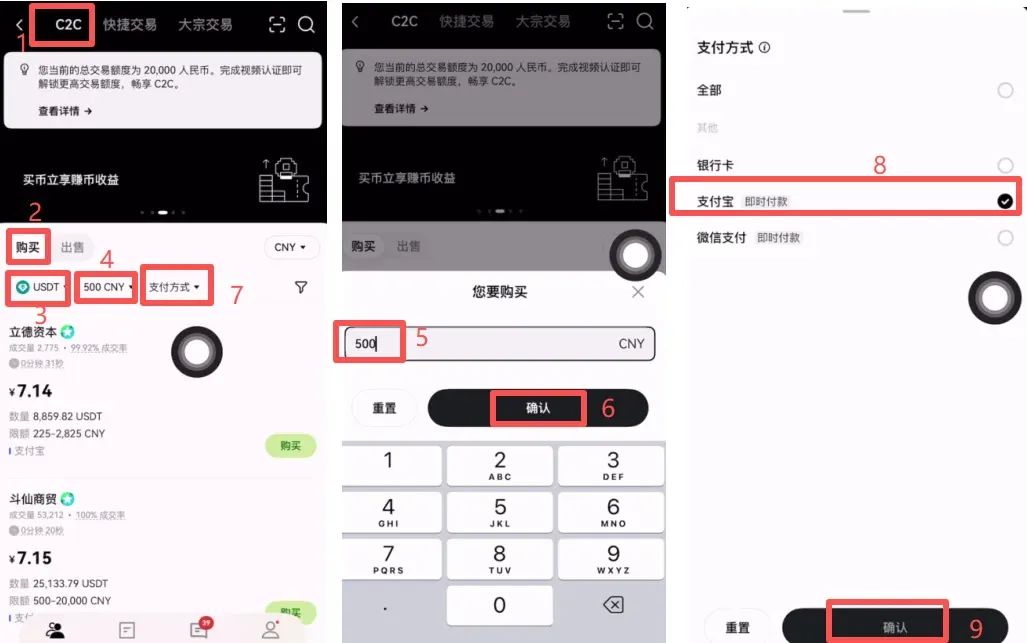
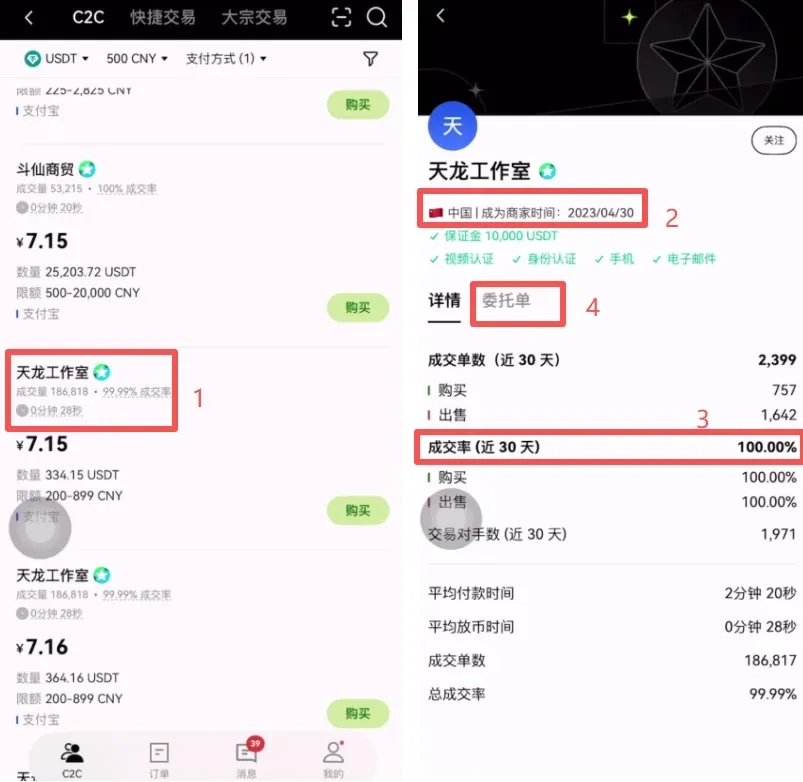
- The platform automatically filters sellers that meet your criteria. We recommend prioritising sellers with high transaction volume, high fulfillment rate, and a long registration history to reduce counter‑party risk.
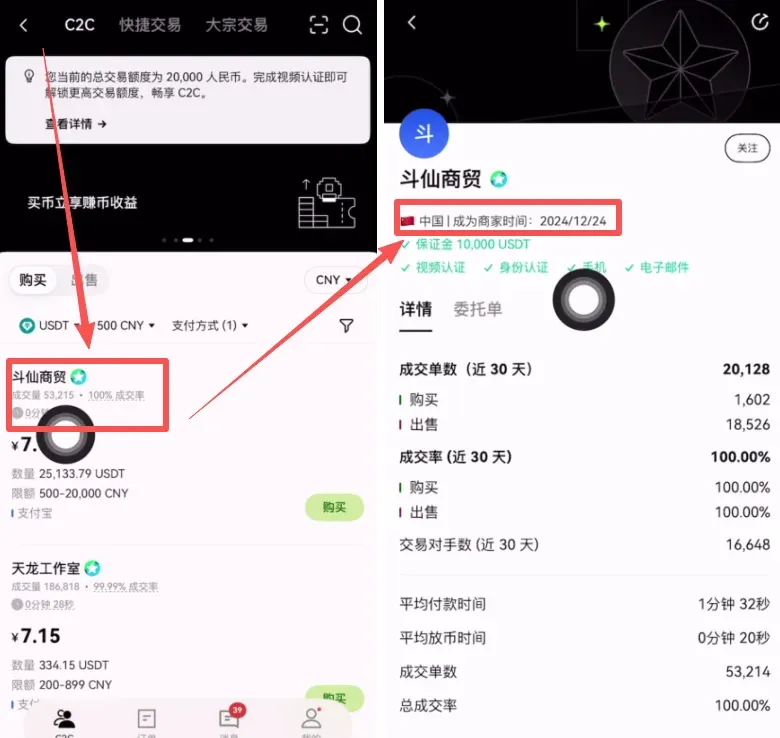
- For example, you might select “Tianlong Studio” (registered on 30 April 2023, 30‑day fulfillment rate 100 %). Click Order → Buy.
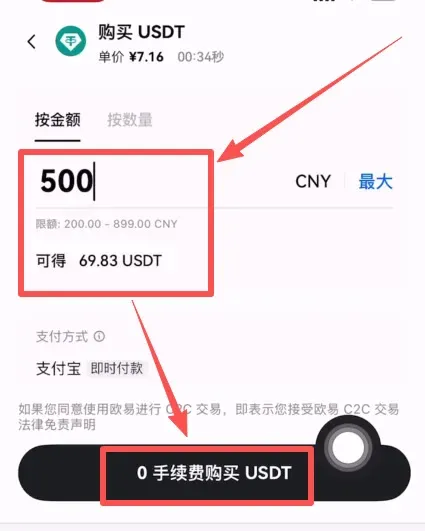
- After confirming the purchase amount, the system will display the corresponding USDT quantity (e.g., 500 USD buys 69.83 USDT). Tap 0 % fee purchase USDT to lock in the deal.
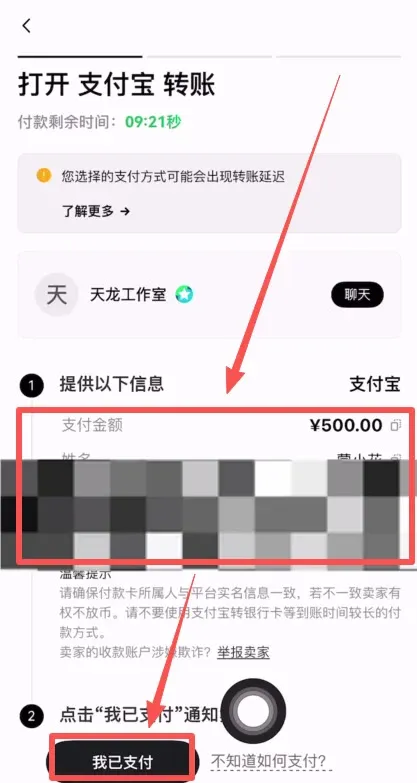
- A chat window with the seller opens. Follow the seller’s instructions to complete real‑name verified payment, then click Get Payment Details and transfer the fiat using the method the seller provided.
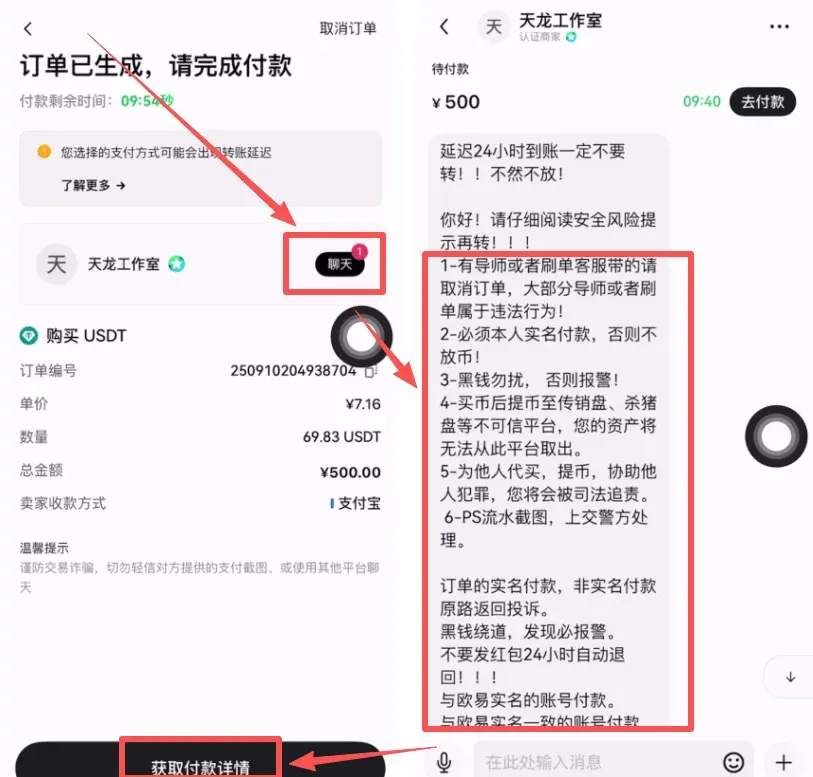
- After the transfer, tap I have paid. Once the seller confirms receipt, the USDT will be automatically credited to your Funding Account.
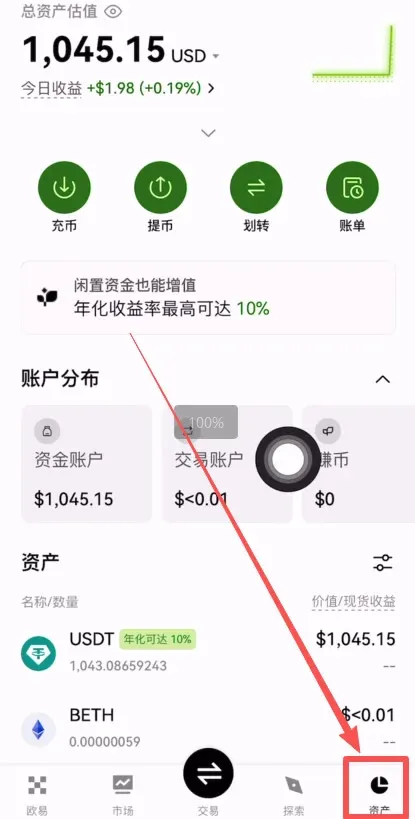
- You can view the newly arrived USDT on the Assets page at the bottom right of the APP.
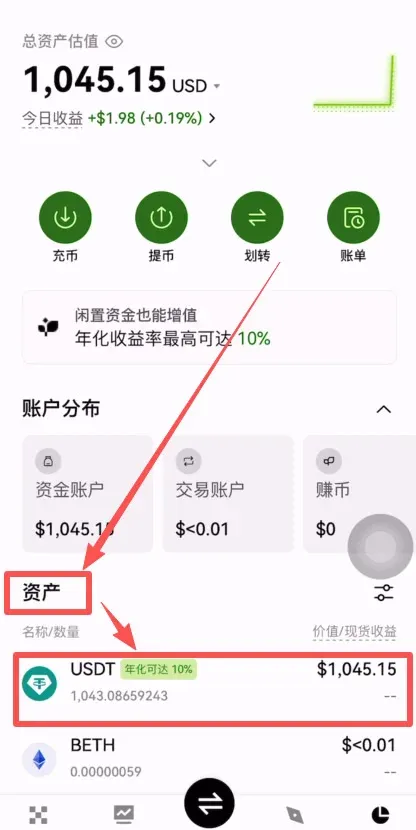
The bulk‑trade workflow mirrors the quick‑trade process; the essential difference is the need to carefully select a reliable counter‑party and fulfil the seller’s payment instructions.
---
5. Fee Summary
Regardless of which deposit method you choose, OKX itself does not charge a direct deposit fee. However, keep an eye on the following two points:
- On‑Chain Deposit: The originating exchange or wallet (e.g., MAX, Binance, or Binance.US for U.S. residents) will levy a one‑time network fee based on the selected blockchain and token. For USDT
Related Reading
- OKX Review 2024: Secure Crypto Exchange Features, Trading & Safety
- OKX Exchange Beginner Registration Tutorial – Up to 20% Fee Discount
- Best 10 Crypto Trading Apps 2024: Binance, Coinbase, Kraken
💡 Register on Binance with referral code B2345 for the maximum trading fee discount. See Binance complete guide.



