
 Bitaigen Research
 In this article we guide new OKX users through the entire process—from account registration to completing the first purchase—focusing on common steps such as phone/email binding, identity verification (KYC), and order placement. Practical tips and troubleshooting advice are provided to help you get started quickly and trade with confidence. In addition, we summarize key platform security measures so you can mitigate risks. Continue reading for the full step‑by‑step guide.
How to Buy Cryptocurrency on OKX? Complete Beginner’s Trading Flow in One Go
Purchasing crypto on OKX (formerly OKEx) requires only four core steps: Register → Complete KYC → Bind phone number/e‑mail → Set a fund password → Place a buy order. Once these are done, you can trade smoothly.
1. Register an Account
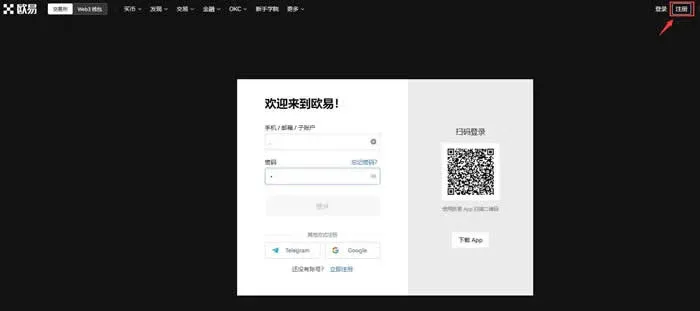
- Visit the official OKX website click here to join.
- Choose Phone number or E‑mail for registration, follow the on‑screen prompts, fill in the required information and complete the verification.
Helpful notes
- A phone number must be bound before you can trade, so we recommend registering directly with a mobile number.
- If you do not receive the SMS verification code, you can:
- Click “Didn’t receive the code?” on the login page and follow the instructions to unbind the number;
- Send clear photos of the front and back of your government‑issued ID (original documents) together with the phone number you wish to unbind to the official support mailbox service@OKX.com; the support team will assist you.
2. Complete Your Personal Information
Before you can place any trades, you need to finish three settings:
| Item | Navigation Path | Description |
|---|---|---|
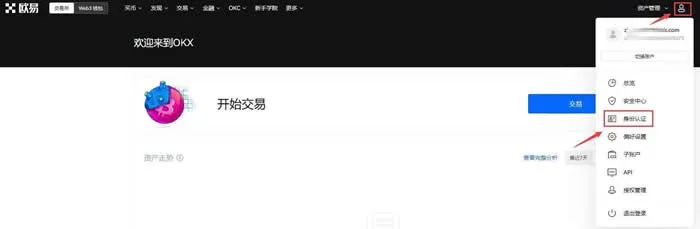
| **KYC Verification** | Click the avatar in the top‑right → **Identity Verification** → complete **Level 1 Basic Verification** and **Level 2 Advanced Verification** | Higher verification levels unlock better liquidity providers and more competitive pricing. |
| **Bind Phone/E‑mail** | Avatar (top‑right) → **Security Center** → **Phone Verification** (or **E‑mail Verification**) | Users who registered with a phone number can skip the phone‑binding step. |
| **Fund Password** | Avatar (top‑right) → **Security Center** → **Fund Password** | Required for withdrawals and trade confirmations, adding an extra layer of account protection. |
Note: On the same security page you can also set a login password, enable Google Authenticator, configure an anti‑phishing code, and more. The more complete your security profile, the smoother future transactions will be.
3. Start Buying Cryptocurrency
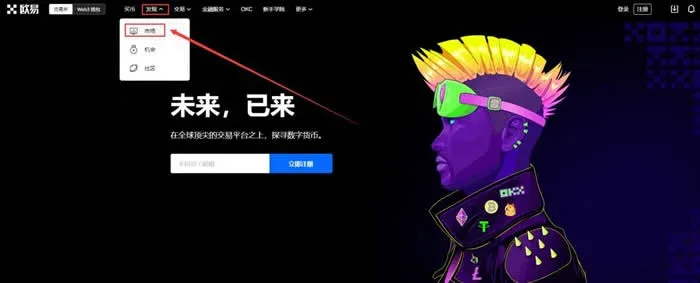
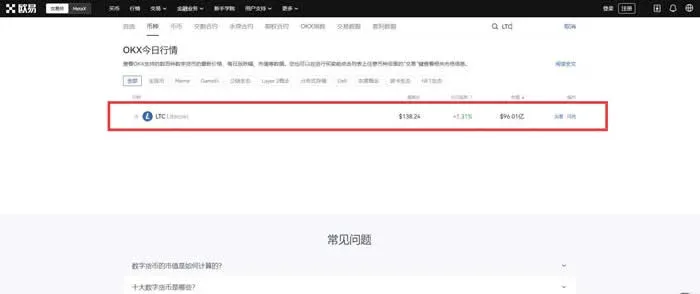
- Log in on the official website and navigate to Discover → Market.
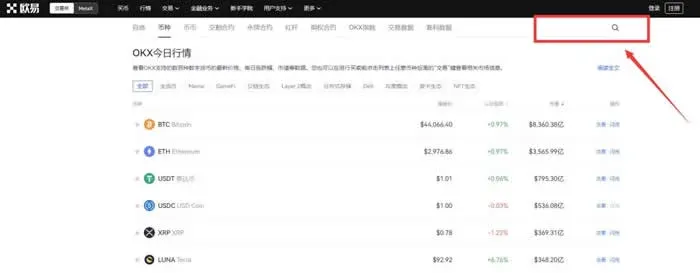
- Enter the name of the coin you wish to purchase in the search bar (example: LTC) and select the corresponding trading pair.
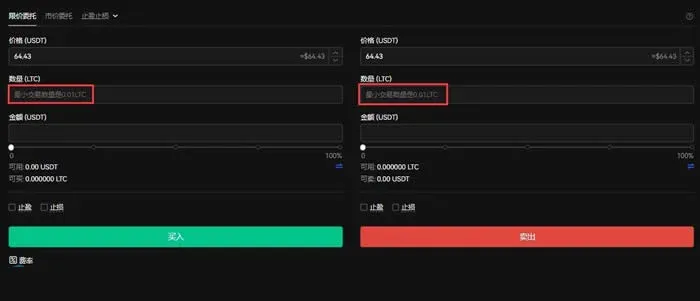
- On the trading screen click Buy (or Sell), input the amount you want, and confirm the order.
4. Overview of the OKX Platform
- Global presence: OKX ranks among the world’s highest‑volume cryptocurrency exchanges, offering competitive fees, 24/7 customer support, and industry‑leading security measures. To date, it has not suffered any major hacking incidents.
- Centralized + Decentralized: Although fundamentally a centralized exchange (CEX), OKX also provides decentralized services such as P2P trading, staking, and yield farms. Users who prefer not to complete KYC can access the DEX portion.
- Multi‑device access: Native apps are available for Android and iOS, and a full‑featured web interface works on desktop browsers, accommodating a variety of user preferences.
- User tiers: The platform tailors its interface and services for beginners, experienced retail traders, and institutional clients. The UI is clean, market data are displayed clearly, and users can quickly find the assets they want to trade.
Security Highlights
- After completing KYC, it is strongly recommended to enable Two‑Factor Authentication (2FA). You can choose SMS or an authenticator app in the “Security Settings” section.
- For deposits and withdrawals, navigate to Assets → Deposit/Withdraw and double‑check the destination address before confirming.
The steps above constitute the complete process for buying cryptocurrency on OKX. For deeper insights, follow the upcoming articles on the Bitaigen platform.
Additional considerations for a global audience
- When depositing fiat, OKX supports USD via bank transfers (SEPA for euros, SWIFT for other currencies).
- U.S. residents must use Binance.US or other locally licensed platforms; the global OKX site is not available to them.
- Crypto transactions may generate taxable events in many jurisdictions. Please consult a tax professional familiar with your local regulations.
Related Reading
- 2024 Pi Network KYC Guide: Verify in 5‑10 Minutes
- KYC Verification for Crypto Exchanges: A Beginner’s Guide
- KYC Verification Explained for Crypto Trading Platforms
💡 Register on Binance with referral code B2345 for the maximum trading fee discount. See Binance complete guide.



