
 Bitaigen Research
 What Is a Take‑Profit/Stop‑Loss Order?
Take‑Profit (TP) and Stop‑Loss (SL) orders are essentially pre‑set trigger prices combined with a limit price. When the market price reaches the trigger price you have defined, the system automatically sends the corresponding limit order to the exchange for matching. This enables automatic profit‑taking, loss‑cutting, or “chasing” moves without manual intervention. The two orders are linked: once one of them is triggered and filled, the other is automatically cancelled by the system. Spot‑market trading on OKX (formerly OKEx) now fully supports this functionality.
- Spot Take‑Profit (TP) – When the price hits your target level, the system sells the held position at the preset limit price, locking in the profit.
- Spot Stop‑Loss (SL) – When the price drops to your predefined threshold, the system sells the position at the preset limit price to limit any further loss.
---
Why Add Take‑Profit/Stop‑Loss to a Limit Order?
- Pre‑set Strategy, Seize the Initiative – By defining your exit points in advance, your trading plan executes automatically, sparing you from constantly watching the chart.
- Risk Management, Stay Calm – Clear profit targets and loss caps help you manage position risk more effectively.
- Precise Execution, Capture Volatility – The trigger price determines exactly when the limit order is sent to the market, improving your response to rapid price swings.
---
The Meaning of a Trigger Price
The trigger price is the market level at which the system will forward your pre‑configured limit order to the exchange for matching. Think of it as the “activation condition” for the order. Whether the order actually fills depends on the type of limit order you chose, the limit price you set, and the prevailing market liquidity, among other factors.
---
Section 4: Take‑Profit/Stop‑Loss Setting Example
Order‑placement example
- Limit price: 50,000 USD (the price at which you intend to buy Bitcoin)
- Order quantity: 1 BTC (the amount you wish to acquire)
Take‑Profit / Stop‑Loss parameters
- Take‑Profit trigger price: 55,000 USD (the level at which you would like to lock in profit)
- Stop‑Loss trigger price: 45,000 USD (the level at which you want to limit a potential loss)
When the spot price reaches 55,000 USD, the system automatically sells the 1 BTC at the limit price you specified, securing the gain. Conversely, if the price falls to 45,000 USD, the stop‑loss is triggered and the same quantity is sold to curb further loss.
---
Section 5: Factors to Consider When Setting Take‑Profit/Stop‑Loss Prices
- Market volatility – Different cryptocurrencies exhibit vastly different price swings. During periods of high volatility you may want to widen the TP/SL band to avoid being stopped out too frequently.
- Risk tolerance – Your personal risk appetite and trading plan should dictate the exact numeric values you choose for TP and SL.
- Current market environment – Keep an eye on trend changes, macro‑economic news, and other external factors, as they can affect the effectiveness of your TP/SL settings.
---
Section 1: What Is a Take‑Profit/Stop‑Loss?
(See the introductory section above.)
---
Section 2: Why Include Take‑Profit/Stop‑Loss in a Limit Order?
(See the “Why Add…” section above.)
---
Section 3: The Meaning of a Trigger Price
(See the “Trigger Price” section above.)
---
Section 6: How to Set Take‑Profit/Stop‑Loss in Spot Trading
If you do not yet have an OKX account, you can register using the link below and download the client app. A video tutorial is also available to guide you through the process.
- Official OKX registration link: <https://www.okx.com/zh-hans/join/B2345>
- OKX APP download address: <https://www.bitaigen.com/binance/download>
*Note for U.S. residents: Binance services are not available through the global site. Please use Binance.US for any Binance‑related functionality.*
Friendly reminder: Registering through the above link (or using the invitation code `B2345`) grants new users a reward of up to 50 USDT. Remember to enter the invitation code to claim the bonus.
1. Adding Take‑Profit/Stop‑Loss When Placing an Order
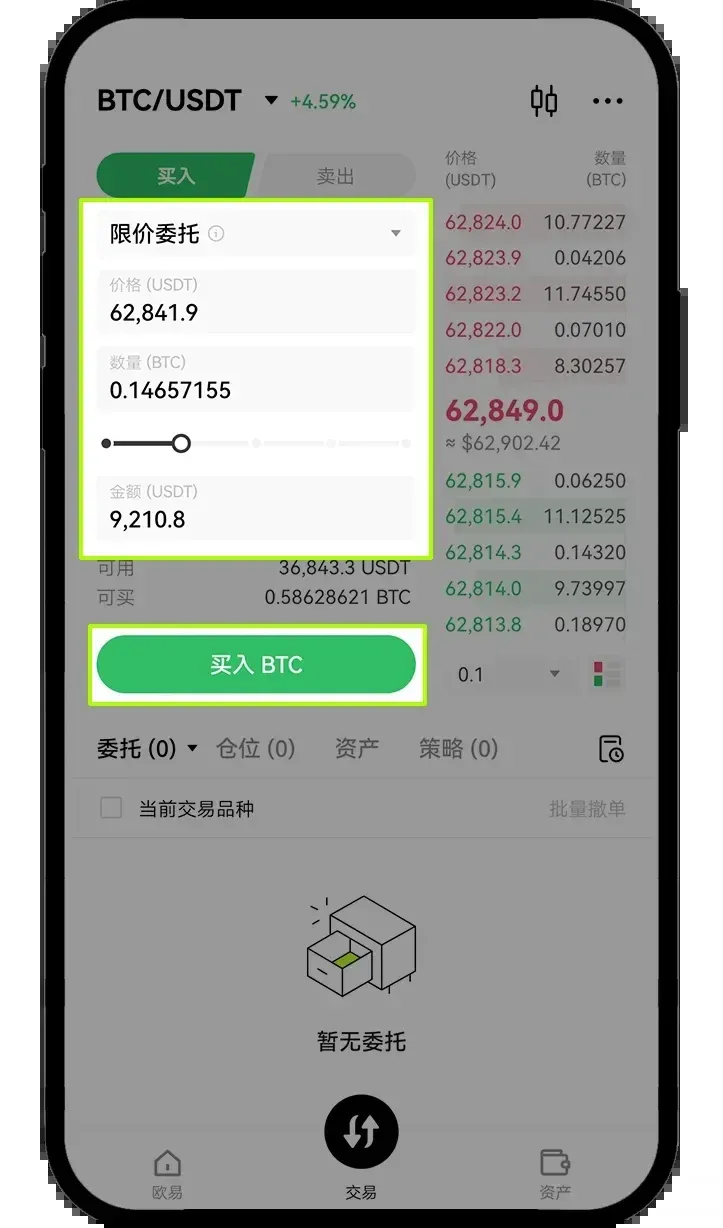
- Open the Spot Trading page in the OKX app, select Limit Order, and fill in the desired buy price and quantity, then tap Buy.
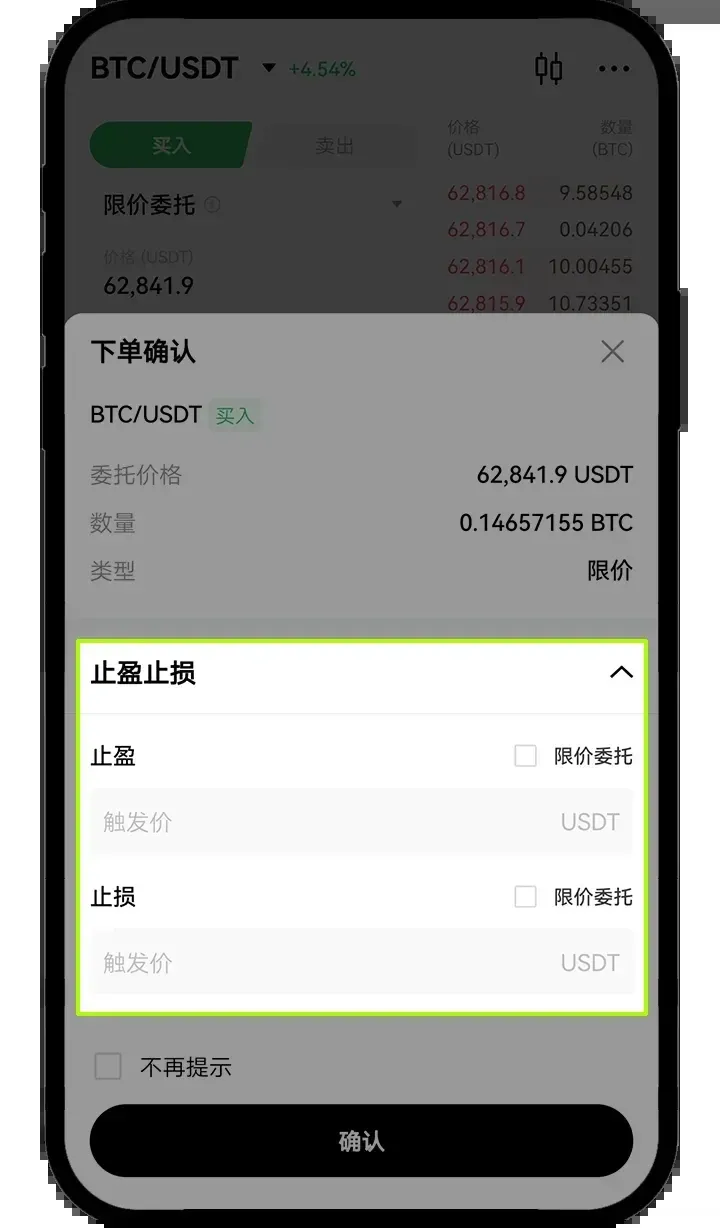
- In the pop‑up Order Confirmation screen, tap Take‑Profit/Stop‑Loss → enter the Take‑Profit trigger price and Stop‑Loss trigger price → confirm to submit.
2. Setting Take‑Profit/Stop‑Loss After an Order Has Filled
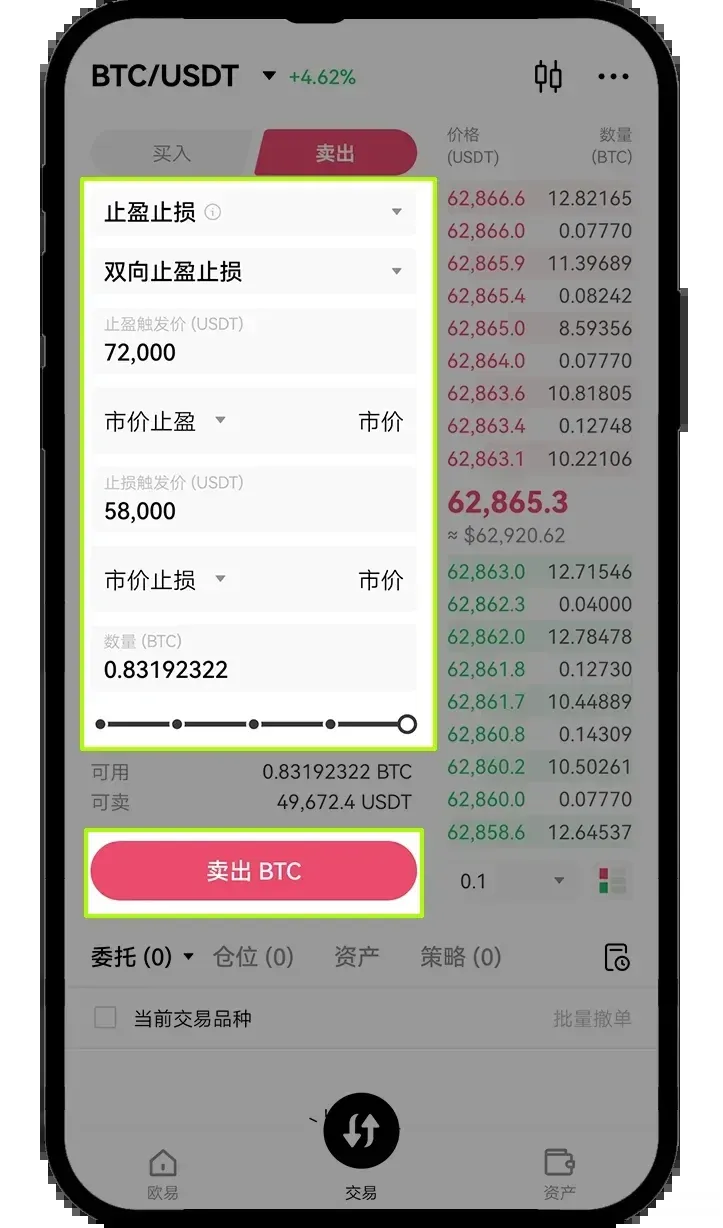
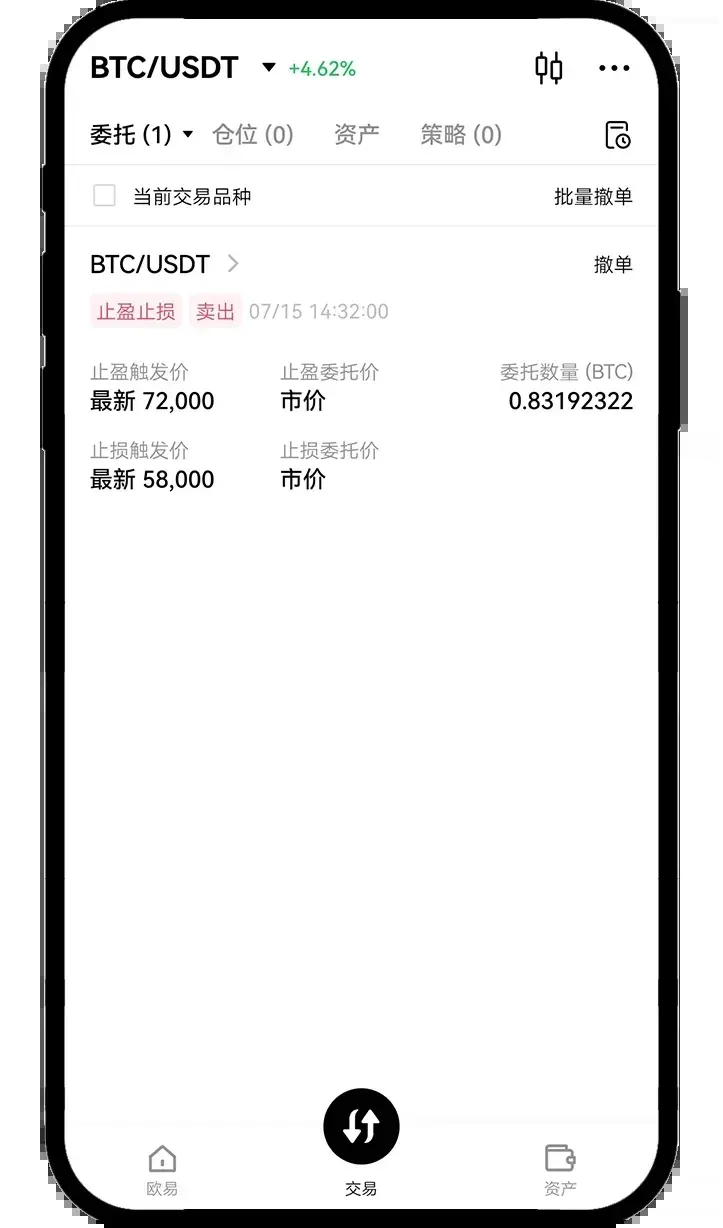
- Navigate to the Spot Trading page in the app and tap Take‑Profit/Stop‑Loss or Dual Take‑Profit/Stop‑Loss.
- Fill in the Take‑Profit trigger price, Stop‑Loss trigger price, and the corresponding quantity, then tap Sell to complete the configuration.
---
Section 7: Common Mistakes Made by Beginners
Some users frequently fall into the following misconceptions:
- Assuming the trigger price guarantees execution – The trigger price only initiates the limit order; execution still depends on market depth and price movement.
- Neglecting to specify the quantity – This can result in only a portion of the position being covered by the TP/SL order.
- Misreading system behavior during extreme volatility – In fast‑moving markets the order may not fill at the exact trigger level.
- Using unofficial entry points – Accessing the platform through non‑official links can cause page‑loading errors or security issues.
---
Conclusion
Using Take‑Profit and Stop‑Loss orders in OKX spot trading is essentially a way to pre‑plan two possible exit strategies for any position. By understanding how trigger prices work, setting reasonable price bands, and configuring the orders either at the time of entry or after the trade has filled, you can achieve a more disciplined and orderly execution process. For newcomers, mastering these rules is far more important than trying to intervene manually on every price tick.
Disclaimer: Cryptocurrency transactions may be subject to tax in your jurisdiction. Please consult a qualified tax professional to understand your obligations.
The above content is from “How to Set Take‑Profit/Stop‑Loss on OKX Spot Trading? OKX Spot Trading Take‑Profit/Stop‑Loss Tutorial”. For more OKX‑related material, follow Bitaigen (比特根) for additional articles.
Related Reading
- 2026 Binance Grid Trading Guide: Tutorial, Pros & Cons
- How Binance Futures Grid Trading Works: Step-by-Step Guide
- Bitget Tops 2026 Copy‑Trading: Liquidity & Risk Management
💡 Register on Binance with referral code B2345 for the maximum trading fee discount. See Binance complete guide.



