
 Bitaigen Research
 Before initiating a withdrawal from OKX to imToken, make sure to verify which tokens and blockchain networks are supported by imToken. If the token you intend to transfer is not within the supported list, you may see the exchange mark the withdrawal as successful while the wallet never receives the assets.
We have outlined the complete process for withdrawing from OKX to imToken, highlighting network‑and‑token matching, address verification, and common risks. This guide helps newcomers avoid failed withdrawals or lost funds. Keep reading to master each step and complete the transfer safely.
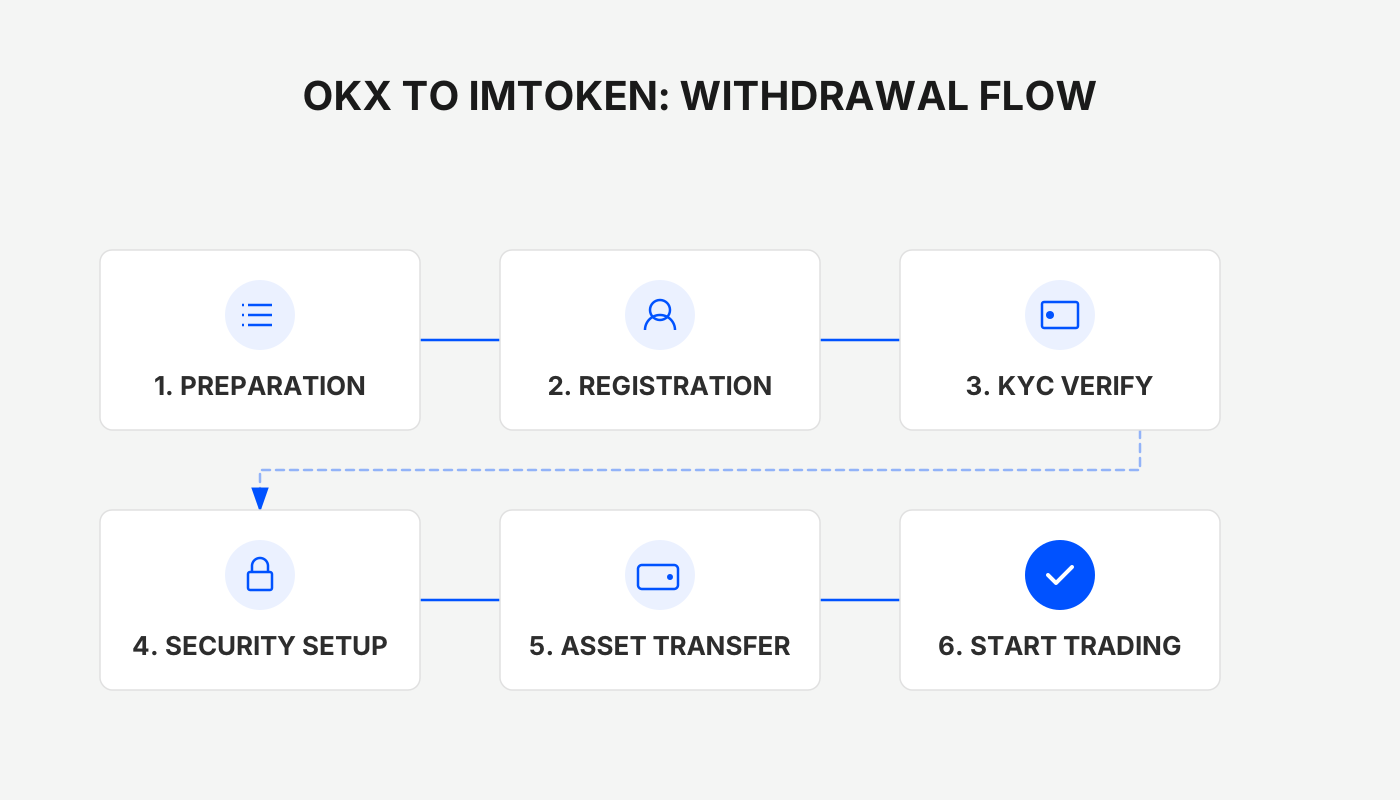
1. Understand the Networks and Tokens Supported by imToken
- BTC – Receive it via the BTC wallet inside imToken;
- ETH, USDT – Can be received through the ETH wallet (ERC‑20) or the TRX wallet (TRC‑20);
- Other chains – If you need to use OKC, Arbitrum, Optimism, etc., first create or switch to the appropriate wallet address on the corresponding chain within imToken before initiating the withdrawal.
Tip: Before selecting a withdrawal network on the exchange, double‑check in imToken that the chosen network is indeed supported.
2. Full Procedure for Withdrawing from OKX to imToken
Step 1 – Log in to the OKX platform and go to the Withdrawal page
Open the OKX exchange and, from the bottom navigation bar, select “Assets → Withdrawal.” Choose the token you want to send (the example below uses ETH).
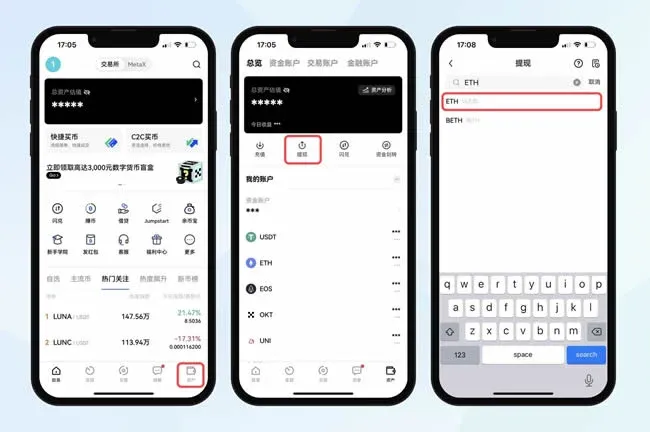
Step 2 – Choose the appropriate withdrawal network
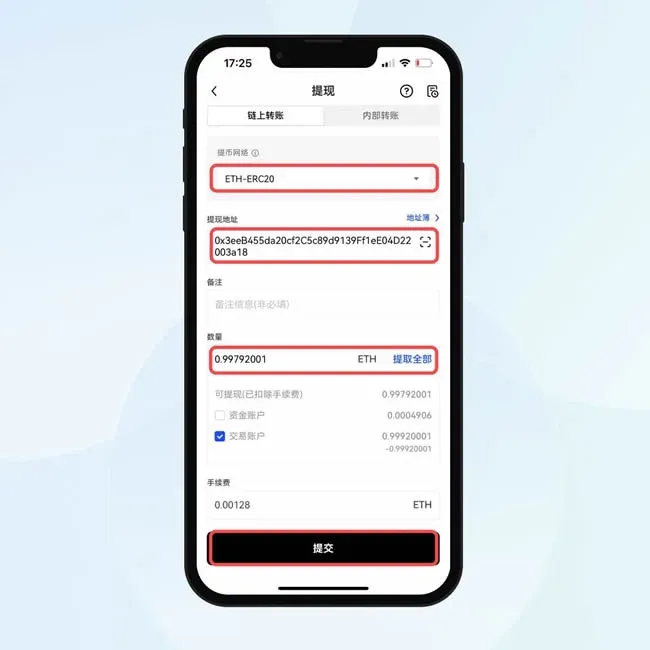
In the “Withdrawal Network” field, pick ETH‑ERC20. (If you prefer another network such as ETH‑OKC, ETH‑Arbitrum, or ETH‑Optimism, first copy the corresponding chain address from imToken.)
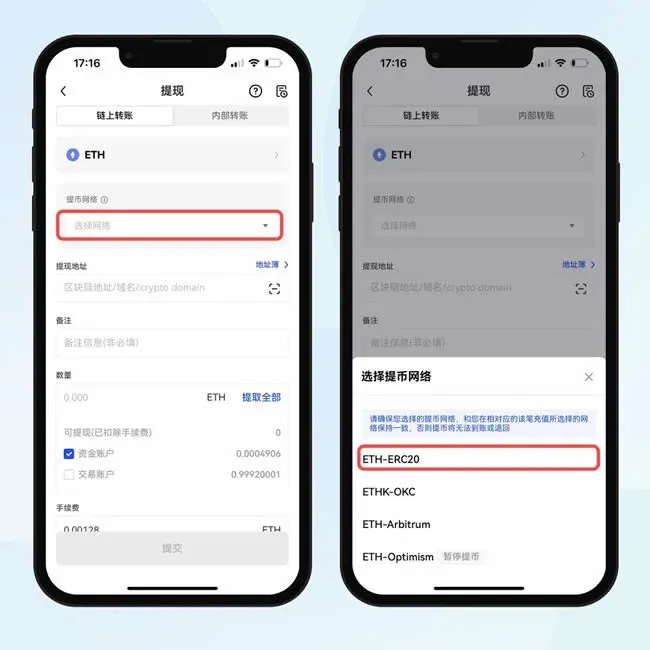
Step 3 – Obtain the imToken receiving address
Open imToken, navigate to the relevant token wallet, tap “Receive” and then “Copy” the address.
- For BTC deposits, switch to the BTC wallet via the top‑left menu;
- For USDT deposits, you may choose either the ETH wallet (ERC‑20) or the TRX wallet (TRC‑20) depending on the network you selected on OKX.
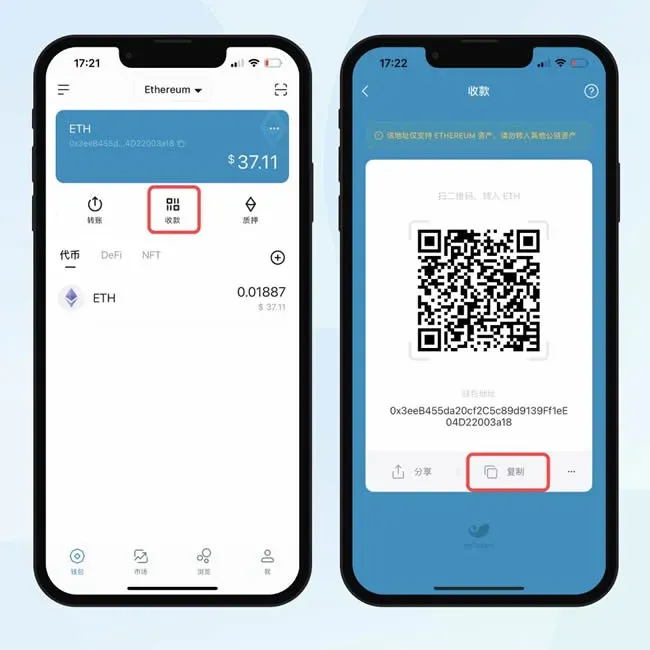
Step 4 – Fill in the withdrawal details and submit
Return to OKX’s withdrawal screen, paste the address you just copied, enter the amount you wish to send, and click “Submit.”
Step 5 – Complete the verification code step
A pop‑up will ask for a verification code (usually sent via SMS or authenticator app). After entering it, click “Confirm Withdrawal” to launch the transaction.
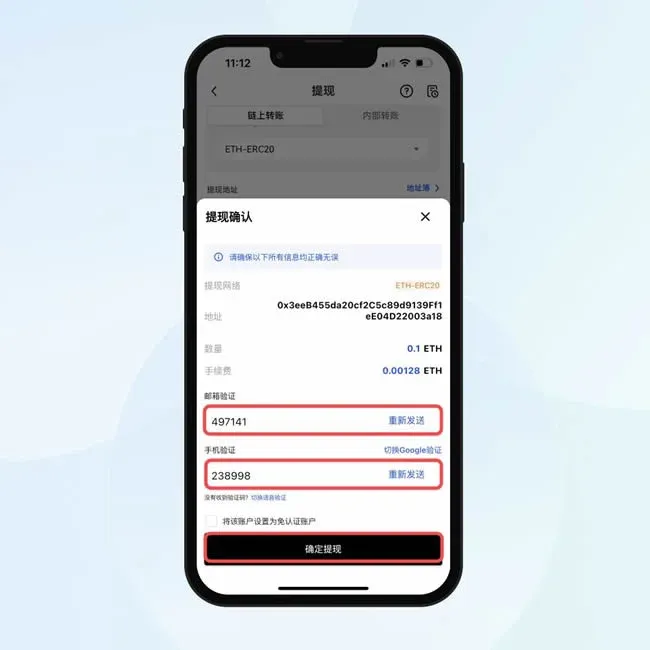
Note: Always double‑check the network fee and the net amount you will receive. Under normal conditions, withdrawals are completed within 1–30 minutes. If you experience unusually long delays, contact OKX support promptly.
3. Basic Information About the OKX Platform
- Official Android client version: v6.158.1
- Category: Banking & Finance
- App size: 376.03 MB
- Language: Simplified Chinese (the app also offers English and other languages for global users)
- Last updated: 2026‑02‑11

OKX is a globally recognized digital‑asset exchange. New registrants receive a blind‑box worth up to USD 6,000 in cryptocurrency and enjoy a 20 % discount on trading fees.
- Official website: https://www.qlxkj.com
- Referral link: https://www.okx.com/zh-hans/join/B2345
The platform was formerly known as OKEX; if you encounter an old URL that no longer works, download the latest official client or visit the updated website directly.
For users located in the United States: Access to OKX’s global services may be restricted. U.S. residents should use Binance.US or other regulated U.S. platforms for comparable withdrawals.
4. Further Options for Asset Security
If you require a higher level of protection beyond a software wallet, consider the imKey hardware wallet. imKey belongs to the same ecosystem as imToken, offering full asset‑management capabilities and is well‑suited for storing large balances or long‑term holdings.
---
This guide provides a step‑by‑step walkthrough for moving funds from OKX to an imToken wallet. For additional articles and updates on OKX‑to‑imToken withdrawals, follow the content published on the Bitaigen (比特根) platform.
Related Reading
- How to Withdraw USDT to CNY on OKX: Step-by-Step Guide
- Binance Pay: Quick Guide to Fast Crypto Transfers
- How to Withdraw USD from OKX: Complete Step-by-Step Guide
💡 Register on Binance with referral code B2345 for the maximum trading fee discount. See Binance complete guide.



