
 Bitaigen Research
 We have compiled a complete step‑by‑step guide for beginners to start participating in DeFi liquidity mining from scratch. The guide covers buying crypto with fiat, configuring wallets, switching networks, and the key points of adding liquidity on a decentralized exchange. By following this article you can get up to speed quickly and grasp the basic principles of safe operation. Subsequent sections will dive deeper into reward collection and risk mitigation, so a thorough read is worthwhile.
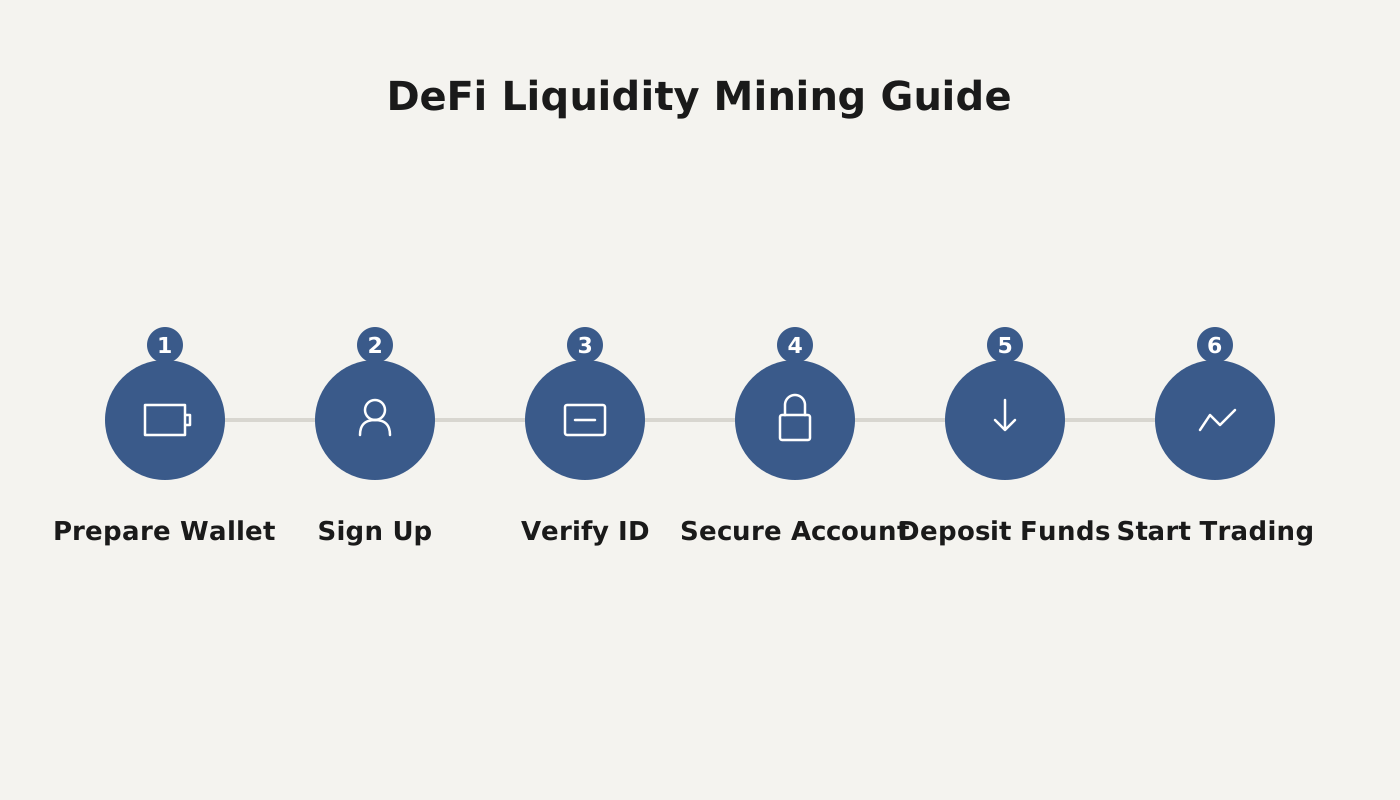
How to Participate in Blockchain DeFi Project Liquidity Mining?
The workflow for DeFi liquidity mining involves buying crypto on an exchange and withdrawing it to a wallet, adding liquidity on a decentralized exchange (DEX), staking the liquidity provider (LP) tokens, and finally claiming the rewards.
1. How to Purchase Digital Assets on an Exchange?
Buying digital assets on an exchange generally falls into two categories:
- Direct fiat purchase – Major tokens (such as USDT, BTC, ETH) support instant purchases via Alipay, WeChat Pay, or bank cards. For example, on Huobi you can buy the aforementioned tokens directly with Alipay.
- Indirect fiat purchase – For tokens that do not support Alipay (e.g., DOGE), you first need to purchase USDT (a stablecoin pegged to roughly 1 USD) with Alipay, and then trade that USDT for the desired token on the exchange.
Note for U.S. users: If you are based in the United States, you must use Binance.US or another U.S.-compliant platform instead of the global Binance service.
2. How to Install a Browser Wallet?
To ensure a smooth experience, we recommend using the Chrome browser on a desktop together with the MetaMask wallet for DeFi mining.
- Follow the official MetaMask installation and onboarding guide for download and initial setup.
- After installation the wallet defaults to the Ethereum Mainnet. If you need to switch to Binance Smart Chain (BSC) or the Huobi Eco‑Chain (HECO), you must add the corresponding network manually. The required RPC parameters are listed below:
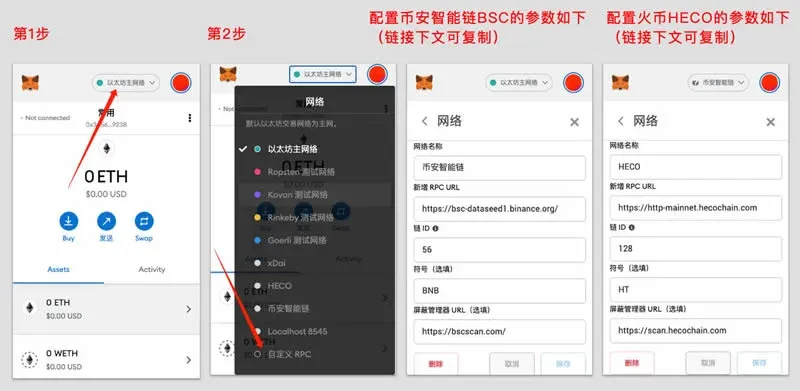
BSC network links
```
https://bsc-dataseed1.binance.org/
https://bscscan.com/
```
HECO network links
```
https://http-mainnet.hecochain.com
https://scan.hecochain.com
```
3. How to Transfer Digital Assets from an Exchange to Your Browser Wallet?
- Open the appropriate network in MetaMask and copy the displayed deposit address.
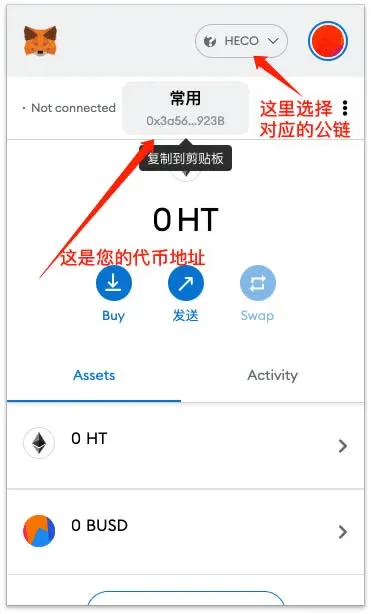
- Log in to the exchange, select “Withdraw”, paste the address you just copied, and confirm the target network (e.g., BSC or HECO).
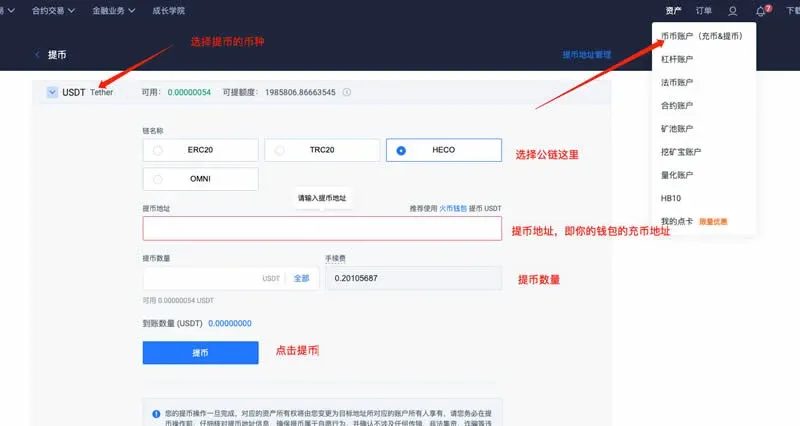
Tip: For your first withdrawal, send only a small amount to verify that the address and network are correct before moving larger sums.
After completing these steps you have successfully transferred assets from the exchange into a decentralized wallet, and you are ready to interact with DeFi applications.
4. Example: Conducting an On‑Chain Swap on MDex
Navigate to the MDex swap page: https://ht.mdex.com/#/swap . Click “Connect Wallet” in the upper‑right corner, ensure the network is set to HECO, and select MetaMask to establish the connection.
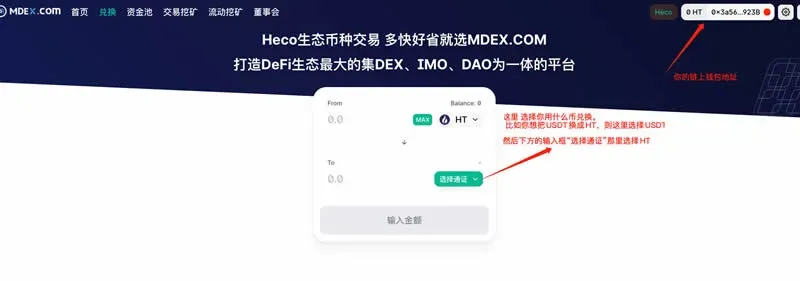
The interface will list the available trading pairs; simply input the desired amount and confirm to execute the swap.
5. Example: Adding Token Liquidity on MDex
Decentralized exchanges operate on an Automated Market Maker (AMM) model. Users can provide liquidity by depositing equal‑value amounts of two tokens (e.g., BTC‑USDT) into a pool, thereby earning a share of the transaction fees. The process does not require active market‑making and liquidity can be withdrawn at any time.
Risk Warning: Supplying liquidity can generate impermanent loss, which occurs when the relative price of the deposited assets changes. Make sure you understand this concept before proceeding.
Steps to add liquidity on MDex:
- Visit the liquidity page: https://ht.mdex.com/#/pool
- Select the two tokens you hold, enter matching amounts, and confirm the submission.
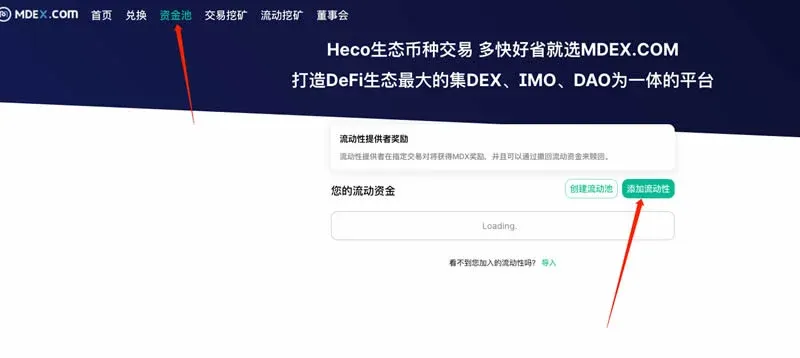
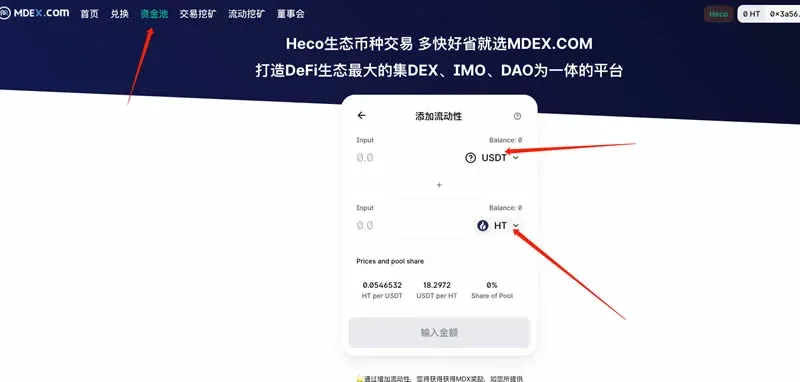
Once the transaction is confirmed, you will receive Liquidity Provider (LP) tokens that represent your share of the pool. These LP tokens can be redeemed for the underlying assets at any time from the same interface.
6. Example: Performing Liquidity Mining on MDex
Core procedure:
- After adding liquidity you receive the corresponding LP tokens.
- Click the “Liquidity Mining” entry point on the MDex main site:
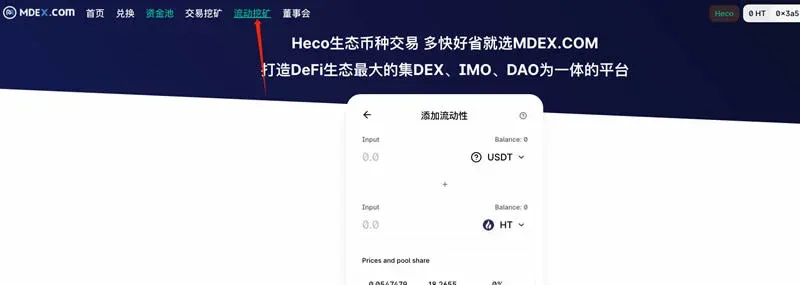
- On the mining page, select the trading pair for which you have provided liquidity and stake the LP tokens.
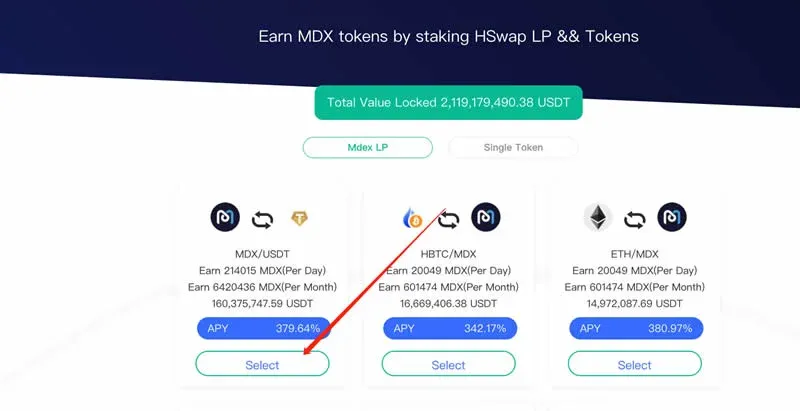
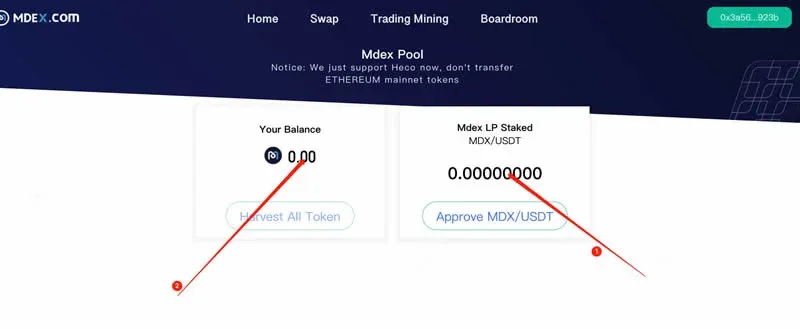
- After staking, the protocol periodically distributes the project’s native token (e.g., MDX). You can click Harvest at any time to claim the accrued rewards. If you decide to stop staking, you may withdraw your LP tokens and retrieve the original assets from the same page.
---
Related Resources
- Huobi exchange tutorial for purchasing Bitcoin (BTC)
- OKEx tutorial for buying Bitcoin (BTC)
- Binance tutorial for buying Bitcoin (BTC)
- Step‑by‑step visual guide for buying Bitcoin (BTC) on Binance
The above constitutes the full workflow presented in “DeFi Mining Guide: How to Participate in Blockchain DeFi Project Liquidity Mining?” For more DeFi insights, follow Bitaigen’s upcoming专题 articles.
Tax Reminder: Crypto earnings may be subject to taxation in your jurisdiction. Consult a local tax professional to ensure compliance with applicable regulations.
Related Reading
- What Is DeFi? A Beginner's Guide to Decentralized Finance
- Liquidity Mining: Earn Fees & Interest with AMM Pools
- Liquidity Mining vs Traditional Crypto Mining: Key Differences Explained
💡 Register on Binance with referral code B2345 for the maximum trading fee discount. See Binance complete guide.



