
 Bitaigen Research
In this article we systematically explain the concept of a reverse order on Binance Alpha, the OTO (One‑Trigger‑One) activation mechanism, and the method for calculating the order quantity. We also provide a complete step‑by‑step guide for placing such orders, helping traders get started quickly while reducing the risk associated with manual operations. Please continue reading for the full details.
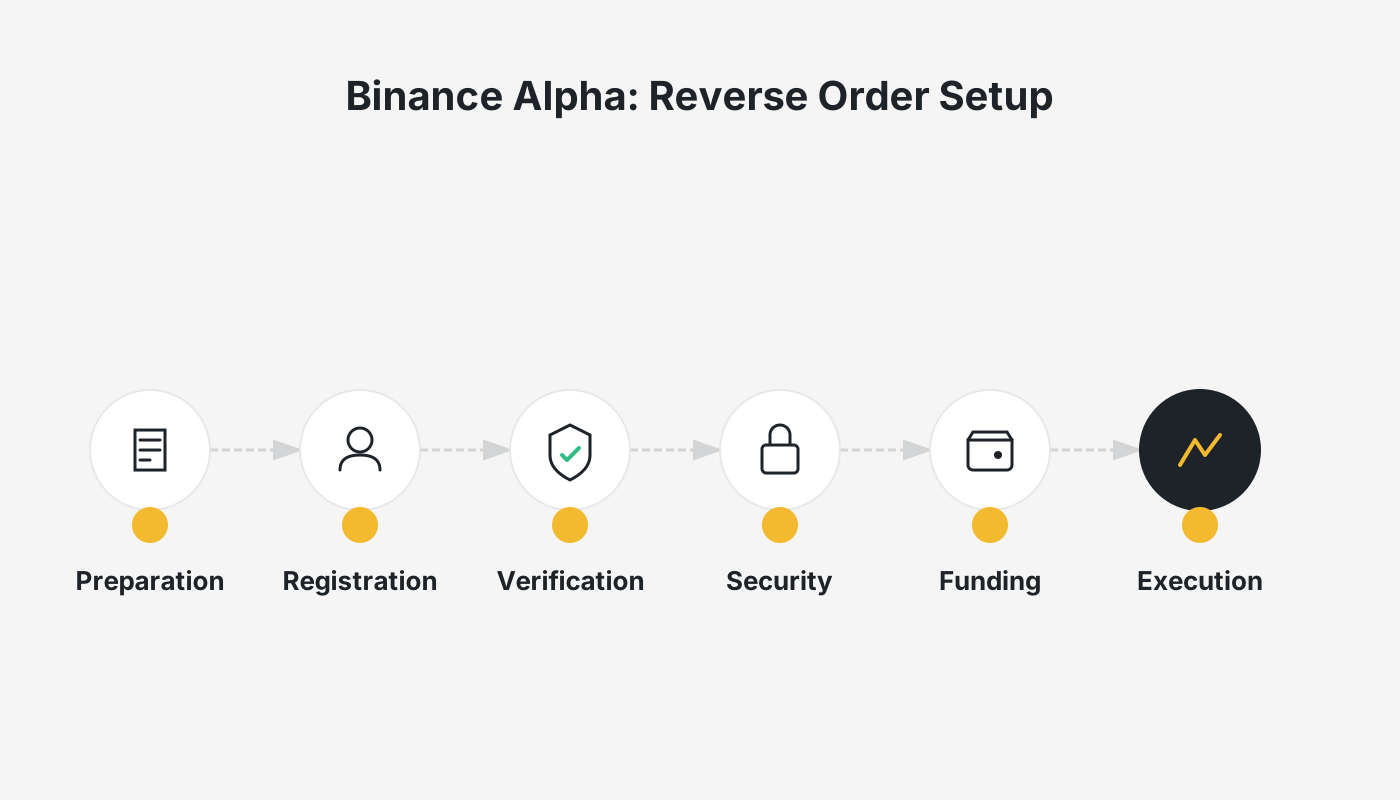
What is a reverse order on Binance Alpha?
A reverse order on Binance Alpha is a OTO (One‑Trigger‑One) strategy: after the primary order is fully filled, the system automatically creates a secondary limit order in the opposite direction, using the price that the user has pre‑specified.
The reverse order belongs to the “one order triggers another order” (OTO) family. Traders submit a primary order; once that order is completely executed, the platform automatically generates a secondary order. This mechanism enables automated hedging, reduces the need for manual intervention, and saves time.
How is the quantity of a Binance Alpha reverse order calculated?
| Primary order type | Secondary order type | Calculation formula |
|---|---|---|
| **Limit Buy** | Limit Sell | Secondary quantity = quantity actually received from the primary order |
| **Limit Sell** | Limit Buy | Secondary quantity = total proceeds of the fully filled primary order ÷ secondary order price |
How to place a Binance Alpha reverse order?
If you do not yet have a Binance account, you can register and download the app via the links below, then follow the video tutorial to operate on your own.
- Register on Binance (global): <https://accounts.binance.com/register?ref=B2345> (copy the URL into your browser)
- Binance Android app download: <https://www.bitaigen.com/binance/download>
Note for U.S. residents: You must use Binance.US rather than the global Binance platform. The registration link above points to the global site; U.S. users should instead sign up at https://www.binance.us.
Placing an Alpha reverse order on the Binance website
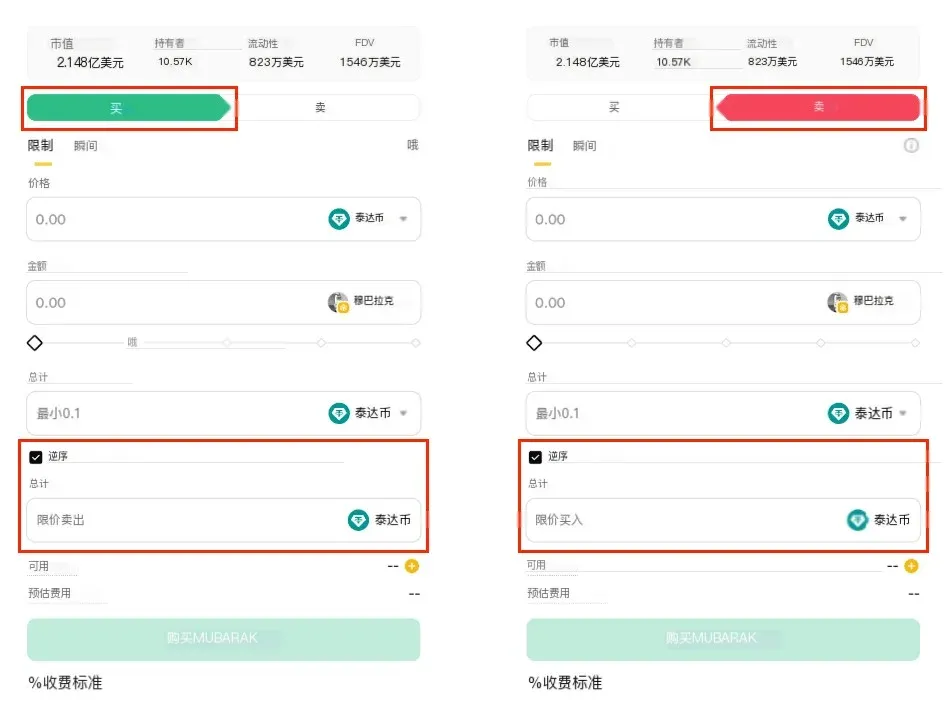
- Open the Alpha trading page.
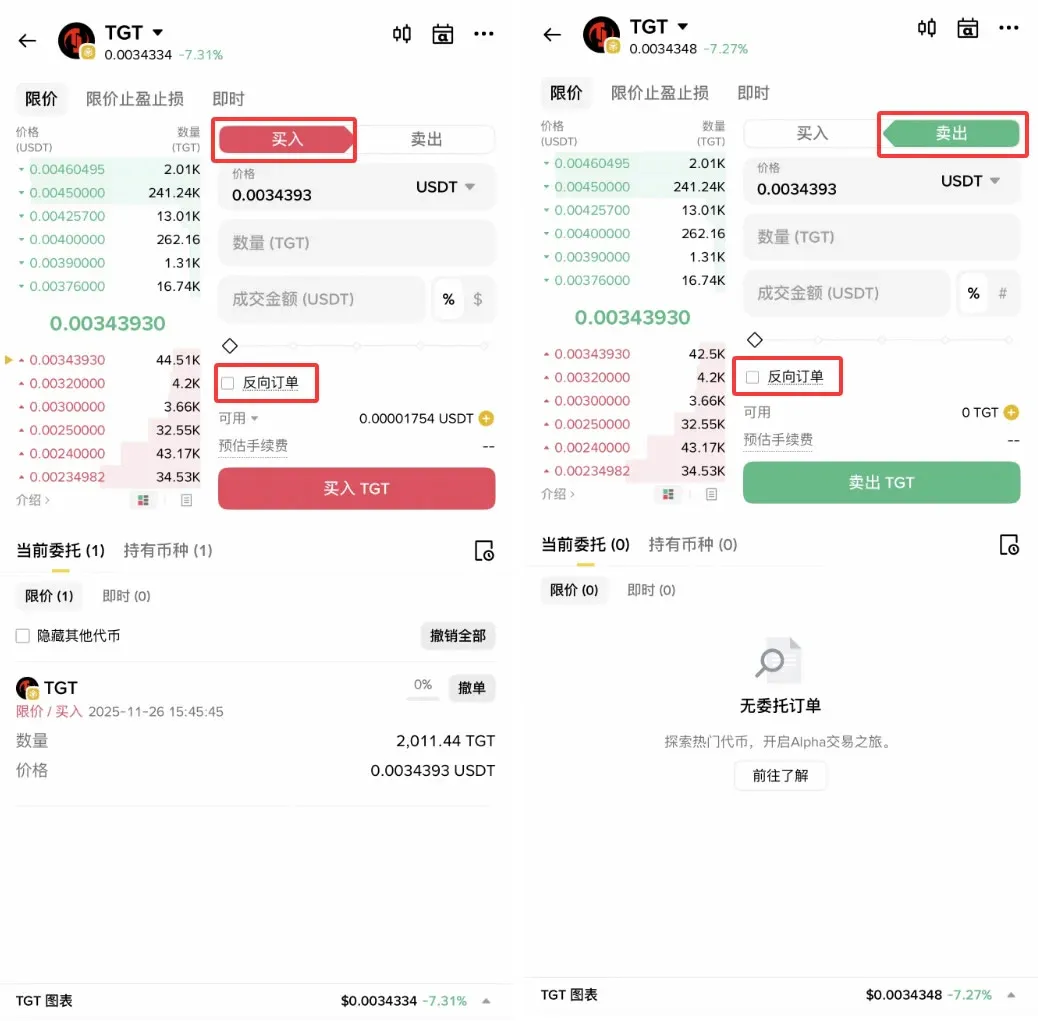
- In the Limit Order section, select [Buy] or [Sell].
- Enter the desired quantity, price, and any other required parameters.
- Tick the [Reverse Order] checkbox.
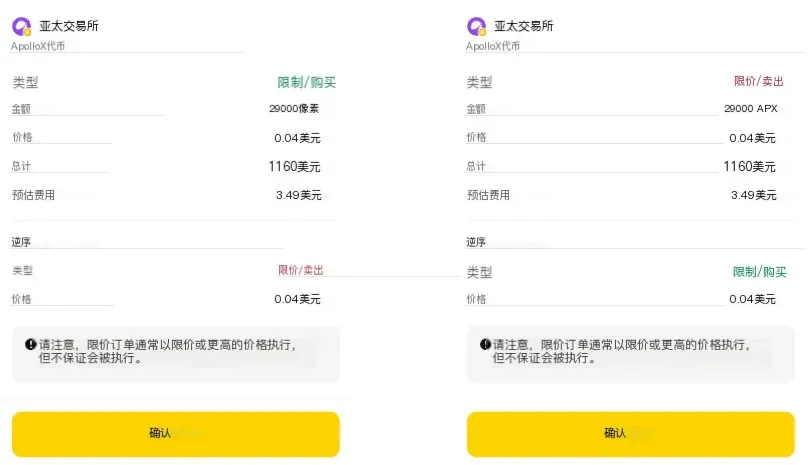
- Before clicking Place Order, you can preview the full order details on the confirmation screen.
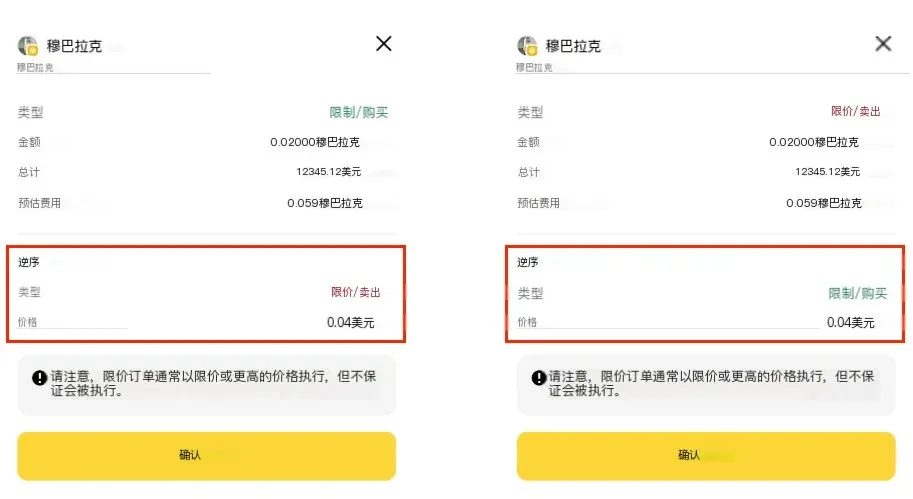
After submission, you can view the order’s full information under [Open Orders] or [Order History].
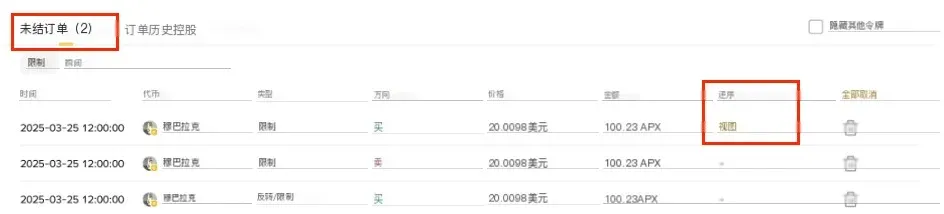
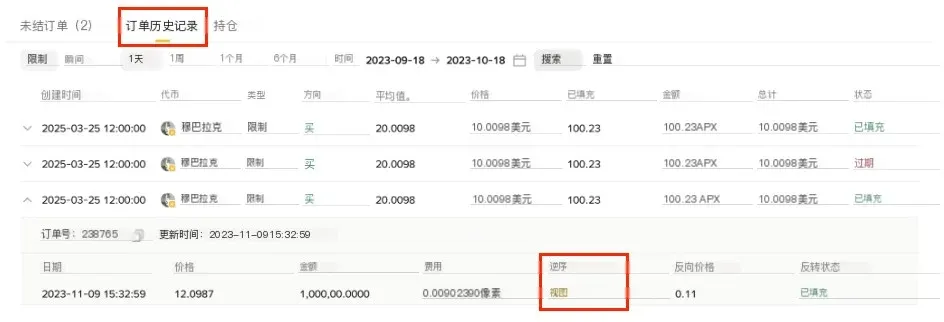
Placing an Alpha reverse order via the Binance mobile app
- Launch the Binance app and navigate to the Alpha trading screen.
- As on the web version, choose [Buy] or [Sell] and fill in the limit order details.
- Check the [Reverse Order] option, confirm the parameters, and place the order.
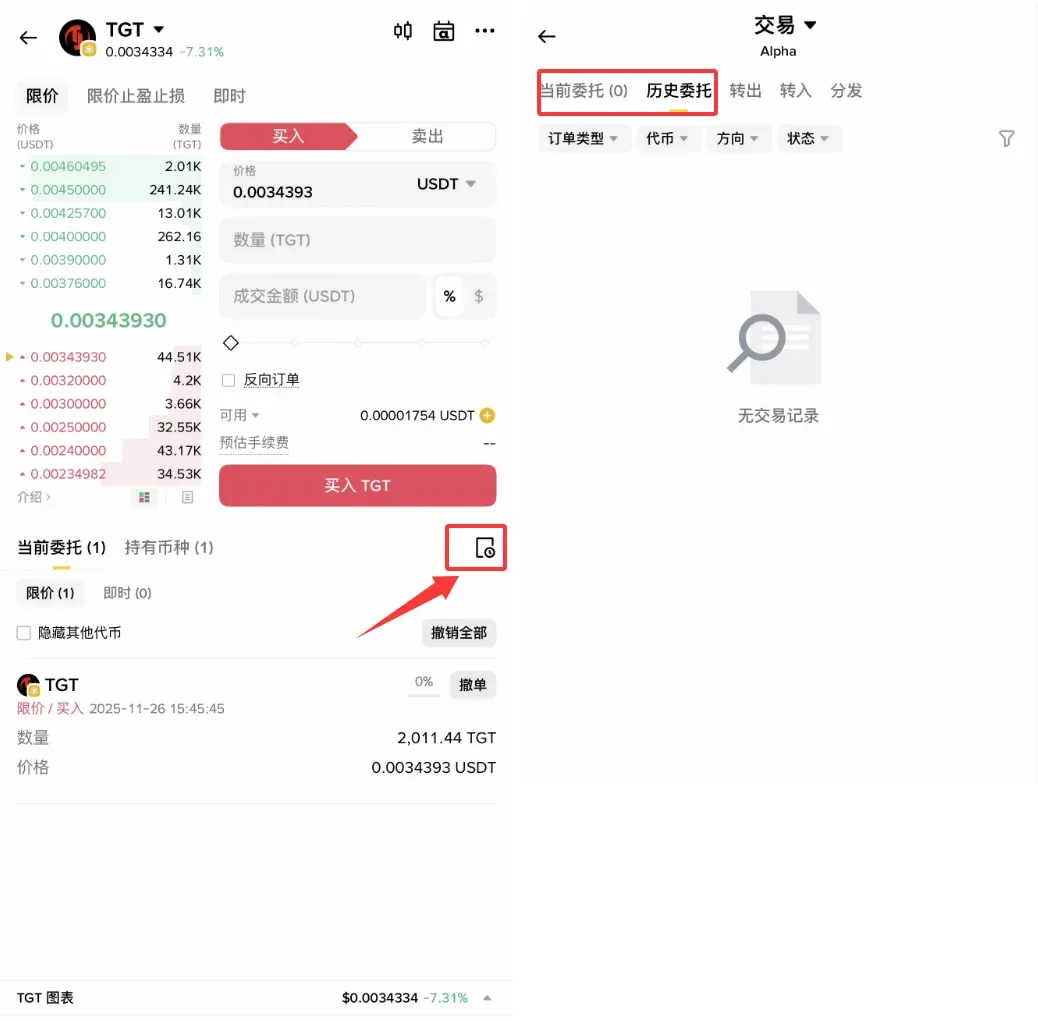
On the Alpha Trading page, tap Order History to view the status of the order under [Open Orders] or [Order History].
Frequently Asked Questions
1. What is a reverse order?
A reverse order is a conditional order type. After the primary order (Order A) is executed, the system automatically creates a secondary order (Order B) in the opposite direction, enabling an automatic sell after a buy or an automatic buy after a sell.
2. What is the difference between the primary order (Order A) and the secondary order (Order B)?
- Order A (primary): The first limit buy or sell order submitted by the user.
- Order B (secondary): A reverse‑direction limit order that the system generates once Order A is fully filled, using the price the user specified for the secondary order.
3. Which order types are supported?
Both the primary and secondary orders are currently limited to limit orders. Market orders are not supported for this OTO mechanism.
4. How is the direction of the secondary order determined?
- If the primary order is a limit buy, the secondary order becomes a limit sell.
- If the primary order is a limit sell, the secondary order becomes a limit buy.
5. How is the quantity of the secondary order calculated?
- Limit Buy primary: Secondary quantity = the exact amount of the asset received from the primary order.
- Limit Sell primary: Secondary quantity = total proceeds of the primary order ÷ the price set for the secondary order.
6. Does a partially filled primary order trigger the secondary order?
The secondary order is only generated after the primary order is completely filled. Partial fills or unfilled orders do not trigger the secondary order.
7. How do I set the price for the secondary order?
When you submit a reverse order, you must manually enter the desired price for the secondary order. The system will place the secondary limit order at that exact price.
8. Can a reverse order be cancelled?
- If the primary order has not yet been filled, you can cancel the entire reverse order at any time.
- Once the primary order is filled and the secondary order is created, the secondary order behaves like a regular limit order and can be cancelled independently.
9. What are common reasons a reverse order might fail?
- The primary order never fills or only partially fills → no secondary order is created.
- The secondary order’s price is set too far from the current market, making execution unlikely.
- After deducting fees, the remaining amount falls below the platform’s minimum order size, causing the order to be rejected.
10. How does a reverse order differ from a standard limit order?
A standard limit order requires the trader to manually place both the initial order and its corresponding opposite order. A reverse order automates the creation of the opposite order once the first one is fully executed, which is useful for traders who need fast, automated hedging.
---
Tax reminder: Cryptocurrency transactions, including gains or losses from reverse orders, may be subject to tax in your jurisdiction. Please consult a qualified tax professional and comply with local regulations.
For a more comprehensive guide to Binance Alpha reverse orders and other related topics, stay tuned to Bitaigen (比特根) for additional articles.
Related Reading
- Binance Alpha to List SUPERFORTUNE (GUA) – Airdrop Nov 27
- Binance Alpha Lists SatLayer (SLAY) – Aug 11 Airdrop Claim
- Binance lists UnifAI (UAI) – Airdrop & Futures Open Nov 6
💡 Register on Binance with referral code B2345 for the maximum trading fee discount. See Binance complete guide.



