
 Bitaigen Research
 For newcomers to the crypto space, the biggest worry is encountering a “shady platform” that prevents withdrawing funds. Among the many exchanges, OKX (formerly known as 欧易) ranks among the top two globally and has weathered multiple bull and bear markets. Its liquidity and security enjoy an excellent reputation among Chinese‑speaking users. Below, we’ll walk through how to purchase Bitcoin quickly on OKX.
The fast‑track steps to buying Bitcoin on OKX are: register and complete KYC, buy USDT on the C2C market, transfer it to your trading account, and place a market order for BTC on the spot market.
In this article we outline the complete process for beginners to buy Bitcoin on OKX, from safe registration and KYC completion, through acquiring USDT via C2C, moving it to the spot account, and finally executing a market purchase. Illustrated step‑by‑step guides and practical tips are provided to help you avoid platform risks and enter the market smoothly.
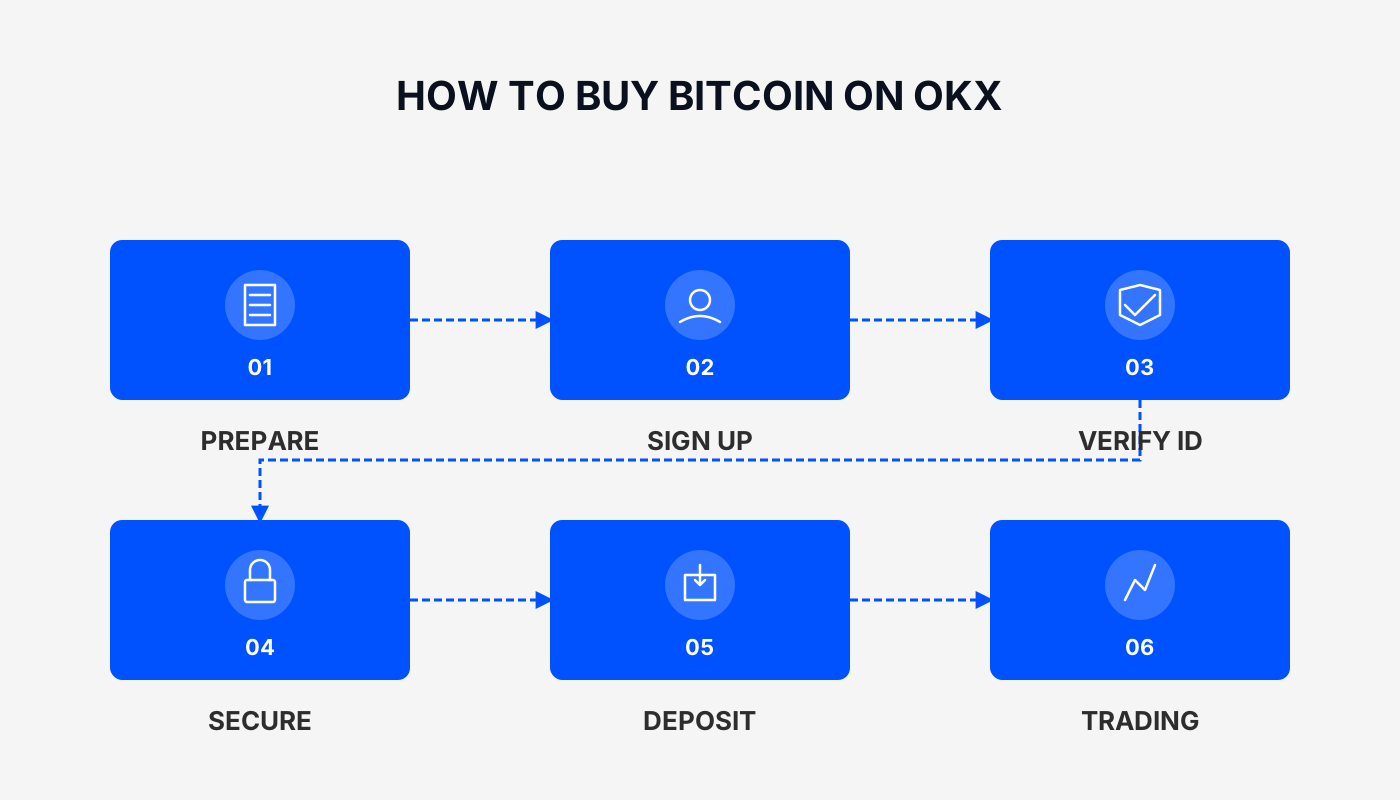
Preparations
Official OKX registration link
*Friendly reminder*: Register through the above link (or use the referral code `B2345`) and new users can receive up to 50 USDT in rewards. The referral code must be entered for the bonus to apply.
Before purchasing Bitcoin, you need to finish account registration and KYC verification. The detailed flow is as follows:
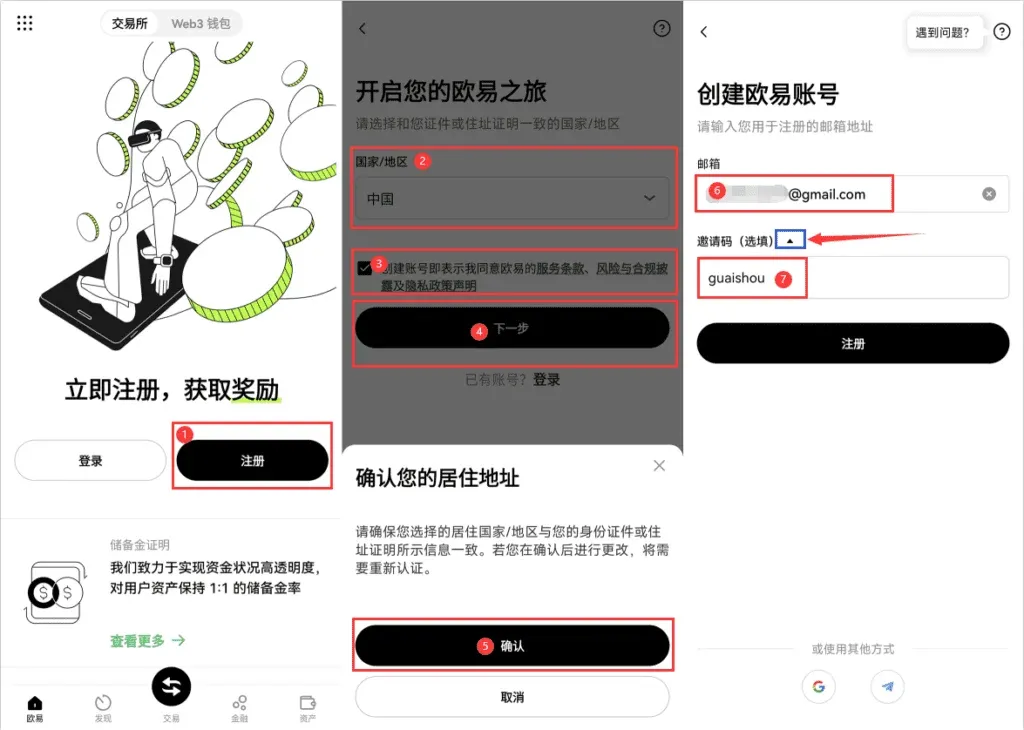
- Open the app (official registration link | official download link) and tap Register.
- Choose the appropriate country (select the country of the ID you will use), agree to the Terms of Service, then tap Confirm.
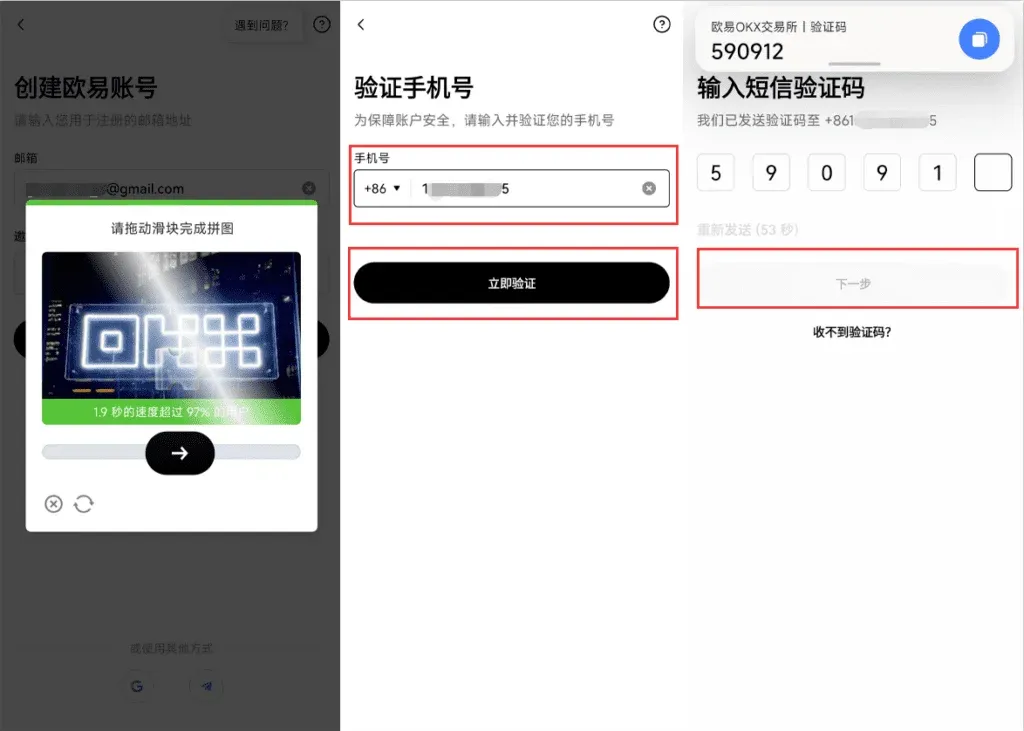
- Complete the image captcha, enter your phone number (Mainland +86, Hong Kong +852, etc.), and input the SMS code to proceed.
- Set a login password; registration is now complete. You can verify your identity immediately, or tap the × in the upper‑right corner to do it later.
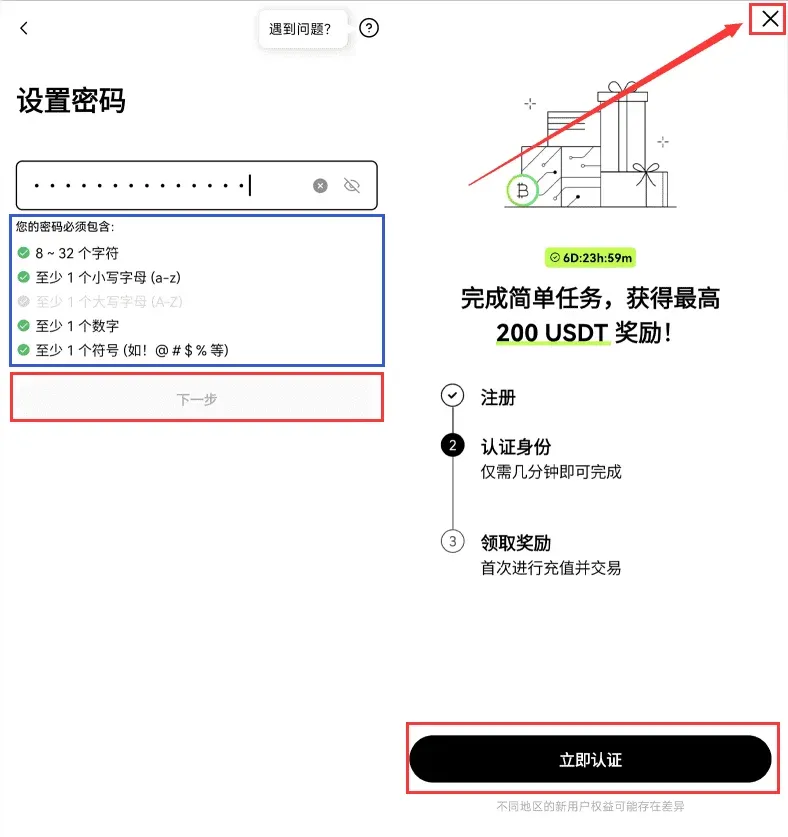
- The verification entry point is always available: a banner appears on the home page for new users or on any trading page.
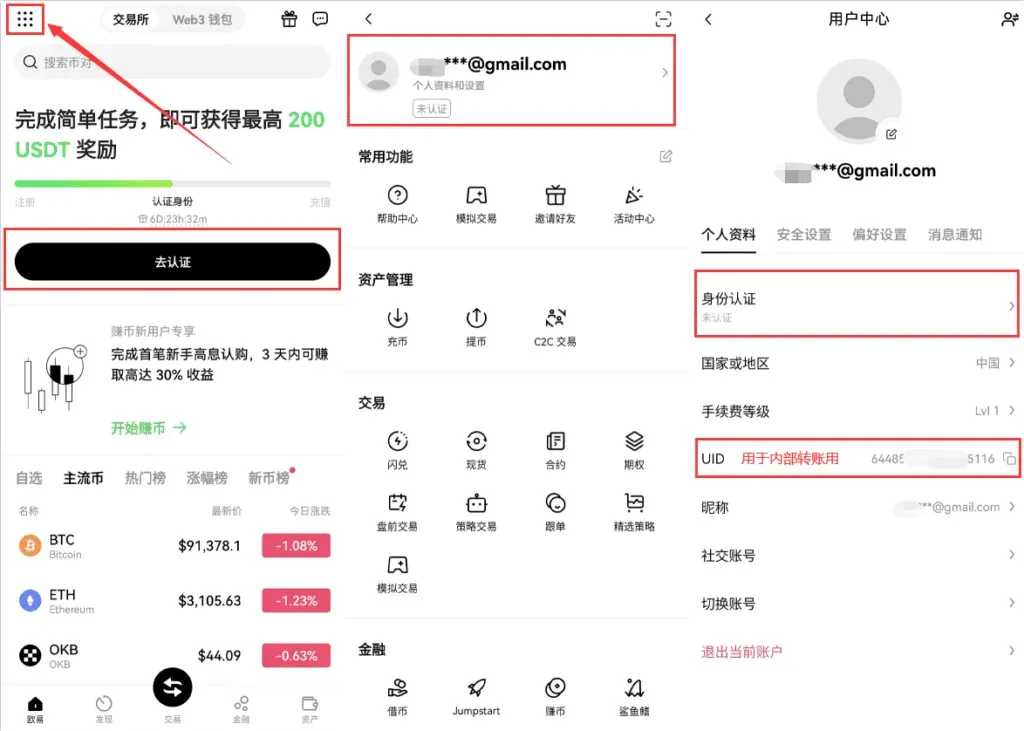
- Open the menu in the upper‑left corner → Profile & Settings → Identity Verification.
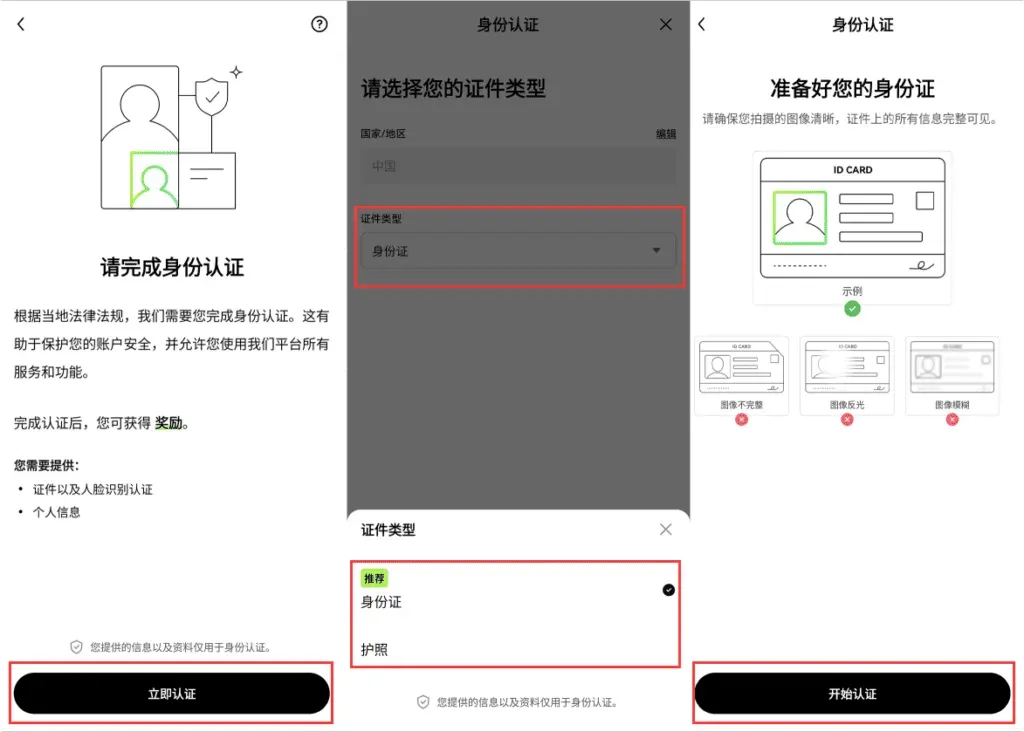
- Tap Start Verification, select the document type, upload the ID, and complete facial recognition to finish real‑name verification.
OKX no longer distinguishes between verification tiers; completing real‑name verification and facial recognition grants full access. If you encounter a C2C video verification option, it is not required for ordinary small‑amount trades.
Step 1: Acquire USDT via the C2C Marketplace
Before you can buy Bitcoin, you need to hold a “hard currency” – USDT.
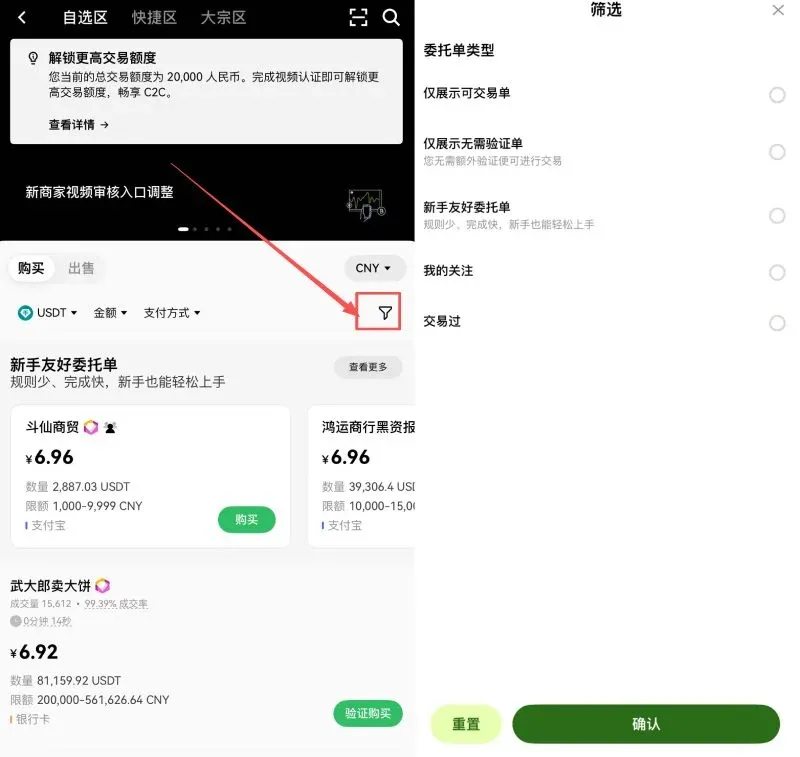
- Filter merchants: Go to the “C2C Buy” page inside the OKX app.
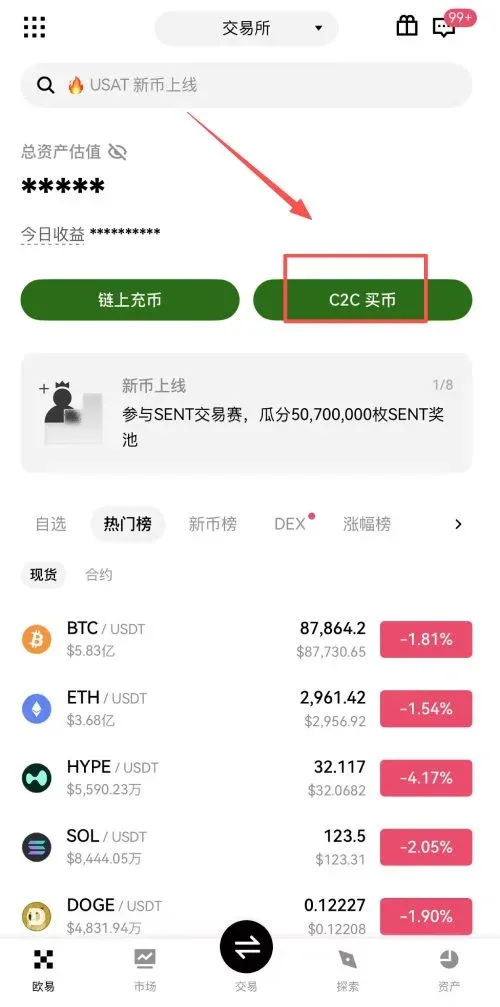
- It is advisable to tick “Show only orders that require no verification” and “Beginner‑friendly orders” to avoid cumbersome self‑verification steps.
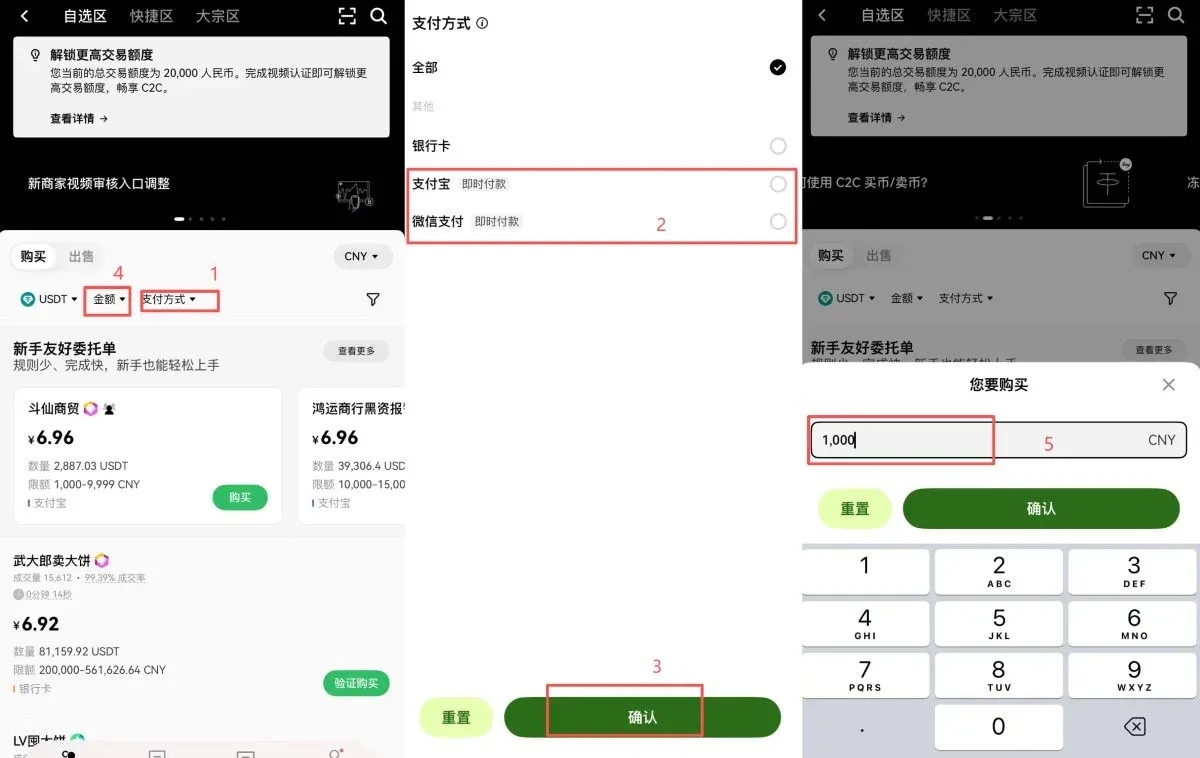
- Select a payment method: Choose the method that matches your region – for example, in the U.S. you might use a SEPA or SWIFT bank transfer, while elsewhere you may use local e‑wallets such as WeChat Pay or Alipay. You can also set a custom amount (e.g., $150 USD).
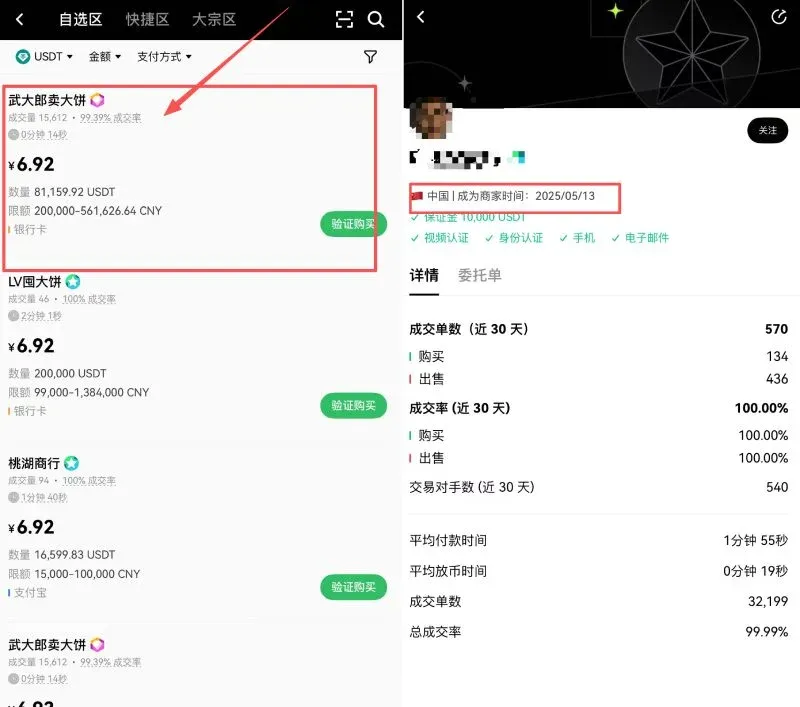
- Identify reliable sellers: Pay close attention to the seller’s trade volume and completion rate. Prefer merchants who have been on the platform for at least six months, as they tend to be more trustworthy.
Step 2: Secure Payment & Risk Prevention
After selecting a seller, click Buy and the system will generate an order.
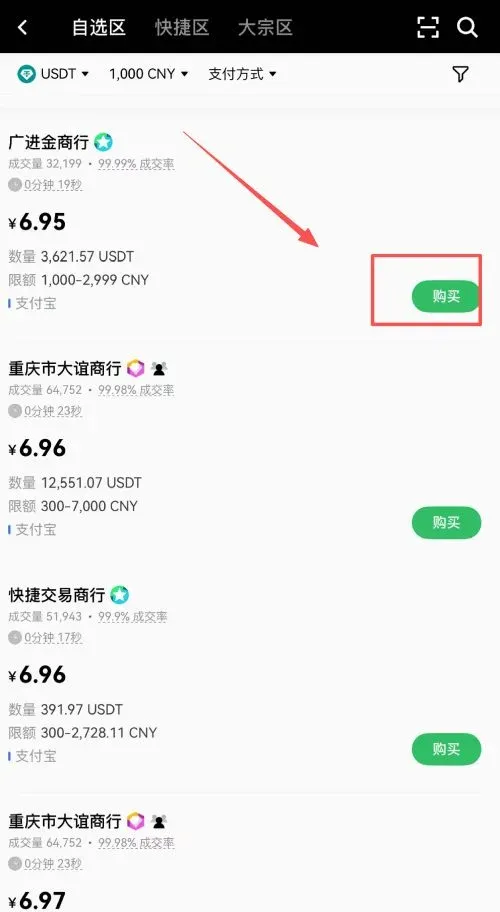
To ensure a smooth transaction, observe the following points:
- Real‑name transfer: Use an account that has already been verified with your real name for the payment.
- No remarks: Do not include “Bitcoin”, “crypto”, or any other sensitive keywords in the transfer note.
- Instant settlement: Avoid selecting delayed‑payment options.
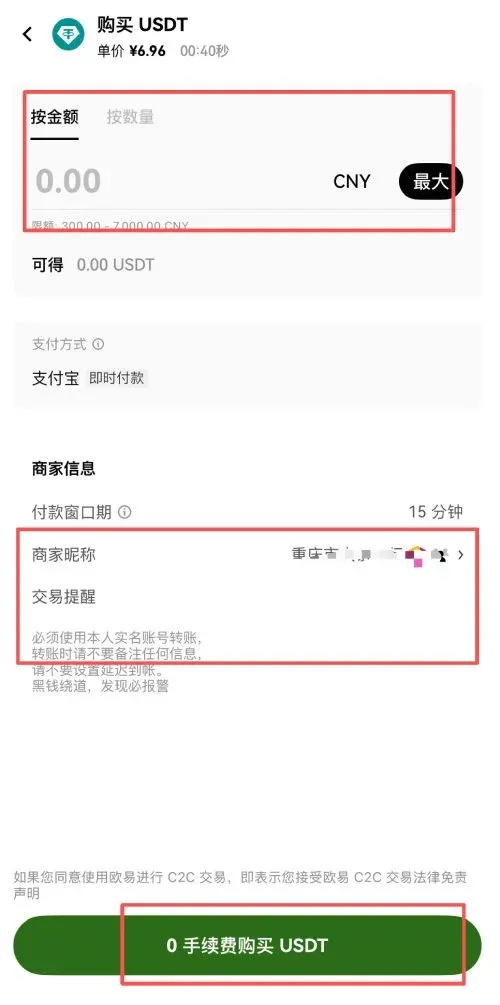
Once the payment is made, return to the platform and click I have paid. After the seller confirms receipt, the USDT will be credited to your account.
Step 3: Transfer Funds (Funding Account → Trading Account)
The USDT you just bought is initially stored in the Funding Account. To trade it for other cryptocurrencies, you must move it to the Trading Account.
- Navigate to the Assets page and tap Transfer.
- Choose USDT, set the destination to Trading Account, and confirm the transfer.
This is an internal transfer on the platform, free of fees, and it completes almost instantly.
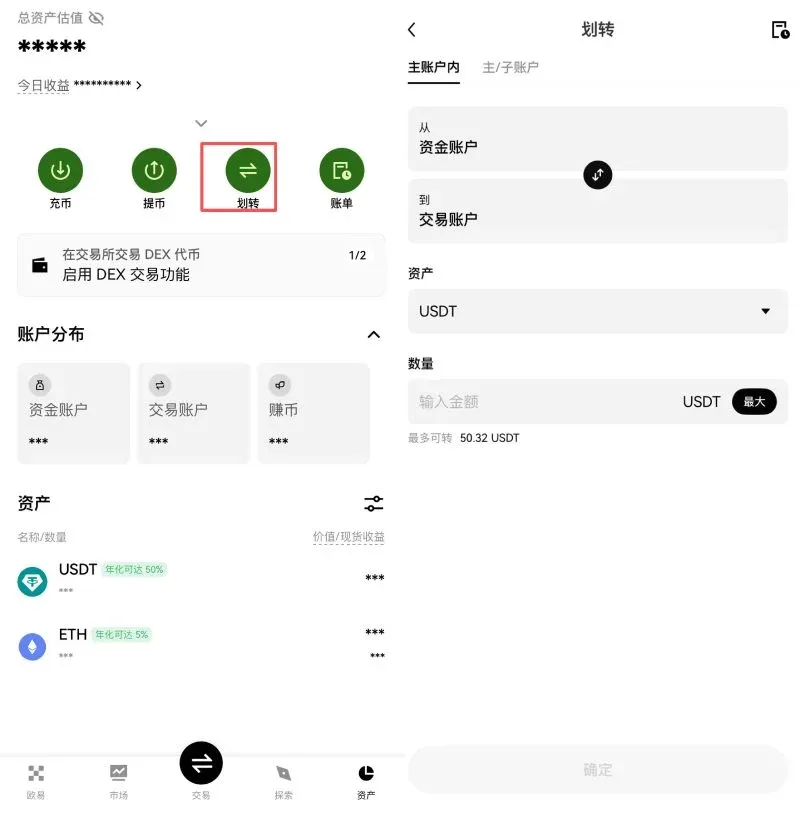
Step 4: Spot‑Market Purchase of Bitcoin
With the preparation steps finished, you can now buy Bitcoin on the spot market.
- Open the trading interface: Tap the middle Trade button at the bottom and select Spot.
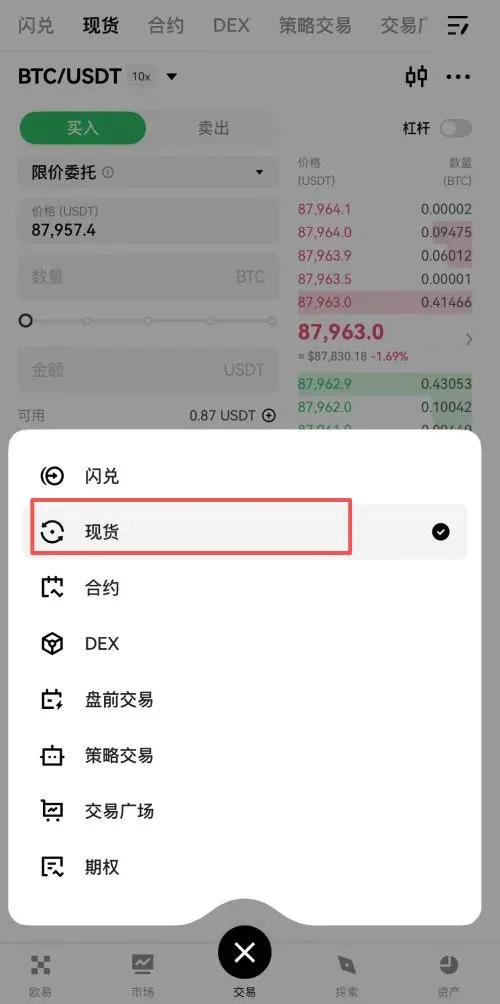
- Select the trading pair: In the search box at the top‑left, type BTC/USDT and confirm.
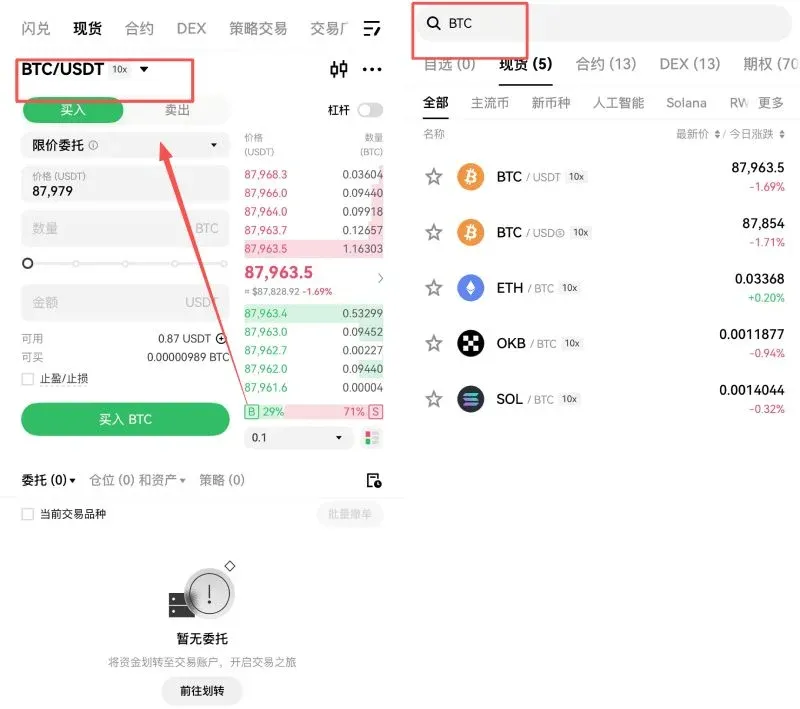
- Execute the buy: For beginners, we recommend a market order; the system will fill the order at the best available price instantly. Enter the amount you wish to spend and tap Buy BTC.
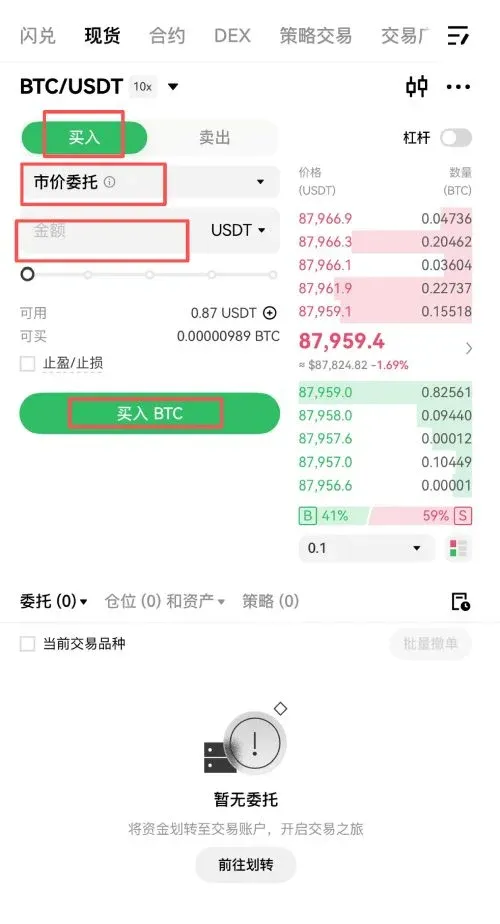
- Selling: The selling process is identical—switch to the Sell tab, adjust the quantity, and confirm to convert BTC back to USDT.
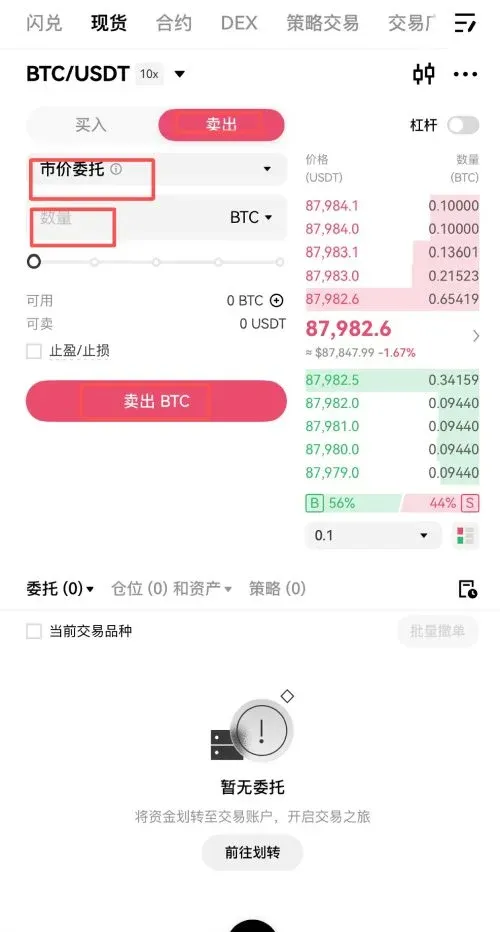
That concludes the full walkthrough for quickly buying Bitcoin on OKX. For more OKX‑related content, you can search the Bitaigen (比特根) archive or continue reading the recommendations below. Thank you for reading, and we hope you keep following Bitaigen for future updates!
Note: Cryptocurrency transactions may be subject to taxation in your jurisdiction; please consult a tax professional.
For U.S. residents: When the article references the Binance download link, be aware that the global Binance platform is not available in the United States; you should use Binance.US instead.
Related Reading
- How to Set Up Dollar-Cost Averaging (DCA) on OKX Exchange
- OKX Rapid DCA: Automated Dollar‑Cost Averaging in 4 Steps
- How to Download the OKX App for Android & iOS – Step-by-Step Guide
💡 Register on Binance with referral code B2345 for the maximum trading fee discount. See Binance complete guide.



