
 Bitaigen Research
 For newcomers stepping into the world of cryptocurrencies, the first priority is to obtain your initial digital asset safely and conveniently.
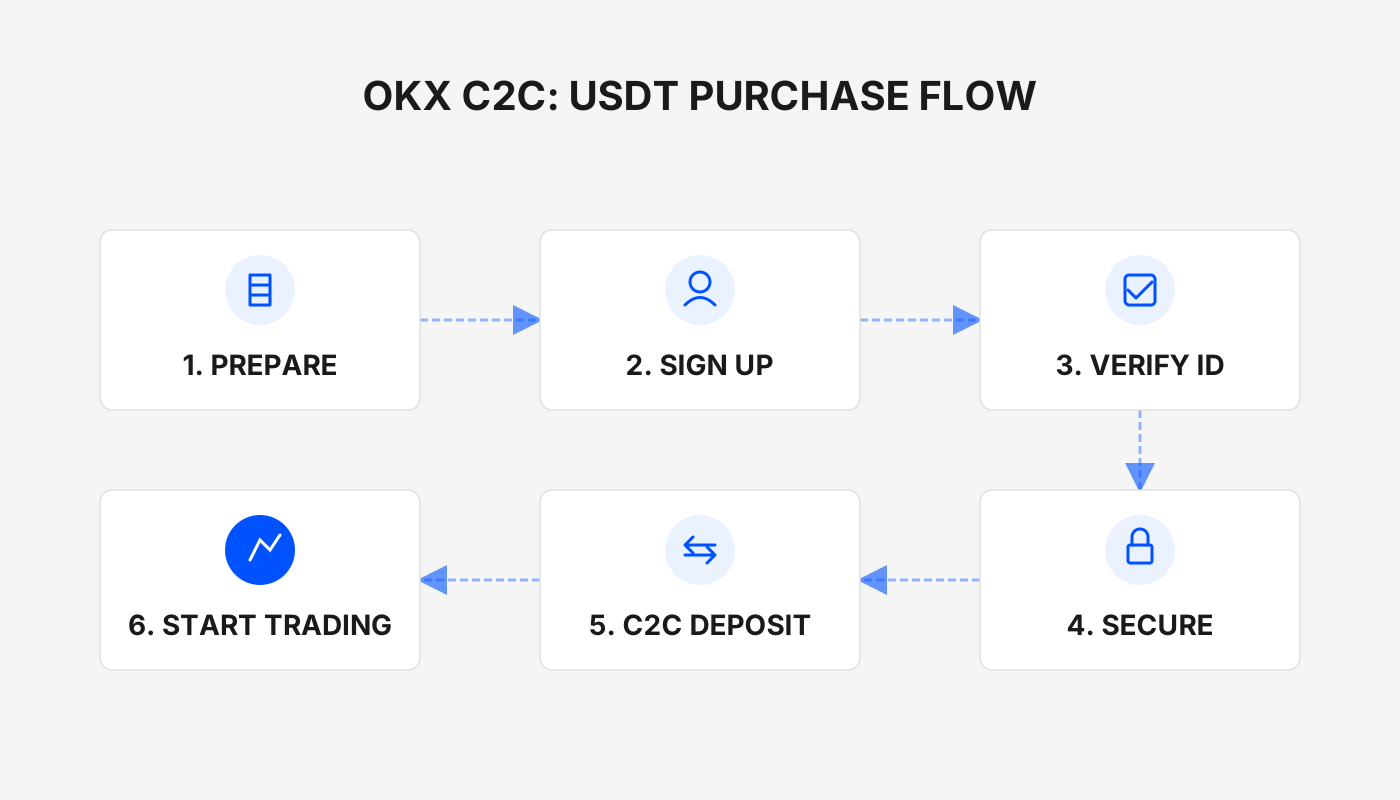
On OKX (formerly OKEx), you can purchase USDT directly with fiat (RMB in the original example) using the C2C (peer‑to‑peer) mode. The whole workflow includes registering an account, completing identity verification, linking a payment method, selecting a beginner‑friendly merchant, and finally completing the transfer.
In this article we walk beginners through the complete C2C buying process on OKX, highlighting the platform’s security features, payment‑method binding, and the key criteria for selecting a trustworthy merchant. With step‑by‑step screenshots and concise explanations, even users with zero experience can smoothly acquire their first batch of USDT and start exploring the broader digital‑asset ecosystem.
What Is OKX and What Is a C2C Transaction?
Before you start clicking any buttons, it helps to understand the basic concepts behind the platform and the trading method.
Brief Overview of the OKX Platform
OKX is a global cryptocurrency exchange that offers a one‑stop suite of blockchain services, including spot trading, futures, margin, DeFi, and a Web3 wallet. The core characteristics that new users should be aware of are:
- Security & Reliability – Multiple layers of protection such as cold‑storage wallets, SSL encryption, and a long operational history give the platform a solid reputation and a large user base.
- Comprehensive Feature Set – In addition to the C2C buying method covered in this guide, OKX also supports spot‑to‑spot trading, instant swaps, and many other products that cater to traders at different stages.
- Localization Friendly – The interface and customer support are available in Chinese; the C2C section integrates popular Chinese payment channels like Alipay, WeChat Pay, and bank cards, making it especially convenient for users in Mainland China. (For users outside China, the same workflow can be performed with your local fiat (e.g., USD) using SEPA or SWIFT transfers where supported.)
Why Do Beginners Usually Choose C2C for Their First Purchase?
C2C (person‑to‑person) on OKX works as a trusted escrow intermediary. The process works as follows:
- Place an Order – You select the amount of USDT you want to buy in the C2C marketplace, and the system displays a list of merchants willing to sell.
- Funds Frozen – OKX temporarily locks the USDT that the merchant intends to sell.
- Make the Payment – You transfer the corresponding fiat (RMB in the original example, or USD/other local currency) to the merchant using Alipay, WeChat Pay, a bank card, or another supported method.
- Release of Tokens – Once the merchant confirms receipt of the payment, OKX releases the USDT into your account.
Key Advantages
- Direct fiat‑to‑USDT conversion using a currency you already hold, with payment methods that match everyday habits.
- Platform‑level escrow reduces counter‑party risk; as long as you follow the prescribed steps, your assets remain protected.
- The workflow resembles a typical e‑commerce purchase, has a low entry barrier, and is ideal for small‑scale testing before committing larger sums.
Registering and Verifying Your OKX Account
Before you can buy any cryptocurrency, you must own an OKX account that has completed identity verification.
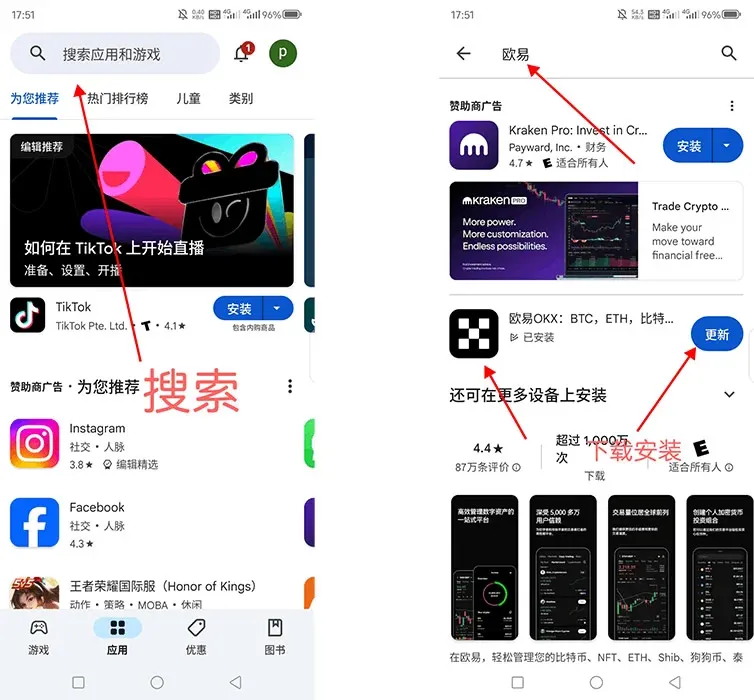
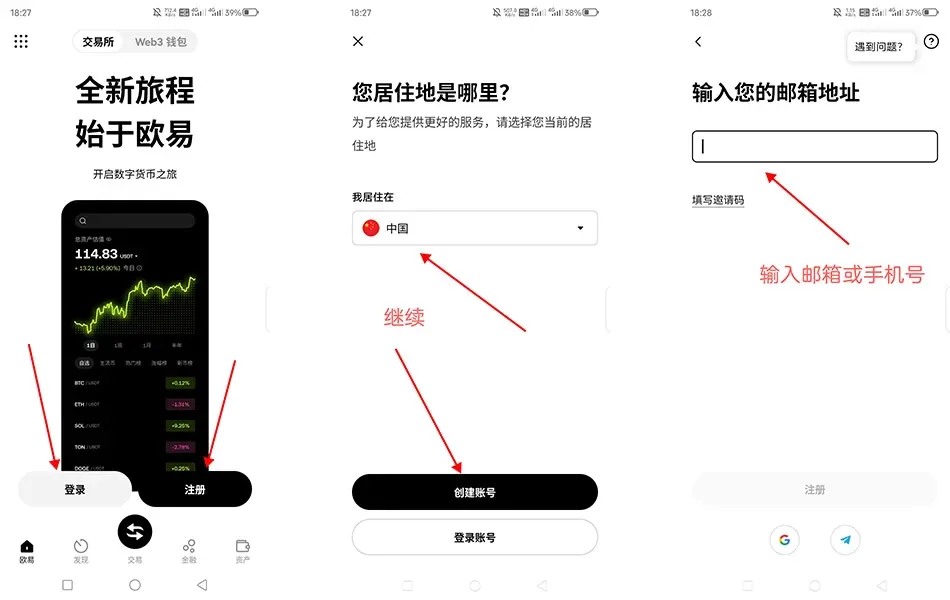
Download and Register the OKX App
- Visit the official OKX website (or search for OKX in your mobile app store) and download the official client.
- Open the app, tap “Register”, and follow the on‑screen prompts to receive a verification code on your mobile number. Enter the code to create your account.
Complete Account Verification
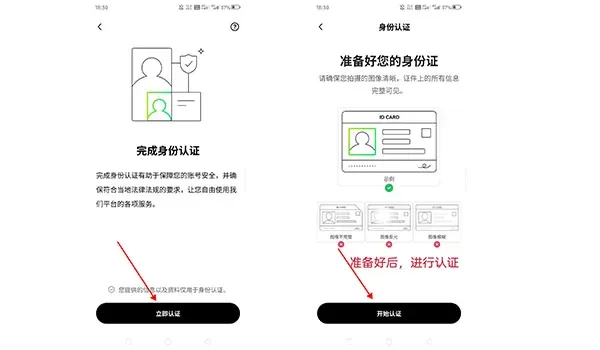
- Tap the personal avatar in the upper‑left corner of the home screen → “Identity Verification.”
- Level 1 Verification – Fill in basic personal details such as full name, nationality, and identification number.
- Level 2 Verification – Upload clear photos of the front and back of your identity document and complete a facial‑recognition check.
Verification usually finishes within a few minutes to a few hours. Once approved, your transaction limits increase dramatically, giving you access to the full suite of OKX services.
Step‑by‑Step Guide for Beginners to Buy USDT via C2C on OKX
1. Bind Your Payment Methods
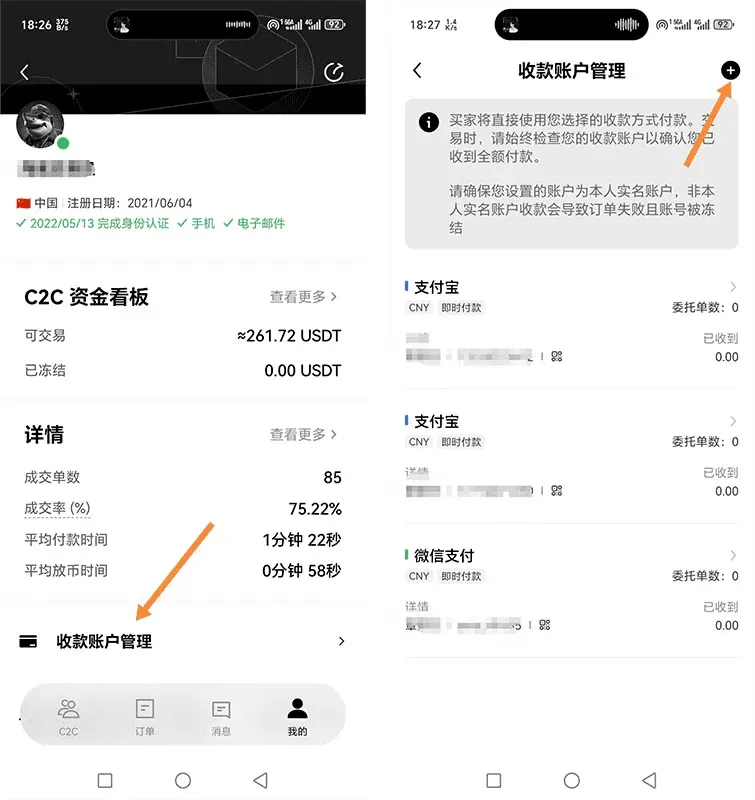
In a C2C transaction you will need to pay the merchant, so linking your preferred payment tools in advance speeds up the process.
- Navigation Path: App → Personal Avatar → “Payment Settings.”
- Supported Methods: Alipay, WeChat Pay QR codes, and bank cards (card number plus issuing bank details).
The app will auto‑populate the fields you have filled, reducing the chance of manual‑entry errors.
2. Enter the C2C Buying Section
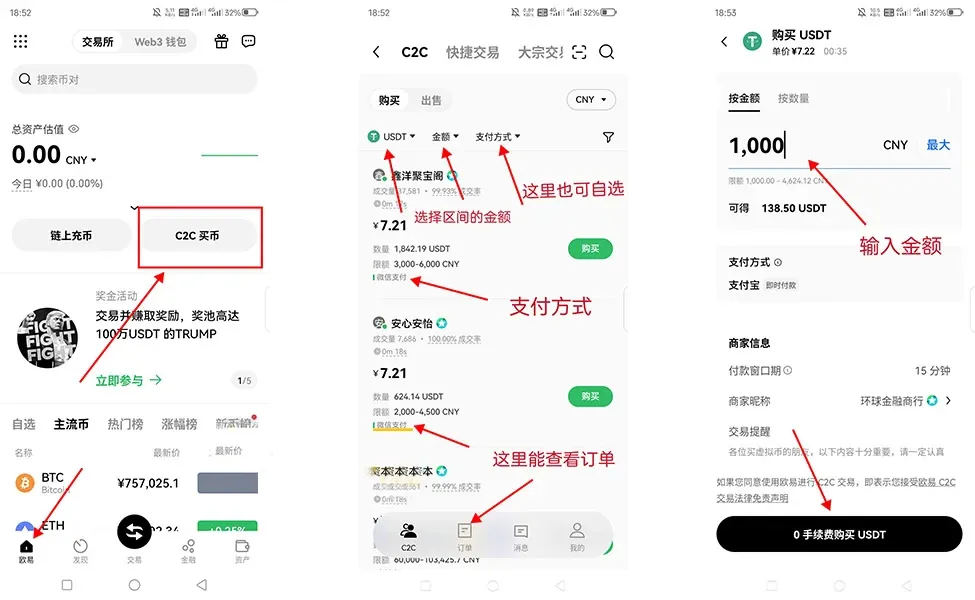
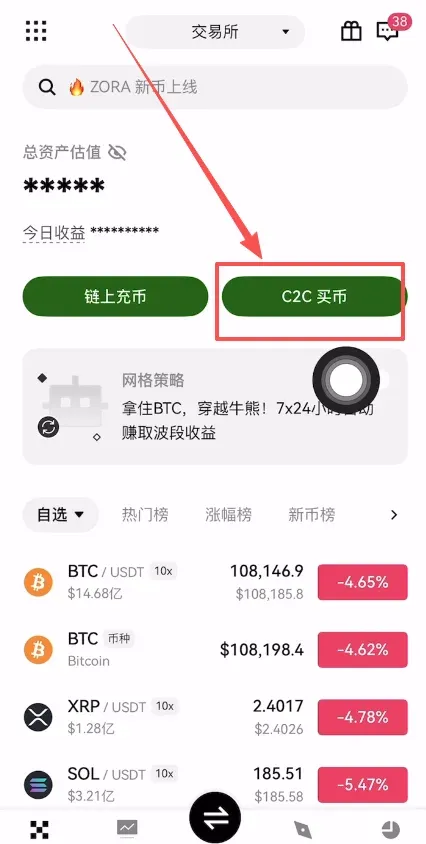
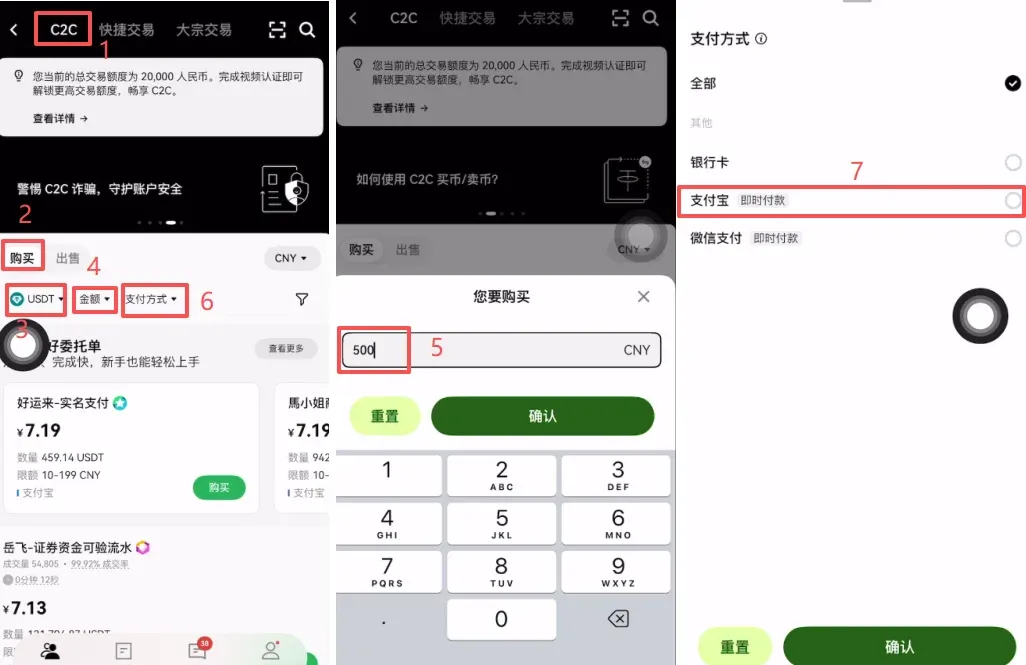
- From the home screen tap 【C2C Buy】.
- Choose the “C2C” tab, then click 【Buy】 and select the cryptocurrency USDT (a stablecoin pegged 1:1 to the US dollar).
3. Set the Purchase Amount and Choose a Payment Method
- In the “Amount” field, type the fiat amount you wish to spend (e.g., 500 RMB; users outside China can enter the equivalent amount in USD or their local currency).
- Tick the checkbox for the payment method you intend to use (Alipay, WeChat Pay, or bank transfer). In this example we select Alipay.
4. Activate the “Beginner‑Friendly Order”
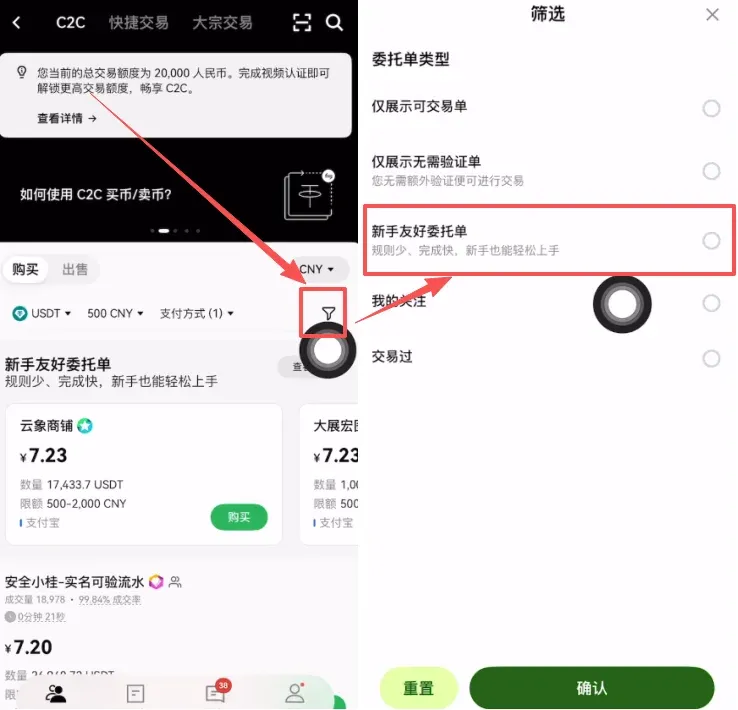
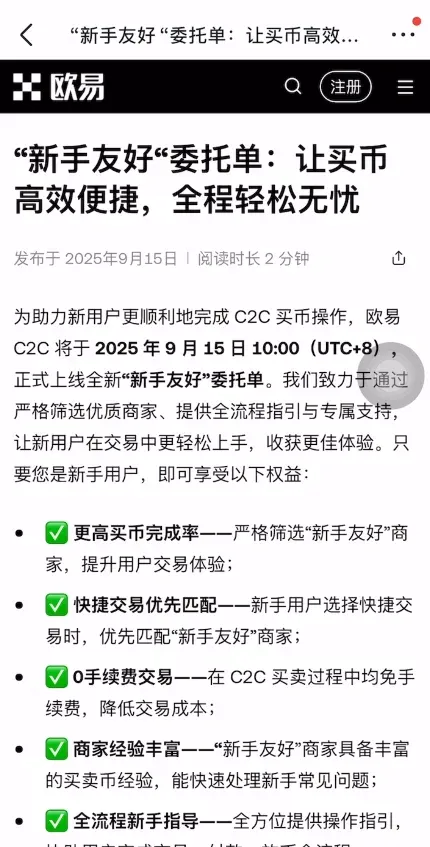
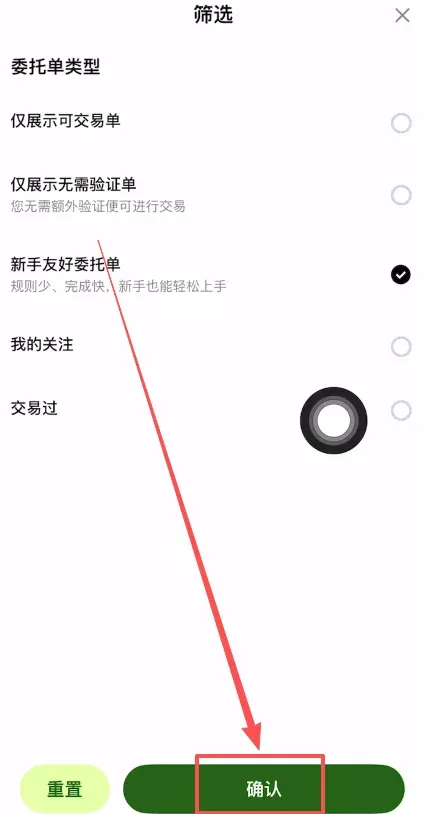
- Check the small pin‑icon next to the amount field labeled “Beginner‑Friendly Order.” The system will then filter the merchant list to show only those with solid reputations and a proven track record.
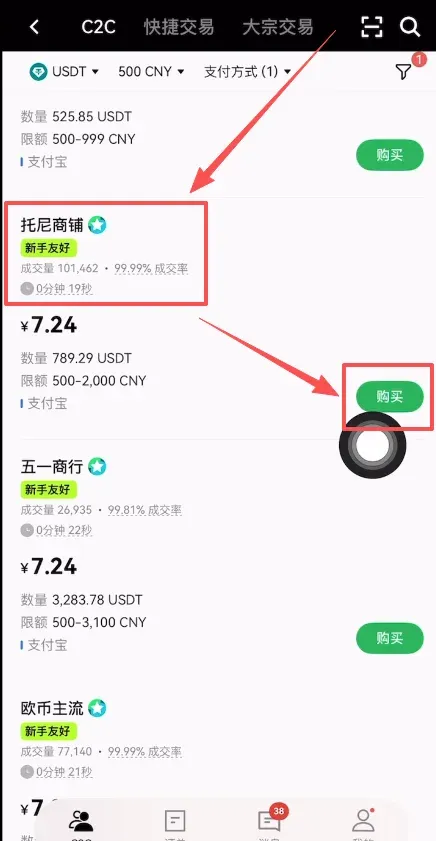
5. Choose a Merchant and Confirm the Order
- The platform now displays merchants that carry the “Beginner‑Friendly” badge. Prioritize merchants with high trading volume and excellent positive‑review ratios.
- Example: “Tony’s Shop”, with 100,000+ completed orders and a 99.99 % positive rating.
Tap the 【Buy】 button next to the chosen merchant.
6. Review Payment Details
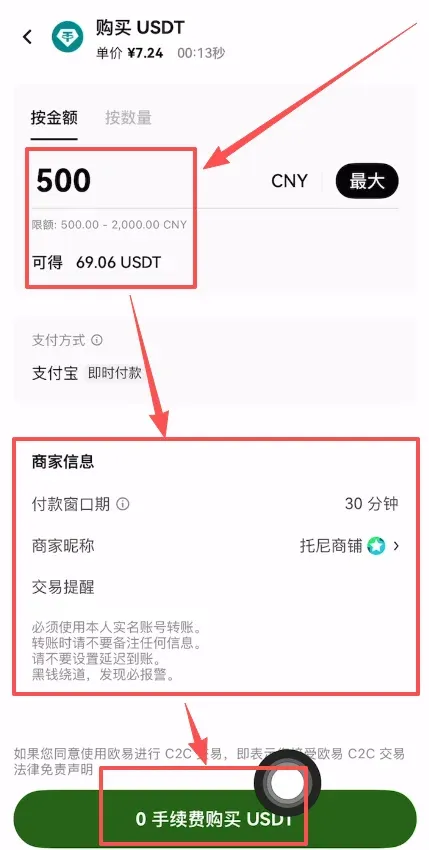
- After entering the fiat amount, the system automatically calculates the amount of USDT you will receive (e.g., 500 RMB ≈ 69.06 USDT; the exact rate fluctuates with market conditions).
- The merchant will provide a short payment reminder, typically asking you to:
- Use a personal, real‑name account for the transfer;
- Avoid adding extra notes in the payment memo;
- Not set any “delayed arrival” options.
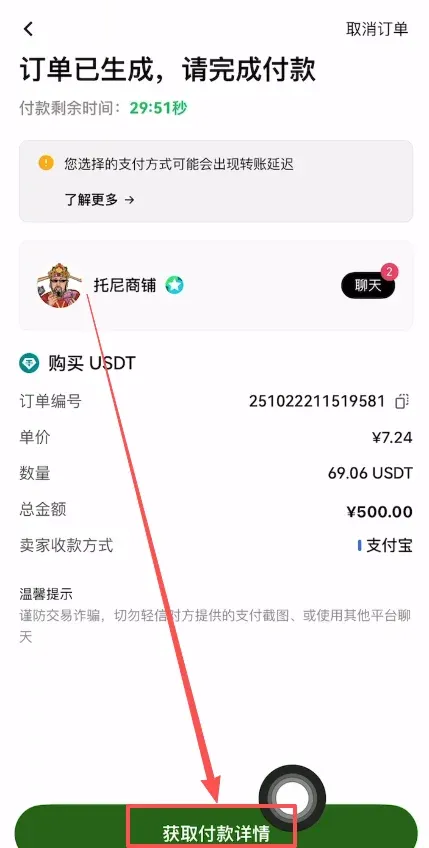
Press the 【Zero‑Fee Purchase USDT】 button to reveal the final payment instructions.
7. Complete the Transfer and Confirm
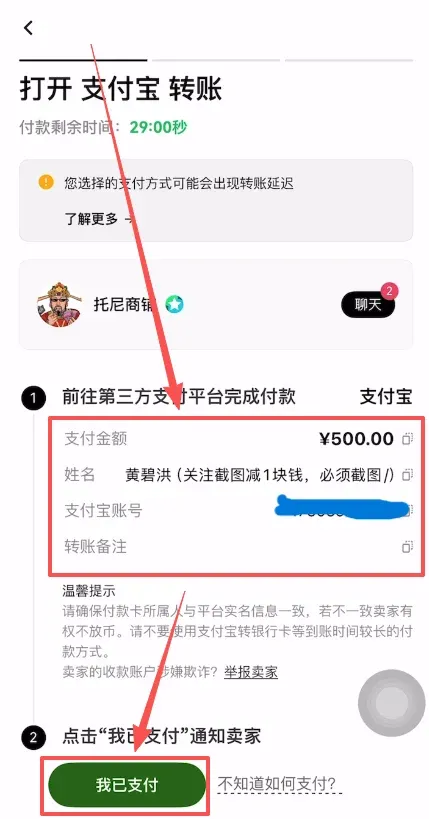
- Follow the merchant’s payment information and send the fiat amount via Alipay, WeChat Pay, or your bank’s online transfer service.
- Once the transfer is successful, tap 【I Have Paid】 in the app. This notifies the merchant that you have completed the payment.
- After the merchant verifies receipt, the previously frozen USDT is automatically released into your OKX wallet, finalizing the purchase.
Safety Tips and What to Do Next
- Do not click “I have paid” before the transfer is actually completed. Premature confirmation can cause unnecessary disputes.
- Avoid off‑platform communication. Any request to move the conversation to WeChat, QQ, Telegram, or other external channels is a classic scam; keep all interactions within the OKX interface.
- Double‑check the merchant’s payment details (name, account number, and any reference codes) against what appears on the order page before hitting “Send.”
- Beware of “proxy buying” services. Anyone offering to buy or sell on your behalf is likely attempting fraud; you must complete the transaction yourself.
- Promptly file an appeal if the merchant does not release the USDT within a reasonable time or if a dispute arises. Use the “Appeal” button on the order page to involve OKX support for arbitration.
Frequently Asked Questions About C2C
Q1: What should I do if the merchant does not release the USDT after I have paid?
A: First verify that you have indeed tapped the “I have paid” button. If you have, send a polite reminder through the in‑order chat. If 15–30 minutes pass without a response or the USDT is still not released, immediately launch an appeal. OKX will then step in to mediate.
Q2: I entered the wrong payment amount. How can I fix it?
A: Immediately inform the merchant via the order chat and attach a screenshot of the payment receipt. If the merchant refuses to adjust the order, you will need to open an appeal. The platform will assess the provided transaction evidence and render a decision.
Q3: Are there alternatives to C2C for buying crypto?
A: Yes. OKX also offers a “Quick Buy” feature, which automatically matches you with a C2C merchant but with a slightly higher fee, and a “OTC (over‑the‑counter) large‑volume trade” option for institutional‑size purchases.
Conclusion – By following the steps outlined above, a complete beginner can successfully purchase USDT via C2C on OKX, turning “zero experience” into a solid foundational skill. In the cryptocurrency landscape, cultivating safe habits and committing to continuous learning are as important as the assets themselves. As long as you adhere strictly to the platform’s prescribed workflow and stay vigilant against scams, your first purchase can be both safe and hassle‑free.
*Please note that cryptocurrency gains may be taxable in your local jurisdiction; consult a tax professional to understand your obligations.*
Related Reading
- Step-by-Step Guide to Buying USDT on OKX C2C Marketplace
- Top US Alt‑Coin Exchanges 2024: Why OKX Leads the Pack
- How to Register and Verify Your Account on OKX Exchange
💡 Register on Binance with referral code B2345 for the maximum trading fee discount. See Binance complete guide.



