
 Bitaigen Research
 We systematically examine CoinW’s deposit and withdrawal procedures by reviewing the platform’s overview, feature highlights, and detailed operational steps. Illustrated step‑by‑step guides help newcomers get started quickly, avoid common pitfalls, and provide an objective assessment of the platform’s strengths and weaknesses, enabling more informed decisions in asset management.
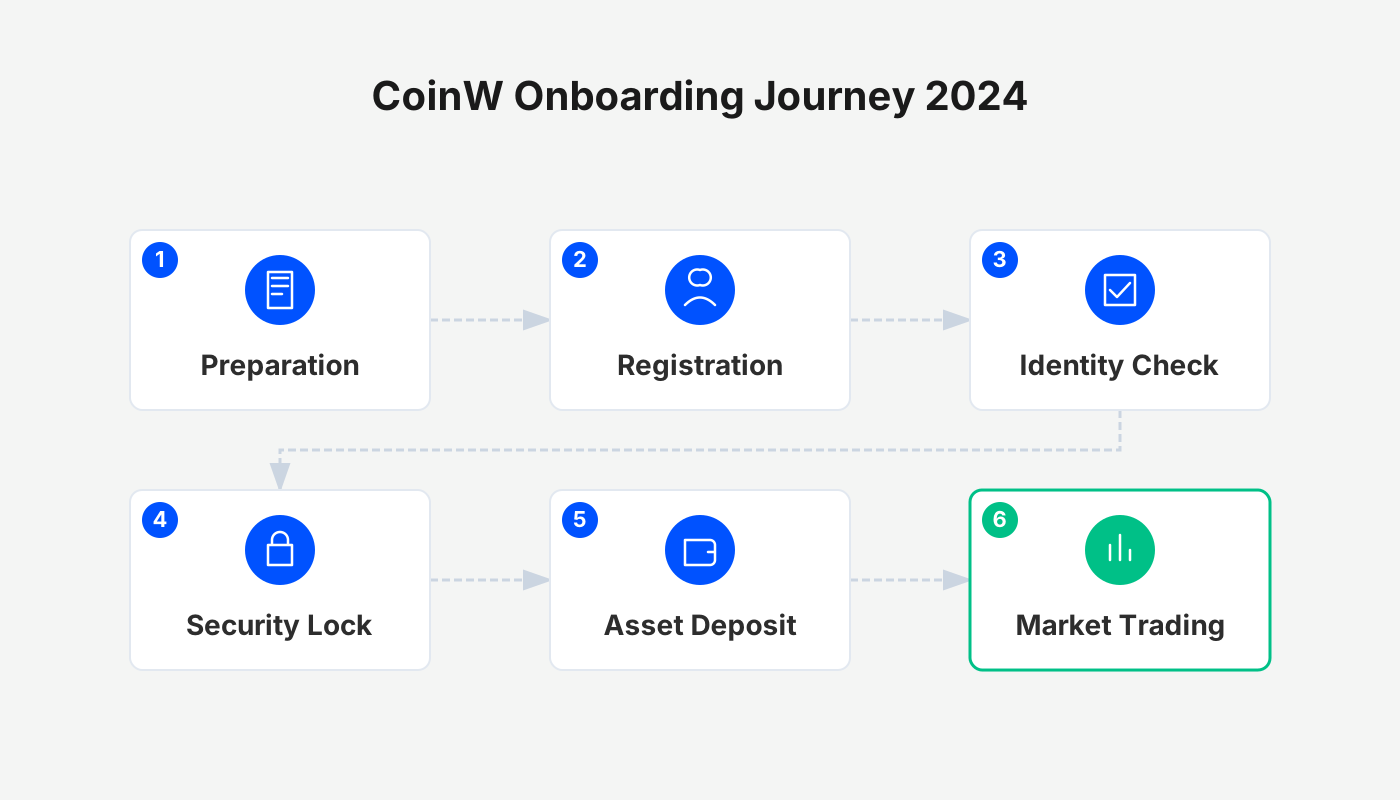
Overview of the CoinW Exchange
Founded in 2017 by David Bai, CoinW is headquartered in Dubai, United Arab Emirates. The platform has attracted over 50,000 users and operates in more than 100 countries and regions, pursuing the mission of “global financial freedom and inclusion.” From its product ecosystem to community operations, CoinW aligns its activities with this mission, aiming to create a mutually beneficial relationship between the exchange and its users.
The spot‑trading module supports 389 cryptocurrency assets and offers a suite of advanced order types, including Smart Market, Conditional Stop‑Loss, Trailing Stop‑Loss, OCO (One‑Cancels‑Other), and Iceberg orders. On the derivatives side, more than 140 contracts are available, with leverage reaching up to 200×. The maker and taker fees are 0.010 % and 0.060 %, respectively. In addition, CoinW provides a range of automated strategies—copy‑trading, grid trading, auto‑investment, CTA (Commodity Trading Advisor), and Martingale bots—to accommodate diverse trading styles.
Advantages and Disadvantages of CoinW
| Advantages | Disadvantages |
|---|---|
| ✅ Supports more than 389 spot‑market coins and over 140 futures contracts | ❌ Customer‑service response times could be improved |
| ✅ Futures leverage up to 200× | ❌ Fiat‑on‑ramp options are limited; bank transfers are not offered |
| ✅ Spot market offers a variety of advanced order types | ❌ P2P market liquidity is relatively thin |
| ✅ Built‑in copy‑trading and automation bots | ❌ Recent removal of the CWT fee‑discount program |
| ✅ Free internal “instant‑transfer” feature |
Summary of the Deposit Process
When you hold digital assets in another wallet or exchange and wish to move them to CoinW, you can use the Deposit function. The following sections describe the exact steps for both the web version and the mobile app.
1. Depositing via the Web Platform
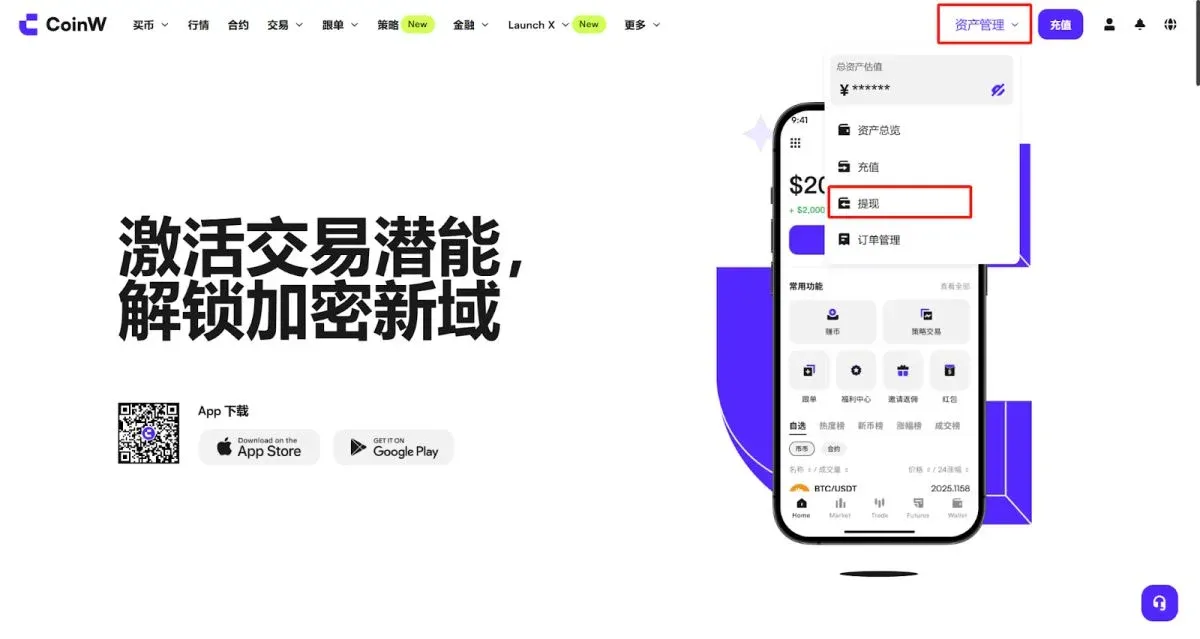
- Visit the official CoinW website, click [Asset Management] in the upper‑right corner, then select [Deposit] in the asset center. Choose the desired cryptocurrency and specify the mainnet; the corresponding deposit address will be displayed.
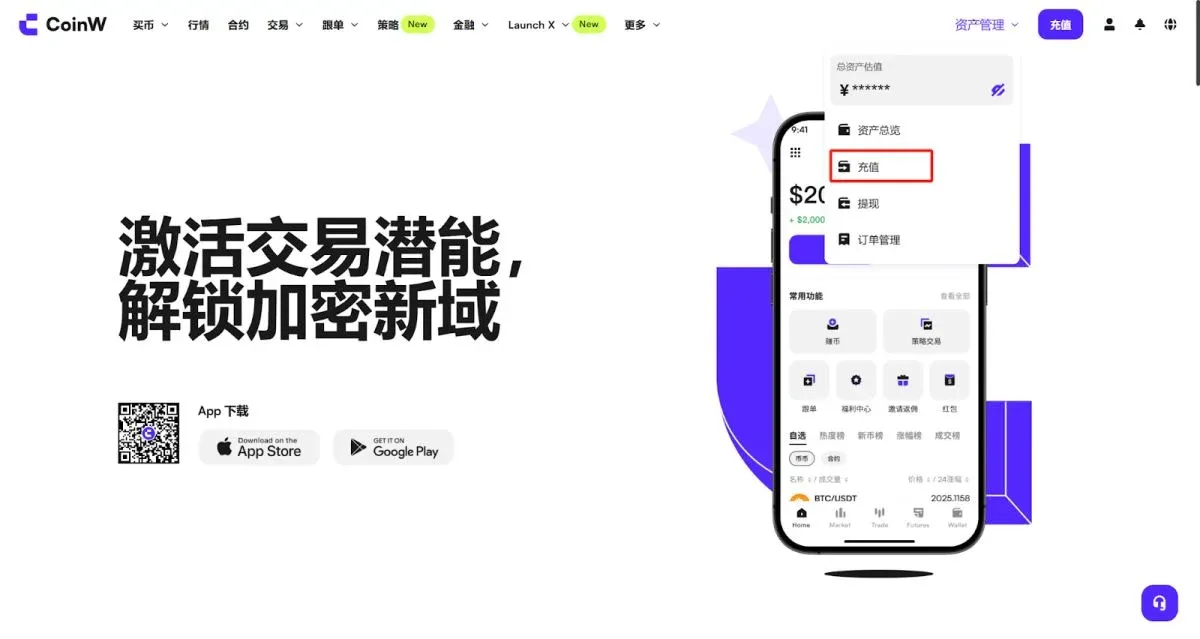
- Using USDT as an example, you must first determine the correct mainnet type before obtaining the address.
Tip: The mainnet you select must match the network chosen on the sending platform. For instance, if the address is on TRC20, the originating exchange should also select TRC20 for withdrawal.
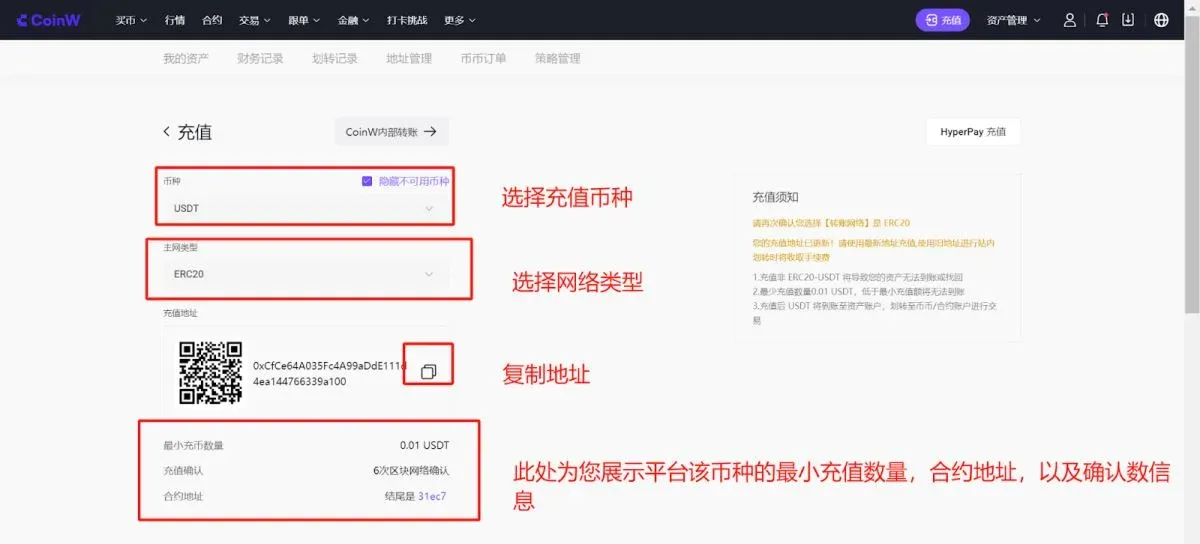
- Minimum deposit amount: Deposits below the platform‑specified minimum will not be credited.
- Deposit confirmations: The blockchain must complete a certain number of confirmations before the funds appear in your CoinW account.
- Contract address: Ensure the token contract you are sending matches the contract displayed by CoinW; otherwise, assets may be lost.
- Copy the shown deposit address and paste it into the withdrawal page of the wallet or exchange where your assets are currently held to complete the transfer.
2. Depositing via the Mobile App
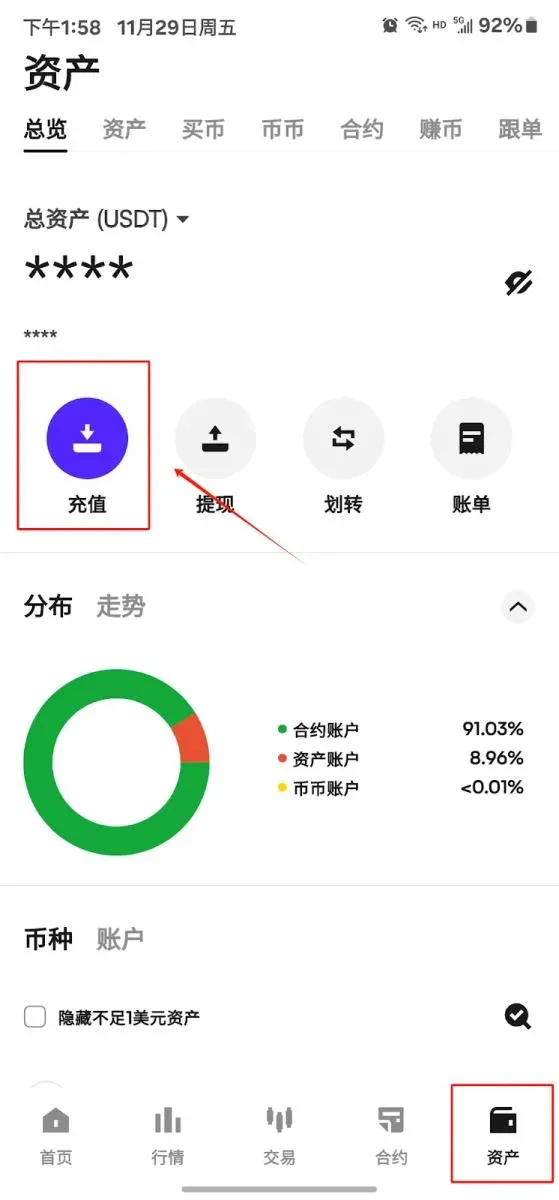
- Open the CoinW app and tap Asset in the bottom navigation bar to reach the asset page.
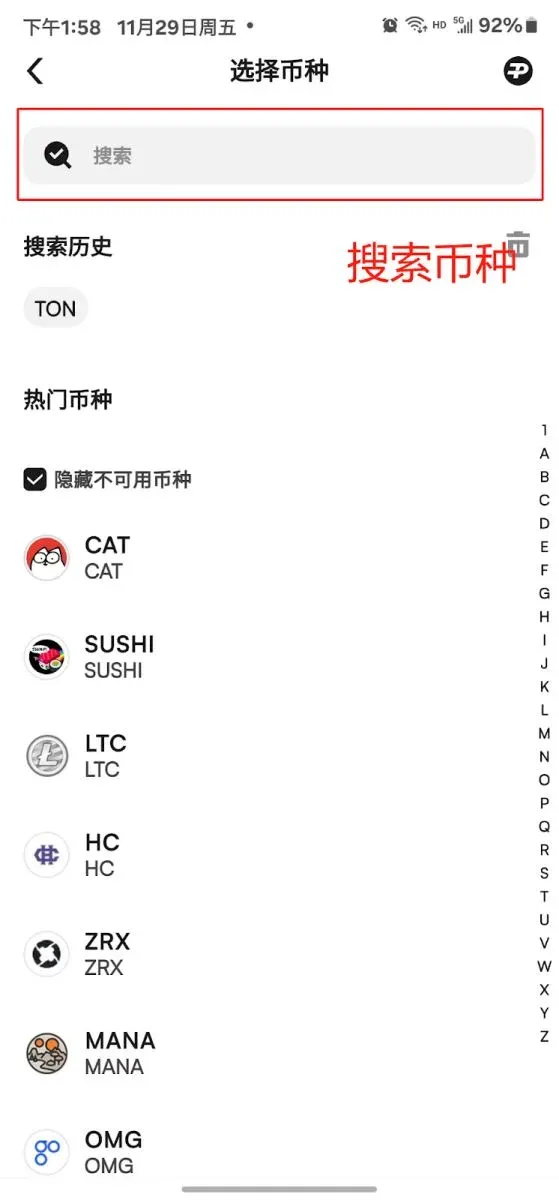
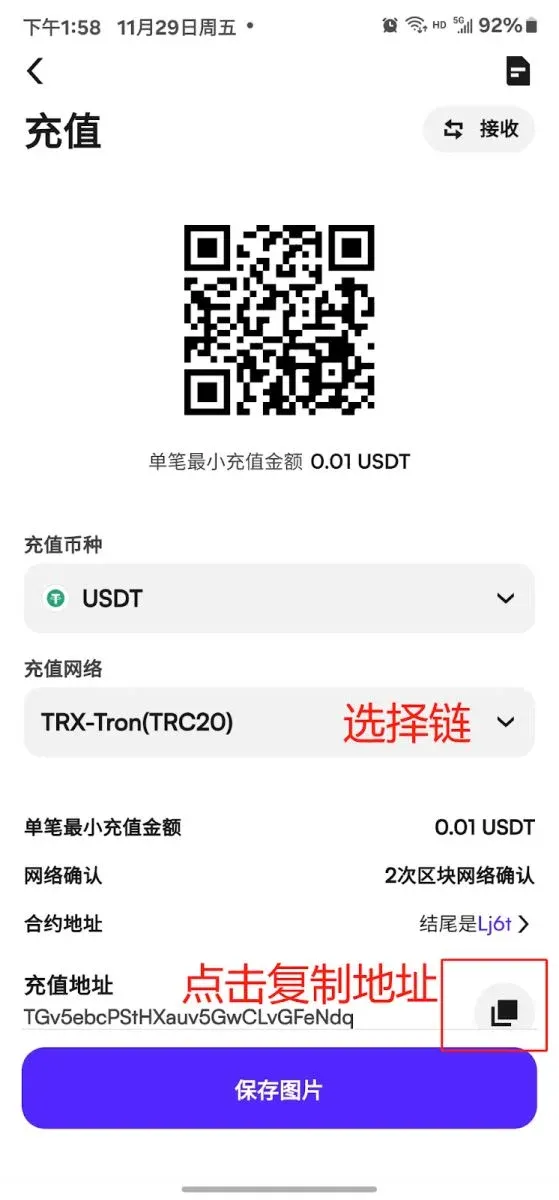
- At the top of the page, tap [Deposit], select the cryptocurrency, confirm the mainnet type, and the app will present the corresponding deposit address.
- Copy that address and enter it as the withdrawal address on the source platform to initiate the deposit.
Key Points to Remember When Depositing
- Network consistency: Always make sure the selected mainnet matches the network option on the sending platform; a mismatch can cause the deposit to fail or be lost.
- Memo (or Tag): Some assets require a Memo or Tag when depositing. Omitting this field may result in a failed deposit, so double‑check the requirement before confirming.
Withdrawal Guide
If you wish to move assets out of your CoinW account to another exchange, wallet, or to another CoinW user, you can use the Withdrawal function. Withdrawals can be performed as a standard blockchain transfer or as a free internal transfer between CoinW accounts.
1. Blockchain Transfer (Standard Withdrawal)
Web‑Based Procedure
- After logging in, click [Asset Management] in the upper‑right corner, go to the asset center, select [Withdraw], pick the cryptocurrency, choose Standard Withdrawal, then confirm the mainnet and target address as prompted.
- For first‑time users, you must first add a withdrawal address: click Add Address, paste the destination address, select the address source (e.g., wallet or exchange), optionally fill in a withdrawal note, verify the details, and submit.
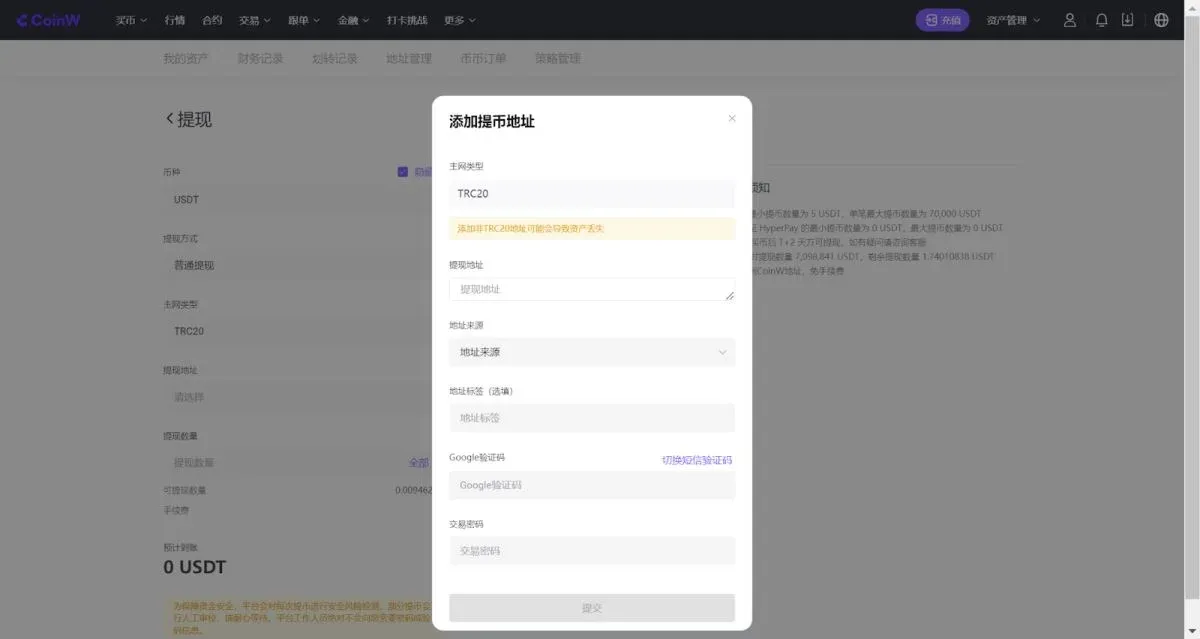
- Once the address is successfully saved, select it on the withdrawal page and submit your withdrawal request.
App‑Based Procedure
- From the bottom navigation bar, go to Asset in the app.
- Tap [Withdraw] at the top, choose the cryptocurrency, select Standard Withdrawal, pick the appropriate mainnet, and choose a previously saved address.
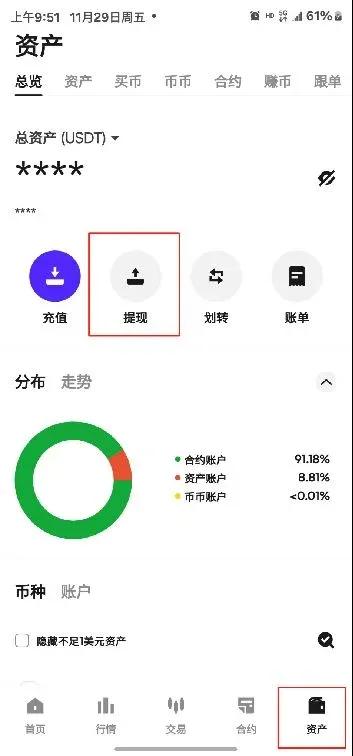
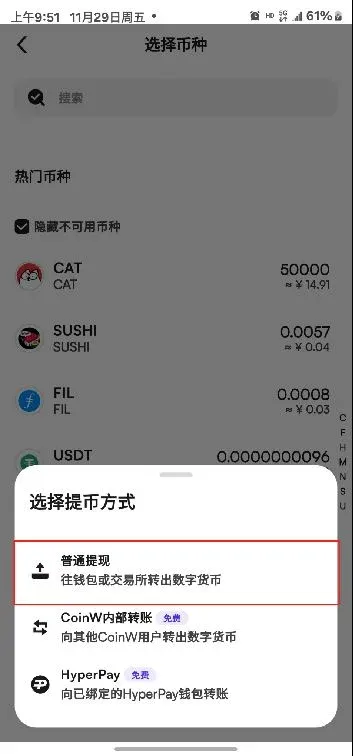
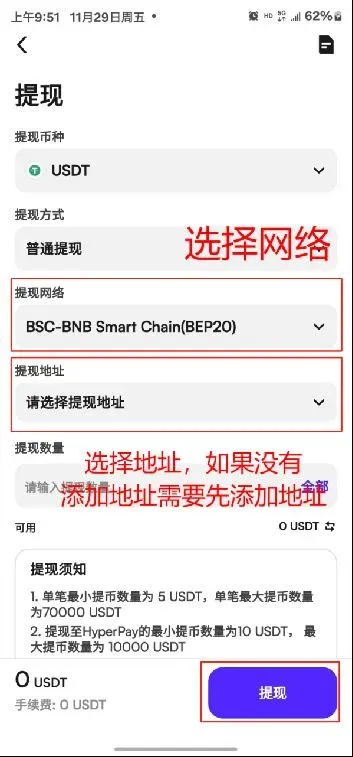
- If you have not yet saved an address, tap Add Address, fill in the destination address, indicate its source, optionally add a memo, and confirm.
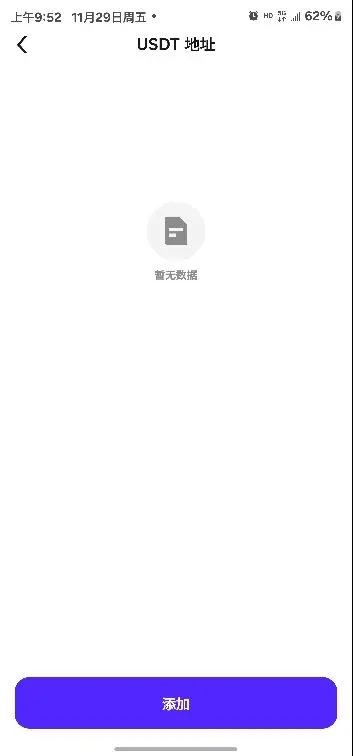
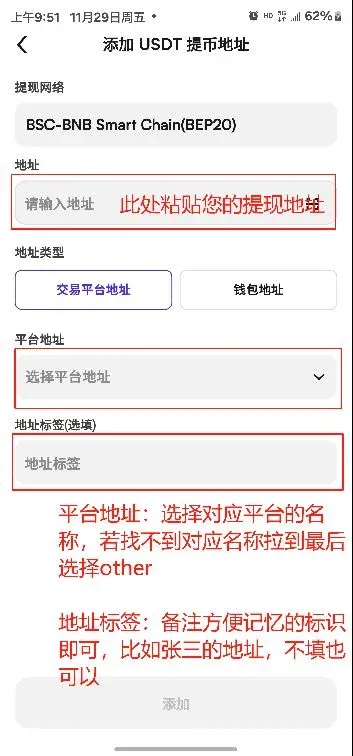
- After the address is stored, select it and submit the withdrawal request.
Critical Withdrawal Tips
- Once a withdrawal passes the compliance review, it cannot be reversed. Verify the address, network, and any required Memo before confirming.
- The network selection must correspond to the blockchain of the destination address; an incorrect network will cause the transaction to fail.
- Certain tokens mandate a Memo (or Tag). Leaving this field blank or entering an incorrect value can result in the funds not arriving.
2. Free Internal Transfer
If you need to move assets to another CoinW user, you can use the internal transfer feature. The workflow mirrors a standard withdrawal; simply change the Withdrawal Method to [CoinW Internal Transfer] on the withdrawal page. This option incurs no fees, the transfer is instantaneous, and you can specify the recipient via UID, phone number, or email address.
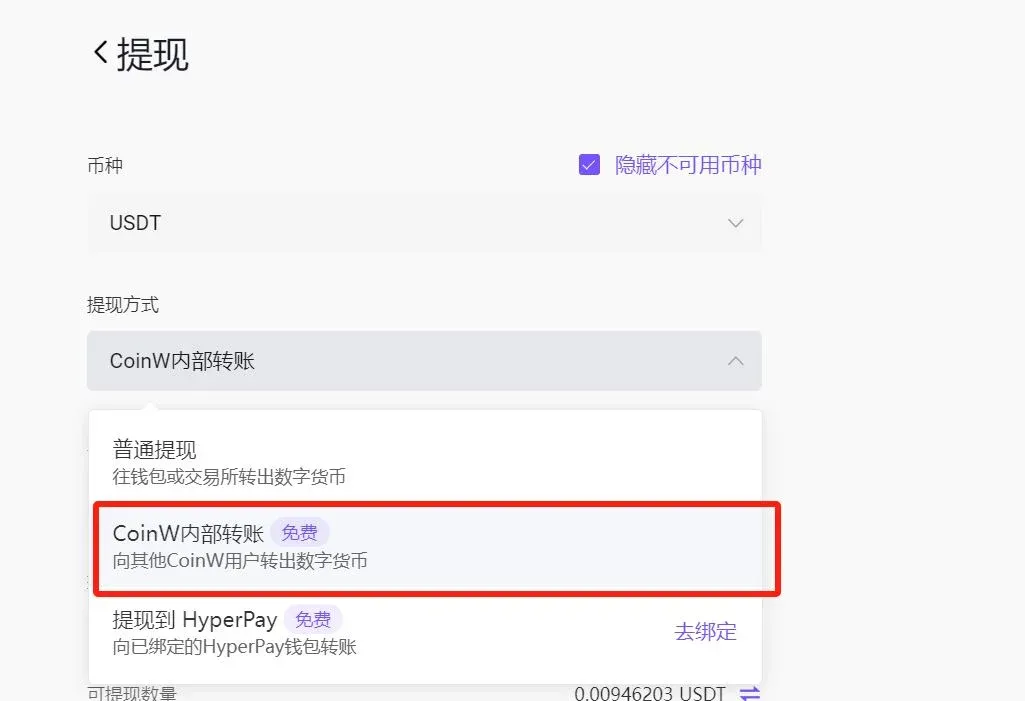
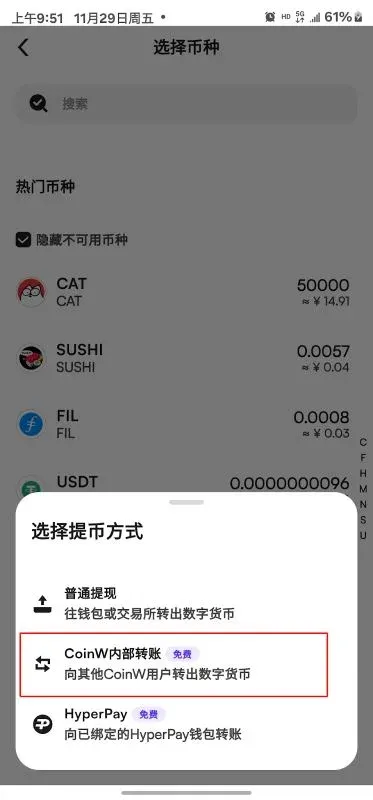
Friendly reminder: When performing an internal transfer, double‑check the recipient’s UID, phone number, or email to avoid sending funds to the wrong account.
Frequently Asked Questions
Q1: How should I fill in the withdrawal address note?
A: The note field is optional. If you are unsure, you may leave it blank; otherwise, you can enter a recognizable label such as “John’s wallet” for easier identification.
Q2: What is a Memo, and is it mandatory?
A: If the destination platform requires a Memo (or Tag), you must provide it; otherwise the assets will not be credited. If the receiving platform does not require a Memo, you may either enter any string or leave the field empty.
Q3: Where can I view withdrawal fees and limits?
A: Fees and limits vary by cryptocurrency and blockchain. Always refer to the amounts displayed on the withdrawal screen for the most accurate information.
Q4: Why do some withdrawals show a “T+2” or 24‑hour restriction?
A: These are risk‑control measures. If you recently purchased USDT via a fiat gateway, the system enforces a 48‑hour (T+2) waiting period before allowing a withdrawal. Changing security settings such as your login password, linked phone number, or email may also trigger a 24‑hour cooldown to protect your account.
Tax note: Cryptocurrency gains may be subject to taxation in your jurisdiction. Users should consult local tax regulations or a qualified tax professional to determine any reporting obligations.
---
The above sections provide a comprehensive, step‑by‑step description of how to deposit and withdraw assets on CoinW. For deeper operational details or the latest policy updates, continue following reports from Bitaigen (比特根).
Related Reading
- CoinW Review 2024: Secure Crypto Exchange with Licenses
- CoinW & GemW Dual-Wheel: Deep Liquidity & Fast Listings
- Register on OKX with Invitation Code – Get 20% Fee Discount
💡 Register on Binance with referral code B2345 for the maximum trading fee discount. See Binance complete guide.



