
 Bitaigen Research
 This article was compiled by the Bitaigen editorial team to provide newcomers to Gate.io with a complete step‑by‑step guide for topping up via WeChat. From downloading the client, completing KYC, to selecting WeChat payment on the C2C page, each step is illustrated with screenshots to help readers get started quickly and avoid common pitfalls. Continue reading for the full details.
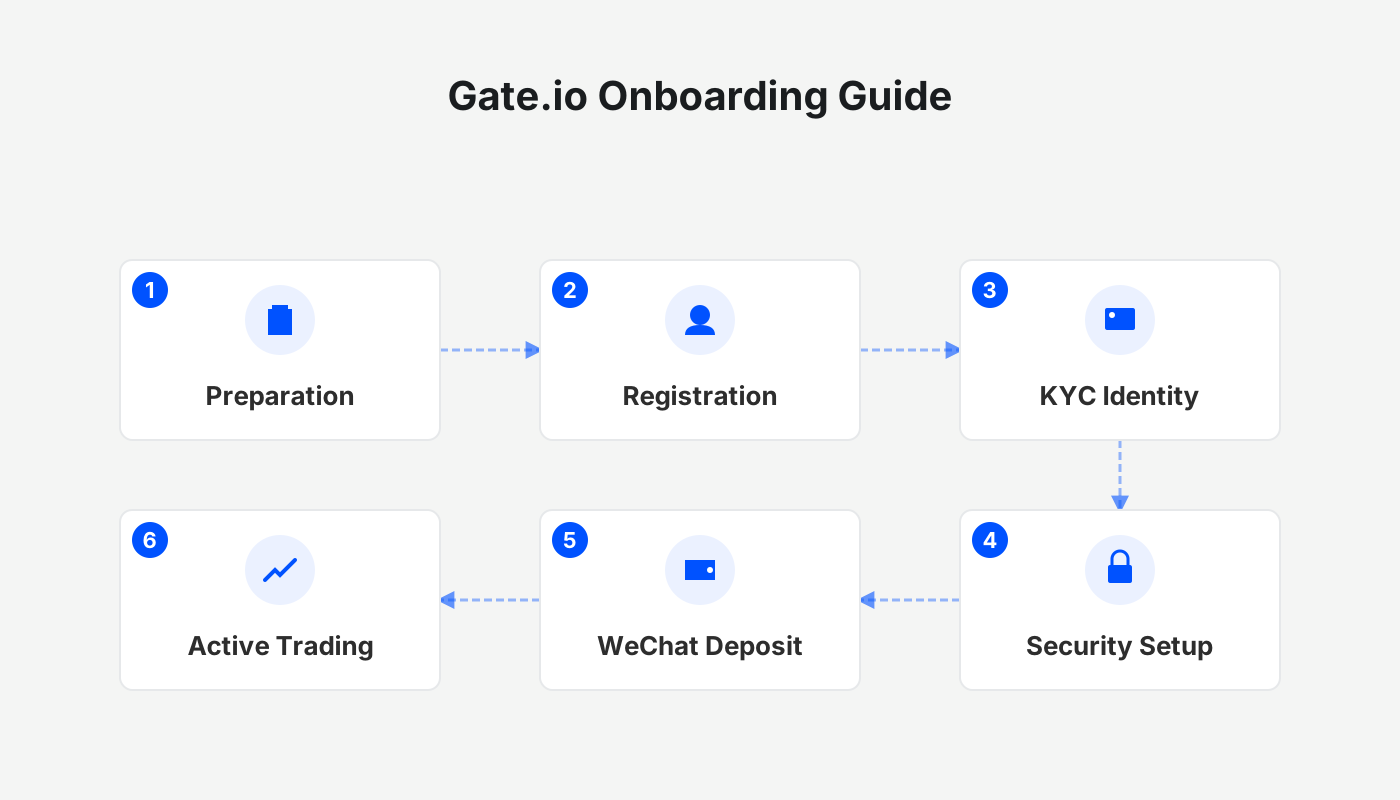
How to Top Up Your Gate.io Account Using WeChat? Complete Guide for Beginners
Topping up Gate.io with WeChat is straightforward: on the homepage choose C2C, filter the merchants in the “Favorites” section, select WeChat as the payment method, complete the transfer and click “I have paid”. The funds will be credited instantly.
Before you begin, download the official Gate.io client from the authorized channels (official registration link, official download link). Complete account registration, KYC identity verification, and set up your security preferences.
1. Access the Deposit Portal
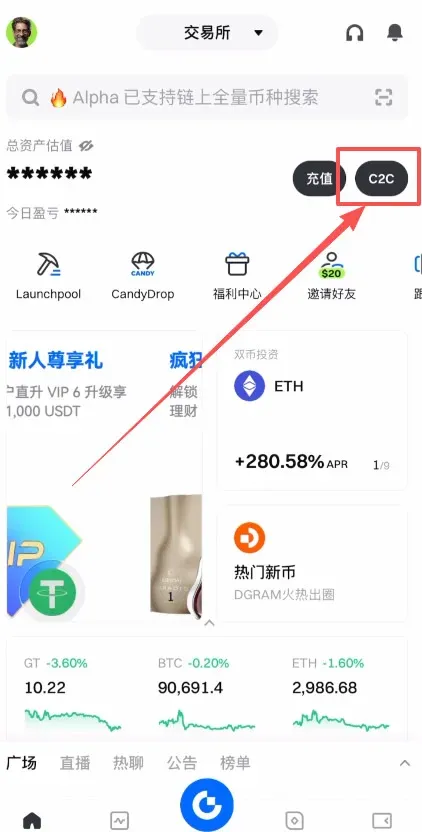
- Open the Gate.io homepage and click the “Deposit” and “C2C” buttons in the upper‑right corner.
- This tutorial uses the C2C route because it allows you to buy crypto directly with WeChat funds.
2. Choose a Trading Section
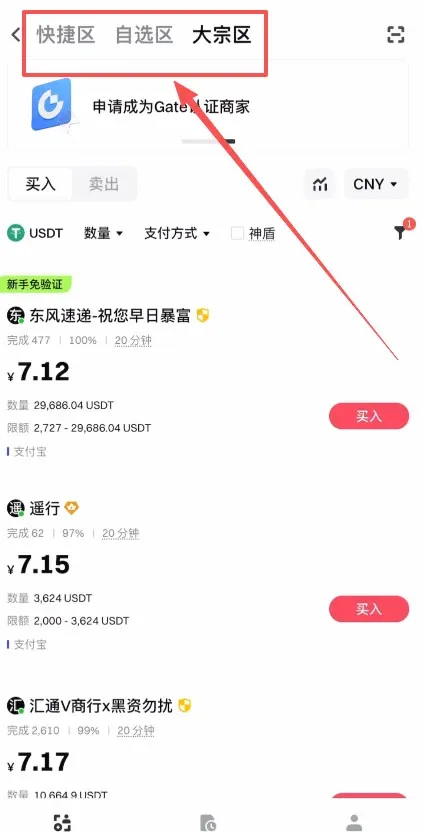
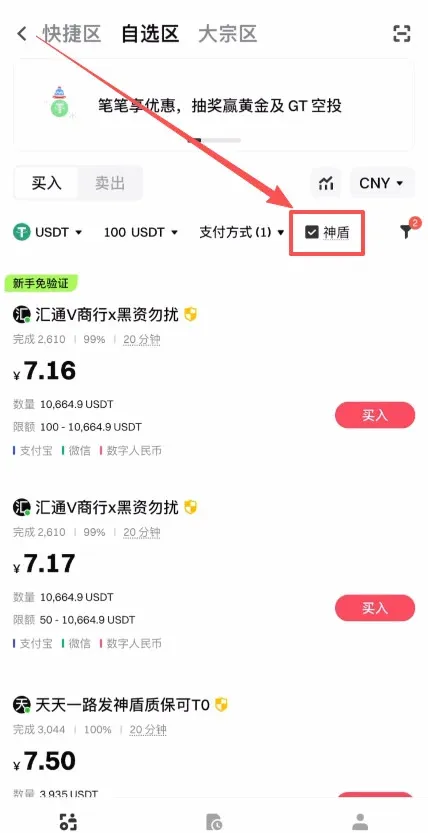
- After entering, the page is divided into Quick Zone, Favorites Zone, and Bulk Zone.
- The Bulk Zone is intended for large‑volume trades with higher limits; most retail users should stick to the Favorites Zone.
3. Filter Merchants and Set the Payment Method
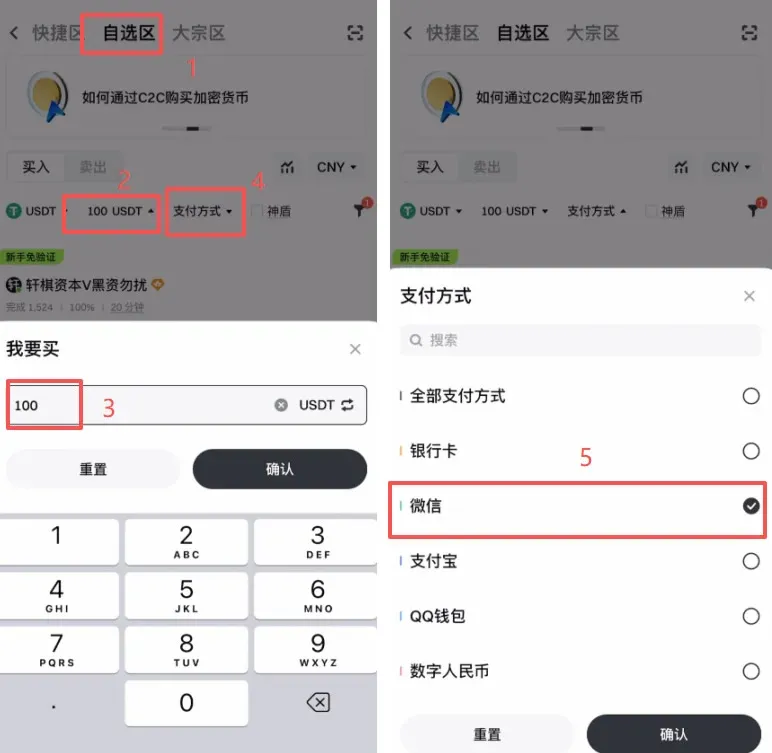
- In the Favorites Zone, enter the amount of USDT you wish to purchase to filter the offers.
- Tick the “WeChat” option under payment methods.
4. Enable the “Shield” Protection
- Check the Shield merchants box. These merchants have a locked margin on the platform; if a transaction goes awry, you may receive compensation, enhancing safety.
5. Adjust Filtering Options
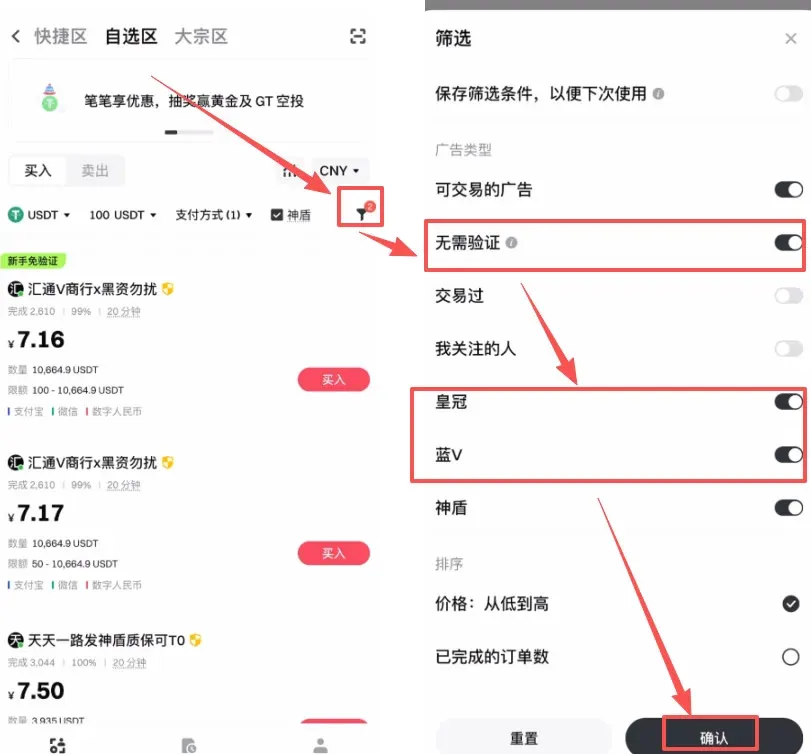
- Click the funnel icon on the right to open filters such as “No verification required”, “Crown”, “Blue V”, etc., which streamline the trading process.
- After setting your preferences, click 【Confirm】.
6. Compare and Select a Merchant
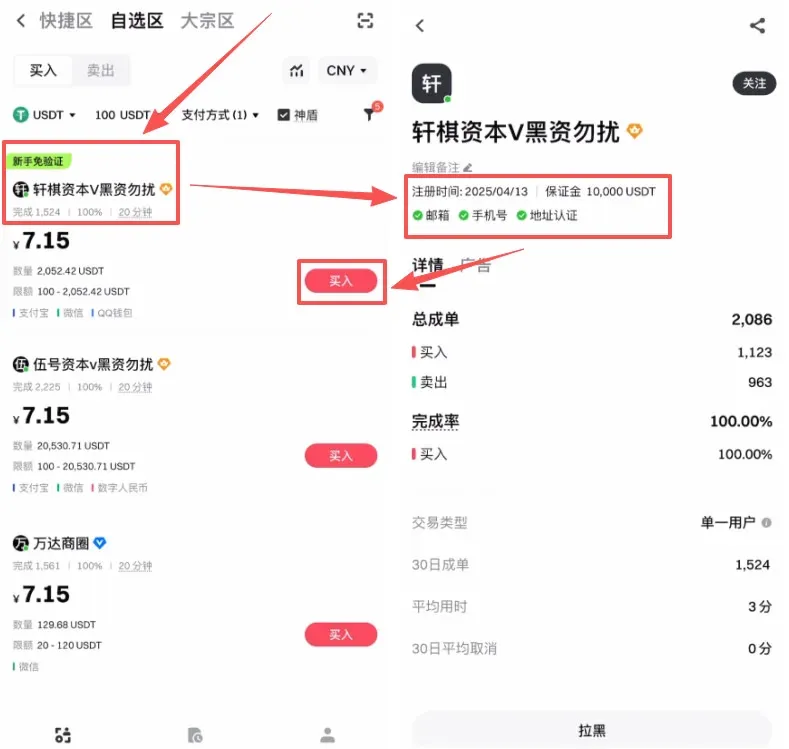
- The page will now display a list of merchants that match your criteria.
- Review each merchant’s order volume, completion rate, registration age (preferably six months or more), and whether they have posted sufficient margin.
- Once you are satisfied with the merchant’s reputation, click the 【Buy】 button on the right side.
7. Fill in the Order Details
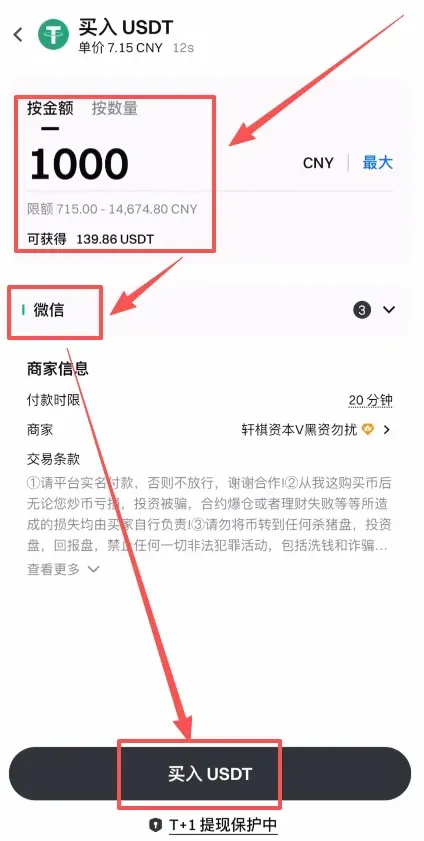
- Enter either the purchase amount in USD or the quantity of USDT you want. The payment method should remain WeChat.
- Click 【Buy USDT】.
8. Retrieve Payment Information
- After the order is generated, click 【Chat】 to view the merchant’s specific instructions.
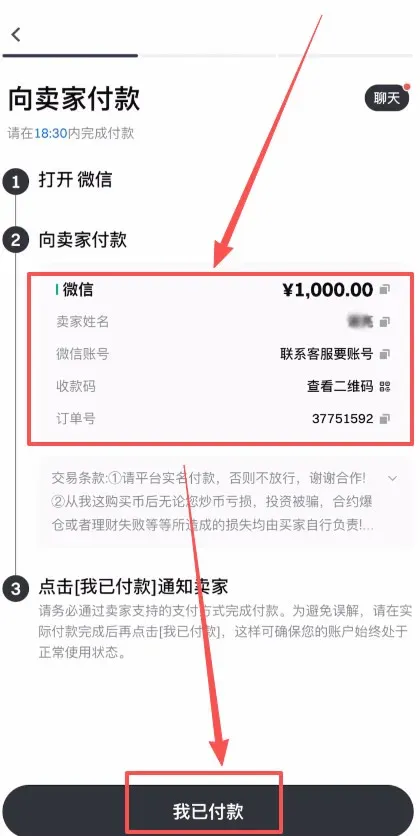
- Then click 【Get Payment Details】.
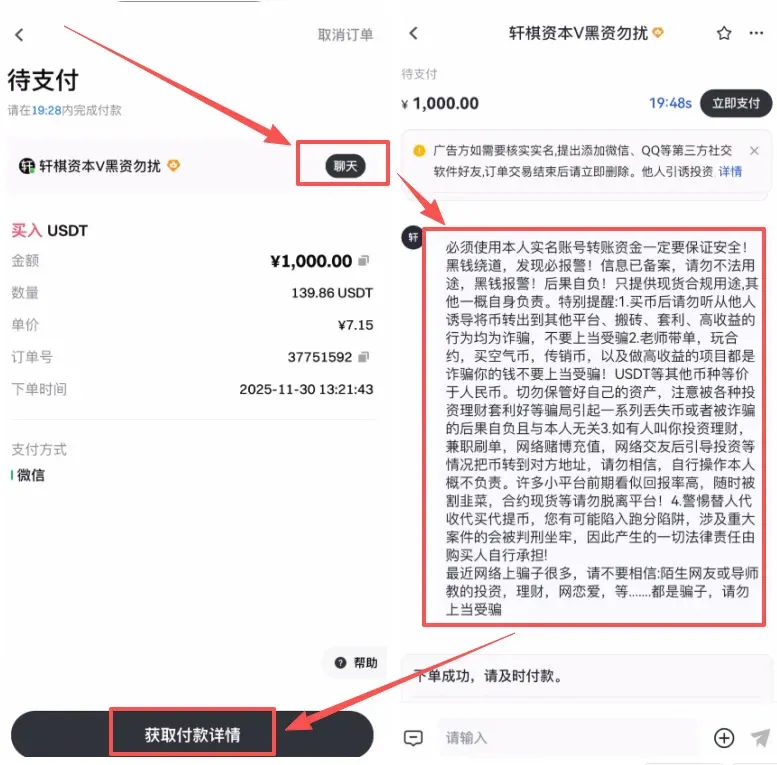
9. Complete the WeChat Transfer and Confirm
- The merchant will display their name, WeChat ID, and a QR code for payment. If this information is missing, request it via the chat window.
- Open WeChat on your phone, scan the QR code or enter the provided account details to send the funds.
- Once the transfer is successful, return to the Gate.io page and click 【I have paid】 to notify the merchant.
- After the merchant confirms receipt, the platform will automatically credit the purchased USDT to your account, completing the top‑up.
That concludes the full process for funding your Gate.io account via WeChat. For additional tutorials on Gate.io deposits and other features, stay tuned to future articles from Bitaigen.
Note for International Users:
• When dealing with fiat onramp/off‑ramp, Gate.io supports USD deposits via SEPA (for European users) or SWIFT (global).
• U.S. residents should use Binance.US instead of the global Binance platform, as the latter is not available to U.S. customers.
• Cryptocurrency transactions may be subject to tax in your jurisdiction. Keep records of purchases and consult a tax professional to ensure compliance.
Related Reading
- Gate.io Review: Top Alt‑Coin Exchange & Fee‑Saving Tips
- Binance vs Gate.io vs Bybit vs Bitget: Best Crypto Exchange
- Gate.io Registration & Real‑Name Verification for Mainland China
💡 Register on Binance with referral code B2345 for the maximum trading fee discount. See Binance complete guide.



