
 Bitaigen Research
 The trading mechanics on the OKEX contract platform are as follows: first select a weekly, bi‑weekly, or quarterly contract, set leverage and margin based on your bullish or bearish view of the underlying price, place the order, and after the position is opened you can close it at any time or add to it. On the settlement date the contract is settled against an index.
We break down the platform’s features, contract types, and order‑placement essentials from every angle, helping newcomers quickly master the core workflow of OKEX contracts and avoid common pitfalls. If you want to learn how to pick the right contract, adjust positions flexibly, and settle smoothly, keep reading for practical guidance.
How to Trade on the OKEX Contract Platform?
1. Determine Bullish or Bearish Direction and Choose Contract Type
Users decide whether to go long or short based on their view of BTC (or any other underlying) price movement, and then select a contract duration that matches their intended holding period. Currently OKEX (https://www.ouyi.cc/) offers three contract families: Weekly contracts, Bi‑weekly contracts, and Quarterly contracts.
- Weekly contracts – settlement occurs on the nearest Friday.
- Bi‑weekly contracts – settlement occurs on the second‑nearest Friday.
- Quarterly contracts – settlement occurs on the last Friday of March, June, September, or December, and these dates never overlap with the weekly or bi‑weekly contracts.

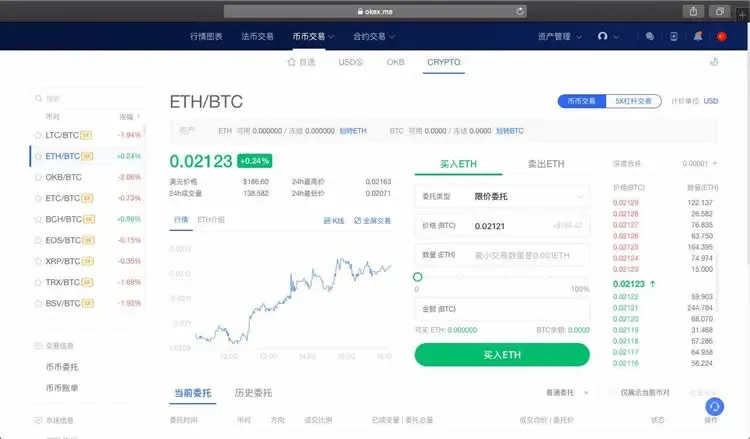
2. Choose Price and Quantity to Complete the Order
When you place an order, the system calculates the required margin as (contract‑value‑denominated‑in‑BTC) ÷ leverage. You can only submit the order if your account equity is equal to or greater than the required margin.
3. Margin Mode
When creating a contract account you must select either cross‑margin (全仓) or isolated‑margin (逐仓). The margin calculation and risk‑control rules differ between the two. If you have no open positions and no pending orders (i.e., margin usage is 0), you can switch modes at any time.
- Cross‑margin mode – all positions in the account share the same pool of margin; after opening a position the overall margin ratio must stay ≥ 100 %.
- Isolated‑margin mode – each contract’s long and short sides calculate margin and profit‑and‑loss independently; you can only place an order when your available margin for that specific contract is ≥ the required margin. Available margin may differ across contracts.
4. Equity Changes After Opening a Position
- Cross‑margin: account equity fluctuates with the latest trade price. If you are using 10× leverage and equity falls below 10 % of the required margin, or 20× leverage and equity falls below 20 %, the system will trigger a forced liquidation.
- Isolated‑margin: the unrealized P&L of an individual contract changes with the latest price, while the margin amount remains fixed. When the margin ratio drops to ≤ 10 % (for 10×) or ≤ 20 % (for 20×), the system will force‑liquidate that contract.
5. Position Management
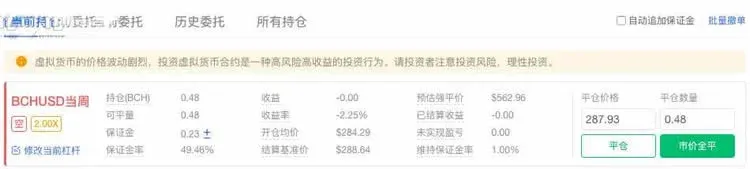
After the trade is executed, the user holds a position in the chosen direction. At any moment you can close the position to lock in profit or stop loss, or you can add more contracts to enlarge the exposure.
6. Adjusting the Position
You may increase or decrease your exposure at any time based on market conditions: closing part or all of the position for profit‑taking or risk management, and opening additional contracts to chase a trend or deepen a short stance.
7. Settlement Rules
If a contract remains open on the settlement date, it is settled against the settlement index. Every $1 movement in the index triggers a corresponding settlement transaction. The profit or loss generated by the settlement is recorded in the contract account’s “realized P&L”. After settlement, the system deducts proportional losses from accounts that experienced a margin shortfall (negative equity).
8. Clearing Process
Once clearing is complete, all realized profits and losses are aggregated into the account balance.
9. End of Contract Cycle
When a contract expires, the exchange launches a new contract for the next trading cycle.
OKEX Contract Gameplay Rules
1. Trading Hours
Contracts trade 24 hours × 7 days. The only interruptions occur on Fridays at 16:00 (UTC+8) when settlement or delivery takes place. During the final 10 minutes before settlement you may only close positions; opening new positions is prohibited.
2. Order Types
| Type | Action | Meaning |
|---|---|---|
| Buy to Open Long | Long entry | Purchase contracts when you expect the price to rise, increasing a long position |
| Sell to Close Long | Long exit | Sell contracts when the bullish outlook ends, reducing a long position |
| Sell to Open Short | Short entry | Sell contracts when you expect the price to fall, increasing a short position |
| Buy to Close Short | Short exit | Buy contracts when the bearish outlook ends, reducing a short position |
3. Order Submission Methods
- Limit Order – you specify both price and quantity; usable for both opening and closing positions.
- Market‑price (counter‑price) Order – you only input the quantity; the system automatically places a limit order at the best available opposite side (best bid or best ask).
4. Position Aggregation Rules
Positions that share the same contract and the same direction are automatically merged. Each contract account can hold up to six distinct positions: weekly long, weekly short, bi‑weekly long, bi‑weekly short, quarterly long, and quarterly short.
5. Order Limits
The platform imposes caps on the total quantity a single user may hold for a given contract period, as well as limits on the size of individual opening or closing orders, to mitigate market manipulation risk.
6. Risk Warning
Contract trading essentially means using a small amount of capital to control a larger exposure. Choose leverage that aligns with your personal risk tolerance. Beginners are advised to start with low leverage to avoid forced liquidations caused by excessive leverage. Contracts are best suited for short‑term strategies; frequent entry and exit can help keep risk in check.
The above constitutes the full operational guide for the OKEX Contract Platform. For additional details, follow the other articles published by Bitaigen (比特根).
Related Reading
- Huobi Contract Trading Fees: Breakdown & Calculation Guide
- Huobi Contract Trading: Leverage Benefits & Regional Limits
- Ethereum Contract Trading Guide: Read Charts & Trade for Beginners
💡 Register on Binance with referral code B2345 for the maximum trading fee discount. See Binance complete guide.



