
 Bitaigen Research
 In this article we walk you through the complete steps for opening an OKX account and completing real‑name verification (KYC). Whether you use the mobile app or the web portal, we provide practical preparation tips and security reminders. With clear, step‑by‑step instructions, even first‑time crypto traders can get started quickly and avoid unnecessary trial‑and‑error. Read on for a smooth entry onto the OKX platform.
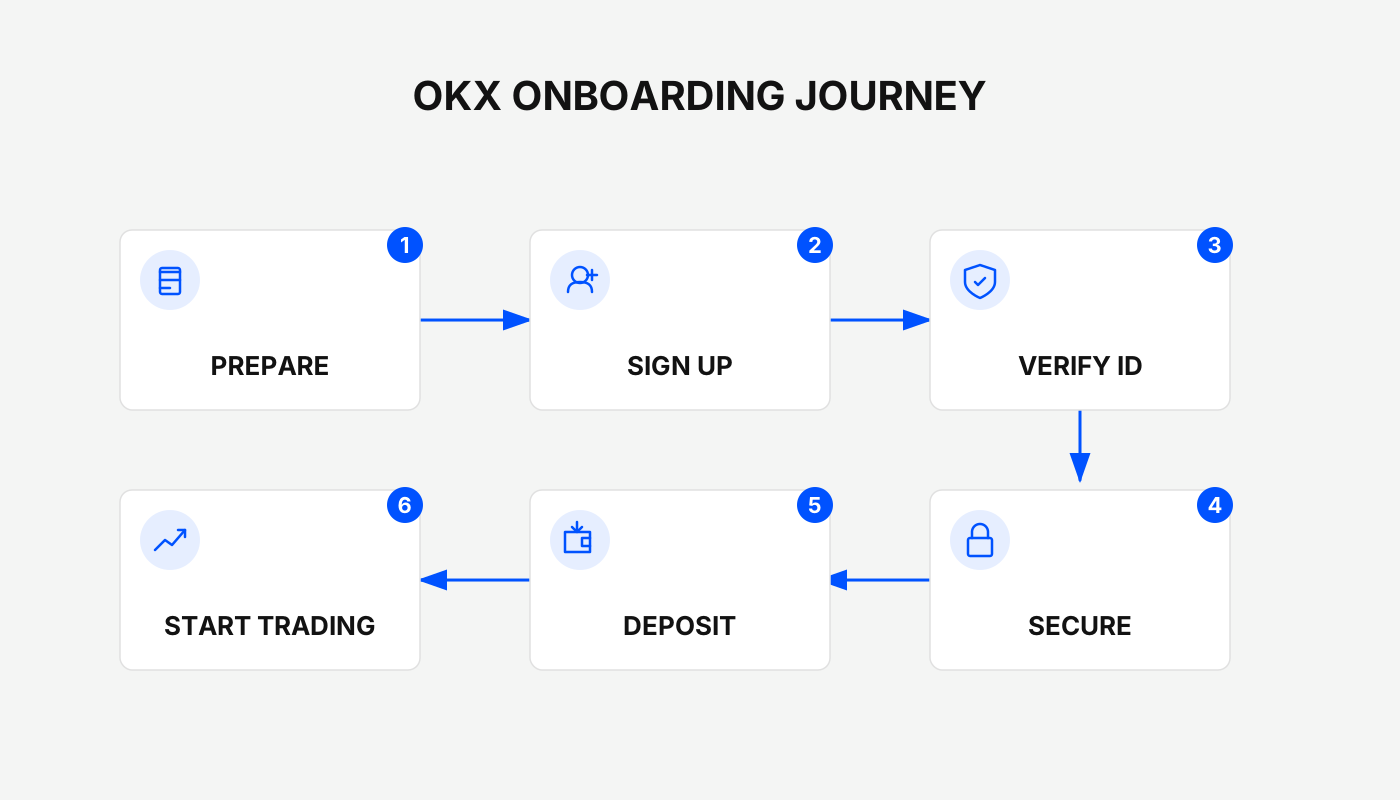
Preparations Before Registering
Before you actually create an account, make sure your device, personal information, and security mindset are ready. This helps the whole process run smoothly and usually takes less than a minute.
- Choose a device: If you prefer trading on the go, we recommend the mobile app; if you like a larger screen or need to have multiple pages open simultaneously, the desktop web version is more suitable. iOS users can search “OKX” in the App Store, Android users should download the latest APK from the official website—avoid third‑party sources. The official entry point is www.okx.com.
- Information preparation: Have an email address that can receive verification codes (e.g., Gmail) and a phone number that includes the international dialing code. For the password, use 8‑32 characters with a mix of upper‑ and lower‑case letters, numbers and special symbols to improve security.
- Security awareness: After registration, enable two‑factor authentication (2FA) immediately and never click unknown links to avoid phishing. Official support is only provided through the in‑app customer service channel.
---
OKX Mobile App Registration (Recommended for Beginners)
Suitable scenario: Users who prioritize the mobile side and need to monitor market data at any time.
Step 1: Download and install the OKX App
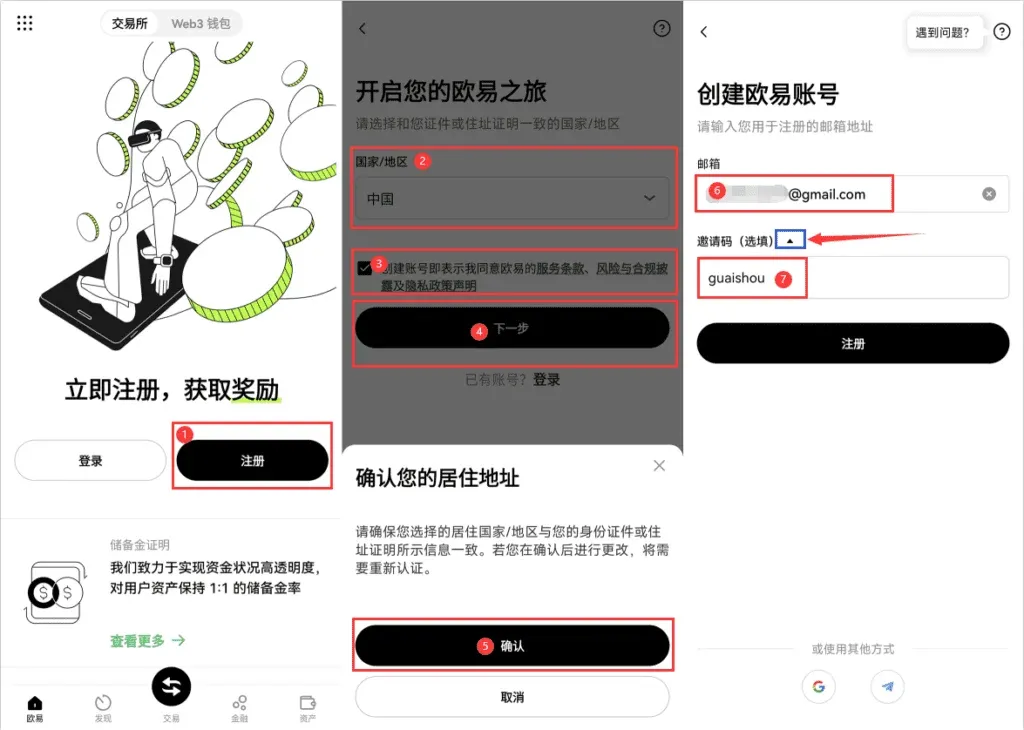
Obtain the latest version from the official website or app store (as of February 2026 the app is updated to v6.5+). Open it and tap the “Register” button on the home screen; the interface is clean and intuitive.
Step 2: Choose a registration method and complete verification
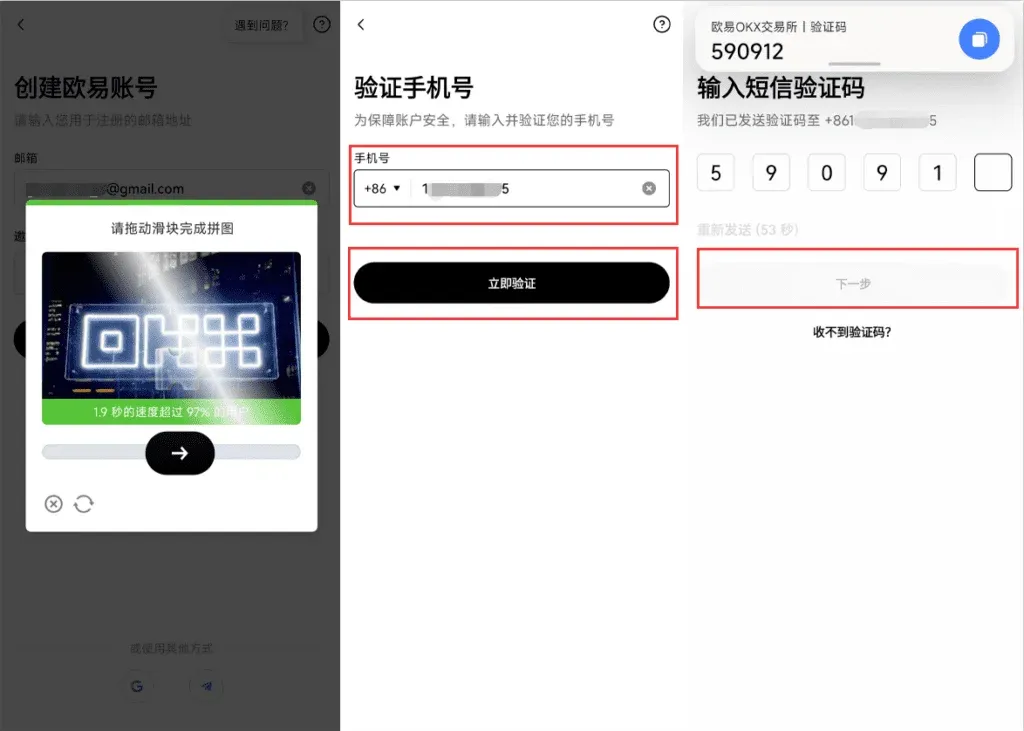
- We recommend email registration: enter your email, tap “Get verification code”, locate the 6‑digit code in your inbox (including the spam folder) and input it.
- Next, bind a phone number: select the appropriate country code, enter the mobile number, request the SMS code and fill it in. The whole process takes roughly 30 seconds.
- Invitation code – enter `B2345`.
Step 3: Set a login password
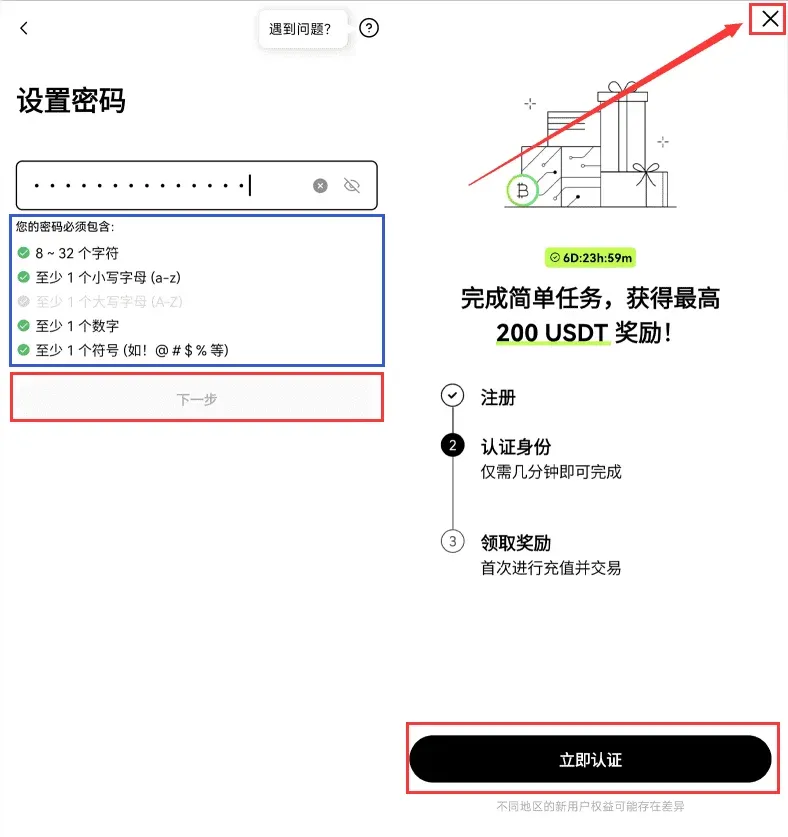
Example password: `Okx2026@Sg1` (please change it). Tick “Agree to terms”, then tap “Register”. The system logs you in automatically and shows a welcome screen; new users may also receive a blind‑box reward (random USDT).
Step 4: Complete security settings
Navigate to Me → Security Center → Authentication App, scan the QR code with Google Authenticator, and input the one‑time code to finish binding.
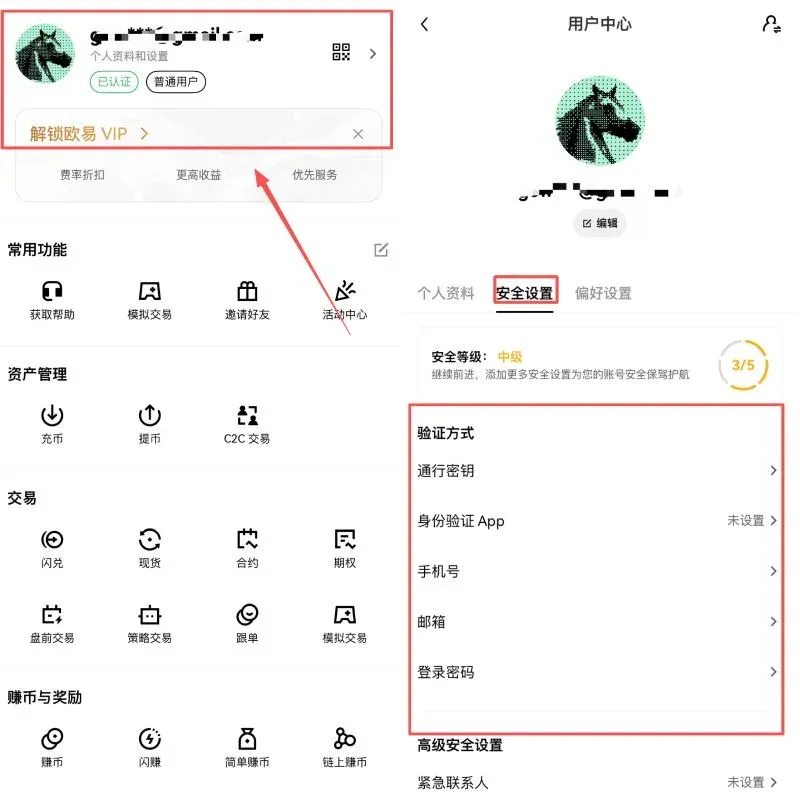
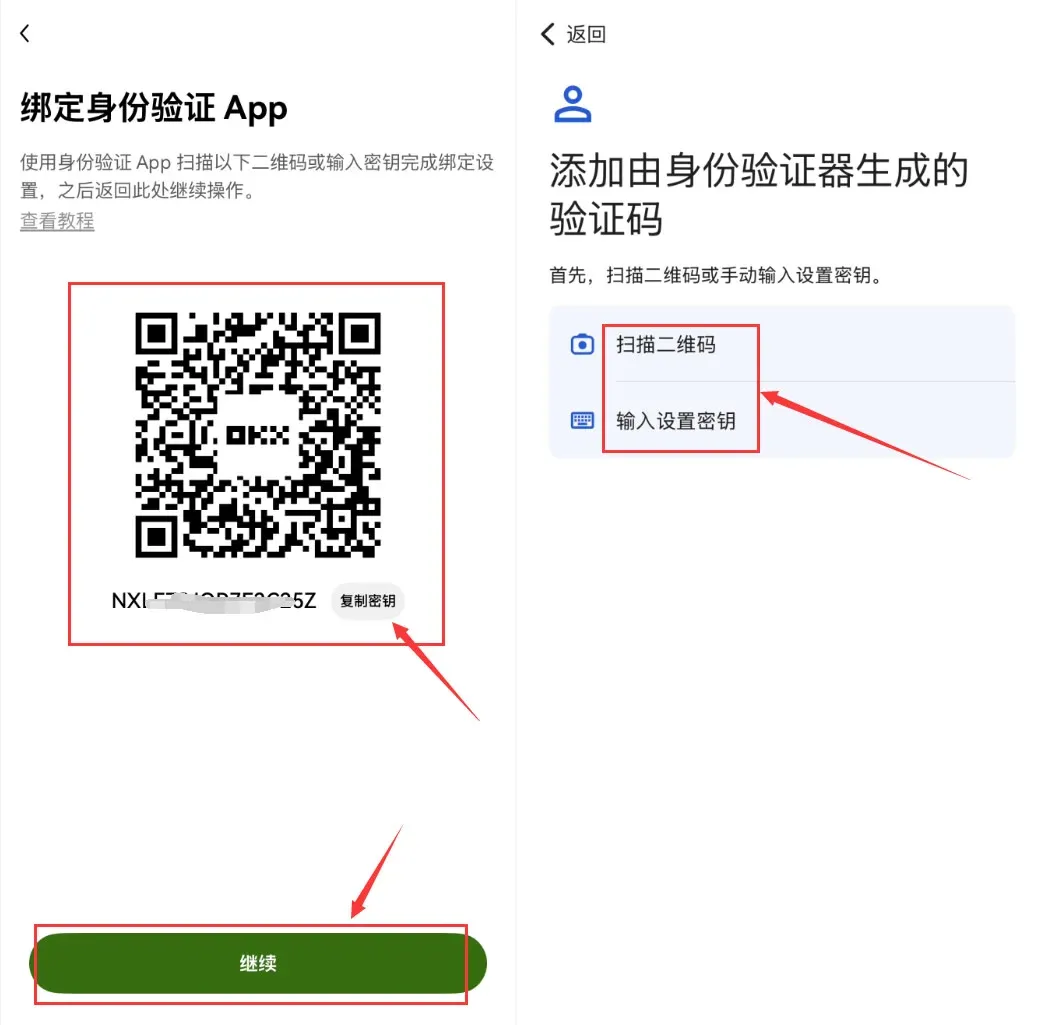
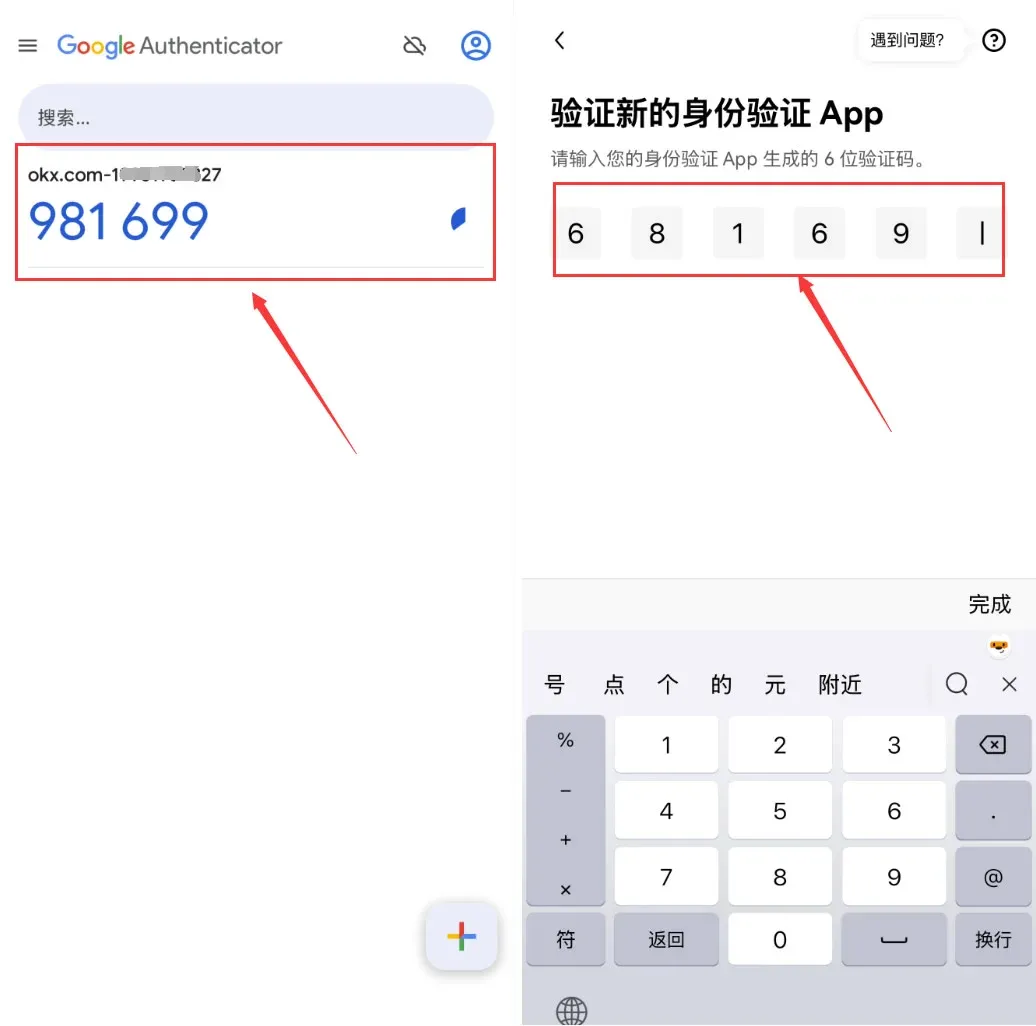
Tip: If the verification code is delayed, check your network connection or try to request a new code. The entire flow should stay under three minutes; once finished you can start browsing market data and place trades.
---
OKX Web Registration (Ideal for Desktop Users)
Suitable scenario: Investors who handle large‑volume trades or need multi‑screen operations.
- Open the official link www.okx.com/cn, click the “Register / Login” button at the top‑right, then select “Register now”.
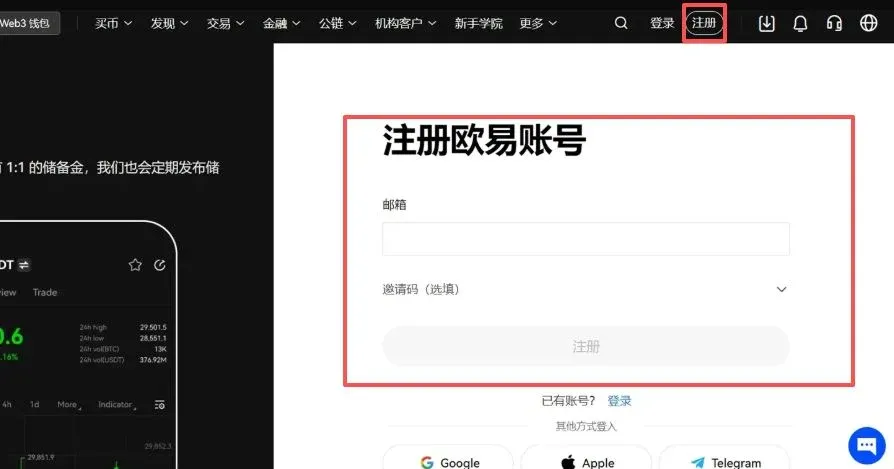
- Enter your email, request and fill in the email verification code; afterwards bind your phone number and input the SMS code to complete verification.
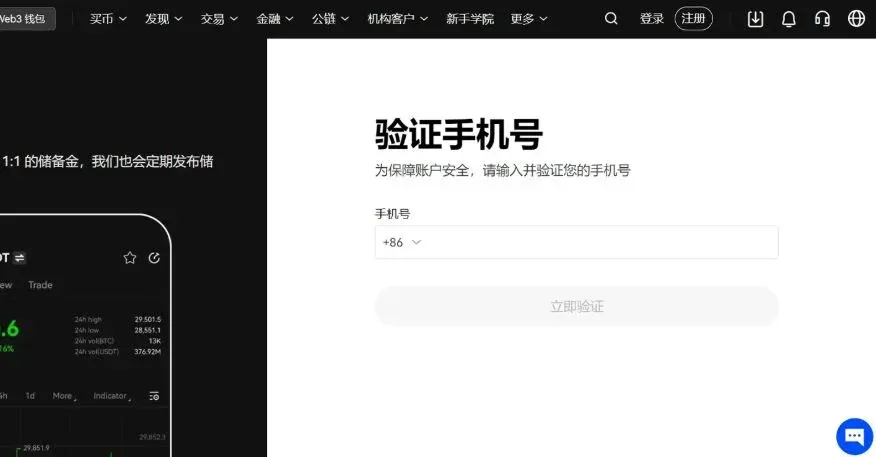
- Set a login password, tick the agreement checkbox and click “Complete registration”.
- Go to Account & Security, enable 2FA and set up an anti‑phishing code (a custom phrase that appears in all official emails).
The web registration can also be wrapped up in roughly three minutes; the page provides more detailed information, which is handy for watching tutorial videos.
Friendly reminder: Registering with the above link or invitation code `B2345` entitles new users to a reward of up to 50 USDT. Be sure to enter the invitation code during sign‑up.
---
KYC Real‑Name Verification: Unlocking Account Privileges
After creating the account, if you have not completed KYC, the account can only view markets and cannot withdraw or perform fiat transactions. Once verified, the daily withdrawal limit can increase to 100,000 USDT.
Step 1: Open the identity verification page
Tap Me → Identity Verification in either the app or the web portal.
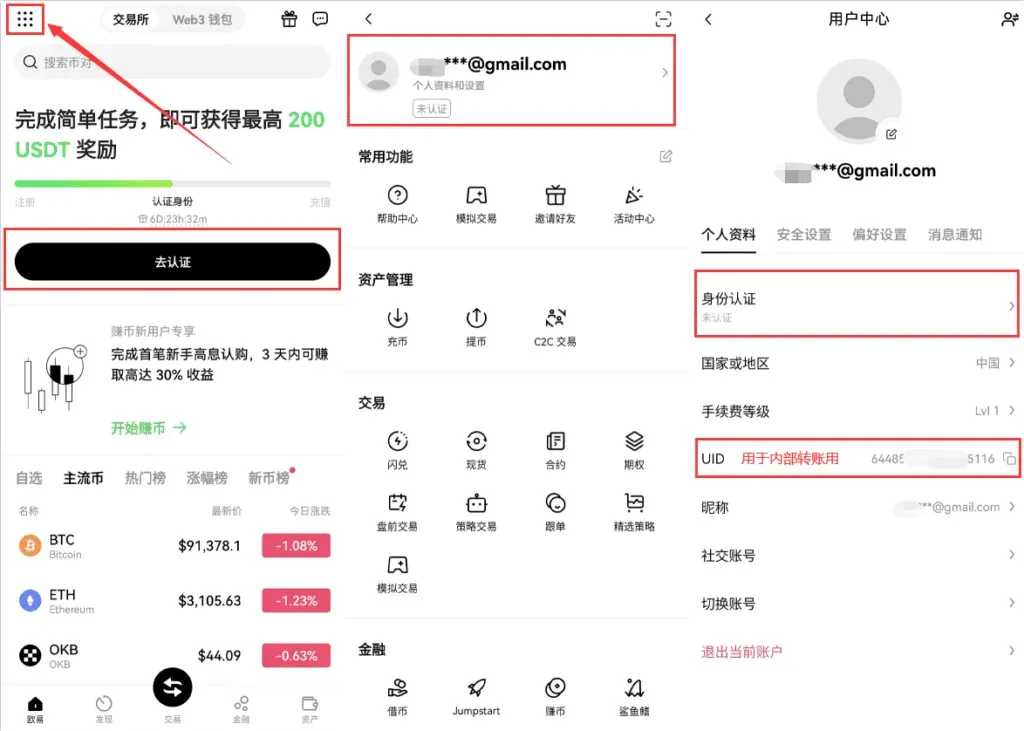
Step 2: Submit identification documents
Select your country (China), upload front and back photos of your national ID or passport, and complete a facial‑recognition check (the system will read out numbers; keep the camera aligned in real time).
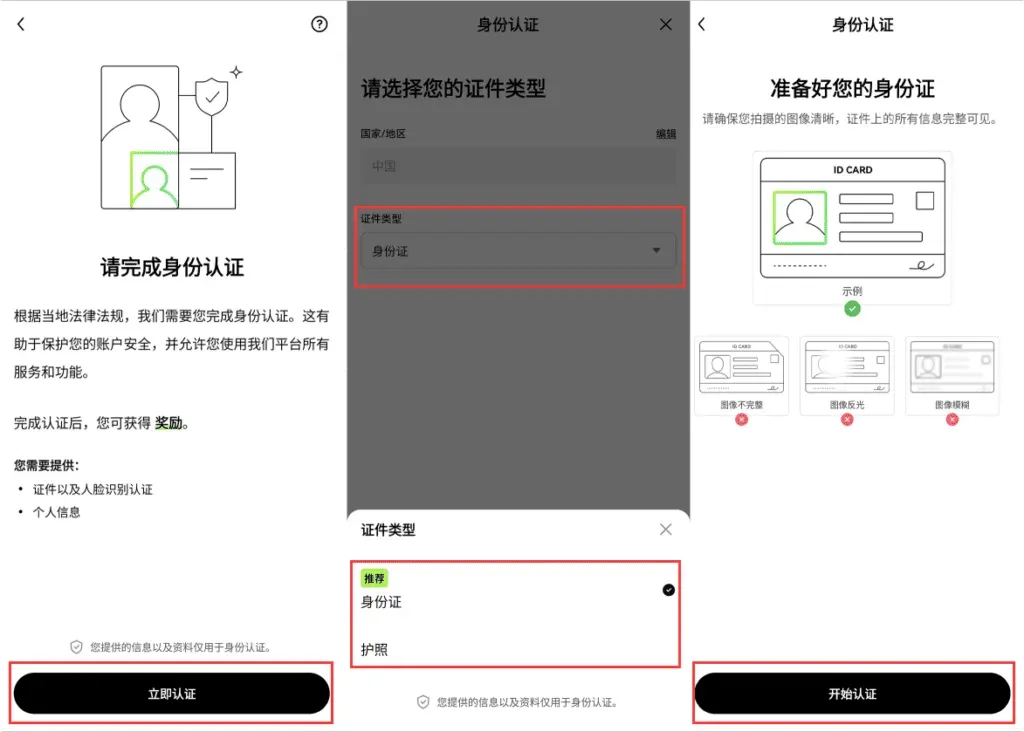
Step 3: Wait for review
Verification typically succeeds within 1‑3 minutes. To upgrade to Level 2, you will also need to provide an address proof such as a bank statement.
Note: Uploaded photos must be clear and truthful. If verification fails, you can resubmit or contact official support.
*Tax reminder*: Crypto gains may be subject to tax in your jurisdiction; consult a local tax professional to ensure compliance.
---
Detailed Security Settings: Protecting Your Assets End‑to‑End
OKX places a strong emphasis on account security. After registration, we recommend completing the following configurations right away:
- Two‑Factor Authentication (2FA): Install Google Authenticator, bind it, and you will need a dynamic code for every login and withdrawal.
- Withdrawal password: A separate 6‑digit numeric code used exclusively for confirming withdrawals.
- Anti‑phishing code: A custom phrase that the platform embeds in every official email, helping you distinguish genuine communications.
- Device management: Real‑time monitoring of logged‑in devices; abnormal activity triggers an automatic alert.
- API keys: If you use third‑party trading tools, restrict the key’s permissions to only the functions you need.
Setting up these options takes about two minutes and can raise your account’s protection level close to 99 %. Be sure to comply with local regulators (e.g., MAS) and avoid high‑risk contract products.
---
OKX Platform Overview and Registration Benefits
Founded in 2017 and headquartered in the Seychelles, OKX has obtained partial compliance certifications from several regulators, including the Monetary Authority of Singapore (MAS). The exchange is known for low fees (spot trading 0.08 %‑0.10 %) and deep liquidity, offering spot, futures, options, C2C fiat trading, leveraged products, and an NFT marketplace.
- Security: Cold‑wallet isolation, multi‑signature architecture; historically no hacks resulting in user fund loss.
- Convenience: In certain regions, local payment methods such as WeChat Pay and Alipay are supported.
- Innovation: Built‑in Web3 wallet and DeFi tools provide a one‑stop solution for multi‑chain needs.
- User base: As of February 2026, the platform hosts over 50 million active users, with daily trading volume in the hundreds of billions of USD.
Compared with other exchanges, OKX offers superior contract depth, a broader asset roster, and a smoother cross‑chain experience. Registration requires only an email or phone number and takes no more than three minutes, eliminating the need for separate wallet management.
*Fiat note*: When depositing or withdrawing fiat, OKX supports USD transfers via SEPA or SWIFT. Users located in the United States must use Binance.US for any fiat‑on‑ramp/off‑ramp services; the global Binance platform is not available to U.S. residents.
---
Registration Pitfalls to Avoid
- Invitation code cannot be added later: If you forget to enter `B2345` during sign‑up, you must delete the account after 30 days and create a new one. The same ID document cannot be reused within that 30‑day window.
- Facial‑recognition failures: Ensure adequate lighting, avoid dark sunglasses, and use a live‑capture photo rather than a saved image from the gallery.
- Unconfirmed fiat payment: After completing a fiat purchase, always tap “I have paid”. If the confirmation times out, submit a support ticket within the app; the platform will intervene.
- Regional restrictions: If you encounter a login‑blocked message, try switching IP addresses or use a VPN to connect from a supported jurisdiction.
---
Frequently Asked Questions
I didn’t receive the verification code—what should I do?
Check your email or SMS filtering settings, try resending the code, or switch to a different network.
Why is my account frozen?
Most commonly this is due to incomplete or unapproved KYC information. Contact official support and provide the missing documents.
The app crashes or won’t open properly?
Make sure you are running the latest version; if the problem persists, uninstall and reinstall the app.
These FAQs address roughly 90 % of the common issues new users encounter during registration.
---
Post‑Registration Getting‑Started Guide
- Open the Market page to view real‑time prices for major coins such as BTC and ETH.
- Use the Demo Trading feature first to practice order placement without risking real funds.
- After depositing USDT, you can start spot trading; we recommend beginning with small amounts to become comfortable with the interface.
- For long‑term holdings, consider diversifying across assets and avoid using high leverage for speculative bets.
OKX’s official community is active, and the Telegram group provides real‑time assistance. Remember to invest responsibly and manage risk.
---
Closing Remarks
With this guide you can create an OKX account, complete KYC, and configure essential security settings in under three minutes. As a globally regulated exchange with high liquidity, OKX offers a wide range of trading tools and strong asset protection. We hope this tutorial helps you step confidently into the world of digital assets. For deeper operational tips, stay tuned to Bitaigen’s future publications.
Related Reading
- Prevent Binance Account Suspension: KYC & Security Tips
- Best Altcoin Trading Platforms: Binance, MEXC, OKX & More
- MoonPay Real‑Name Verification & KYC Process Explained
💡 Register on Binance with referral code B2345 for the maximum trading fee discount. See Binance complete guide.



