
 Bitaigen Research
 OKX Contract Copy‑Trading: A Complete Guide for the 2025 App Version
Official OKX registration link: https://www.okx.com/
OKX app download link: https://www.bitaigen.com/binance/download
*(U.S. users should use Binance.US for any Binance‑related services, as the global Binance platform is not available in the United States.)*

This article provides a step‑by‑step reference for the contract copy‑trading feature in the 2025 version of the OKX app. We outline the core characteristics, the usage workflow, criteria for selecting signal providers, and we highlight fees and risks. The goal is to help newcomers start copying top traders quickly. Continue reading for detailed instructions.
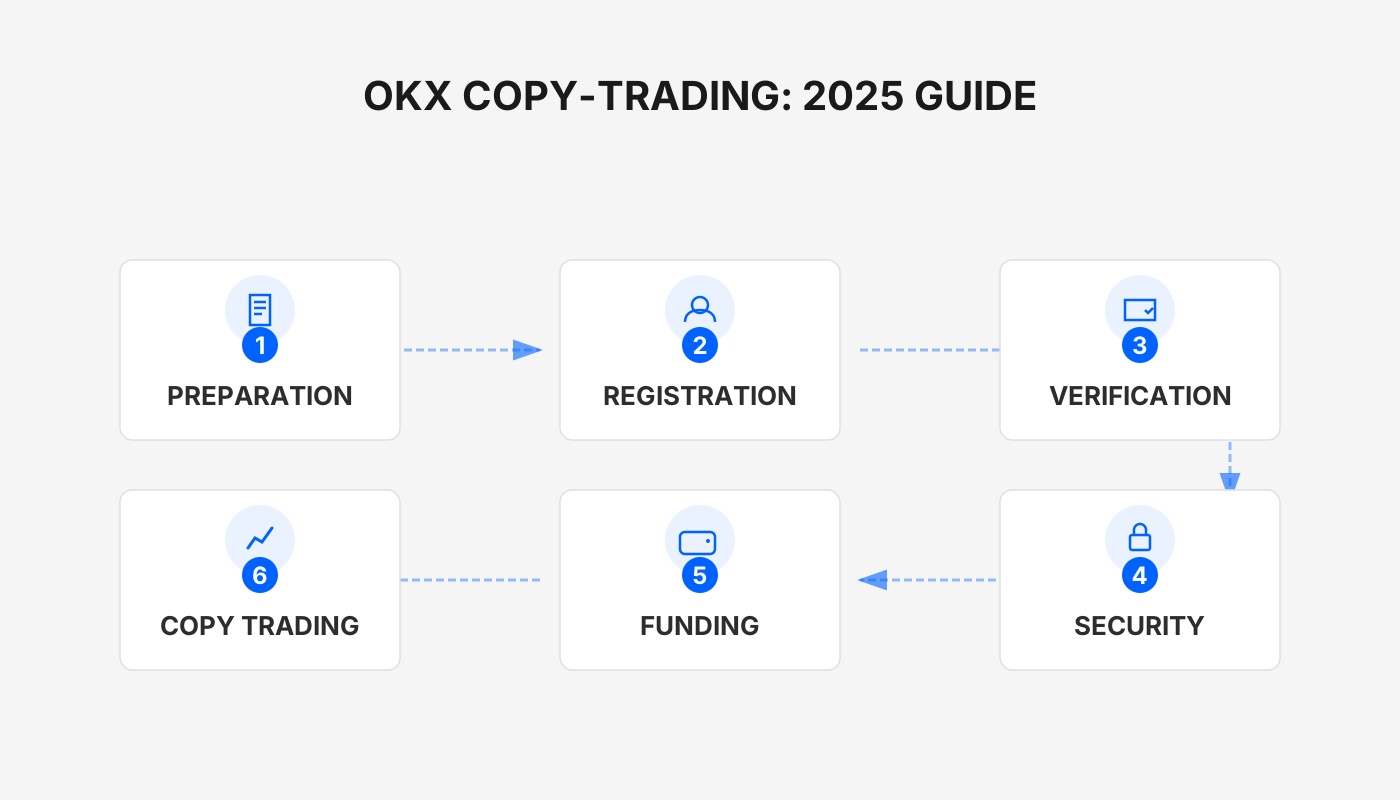
Core Features of Contract Copy‑Trading
- Fully automated execution – The system mirrors the trader’s opening and closing orders in the background, so users do not need to monitor the market constantly.
- Strategy transparency – Each signal provider’s win rate, cumulative profit and other key metrics are publicly available, enabling investors to make informed choices.
- Customizable parameters – Users can set the copy amount, leverage level, take‑profit and stop‑loss thresholds to match their personal risk tolerance.
Quick Start: Activating Copy‑Trading in the OKX App
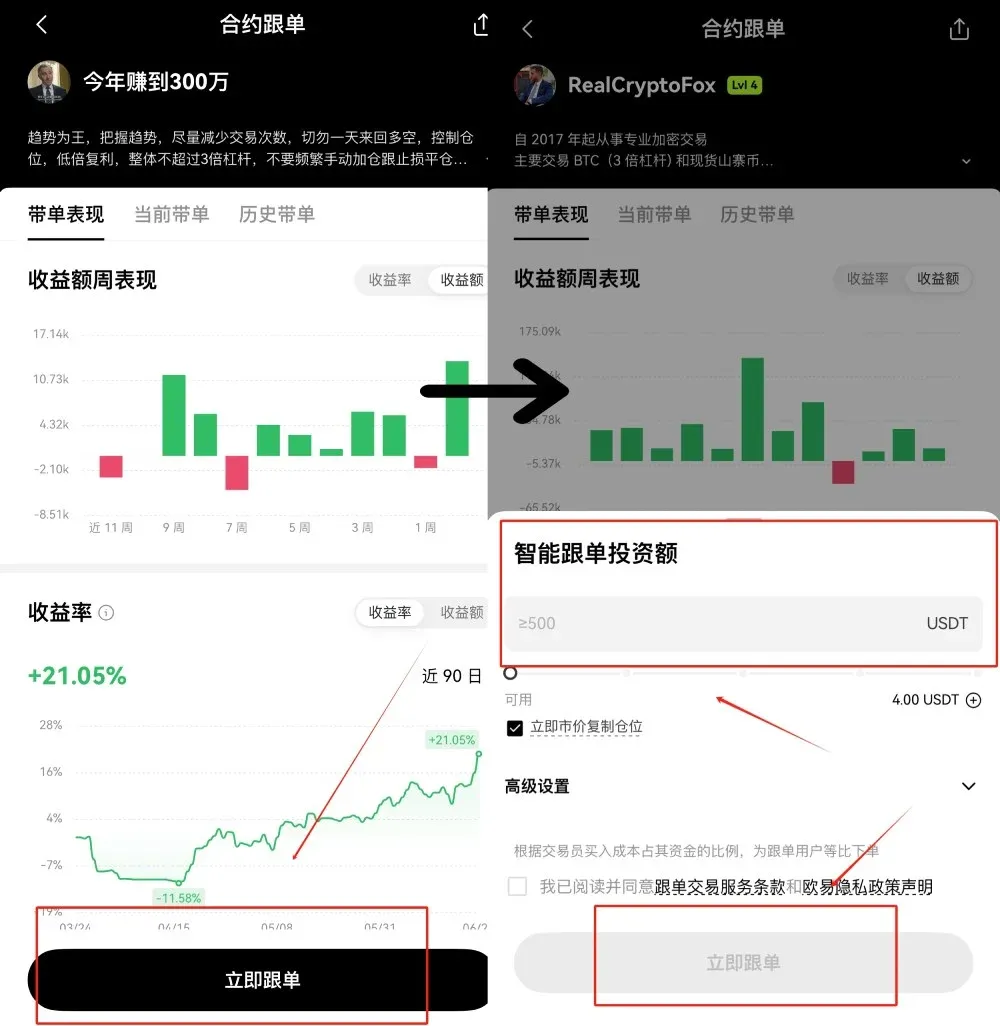
- Launch the OKX app (via the registration link above or the official download page) and tap the `Trade` button located in the middle of the bottom navigation bar.
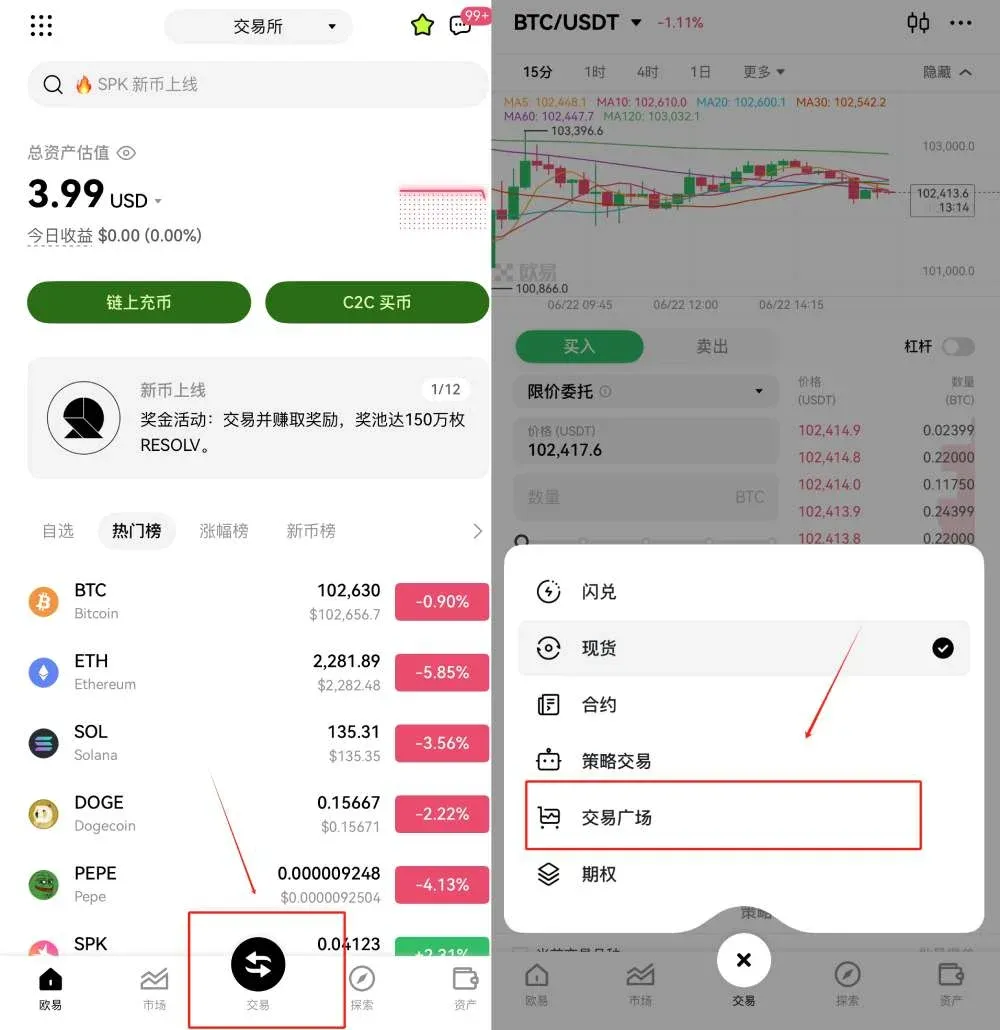
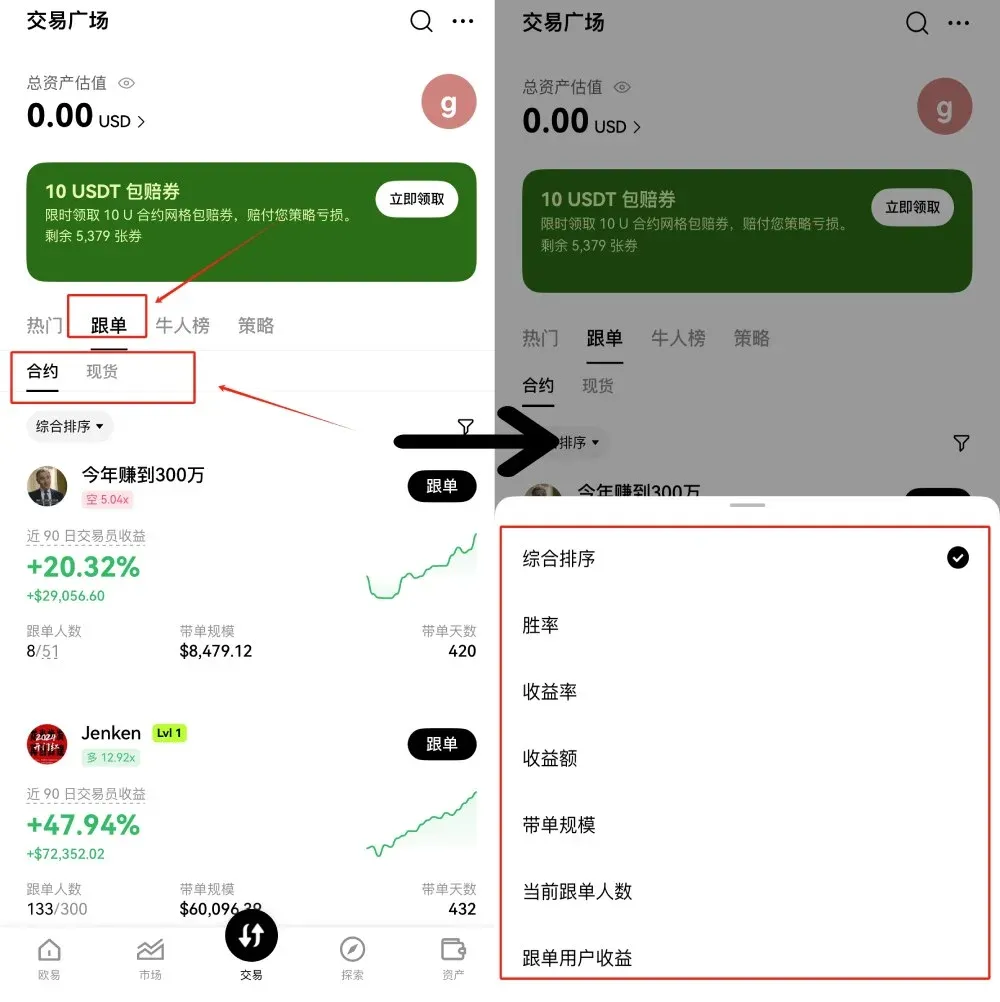
- Select `Copy‑Trading` from the top‑left corner, then switch to the `Contracts` tab within the copy‑trading marketplace (the other tab is `Spot`). Use the `Comprehensive Sort` function to filter traders by win rate, profit ratio and other dimensions, and pick the provider you wish to follow.
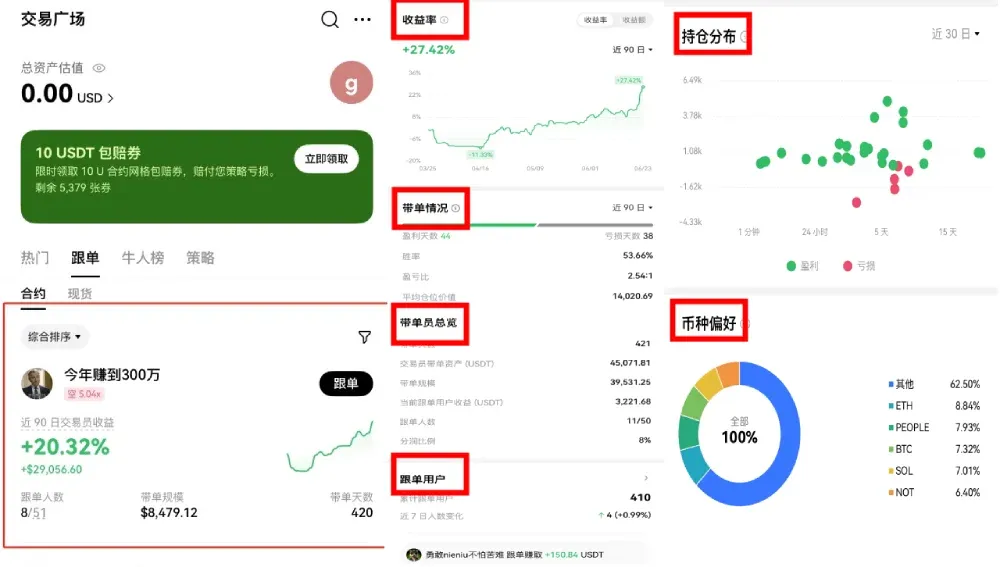
- Open the chosen trader’s card to view detailed statistics such as profit percentage, copy‑trading summary, position distribution, preferred coins, etc.
- After confirming, tap `Copy Now`, enter the amount you wish to allocate (in USD or your local fiat via SEPA/SWIFT), and the setup is complete.
Practical Tips for Copy‑Trading
- Single‑trade investment vs. maximum copy amount – When using a fixed‑margin model, ensure that maximum copy amount ÷ single‑trade investment is larger than the number of entry levels the trader employs (this information can be found in the trader’s profile or by private messaging). For proportional copy‑trading, both values should equal the trader’s total allocated capital so that your returns track theirs proportionally.
- Trading pair alignment – Always use the same coin pair as the signal provider.
- Leverage selection – It is advisable to keep leverage at or below 20 × to avoid excessive volatility.
- Margin mode – Choose either cross‑margin or isolated‑margin in line with the trader’s settings.
- Take‑profit / stop‑loss – Beginners can start with the default parameters; adjust only if you have a specific risk management plan.
How to Choose a Reliable Signal Provider
- Win rate and profit ratio – Prioritize traders with a consistent long‑term track record rather than those who show a short‑term spike in returns.
- Trading frequency – Review the average holding time and number of trades; excessive lock‑up of capital can reduce liquidity.
- Historical performance – Examine past copy‑trading results to determine whether the strategy matches your risk appetite.
Fee Structure
- Revenue‑share fee – When a provider generates profit, the platform charges the copier up to 10 % of that profit as a revenue‑share fee.
- Contract trading fee – Both opening and closing positions incur an execution fee of roughly 0.05 %.
- Funding rate – Perpetual contracts settle funding fees based on the prevailing positive or negative funding rate, which fluctuates with market conditions.
*(Note: All fiat deposits and withdrawals can be made in USD via SEPA or SWIFT transfers, depending on your jurisdiction.)*
Risk Disclosure
- Leverage amplification – Contracts are leveraged instruments; while they can boost gains, they can also magnify losses and may lead to liquidation in extreme market moves.
- Trader performance volatility – Even if a provider’s statistics look strong, sudden market events can cause copy‑trading losses. Choose providers whose risk profile you deem manageable and adjust parameters according to your own asset size.
- Stop‑loss settings – Setting a very tight stop‑loss may trigger premature liquidation before the market recovers, potentially eroding overall profitability.
*Crypto gains may be taxable in your local jurisdiction; consult a tax professional to understand your obligations.*
Advantages and Limitations of OKX Contract Copy‑Trading
Advantages
- Transparent information – Historical data of signal providers is openly displayed, helping users assess credibility.
- User‑friendly onboarding – The interface is clean and intuitive, allowing newcomers to become familiar quickly.
- Deep liquidity – Backed by a leading global exchange, slippage is generally low.
Limitations
- High‑risk nature – Leveraged contracts are inherently volatile; potential losses should not be ignored.
- Feature constraints – Certain configuration options are limited by platform rules, reducing flexibility.
Frequently Asked Questions
- Is contract copy‑trading suitable for beginners?
While it lowers the entry barrier, beginners should start with small amounts and low leverage, and maintain strict risk controls.
- How do I stop an active copy‑trade?
Go to `My Copy‑Trades`, locate the corresponding provider, and tap `Stop Copy‑Trading`.
- Can I follow multiple providers simultaneously?
After switching the position mode to `Open/Close Mode`, you can copy up to 5 traders at the same time.
---
That concludes the guide. For more hands‑on tips about OKX contract copy‑trading, you can search for past articles on Bitaigen (比特根) or continue reading the related links below. Thank you for your attention, and we look forward to assisting you in future content!
Related Reading
- OKX On-Chain Earn: Register, Get Fee Discounts & Earn Safely
- OKX Guide: Register, Verify KYC & Buy Crypto via C2C
- How to Safely Buy USDT on OKX for Beginners Using C2C
💡 Register on Binance with referral code B2345 for the maximum trading fee discount. See Binance complete guide.



