
 Bitaigen Research
 How to Sell USDT on OKX and Cash Out to a Bank Account?
In the Fiat Trading Zone of OKX, first transfer your USDT to the Fiat Account, place a sell order for USDT and select Bank Transfer as the payment method. Once the buyer has paid and you confirm receipt, the withdrawal is complete.
From a practical‑operation perspective, this article breaks down the complete process of converting USDT to cash and sending it to a bank account on the OKX platform. It outlines the basic logic of the fiat zone, helps newcomers understand the platform’s custodial safety mechanisms, and highlights key points to watch out for. Afterwards, it provides step‑by‑step guidance—from account registration and KYC completion to placing a sell order and confirming receipt—accompanied by screenshots, so you can get started while mitigating risk. Users who want a smooth cash‑out should keep reading.

Basic Logic You Need to Know Before Withdrawing
Withdrawing digital assets to a bank account on OKX essentially means selling your USDT (or other tokens) in the “Fiat Trading Zone” to another user in exchange for fiat currency (e.g., USD). This zone supports payment methods such as bank transfers, SEPA, SWIFT, and other local equivalents. The platform acts only as an intermediary: you place a sell order, the buyer sends the funds, you confirm receipt, and only then does the platform release the crypto. The whole process is custodial, which reduces the risk associated with direct peer‑to‑peer transactions.
Key Points
- Transfer First: You must move the tokens to your fiat account before you can sell them.
- Choose Certified Merchants: Certified merchants have posted a security deposit (e.g., 5,000 OKB) and are generally more reliable.
- Release Tokens After Confirming Receipt: Only click “Confirm Release” after you have verified that the money has arrived in your bank account.
For first‑time users, it is advisable to start with a small amount to become familiar with the workflow.
How to Sell USDT on OKX and Cash Out to a Bank Account
1. Register and Complete KYC
If you do not already have an OKX account, you must first register and finish identity verification (KYC).
- Registration Guide: *2025 Complete OKX Account Registration + KYC Step‑by‑Step Tutorial*
- iOS Download: *OKX iOS App Download Guide*
Tax Note: Crypto‑related gains may be taxable in your jurisdiction. Be sure to consult a tax professional and report any taxable events according to local law.
2. Open the C2C “Buy Crypto” Page
From the OKX homepage, click the top navigation tab 【C2C Buy Crypto】.
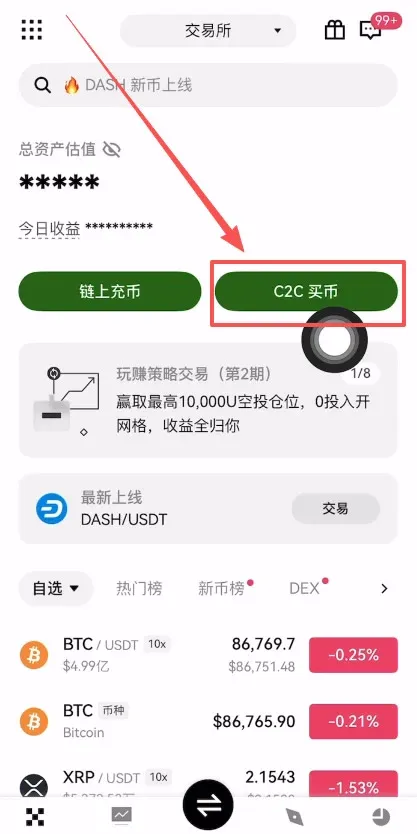
3. Select “Sell USDT”
On the C2C trading page, switch to 【Sell】, choose the cryptocurrency USDT, and input the amount you wish to sell (e.g., 100 USDT). Click 【Confirm】.
4. Set the Payment Method
In the payment‑method section, tick “Bank Transfer”. After confirming, the system will filter merchants that accept this method.
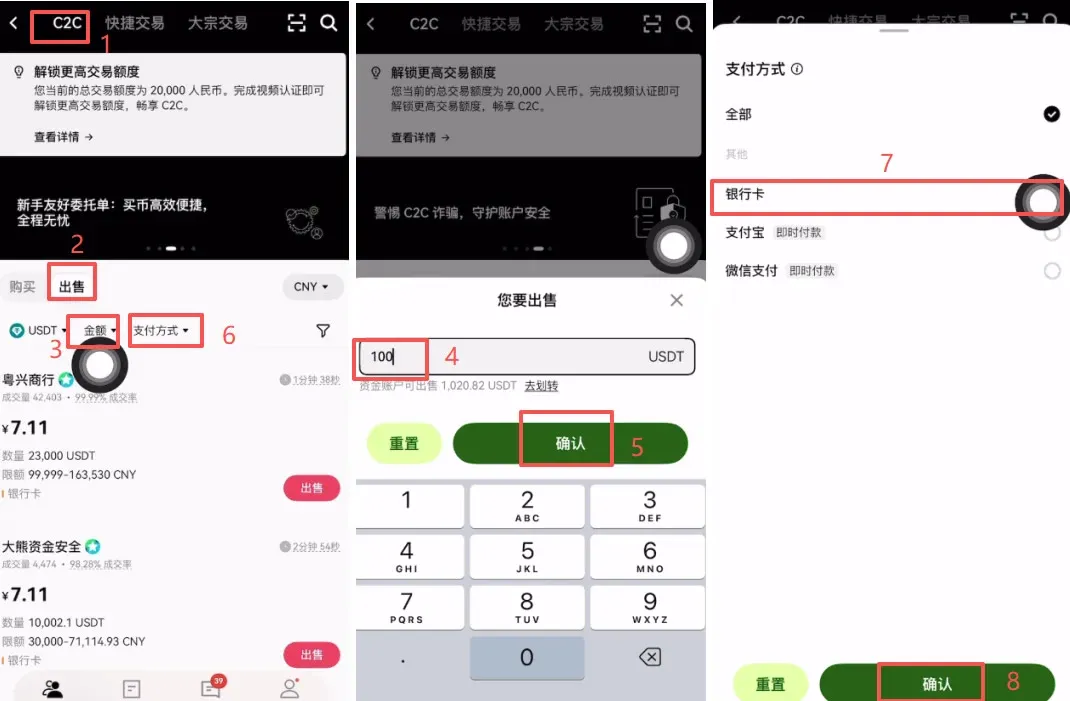
5. Choose an Appropriate Merchant
Prioritize merchants based on the following metrics:
- High Trade Volume / Completion Rate
- Long Registration History (e.g., accounts created in January 2023 and operating for two years)
- Average Payment Confirmation Time ≤ 3 minutes
Click the 【Order】 button next to the merchant’s name to proceed to the order page.
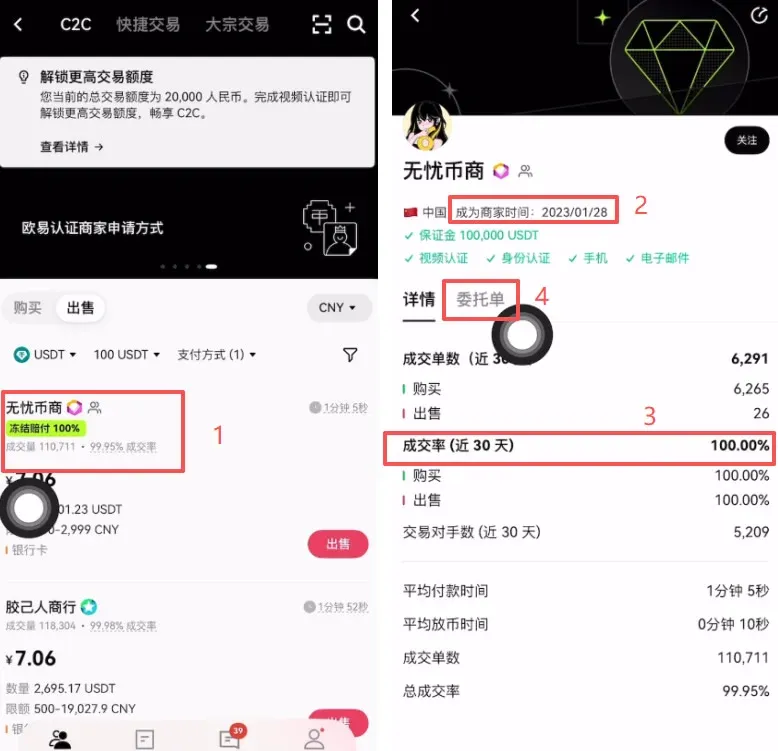
6. Initiate the Sell Order
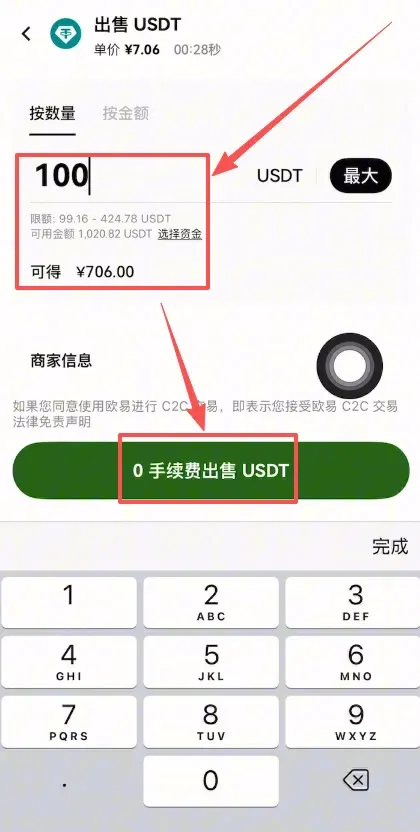
On the order screen, enter the sell quantity (for example, 100 USDT). The platform will display the estimated fiat you will receive (e.g., $100 USD). Then click 【Zero‑Fee Sell USDT】.
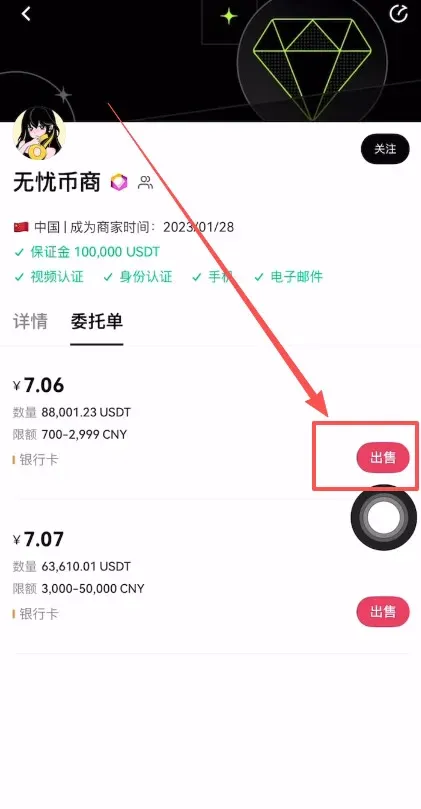
7. Receive the Funds and Confirm Release
Once the merchant transfers the money to your bank account, verify that the funds have arrived.
- Do not trade with a party whose KYC is not verified; such transactions are strictly prohibited.
- After confirming receipt, click “Confirm Receipt”; the platform will then release the USDT to the buyer.
Advanced Tips: How to Sell Faster and Safer
| Tip | Explanation |
|---|---|
| **Prefer Certified Merchants** | They have posted a 5,000 OKB security deposit; completion rates are usually ≥ 98% and token release is swift. |
| **Watch Completion Rate & Avg. Release Time** | Merchants with a completion rate < 95% or average release time > 30 minutes should be treated with caution. |
| **Avoid Peak Hours** | Weekday 10:00‑16:00 sees the highest volume and relatively stable pricing; evenings or weekends may experience more volatility. |
| **Large‑Amount Trades Use the Institutional Zone** | For single transactions ≥ $10,000, consider the **Institutional Trading** section, where merchants typically have stronger capital backing. |
Common Pitfalls to Guard Against
- Bank Account Details: Ensure the account holder’s name, account number, and bank name are entered correctly; mistakes can lead to failed withdrawals or misdirected funds.
- Account Security: Never share your transaction password, OTP, or any verification code with anyone, including anyone claiming to be “customer support.” Legitimate support will never request these details.
- Withdrawal Timing: Try to avoid weekends and public holidays, as inter‑bank transfers can be delayed during those periods.
- Prolonged Non‑Arrival: If the funds do not show up promptly, contact OKX support immediately with screenshots and relevant evidence; avoid making speculative actions that could jeopardize the trade.
Frequently Asked Questions (FAQ)
Q: How long does it take for the fiat to arrive after I sell?
A: The buyer sends the money directly to you, usually arriving within 5‑15 minutes for bank transfers. SEPA or SWIFT transfers may take a bit longer, while instant payment methods (e.g., local e‑wallets) are often near‑instant.
Q: How are fees calculated?
A: The fiat‑to‑fiat transaction itself carries no platform fee. If you originally acquired USDT via a spot trade, the corresponding trading fee from that transaction still applies.
Q: What if the buyer pays but refuses to release the tokens?
A: Because the tokens are held in escrow by OKX, you can open a dispute in the C2C section. The platform will freeze the relevant amount and launch an investigation.
Q: Can I withdraw directly to an overseas bank account?
A: No. The fiat‑trading feature currently supports only domestic payment methods (e.g., local bank transfers, SEPA for Europe, or SWIFT for other regions). International users should explore alternative withdrawal channels.
Q: Are there limits on how much I can sell in one transaction?
A: Each merchant sets their own limits, commonly ranging from $500 to $50,000 per trade. For larger amounts, you can split the order into multiple smaller trades or use the Institutional Trading zone.
Q: What should I do if the received amount is incorrect?
A: Do not confirm receipt immediately. Capture a screenshot, open a dispute, and provide the evidence. OKX will verify the transaction and may request the buyer to make up the shortfall.
Why Choose OKX for Fiat Trading?
- High‑Quality Merchants: Certified merchants must post a security deposit, making it costly for them to disappear.
- Fast Matching: The platform’s large liquidity pool means orders are often filled within seconds.
- Prompt Dispute Resolution: 24‑hour customer support and a clear appeals process keep issues moving.
The overall workflow can be summarized as Transfer → Order → Receive → Release, a four‑step process. Once you become familiar with it, a typical USDT cash‑out can be completed in about 10 minutes. Remember the core principles: confirm receipt before releasing tokens, prioritize certified merchants, and raise a dispute promptly if anything looks off. Following these guidelines will help you achieve a safe and swift fiat withdrawal.
This concludes the complete guide titled “How to Sell USDT on OKX and Cash Out to a Bank Account – Step‑by‑Step Tutorial.” For more articles about OKX withdrawals and related topics, please follow Bitaigen (比特根).
---
*Disclaimer: The information provided herein is for educational purposes only and does not constitute financial or investment advice. Always conduct your own due diligence and consult professional advisors where appropriate.*
Related Reading
- Buy USDT on OKX with Alipay CNY – Fast C2C & KYC Guide
- Buy Bitcoin from Your Home Country: Step‑by‑Step Guide
- OKX Download Guide for Mainland China – Android & iOS
💡 Register on Binance with referral code B2345 for the maximum trading fee discount. See Binance complete guide.



