
 Bitaigen Research
 On the Huobi platform, first transfer USDT to your fiat‑currency account, then sell it on the fiat‑currency market for USD (or another supported fiat such as EUR via SEPA/SWIFT). If you need to move the funds to Binance, go to the withdrawal page, paste the Binance.US USDT deposit address, and submit the request.
In this article we walk you through the complete process of withdrawing USDT from Huobi and converting it to fiat currency, as well as how to safely transfer the assets to Binance or other exchanges. With step‑by‑step screenshots, beginners can get started quickly while avoiding common pitfalls. Continue reading for the detailed procedures.
How to exchange USDT for fiat on Huobi?
- Fund transfer
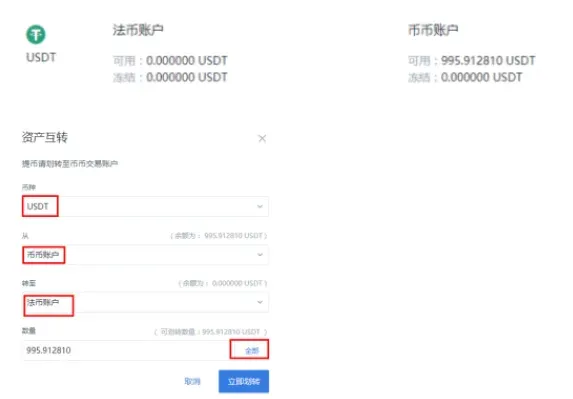
- Move the USDT in your Spot (trading) account into the fiat‑currency account (visible after logging in). The operation is illustrated in the screenshots below:
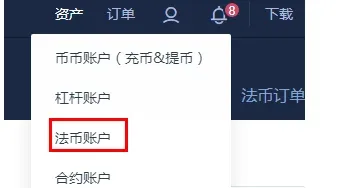
- In the asset list locate USDT, click “Transfer/Withdraw”, and enter the amount you wish to move.
- Enter the fiat‑currency trading page
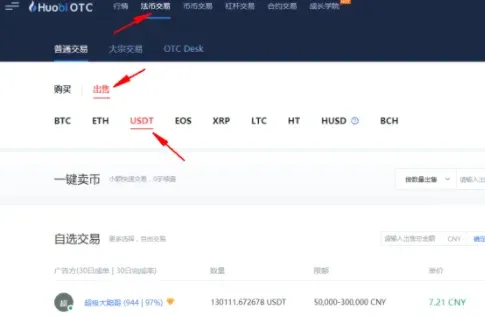
- Click the “Fiat Trading” tab in the top navigation bar. This page supports multiple payment methods such as bank transfer, SEPA, SWIFT, and other regional options.
- Sell USDT
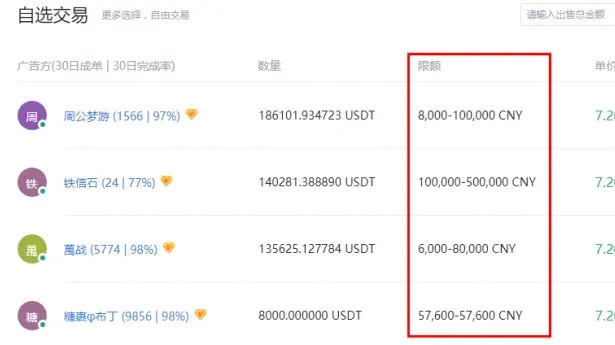
- Choose “Sell – USDT”. The system will present a list of sell orders, each with its own price and accepted payment method. Pick the order that best matches your requirements and click “Sell USDT”.
- Note the limits: Every order has a minimum and maximum fiat amount. Orders that fall outside these limits cannot be fulfilled, so calculate the required USDT amount in advance based on your holdings.
If you wish to buy USDT instead, select “Buy – USDT”.
- Confirm the order
- In the pop‑up window, enter the amount of USDT you want to sell, or simply click the “All” button to use the full balance.

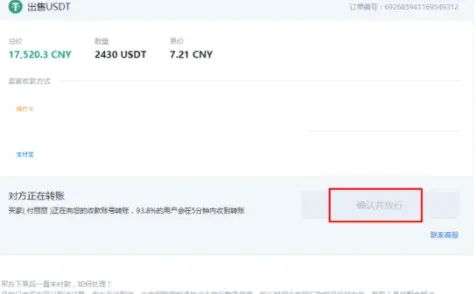
- Wait for the buyer’s payment
- After submitting the order, the interface shows “Waiting for buyer payment”. At this stage the “Confirm and Release” button remains greyed out and cannot be clicked. You may communicate with the buyer via the chat box on the right side (optional).
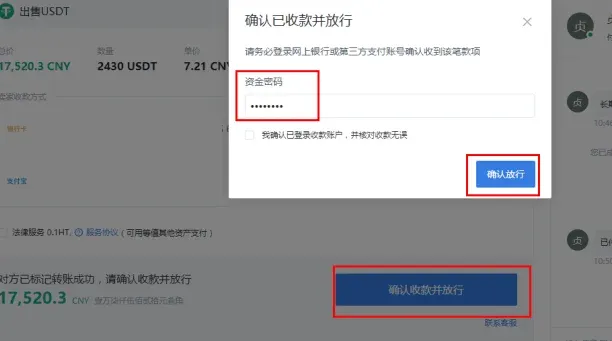
- Confirm and release
- Once you have received the buyer’s payment (e.g., via bank transfer, SEPA, or SWIFT), immediately click “Confirm receipt and release”.
Tax reminder: Gains from cryptocurrency transactions may be subject to tax in your jurisdiction. Consult a local tax professional to ensure compliance.
---
How to transfer USDT from Huobi to Binance?
Mobile app workflow
- Open the Huobi app, go to the “Assets” tab, and tap “Withdraw”.
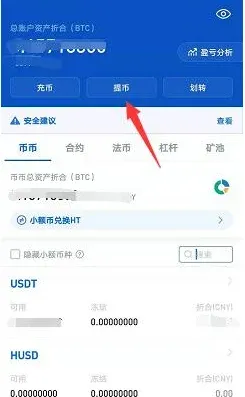
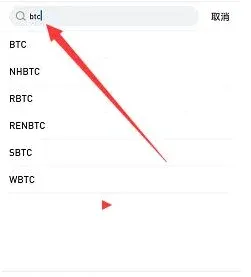
- In the search field, type the coin’s English symbol (e.g., USDT) and select the corresponding entry.
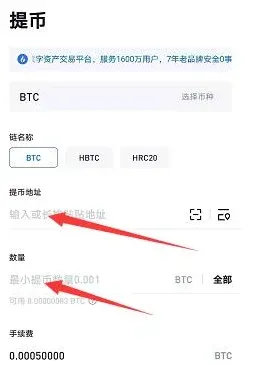
- Paste the USDT deposit address provided by Binance.US (U.S. users must use Binance.US; users outside the United States may use the global Binance platform), specify the withdrawal amount, and tap “Withdraw”. After the blockchain confirms the transaction, the funds will appear in your Binance account.
Desktop (web) workflow
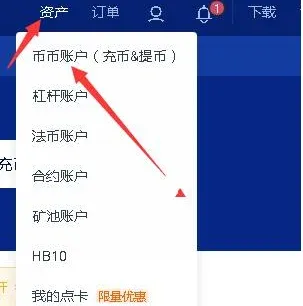
- Visit the Huobi website and log in (if you haven’t registered, complete the registration first). Click “Assets” in the upper‑right corner, then go to the “Spot Account”.
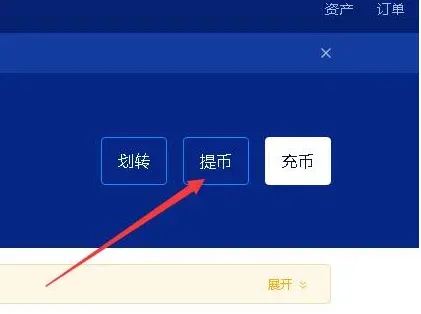
- Locate and click the “Withdraw” button in the upper‑right area of the page.
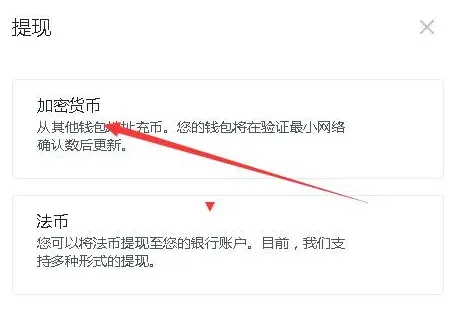
- Choose Crypto Withdrawal (the fiat‑withdrawal option is only for converting a cryptocurrency directly into cash and sending it to a bank account).
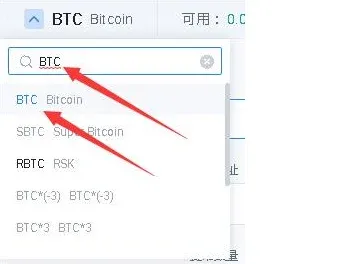
- Search for and select USDT (the screenshot uses BTC as an example; the steps are identical for USDT), which brings you to the withdrawal form.
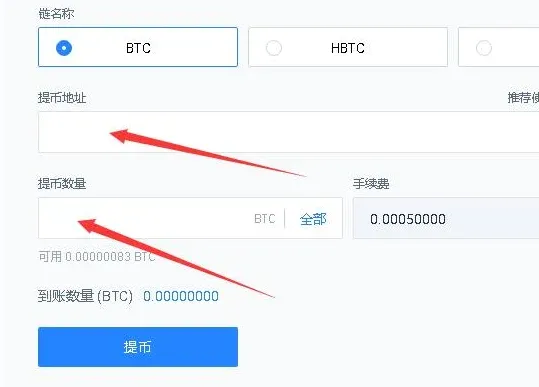
- Enter the USDT deposit address from Binance.US, type the amount you wish to transfer, and click “Withdraw”. Once the transaction receives the required number of blockchain confirmations, the USDT will be credited to your Binance account.
---
What does “USDT frozen” mean on Huobi?
Freezes generally fall into two categories: bank‑level freezes and judicial freezes.
1. Bank‑level freeze
- Regulatory restrictions: Some banks in certain countries prohibit accounts from engaging in digital‑asset transactions. If a transfer memo contains keywords such as BTC, ETH, USDT, the bank’s risk‑control system may freeze or temporarily suspend part of the account’s transaction capabilities.
- Anti‑money‑laundering triggers: Large transfers late at night, frequent transactions with multiple counterparties, or prolonged periods of zero balance can prompt a bank to limit non‑counter‑party services (e.g., “pay‑only” mode) rather than outright block the card.
2. Judicial freeze
- When a user is implicated in a fraud case or similar investigation, law‑enforcement agencies may request the freezing of the associated bank accounts based on the money‑flow trail. Such freezes are not instantaneous; they are typically enacted days or weeks after the suspicious transaction is identified.
Understanding these possible freeze scenarios helps you quickly assess any abnormal notifications and take appropriate action.
Disclaimer: This guide is for informational purposes only and does not constitute financial, legal, or tax advice. Always consult qualified professionals for advice tailored to your personal situation.
💡 Register on Binance with referral code B2345 for the maximum trading fee discount. See Binance complete guide.



