
 Bitaigen Research
 Our Bitaigen editorial team has meticulously compiled the complete step‑by‑step process for a first‑time withdrawal from Binance. We break down the critical stages of selling USDT on the C2C market, identity verification, security settings, and common risks. By reading this article you will understand every operational detail, avoid common pitfalls, and successfully withdraw fiat currency (converted to your local currency).
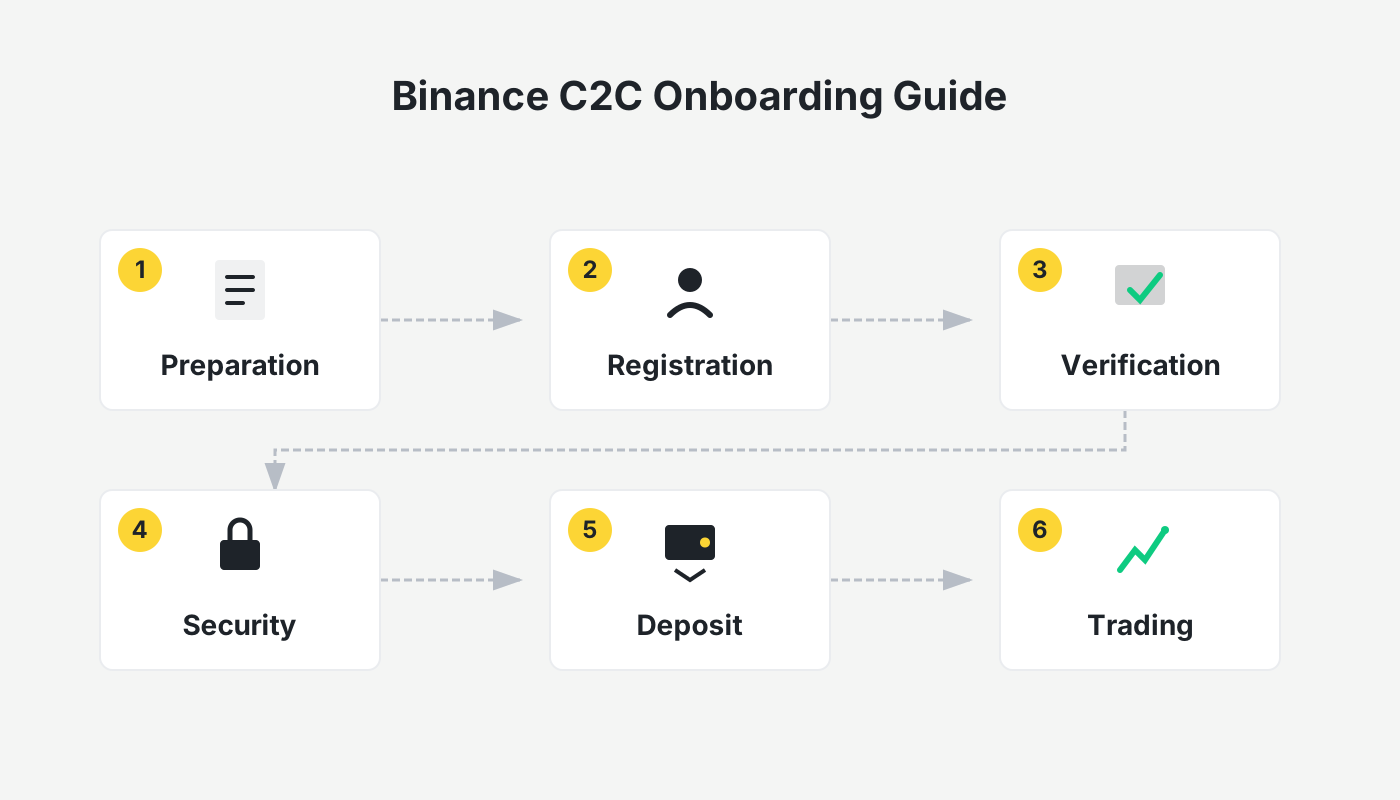
Introduction: Why Choose the C2C Method for Withdrawal
For users who are withdrawing fiat (e.g., USD, EUR, GBP) for the first time on Binance, the most convenient route is to sell the USDT you hold directly to a buyer who accepts Alipay, WeChat Pay, or bank transfers via the platform’s C2C market. This method is simple, funds arrive quickly, and the platform provides a trade guarantee, making it ideal for beginners. Below we outline the whole workflow step by step, helping you sidestep typical risks.
---
1. Pre‑Withdrawal Checklist (Security First)
1. Complete Level‑2 Identity Verification
- Go to Profile → Identification → Personal Verification.
- Upload the front and back of your national ID and complete facial recognition (usually approved within 10 minutes).
- Without completed verification you cannot use the C2C feature or make large‑amount withdrawals.
2. Verify All Security Settings
| Item | Navigation Path | Description |
|---|---|---|
| Google Authenticator | Profile → Security → Google Authenticator | Must be enabled and QR‑code bound. |
| Withdrawal PIN | Profile → Security → Withdrawal PIN | Different from login password; used to confirm withdrawals. |
| Payment Method Binding | Profile → Security → Payment Methods | The name on the linked bank card/Alipay/WeChat must match the verified identity. |
| Device Management | Profile → Security → Device Management | Remove rarely used devices and enable login alerts. |
3. Asset Preparation: Prefer USDT
- If your account holds BTC, ETH or other coins, first convert them to USDT in the Spot market (Trade → Spot → select the appropriate pair and sell).
- Ensure the USDT is in your Spot wallet; assets in Futures or Earn accounts must be transferred to the Spot wallet first.
Reference Guides
- 2026 latest guide for registering on Binance for global users
- Binance app download and installation (Android / iOS) – U.S. users must download Binance.US (the separate platform for American residents).
- Detailed steps for depositing USDT via the Binance app
---
2. Core Process: Selling USDT on the C2C Market (Recommended Route)
1. Transfer Assets (If Needed)
- Open the Binance app (official registration link / official download page).
- Navigate to Wallet → Spot Wallet → Transfer.
- Choose the source account (Futures, Earn, etc.) and the destination account (Spot), select USDT, enter the amount, and click Confirm. The transfer is instantaneous and fee‑free.
2. Open the C2C Sell Page
On the home screen click Add Funds → C2C Trading.
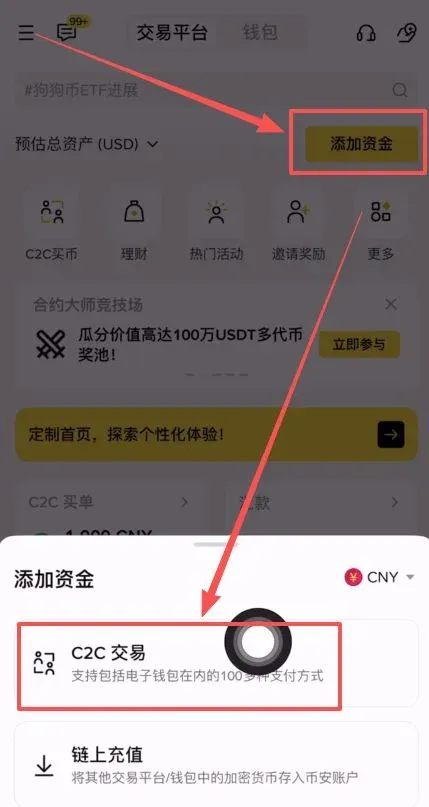
The platform page is divided into Quick, Custom, Premium, and Bulk sections. It is strongly recommended to operate in the Premium section because Binance has marked the merchants there and guarantees “100 % compensation”, offering the highest safety level.
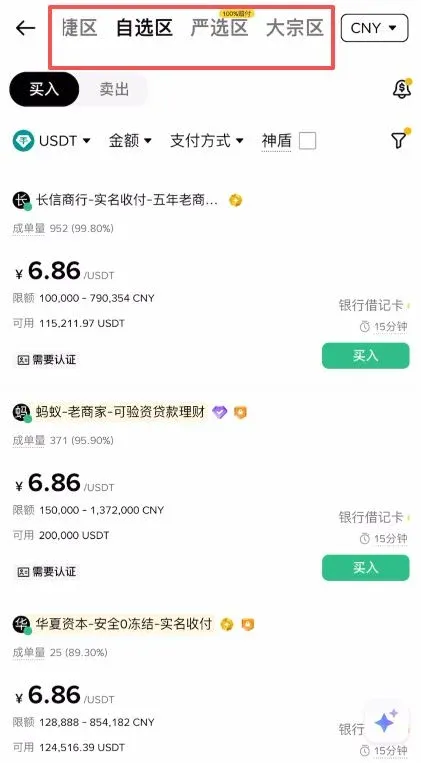
3. Filter for a Suitable Buyer
- After entering the Premium section, switch to Sell mode.
- Tap the Payment Method button at the top‑right and tick the payment channel you intend to use (e.g., WeChat, Alipay, bank transfer). The system will only display buyers who support that channel and meet the Premium criteria.
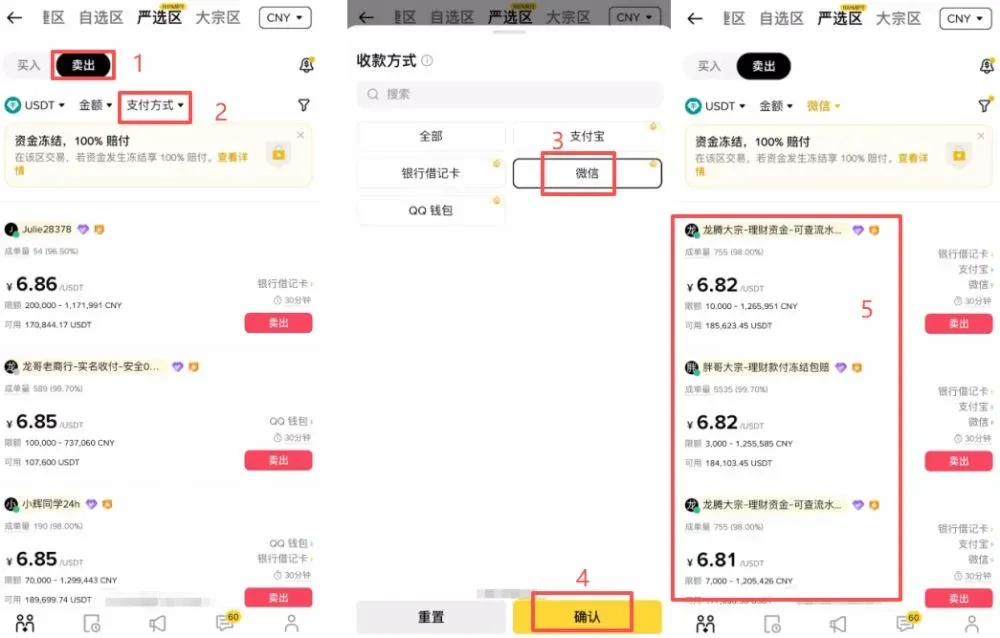
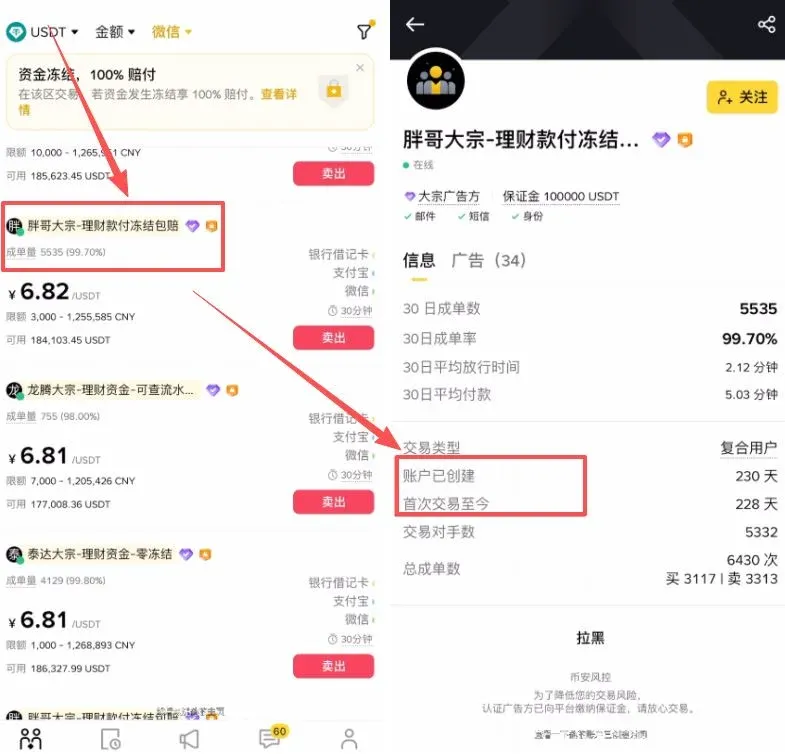
When selecting a buyer, do not place an order blindly. Pay particular attention to:
- Account age (recommended ≥ 180 days)
- Time since first trade
Long‑standing accounts generally indicate more stable funding sources and a lower risk profile.
4. Add Payment Details and Place the Order
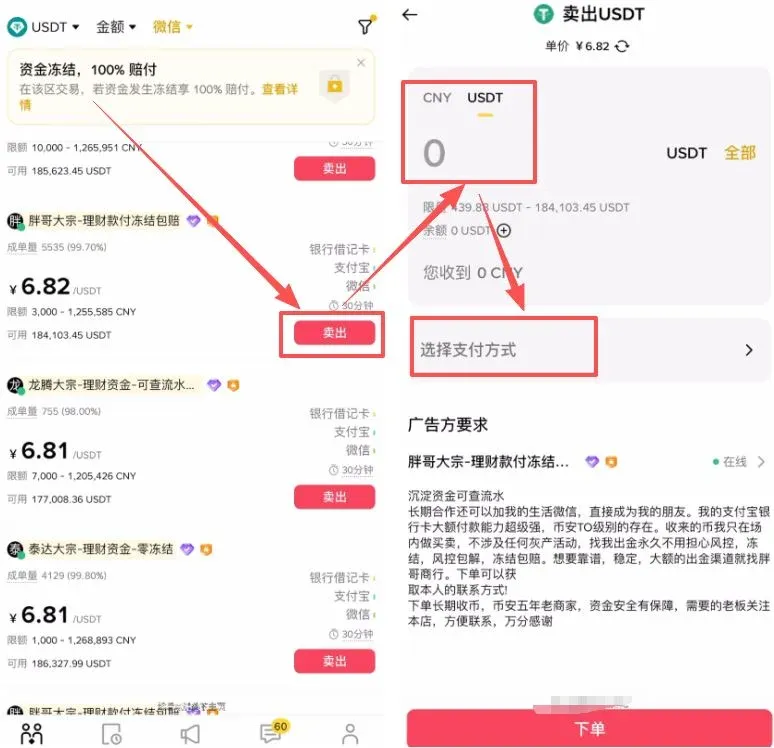
- On the selected buyer’s page click the Sell button on the right side. In the pop‑up, enter the amount of fiat (e.g., USD) you wish to receive.
- After clicking Select Payment Method, use the + button to add the corresponding receipt account or QR code (WeChat, Alipay, or bank account).
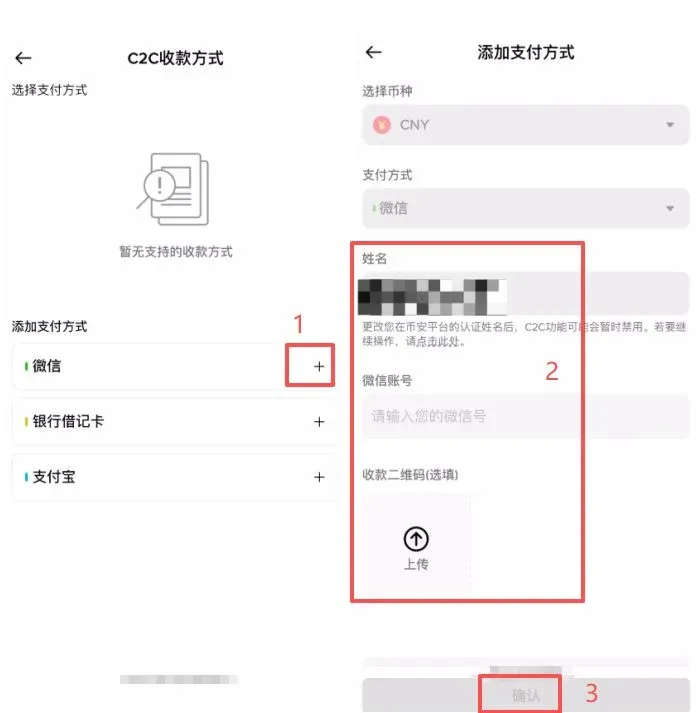
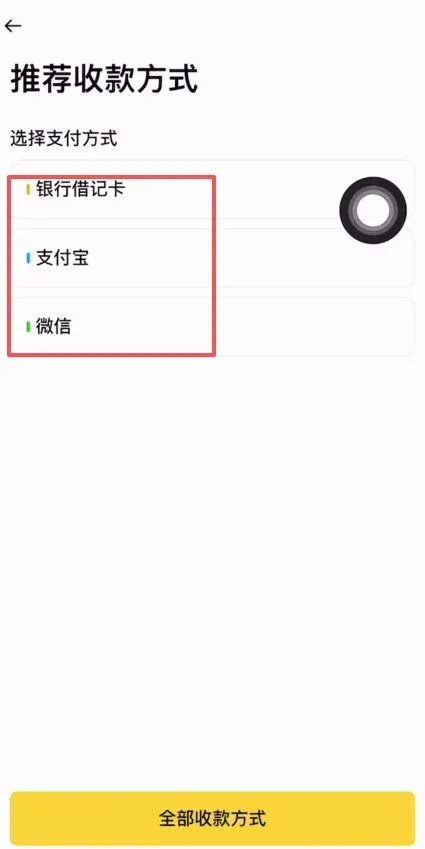
- Once all information is filled in and double‑checked, click Place Order.
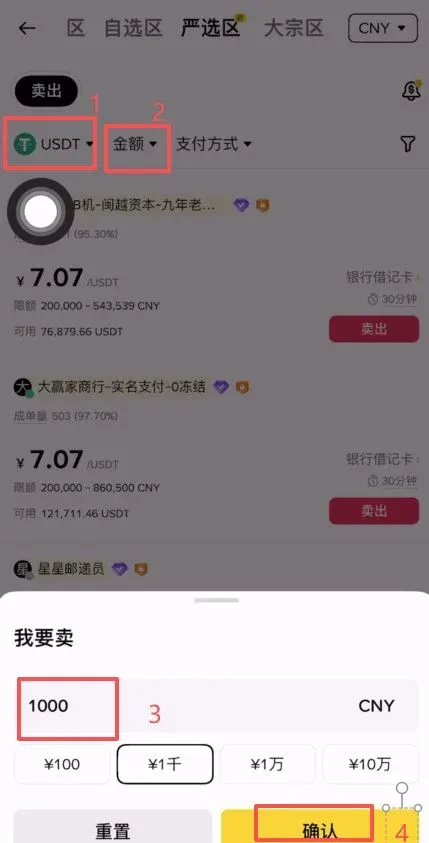
5. Wait for the Buyer’s Payment and Confirm Receipt
- The buyer’s payment status will be displayed on the right side of the page.
- After receiving a “payment completed” notification, go to the Wallet page and verify the actual amount that arrived in your chosen account. Once confirmed, click I Have Received the Payment.
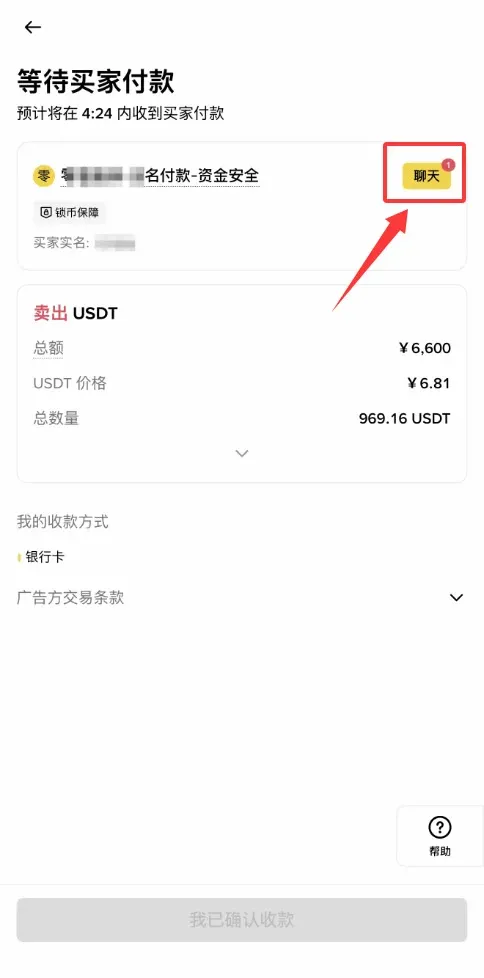
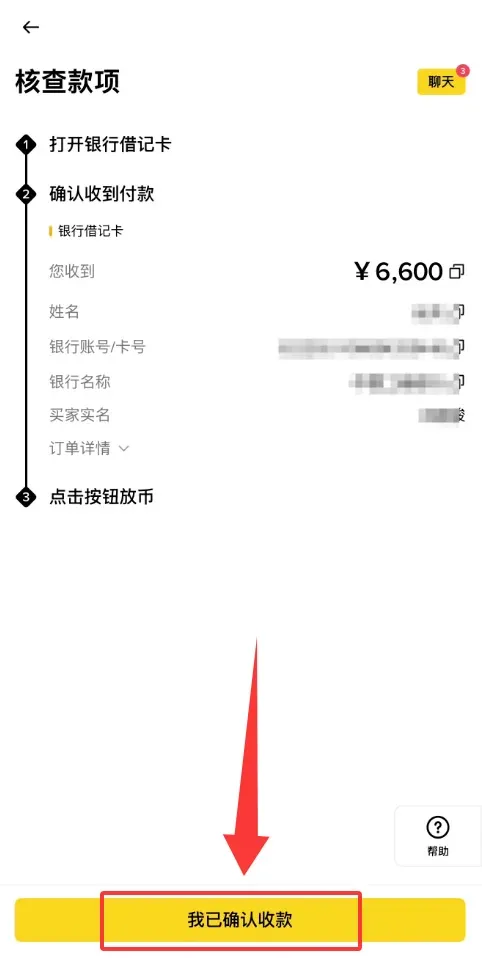
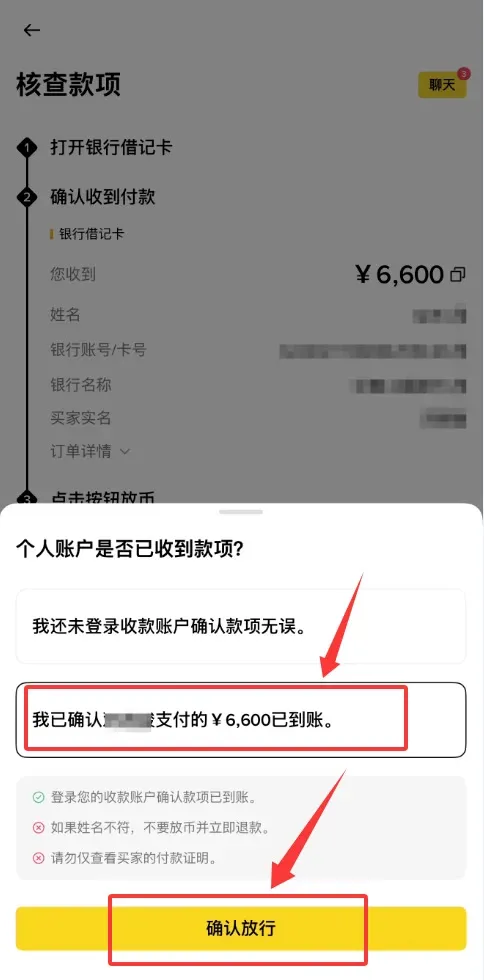
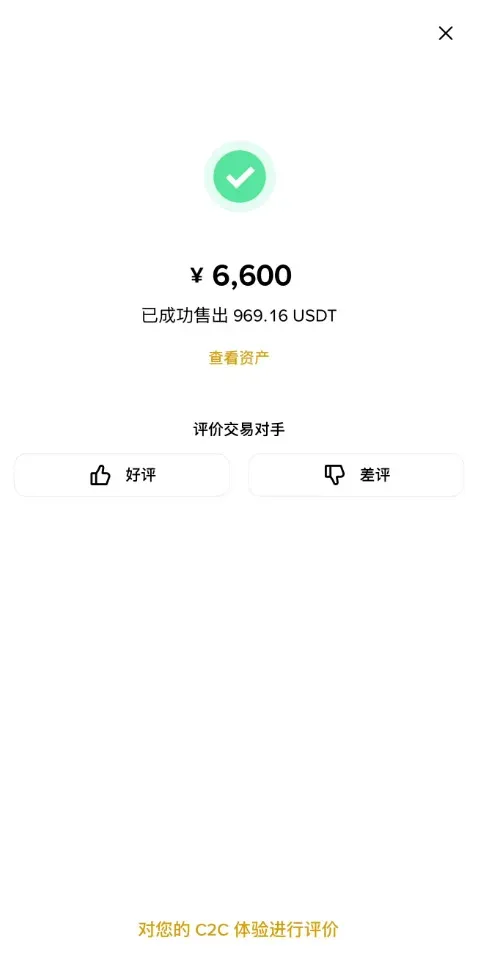
Only after you confirm receipt of the fiat will Binance release the corresponding USDT. At this point the entire C2C withdrawal process is complete.
---
3. Alternative Path: Quick‑Sell (Suitable for Small, Fast Withdrawals)
- On the home screen tap Quick Buy → switch to Quick Sell.
- Choose the cryptocurrency to sell (USDT) and enter the desired fiat amount.
- Select the receipt method (bank card, Alipay, WeChat) and click Confirm Sell.
- The system automatically matches you with a high‑quality buyer; funds are transferred instantly.
Fee Note: 0.1 % – 0.3 % trading fee; typical settlement time is about 1 minute.
---
4. Advanced Option: Sell to Fiat (Large‑Amount Withdrawal, Requires an International Bank Card)
In 2026 Binance introduced a Sell to Fiat feature that lets you first convert USDT to USD and then withdraw to a bank card issued in Hong Kong, Singapore, or other supported jurisdictions, after which you can move the funds back to your home country through compliant channels.
Steps
- On the home screen click More → locate Sell to Fiat and complete the activation.
- Convert USDT to USD (the platform waives the conversion fee, charging only an approximate 0.08 % spread).
- Go to Wallet → Spot Wallet → Withdraw → Fiat, select USD, bind a pre‑registered overseas bank card, enter the amount, and submit the withdrawal.
- Once the money reaches the overseas account, you may transfer it back to your domestic bank via a regulated method (e.g., SEPA, SWIFT).
*Please be aware that cryptocurrency gains may be taxable in your jurisdiction; consult a tax professional for guidance.*
---
5. Withdrawal Safety and Pitfall‑Avoidance (Must‑Know)
1. Key Measures to Prevent Account Freezing
- Avoid Sensitive Keywords: Do not include terms like “gambling”, “investment” or other high‑risk phrases in the transfer memo.
- Do Not Use Third‑Party Accounts: Binance requires that the linked bank card/Alipay/WeChat belong to the same verified individual.
- Split Into Small Batches: For a first withdrawal, keep the amount below $5,000 (or equivalent). After you are familiar with the process, you can gradually increase the limit.
2. Transaction Tips
- Multiple Small Transactions: Dispersing the total amount reduces the chance of triggering automated risk controls.
- Multiple Receipt Channels: Do not rely on a single bank card; keep Alipay, WeChat, and a backup bank account ready.
- Keep Proofs: Screenshot each completed transfer; these records are useful if a dispute arises.
- Confirm Promptly: After you receive the fiat, click the platform’s confirmation button as soon as possible to avoid the buyer filing a complaint due to timeout.
3. Common Issues and Resolutions
| Issue | Resolution |
|---|---|
| Buyer does not confirm receipt | After 15 minutes click **Appeal**, upload the transfer screenshot, and let Binance mediate. |
| Transfer not reflected in your bank | Verify the payment details, contact your bank’s support; if needed, open an appeal on Binance. |
| Account restricted from trading | Contact Binance support, provide identity documents and source‑of‑funds proof, request the restriction be lifted. |
| Payment method rejected | Switch to another already‑linked receipt channel, or select a buyer who accepts the method you have. |
---
6. Fees and Settlement Time Comparison
| Method | Fee | Expected Settlement Time | Maximum Per‑Transaction |
|---|---|---|---|
| C2C USDT Sell | 0 % (platform free, merchant may apply a spread) | 1 – 5 minutes (Alipay/WeChat even faster) | up to 500,000 CNY (≈ 70,000 USD) |
| Quick‑Sell | 0.1 % – 0.3 % | < 1 minute | up to 100,000 CNY (≈ 14,000 USD) |
| Sell to Fiat + International Card | ~0.08 % spread + bank transfer fee | 1 – 3 business days | limited by the overseas bank’s own caps (often via SEPA/SWIFT) |
---
7. Risk Disclaimer
- Trading crypto assets inherently carries price volatility; ensure the source of funds is legitimate before withdrawing.
- Comply strictly with the laws and regulations of your jurisdiction; avoid participation in money‑laundering, scams, or other illegal activities.
- Although C2C trades are backed by Binance’s guarantee, you should still verify the buyer’s account age, trade volume, and rating before placing an order.
- Be wary of unknown accounts promising “high exchange rates” or “instant settlement”; never send funds to an unverified counter‑party.
Best Practice: After a successful withdrawal, move the fiat out of the exchange’s wallet promptly and store it in separate, secure accounts to enhance overall fund safety.
---
This guide represents the 2026‑latest, beginner‑focused full withdrawal workflow for Binance (global version). For more practical Binance withdrawal tips, follow Bitaigen for future updates and in‑depth analyses.
Related Reading
💡 Register on Binance with referral code B2345 for the maximum trading fee discount. See Binance complete guide.



