
 Bitaigen Research
 This article was carefully compiled by the Bitaigen editorial team, providing an in‑depth analysis of common obstacles encountered when registering on Binance, along with practical troubleshooting ideas and the latest operational guidance. Whether the issue is IP restriction, verification‑code interception, or KYC review problems, reading this will help you quickly locate and resolve them, improving your registration success rate. To see the full process, continue reading below.
Frequently Asked Questions
Q: I get a “Service not available in this region” pop‑up during registration – what should I do?
A: The system has detected that your IP address belongs to a restricted region. Switch to an IP node located in Taiwan, then clear your browser cache and revisit the registration page, making sure to use the same IP throughout the whole process.
Q: My KYC verification was rejected by the system. How do I resubmit?
A: First determine the reason for the rejection. Common issues include blurry document photos and mismatched information. Take new, clear, complete pictures of the required document, ensure the residence information matches exactly what you entered during registration, and submit again.
Q: I’m not receiving the verification code. What should I check?
A: If you are using email, check both your inbox and the spam folder; if you are using a mobile number, review any SMS‑blocking logs. We recommend using international email providers such as Gmail or Outlook, and resend the code during a period of stable network connectivity.
---
Four Deep‑Rooted Reasons Why Binance Registrations Fail
Understanding the main factors that block registration before you start troubleshooting allows you to target the right solution.
Reason 1: IP Node Restrictions
Binance enforces very strict compliance requirements. If your network appears to be located in the United States, Singapore, mainland China, or other restricted jurisdictions, the system will immediately return a “Service not available” message. Switching to an IP located in Taiwan is currently the most common workaround, as that region offers relatively open access to Binance and stable network quality.
Reason 2: Verification Code Interception
Domestic mobile numbers are often filtered by carriers for overseas SMS, and local email services such as 163.com or QQ Mail frequently flag Binance emails as spam. Using international email services like Gmail or Outlook can significantly improve delivery rates for verification codes. If you still do not receive them, check your SMS‑blocking settings or retry during off‑peak hours.
Reason 3: Unofficial App Versions
Fake Binance clients not only fail to complete registration, they may also expose your assets to theft. iOS users should download the official app using an overseas Apple ID from the App Store; Android users should obtain the latest APK directly from the Binance official website.
Reason 4: KYC Information Mismatch
Under the 2026 risk‑control framework, if the country of residence you select during registration does not match the issuing country of the identification document you later upload, the system will reject the review outright. Ensuring that the residence field on the registration page aligns with the country printed on your ID is a critical step toward successful verification.
---
2026 Complete Binance Registration Step‑by‑Step Illustrated Guide
Once you understand the root causes above, follow the steps below to dramatically increase your chances of a successful registration.
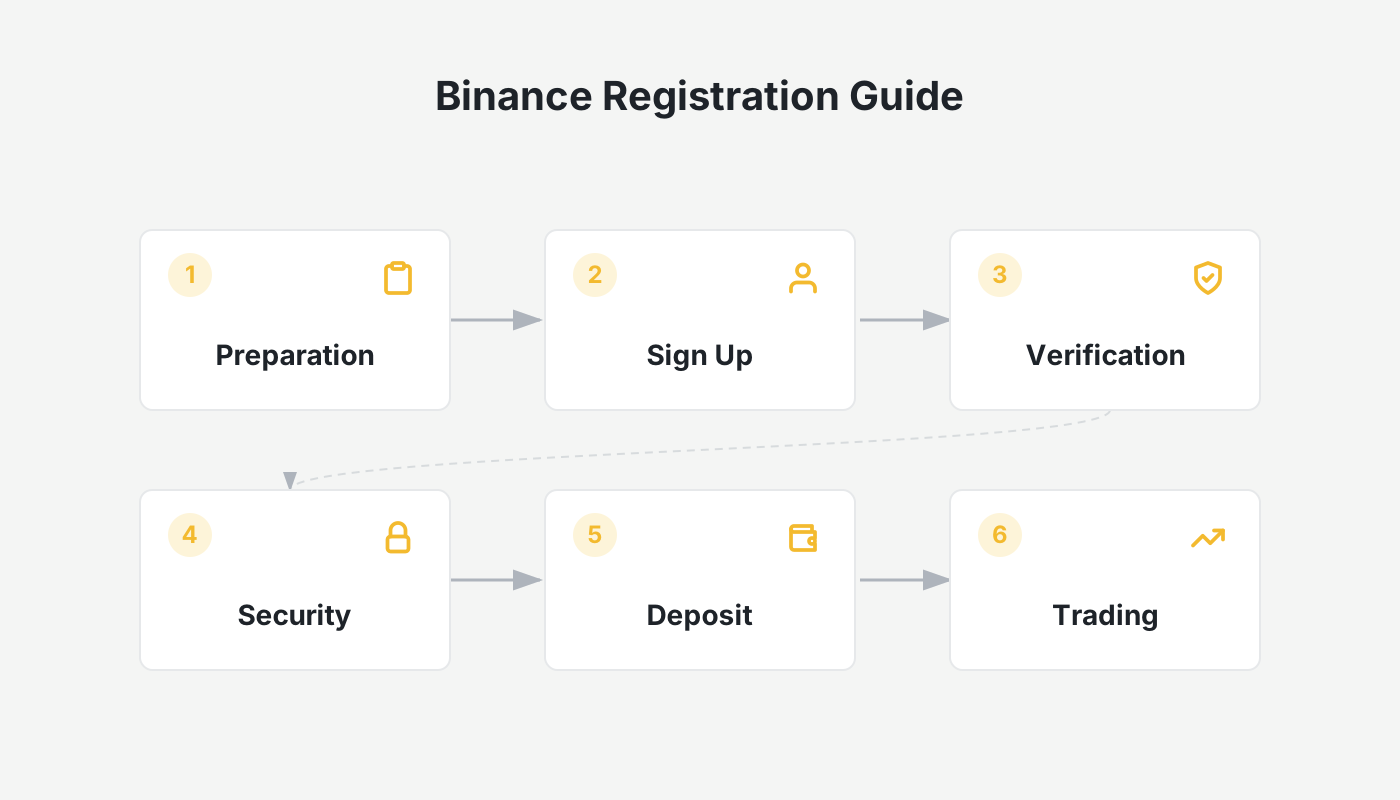
Step 1: Preparation
- Change your network IP to a Taiwan node.
- Prepare a Gmail or Outlook email address.
- Have a valid national ID, driver’s license, or passport ready.
- Ensure a stable internet connection; wired Ethernet or a strong Wi‑Fi signal is recommended.
Step 2: Open the Registration Portal
- In your browser, visit the Binance website: <https://www.binance.com> (U.S. residents must use Binance.US at <https://www.binance.us>).
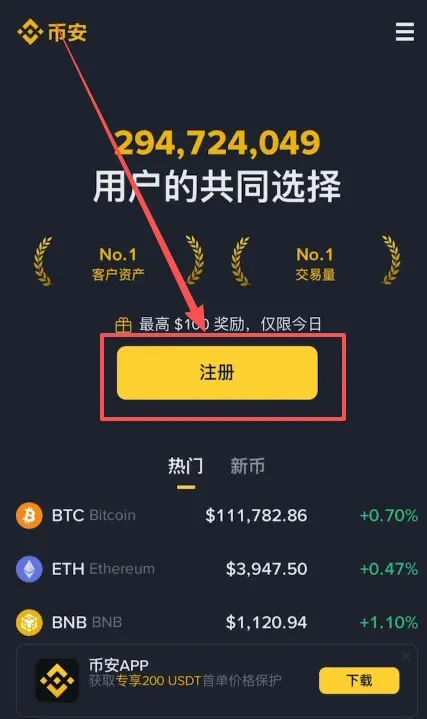
- Click the “Register” button at the top‑right corner of the page.
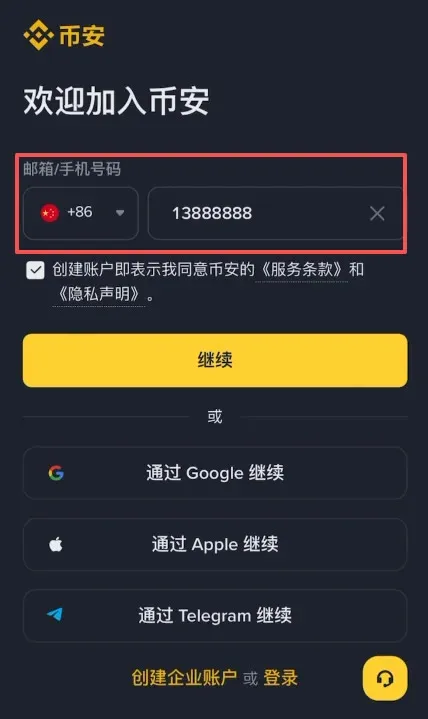
- Enter the email address or mobile number you prepared in the previous step, then click “Continue”.
Step 3: Verification‑Code Confirmation
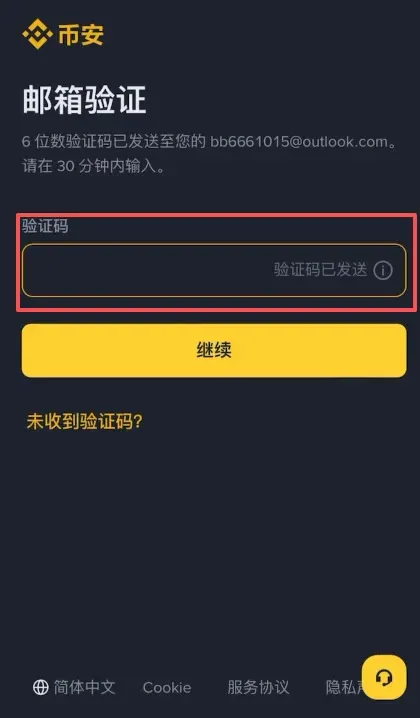
The system will send a verification code to the email you supplied. Open your inbox (including the spam folder) promptly, and enter the six‑digit code into the corresponding field.
Step 4: Set a Login Password
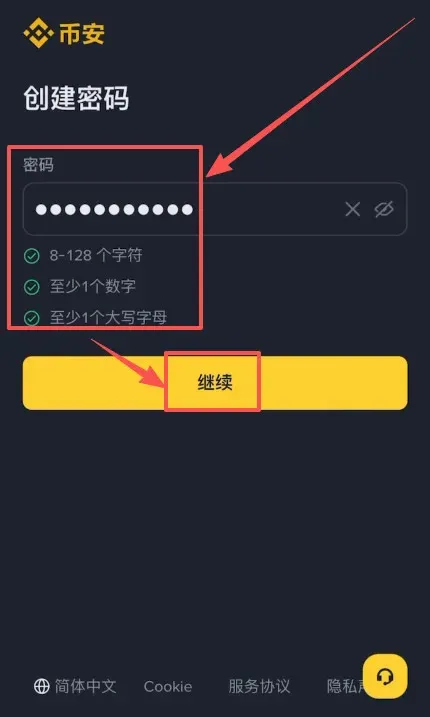
Create a strong password. We recommend using a combination of uppercase and lowercase letters, numbers, and special characters, with a minimum length of 8 characters, to protect your account.
Step 5: Enter an Invitation Code (Optional)
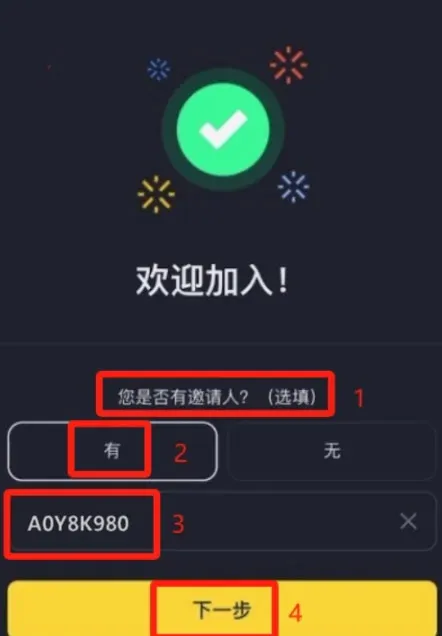
When prompted for an inviter, choose “Yes” and input the invitation code `B2345`. Using this code can grant you a fee discount on subsequent trades.
---
Detailed KYC Identity‑Verification Procedure
After creating your account, you must pass the KYC (Know‑Your‑Customer) review before you can activate trading functions.
1. Pre‑Verification Preparations
- Download the official Binance app on your phone (see official registration link and official download link).
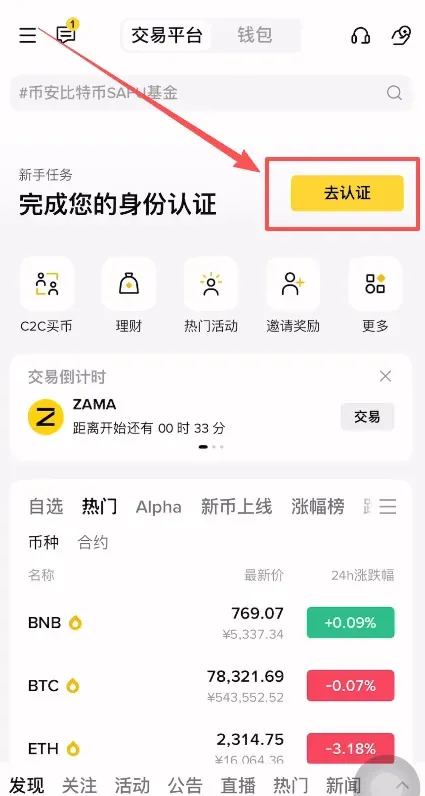
- Log in with the account you just registered; the app will automatically redirect you to the identity‑verification page.
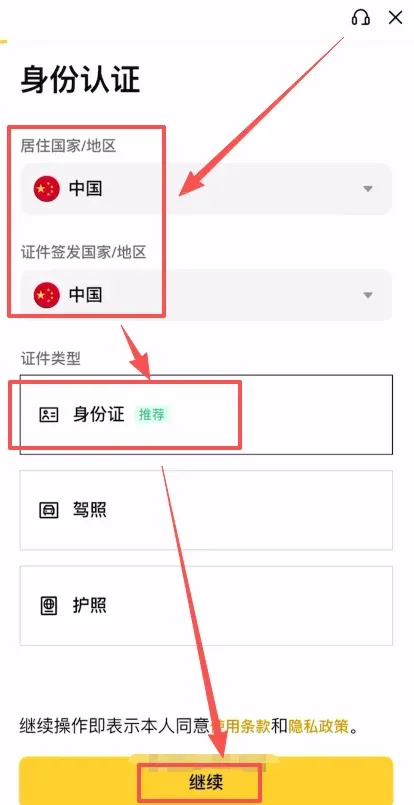
- Select “Mainland China” for both “Country/Region of Residence” and “Document Issuing Country/Region” to keep the information consistent.
2. Choose Document Type and Upload
- Select the document you wish to submit: national ID, driver’s license, or passport are all accepted.
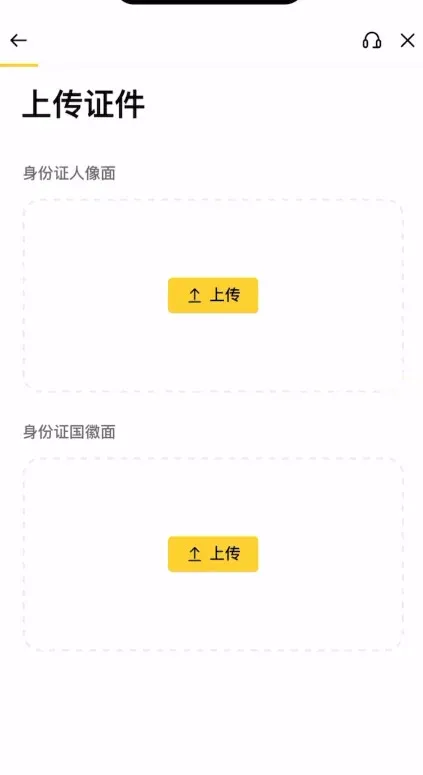
- Follow the on‑screen prompts to capture or upload clear photos of the front and back of the document.
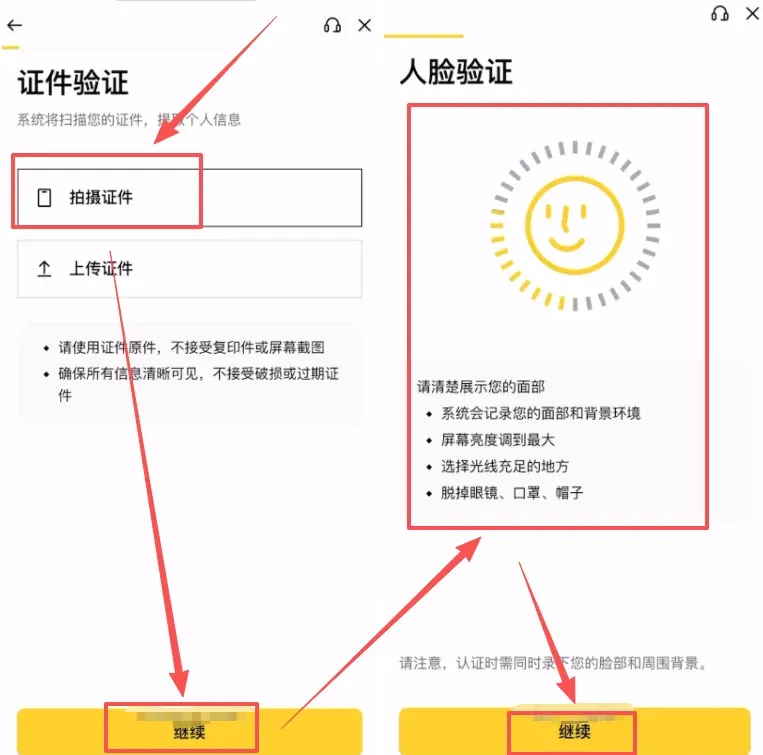
- Ensure all four corners of the document are visible, there is no glare, and the text is legible.
3. Facial Recognition
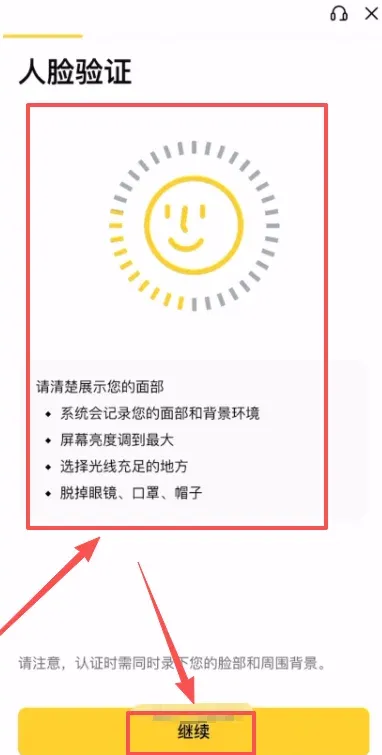
After uploading the document, you will be required to complete a real‑time facial‑recognition check. Perform the instructed actions in a well‑lit environment while facing the camera.
4. Review Information and Submit
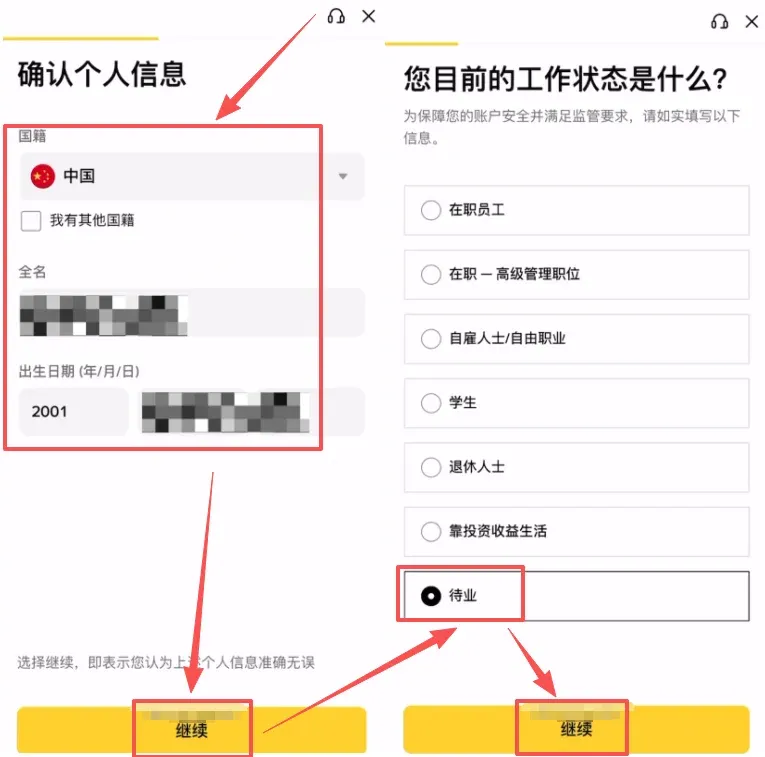
Verify personal details such as nationality, full name, date of birth, and current employment status. Once everything is correct, submit the application. Review typically completes within 1–3 business days, and you can monitor progress at any time within the app.
Tax Note: Crypto‑related gains may be taxable in your jurisdiction. After you have completed KYC and begin trading, consider consulting a local tax professional to ensure compliance with applicable tax laws.
---
Common Binance Registration Issues and Optimization Tips
Network Environment Optimization
- Choose a stable connection and avoid registering during peak internet traffic periods.
- If you need a VPN, connect to a Taiwan node and keep the connection stable throughout the whole registration flow.
Document Photo Requirements
- Ensure ample lighting to avoid reflections or shadows.
- Capture the entire document, including all four corners, and make sure the text is clearly readable.
Review Time and Status Checks
- KYC reviews usually take 1–3 days; you can view the status in the app.
- If your application is rejected, read the rejection reason carefully and resubmit the corrected material.
---
Major Exchange Fee Rebates and Registration Benefits
| Exchange | Invite Code | Fee Rebate | Official Registration Link | Official Download Link |
|---|---|---|---|---|
| OKX | `B2345` | 20 % | [Official Register](https://www.bitaigen.com/binance) | [Official Download](https://www.bitaigen.com/binance/download) |
| Binance | `B2345` | 20 % | Same as above | Same as above |
| HTX | `b6yq8223` | 20 % | Same as above | Same as above |
| gate.io | `VLIWUGTFAA` | 20 % | Same as above | Same as above |
| bybit | `B2345` | 20 % | Same as above | Same as above |
| bitget | `good9999` | 20 % | [Official Register](https://www.bitget.org/zh-CN/referral/register?clacCode=NTBZAG9J) | [Official Download](https://basebiance.com/bitget/) |
Important Reminder: You must complete the registration on the respective platform before you can claim any referral or fee‑rebate benefits.
---
Fee‑Rebate and Benefit Explanation
After successfully creating a Binance account, leveraging an invitation code and participating in periodic platform promotions can substantially reduce your trading costs. Binance typically offers a 20 % fee rebate, and other exchanges provide comparable rebates. Choose the incentive program that best matches your trading frequency and preferences to maximize cost savings.
---
By following the detailed steps and paying attention to the optimization tips above, you should be able to complete a Binance account registration and KYC verification in 2026 without major obstacles. If you encounter difficulties, first cross‑check each stage against the common‑issue list and optimization suggestions in this article, and resubmit any required documents if needed. Once registration is complete, you can begin your journey into cryptocurrency investment, remembering to handle fiat deposits and withdrawals via USD, SEPA, or SWIFT channels as appropriate for your region.
This concludes the full content of “Can’t Register on Binance in 2026? Four Major Reasons for Failure and the Latest 2026 Registration Tutorial.” For the newest Binance registration guides, stay tuned to Bitaigen and its related sections.
Related Reading
- Download Binance App 2026 & Register: Step‑by‑Step Guide
- 2026 Guide: How Mainland China Users Can Access Binance Safely
- 2026 Binance Registration & Trading Guide for Beginners
💡 Register on Binance with referral code B2345 for the maximum trading fee discount. See Binance complete guide.



