
 Bitaigen Research
In 2026, as the digital‑currency ecosystem continues to expand at breakneck speed, the stablecoin USDT—the “dollar‑pegged” benchmark of the crypto world—has become the tool of choice for investors and traders alike. The OKX exchange (official registration link | official download link) supports top‑up via Alipay, providing a convenient channel for users in Mainland China. Below is a step‑by‑step walkthrough covering the download of the OKX app, account registration, payment‑method binding, and the complete process of buying and selling cryptocurrencies, designed to help newcomers get up to speed quickly.
The OKX beginner guide includes downloading the app, registering an account, linking a payment method, and completing a full crypto‑buy‑sell workflow, complete with practical screenshots to help new users start trading without delay.
Our Bitaigen editorial team has carefully compiled a full‑process, hands‑on guide for OKX, covering app download, account creation, payment‑method binding, and crypto‑asset trading steps, all illustrated with clear screenshots. This assists domestic beginners in avoiding common pitfalls and getting started swiftly. For detailed operational instructions, keep reading.
Download the OKX App
- OKX app download link: Click to download
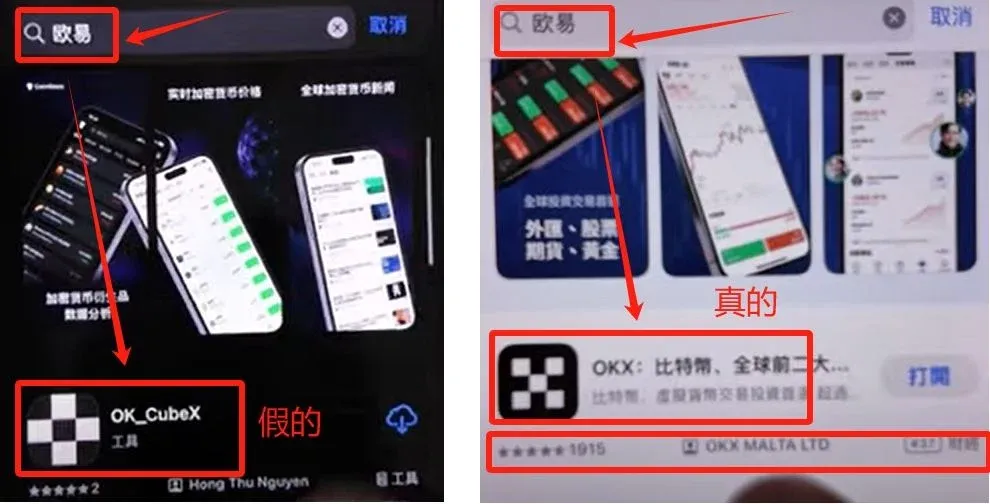
The left‑hand screenshot shows a phone logged in with a Mainland China Apple ID; the App Store does not list OKX there, and downloading a counterfeit version can expose assets to security risks.
The right‑hand screenshot uses a Taiwan Apple ID to search “OKX”; you can see the developer listed as OKX MALTA LTD, with roughly 1,900 positive reviews in Taiwan and a ranking of 37 on the finance chart—this is the official, legitimate version.
Further reading: How to register an overseas Apple ID on an iPhone? iOS user guide for creating a Taiwan Apple ID.
Register a New OKX Account and Add a Payment Method
OKX new‑user registration portal: Click to register
Using the link above or the referral code B2345, new users can claim a maximum reward of 50 USDT (the code must be entered for the reward to apply).
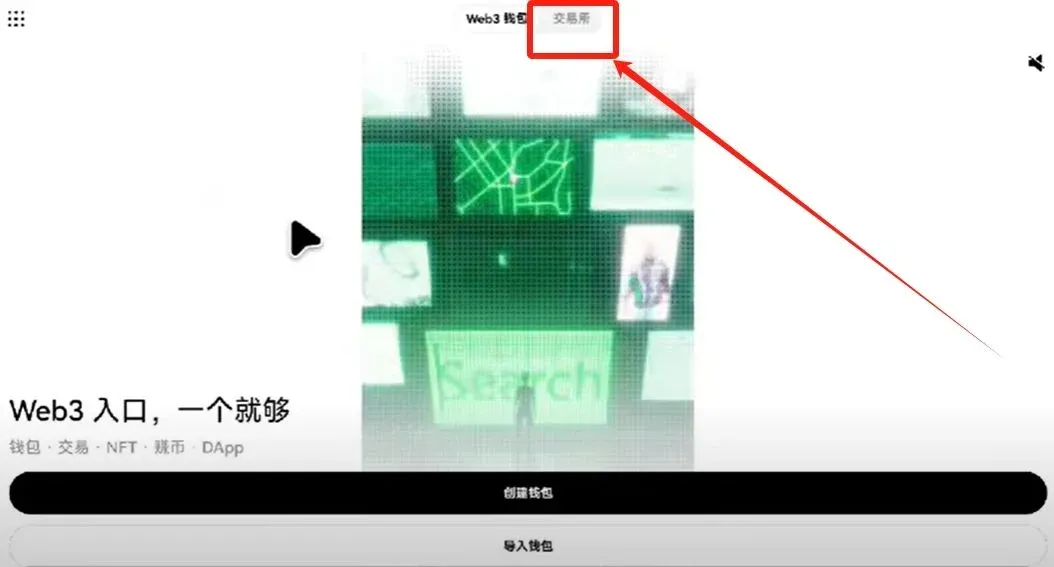
- Open the app; if the home screen defaults to “Wallet”, tap the top‑left corner to switch to “Exchange”.
- Tap [Register], select your country/region of residence (preferably matching the ID you will provide), check the agreement box, and tap [Next].
- On the identity‑verification screen, fill in your national‑ID details and confirm.
- Enter the referral code B2345; a notice will appear indicating a 20 % fee rebate, meaning all future trading fees are permanently discounted by 20 %.
- After completing the steps, you will be taken to the main account dashboard.
Purchase USDT to Participate in “Simple Earn”
- From the main page, tap [C2C Buy].
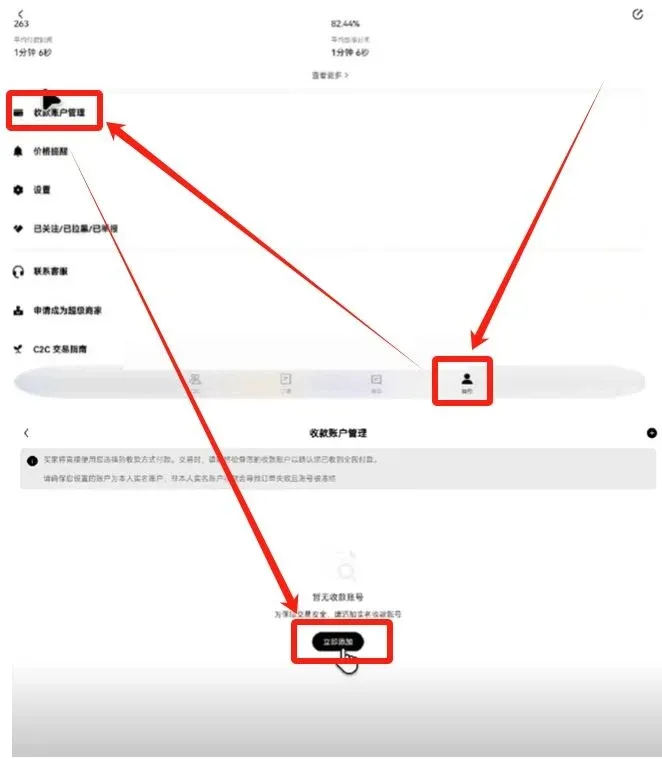
- The first time you use this feature you must add a payment method:
- Go to [Me] → [Payment Account Management] → [Add Now].
- Three options are supported: bank card, Alipay, WeChat Pay. Because Alipay’s risk controls are relatively strict, it is advisable to prioritize a bank card or WeChat Pay.
Example: Adding a Bank Card
- Enter the bank name → tap [Complete Add].
Example: Adding WeChat Pay
- Tap the “+” icon in the upper‑right corner, switch to WeChat, fill in the WeChat ID or QR‑code → tap [Complete Add].
Choose a Trading Mode
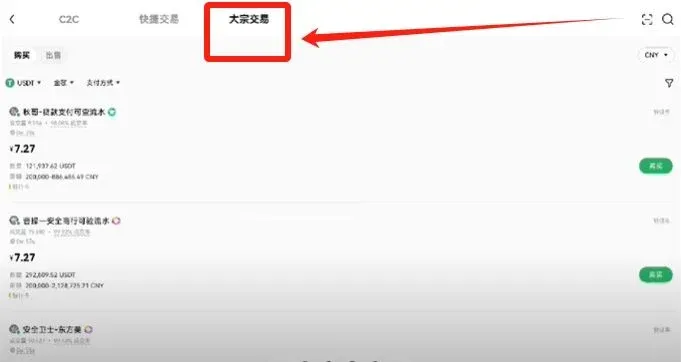
- Bulk Trade: single transaction ≥ ¥100,000 (approximately $15,000 USD). Suitable for users with ample capital and who want to reduce the frequency of withdrawals.
- Fast Trade: the system automatically matches you with a counter‑party; the fill‑rate is about 96 %, but the risk is higher, so beginners are advised to avoid this mode.
- C2C Manual Selection: manually pick payment method, counter‑party reputation, trade volume, release‑speed, and other key metrics.
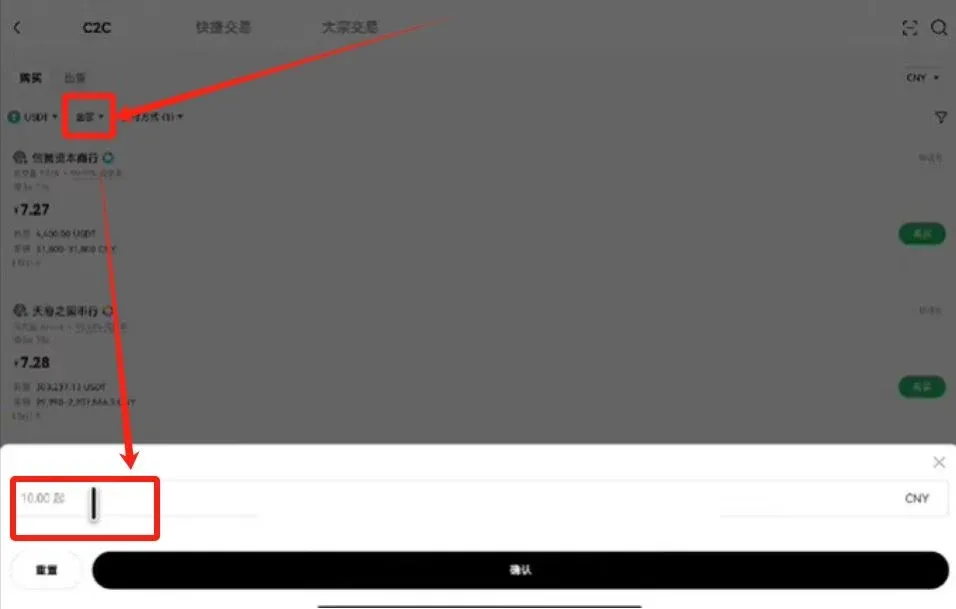
Key Filters for C2C Trading
| Criterion | Recommended Threshold |
|---|---|
| **Payment Method** | Bank card or WeChat Pay |
| **Trade Volume** | ≥ 1,000 (units of the local currency) |
| **Success Rate** | ≥ 99 % |
| **Release Time** | ≤ 30 seconds |
| **Counter‑party Age** | ≥ 6 months |
After applying the filters above, click the counter‑party’s avatar to view detailed information; once you are satisfied that there are no red flags, proceed to the next step.
Complete the Payment
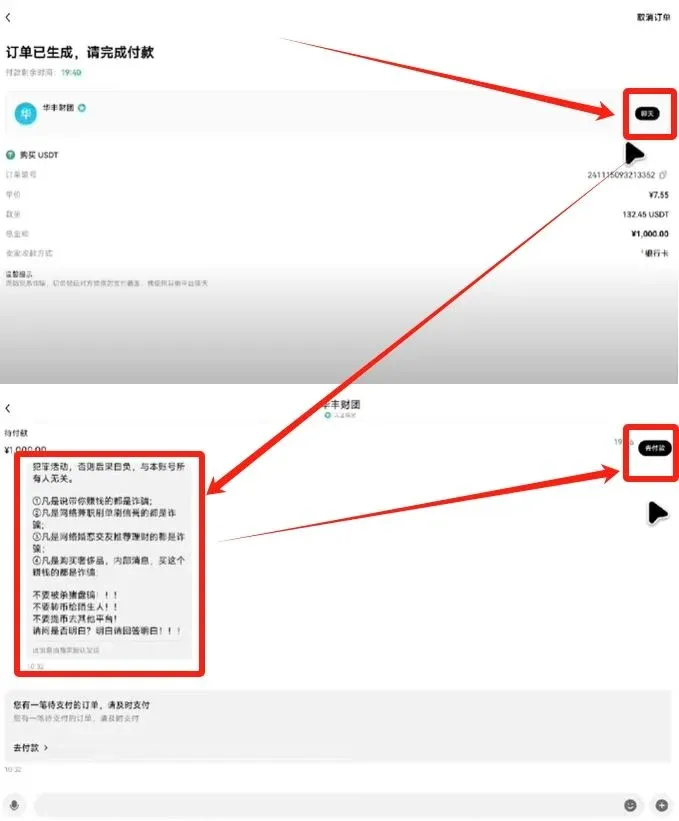
- Enter the purchase amount (e.g., ¥1,000, roughly $150 USD). The platform will automatically calculate the corresponding USDT amount.
- Tap [0‑Fee USDT Purchase], which opens a chat window where you confirm details with the counter‑party.
- Use your banking app to transfer the funds according to the counter‑party’s payment instructions; after the transfer succeeds, take a screenshot as proof.
- Return to OKX, tap [I Have Paid], and wait for the counter‑party to release the USDT.
It is strongly recommended to use a non‑primary bank card (e.g., a secondary savings account rather than your salary‑card or social‑security card) to avoid potential account freezes caused by risk‑control triggers.
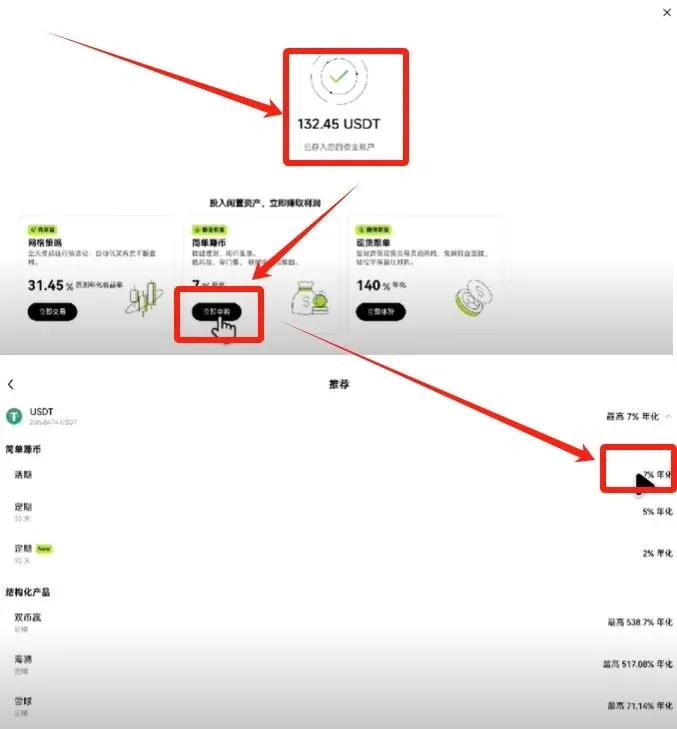
Join the “Simple Earn” Program
- Navigate to the [Earn] page, select “Flexible Savings” (annualised yield around 7 %). Tap [Subscribe], input the amount you wish to lend (minimum 5 % APY), check the agreement box, and confirm. The funds remain within the OKX ecosystem, offering a relatively high level of safety.
Buying and Selling PEPE Token
- Tap the bottom [Assets] tab, and view your USDT balance in the Funds Account.
- Transfer USDT from the Funds Account to the Trading Account (free of charge, no fee).
- Go to [Trade], switch to Spot (the Instant Swap feature has a large spread and is not recommended).
- Search the trading‑pair list for PEPE/USDT, then open the trading interface.
Order‑Type Overview
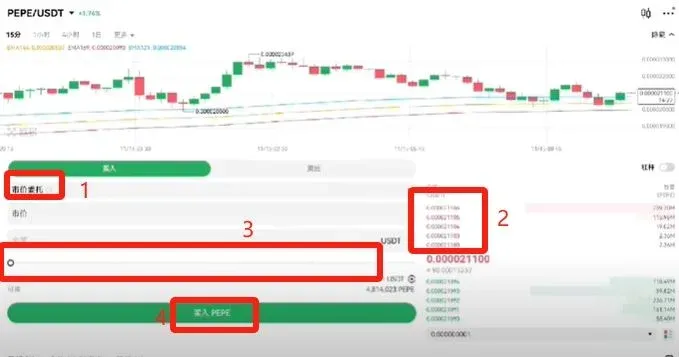
- Limit Order: Set a specific buy or sell price; the order executes when the market reaches that price.
- Market Order: Executes immediately at the best available price on the order book, suitable for fast entry or exit.
Limit‑Buy Example
- Set a buy price of 2 USDT, fill in the desired quantity → tap [Buy PEPE].
- To cancel, simply press [Cancel] (no fee).
Market‑Buy Example
- Enter the amount you wish to spend, tap [Buy PEPE], and the system will match existing sell orders to complete the trade.
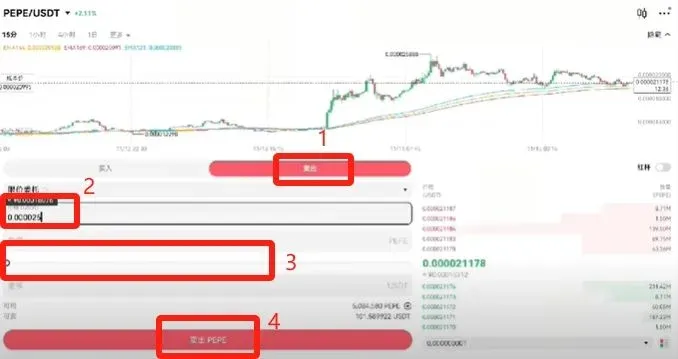
Limit‑Sell Example
- After acquiring PEPE, set a sell price of 25 USDT → tap [Sell PEPE]; the order will automatically execute once the target price is reached.
Convert PEPE Back to USDT and Cash Out to Fiat
- In the Trading Account, sell PEPE to obtain USDT.
- Transfer the USDT back to the Funds Account.
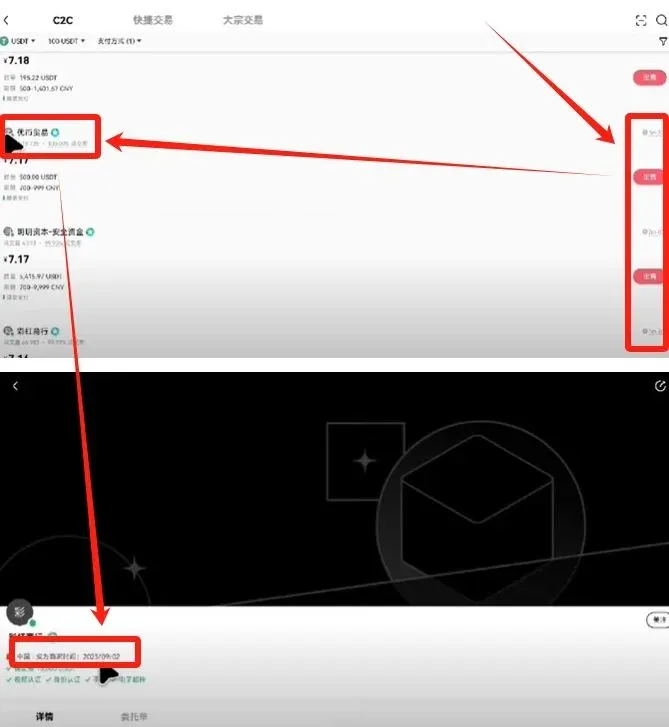
- Return to [C2C Buy], this time choose [Sell], select a payment method (WeChat Pay is recommended for quick settlement).
- Enter either the amount of PEPE you wish to sell or the fiat amount you want to receive.
- Choose a counter‑party that meets the following criteria: transaction time ≤ 2 minutes, success rate ≥ 99 %, trade volume ≥ 10,000. After the buyer confirms receipt, click [Release Coins] on OKX.
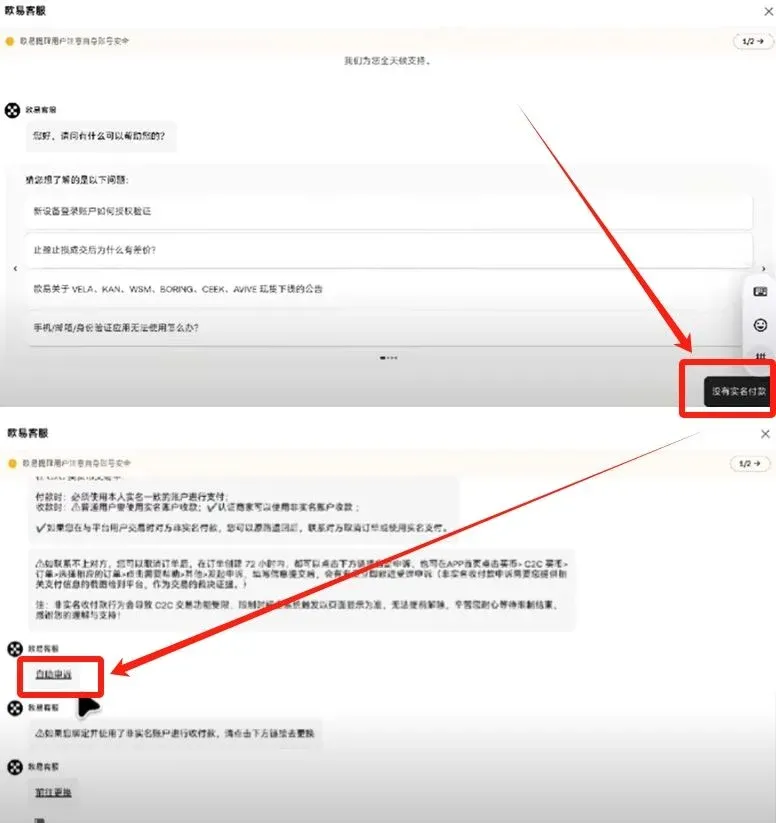
Risk Notice: If the counter‑party asks you to use a bank card that is not in your name or requests any suspicious payment details, terminate the transaction immediately and contact OKX customer support.
Overview of Contract (Leverage) Trading
- Transfer USDT from the Funds Account to the Trading Account.
- Open [Contract Trading], and select either Cross‑Margin or Isolated‑Margin (new traders are advised to start with Isolated‑Margin).
- Set the leverage multiplier (recommended ≤ 5×), choose Market Order, input the quantity you wish to buy → tap [Buy/Long].
- Configure Take‑Profit / Stop‑Loss: for example, set an automatic close‑out if the price drops by ‑5 % → tap [Set TP/SL for All Positions] → [Confirm].
- To close a position manually, press [Market Close All].
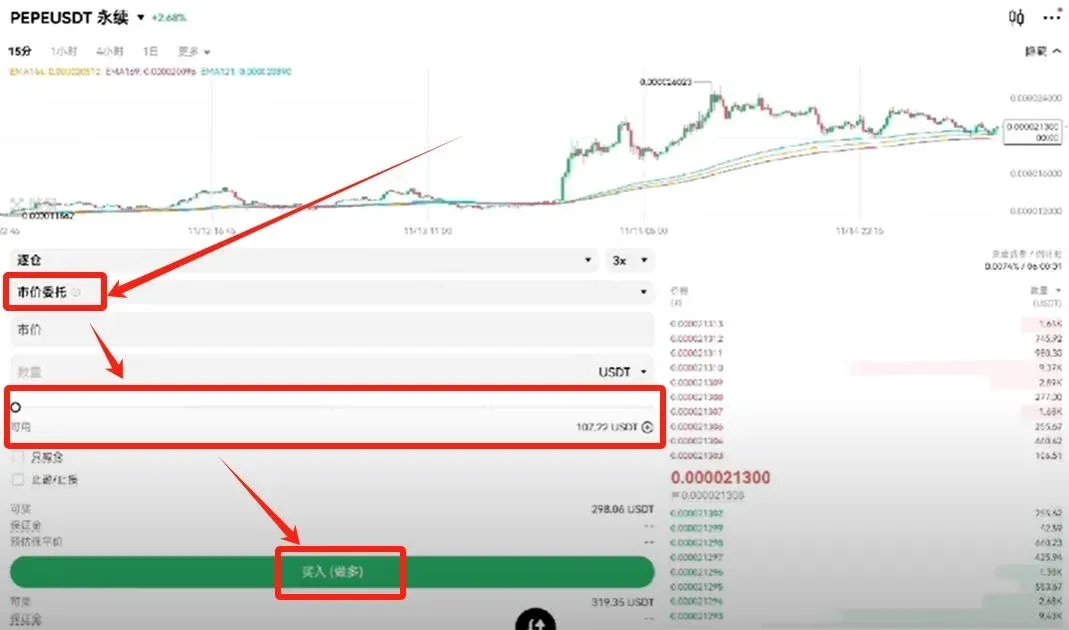
Fees and Profit‑Loss Inspection
- On the trading screen, tap the top‑left [Historical Positions] to view profit or loss for each trade.
- Tap [Trade Statements] to see cumulative fees.
- Using the referral code B2345 grants a permanent 20 % discount on all trading fees.
Summary
This article provides a comprehensive, step‑by‑step walkthrough of OKX—from downloading the app, registering an account, linking payment methods, executing C2C USDT purchases, spot‑trading the PEPE token, to conducting leveraged contract trades. For additional OKX onboarding tips, you can search the Bitaigen (比特根) archive or continue exploring the related links below. We wish you a safe and smooth journey through the world of digital assets.
Tax Reminder: Crypto‑related gains may be subject to tax in your jurisdiction. Please consult a qualified tax professional to ensure compliance with local regulations.
Related Reading
- Step-by-Step Guide: How to Buy Bitcoin for the First Time
- What is a DEX? Best Decentralized Exchanges Guide 2026
- Buy Bitcoin on OKX 2026: Beginner’s Step‑by‑Step Guide
💡 Register on Binance with referral code B2345 for the maximum trading fee discount. See Binance complete guide.



