
 Bitaigen Research
 We provide an in‑depth analysis of OKX’s copy‑trading feature in this article, helping newcomers understand the actual workflow, benefits, and potential risks of replicating experienced traders. By the end, you will have clear criteria for deciding whether to follow a trader, thereby avoiding blind copying. At the same time, we evaluate the platform’s user‑interface friendliness, fee structure, and the flexibility of the copying methods, so you can comprehensively assess whether the service matches your own investment style.
Concept of OKX Copy‑Trading and Core Characteristics
When you first enter the crypto space, many beginners have no idea which coin to buy or when to enter and exit positions. To address this pain point, OKX introduced the Copy‑Trading feature, which allows users to directly duplicate the actions of seasoned traders.
What Is OKX Copy‑Trading?
After you select a trader on the platform and allocate funds, every time that trader places an order, your funds automatically execute the same buy or sell command; when the trader closes a position, your position is closed as well. The whole process works like a real‑time mirror of the other party’s trades, with profit and loss naturally syncing.
Unlike traditional “managed trading” where a third party controls your assets, copy‑trading keeps your assets in your own account at all times. You can close positions or withdraw funds whenever you wish. Moreover, the platform only takes a roughly 10 % share of the trader’s profit when you actually make money; no fee is charged on losing trades.
Tip: OKX also offers a “Strategy” feature, which is a post‑trade copying mode. In this mode the trader may have already realized a profit while you are still trying to catch up, so the profit‑and‑loss dynamics differ from the real‑time copy‑trading described above.
Main Advantages of OKX Copy‑Trading
- Intuitive Interface: Switching between futures and spot markets is obvious, trader information is displayed clearly, and entry points are streamlined, making it easy for newcomers to get started quickly.
- Flexible Copying Methods:
- *Smart Copy*: Replicates the trader’s full position ratio.
- *Custom Copy*: Copies only the trade price and asset, allowing you to set per‑trade or total‑investment caps.
- Fee‑Friendly: The platform charges a profit share to the trader on a weekly net‑profit basis; no extra fees are required when you incur losses.
- Potential Slippage: Because OKX’s overall trading volume is relatively modest, you may experience slight price differences when copying, leading to minor deviations in realized profit or loss.
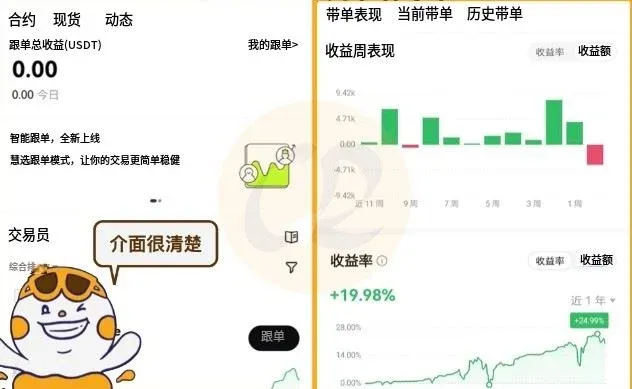
Risks to Consider When Using OKX Copy‑Trading
Even with a senior trader’s guidance, you must stay vigilant because not every signal provider is trustworthy. The mechanism only pays a commission to the trader when profits are generated; losses are borne entirely by the follower. This asymmetry can be abused by a small number of malicious actors: they may operate with minimal capital, using ultra‑high‑frequency, extremely leveraged futures positions that quickly deplete followers’ funds, while they themselves only incur tiny losses or occasional accidental gains.
How to Choose a Reliable Signal Provider
On the OKX copy‑trading marketplace, I usually evaluate potential traders from three perspectives:
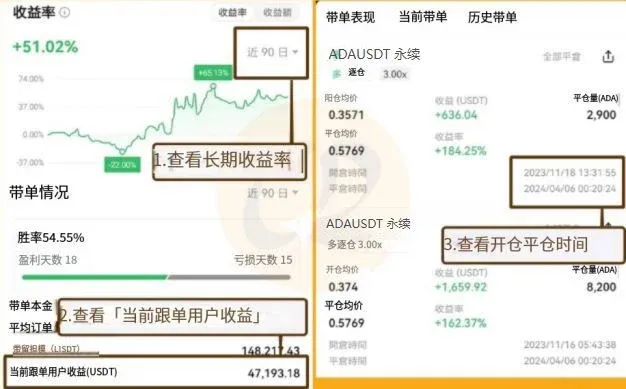
- Long‑Term Return Rate: Does the trader’s cumulative profit outperform Bitcoin’s price movement? If the trader’s return is lower than simply holding Bitcoin, buying Bitcoin directly is more cost‑effective.
- Follower Profitability: Review the historical earnings of past followers; this directly reflects the trader’s copy‑trading performance.
- Historical Trading Behavior: Examine the intervals between opening and closing positions and the frequency of trades. Avoid traders who open and close many positions within a single day while employing high leverage, as this may indicate risky behavior.
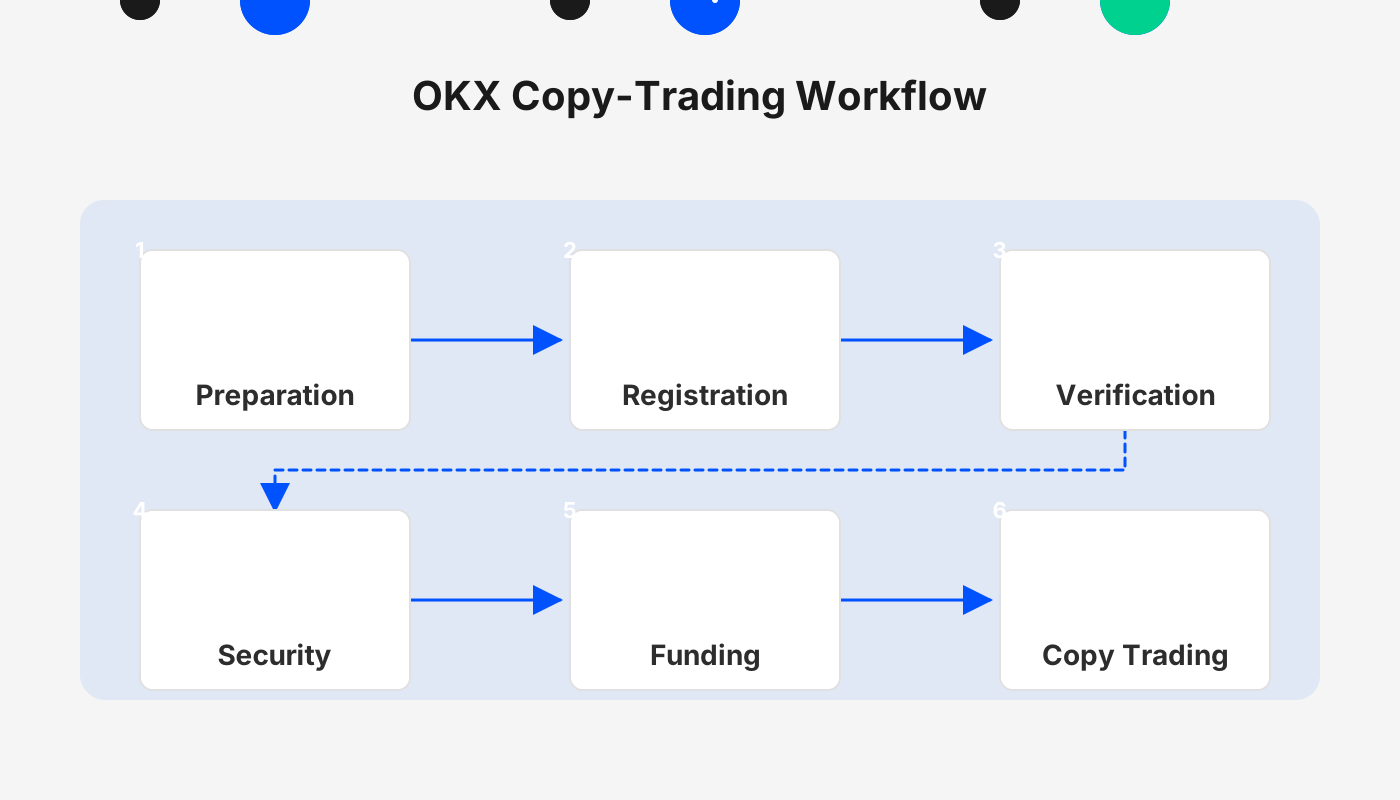
Complete OKX Copy‑Trading Tutorial Workflow
Step 1: Register and Complete Funding
- Follow the link below to the OKX registration page and use the referral code `B2345`. After completing identity verification, you will receive a 20 % fee discount.
- Transfer funds into your OKX account. A common approach is to first convert Taiwanese dollars (TWD) into USDT on the MAX exchange, then deposit the USDT onto OKX via an on‑chain transfer. For users outside Taiwan, you can deposit USD via SEPA or SWIFT transfers, keeping in mind that U.S. residents must use Binance.US for any fiat‑on‑ramp activities that involve Binance services.
Step 2: Open the Copy‑Trading Interface
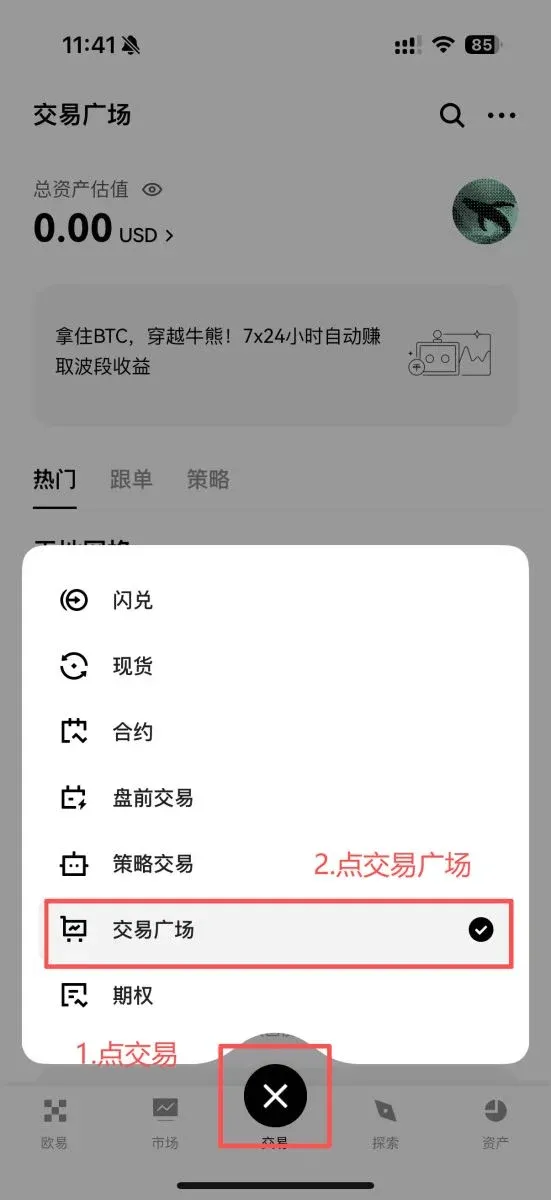
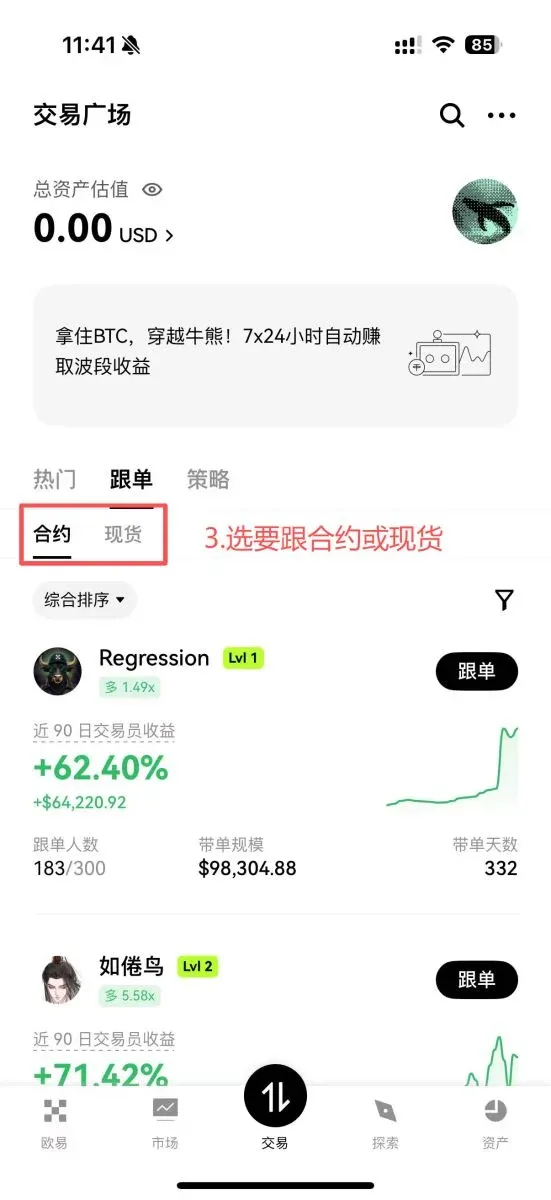
In the mobile app, tap Trade → Trade Plaza to access the copy‑trading page. The top of the page presents two main tabs: Futures and Spot. Beginners are advised to start with Spot copying, as it generally involves lower leverage and simpler risk management.
Step 3: Filter and Choose a Trader to Follow
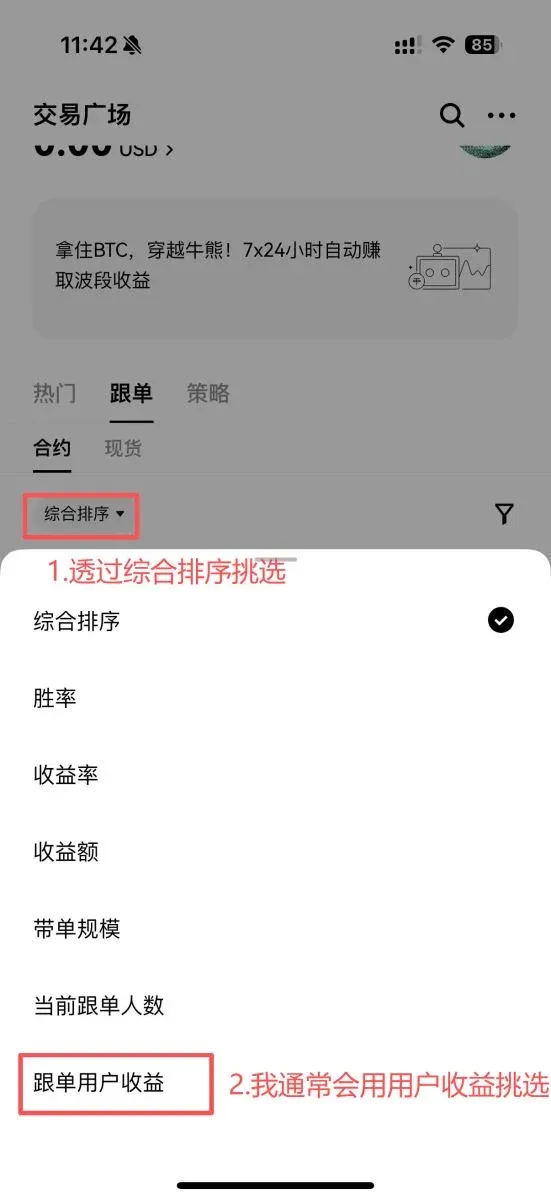
- Go to Comprehensive Ranking → Follower Profit for an initial filter.
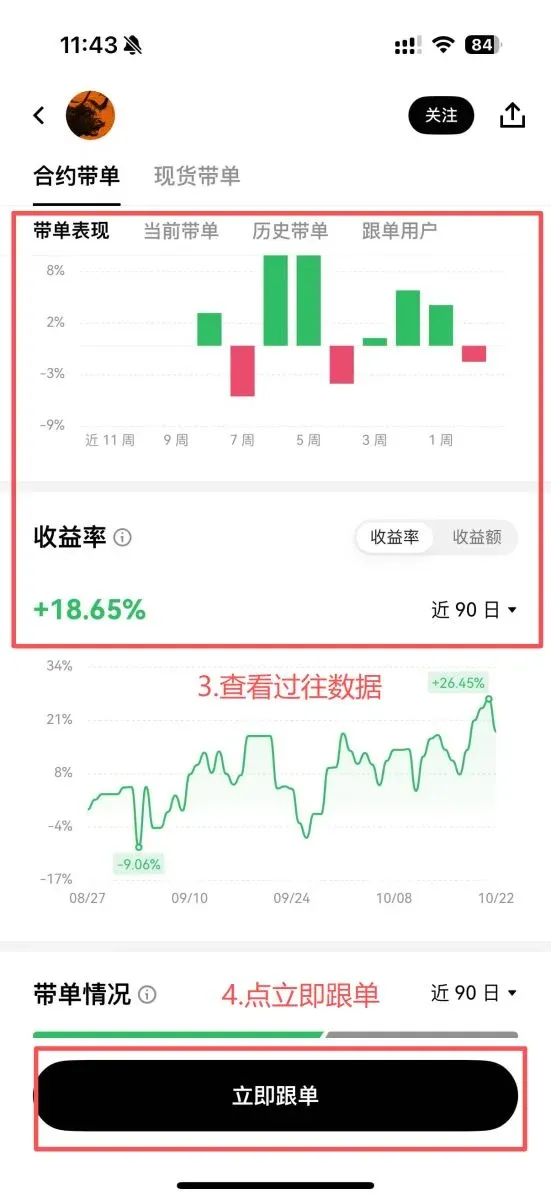
- Open each trader’s detail page and focus on:
- Return Rate: Look for a stable upward trend that outperforms Bitcoin.
- Current Follower Profit: Verify whether recent followers have realized gains.
- Current Copy‑Trading Status: If the trader shows close to 100 % loss without a stop‑loss in place, consider discarding them.
- Historical Copy‑Trading: Review the timing between opening and closing positions, leverage usage, and asset distribution to see if they match your risk tolerance.
After confirming the trader meets your criteria, click Copy Now to proceed to the next step.
Step 4: Set Copy‑Trading Parameters
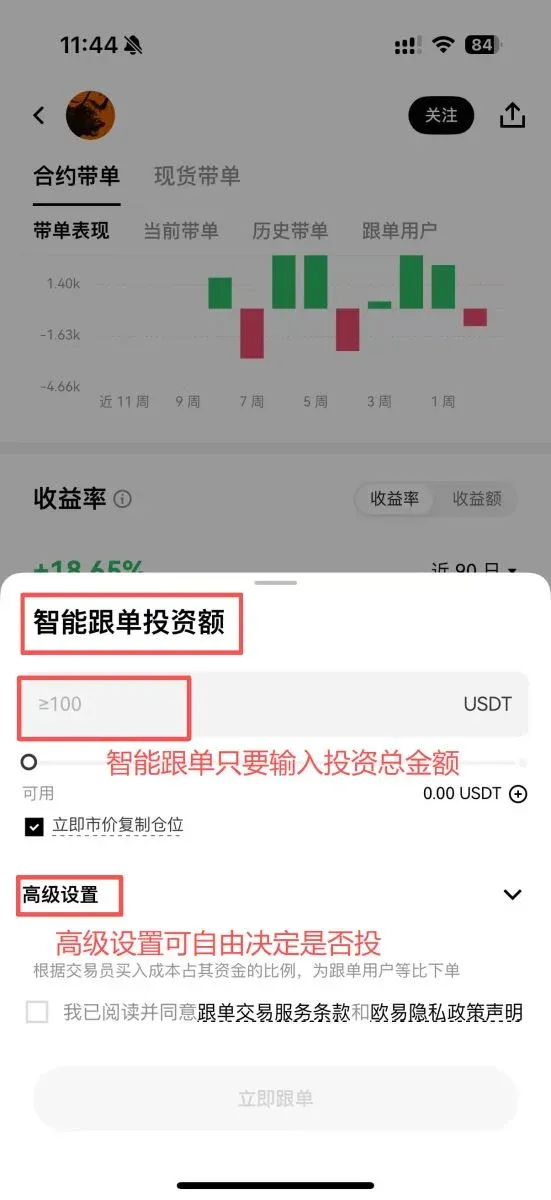
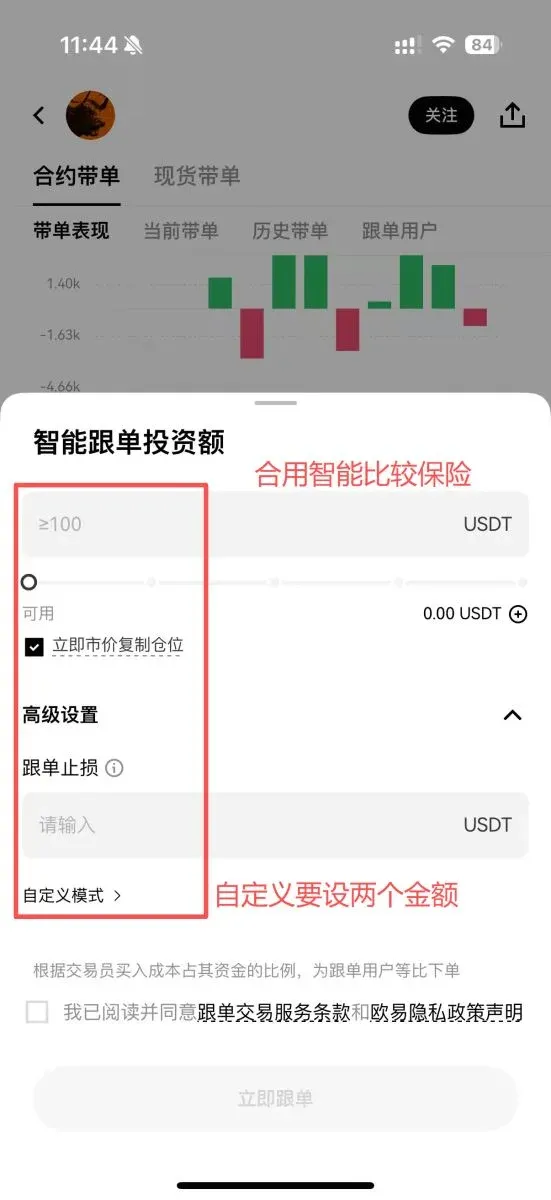
- Smart Copy (Futures only): Mirrors the trader’s overall position ratio, keeping your risk exposure aligned with theirs and resulting in smoother profit‑and‑loss fluctuations.
- Custom Copy: Allows you to define the amount per trade and a maximum total allocation, which carries higher risk. It is recommended that the Maximum Copy Amount does not exceed three times the Per‑Trade Copy Amount, to prevent a single trader from consuming too much of your capital.
In the Advanced Settings, you may add stop‑loss limits, leverage caps, and other safeguards. If you fully trust the trader, you can leave these protections off, but be aware that premature stop‑losses could cut off potential upside.
If your account lacks sufficient free balance, tap the “+” button at the lower right of the investment amount field to transfer funds from your Funding Account to the Trading Account. After confirming the parameters, click Start Copying to activate automatic replication.
Step 5: Ongoing Management and Cancelling the Copy
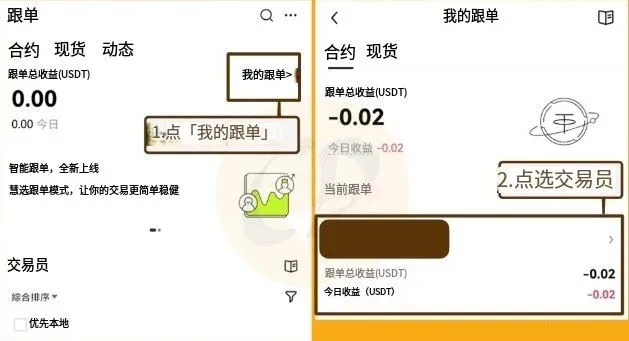
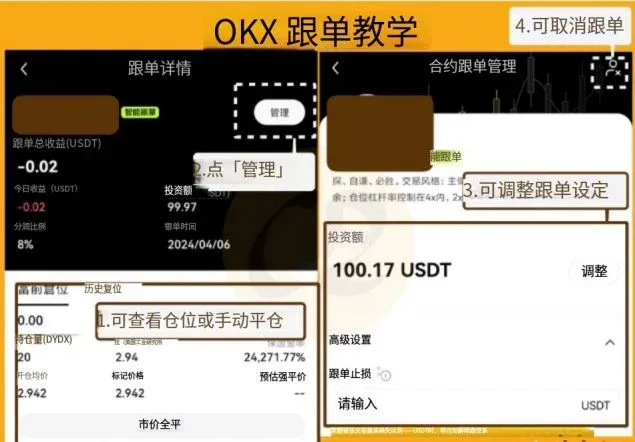
When the trader executes an order, your funds are automatically synchronized—no manual intervention is required. To review or modify a specific trader’s performance, go to My Copy‑Trades. Under each trader’s entry you can view detailed statistics, edit copy settings, or perform a Market Close‑All on the position.
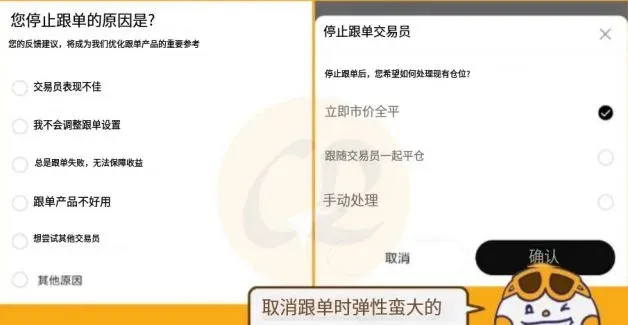
If you decide to stop following, tap the Manage button in the upper right corner and select Cancel Follow. The system will ask for a cancellation reason, which helps the platform collect feedback and improve trader vetting. After cancellation, any open positions can be closed immediately or left to continue under your own discretion, offering high flexibility.
Fee and Threshold Overview
| Item | Minimum Amount | Fee Explanation |
|---|---|---|
| Custom Copy | 10 USDT | Approximately 10 % profit share taken only when you make a profit |
| Smart Copy | 100 USDT | Same profit‑share model, but requires copying the full position |
| Become a Signal Provider | 500 USDT + identity verification | Eligibility to apply for the copy‑trading feature as a trader |
Frequently Asked Questions (FAQ)
- What is the minimum capital required to use OKX copy‑trading?
- You can start with 10 USDT for Custom Copy and 100 USDT for Smart Copy.
- Can I become a signal provider myself?
- Yes. If your account holds at least 500 USDT and you have completed KYC, you can submit an application to become a copy‑trading provider.
Summary Points
OKX’s copy‑trading feature offers users without trading experience a pathway to “follow the experts.” When profits are generated, a portion of the earnings is paid to the trader; losses remain the follower’s responsibility. Consequently, selecting a suitable and trustworthy trader is crucial. By following the steps and screening criteria outlined in this article, you can use OKX copy‑trading with greater confidence and reduce the risk of indiscriminate copying.
For more practical insights on OKX copy‑trading, feel free to follow Bitaigen (比特根) and watch for upcoming related articles.
Note: Crypto trading profits may be taxable in your jurisdiction. Be sure to consult a tax professional regarding the reporting of gains or losses.
---
*All fiat deposits mentioned assume USD via SEPA or SWIFT channels for global users. U.S. residents should use Binance.US for any Binance‑related fiat on‑ramps.*
Related Reading
- 2026 Top Cryptocurrency Exchanges Ranked: Binance, OKX & More
- Top 10 Most Recognized Crypto Exchange Platforms in 2026
- How to Download the OKX App on Android – Step-by-Step Guide
💡 Register on Binance with referral code B2345 for the maximum trading fee discount. See Binance complete guide.



