
 Bitaigen Research
 OKX (formerly OKEx) is a global cryptocurrency exchange headquartered in Seychelles, offering spot trading, contracts, and a variety of other services while employing multiple security measures to protect user assets.
We examine OKX from four angles—platform structure, regulatory background, core functions, and security system—to give a comprehensive picture of its current operation and user experience. The article helps newcomers complete registration quickly, evaluates OKX’s competitiveness in the 2026 global exchange rankings, and provides detailed step‑by‑step instructions together with risk warnings. Continue reading for the full guide.
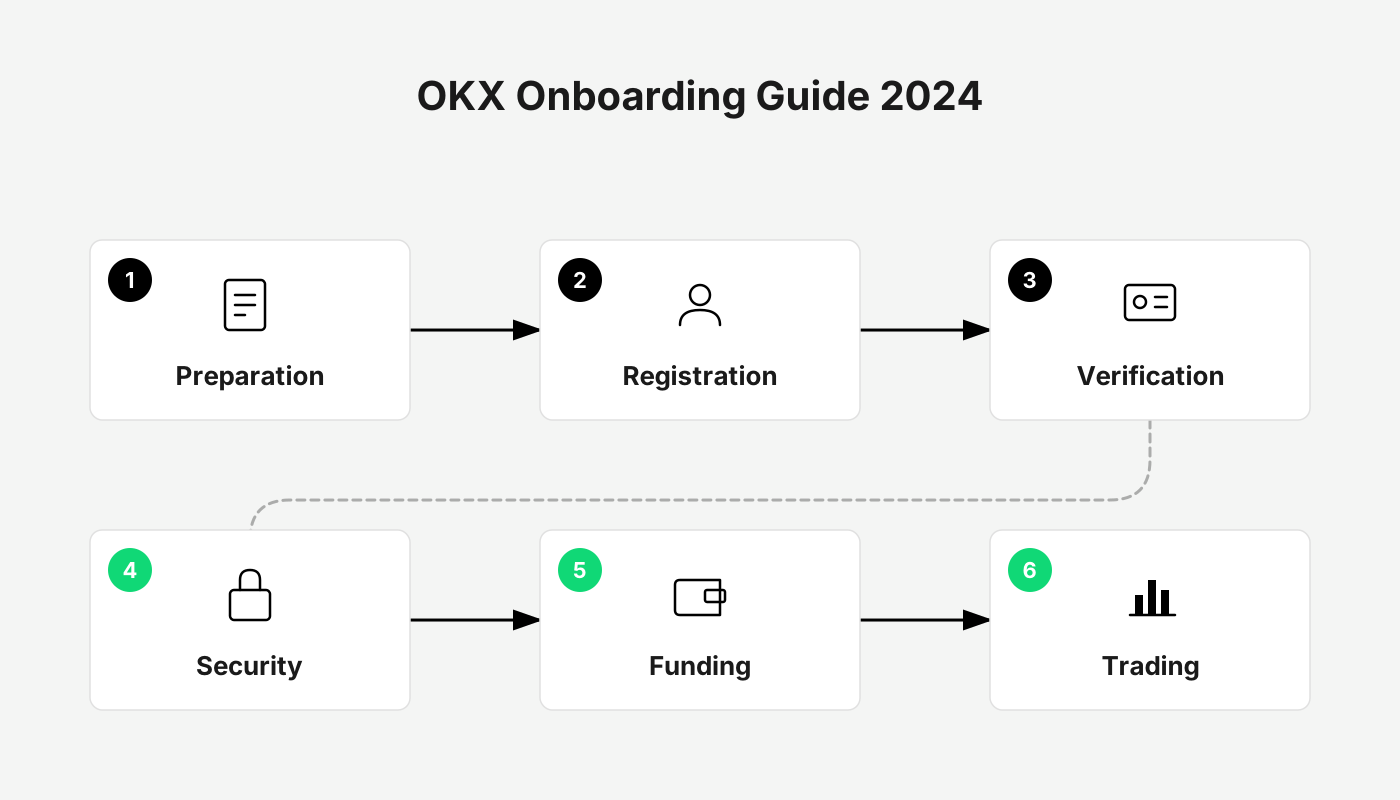
OKX Exchange Overview
- Official website: <https://www.bitaigen.com/binance> (the actual entry point is https://www.okx.com)
- Registered jurisdiction: Singapore, headquarters moved to Seychelles in 2024
- Founder: Xu Mingxing, founded in 2017 (originally OKEx), renamed OKX in 2022
- Native token: OKB (the platform’s utility token)
- Supported assets: over 300 trading pairs, covering major coins and many altcoins
- Trading fees: typically between 0% and 0.1%, depending on the product type and trading volume
- Withdrawal fees: vary by cryptocurrency
Core strengths: user‑friendly interface, low fees, a wide range of wealth‑management products, an independent wallet system, publicly disclosed reserve proof, 2FA, offline cold wallets, anti‑phishing codes, and other layered security safeguards.
Deposit / withdrawal methods: cryptocurrency transfers, WeChat Pay, Alipay, bank cards, etc.
What Is OKX? Relationship with OKEx
OKX (originally OKEx) was founded in 2014 as a centralized crypto‑asset trading platform. As the blockchain ecosystem evolved, the platform gradually added decentralized finance (DeFi), NFTs, the metaverse, SocialFi and other new services. In 2022, to highlight its diversified layout, the brand officially rebranded to OKX.
Is OKX Safe?
The platform employs a range of technologies and policies to safeguard assets:
- Multi‑signature cold wallets – cold storage uses multi‑sig technology, with geographically distributed backups housed in bank vaults.
- Regular security audits – external audit firms conduct periodic system reviews.
- Two‑factor authentication (2FA) – both login and withdrawals require a second verification step.
- Public reserve proof – users can query the platform’s reserve data themselves, providing high transparency.
- OKX Safety Fund – a dedicated risk‑reserve fund that offers asset protection in the event of security incidents.
As threat landscapes evolve, the platform continuously upgrades its security measures to reduce the likelihood of hacking and theft.
Pros and Cons Overview
| Advantages | Disadvantages |
|---|---|
| Trading fees as low as 0.10% | Full functionality unavailable in some regions (e.g., the United States) |
| Intuitive UI, multilingual support | Liquidity for certain smaller tokens can be thin |
| Supports WeChat Pay, Alipay, bank cards and other channels | User reviews vary widely based on individual experience |
OKX Registration Tutorial
Step 1: Prepare Your Network Environment (Critical)
- Recommended nodes: IP addresses located in Taiwan, Japan or South Korea.
- Blocked nodes: IPs from the United States, Canada, Singapore, Hong Kong (China) and other restricted regions will cause registration to fail.
Step 2: Register on the Official Site and Save Money
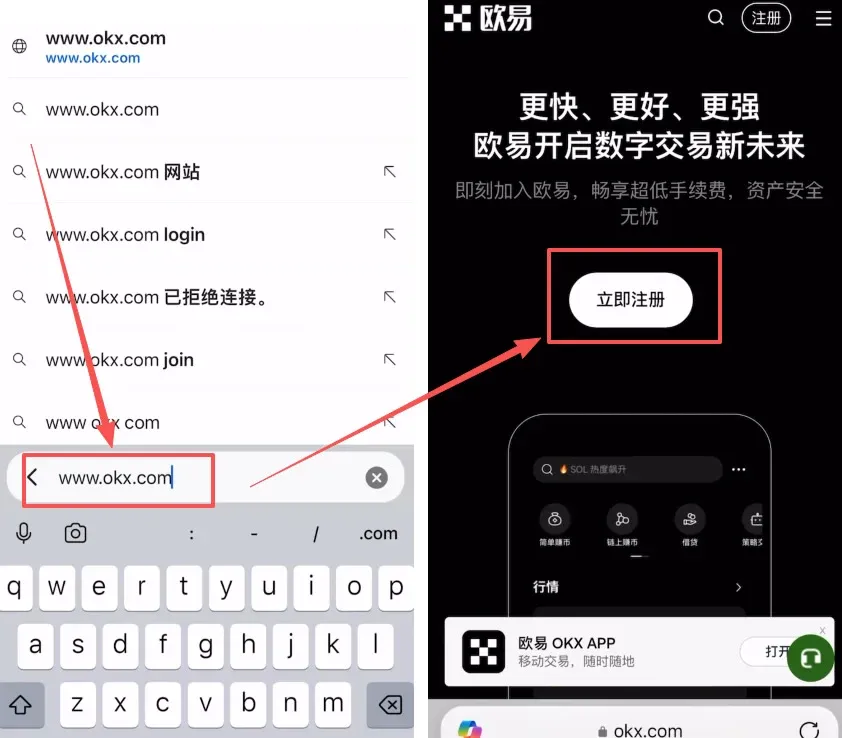
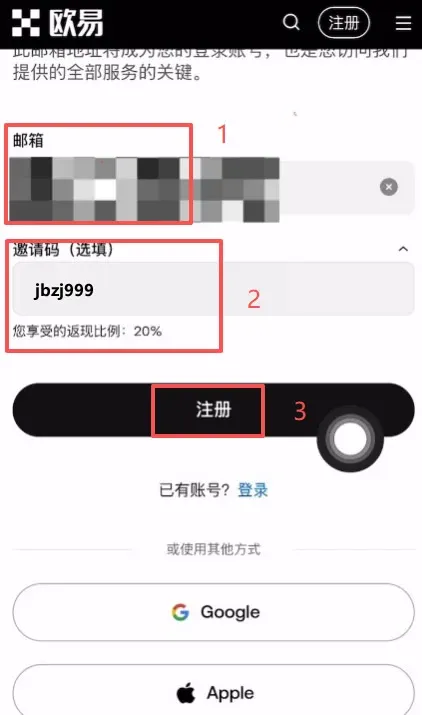
- Visit the official site: type `www.okx.com` into your browser and click “Sign Up”.
- Select your region: make sure the “Country/Region of residence” matches the IP node you are using.
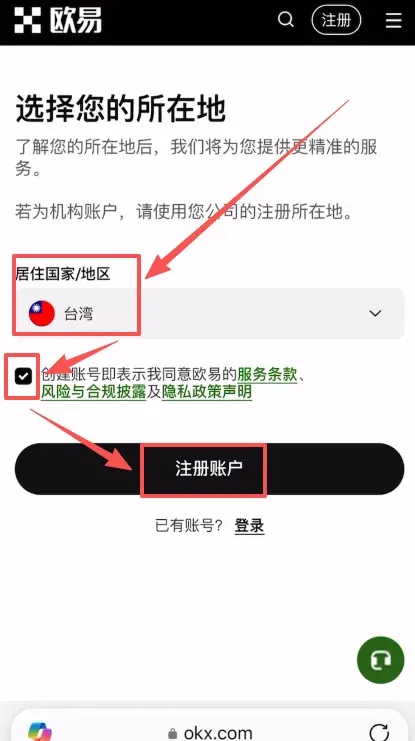
- Enter your details: provide a valid email address and click “Register”.
- Referral code: input `B2345` in the referral field to receive a permanent 20% trading‑fee discount on future trades.
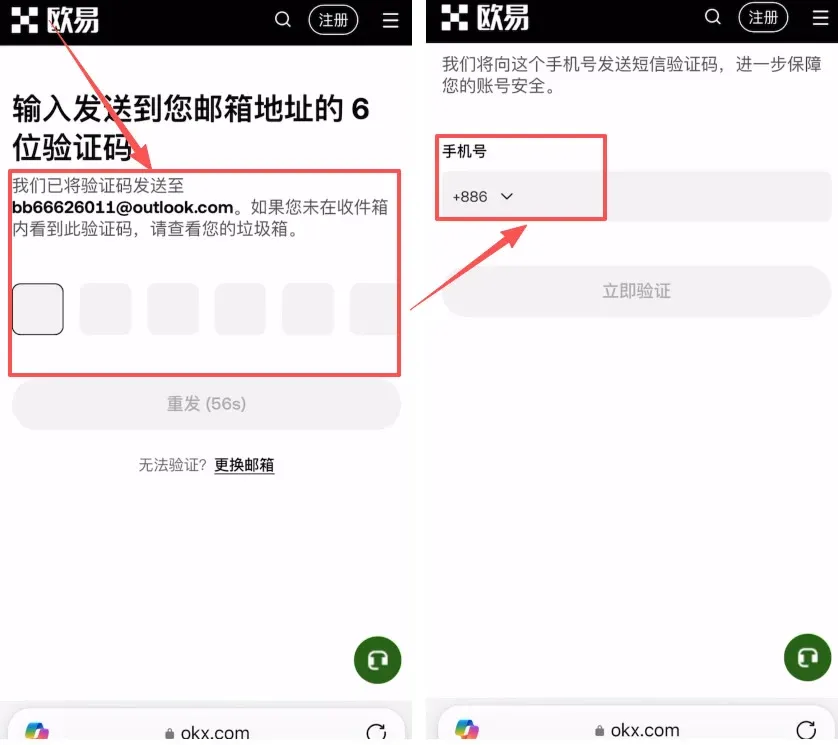
- Email verification and phone binding: enter the code you receive by email; you can also bind a Mainland China mobile number (+86) directly.
Step 3: Identity Verification (KYC)
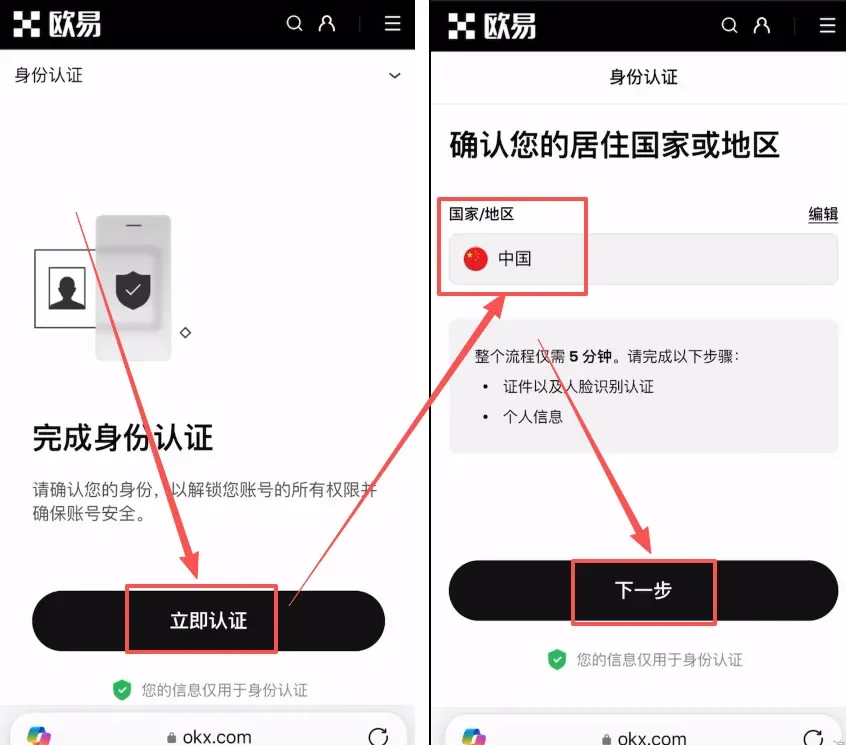
- After logging in, click “Verify Now” and confirm your country of residence.
- Choose Identity Card as the document type, upload front‑ and back‑side photos, and complete facial recognition.
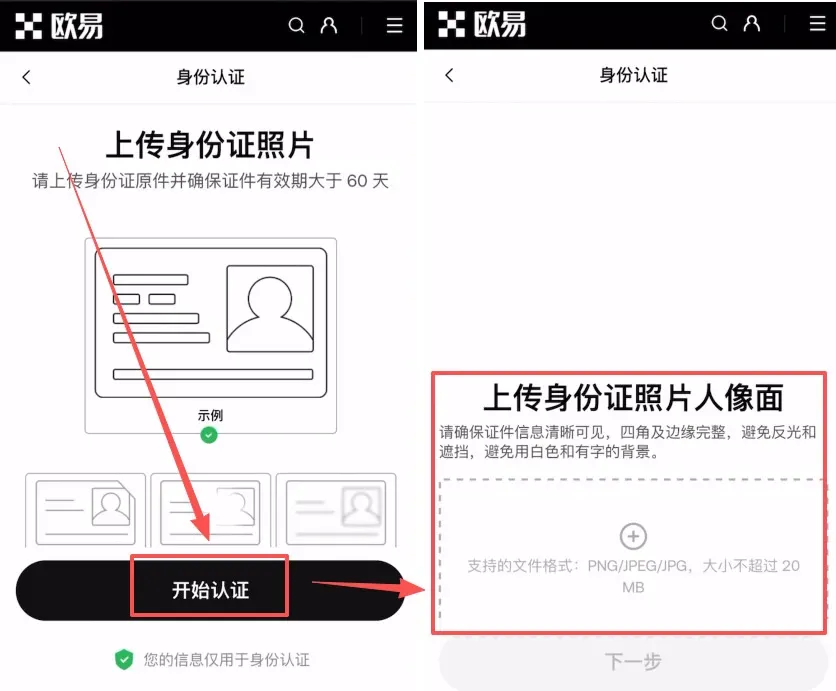
Verification usually finishes within a few minutes.
Step 4: Android App Download Guide (Resolving “Potentially Harmful” Alerts)
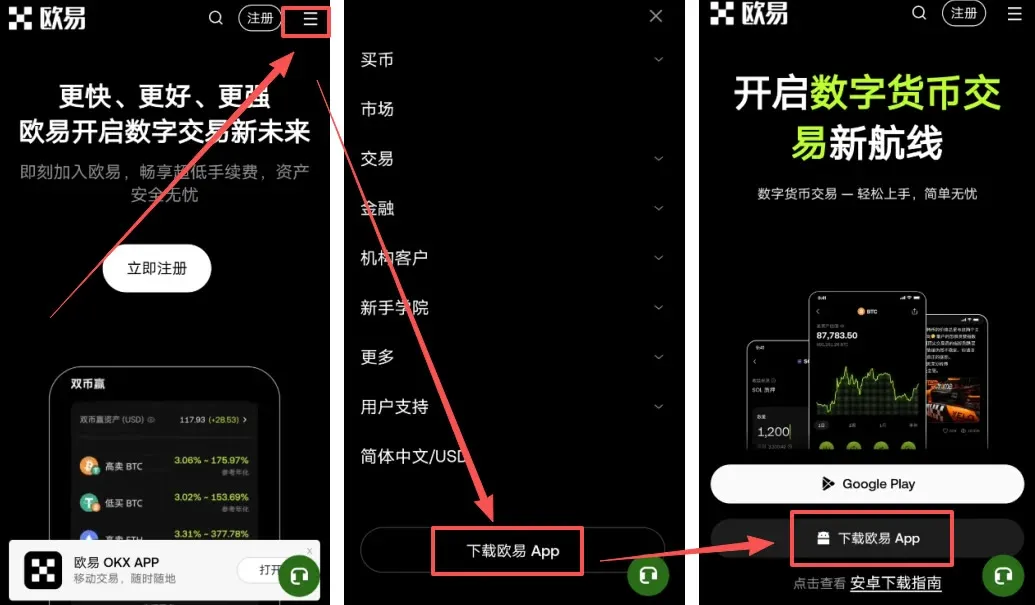
- In the top‑right menu of the website, select Download OKX APP to obtain the APK file.
- If the installer shows a “Risk detected” or “Virus” warning, tick I understand the risk and click Install anyway. This is a false positive; as long as the source is the official website, the app is safe.
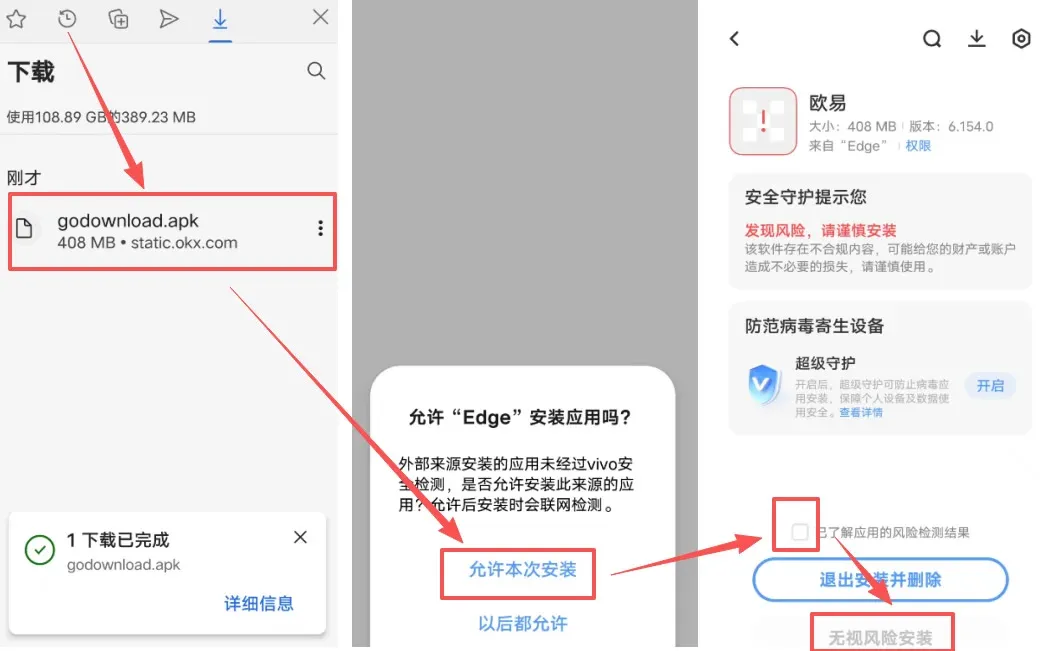
- Install offline (if the warning persists): disable Wi‑Fi and mobile data, enable “Allow installation from unknown sources”, and turn off any “Clean mode” or “Super Guard” features, then proceed with the installation.
Step 5: iOS Device Download Guide
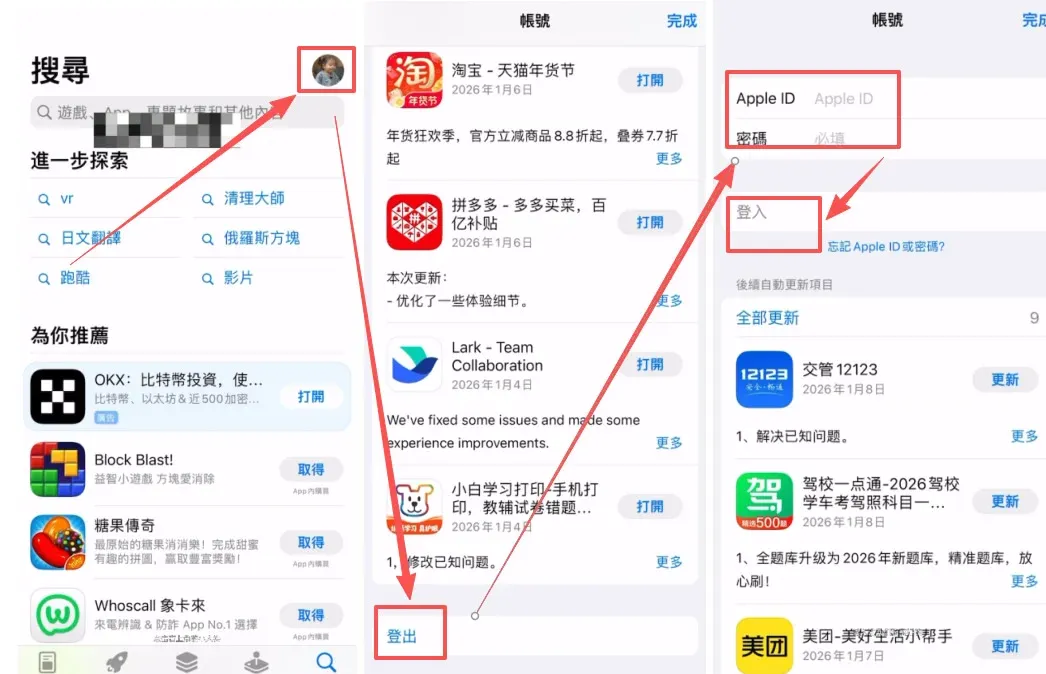
- Obtain an overseas Apple ID: log into the App Store using a Taiwan‑based (or other non‑US) Apple ID.
- Switch accounts: open the App Store → tap the avatar in the top‑right corner → sign out → sign in with the overseas ID.
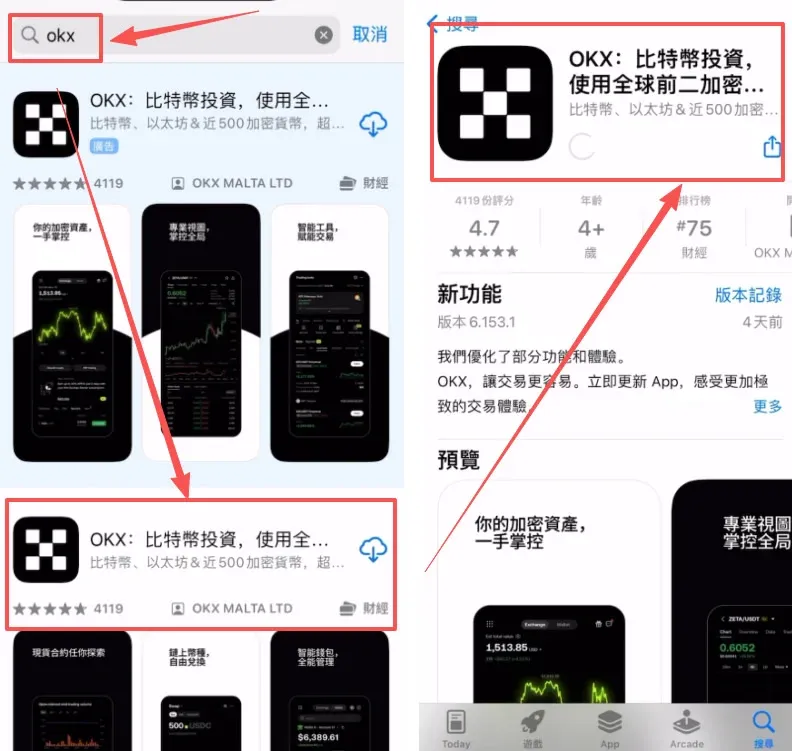
- Search for “OKX” and download the official application.
OKX Deposit / Funding Tutorial
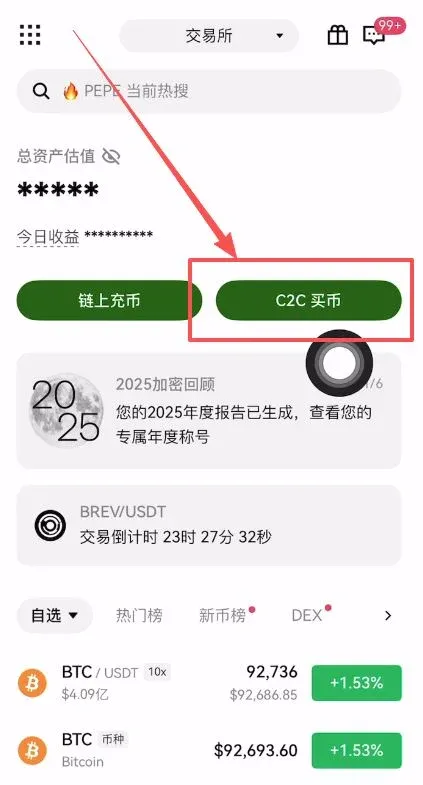
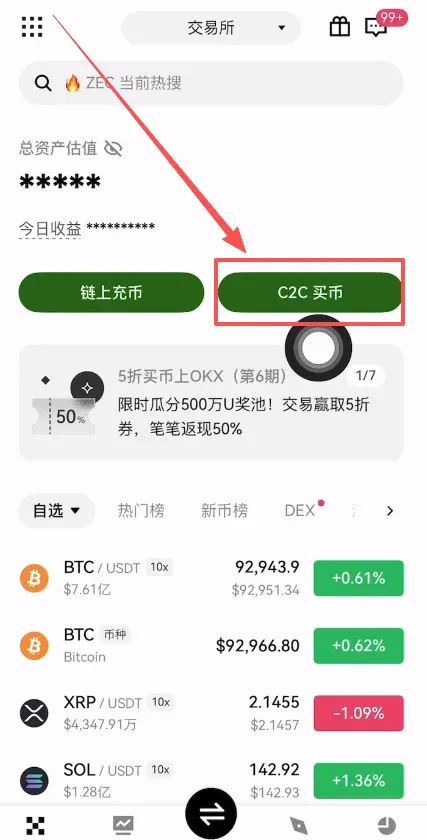
Step 1: Open the C2C “Buy Crypto” Page
Launch the OKX app and tap C2C Buy.
Risk warning: Peer‑to‑peer (P2P) transactions carry a risk of bank‑card freezes. It is advisable to use a secondary card or a dedicated WeChat/Alipay account that is not linked to your salary.
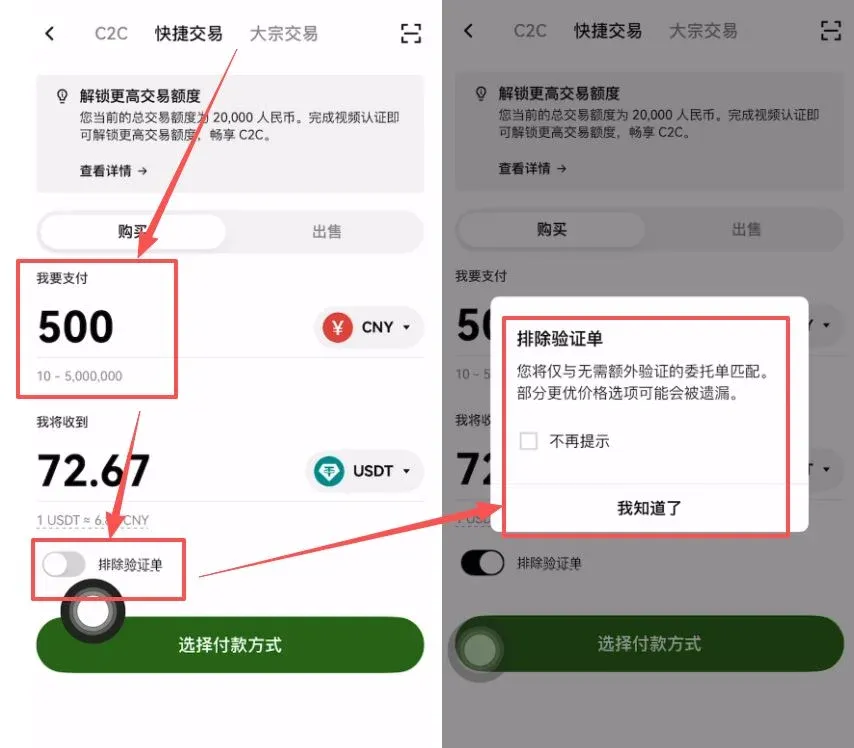
Step 2: Filter Sellers and Set Verification Order
- Verified sellers: higher security; they may require you to provide transaction statements or video verification.
- Regular sellers: streamlined process; you can turn off the “Verification order” option.
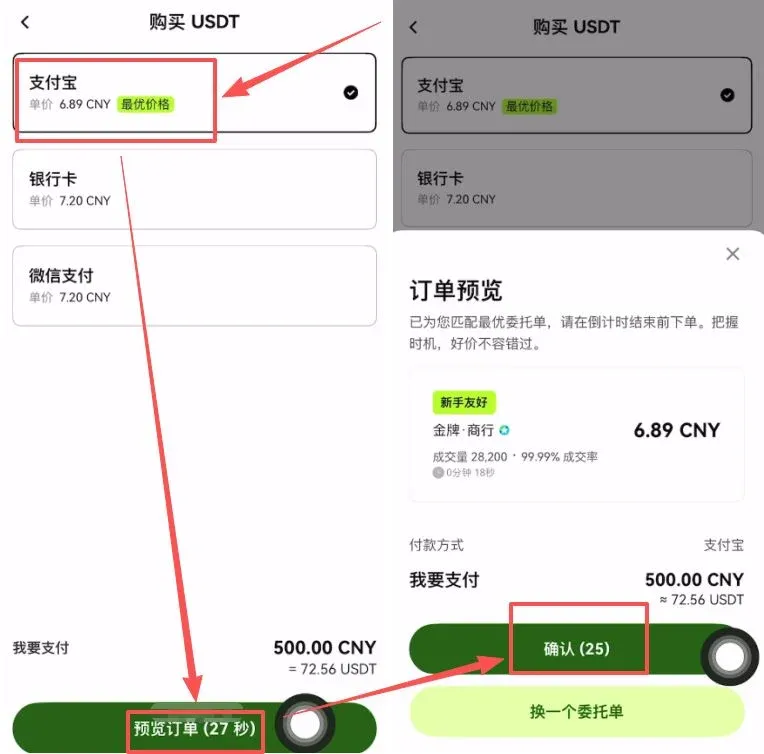
Step 3: Match Order and Review Requirements
Select a payment method (e.g., Alipay), preview the order, and let the system automatically match you with a seller.
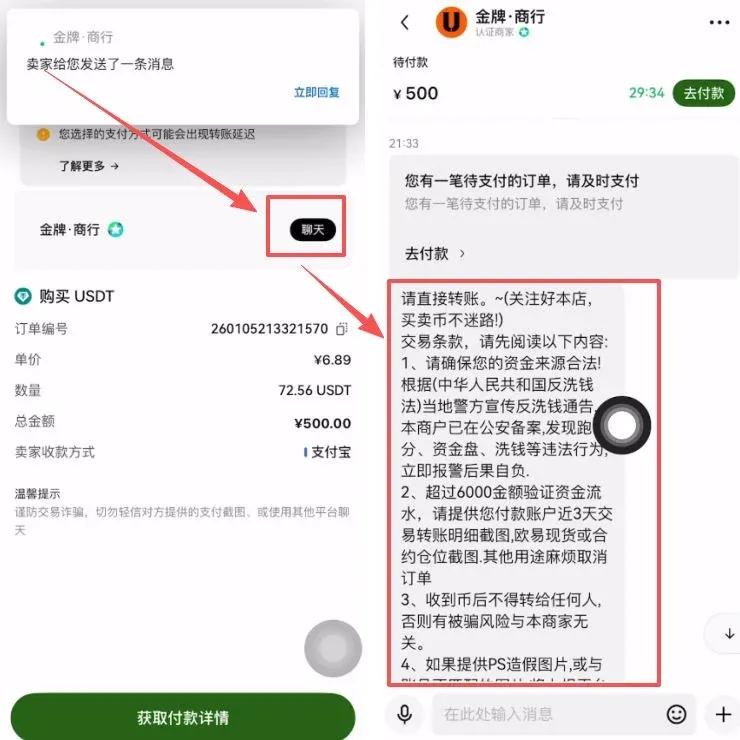
Be sure to tap the chat icon in the upper‑right corner and read the seller’s payment instructions:
- The payment account must match the name used for OKX’s real‑name verification.
- Do not include keywords such as “Bitcoin”, “USDT”, “OKX” in the transfer note.
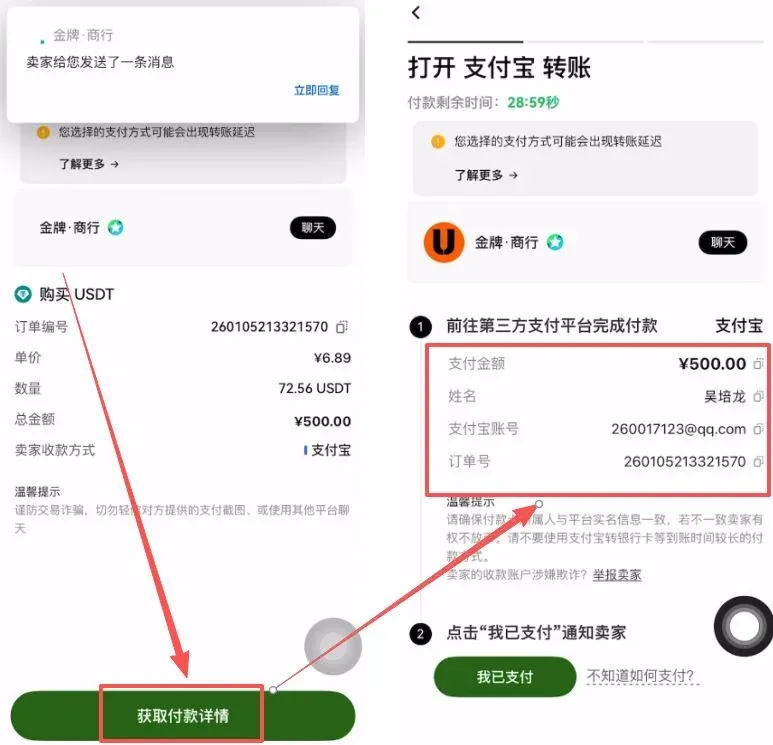
Step 4: Obtain Payment Details and Transfer Funds
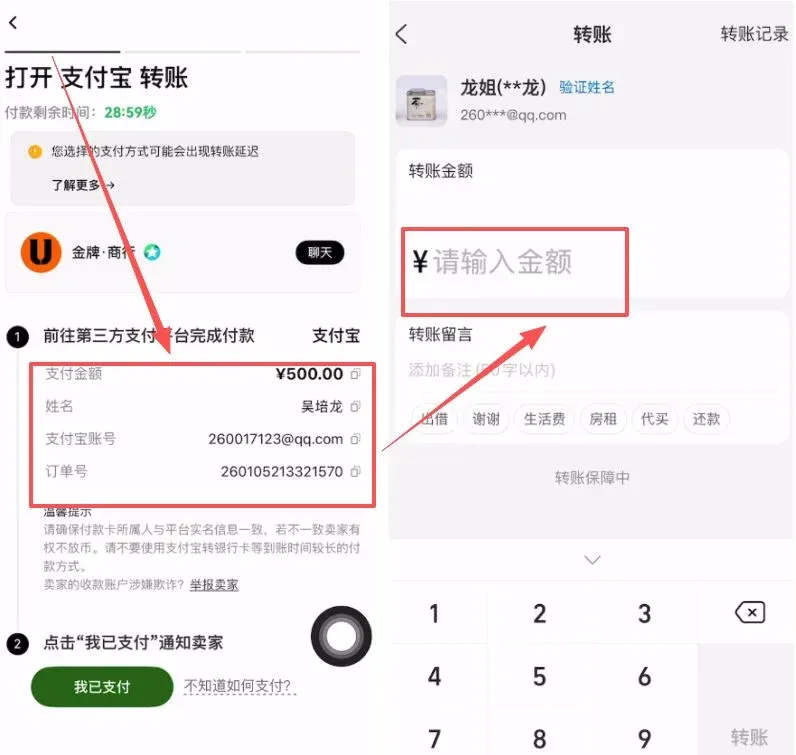
Tap Get payment details, verify the seller’s name and account number, then complete the transfer via Alipay or online banking.
Step 5: Confirm Payment and Release Coins
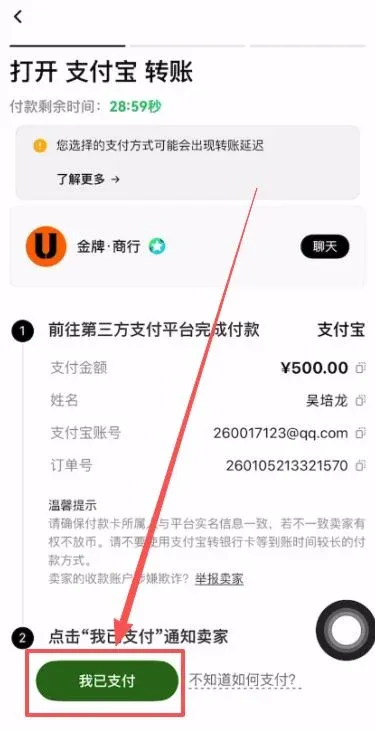
After the transfer succeeds, return to the OKX app and click I have paid. Once the seller confirms receipt, the platform will automatically release the USDT to your account.
Tips for beginners
- Conduct the entire transaction inside the OKX app; avoid off‑platform private transfers.
- Double‑check the recipient details before each payment.
- Beware of phishing attempts; always look for official OKX branding.
OKX Withdrawal / Funding Exit Tutorial
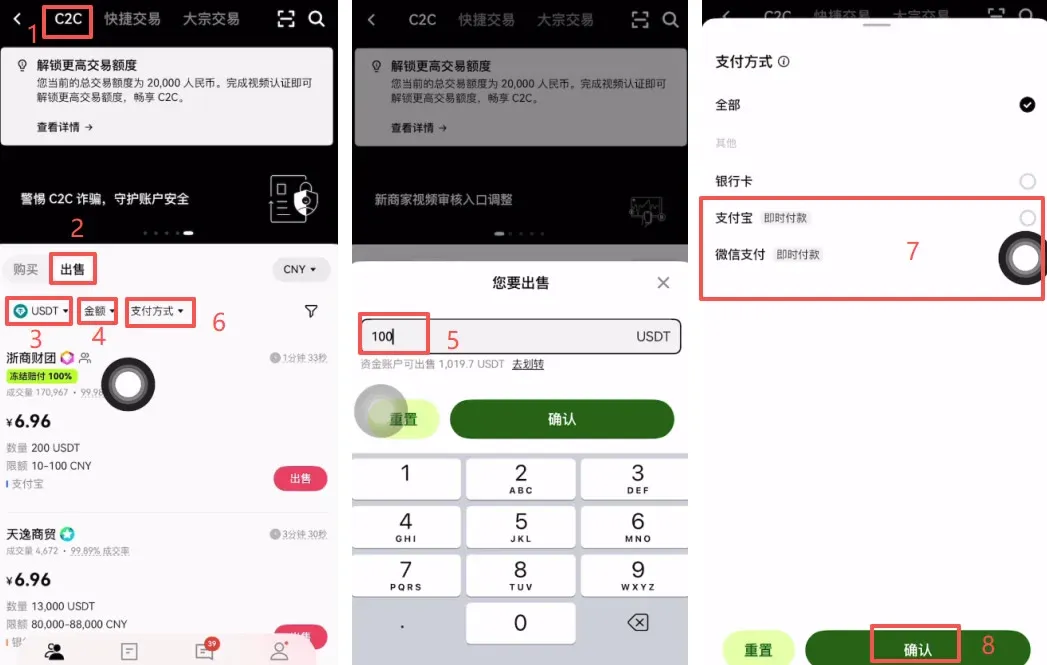
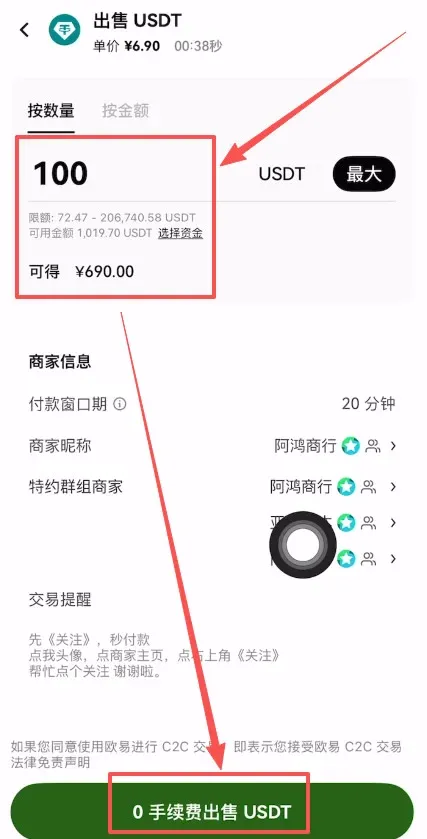
- Open the OKX app and tap the top menu C2C Buy, then switch to Sell.
- Choose the cryptocurrency (e.g., USDT) and the amount you wish to cash out; Alipay or WeChat Pay are recommended payment methods.
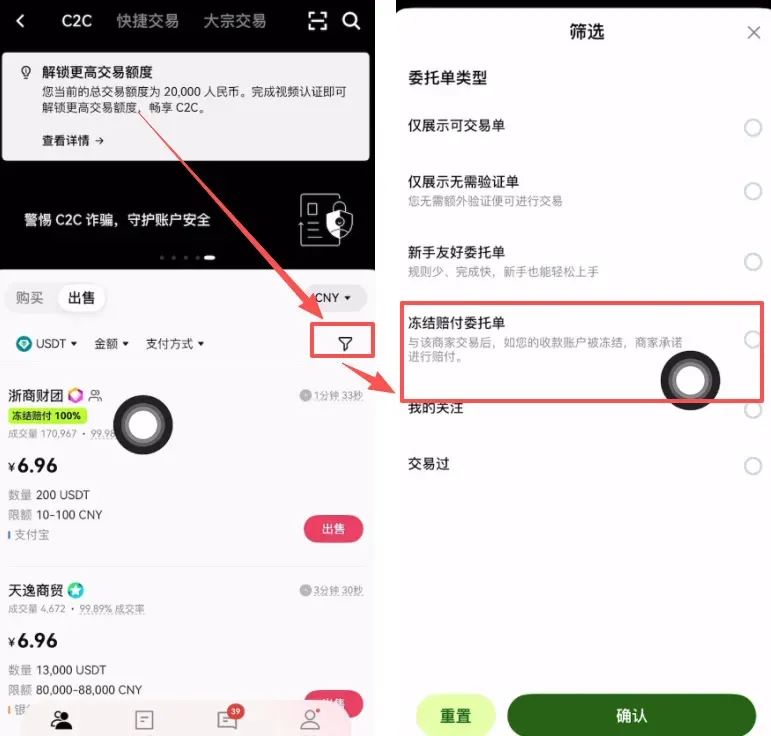
- Tick Freeze compensation order to ensure that if the counterparty’s receiving account gets frozen, the platform will provide a 100% compensation.
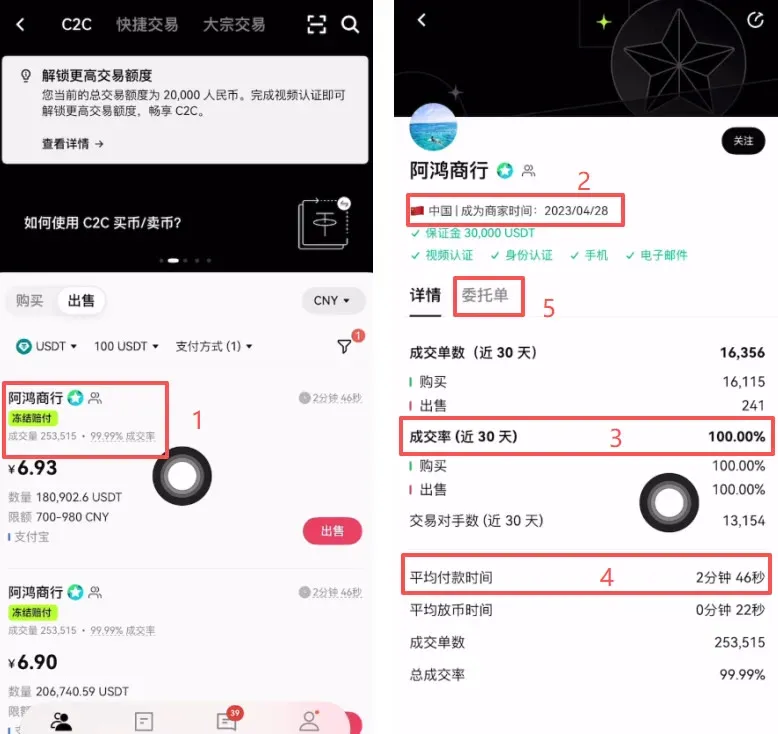
- The system will filter sellers with high trade volume, near‑100% fill rate, and an average payment time of ≤ 3 minutes; click Place order.
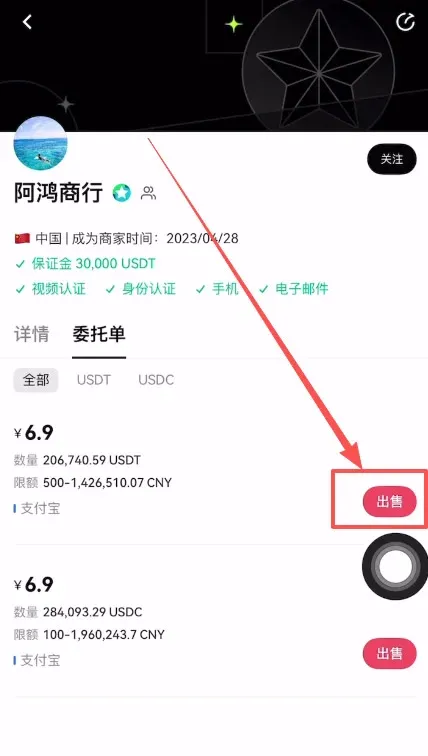
- Confirm the sale, enter the quantity, and click 0‑fee USDT sell. After the platform confirms receipt of funds, the USDT will be released.
OKX Ranking and Industry Position
- Founded in 2017; current headquarters in Malta.
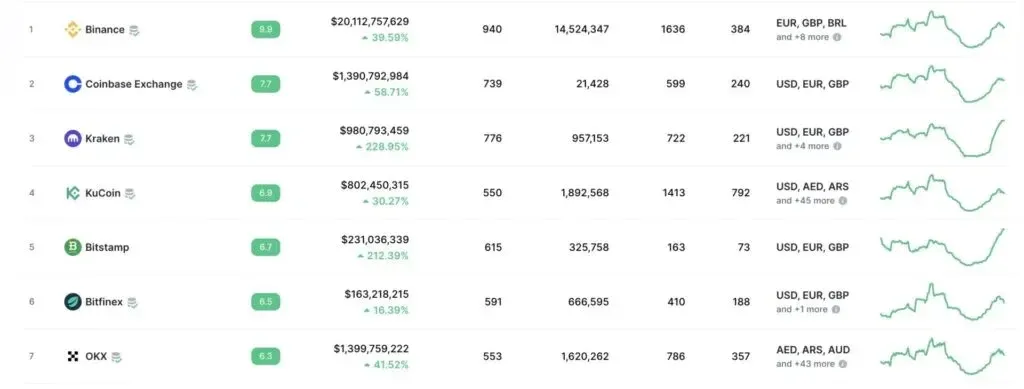
- According to CoinMarketCap, OKX consistently ranks among the top ten exchanges worldwide by trading volume.
Products offered
|
Related Reading
- Bitstamp Safety for Taiwan & Hong Kong: Scam Check & Review
- How to Purchase Bitcoin on Binance: Step‑by‑Step Guide
- OKX: Leading Crypto Exchange for Chinese Users in 2026
💡 Register on Binance with referral code B2345 for the maximum trading fee discount. See Binance complete guide.



