
 Bitaigen Research
 Many New OKX Users Encounter “On‑Chain Shows Completed, Yet My Wallet Still Shows 0?”
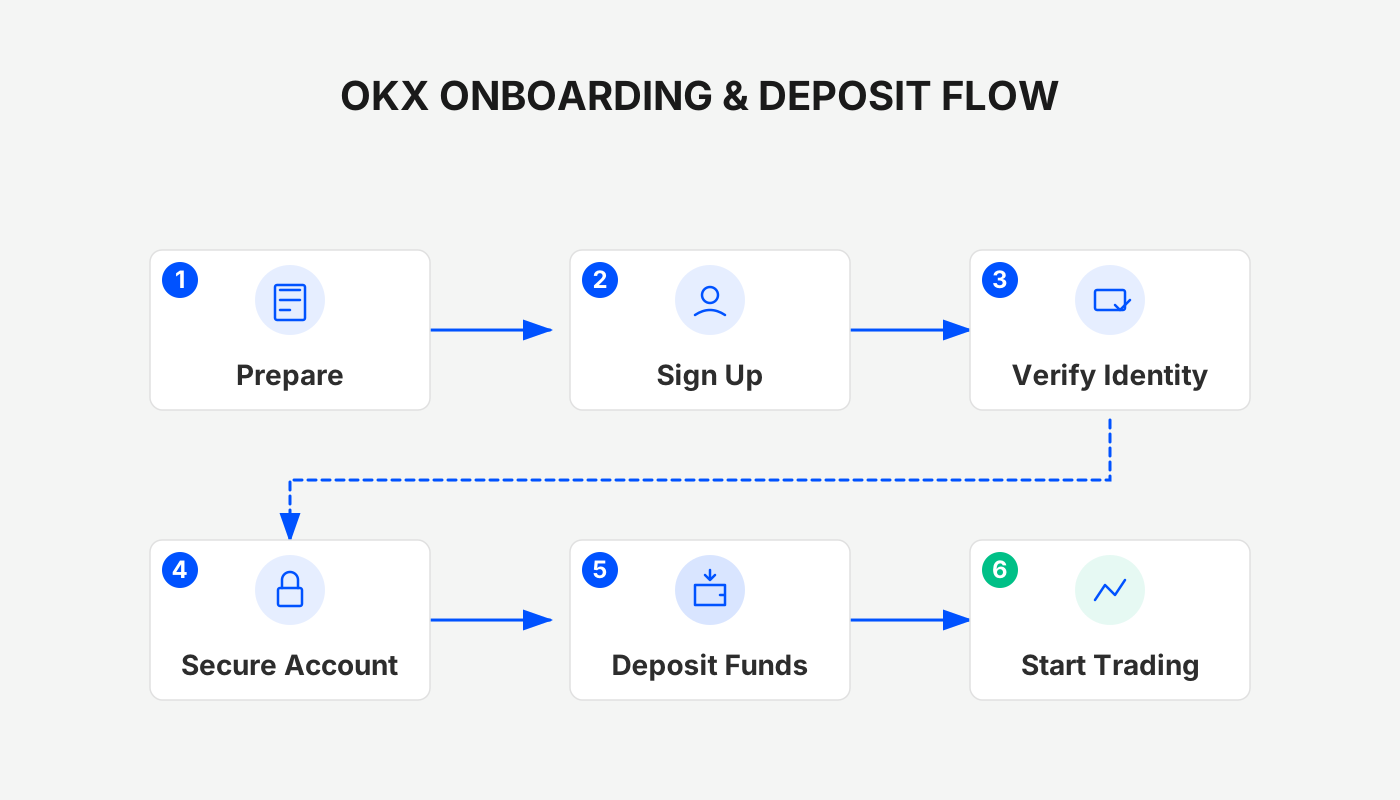
Ensure You Are Viewing the Official OKX Website
Before troubleshooting whether a deposit has arrived, the first step is to confirm that you are logged into the official OKX portal. Some phishing sites mimic “deposit records” or “asset pages” and may even prompt you to enter your mnemonic phrase or verification code. To stay safe, use the officially verified navigation links:
- OKX Official Website: https://www.okx.com/zh-hans/join/B2345
- OKX Mobile App Download: https://www.bitaigen.com/binance/download
The system will automatically detect your network environment and assign the latest backup address, ensuring that queries of deposit records and asset balances are always performed in a secure context.
Common Reasons Why a Successful Deposit Does Not Appear in Your Asset Page
An asset not showing up does not mean the funds have not arrived; it simply means the process is not yet finished. The deposit workflow involves two major stages: the blockchain and the exchange platform. The most frequent causes are:
- On‑chain Confirmation Received, Platform Still Pending
The exchange only credits your account after the transaction reaches a certain number of confirmations, which varies by chain:
- USDT‑TRC20 (Tron) – 1–3 confirmations, typically 1–5 minutes.
- ERC‑20 (Ethereum) – can take 5–30 minutes during network congestion.
- Bitcoin Mainnet – usually requires 6 confirmations, taking 30 minutes to 1 hour.
Consequently, even if a block explorer shows the transaction as “completed,” the platform may still be in a “pending credit” state.
- Wrong Network / Chain Type Selected
A common mistake is sending USDT via an ERC‑20 address while the deposit page expects a TRC‑20 address, or copying a BSC address and using a different chain. Depositing on the wrong chain prevents automatic crediting and, in severe cases, may make recovery difficult. Always double‑check the chain type indicated on the deposit screen.
- Incorrect Address or Missing Memo/Tag****
Certain assets (e.g., XRP, ATOM, XLM) require an additional Memo or Tag. If omitted, the on‑chain transaction succeeds, but the platform cannot associate it with your account. In such cases you will need to contact customer support and provide the relevant details.
- Funds Deposited into a Different Account Sub‑section
OKX separates assets into:
- Funding Account
- Trading Account
- Earn/Wealth Management Account
New users often look at only one sub‑section and mistakenly think the deposit is missing. Check the balances of all sections on the Assets page.
- On‑chain Confirmed but System Shows “Pending Credit”
This is an internal risk‑control verification. Typical triggers include:
- Large deposit amounts.
- First‑time deposit to a particular address.
- Temporary node‑sync delays.
Usually the status resolves automatically after a few minutes.
How to Inspect Each Step of the Deposit Process?
OKX provides full traceability of deposit records. You can view the details via web or mobile as follows:
Web Interface
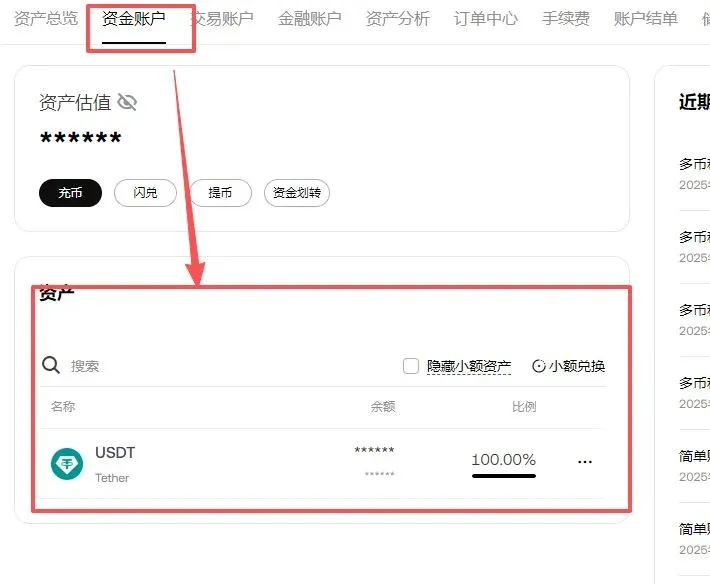
- Navigate to Assets → Funding Account → Deposit History
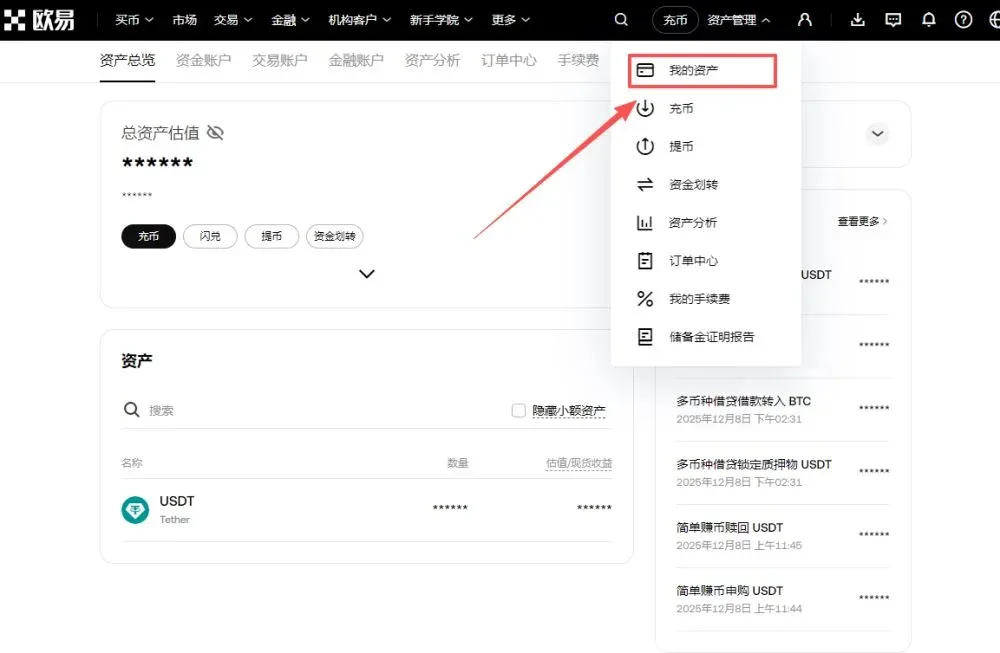
- Locate the relevant deposit entry and click to view the blockchain TxID
OKX Mobile App
- Open Assets → Records → Deposit
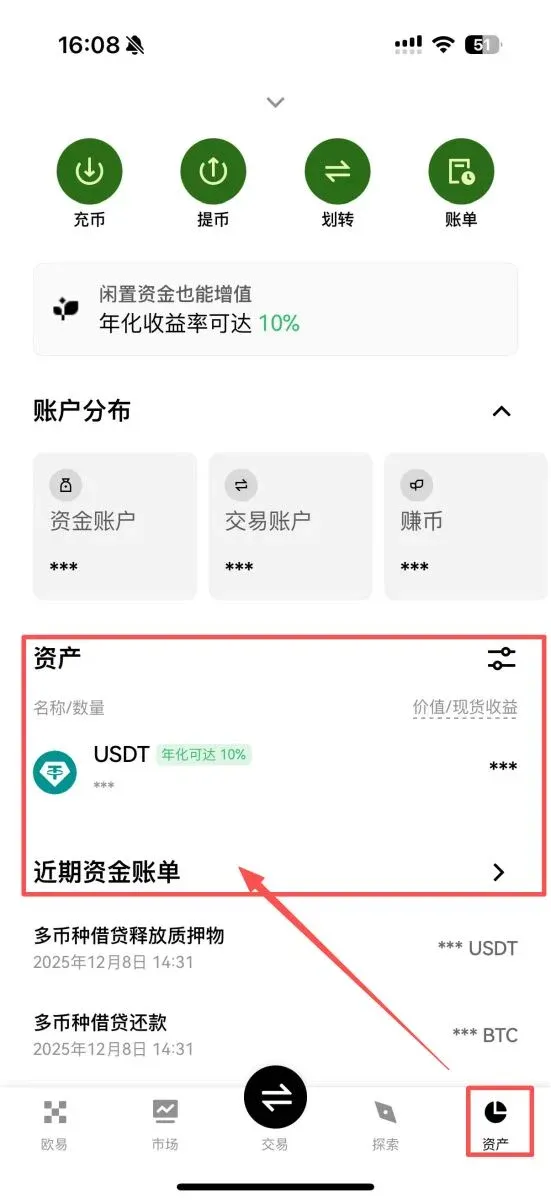
- Tap the hash (TxID) to jump to the block explorer
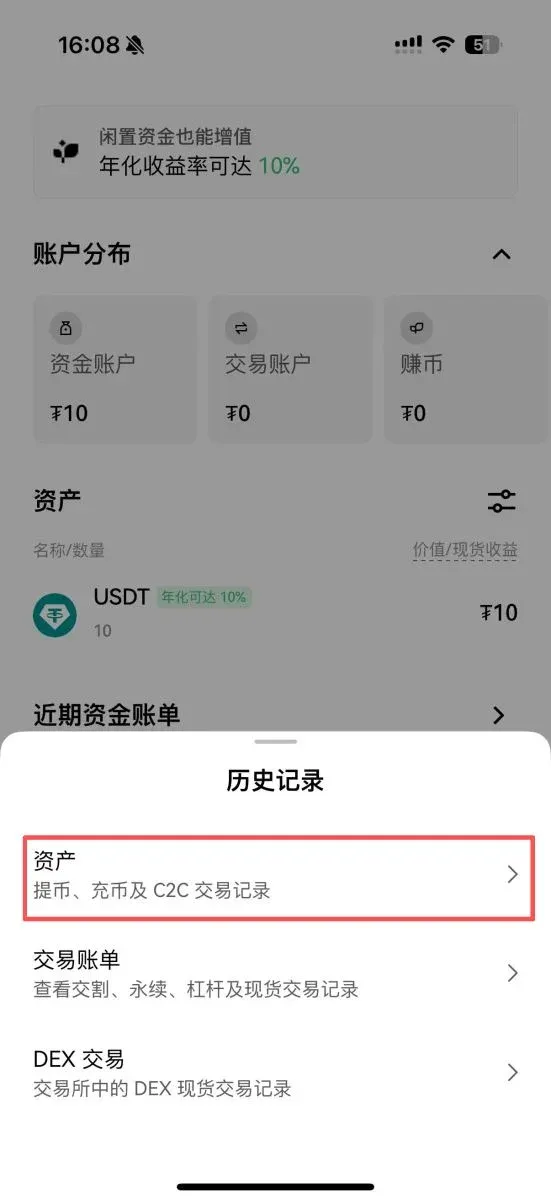
If the on‑chain confirmation appears normal, the funds are in transit.
What to Do If the Deposit Remains Uncredited for an Extended Period?
When the waiting time exceeds the typical window, follow these troubleshooting steps:
- Verify the Chain Type
Selecting the wrong chain is the most frequent issue. If you discover a mismatch, you will need to submit a manual retrieval request to support.
- Check the TxID Confirmation Count
Insufficient confirmations are normal; continue monitoring until the required number is reached.
- Confirm Whether a Memo/Tag Was Omitted
Provide the following information to the support team:
- TxID
- Deposit address
- Screenshot of the deposit screen
After verification, the support staff can credit the amount manually.
- Contact Customer Service Through the Official Portal
Visit the official support page and submit a ticket via the Help Center.
How to Prevent Future “Deposit Not Credited” Situations?
- Always match the chain type before copying the deposit address.
- Check the “Supported Chains” list inside the OKX app before initiating a transfer.
- Avoid typographical errors or incomplete address copies.
- Monitor network congestion and prefer high‑throughput chains such as TRC‑20 when possible.
In the vast majority of cases, a missing asset display is caused by pending on‑chain confirmations or platform crediting. As long as the transaction is confirmed on the blockchain, the address‑chain pairing is correct, and any required Memo/Tag is supplied, the funds will eventually appear in your account. Using OKX’s backup addresses or the official app to view deposit records enhances both safety and traceability.
Full C2C USDT Deposit and Withdrawal Workflow on OKX
If you have not yet created an OKX account, you can register via the links below and follow the video tutorial.
- OKX Official Registration: https://www.okx.com/zh-hans/join/B2345
- OKX Mobile App Download: https://www.bitaigen.com/binance/download
Note: When registering through the above link or using the invitation code `B2345`, new users may receive up to 50 USDT as a welcome bonus (subject to entering the invitation code).
Deposit (C2C “Buy Crypto”)
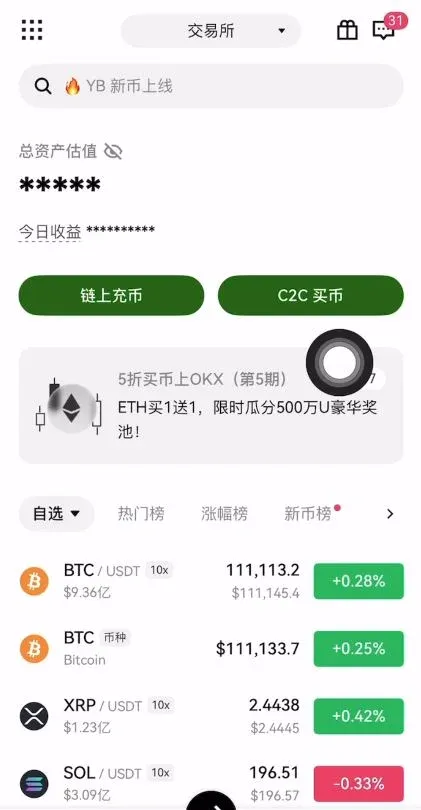
- After logging in, go to the homepage and click C2C Buy.
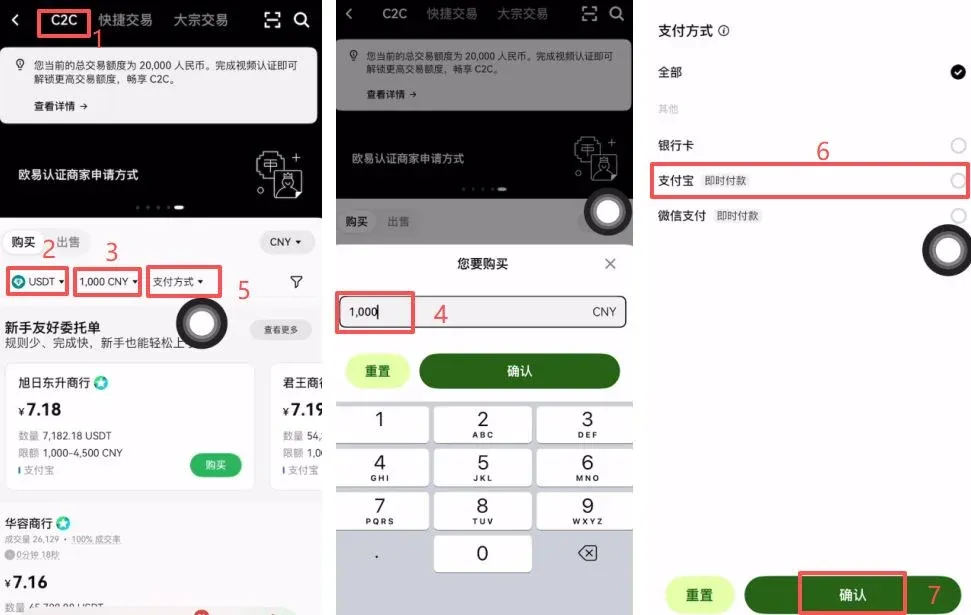
- Choose C2C Trading (person‑to‑person) and select USDT from the currency list.
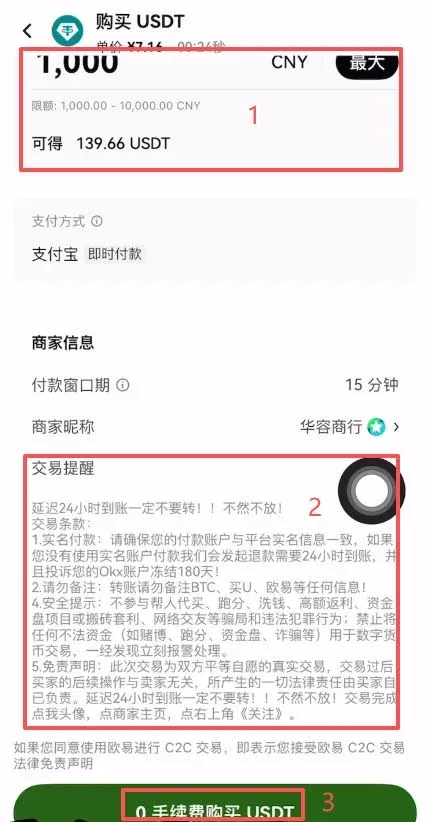
- Enter the purchase amount, e.g., 1,000 CNY, and pick a payment method (bank card, Alipay, WeChat Pay).
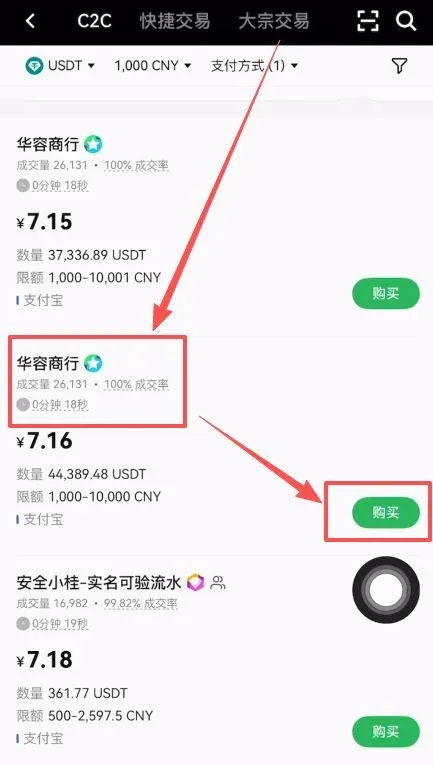
- The system automatically matches you with a seller. It is advisable to select a merchant with high transaction volume and a strong positive‑feedback rating, such as “Huá Róng Trading” (26,000 orders, 100 % positive). Click Buy.
- Confirm the amount again. The system will display the corresponding USDT quantity (e.g., 1,000 CNY ≈ 139.66 USDT) and remind you to pay with the same name as your verified identity. Click Buy USDT with 0 Fee.
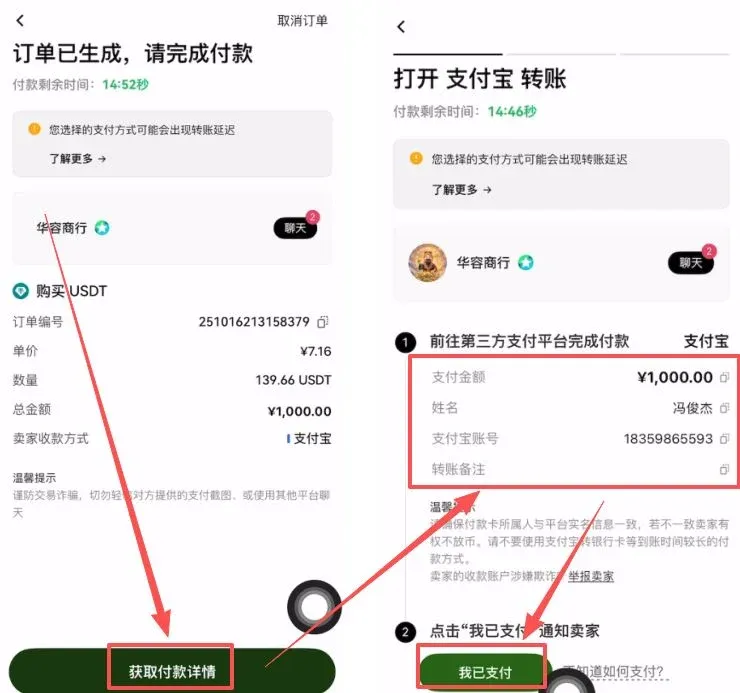
- Follow the seller’s payment instructions, transfer the funds, then click I Have Paid. Once the seller confirms receipt, the USDT will be credited to your account.
Withdrawal (C2C “Sell Crypto”)
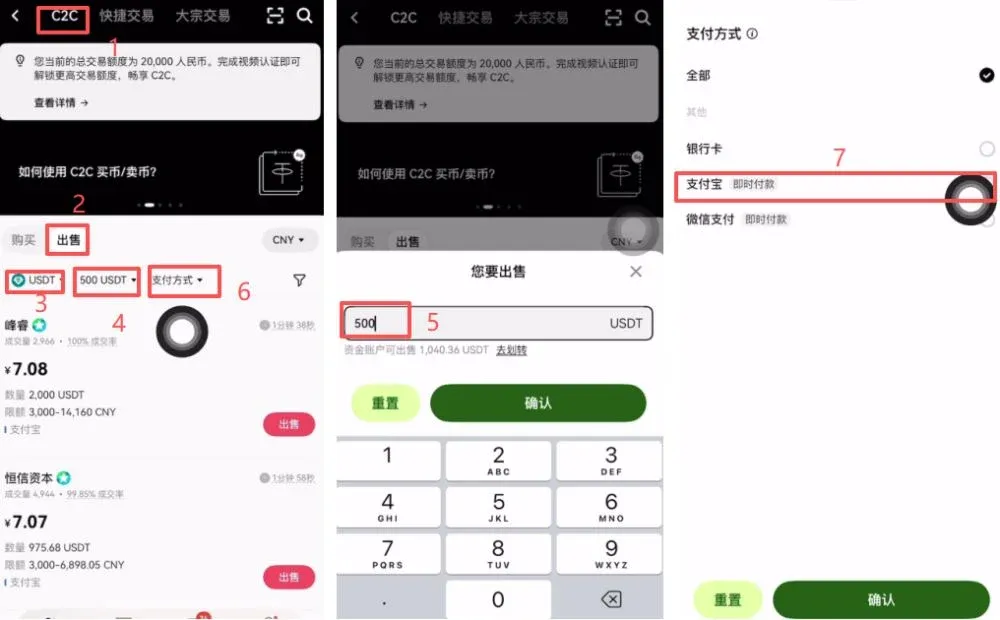
- On the C2C page, select Sell, choose USDT, and enter the amount you wish to sell (e.g., 500 CNY).
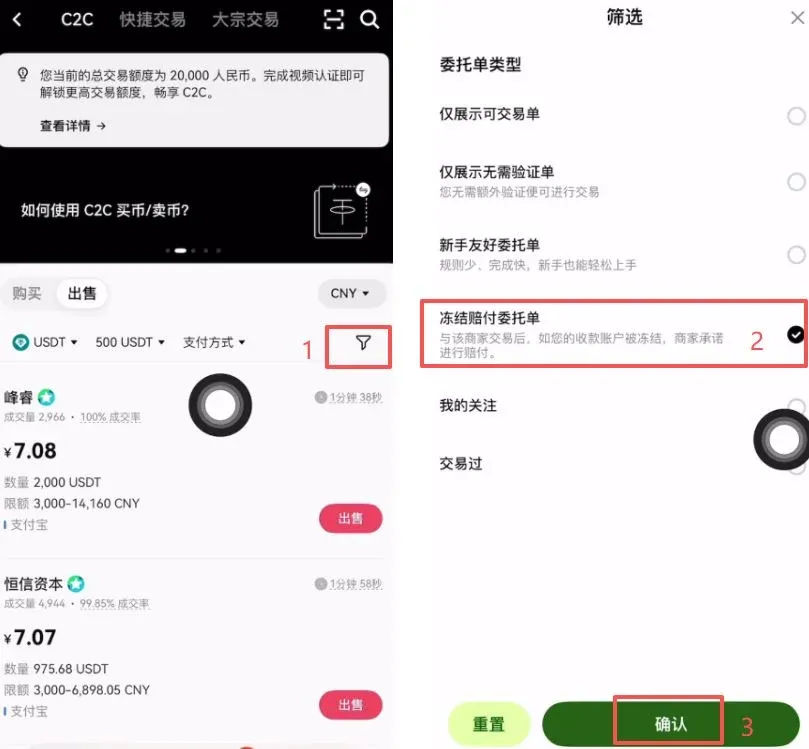
- Choose a receiving method (bank card, Alipay, WeChat Pay) and check the “Freeze Compensation Order” box. This ensures you are compensated if the buyer’s receiving account becomes frozen.
- The platform will list sellers who hold a freeze‑compensation qualification. Prioritize merchants with large trade volumes, high positive‑feedback rates, long registration histories, and an average payment time of ≤ 3 minutes, such as “A‑Hong Trading” (220,000 orders, 100 % positive over the last 30 days, average payment 2 minutes 40 seconds). Click their order.
- Input the sell quantity (e.g., 100 USDT). The system will automatically calculate the amount of fiat you will receive (e.g., 100 USDT ≈ 700 CNY). Click Sell USDT with 0 Fee.
- After the buyer transfers the fiat to you, verify the receipt in Account → Assets before confirming the transaction. This releases the USDT back to the buyer. If the counter‑party is not a KYC‑verified account (e.g., a relative’s or a third‑party account), you should decline the trade.
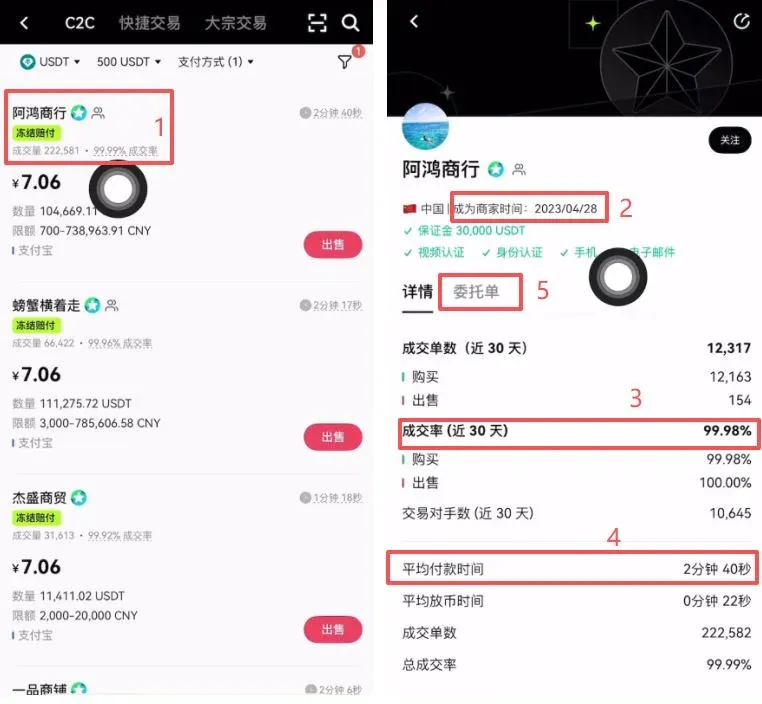
Following these steps completes the full OKX deposit and withdrawal cycle.
For more details on why a successful OKX deposit may not immediately appear in your asset view, please explore additional articles from Bitaigen (比特根).
Additional Localization Notes
- When dealing with fiat on the global market, OKX supports USD transfers via SEPA (for Euro) or SWIFT for other currencies.
- U.S. residents should use Binance.US or other regulated U.S. platforms for fiat on‑ramps; the global Binance link in the original text is intended for non‑U.S. jurisdictions.
- Cryptocurrency gains may be taxable in your local jurisdiction. Users should consult a tax professional to understand their obligations.
Related Reading
- Fix OKX Fiat Deposit Issues: Common Problems & Solutions
- Buy Polkadot (DOT) on OKX: Step-by-Step Guide
- OKB Burn Frequency: Quarterly Burns & One‑Off Token Destruction
💡 Register on Binance with referral code B2345 for the maximum trading fee discount. See Binance complete guide.



