
 Bitaigen Research
 Binance Leveraged Trading on the Mobile App (2025 Edition)
Binance, as a leading global digital‑asset exchange, offers not only spot trading but also two types of leveraged tools: margin trading and futures contracts. Margin trading lets users borrow additional funds with a small amount of collateral, magnifying both gains and losses. Below is a systematic guide covering risk management, trading mechanics, operational steps, and fee structure for using Binance’s mobile app for margin trading (2025 version).
From risk controls and trading mechanisms to fee structures, we break down the essential points of Binance’s margin‑trading interface and provide practical step‑by‑step instructions to help beginners get started quickly while avoiding common pitfalls. If you want to master the key techniques for safely using leverage, keep reading for the complete tutorial.
Risk Management and Liquidation Mechanism
When using leverage, risk control is especially critical. If the margin becomes insufficient, the system will automatically liquidate positions based on the Margin Level (ML) to prevent the account from going negative. The formula for the margin level is:
Margin Level = Total Asset Value / (Total Debt + Unpaid Interest)
*Total Asset Value* includes the value of all open positions and the collateral; *Debt* refers to the borrowed funds. The main factors influencing the margin level are:
- Asset price decline – losses on positions or a drop in collateral value reduce total assets.
- Borrowed‑asset price rise – for example, when shorting BTC, a rebound in BTC price increases the debt.
- Interest rate increase – borrowing costs fluctuate with market conditions; a rate spike raises the debt amount.
When the margin level falls below the threshold for a given margin mode, the system triggers a forced liquidation. The typical trigger standards (data from Binance) are:
| Margin Mode | Leverage | Liquidation Threshold |
|---|---|---|
| Cross (All‑margin) | 3× | ML < 1.15 |
| Isolated (Per‑pair) | 3× | ML < 1.185 |
| Isolated (Per‑pair) | 10× | ML < 1.05 |
Example: If BTC is priced at 60,000 USD, you deposit 1,000 USD as margin and borrow 2,000 USD, creating a 3,000 USD long position. When the price drops to roughly 44,000 USD, the margin level falls to about 1.1, and the system will liquidate the position.
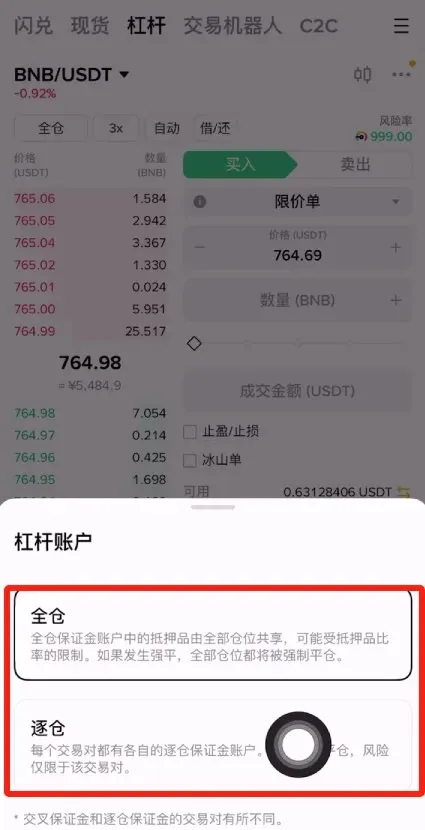
Cross (All‑Margin) vs. Isolated Margin Modes
Binance offers two ways to calculate margin for leveraged trades:
Cross (All‑Margin) Mode
- Feature: All assets in the account share the same margin pool; profits and losses can offset each other.
- Advantage: Higher capital efficiency; a single trade is less likely to be liquidated.
- Disadvantage: A large loss on one trade can jeopardize the entire account’s margin.
Isolated Margin Mode
- Feature: Margin is locked to the specific trading pair and limited to that asset and USDT.
- Advantage: Higher possible leverage; a loss on one pair does not affect other assets.
- Disadvantage: Lower capital efficiency; a single trade has a higher chance of liquidation.
Choosing the appropriate margin mode based on your risk tolerance and trading strategy is the first step to controlling potential losses.
Core Concepts of Margin Trading
Margin trading essentially means borrowing funds from the platform to amplify your market exposure, similar to margin lending in traditional finance. Users must first lock up collateral; the platform charges interest at a defined rate. If a position’s loss exceeds the collateral, the system will automatically close it.
- Long (Buy): Expect the price to rise, borrow funds to purchase the asset.
- Short (Sell): Expect the price to fall, borrow the asset, sell it at a high price, then buy back later to return it.
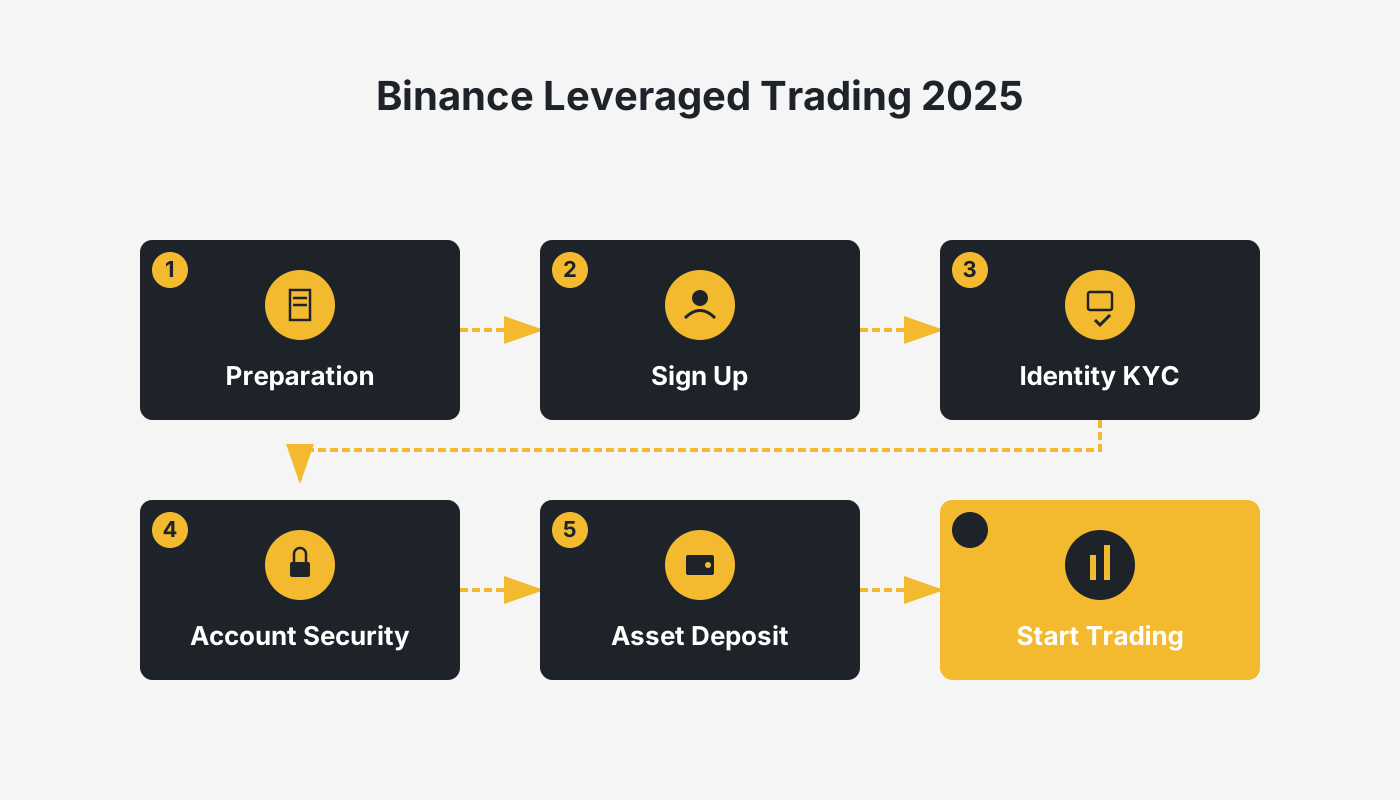
Step‑by‑Step Process (Beginner Tutorial)
The following outlines every action required to complete a margin trade on the Binance mobile app.
1. Register and Complete Identity Verification
- Visit the official registration link to create an account.
- After completing KYC verification, your account security improves and higher leverage limits become available.
- Important for U.S. users: Use Binance.US (https://www.binance.us) instead of the global Binance platform.
- Android download page: <https://www.bitaigen.com/binance/download>.

2. Deposit Funds into Your Spot Wallet
Before you can start margin trading, you need to fund your spot wallet. This can be done via fiat gateways (USD, SEPA, SWIFT), cryptocurrency transfers, or other supported payment methods. After the deposit, transfer the funds from the spot wallet to the margin wallet within the app.
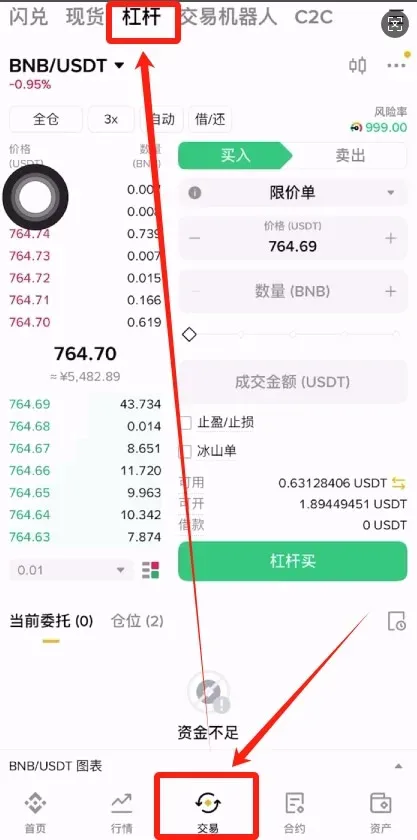
3. Open the Margin Trading Interface
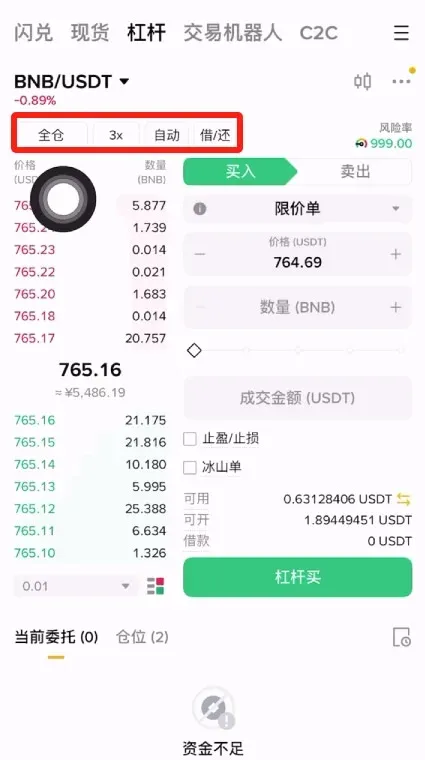
Launch the Binance app, then tap Trade → Margin to reach the margin‑trading page. The top of the page provides the following controls:
- Cross / Isolated toggle
- Leverage selector
- Auto‑Borrow and Manual Repay buttons
4. Choose Margin Mode and Leverage
- If you prefer capital efficiency, select Cross; if you want to limit risk to a single pair, choose Isolated.
- Tap the leverage field and pick a suitable multiple (beginners are advised to start with 2× or 5×, the maximum can reach 125× for futures, but margin trading caps at 10×).
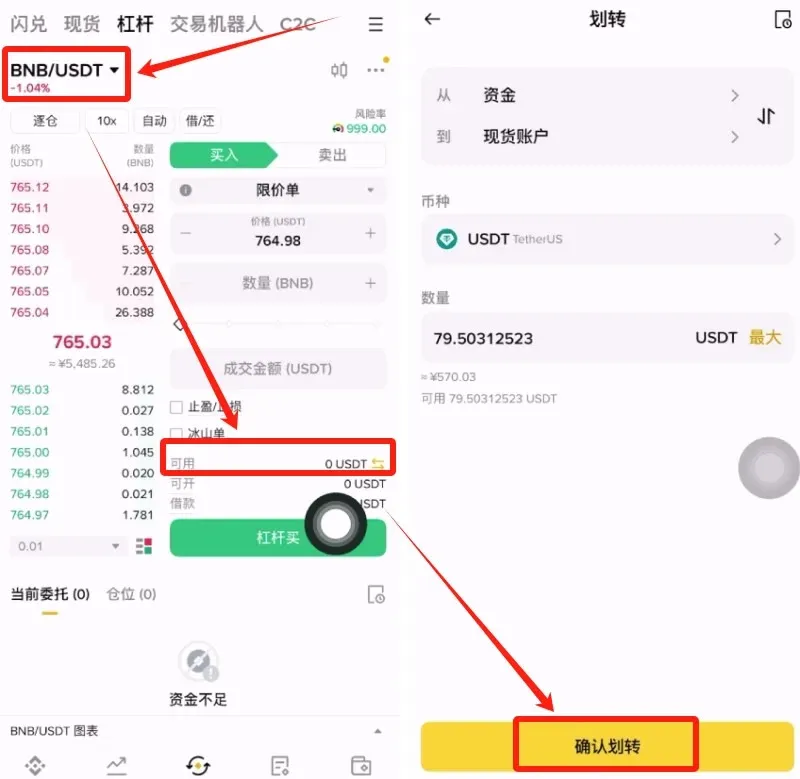
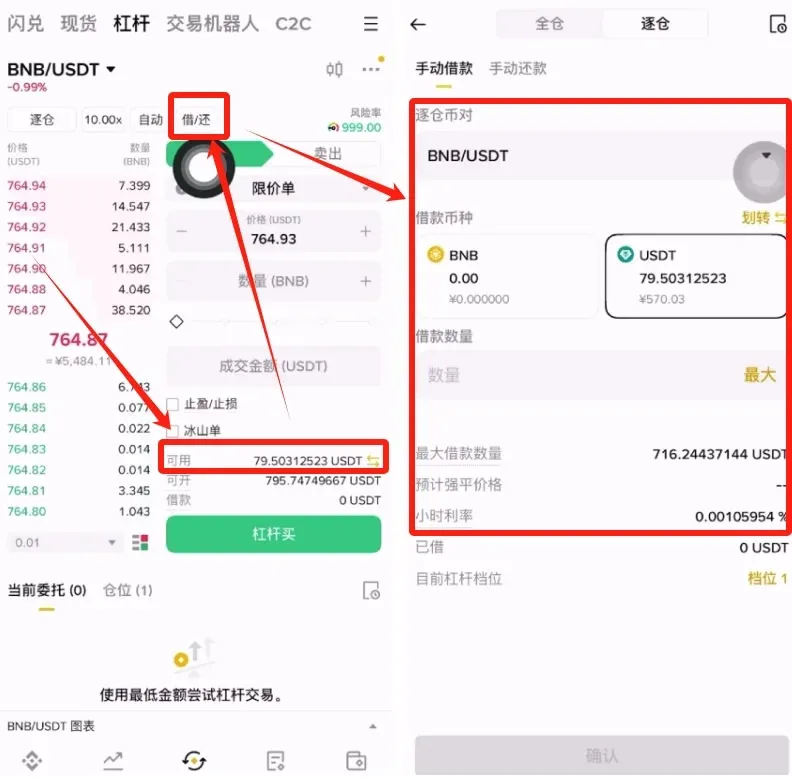
5. Transfer or Borrow the Trading Asset
In the trading‑pair list (e.g., BNB/USDT), if the available amount shows 0, you must first move USDT from the spot wallet to the margin wallet. If you lack sufficient USDT, use the Borrow function; the system will automatically match the borrowing amount based on the selected leverage.
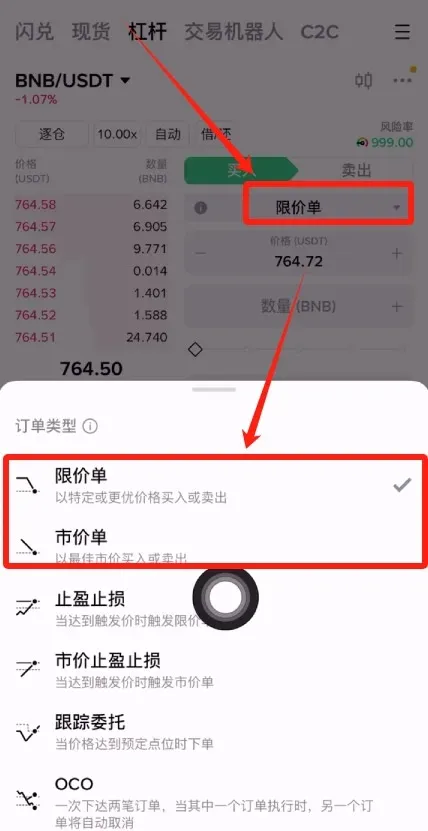
6. Choose Order Type
Once you have enough USDT, you can place either a Limit Order (specify price) or a Market Order (instant execution). Tap Buy/Long or Sell/Short on the right side of the screen according to your market view.
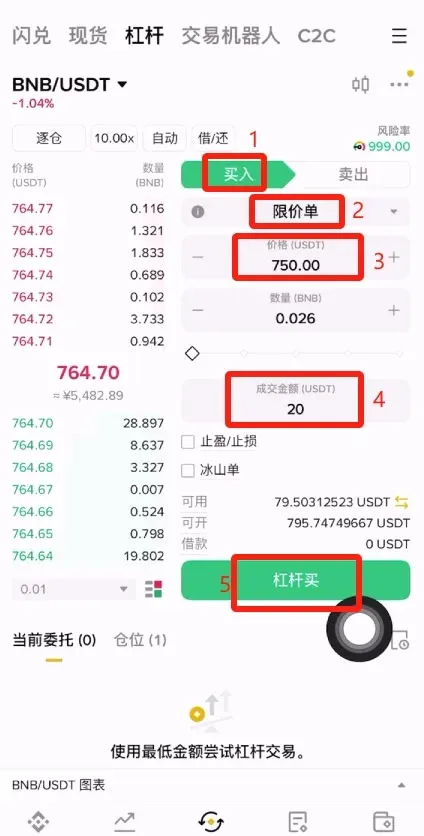
7. Set Price and Quantity
For example, with BNB priced at 760 USD, if you anticipate a rise, enter a limit price of 750 USD in the Buy/Long section, specify the desired quantity, and then tap Margin Buy.
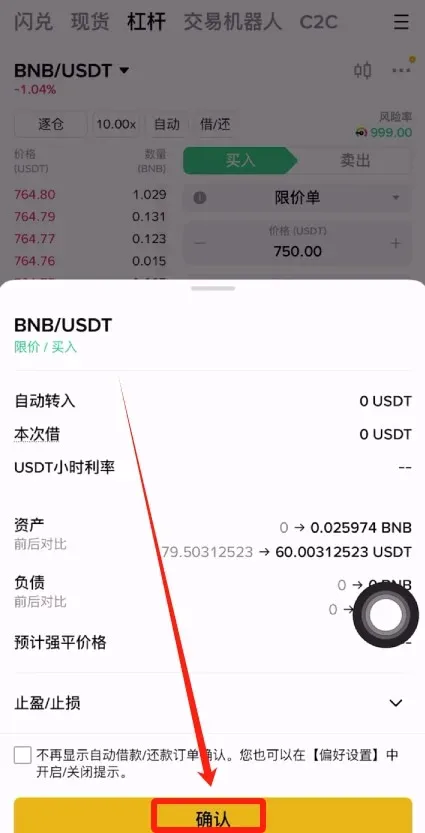
8. Confirm and Submit the Order
A confirmation dialog will appear. Verify the details and click Confirm; the order is then submitted.
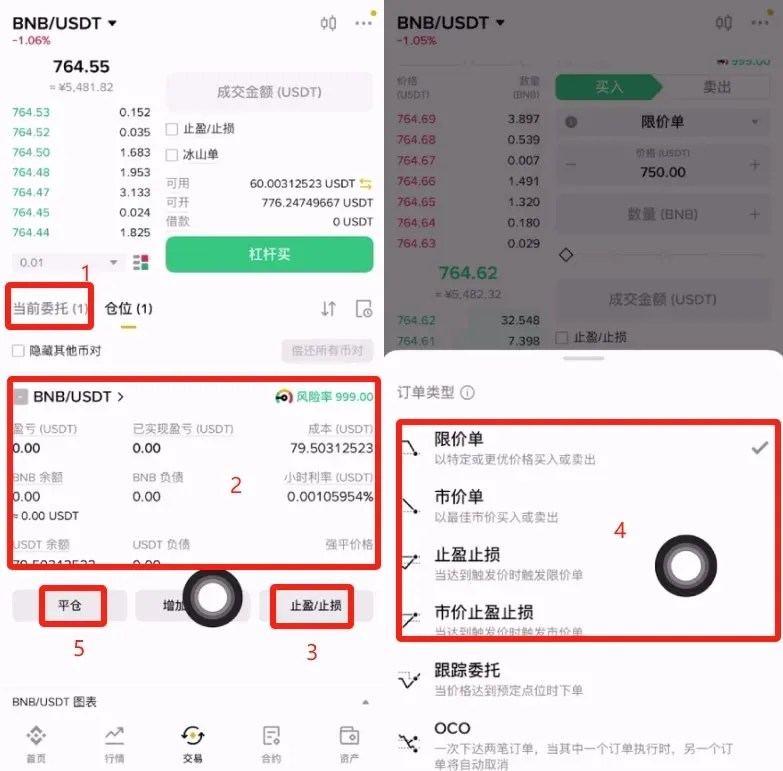
9. Monitor Positions and Set Take‑Profit/Stop‑Loss
The Open Orders screen displays real‑time order status. To limit potential loss, set a Stop‑Loss; to lock in gains, set a Take‑Profit. When you decide to exit, simply tap Close Position.
How Leverage Is Calculated
The basic formula for leverage is:
Leverage = Position Value / Actual Margin Invested
Example: Deposit 1,000 USD, borrow another 1,000 USD, and use the total 2,000 USD to go long on BTC. The leverage is 2× (2,000 ÷ 1,000). On Binance, the maximum selectable leverage for margin trading is 10×, and you can manually adjust the borrowed amount for each trade.
Fee Structure
Margin trading incurs two types of fees: trading fees and borrow‑interest.
Trading Fees
The standard fee for spot assets is 0.10 %. After registering on Binance, you can enjoy the following discounts:
- 20 % spot‑fee discount (auto‑applied)
- Additional 25 % discount for holding BNB, up to a total of 40 %
- New users receive a 600 USD fee rebate
- Up to 5,000 USD of free futures position size
Borrow‑Interest
Interest is calculated as:
Interest = Borrowed Amount × Borrow Rate × Borrow Duration (hours)
Interest accrues from the moment of borrowing and is charged at each whole hour mark (e.g., 19:00, 20:00). For instance, borrowing 1,000 USD at an hourly rate of 0.001 % at 13:50 results in:
- First‑hour interest = 1,000 × 0.001 % × 2 = 0.02 USD (any partial hour is rounded up to a full hour; interest is recorded at 13:50 and again at 14:00).
Borrow rates vary by asset and market supply‑demand; current rates can be checked on the Binance website.
Note: Crypto gains may be taxable in your local jurisdiction. Consult a tax professional for guidance.
Margin Trading vs. Futures Contracts
| Item | Margin Trading | Futures Contracts |
|---|---|---|
| Underlying | Spot assets | Perpetual contracts |
| Maximum Leverage | 10× | 125× |
| Fee Model | Borrow‑interest + spot trading fee | Funding rate (charged every 8 hours) |
| Liquidation Mechanism | Yes | Yes |
- Beginners: If you want to experience capital amplification without the complexity of ultra‑high leverage, margin trading is more straightforward and resembles the spot interface.
- Experienced traders: If you are comfortable with market volatility and seek higher leverage for short‑term strategies, futures contracts provide greater flexibility, but they require strict stop‑loss and take‑profit discipline.
Guidance on Selecting an Appropriate Leverage Level
Higher leverage magnifies both potential profit and risk. Newcomers are advised to start with 2× or 5×, gaining familiarity before moving to higher multiples. Leverage can be adjusted directly on the contract page; for example, selecting 10× means you control a position ten times larger than the amount of your own capital (i.e., you use 10 % of your own funds).
Summary
Binance’s mobile‑app margin trading offers a channel for amplifying capital, yet it carries significant risk. Beginners should start with low leverage and isolated margin, making full use of stop‑loss and take‑profit tools for risk control. More seasoned users can adjust leverage according to market judgment while maintaining disciplined position management. Understanding both risk management and the fee landscape is essential for achieving steady results in a leveraged environment.
For deeper insights into Binance margin trading, stay tuned to future articles on the Bitaigen platform.
Related Reading
- Hyperliquid vs Aster DEX Battle: Volume & Leverage
- Top 10 Safest Crypto Exchanges for Beginners in 2026
- Polkadot (DOT) Listed on Major Exchanges: Binance, Kraken
💡 Register on Binance with referral code B2345 for the maximum trading fee discount. See Binance complete guide.



