
 Bitaigen Research
 We have carefully mapped out the complete purchase pathway for beginners, from Alipay and WeChat to Bitcoin, providing a detailed analysis of each step’s security considerations and common pitfalls. This guide helps you complete your first BTC acquisition smoothly without incurring high premiums. Continue reading for the full step‑by‑step process.
Why do many newcomers initially buy coins through the CNY‑USDT‑BTC route?
Purchasing Bitcoin directly with Chinese yuan often results in a significant premium, making the actual cost uneconomical.
A more common and lower‑cost approach is to first convert CNY into a USD‑denominated stablecoin (USDT) and then exchange that USDT for Bitcoin (BTC) on the spot market. This route offers a friendlier exchange rate and aligns better with the trading habits of mainstream exchanges.
Support for WeChat and Alipay on major exchanges
The platforms listed below currently provide a CNY deposit gateway and allow you to buy coins via WeChat or Alipay. After funding, you can either purchase BTC directly or first convert to USDT and then trade.
| Exchange Platform | Overall Rating | Spot Trading Fee | Futures/Derivatives Fee | KYC Required | Deposit/Withdrawal Methods | Tutorial |
|---|---|---|---|---|---|---|
| [OKX (欧易)](https://www.bitaigen.com/binance) | 5.0 | 0.08% – 0.1% | 0.02% – 0.05% | ✅ | Alipay, WeChat | C2C / Bank‑card registration guide |
| [Binance](https://www.bitaigen.com/binance) *(U.S. users should use Binance.US)* | 5.0 | 0.10% | 0.02% – 0.05% | ✅ | Alipay, WeChat | C2C / Bank‑card registration guide |
| Gate.io | 5.0 | 0.10% | 0.02% – 0.05% | ✅ | Alipay, WeChat | C2C / Bank‑card registration guide |
Below we use Binance as an example to demonstrate the entire workflow—from depositing USDT to owning your first Bitcoin.
Before you start: Download and register a Binance account
- Download & install: Refer to the “2026 Latest Domestic User Registration Guide for Binance” and the “Binance App Download & Installation Guide (Android / iOS)”.
- Complete registration: Use the official link to register or the official download page to create your account.
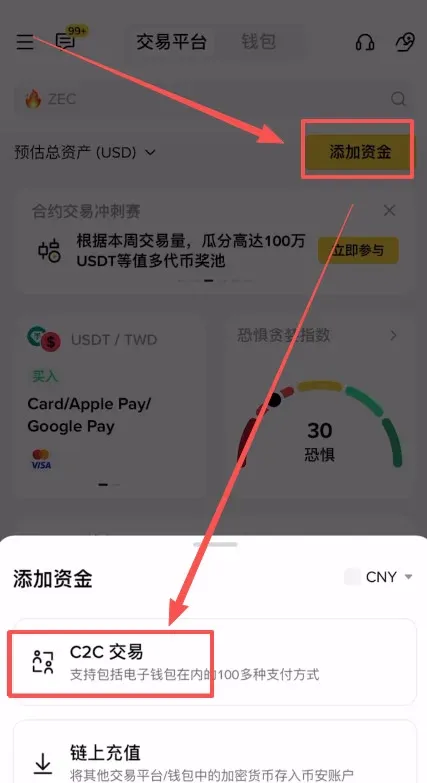
Step 1: Enter the C2C trading area and select a vetted merchant
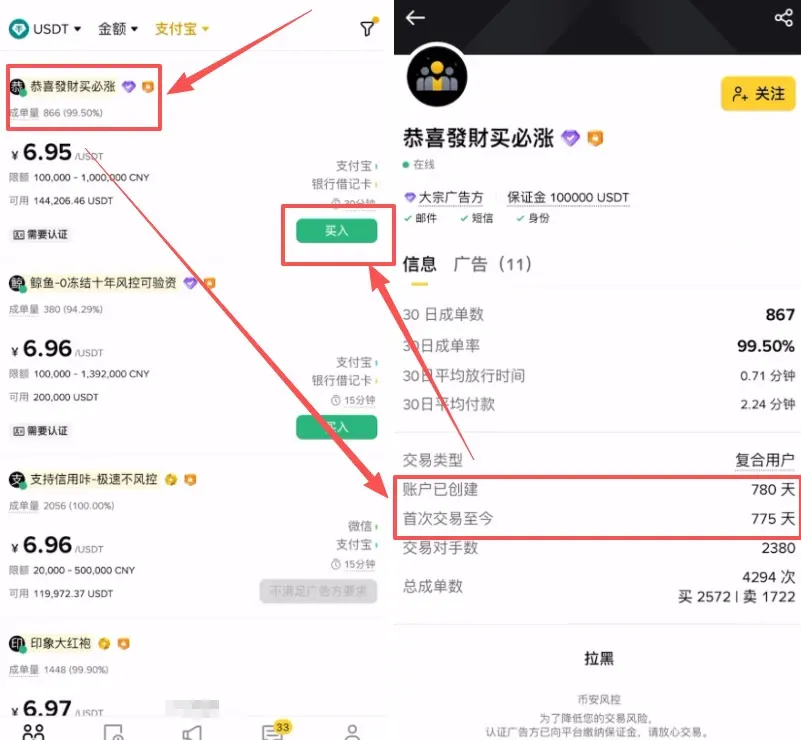
Open the Binance app and go to the C2C page. At the top you will see a Quick‑Access zone, a Favorites zone, a Selected zone (sometimes called “Premium” or “Shield” zone), and a Bulk‑trade zone. Beginners are advised to start with the “Selected zone.” This area is marked with “100% Compensation,” meaning that if any fund‑safety issue occurs during the trade, the platform will fully reimburse the loss—providing a first line of risk protection.
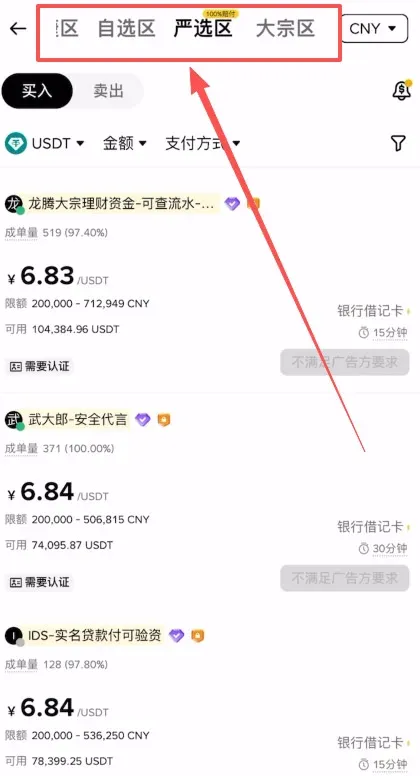
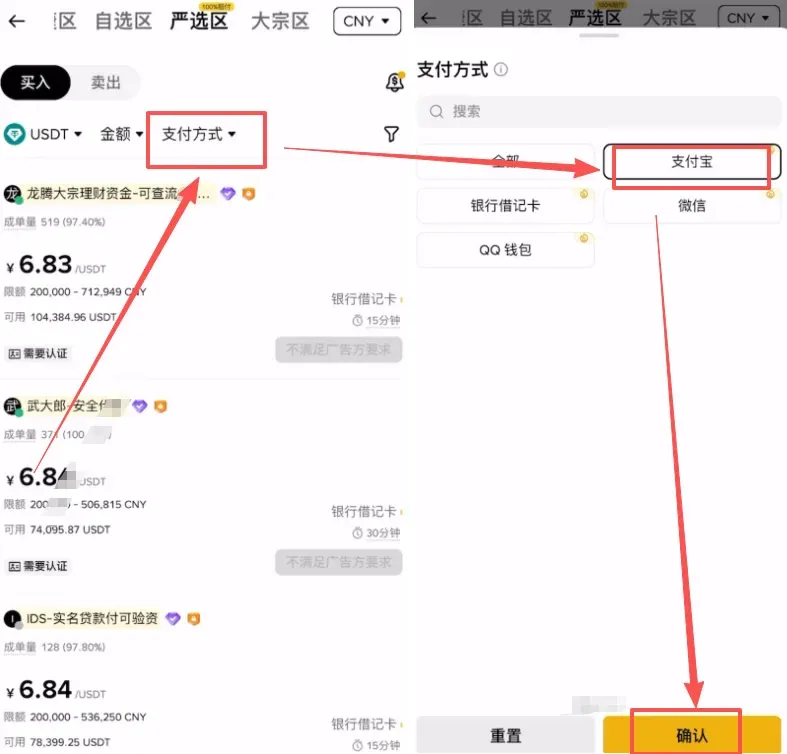
Step 2: Key points for buying USDT with Alipay
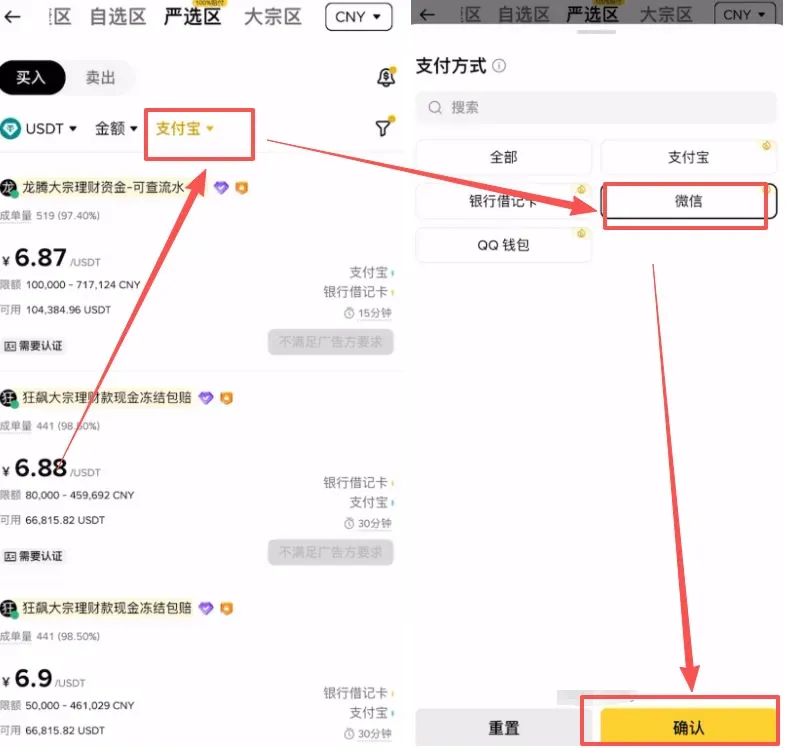
- In the payment‑method filter, tick Alipay;
- Choose merchants according to the following criteria:
- Order‑completion rate ≥ 98% – prioritize sellers with a high success ratio;
- Account age ≥ 1 year – older accounts usually indicate more stable funding sources and a lower probability of risk controls being triggered.
Step 3: Place the order, pay, and submit proof of payment
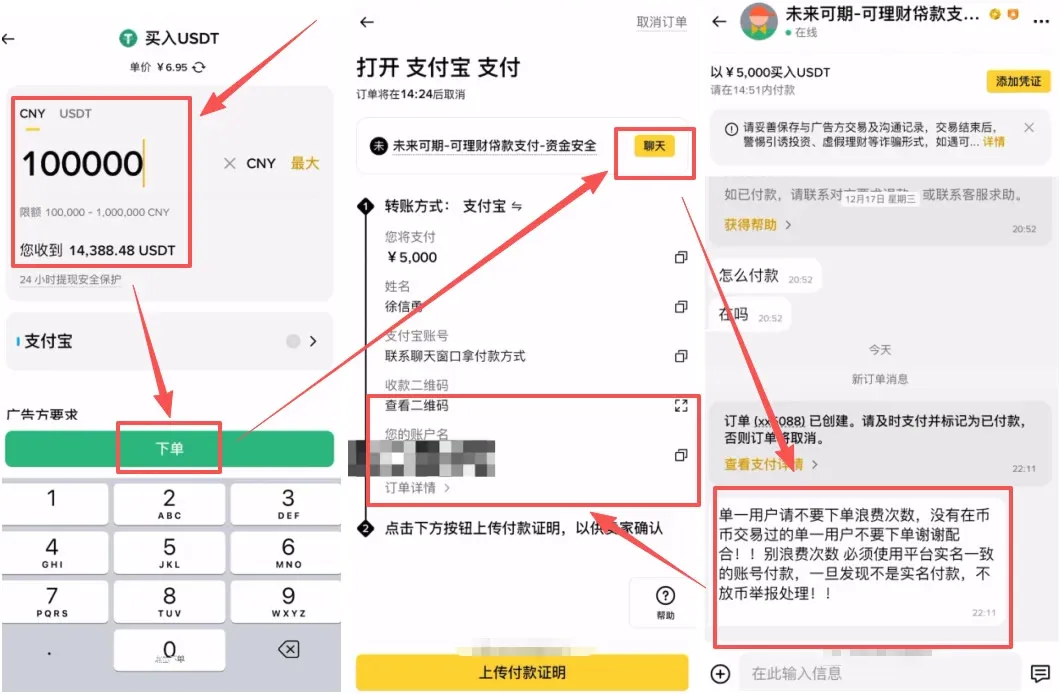
- After entering the amount you wish to purchase, tap Place Order. The chat window will then display the seller’s specific payment instructions (most sellers require a real‑name payment).
- Follow the instructions to obtain the seller’s Alipay account or QR code, exit the Binance app, and complete the transfer in Alipay.
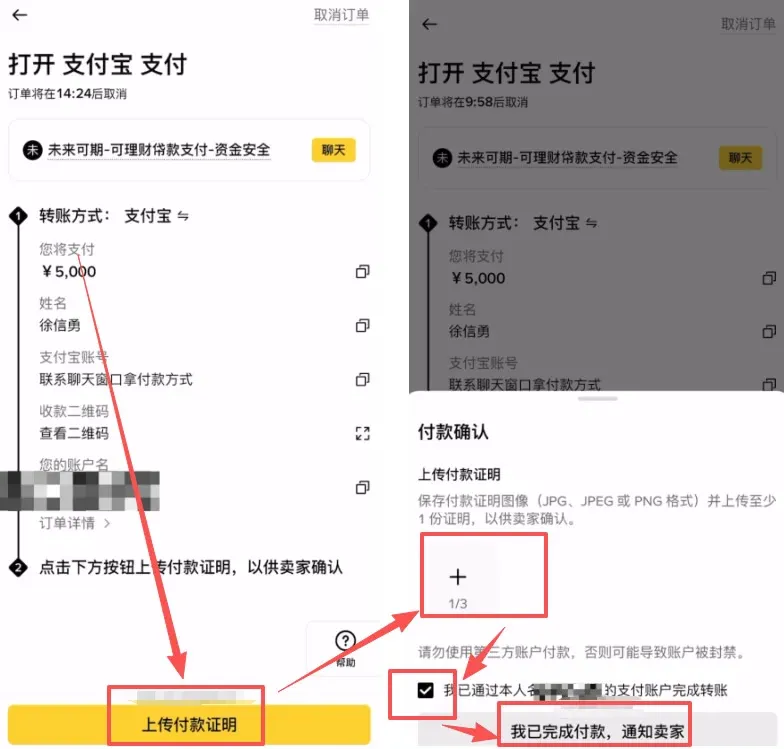
- Once the transfer is done, take a screenshot of the payment proof, return to Binance, click Upload Payment Proof, attach the screenshot, and confirm “I have completed the payment, notify the seller.”
Step 4: Special considerations for WeChat Pay
The WeChat Pay flow mirrors Alipay: first filter for WeChat, then select sellers that meet the same “old‑account” criteria, place the order, and add the seller as a friend to complete the transfer.
⚠️ Do NOT include any cryptocurrency‑related keywords (e.g., “buy coin”, “USDT”, “BTC”, “Binance”) in the WeChat transfer note, as this may trigger the transfer to be blocked or your account to be restricted. A plain personal‑money transfer is sufficient.
Step 5: Transfer the USDT obtained via C2C to your Spot wallet
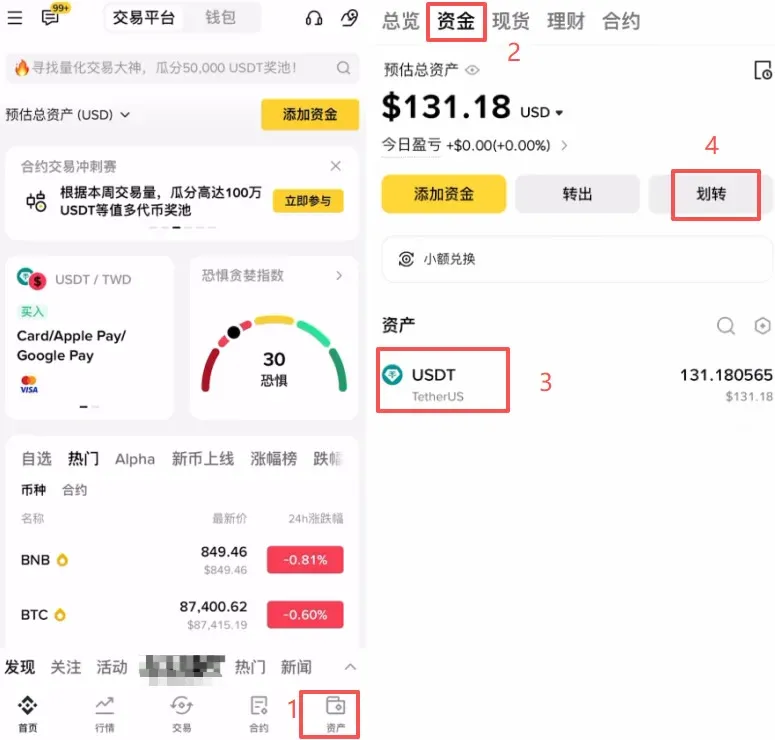
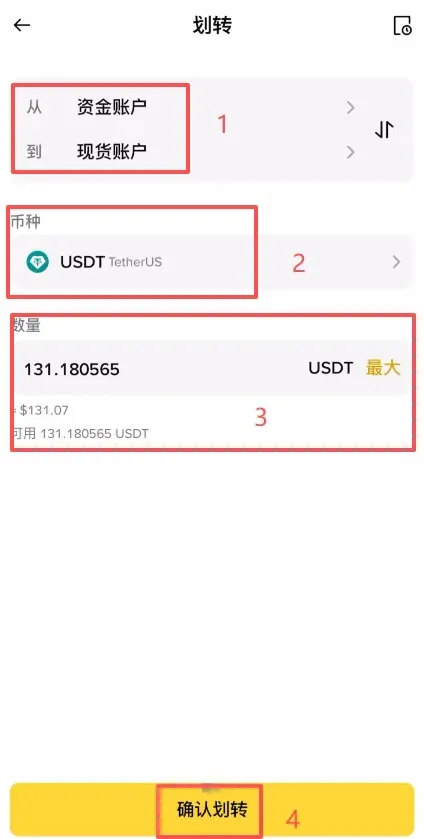
After the purchase, the USDT is stored in the Funding Wallet by default. To buy Bitcoin on the spot market you need to move the USDT from the Funding Wallet to the Spot Wallet. The path is: tap Assets at the bottom right → Transfer → select USDT and confirm the transfer. This operation is free and instantaneous.
Step 6: Purchase Bitcoin on the spot market
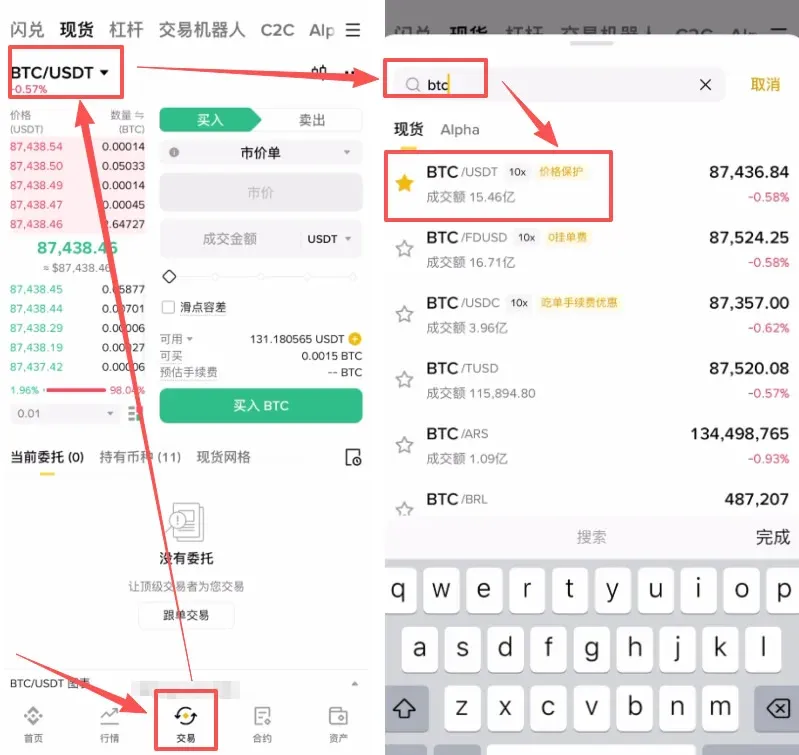
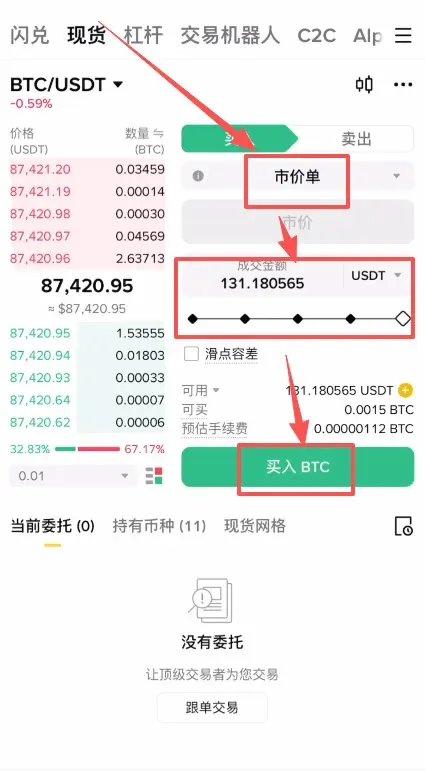
Navigate to the Trade tab at the bottom, search for and select the BTC/USDT pair. Two common order types are available:
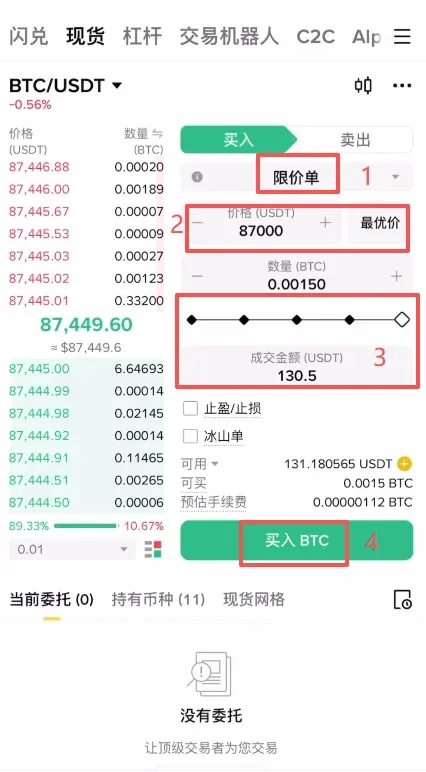
- Limit Order: Suitable for users who want to buy at a specific price. For example, if the current price is $27,000, you can set a limit at $27,000; the order will only fill if the market drops to that level.
- Market Order: Ideal for those who want an immediate fill. No price input is required—just enter the amount you wish to spend, and the system will execute the trade at the best available market price instantly. Beginners are recommended to use Market orders. After entering the amount, click “Buy BTC” and you will own your first Bitcoin within seconds.
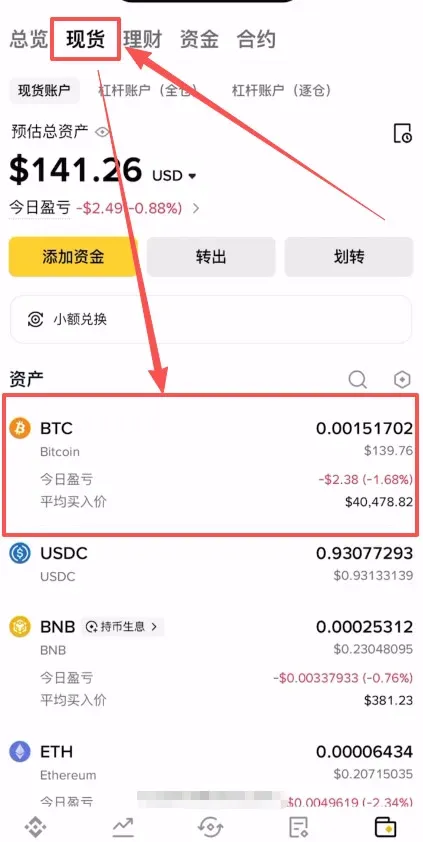
After the trade completes, you can view the received Bitcoin in the Assets section.
Five basic principles for beginners investing on Binance in 2026
Even if you have mastered the workflow, risk management remains essential. The following guidelines are strongly recommended:
- Only use disposable funds – allocate no more than 5 % of your total net worth to crypto, avoid leverage or borrowing, and be prepared for the possibility of a total loss.
- Focus on spot trading – Binance offers futures, margin, and other advanced products, but newcomers should stick to spot markets to avoid liquidation risks associated with high leverage.
- Build positions gradually and avoid chasing peaks – do not commit your entire budget in a single order; consider adding to your position when Bitcoin drops 5 %–10 % to smooth out the average cost.
- Set profit‑taking and stop‑loss levels – for example, consider taking profits at a 20 %–30 % gain and cutting losses at a 10 %–15 % decline, and execute decisively once targets are met.
- Monitor platform announcements promptly – Binance regularly publishes updates on regulatory changes, token‑specific risks, system upgrades, and more; staying informed helps mitigate losses caused by delayed information.
Tax reminder: Cryptocurrency gains may be subject to tax in your jurisdiction. Consult a qualified tax professional to understand your reporting obligations.
---
This guide provides a complete, secure method for purchasing your first Bitcoin using Alipay or WeChat. For additional step‑by‑step tutorials, follow the upcoming articles on the Bitaigen platform.
Related Reading
- 2026 Beginner's Guide: How to Buy Bitcoin Safely on OKX
- Buy Bitcoin in China with Binance & OKX – Step-by-Step Guide
- 2026 Binance Tutorial for Beginners: Start Trading Securely
💡 Register on Binance with referral code B2345 for the maximum trading fee discount. See Binance complete guide.



