
 Bitaigen Research
 We conduct an in‑depth analysis of the Coinbase Wallet from both security and user‑experience perspectives, helping readers assess whether its private‑key management aligns with decentralization principles. The article also provides official download steps and common precautions. By reading this guide, you will quickly grasp the wallet’s core functions, supported blockchains, and how to operate the built‑in dApp browser, then follow the instructions for a secure installation. If you want to master the key details of self‑custody, keep reading.
Overview of Coinbase Wallet Security
Coinbase Wallet (formerly the Toshi wallet) is designed to give users a freer way to manage crypto assets. It is not merely a trading entry point; it is a standalone application that stores private keys directly on the user’s device, allowing operation without linking a Coinbase account. Because the private keys remain on the user’s own hardware, full control of the assets stays with the individual, eliminating the custodial risk associated with traditional centralized exchanges. The wallet currently supports ETH and all ERC‑20 tokens, and will gradually add major chains such as BTC, BCH, and LTC. Through its built‑in dApp browser, token holders can directly access a variety of decentralized applications, participate in airdrops, ICOs, or trade on decentralized exchanges with zero fees.
How to Obtain Coinbase Wallet
Option 1: Direct Download from the Official Site
Visit Coinbase’s official website. Under the “Wallet” section you will see three distinct download links for different platforms. Click the button that matches your operating system or browser preference to retrieve the appropriate installation package.
Option 2: Quick Links for Installation
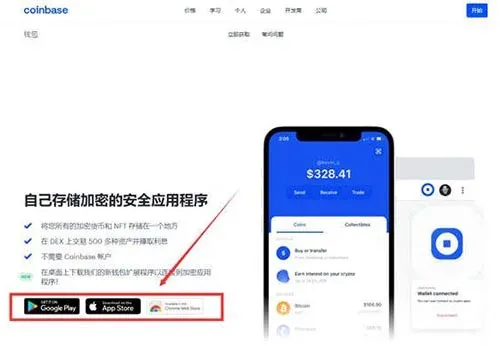
As illustrated, the page offers download options for a desktop extension, a mobile app, and a browser plug‑in. Users simply choose the method that fits their device, complete the installation, and can then start using Coinbase Wallet.
Core Features of Coinbase Wallet
- Local Private‑Key Management: Asset private keys are stored on the user’s device and never pass through centralized servers.
- Multi‑Chain Asset Support: Currently supports ETH and all ERC‑20 tokens, with plans to add BTC, BCH, LTC and other major chains.
- Airdrop & ICO Reception: Tokens distributed by projects can be received directly within the wallet.
- Decentralized Trading: Built‑in DEX or proxy services enable peer‑to‑peer asset swaps.
- dApp Gateway: The wallet includes a browser that can open third‑party decentralized applications, facilitating lending, gaming, marketplace trading and many other scenarios.
Coinbase Wallet has become the preferred mobile development platform for numerous crypto startups. Developers can leverage the wallet or its browser to connect directly with users, delivering smoother product interactions.
Conclusion
In summary, Coinbase Wallet offers a relatively secure and user‑friendly digital‑asset management tool through on‑device private‑key storage, broad on‑chain asset support, and an integrated decentralized‑application entry point. For more detailed download instructions or usage guides, stay tuned to Bitaigen’s upcoming articles.
💡 Register on Binance with referral code B2345 for the maximum trading fee discount. See Binance complete guide.



