
 Bitaigen Research
 We have compiled a complete step‑by‑step guide for obtaining an overseas Apple ID on an iPhone, safely downloading the official Binance client, and we emphasize the key points of registration as well as the platform’s core functions. Read on to easily avoid the risks associated with unofficial channels and to quickly enter a secure digital‑asset trading environment.
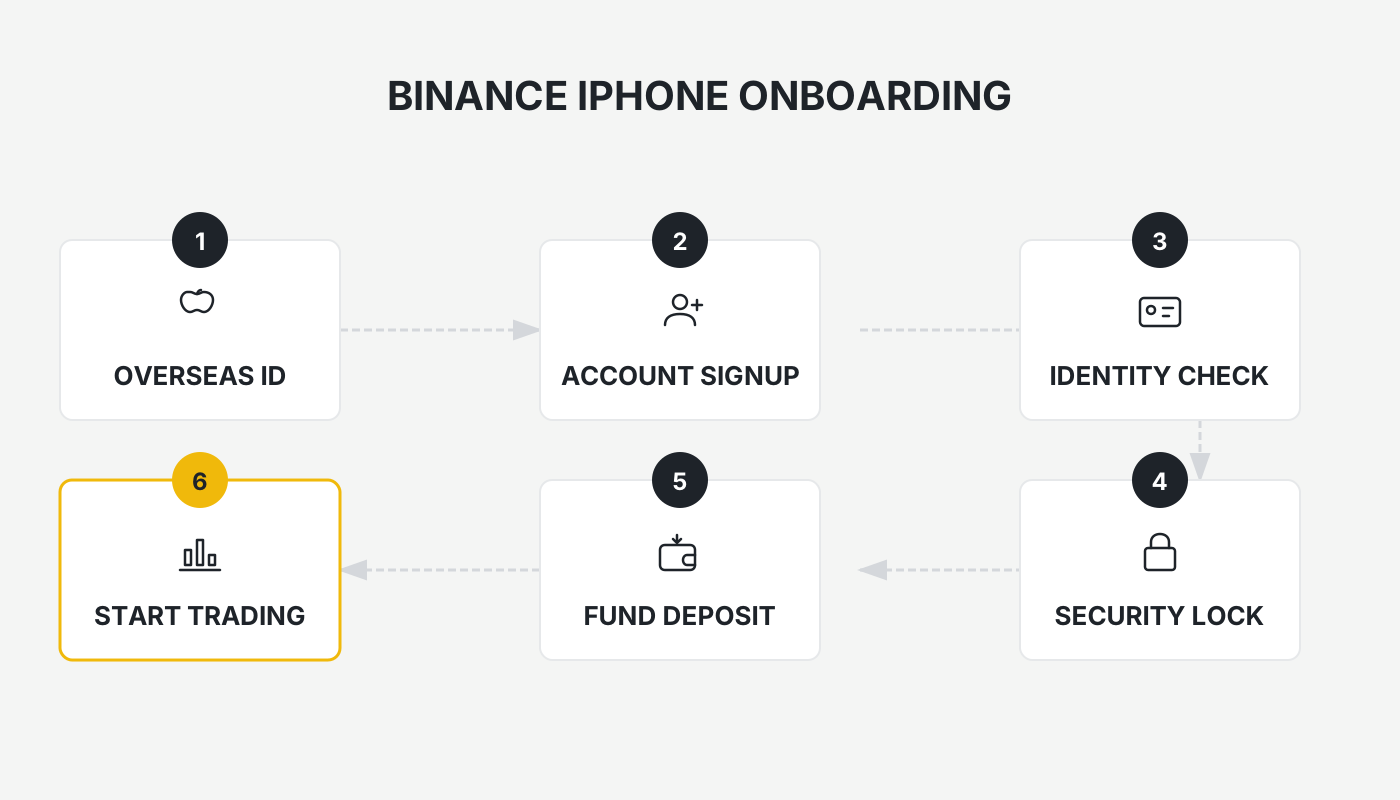
Full Guide to Downloading the Binance App: Official Entry, Getting an Overseas Apple ID, and Registration Process
On iPhones located in Mainland China, a direct search in the App Store usually does not return the official Binance client. To access the full suite of features you must first own an Apple ID that can reach an overseas App Store. This article walks you through obtaining an overseas Apple ID, downloading the official Binance app, completing account registration, and explains the main platform functions and fee structure, providing a practical, step‑by‑step workflow that helps you join the Binance ecosystem safely and smoothly.
---
1️⃣ Why You Must Download the Binance App Through the Official Entry
- Safety First: Binance is a globally leading digital‑asset exchange; all official services run under the official domain. Apps obtained from unofficial sources may expose your account to theft, loss of assets, or malicious code.
- Full Feature Set: The official client supports spot trading, futures, margin, options, grid trading, recurring buys, savings, and many other end‑to‑end products. Third‑party channels often omit one or more of these functions.
- Official Discount: Registering with an official invitation code grants a 20 % trading‑fee discount. This discount is applied only when the invitation code is bound during the first registration and cannot be added later.
Friendly Reminder: Before you download, double‑check that the app’s name is “Binance” or “币安” and that the developer information indicates it is published by the official Binance entity.
---
📱 Obtaining and Using an Overseas Apple ID
1. Why Creating an Overseas Apple ID Is Necessary
The App Store tailors its catalogue according to the country or region associated with the Apple ID. Binance is not listed in the Mainland China store; it can only be seen and downloaded from stores that are set to Taiwan, Hong Kong, the United States, or other regions where Binance is available.
2. Materials You’ll Need Before Registering
| Item | Description |
|---|---|
| **Email address** | Any regularly used Gmail, Outlook, QQ, 163.com, etc., as long as you can receive verification codes from Apple. |
| **Phone number** | Either a Mainland China +86 number or an overseas mobile number; a single number can be linked to up to two Apple IDs. |
| **Virtual address** | Use an online address generator (e.g., <https://www.meiguodizhi.com/>) to obtain a Taiwanese street address, city, county, and postal code. |
3. Detailed Registration Steps
- Open the address generator, select “Taiwan address”, type “Tainan City” into the city field, click Generate, and record the street, district, city, and zip code that are produced.
- Go to Apple’s official account page <https://account.apple.com/account#>, click “Create Your Apple ID”, and fill in the fields in order:
- Name – any name you prefer.
- Country/Region – Taiwan.
- Date of Birth – a date that makes you an adult.
- Email – a real address that can receive Apple’s verification code.
- Password – a strong password that meets Apple’s requirements.
- Address Country/Region – China Mainland (this does not affect later region switching).
- Phone Number – a number that can receive SMS; choose SMS as the verification method.
- After entering the email and phone verification codes, the system will display “This Apple ID has not been used with iTunes Store yet.” Click Check to finish creating the account.
- Open the App Store, tap the avatar in the top‑right corner, sign out of any existing account, then sign in with the newly created Apple ID.
- When the store asks for billing information, first select “None”. If the None option does not appear, simply skip the step. Then paste the virtual Taiwanese address you generated earlier into the address fields, making sure the street, city, county, and postal code are all filled in completely.
Common Error: After submitting the information you may see “We can’t create your account right now.” In that case, try a different email that you have not used before, switch your network (e.g., from Wi‑Fi to a mobile hotspot), or wait a few minutes before trying again.
---
📥 How to Download the Official Binance App
1. iOS Download Steps
- Open the App Store and confirm you are logged in with the overseas Apple ID you created in the previous section.
- In the search bar type “binance” or “币安”.
- Locate the official entry titled “Binance – Cryptocurrency Exchange”, then tap Get → Install.
- The system will ask you to authenticate the Apple ID (password, Face ID, or Touch ID). Once authenticated, the download will begin.
If the app does not appear in the search results, verify that you have switched the store region to Taiwan; alternatively, try the United States or Hong Kong store.
Important for U.S. Residents: Users located in the United States must use Binance.US (the U.S.‑compliant version of the platform) instead of the global Binance app.
2. Android Download (For Reference)
- Visit the official download page <https://www.bitaigen.com/binance/download> and click the “Download Android version” button to obtain the latest APK file.
- For security, it is recommended to install the app on a device dedicated solely to trading, keeping it separate from other unrelated applications.
---
🛡️ Registering a Binance Account and Enabling Security Settings
1. Overview of the Registration Process
| Step | Key Actions |
|---|---|
| **Enter email or phone number** | Choose either method; make sure you can receive the verification code. |
| **Create a password** | Minimum 8 characters, must contain upper‑ and lower‑case letters, numbers, and special symbols. |
| **Enter invitation code** | Use **`B2345`** to permanently enjoy a **20 % fee discount** on future trades. |
| **Complete verification** | Input the email or SMS code to finish creating the account. |
Critical Reminder: The invitation code can only be entered during the initial registration. If you miss it, you cannot add it later.
2. Account‑Security Recommendations
- Change your password regularly and enable two‑factor authentication (2FA).
- It is highly recommended to bind Google Authenticator for time‑based one‑time passwords (TOTP) and to back up the 16‑digit recovery key in a secure location.
- If you own a hardware security key such as a YubiKey, you can further harden your account against phishing and credential‑theft attacks.
3. Enabling Google Authenticator (2FA)
- Log in via the website or the mobile app, navigate to “User Center → Security → Two‑Factor Authentication.”
- Choose Google Authenticator, then either scan the QR code or manually type the secret key.
- Enter the 6‑digit code generated by the authenticator app to confirm the binding, and record the recovery key somewhere safe.
---
📊 Overview of Binance Platform Functions and Products
The following sections retain the original placeholders for images or charts; the image URLs are unchanged, while the alt‑text has been translated into English.
Spot Trading !Binance spot‑trading interface screenshot
Users can buy and sell cryptocurrencies at market price or set limit orders in real time, enabling the most basic form of asset conversion.
Futures Trading !Binance futures trading
Provides perpetual contracts, delivery futures, and other derivative products, supporting both long and short positions for traders who wish to profit from price movements without holding the underlying asset.
Margin Trading !Binance margin trading
Allows you to amplify your buying power (e.g., 1 USDT can open a 5 USDT leveraged position). While leverage can increase potential returns, it also magnifies risk.
Options Trading !Binance options trading
Enables you to buy or sell a specific asset at a predetermined price on a future date, useful for hedging or capturing particular market moves.
Grid Trading !Binance grid trading
The system divides a user‑defined price range into multiple “grids” and automatically places buy and sell orders within each grid, achieving automated cost‑averaging in a volatile market.
Recurring Buy (DCA) !Binance recurring buy
Automatically purchases a selected cryptocurrency at fixed time intervals and amounts, helping investors implement a long‑term dollar‑cost‑averaging strategy.
Trade Mining !Binance trade mining
Rewards users with BNB when they trade specified pairs, effectively boosting overall trading returns.
DCA Trading Bot !Binance DCA bot
An automated bot that follows the Dollar Cost Averaging principle, ideal for long‑term holders who want to minimise the impact of short‑term price swings.
Leveraged Tokens
Tokenized products that embed leverage directly; traders can gain exposure to amplified returns or risks without opening a separate leveraged position.
Binance Savings !Binance savings
Deposit assets into Binance‑offered savings products to earn yields that are typically higher than traditional bank deposits.
BNB Staking Pool !Binance BNB staking pool
A dedicated pool for BNB holders; depositing BNB yields additional reward distributions.
Liquidity Mining !Binance liquidity mining
Provide liquidity to selected trading pairs and receive liquidity‑provider rewards from the platform.
Binance Mining Pool !Binance mining pool
Integrates traditional mining rewards with the exchange ecosystem, allowing users to directly use mining earnings for trading or fiat‑related activities within their Binance account.
Staking (Proof‑of‑Stake) !Binance staking
Lock supported tokens on the platform, participate in the corresponding blockchain’s consensus mechanism, and earn block rewards.
Launchpad Token Sale Platform !Binance Launchpad
Enables early‑stage projects to conduct token pre‑sales on Binance; investors can subscribe before the project launches on the open market.
Dual‑Asset Investment !Binance dual‑asset investment
At a future predetermined date, you can buy or sell one of two assets at a preset exchange rate, allowing for hedging or capturing bidirectional returns.
NFT Marketplace !Binance NFT marketplace
A one‑stop NFT marketplace where users can buy, sell, and collect NFTs directly with their Binance account.
---
💰 How Binance Calculates Trading Fees
Fees vary according to the product category, the user’s VIP tier, and whether the platform’s native token BNB is used for a discount. The table below reflects the fee schedule published by Binance; please refer to the official Binance website for the most up‑to‑date numbers.
| VIP Tier | 30‑Day Trading Volume (BUSD) **or** BNB Holding | Maker Fee | Taker Fee |
|---|---|---|---|
| Regular User | < 1,000,000 BUSD **or** ≥ 0 BNB | 0.1000 % | 0.1000 % |
| VIP 1 | ≥ 1,000,000 BUSD **and** ≥ 25 BNB | 0.0900 % / 0.0750 % | 0.0750 % |
| VIP 2 | ≥ 5,000,000 BUSD **and** ≥ 100 BNB | 0.0800 % / 0.0750 % | 0.0600 % |
| … | … | … | … |
| VIP 9 |
Related Reading
- OKX iPhone App: Alternative Download & Apple ID Guide
- Change Apple ID Country/Region on iPhone, iPad & Mac (2026)
- Top 5 Permanent Decentralized Exchanges to Watch in 2025
💡 Register on Binance with referral code B2345 for the maximum trading fee discount. See Binance complete guide.



