
 Bitaigen Research
 How to Buy Bitcoin (BTC) on the Binance Exchange?
The process for buying Bitcoin (BTC) on Binance includes: creating an account, completing KYC verification, depositing USDT or fiat currency, placing a spot‑market order, and storing the asset securely.
Binance is a world‑leading blockchain digital‑asset platform, serving more than 180 countries and regions, with a high‑speed matching engine and large trading volume. The platform puts user interests first, offering a safe, open, and efficient trading environment, and continuously expands its blockchain ecosystem.
In this article we walk you through the entire workflow of purchasing Bitcoin on Binance, covering account registration, identity verification, fund deposits, and the key steps for spot‑market orders. Illustrated step‑by‑step guidance helps even first‑time users get started quickly. Subsequent sections will further explain common questions and practical tips, helping you enter the digital‑asset trading world with confidence.
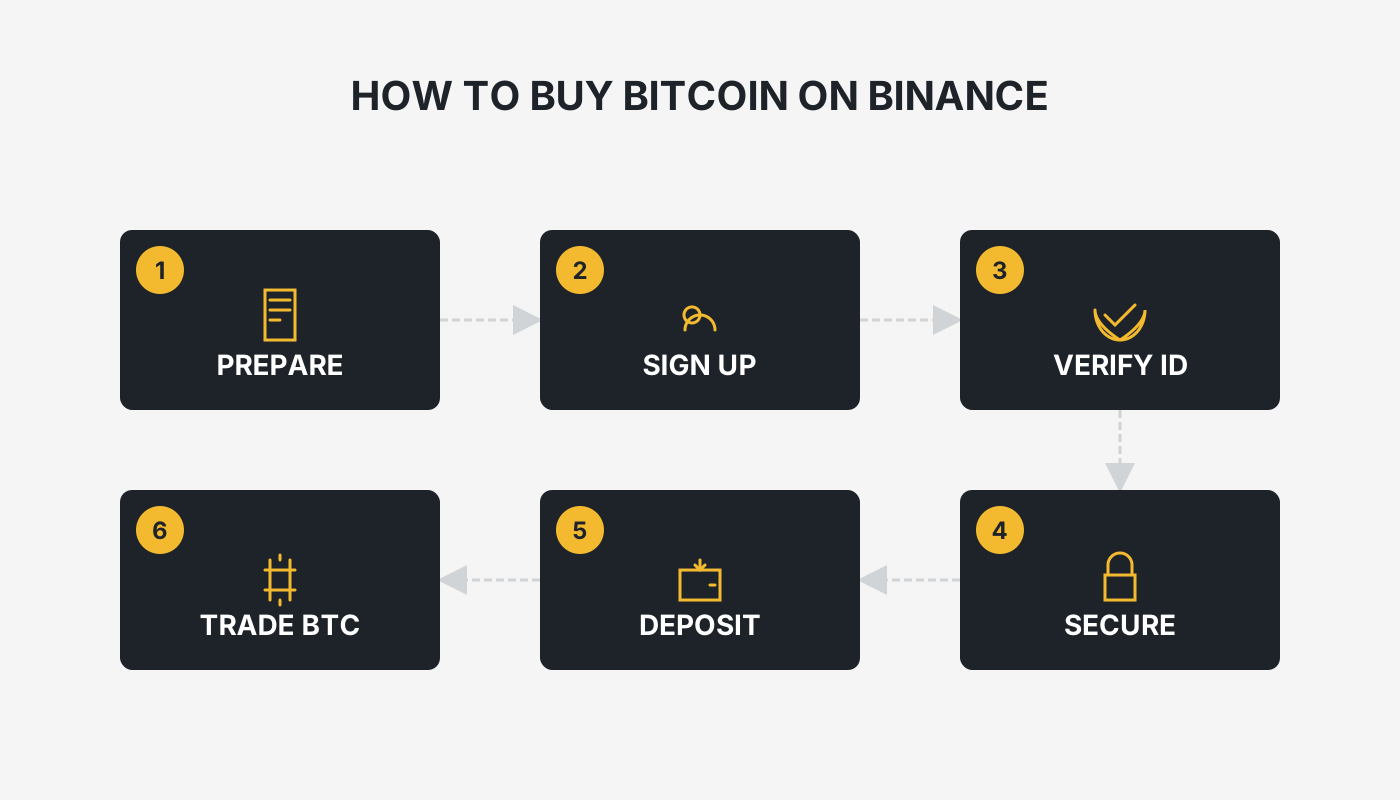
How to Use Binance to Purchase Bitcoin (BTC)
Below are the complete steps for global users to buy Bitcoin on Binance.
Step 1: Register a Binance Account
- Visit the Official Site
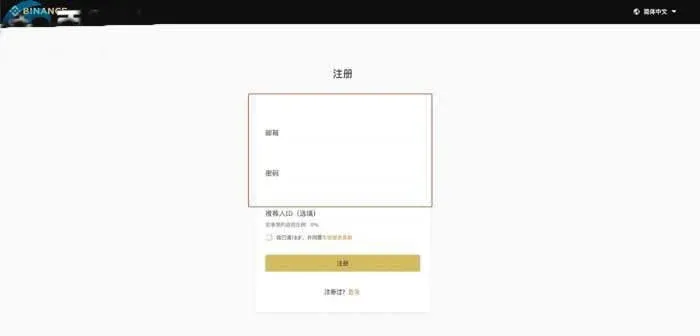
- Open the promo registration link or go directly to the official registration page.
- Click Register and choose either email or mobile number for sign‑up.
- Enter Your Information
- Provide your email address or phone number and set a strong password (minimum 8 characters, including upper‑ and lower‑case letters and numbers).
- Tick the terms of service box and submit.
- Complete Identity Verification (KYC)
- After logging in, navigate to Profile → Identity Verification.
- Upload the front and back of your government‑issued ID (passport, driver’s license, etc.) and perform a facial‑recognition check.
- Once verification is approved, your trading limits will be increased.
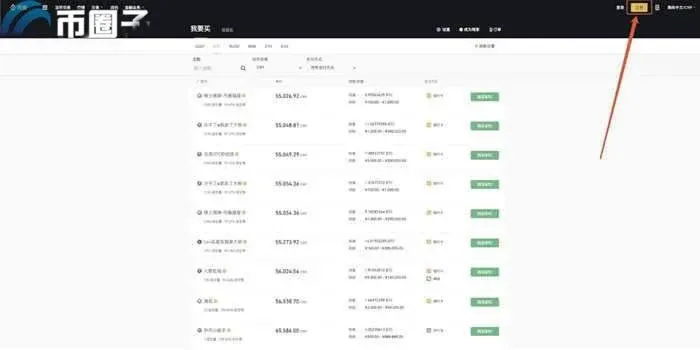
Step 2: Deposit or Purchase USDT
Binance offers two mainstream ways to obtain USDT (a stablecoin) for later conversion into BTC.
| Method | Navigation Path | Notes |
|---|---|---|
| Fiat Deposit | Home → “Buy Crypto” → “C2C Trade” | Supports USD via SEPA/SWIFT, credit/debit cards, and other local payment methods |
| Direct Purchase | C2C Market → Choose a seller → Follow payment instructions | Real‑time pricing; pick sellers with a solid trade history |
- Deposit Fiat: On the C2C page select “Buy USDT”, enter the amount, and complete the payment using your preferred fiat method.
- Direct Purchase: In the P2P marketplace, select a reputable seller, click “Paid”, and after the seller confirms receipt, the USDT will appear in your spot wallet.
Step 3: Use USDT to Purchase Bitcoin (BTC)
- Enter Spot Trading
- From the homepage click Trade → Spot.
- In the search bar type BTC/USDT and select the corresponding trading pair.
- Choose Order Type
- Market Order: Executes instantly at the current market price—ideal for beginners.
- Limit Order: Set a target price; the system will fill the order automatically when the market reaches that level.
- Enter Purchase Amount
- In the order panel, specify the amount of BTC you wish to buy, or input how much USDT you want to spend.
- Confirm by clicking Buy BTC; once executed, the BTC will be credited to your spot wallet.
Step 4: Securely Store Your Bitcoin
- Transfer to a Personal Wallet
- For long‑term holding, consider moving the BTC to a cold wallet (hardware wallet) for enhanced security.
- For short‑term trading, keeping the asset in the Binance wallet is acceptable.
- Enable Security Protections
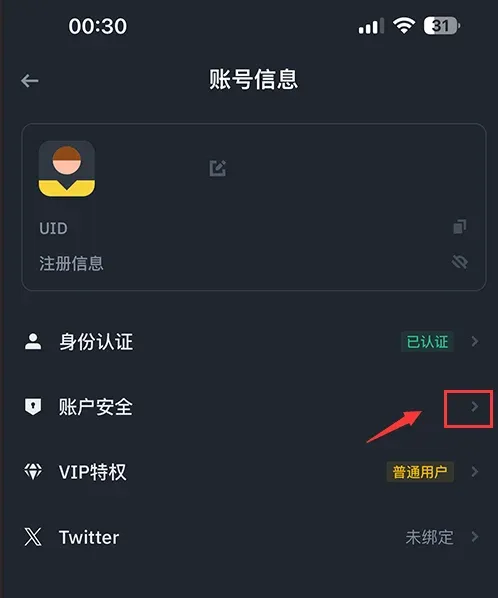
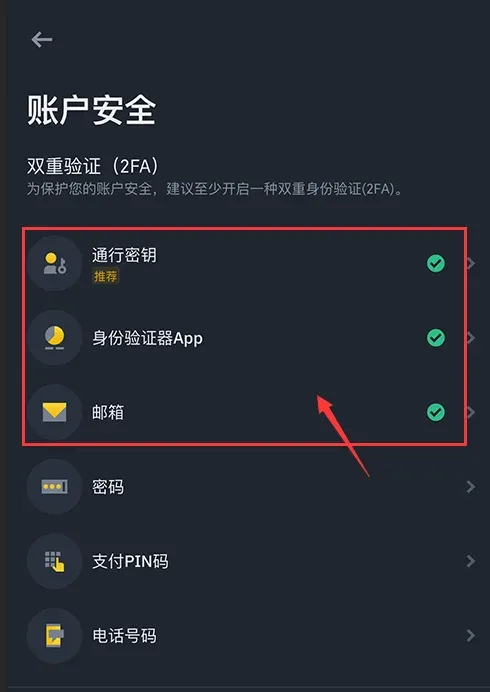
- Activate Two‑Factor Authentication (2FA) such as Google Authenticator.
- Set up a withdrawal whitelist to restrict outgoing addresses.
Important Considerations
- Fees: P2C trades are fee‑free, while spot trading incurs a small percentage fee; using BNB to pay fees grants a discount.
- Market Volatility: Bitcoin prices can swing sharply; monitor market conditions before deciding on the entry point.
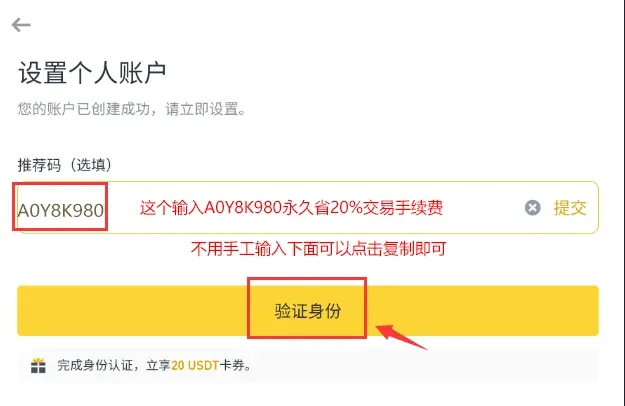
- Referral Bonus: Using the promo registration link may earn you a fee rebate.
Note for U.S. Residents: U.S. customers must use Binance.US (the separate platform compliant with U.S. regulations) rather than the global Binance site.
Tax Disclaimer: Cryptocurrency gains may be taxable in your jurisdiction. Consult a tax professional to understand your local obligations.
Binance App Registration and Usage Guide
1. Download and Open the Binance App
- iOS: Use a non‑U.S. Apple ID (e.g., from Taiwan) to access the App Store, search for “Binance”, and tap Get.
- Android: Visit the official download page and install the APK.
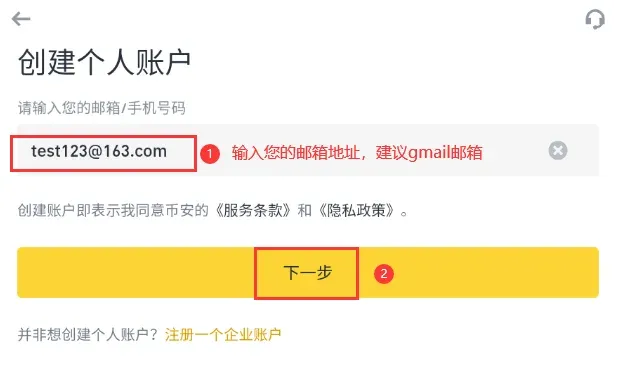
2. Register an Account
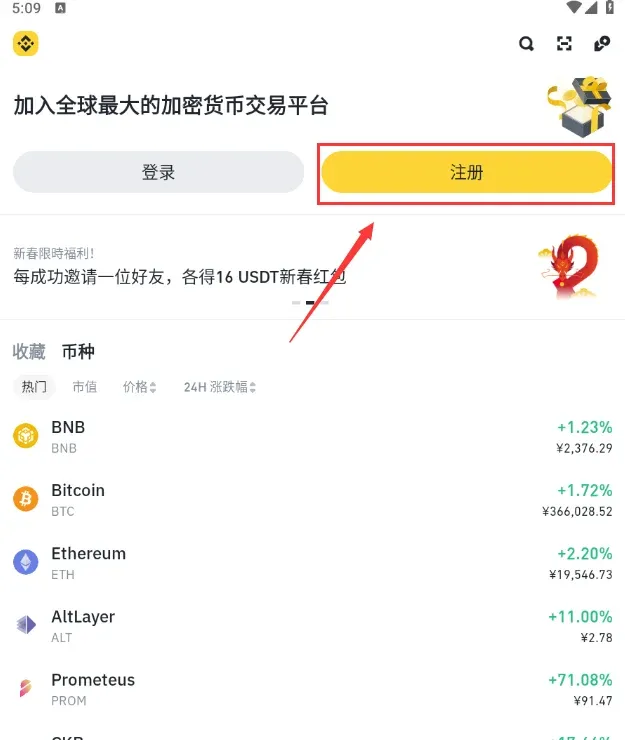
- Open the app and tap Register.
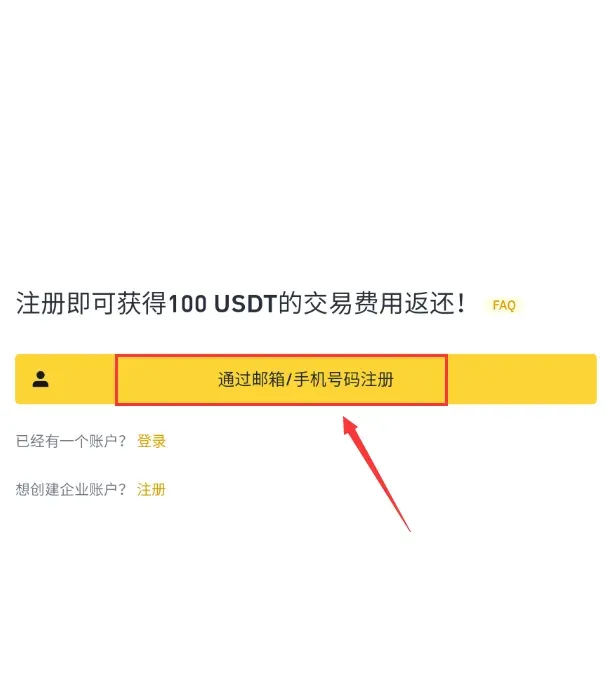
- Choose a registration method: email, mobile number, Apple ID, or Google account.
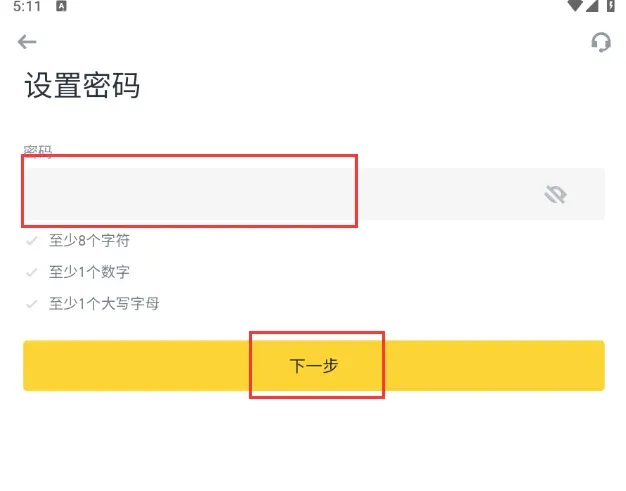
- Enter the email or phone number and set a password that meets security requirements (minimum 8 characters, includes uppercase letters and numbers).
- Receive and enter the 6‑digit verification code, then read and agree to the Terms of Service and Privacy Policy. Submit to complete account creation.
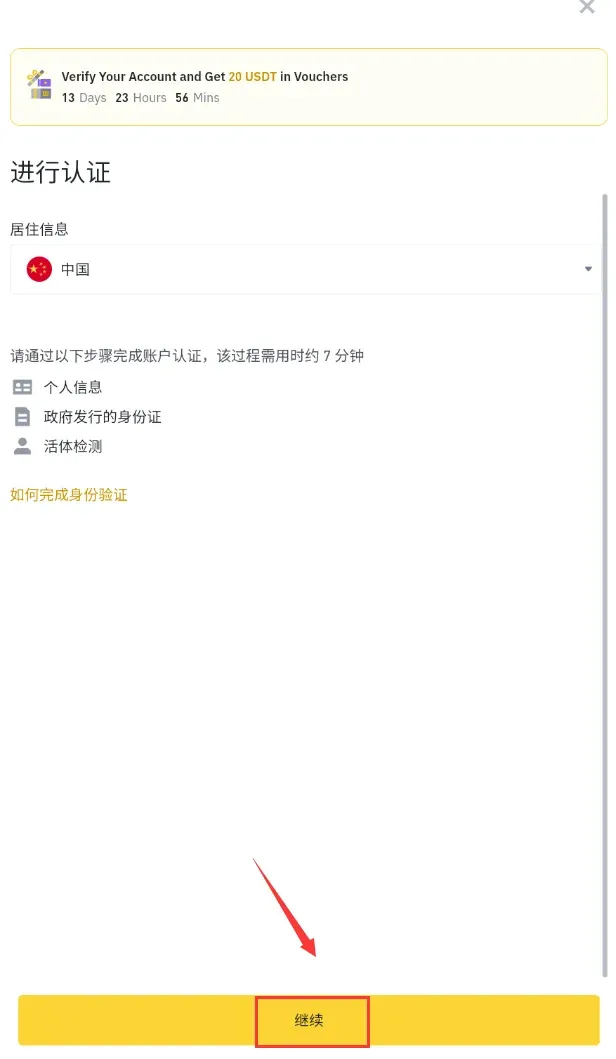
3. Complete KYC Identity Verification
- Go to Profile → Identity Verification, upload your identification documents, and complete facial recognition.
- After approval you can access all features, including C2C and spot trading.
4. Activate Security Settings
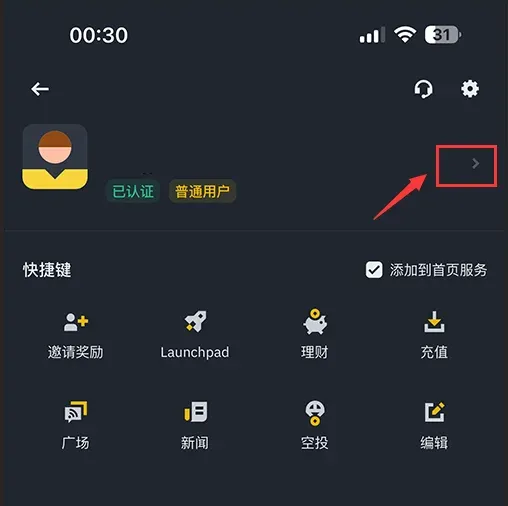
- Open Account Security, enable 2FA, set a payment PIN, and add a withdrawal whitelist.
Practical Binance Bitcoin Purchase Workflow (Illustrated)
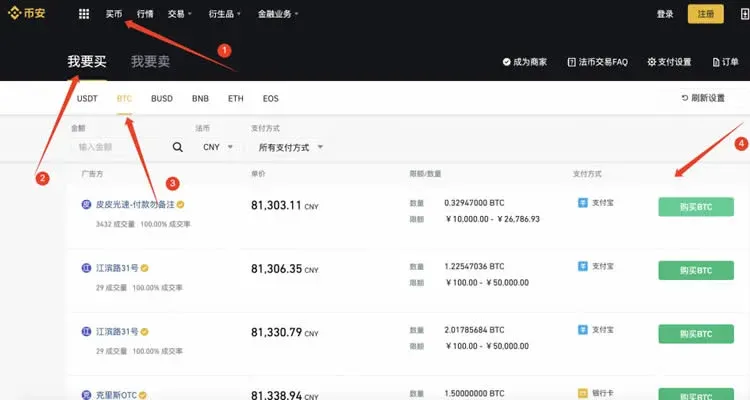
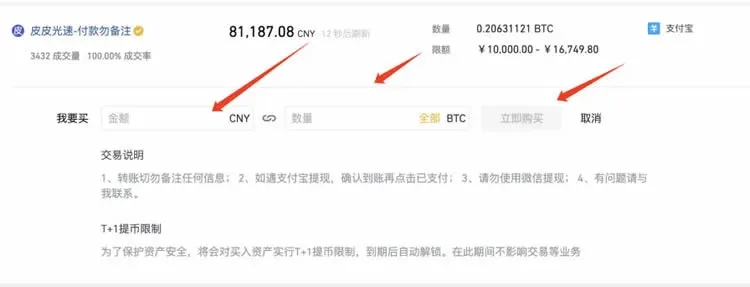
- Go to the “Buy Crypto” Page: On the desktop site click the top‑menu “Buy Crypto” to enter the fiat‑trading section.
- Select BTC: Click “Buy”, then choose BTC from the list of coins.
- Choose an Offer: Based on your budget, pick a seller’s advertisement that matches your desired quantity limits.
- Enter Amount: In the pop‑up purchase window input either the USD amount or the BTC quantity, then click Buy Now.
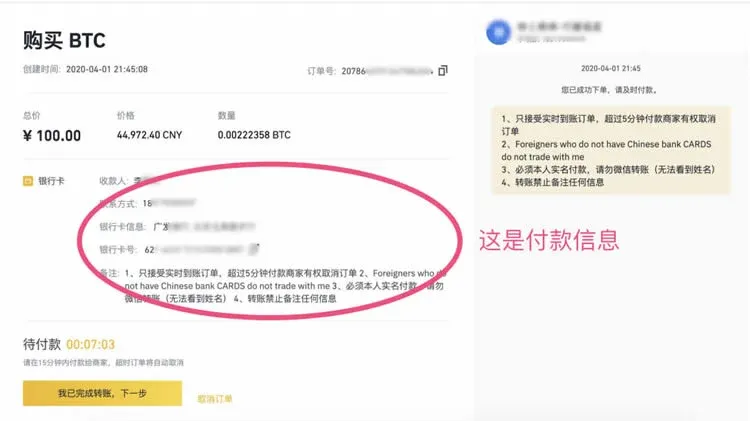
- Transfer Funds to the Seller: Follow the on‑screen instructions to send the payment to the seller’s designated bank account or payment method, then click I Have Completed the Transfer.
- Wait for the BTC to Arrive: After the seller confirms receipt of your payment, they will release the BTC, which will automatically credit to your Binance wallet.
Frequently Asked Questions About Buying Bitcoin
- Do I have to purchase a whole 1 BTC at once?
No. Binance supports fractional purchases; you can buy as little as 0.001 BTC (or the equivalent in USD), with a minimum spend of roughly $15‑$20.
- How can I reduce trading costs?
Pay fees with BNB to obtain a discount, or use fee‑free P2C trades where available.
- How is my capital protected?
For maximum security, store large amounts in a hardware wallet and always enable 2FA and a withdrawal whitelist.
Closing Remarks
By following the steps above, users worldwide can complete the purchase, trade, and secure storage of Bitcoin (BTC) on the Binance platform. For more Binance tips or the latest promotional information, stay tuned to Bitaigen’s upcoming articles.
Related Reading
- How to Buy Bitcoin in 2026: A Beginner’s Complete Guide
- Buy Bitcoin with Alipay and WeChat: Beginner's Step‑by‑Step Guide
- 2026 Beginner's Guide: How to Buy Bitcoin Safely on OKX
💡 Register on Binance with referral code B2345 for the maximum trading fee discount. See Binance complete guide.



