
 Bitaigen Research
 How to Purchase Bitcoin on the Binance Exchange?
On Binance’s spot market you can acquire Bitcoin using four order types: limit order, market order, stop‑limit order, and OCO order. This article provides a complete step‑by‑step visual guide, demonstrating every click and entry required for each method.
In this guide we systematically walk through the four ways to place a spot‑market Bitcoin purchase on Binance, catering to both newcomers and experienced traders. Detailed screenshots accompany each step, helping you quickly set up limit orders, market orders, stop‑limit orders, and OCO orders, while also offering practical tips on account registration, app download, and fee‑discount referral codes. Continue reading to master every operational detail.
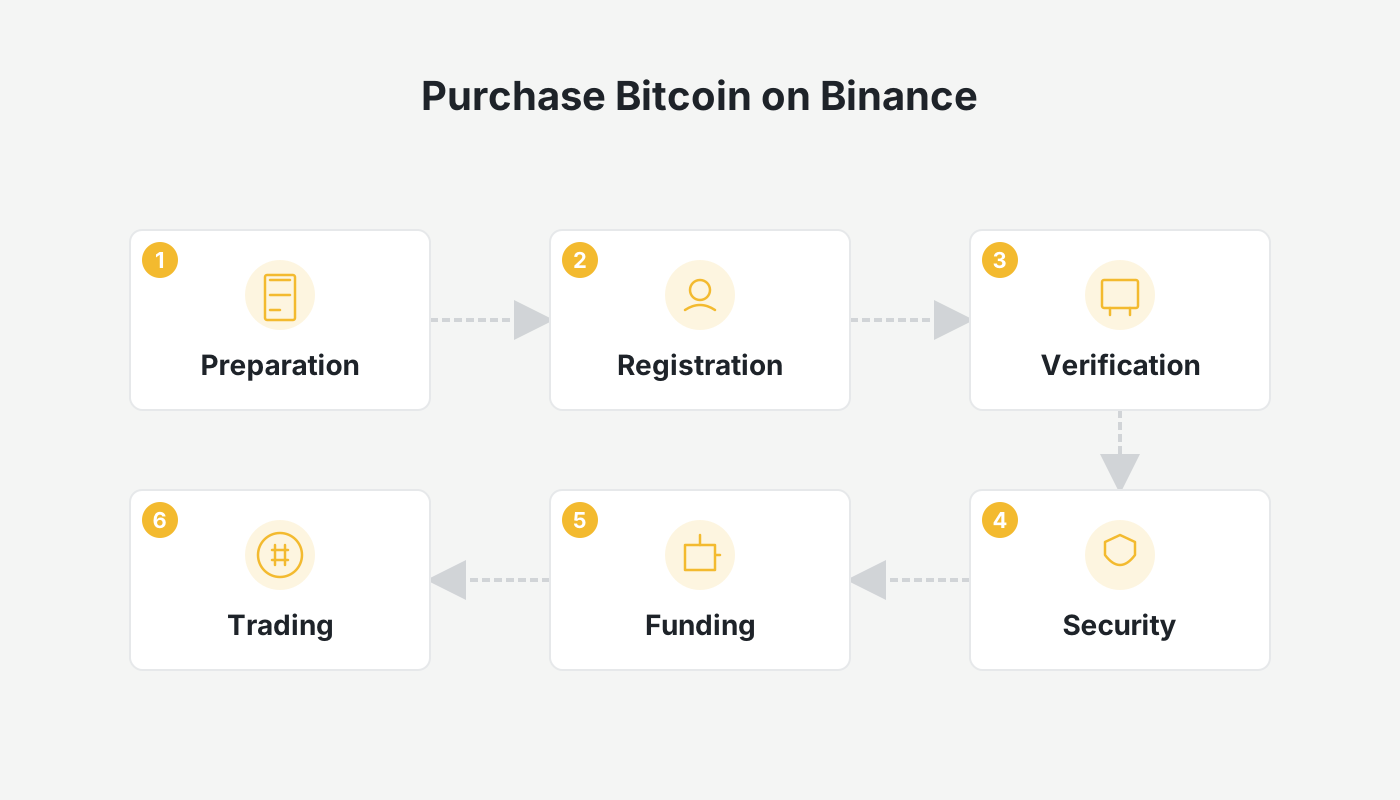
Binance Official Website + App Download + Fee‑Discount Referral Code + Tutorial
If you have not yet created a Binance account, you can use the links below to register and download the official app (available for both Android and iOS). The tutorial that follows was written by the author during the registration process; it is exhaustive and will guide you through registration, app installation, identity verification, and the full onboarding workflow.
- Binance referral code: `B2345` (register with this code to receive a permanent 20 % fee discount)
- Binance exchange official website
- Binance exchange app download page
- How to download Binance on an iPhone in Mainland China? A full guide covering download, registration, deposit/withdrawal, and buying/selling crypto.
- Detailed tutorial for downloading the Binance app on Android phones in Mainland China (includes the latest 2026 registration guide).
Important for U.S. residents: The global Binance platform is not available in the United States. U.S. users should access Binance.US instead, which complies with local regulations.
Spot‑Market Bitcoin Purchase on Binance: Prerequisites
Before placing any order, make sure you have completed the following three steps:
- Successfully registered a Binance account.
- Finished the Know‑Your‑Customer (KYC) identity verification.
- Deposited funds into your account (e.g., holding USDT or another tradable asset).
Once these conditions are satisfied, you can enter Binance’s Pro version of the spot market. The Pro interface offers five spot‑order types (more comprehensive than the Lite version). The following sections will introduce each one in detail.
1. “Limit Order” – Ideal for Users Who Have a Specific Target Purchase Price
A limit order allows the buyer to set a desired price; the order will only be executed when the market price reaches or improves upon that level.
- Order price: the Bitcoin price you wish to pay.
- Quantity: the amount of BTC you want to acquire.
Advantages: controllable cost, virtually no slippage.
Disadvantages: if the market never reaches your price, the order may remain unfilled; execution speed depends on market movement.
2. “Market Order” – Ideal for Users Who Prioritize Speed Over Price Precision
A market order tells the system to execute the trade immediately at the best available price, regardless of the current level.
- You only need to specify quantity (or order value in USDT) to submit the order.
- Execution is instantaneous, making it suitable for rapid purchases.
Advantages: simple operation, fast execution, guaranteed order fill.
Disadvantages: price is not controllable and may experience slippage, especially in volatile markets.
3. “Stop‑Limit Order” – Ideal for Users With a Clear Breakout Strategy
A stop‑limit order becomes a limit order automatically once a pre‑set trigger price is breached.
- Trigger price: the price level that activates the order.
- Limit price: the actual price at which the limit order will be placed after the trigger.
- Quantity: the amount of BTC to buy or sell.
Essentially a variant of a limit order; its pros and cons mirror those of a standard limit order.
4. “OCO Order” – Advanced Order That Simultaneously Sets Two Mutually Exclusive Conditions
OCO (One‑Cancels‑the‑Other) allows you to bind two opposite instructions within a single order. When either instruction is executed, the other is automatically cancelled.
- Combines a limit order with a stop‑limit order.
- Enables you to buy on a pull‑back while also preparing to buy on a breakout, thereby improving capital efficiency.
5. “Trailing Stop Order” – Suitable for Position‑Management After an Initial Purchase
A trailing stop order automatically raises the stop‑loss price as the asset price rises, but it only triggers if the price falls back to the trailing level. This order type is typically used after you already hold a position and is rarely employed for the first entry.
A separate tutorial on selling Bitcoin on Binance will be released later, where the usage of trailing stops will be explained in depth.
Spot‑Market Bitcoin Purchase on Binance: Mobile App Visual Walk‑Through
The steps below use the Binance Pro interface as an example, covering everything from switching the UI mode to submitting an order.
1. Preliminary Step: Switch to Binance Pro
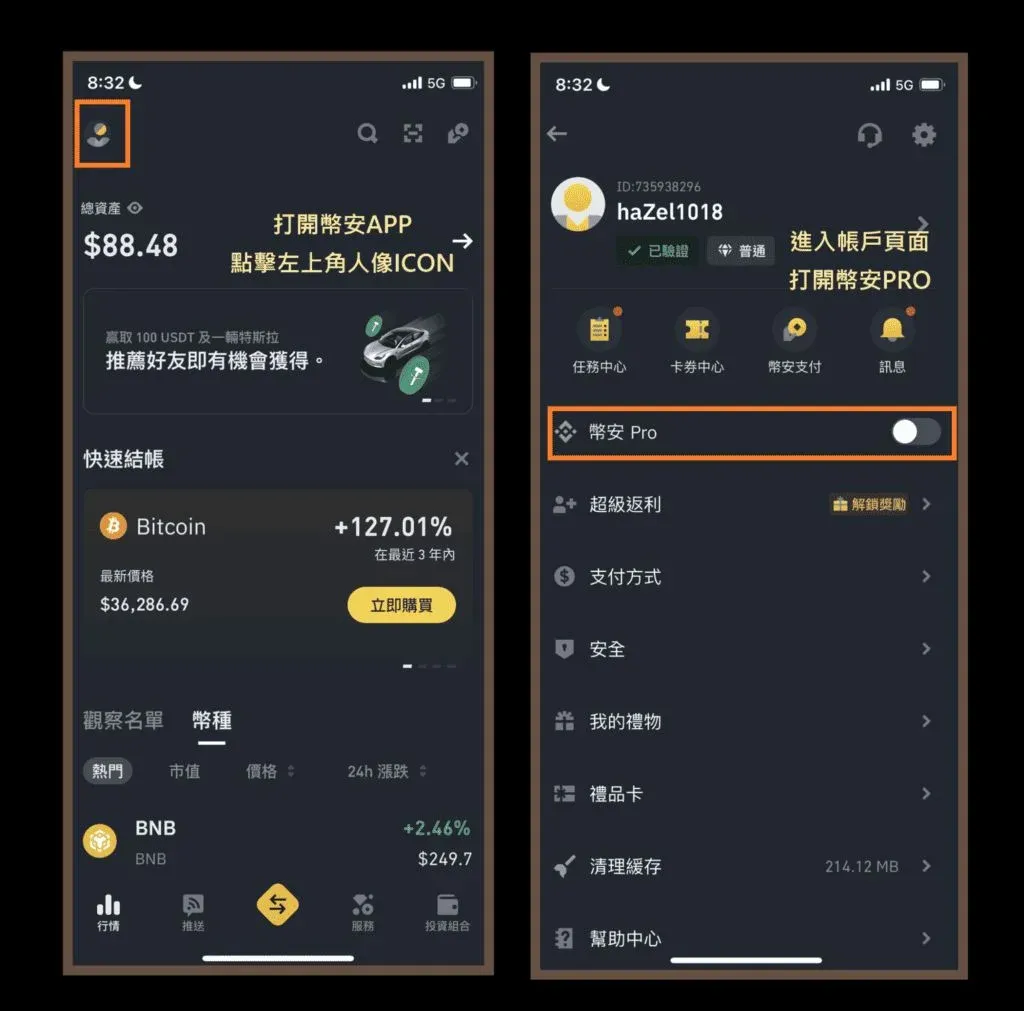
Step ① Open the Binance app and tap the orange icon in the upper‑left corner to access the main account page.
Step ② In the pop‑up window locate the “Binance Pro” toggle and tap it to switch modes. If you already default to Pro, you can skip this step.
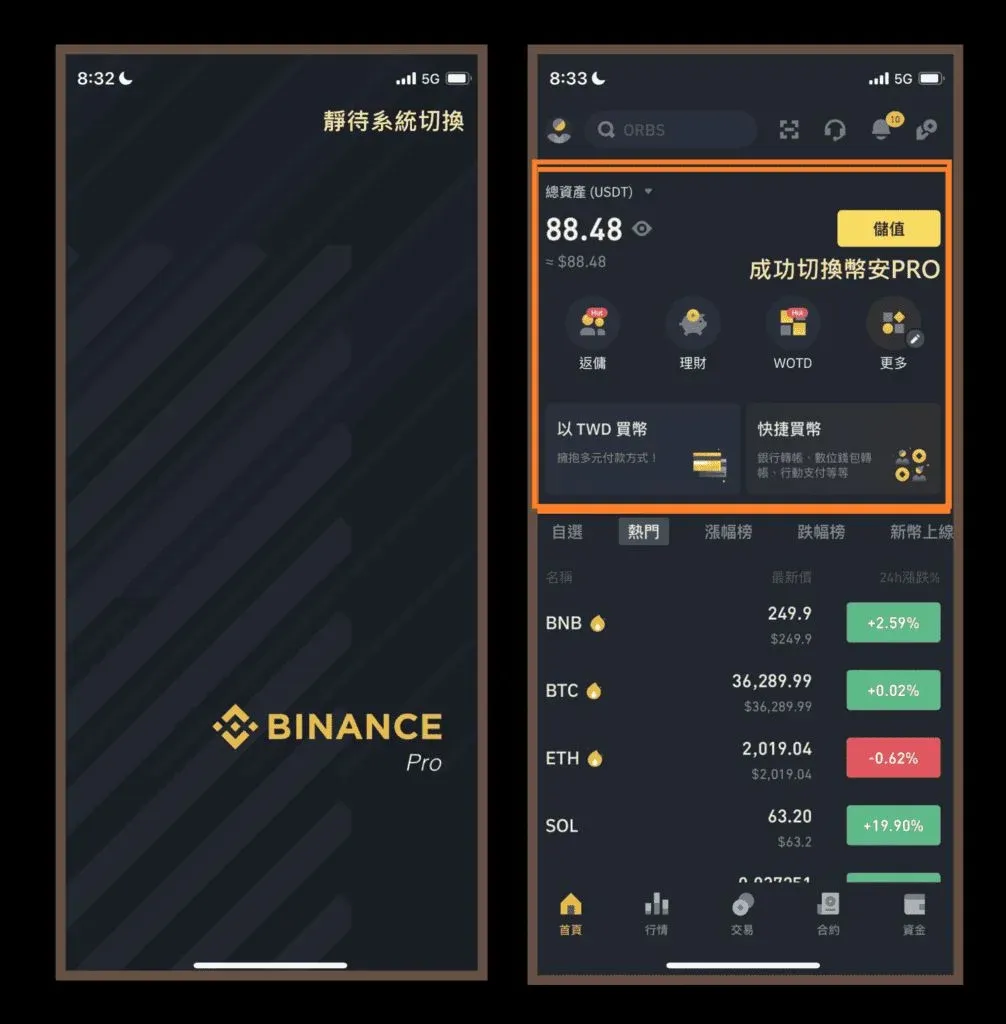
Step ③ After the switch succeeds, tap the “Trade” button in the middle of the bottom navigation bar to enter the trading page.
Step ④ In the upper‑left corner, select the trading pair you wish to use, for example USDT/BTC.
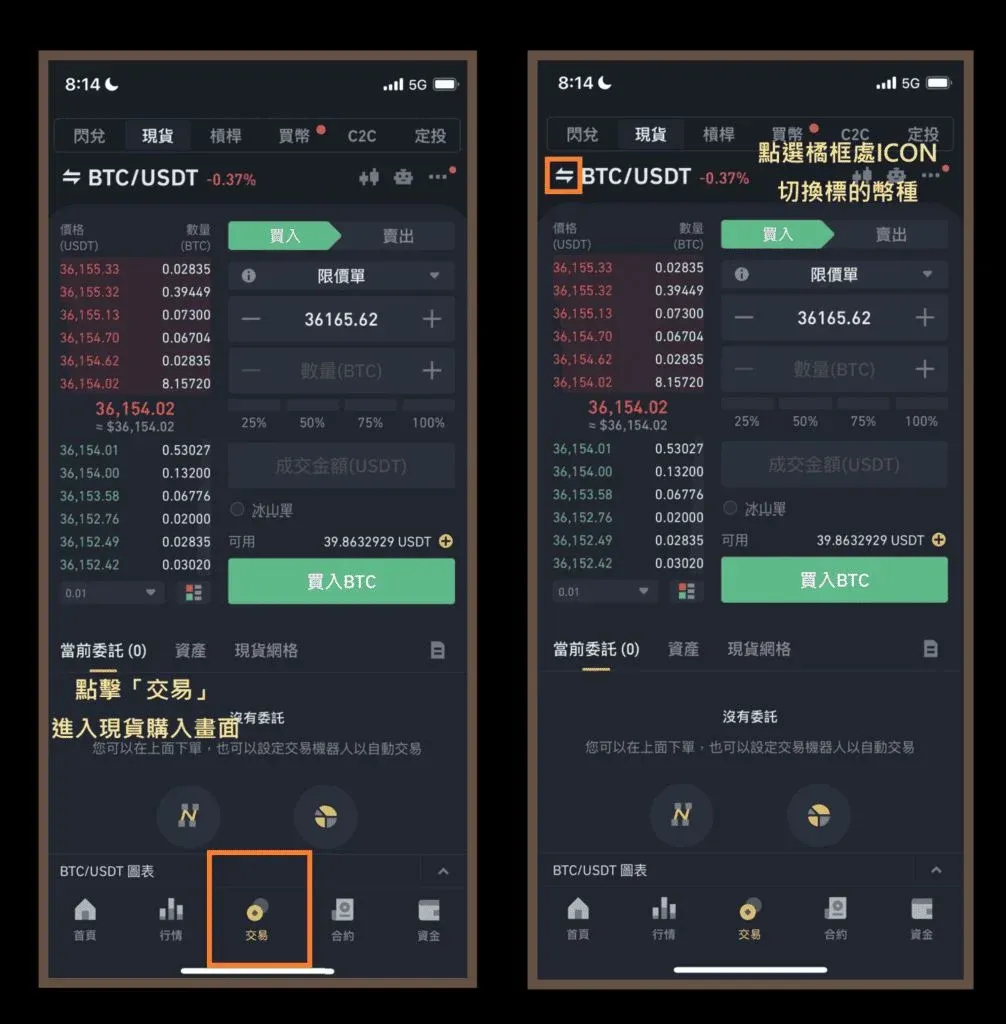
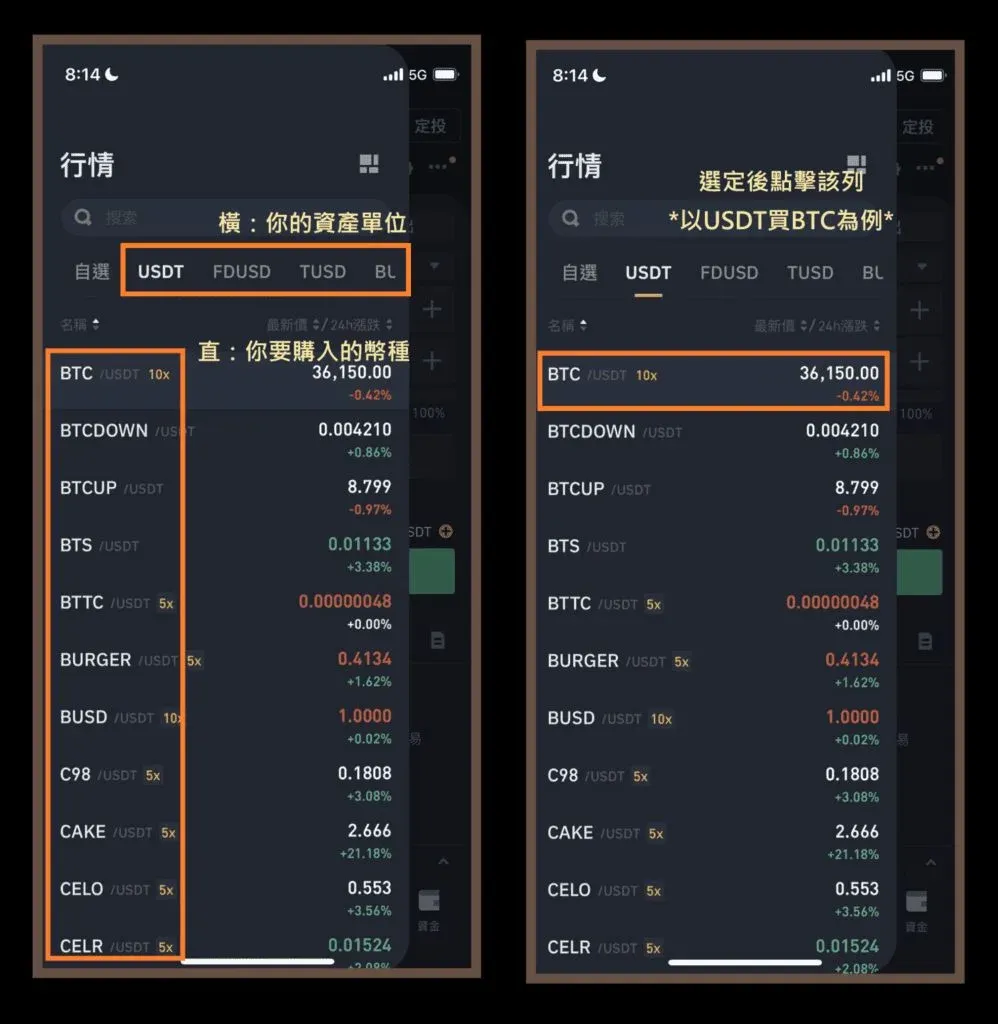
Step ⑤ Choose USDT as the quote currency and BTC as the base currency, which brings you to the “Buy BTC with USDT” trading screen.
- If you prefer to pay with BUSD, ETH, or another supported token, simply swipe the horizontal payment‑currency selector.
- This presumes you already hold the selected payment token in your Binance wallet.
Step ⑥ At the top of the screen you can toggle among Limit, Market, Stop‑Limit, Trailing Stop, and OCO order types.
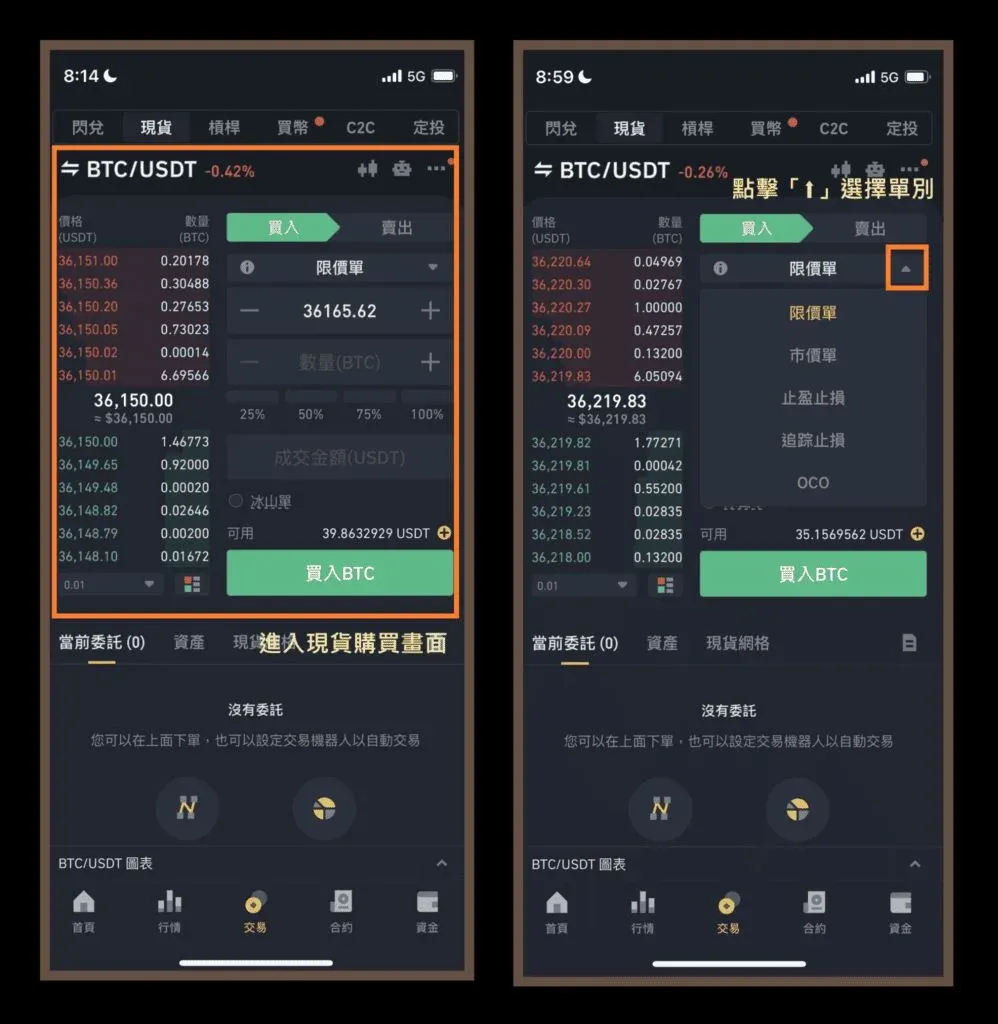
Once the preliminary steps are complete, you may select the order type that best matches your trading strategy and proceed with the hands‑on practice.
2. Limit Order Tutorial
A limit order is suited for situations where you want to buy at a specific price point.
Step ① In the order‑type bar, select “Limit” (this is the default view when you first open the page).
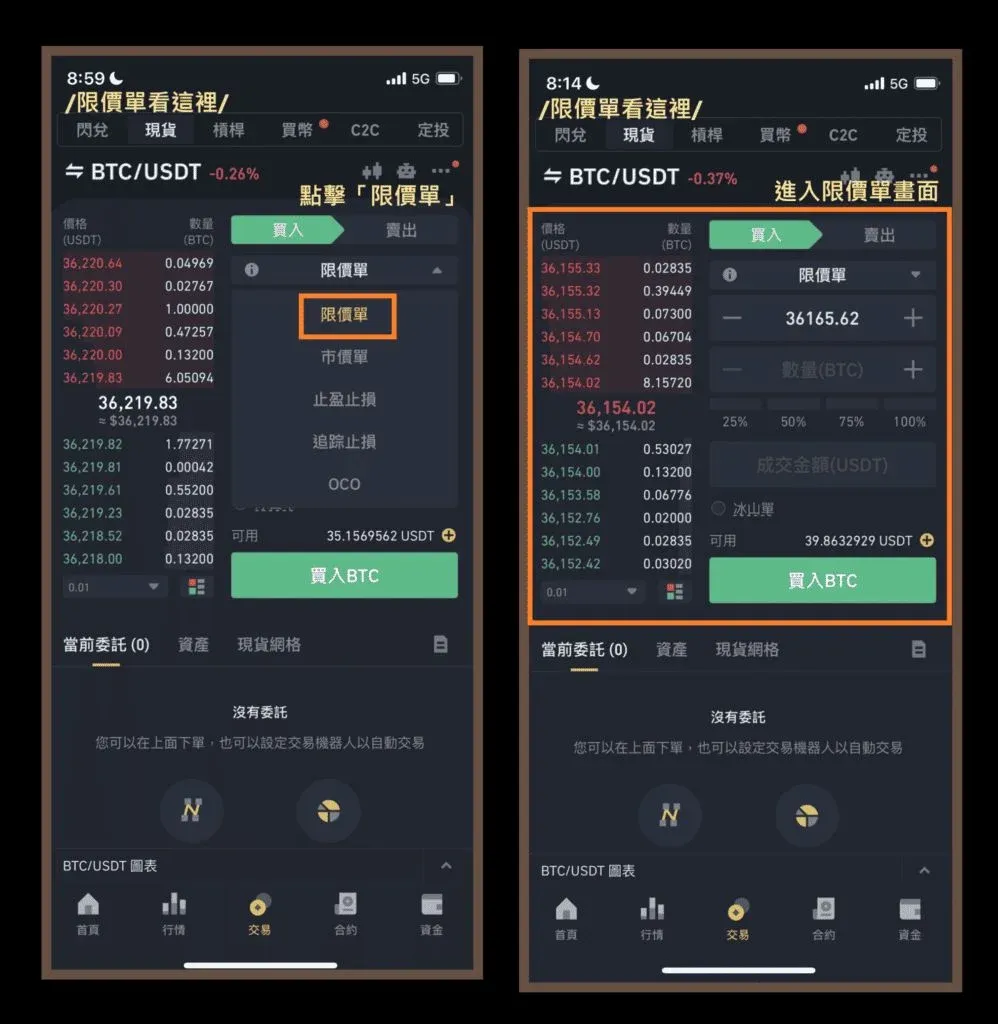
Step ② Fill in the required fields:
- Order price: e.g., 36,000 USDT.
- Quantity: e.g., 0.00015 BTC.
Note: The total order value must be at least 5 USDT; orders below this threshold will be rejected by the system.
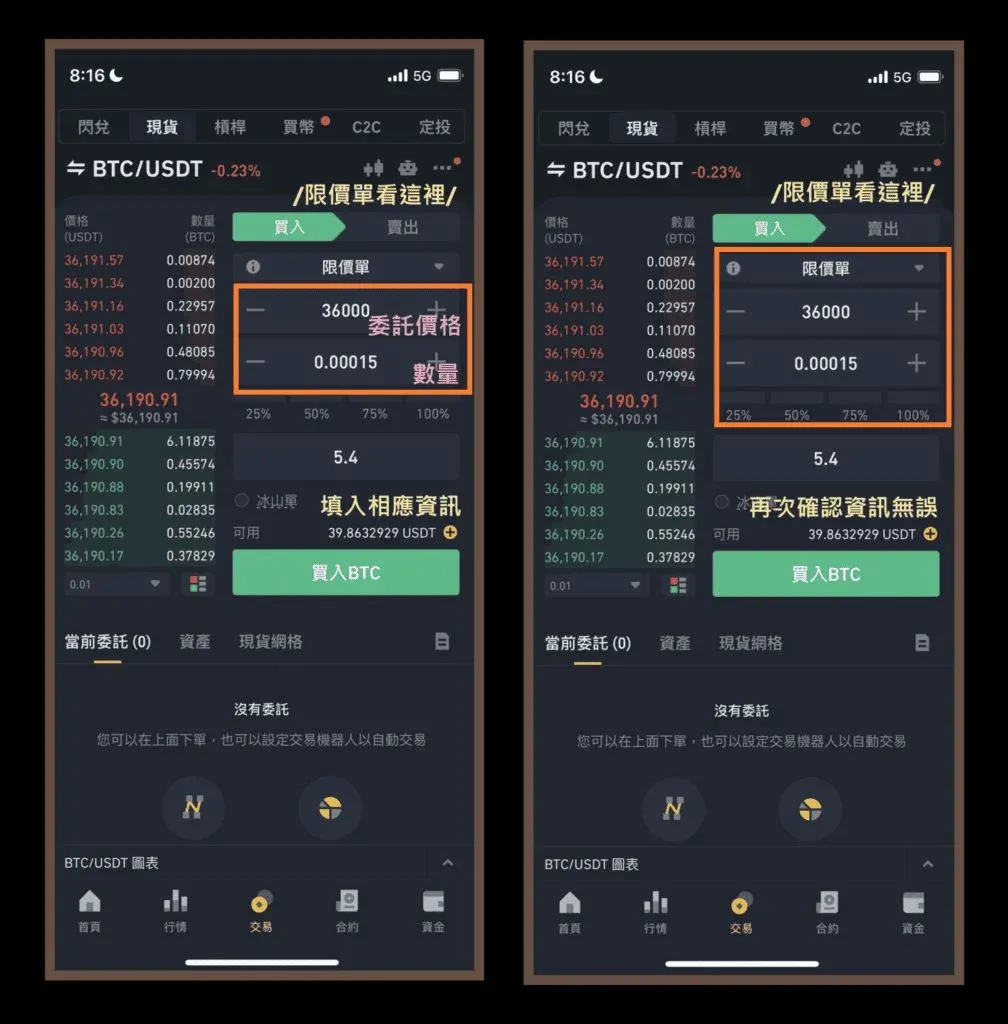
Step ③ After verifying the information, tap the green “Buy BTC” button.
Step ④ A “Order successfully placed” toast will appear, confirming that your limit order is now live on the order book. The trade will only be executed when market conditions meet your price.
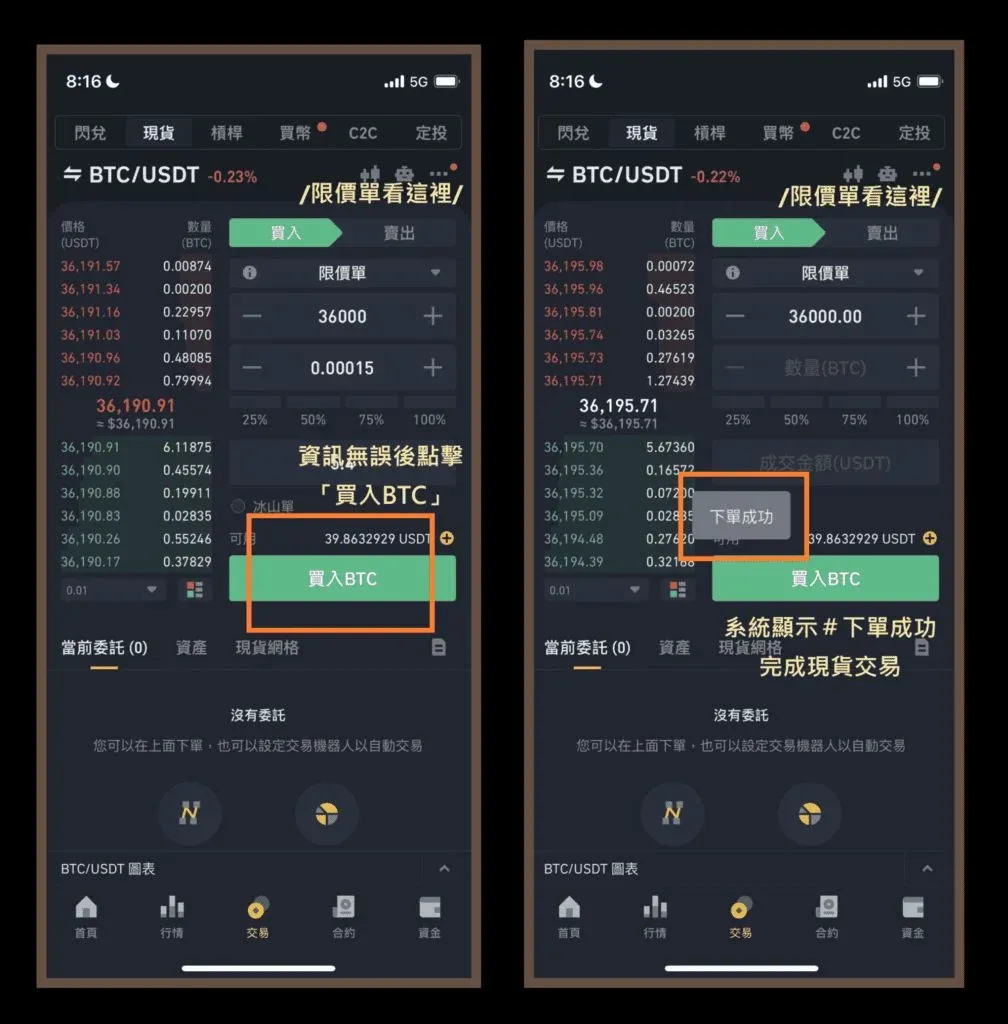
Tip: Binance’s deep liquidity usually allows limit orders to be filled within half an hour, provided the price you set is realistic.
3. Market Order Tutorial
A market order is the fastest way to acquire Bitcoin when you are less concerned about the exact execution price.
Step ① Choose “Market” from the order‑type selector.
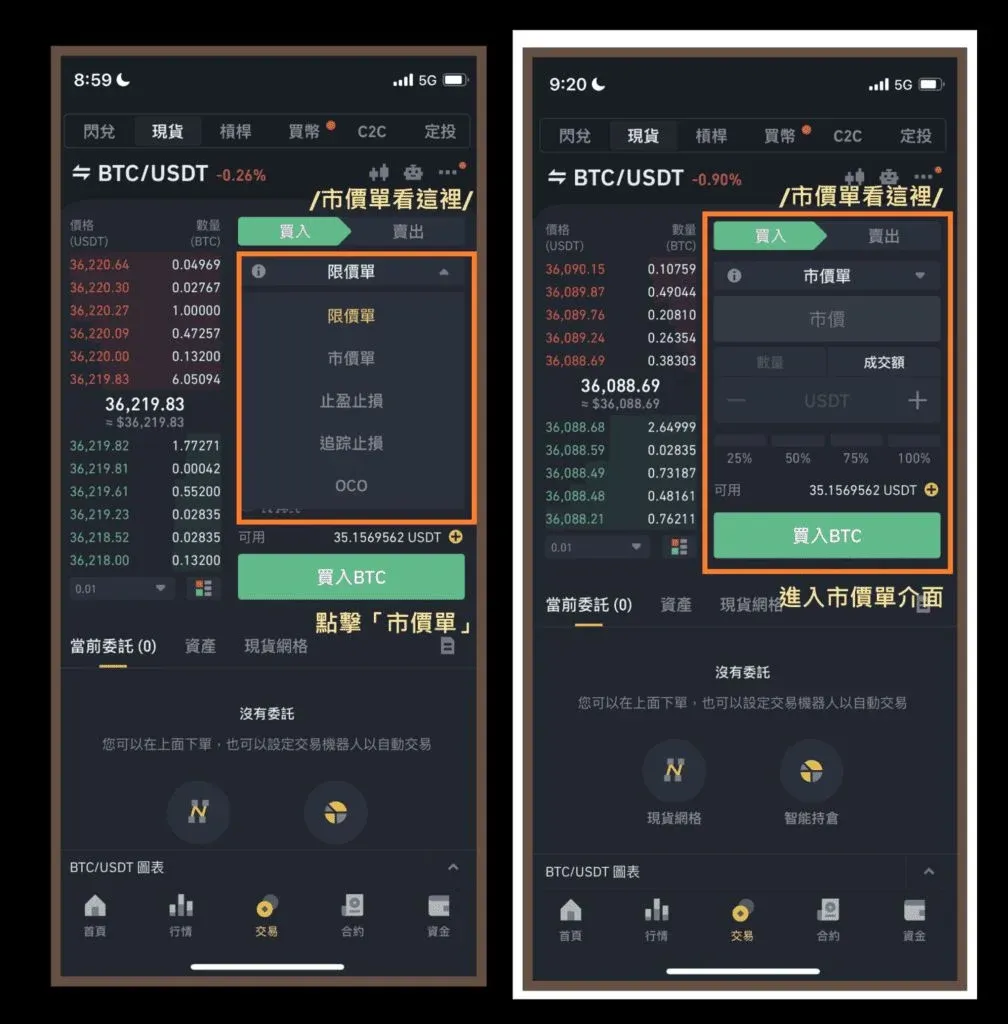
Step ② Enter one of the two possible inputs:
- Quantity: the exact amount of BTC you wish to buy.
- Order value: the amount of USDT you are willing to spend.
The same minimum‑order rule applies: the total value must be ≥ 5 USDT.
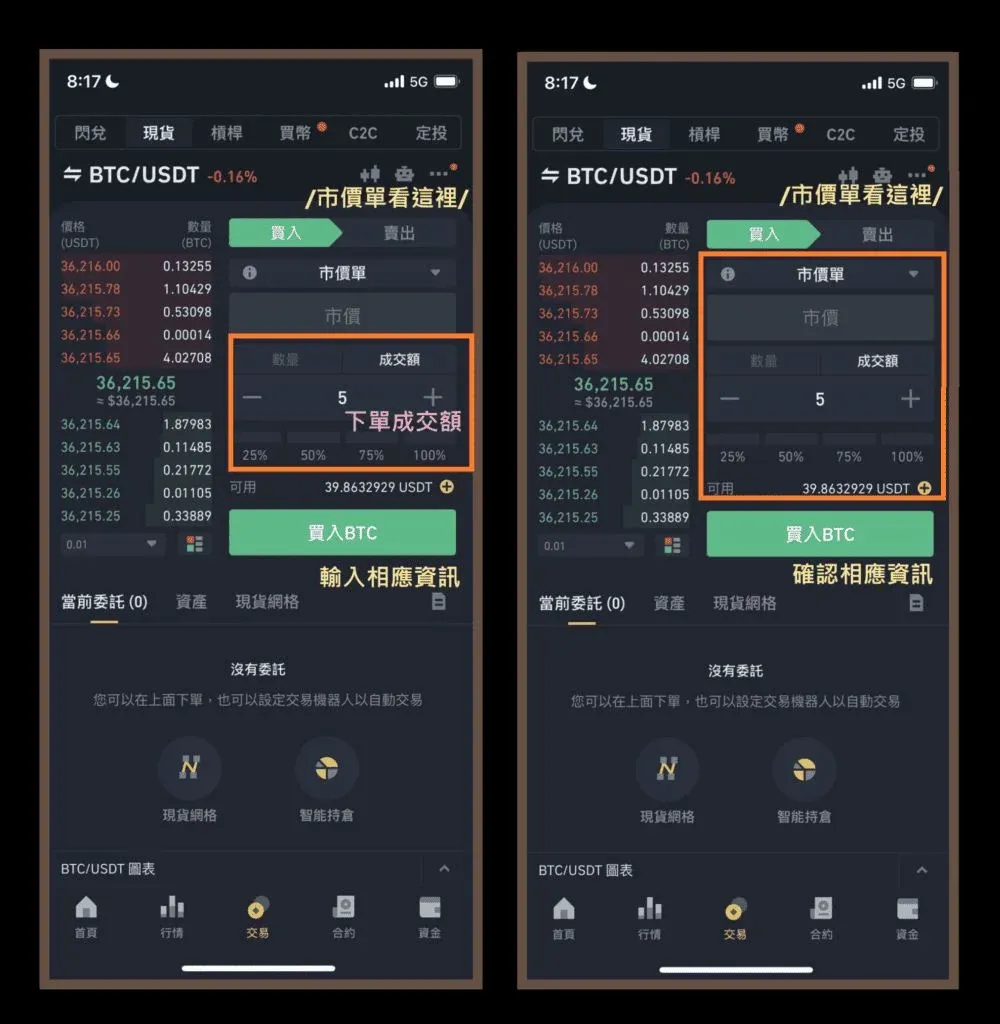
Step ③ Double‑check the numbers and press “Buy BTC”.
Step ④ A “Order successfully placed” message will appear, and the trade will be executed instantly. Your new BTC balance will be reflected on the “Wallet” page in real time.
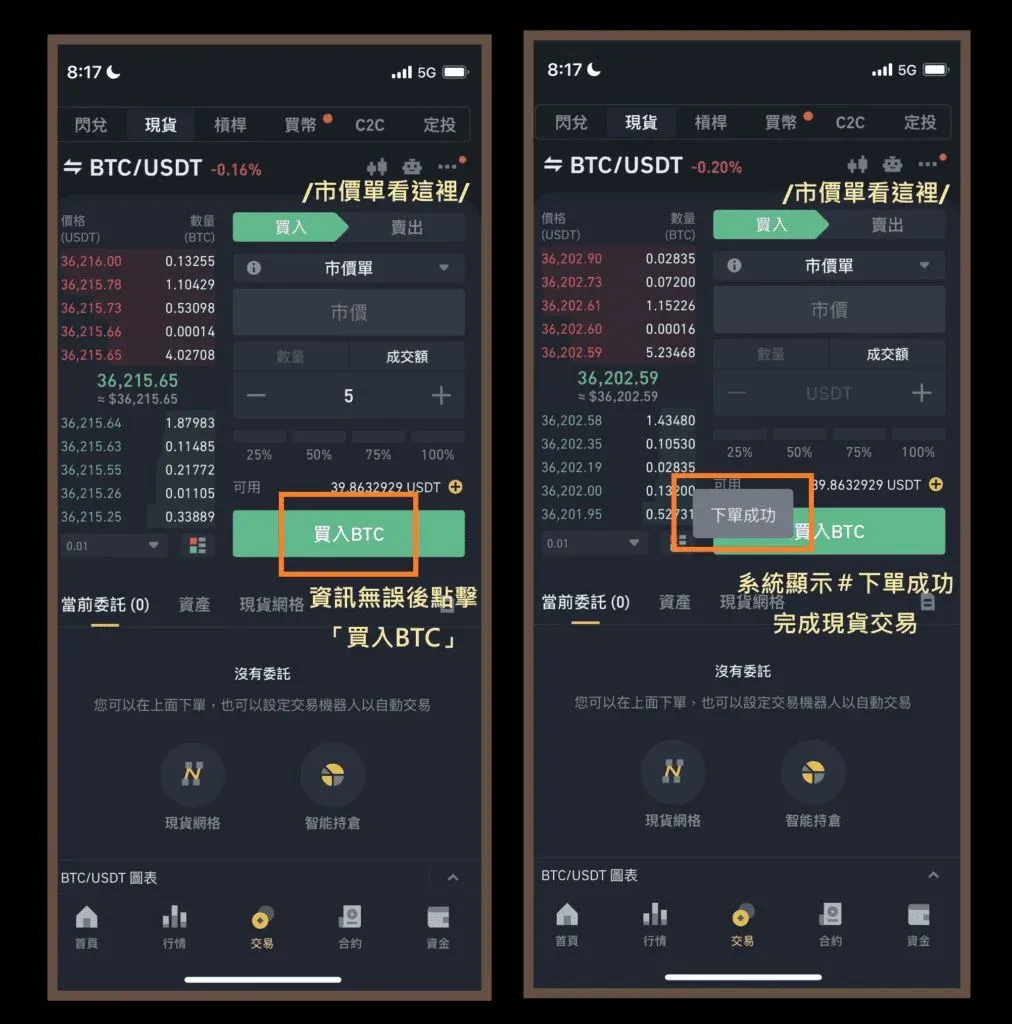
Market orders are ideal for investors who do not want to monitor price movements constantly.
4. Stop‑Limit Order Tutorial
This order type is useful for breakout‑capture scenarios, where you want to automatically buy once the price pierces a resistance level.
Step ① Select “Stop‑Limit”.
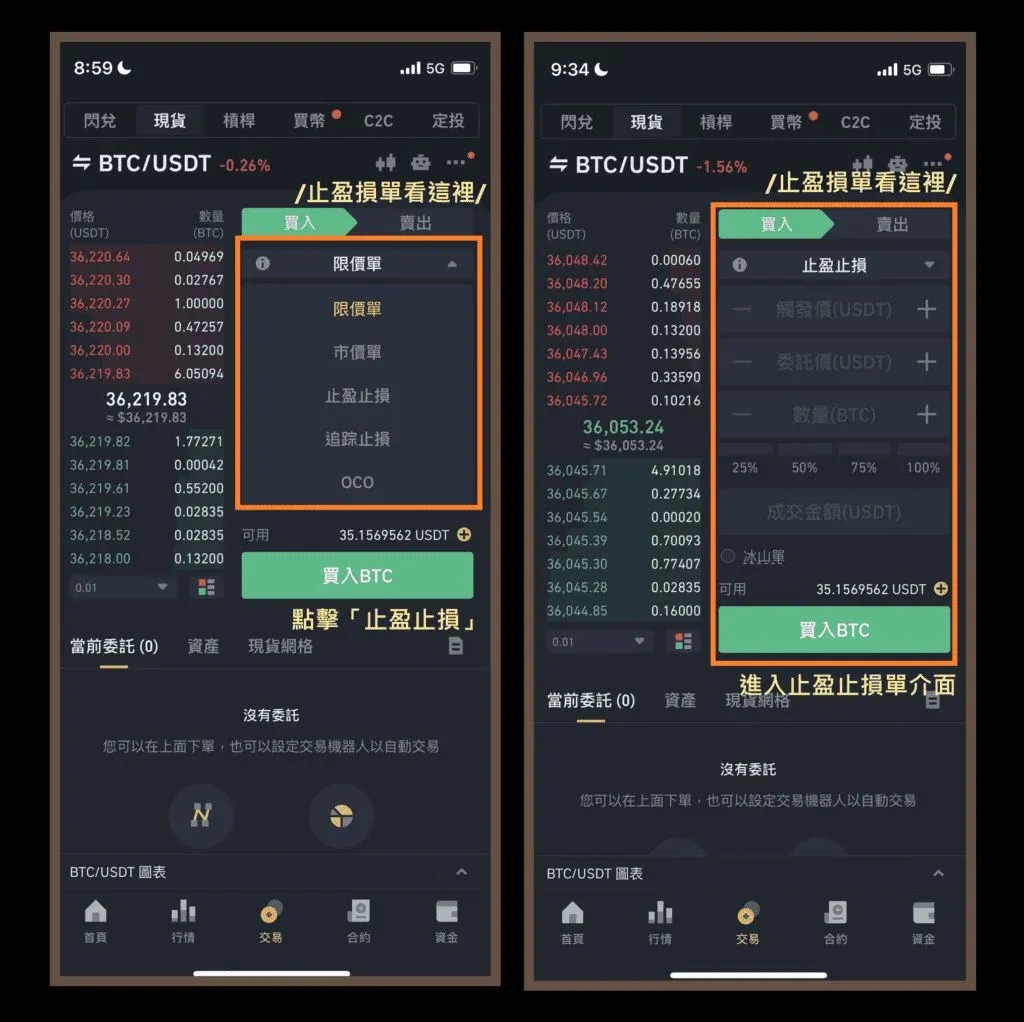
Step ② Fill in the three required fields:
- Trigger price: the breakout level, e.g., 44,488 USDT.
- Limit price: the price at which the limit order will be placed after the trigger, e.g., 44,490 USDT.
- Quantity: e.g., 0.00015 BTC.
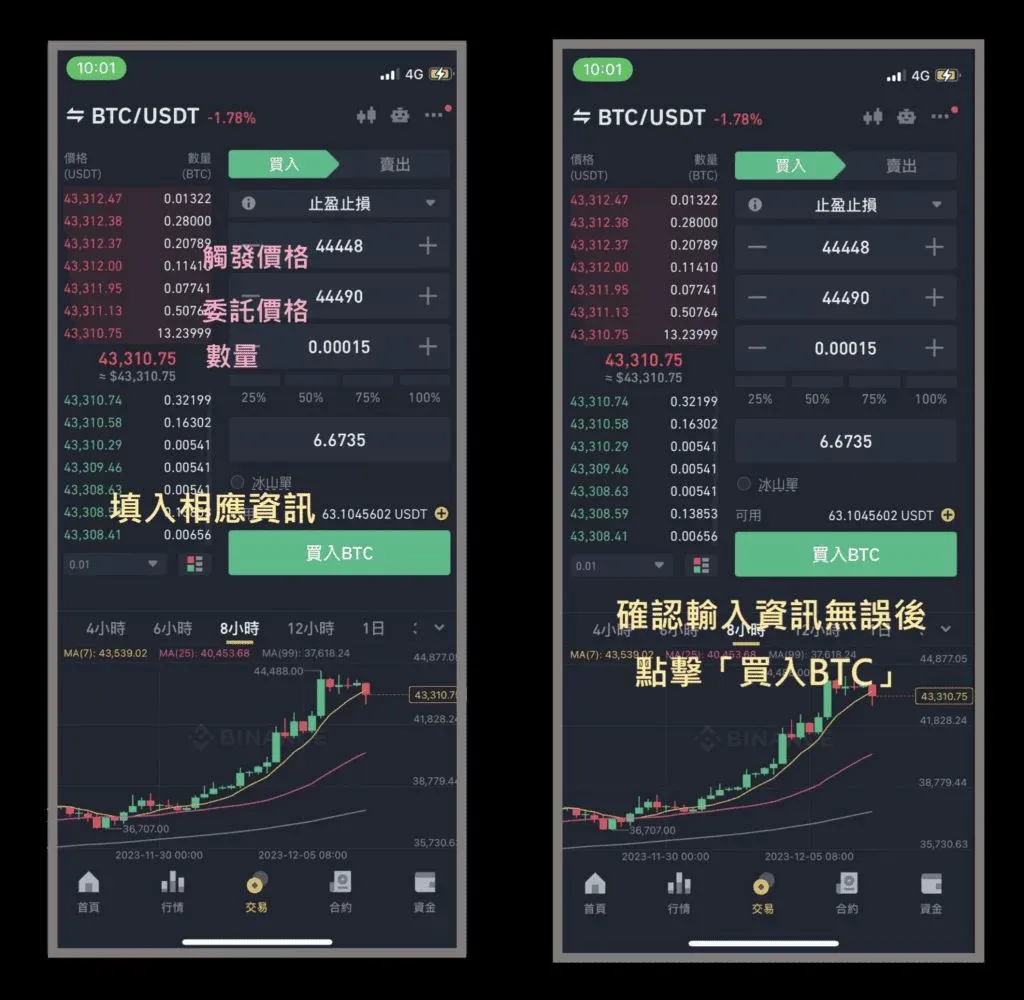
Step ③ Verify all numbers, then tap “Confirm”.
Step ④ The interface will display “Order successfully placed”, indicating that the stop‑limit order is now live. Once the trigger price is breached, the system will automatically submit the limit order on your behalf.
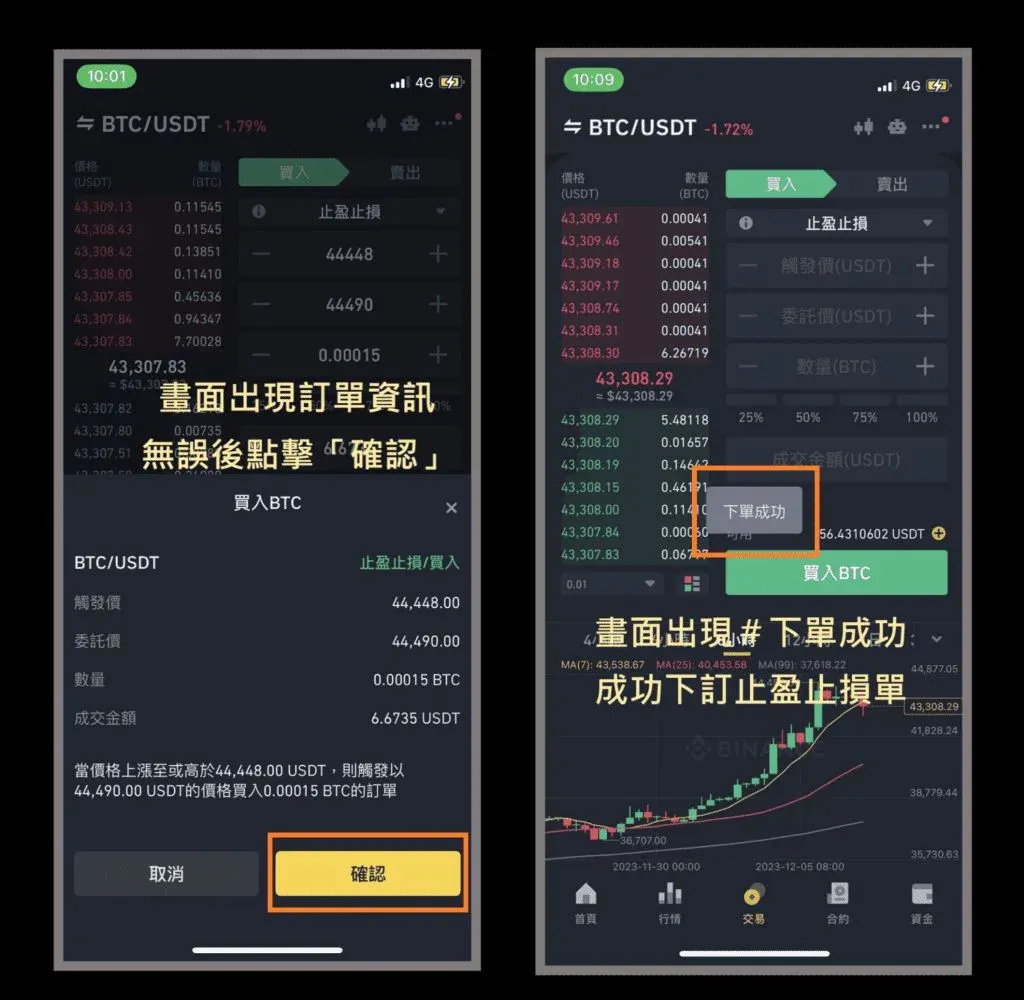
As with other order types, the total order value must be ≥ 5 USDT.
5. OCO Order Tutorial
An OCO (One‑Cancels‑the‑Other) order lets you set both a limit‑buy (for price retracements) and a stop‑limit‑buy (for breakouts) within a single submission. Whichever condition is satisfied first will execute, while the other is automatically cancelled.
Step ① Choose “OCO” from the order‑type bar.
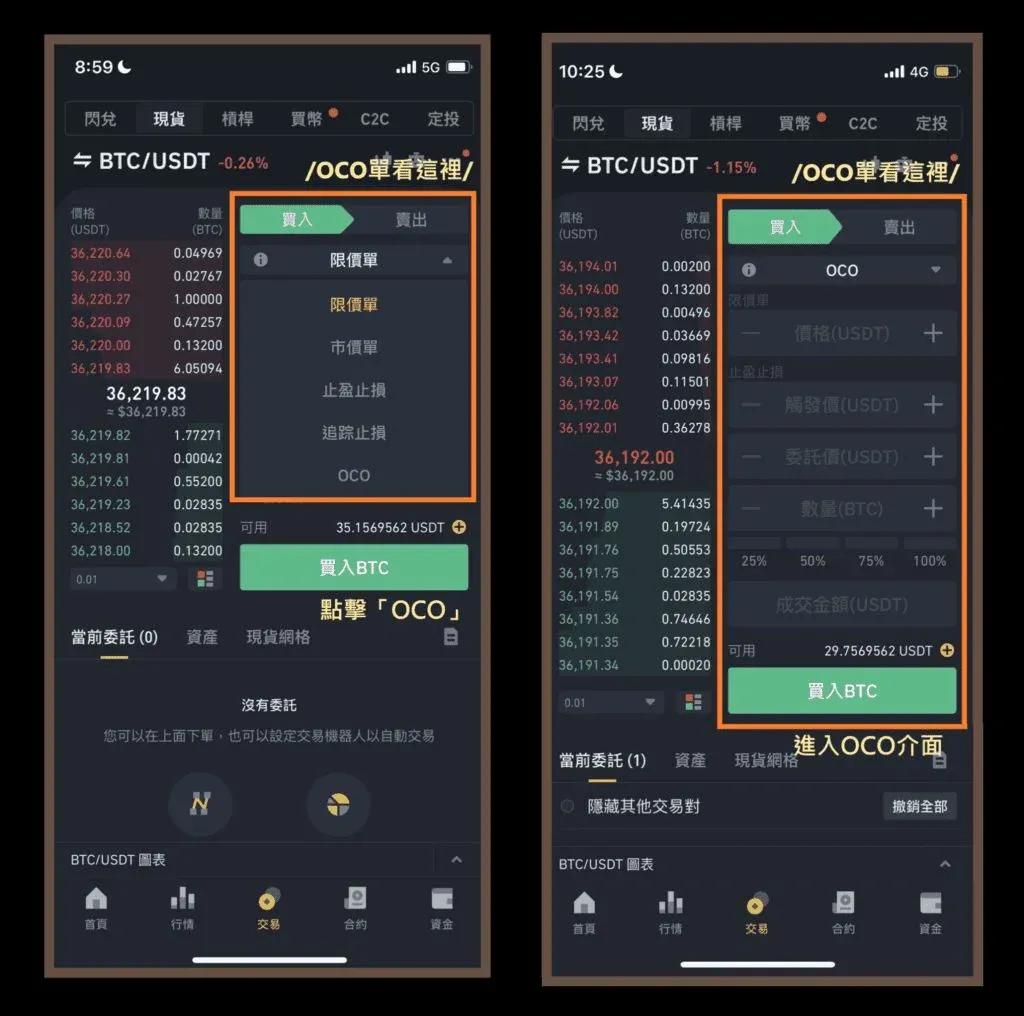
Step ② Populate the fields as follows:
- Limit‑buy price (for pull‑back entry): e.g., 43,000 USDT.
- Trigger price (for breakout entry): e.g., 44,488 USDT.
- Limit price after trigger: e.g., 44,490 USDT.
- Quantity: e.g., 0.00015 BTC.


