
 Bitaigen Research
 In this article we provide a comprehensive breakdown of DexScreener’s core features and usage tips, helping you quickly spot new tokens and hot trends in the DeFi market. Through hands‑on demonstrations you will learn how to view real‑time quotes, technical charts, and liquidity data, giving you an informational edge for on‑chain trading. If you want to improve decision‑making efficiency, keep reading.
What Is DexScreener?
DexScreener is a real‑time market‑data and analytics tool for decentralized exchanges (DEXes). It enables users to discover new tokens quickly, monitor trends, and perform technical analysis while delivering key metrics such as liquidity and market‑cap.
DexScreener aggregates data from multiple blockchains—including Ethereum, BSC, Solana, and others—so users can:
- ✅ Instantly discover newly listed tokens
- ✅ Monitor market trends and spot trading hotspots
- ✅ Use technical‑analysis tools to make more precise trading decisions
In the DeFi ecosystem, many emerging tokens debut on DEXes first. Investors can leverage DexScreener to track movements, obtain real‑time information, and assess risk through technical analysis. The platform also offers:
- 🔹 Instant candlestick (K‑line) charts
- 🔹 Trade history and liquidity data
- 🔹 Community‑influence analytics
This article will dissect DexScreener’s core functionalities, teaching you how to master its tools and gain a competitive edge when trading on‑chain.
Advantages and Limitations of DexScreener
Advantages
- ✔ Supports 90+ blockchains, the broadest coverage
- ✔ On‑chain real‑time data, full transparency
- ✔ Powerful filtering, ideal for short‑term traders
- ✔ Free to use, no subscription or hidden fees
Limitations
- ❌ No built‑in trading capability – you must connect a DEX separately to execute trades
- ❌ Data may experience brief latency, although overall refresh speed remains fast
DexScreener Interface Walkthrough and How to Use It
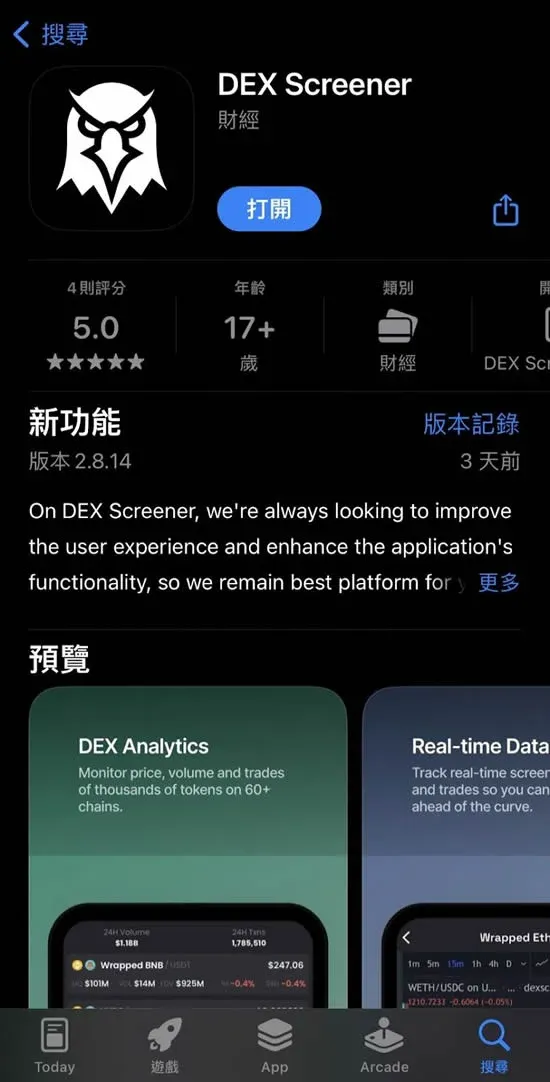
👉 Official website: https://DexScreener.com
Apple Store:
DexScreener is organized into three main zones:
- Top‑level filter bar – quickly locate the market’s hottest tokens
- Pair‑data list – displays real‑time trading information for each token pair
- Bottom filter tools – fine‑tune results using multi‑dimensional criteria
The following sections will analyze each of these components in detail.
1. Main Screen Overview
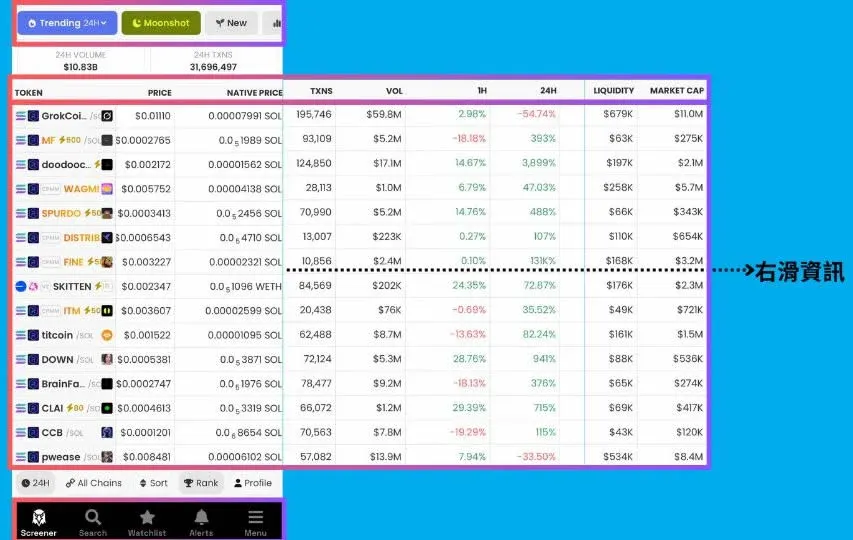
When you launch the DexScreener app, the home screen presents a grid of tokens together with their market‑data columns, allowing you to gauge trends and trading conditions at a glance.
The central list shows the token name and key metrics; the right‑hand columns provide more granular data:
| Metric | Meaning |
|---|---|
| **PRICE** | Latest price quoted in USD |
| **NATIVE PRICE** | Price expressed in the chain’s native asset (e.g., **SOL, ETH, BNB**) |
| **TXNS** | Number of transactions within the selected time window, indicating activity level |
| **VOL** | Total USD‑denominated trading volume over the past 24 hours |
| **1H** | Percentage price change over the last hour |
| **24H** | Percentage price change over the last 24 hours |
| **LIQUIDITY** | Depth of the market; higher values generally mean easier entry/exit |
| **MARKET CAP** | Overall market‑capitalization of the project |
These metrics let traders quickly assess:
- Whether liquidity is sufficient
- How active the market is
- Whether price movement is short‑term or part of a longer trend
2. Trending Tokens and Market Monitoring
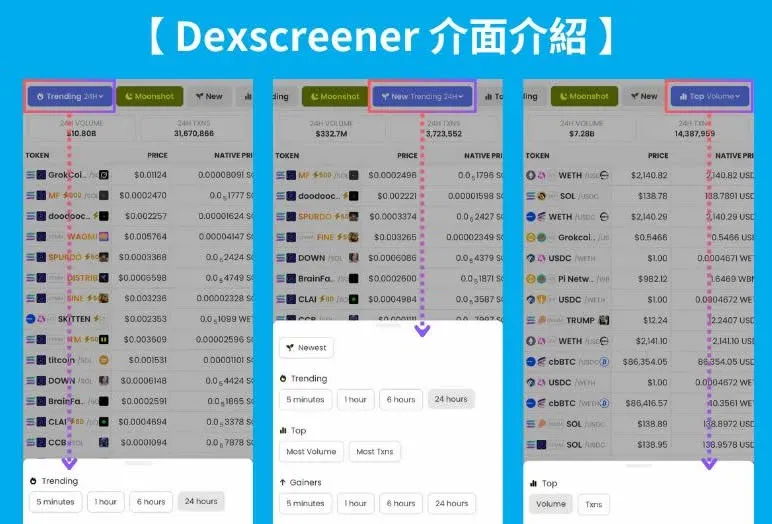
The filter buttons at the top of the main screen let you pinpoint tokens that are performing exceptionally.
Top‑Bar Button Functions
| Button | Purpose |
|---|---|
| **Trending** | Filters by 5 min, 1 h, 6 h, or 24 h volume / price movement – ideal for short‑term opportunities |
| **New** | Shows tokens that have just been listed – useful for scouting freshly launched pairs |
| **Top** | Offers two sorting modes: **Volume** (highest trade volume) and **Txns** (most transactions) – helps surface the most active assets |
By toggling these filters you can swiftly capture short‑lived “pump” tokens or identify projects with sustained momentum.
3. Search Function
Enter a token name (e.g., “GrokCoin”) into the search bar to view all related pairs and their market data. This feature lets you locate a specific asset instantly and evaluate its performance.
Risk Reminder
DexScreener is a price‑tracking tool only; it does not verify the safety or legitimacy of a token. Before acting on any data, perform your own due diligence:
- Price: Does it match official announcements or reputable aggregators such as CoinGecko / CoinMarketCap?
- Market Cap: Does it align with the project’s expected scale? An unusually low market cap may indicate a copycat.
- Fully Diluted Valuation (FDV): Watch for valuations that are dramatically too low or too high.
- Chain: Confirm that the pair resides on the officially designated blockchain.
Cross‑checking these points helps reduce the risk of falling into scam projects.
Tax Note: Crypto‑related gains may be taxable in your jurisdiction. Consult a local tax professional to understand reporting obligations, especially when converting to fiat via SEPA, SWIFT, or other banking channels.
4. Watchlist, Price Alerts, and Settings Menu
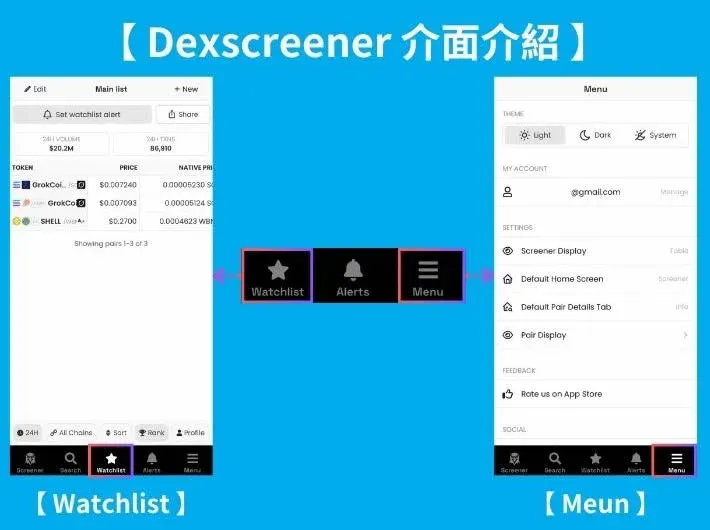
Watchlist
Add tokens to your Watchlist to monitor price movements and market dynamics continuously. This is handy for long‑term holders or traders waiting for optimal entry points.
Price Alerts
Configure Price Alerts so the app pushes a notification the moment a token meets your preset condition, helping you act promptly.
Settings (Menu)
The Menu lets you customize several aspects:
- Theme switching: Light, Dark, System
- Account management: edit personal details or view login history
- Filter display options: reorder or hide specific data columns
- Home‑screen default: set to Screener, Watchlist, or Search
- Token‑detail order: prioritize the most relevant metrics
If you prefer a dark interface or need a personalized layout, these options enhance usability.
5. Time‑Range Filtering
DexScreener supports multiple time‑window selections:
- 5 minutes
- 1 hour
- 6 hours
- 24 hours
Adjusting the interval helps you analyze price volatility and trends over different horizons.
6. Blockchain Network Filtering
You can isolate data by blockchain. Commonly used chains include:
- Solana
- Ethereum
- BSC
- Base
Selecting a specific chain restricts the list to pairs on that network, making it easier to focus on a particular ecosystem.
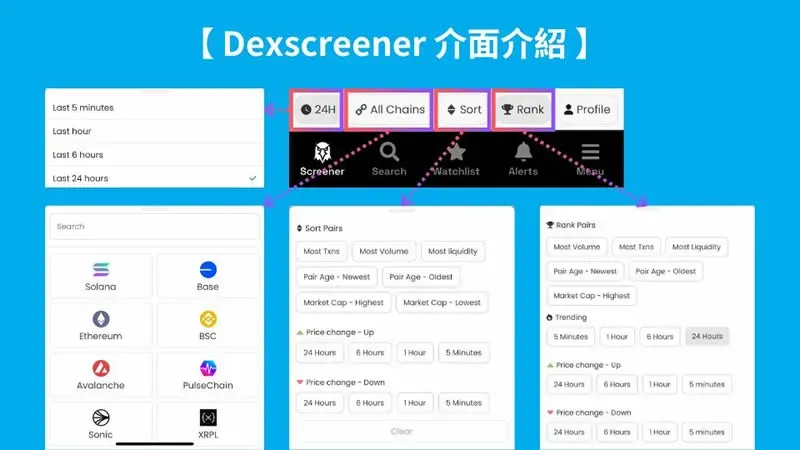
7. Sorting and Ranking Options
DexScreener offers several sorting modes to satisfy diverse analytical needs:
- Most Txns – highest transaction count
- Most Volume – highest USD volume
- Most Liquidity – deepest market depth
- Market Cap – Highest / Lowest – extreme market‑cap values
- Pair Age – Newest / Oldest – recent or legacy listings
Additionally, the Rank Pairs view displays overall market rankings for popular tokens.
Personalized Results and Sponsored Tokens
| Option | Description |
|---|---|
| **Profile** | Shows results tailored to your saved filters |
| **Boosted** | Tokens promoted by the platform (paid promotion) |
| **Ads** | Paid advertising tokens |
⚠️ Note: Tokens appearing under Ads are not necessarily the market’s hottest assets; they are simply projects that have paid for visibility. Always verify liquidity, volume, market cap, and FDV before trading to avoid decisions driven solely by advertising.
8. Advanced Filtering
You can combine multiple criteria to pinpoint tokens that meet very specific requirements:
- Liquidity
- Volume
- Market Cap
- FDV (Fully Diluted Valuation)
- Pair Age
- Txns
- Buys / Sells (net buying or selling pressure)
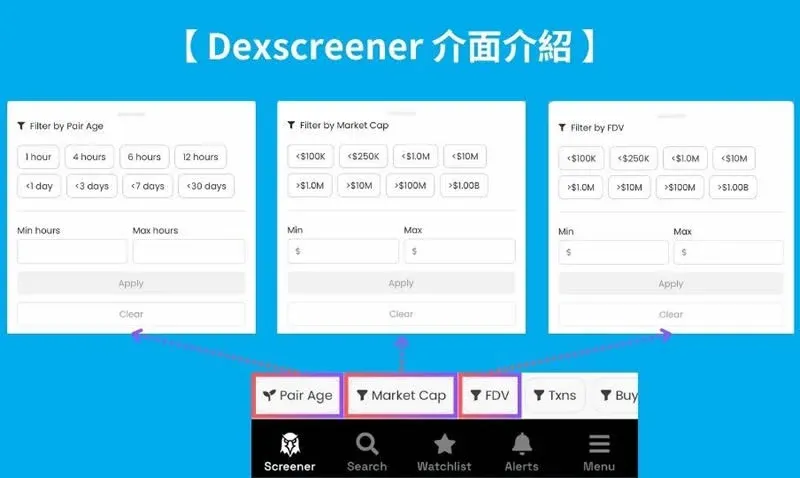
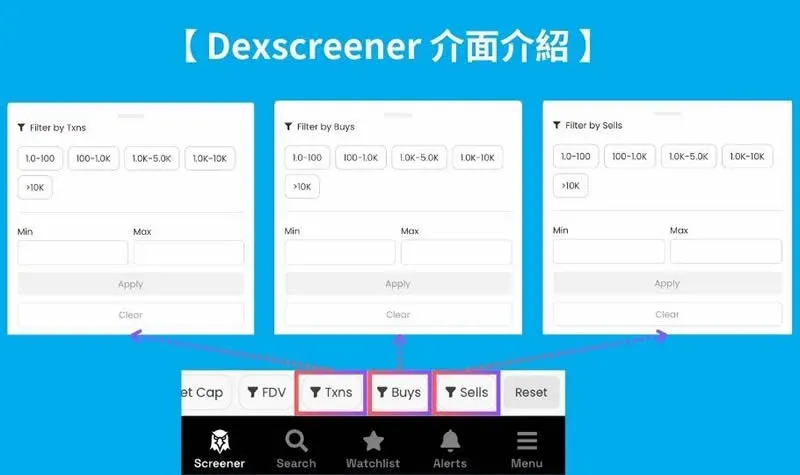
By leveraging these filters, you can quickly lock in projects that align with a particular trading strategy, whether you target high‑liquidity, low‑cap gems or assets showing strong buy‑side pressure.
Summary
DexScreener is a feature‑rich analytics platform for decentralized markets. Using it you can:
- ✅ Track market heat and discover trending tokens
- ✅ Filter projects by liquidity and volume to find high‑quality opportunities
- ✅ Set price alerts and maintain a watchlist for real‑time notifications
- ✅ Apply multi‑dimensional filters to locate assets that fit your trading criteria
Beyond being a simple pair‑lookup tool, DexScreener delivers comprehensive market analysis, community monitoring, and risk‑assessment capabilities, enabling investors to monitor trends and manage portfolios more efficiently. For additional DexScreener tips, follow other articles from Bitaigen (比特根).
💡 Register on Binance with referral code B2345 for the maximum trading fee discount. See Binance complete guide.



