
 Bitaigen Research
 Binance is a globally leading cryptocurrency exchange platform, and users can trade futures contracts on the platform.
Note for U.S. residents: U.S. users should access Binance.US (the U.S.-registered entity) rather than the global Binance website.
On Binance, open the futures page, select ETHUSDT Perpetual Futures, set the desired leverage and margin mode, and use either a market order or a limit order to go long or short. You can also configure take‑profit and stop‑loss settings to manage risk.
In this article we systematically walk through the complete workflow for trading ETH perpetual futures on Binance, covering how to enable a futures account, choose leverage, place orders, and key risk‑control considerations. The step‑by‑step, illustrated guide helps beginners quickly start long or short positions for more flexible asset management. To master the details and avoid common pitfalls, keep reading for practical tips.
How to Go Long or Short Ethereum (ETH) on Binance?
Prerequisites
- Futures account: After registering, you must enable a futures account.
- Margin: For coin‑margin contracts you need to hold the corresponding cryptocurrency (e.g., ETH) and transfer it into the futures wallet as collateral.
- Risk management: It is recommended to set take‑profit and stop‑loss levels before submitting an order to limit potential loss.
Step‑by‑Step Ethereum Futures Procedure
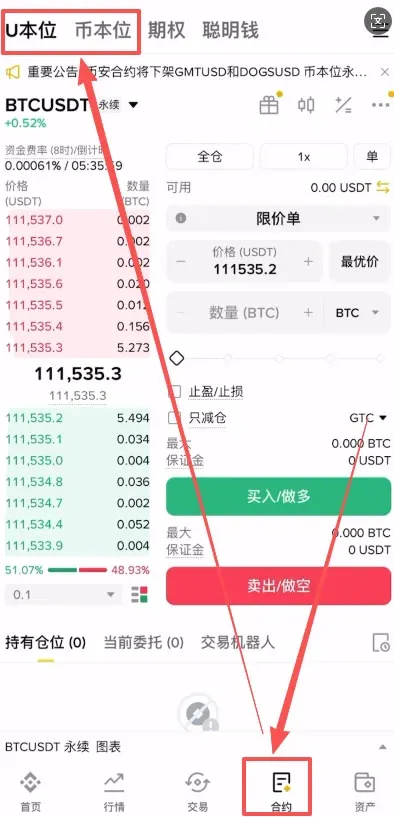
- Open the Binance APP (official registration | official download) and tap the 【Futures】 tab at the bottom.
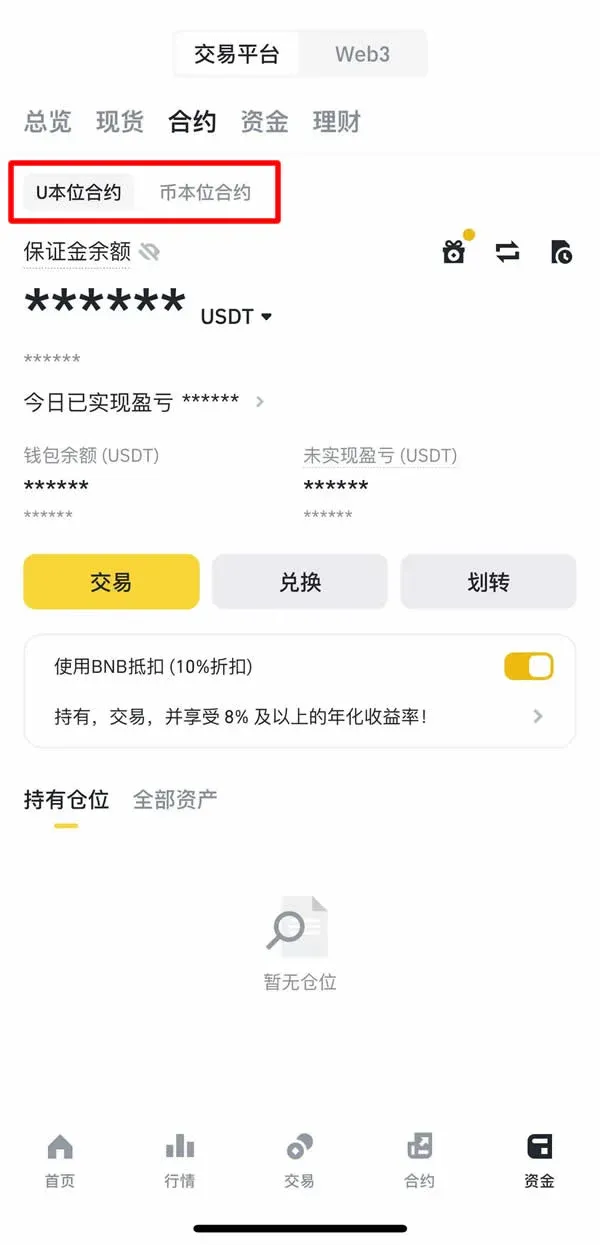
- On the futures page you will see two major categories: USDT‑Margined Futures (settled in USDT) and Coin‑Margined Futures (settled in cryptocurrencies). This guide uses the USDT‑Margined futures as an example.
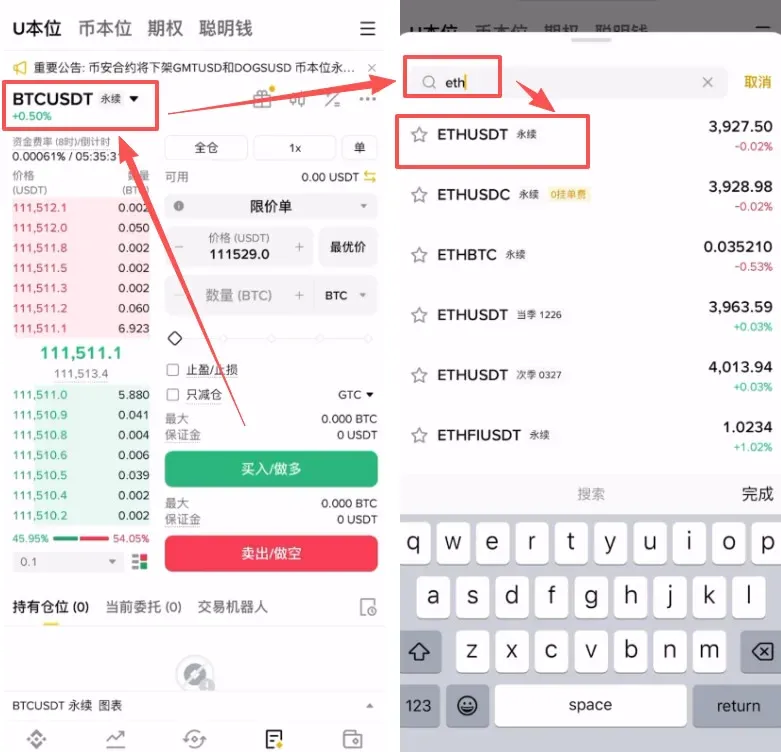
- In the top‑left search box type “ETH” and select “ETHUSDT Perpetual”.
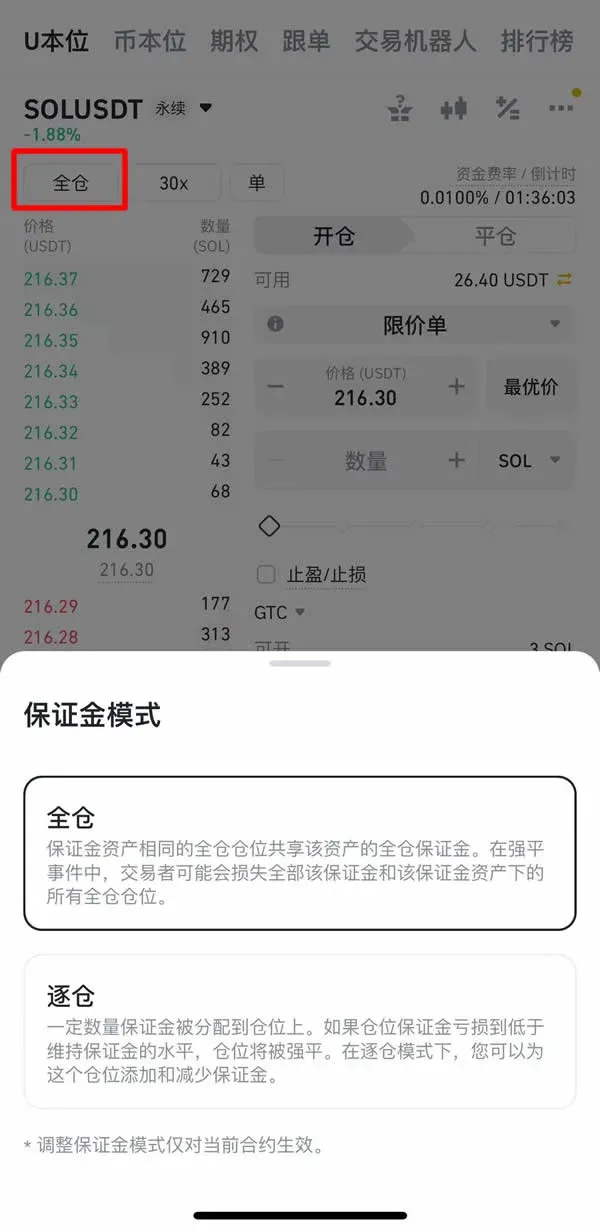
- Choose a margin mode
- Cross margin: All positions share the same margin pool; a single liquidation could wipe out the entire account balance.
- Isolated margin: Each position uses its own margin; a liquidation only affects the margin allocated to that specific position.
*Beginners are generally advised to start with isolated margin.*
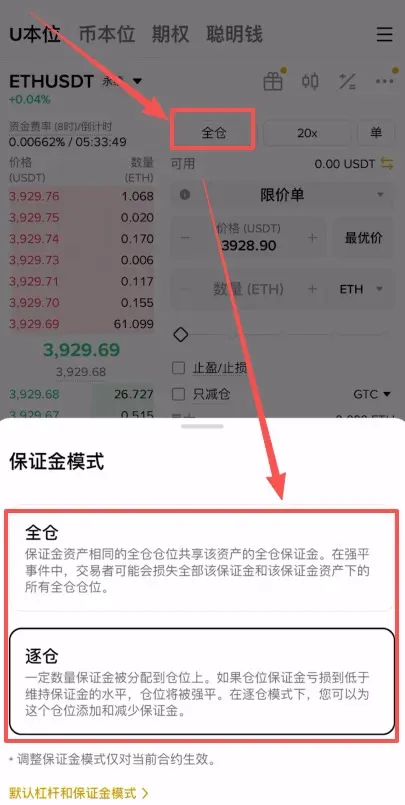
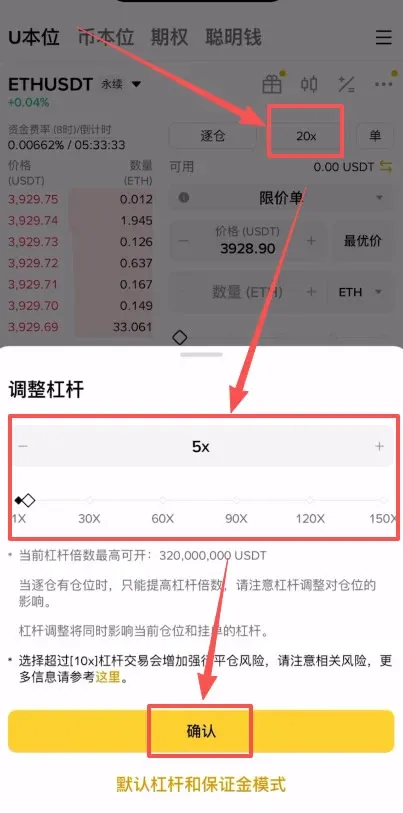
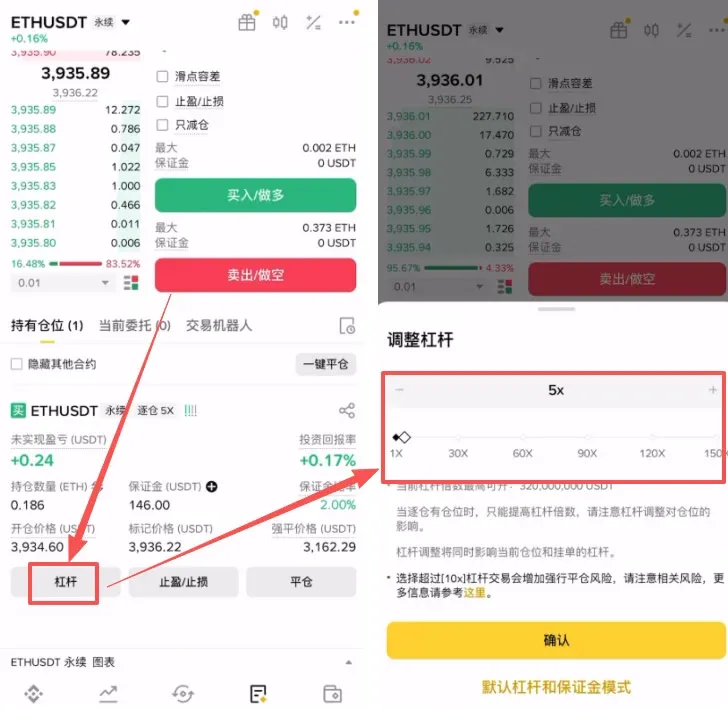
- Set the leverage multiplier (default 20×). You may choose a lower leverage such as 5× if your risk tolerance is modest; then tap 【Confirm】.
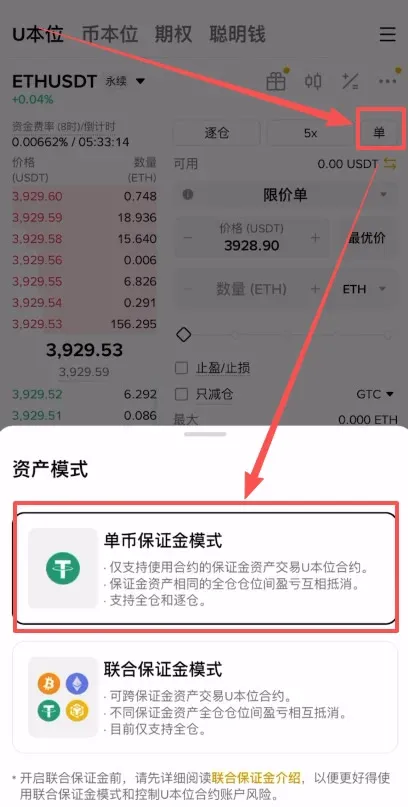
- Choose a collateral type
- Single‑asset margin: Only one asset (e.g., ETH) is used as collateral.
- Multi‑asset margin: Several assets collectively serve as collateral.
This guide defaults to single‑asset margin.
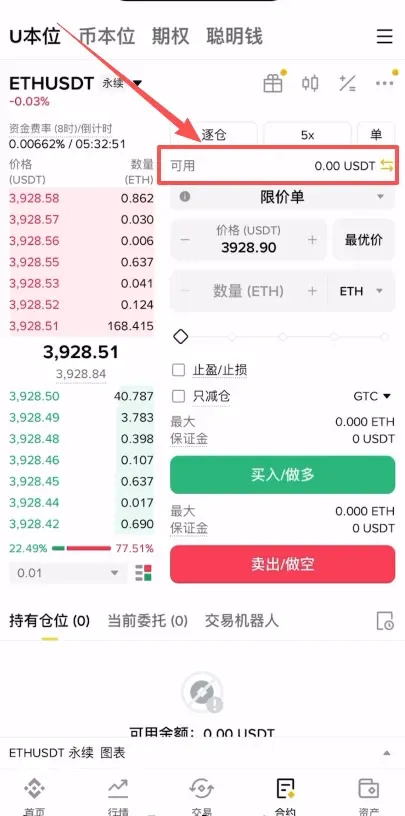
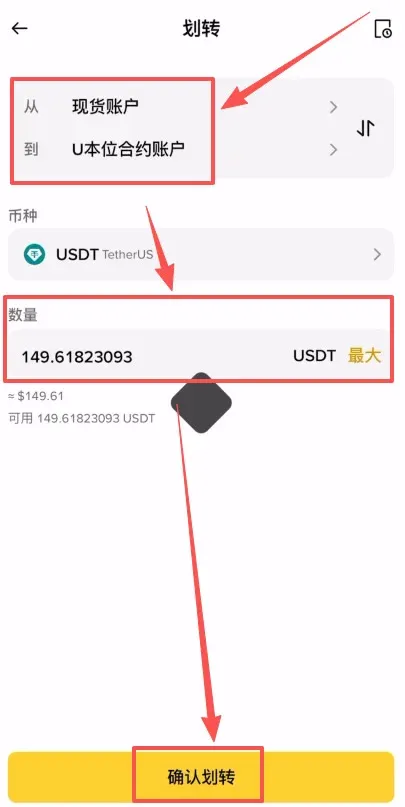
- If the futures wallet shows a balance of 0, tap the double‑arrow icon on the right to open the transfer screen. Move ETH from your Spot wallet to the USDT‑Margined Futures wallet, select “Max” for the amount, and press 【Confirm Transfer】.
- Choose an order type
- Limit order: You set the price at which you want the order to be executed.
- Market order: The order is filled immediately at the best available price.
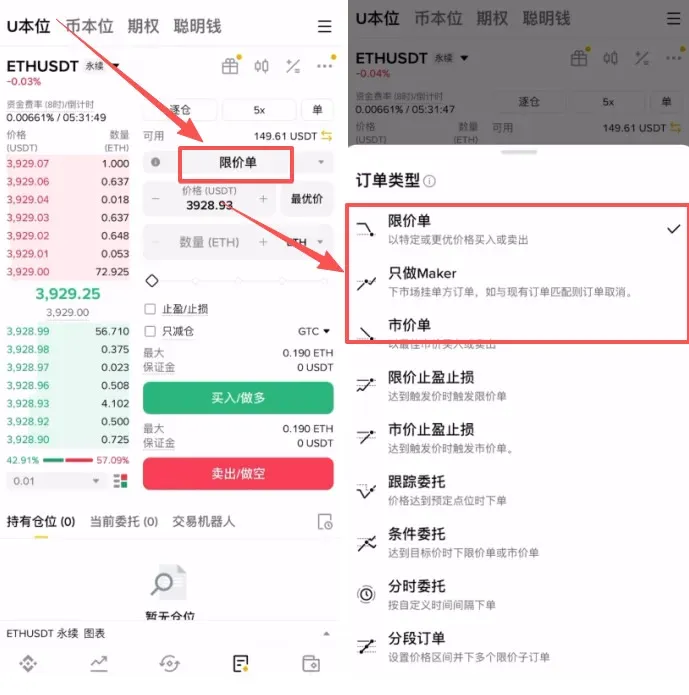
- Limit order example: Suppose the current market price is 3,928 USDT and you want to buy only if the price drops to 3,920 USDT. Enter 3,920 as the limit price and specify the quantity you wish to purchase; the system will automatically submit the order when the price reaches that level.
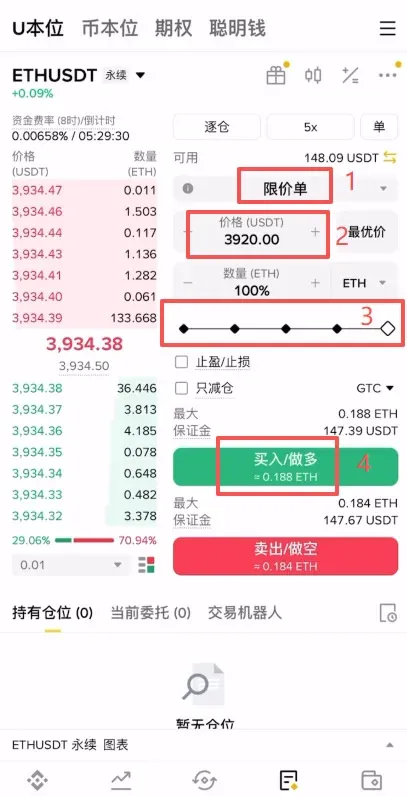
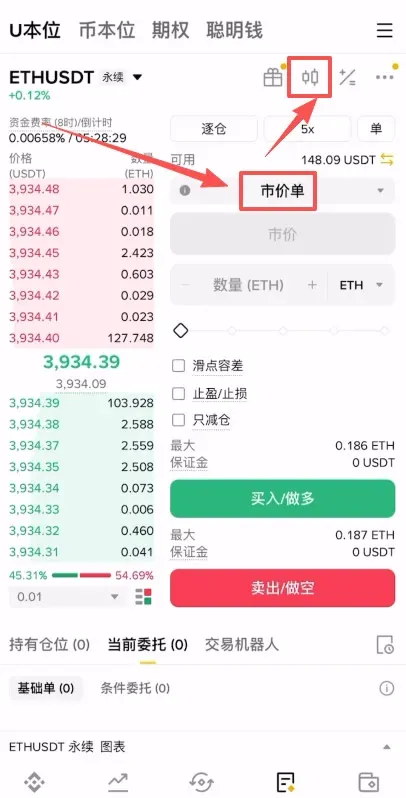
- To cancel an order, tap 【Cancel】; if you decide to switch to a market order, you can do so directly.
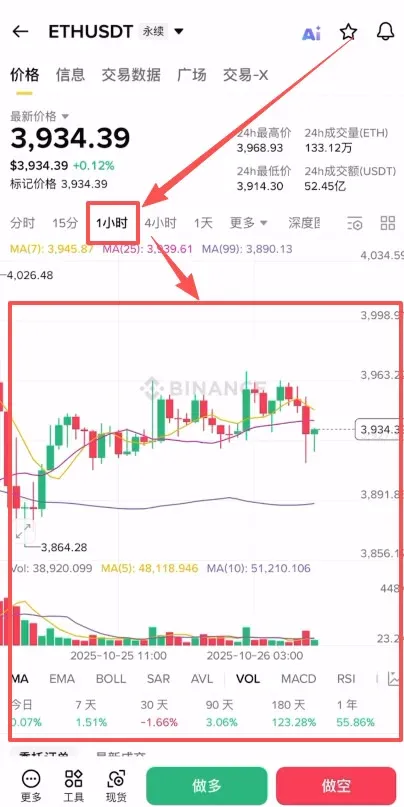
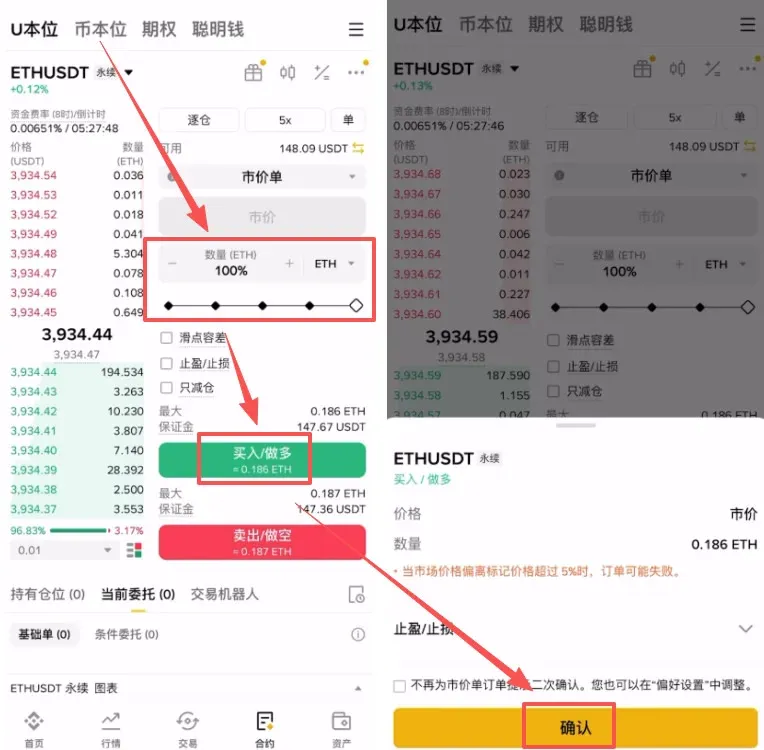
- Open the K‑line chart by tapping the candlestick icon in the top‑right corner. Switch to your preferred time frame (e.g., 1 hour) and assess the trend before deciding whether to go long or short.
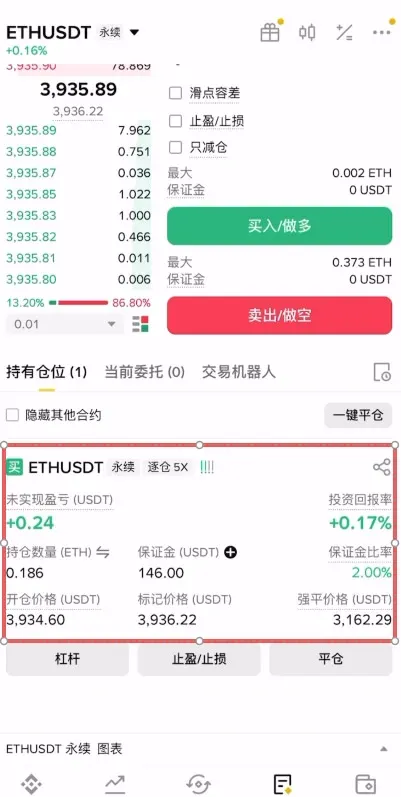
- Drag the quantity slider, then tap 【Buy/Long】 or 【Sell/Short】. After confirming, the order will be executed. The interface will display key metrics in real time, including unrealized P&L, position size, margin ratio, entry price, mark price, and liquidation price.
- To adjust leverage or add take‑profit/stop‑loss parameters:
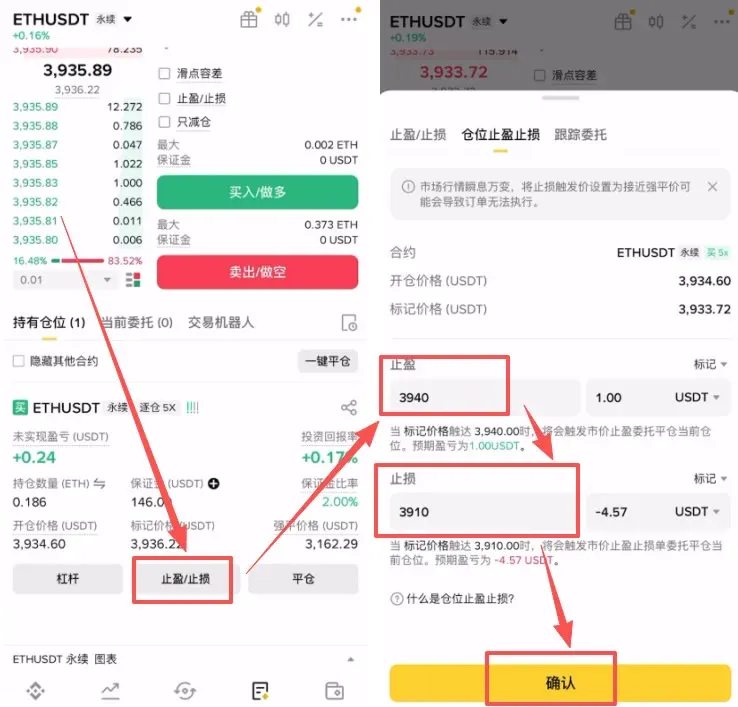
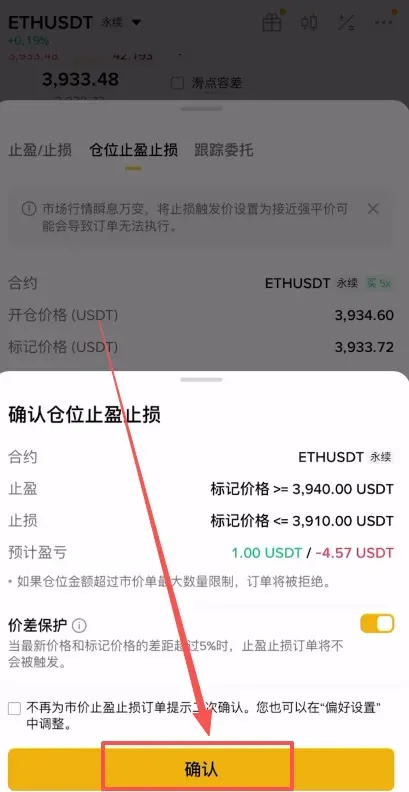
- Tap “Position TP/SL”, enter a take‑profit price (e.g., 3,940 USDT) and a stop‑loss price (e.g., 3,910 USDT), then confirm. The system will automatically close the position when either price is hit.
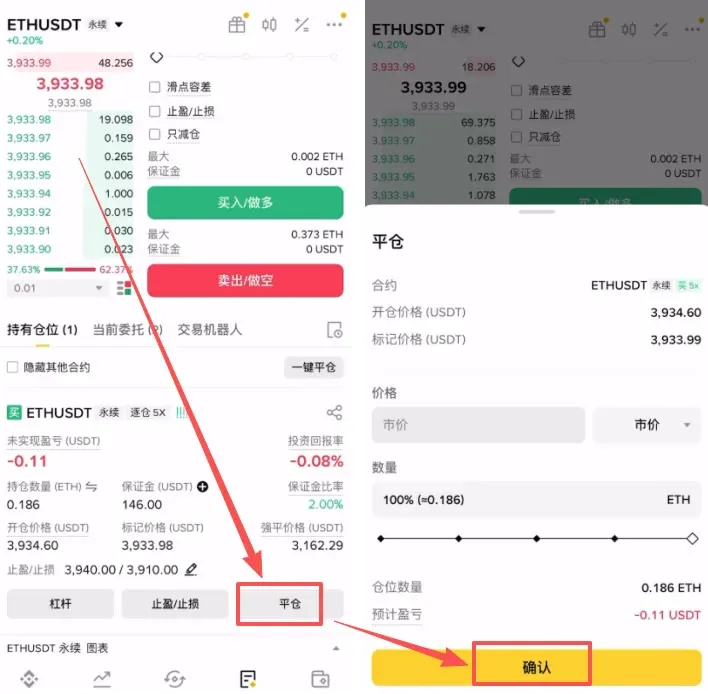
- If you prefer to close the position manually, tap the 【Close】 button on the right, confirm once more, and the position will be settled.
Binance Futures Fee Overview
| Tier | 30‑day Trading Volume (USD) or BNB Held | Maker Fee | Taker Fee |
|---|---|---|---|
| Regular User | < 15,000,000 USD or ≥ 0 BNB | 0.0200% | 0.0500% |
| VIP 1 | ≥ 15,000,000 USD **and** ≥ 25 BNB | 0.0160% | 0.0400% |
| VIP 2 | ≥ 50,000,000 USD **and** ≥ 100 BNB | 0.0140% | 0.0350% |
*USDT‑Margined and Coin‑Margined futures share the same fee schedule; the table applies to both.*
Tax reminder: Profits from cryptocurrency trading may be taxable in your jurisdiction. Consult a tax professional or local regulations to ensure compliance.
Detailed Explanation of Futures Trading Modes
Binance offers two primary futures categories—USDT‑Margined and Coin‑Margined—and margin management can be either Cross or Isolated.
USDT‑Margined vs. Coin‑Margined
- USDT‑Margined Futures: Both margin and settlement are in USDT; profit and loss are denominated in a stablecoin, which is convenient for traders who prefer relatively stable returns.
- Coin‑Margined Futures: Margin and settlement are in a cryptocurrency such as BTC or ETH; P&L is calculated in the underlying coin, appealing to investors who are bullish on the asset itself.
Cross Margin vs. Isolated Margin
| Mode | Description | Advantages | Disadvantages |
|---|---|---|---|
| **Cross** | All positions share a single margin pool | Higher capital efficiency; gains/losses can offset each other across positions | A large loss in one position can trigger liquidation of the entire account |
| **Isolated** | Each position uses its own dedicated margin | Losses are limited to the margin allocated to that specific position, making risk more controllable | Capital utilization is lower; each position must be managed separately |
Recommendation: Beginners should start with isolated margin until they become comfortable with futures mechanics, thereby preventing a single liquidation from wiping out the whole account.
The Three Price Types Used in Futures Trading
- Trade (Execution) Price: The most recent price at which a contract was actually filled.
- Index Price: A weighted average derived from spot prices across multiple exchanges, designed to provide a fair reference and reduce manipulation risk.
- Mark Price: The reference price used for liquidation triggers and unrealized P&L calculations; it blends the trade price, index price, and funding rate.
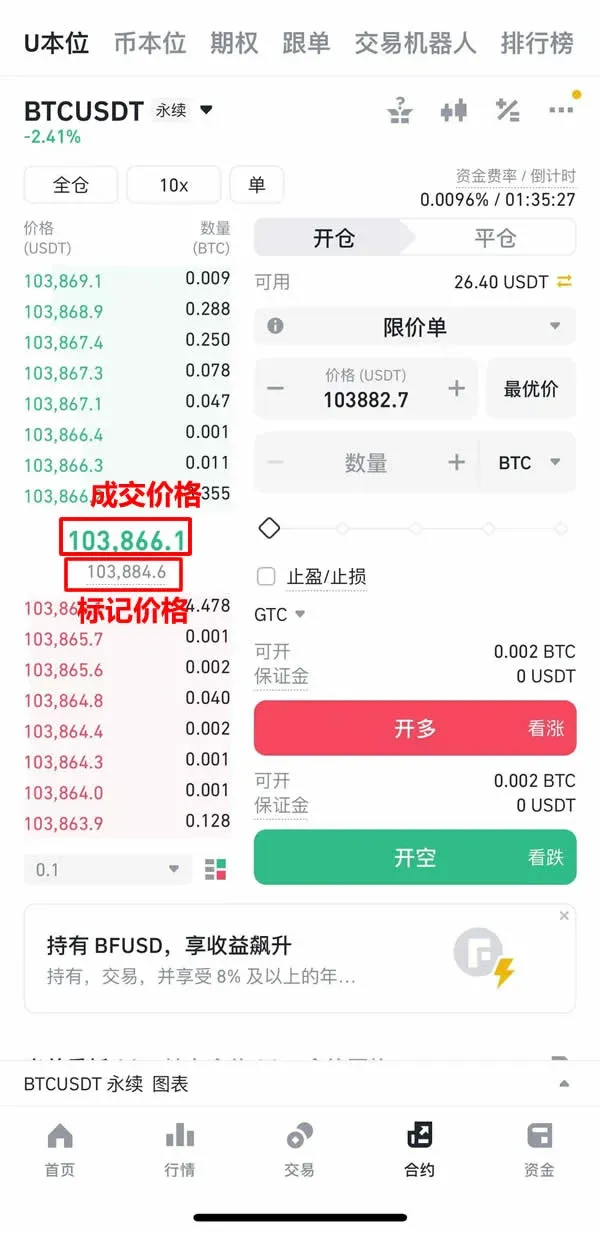
Trade (Execution) Price
The latest price at which a contract actually changed hands. Because futures markets can be less liquid than spot markets, this price may diverge from spot prices.
Index Price
Computed by aggregating spot prices and volumes from several exchanges, the index aims to deliver a more impartial and manipulation‑resistant benchmark.
Tip: The mobile app only displays the trade price; to view the index price you need to use the desktop (PC) interface.
Mark Price
A hybrid figure that incorporates the trade price, index price, and the current funding rate. Binance relies on the mark price for liquidation decisions and for calculating unrealized gains or losses; it tends to be smoother than the raw trade price.
Funding Rate Overview
- Positive funding rate: Long positions pay short positions, indicating a market bias toward longs.
- Negative funding rate: Shorts pay longs, indicating a market bias toward shorts.
Funding rates are settled three times per day at 00:00, 08:00, and 16:00 UTC. While a position is open, you will either incur a fee or receive a payment depending on the prevailing rate.
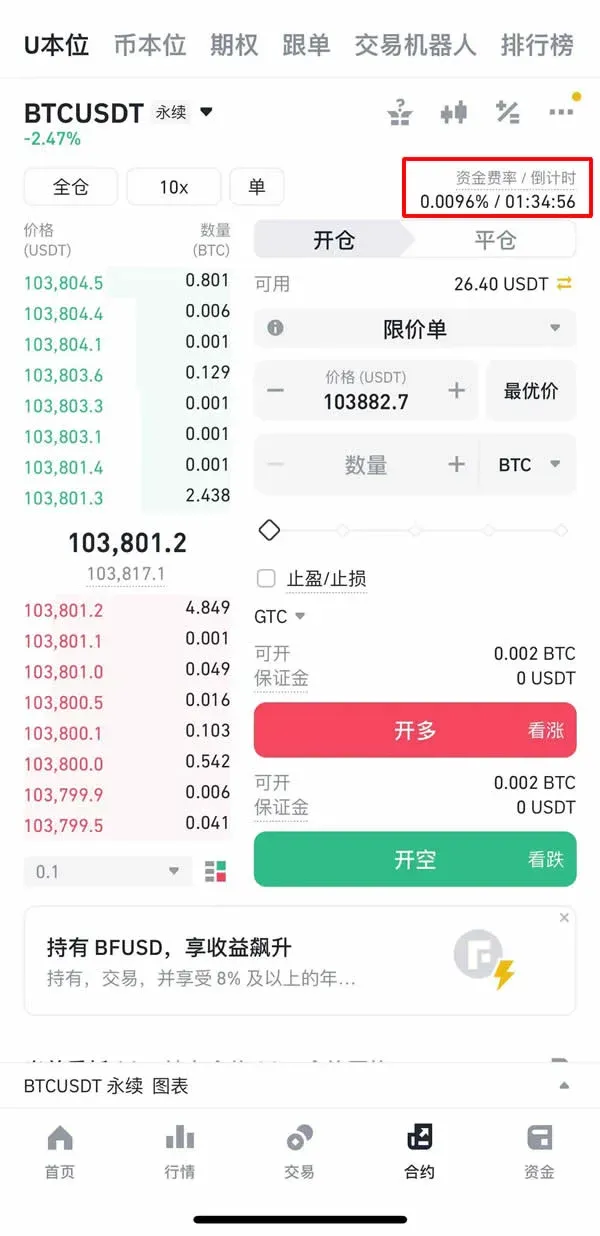
Common Order Types
| Type | Description | Advantages | Disadvantages |
|---|---|---|---|
| **Market order** | Executes immediately at the best available price | Guarantees execution | Execution price may be impacted by order‑book depth and could differ from the quoted price |
| **Limit order** | Executes only when the market reaches your specified price | Allows control over entry price | May never fill if the market does not reach the limit price |
Five Common Stop‑Loss / Take‑Profit Strategies
- Stop‑Loss Order – Set a price or percentage below the entry level; the position is automatically closed when the market reaches that level.
- Take‑Profit Order – Set a target price above the entry level; the position is automatically closed once the target is hit, locking in profit.
- Trailing Stop – The stop‑loss price trails the market price as it moves favorably, protecting accrued gains while allowing further upside.
- Dollar‑Cost Averaging (DCA) – Build or unwind a position in multiple increments to smooth out entry price and risk exposure.
- Technical‑Indicator‑Based Exit –
Related Reading
- Binance vs KuCoin: Liquidity, Fees & New Tokens
- Download Binance, OKX, Bitget: Android APK & iOS Guide
- Binance Global Access Guide: Registration, Mobile & Desktop Tips
💡 Register on Binance with referral code B2345 for the maximum trading fee discount. See Binance complete guide.



