
 Bitaigen Research
 We systematically outline the entire workflow for using Alipay on OKX to purchase USDT, highlighting the real causes behind card freezes and common misconceptions, and providing step‑by‑step instructions and risk‑control tips. This guide helps newcomers complete transactions safely while protecting their funds and avoiding unnecessary trouble.
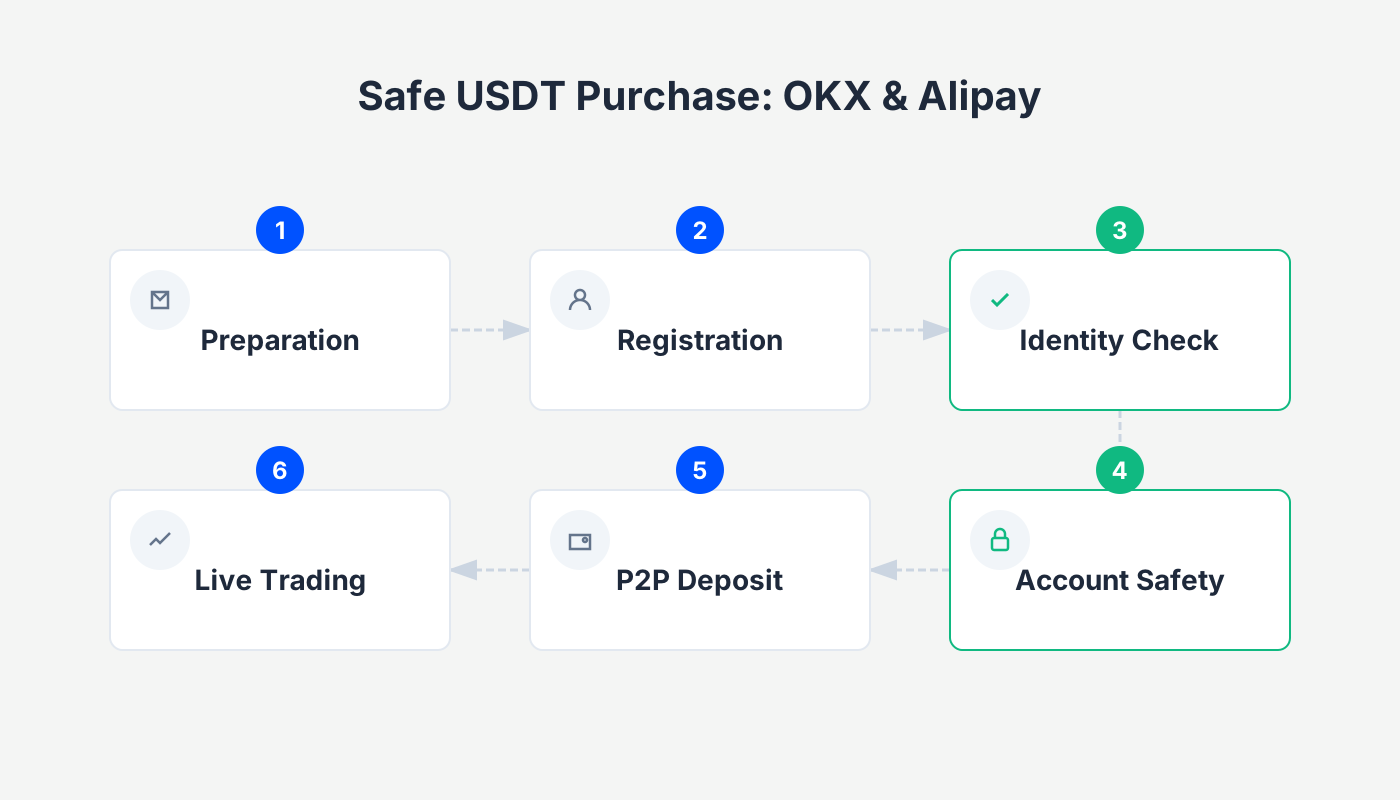
Breaking the “fear of frozen cards”
Purchasing USDT on OKX with Alipay generally does not lead to a frozen card, as long as you follow the correct process: use Alipay balance for payment, avoid direct debit from a bank card, and select compliant merchants.
Many beginners panic at the mention of “risk control” or “card freeze,” but in reality about 90 % of freeze cases stem from user errors or choosing non‑compliant counterparties. As a long‑standing exchange with tens of millions of users, OKX (formerly OKEx) employs a mature T+N risk‑control system and a strict merchant‑selection mechanism. By adhering to the proper steps, the risk can be reduced to a negligible level.
Core anti‑freeze principle: Why Alipay is the preferred method
Before any transaction, three iron‑clad rules must be observed; they form the foundation of fund safety:
- Funds must be clean – No third‑party collection or payment; you must use your own money. Receiving money from others can easily entangle you in illegal chains.
- Leverage Alipay’s “pre‑risk‑control” – Alipay scans the transaction before you pay. If the counterparty’s account shows abnormalities, the system blocks the payment, resulting in “no payment = no trade = zero risk.” This acts as a natural filter.
- Critical operation (isolation method) – Always use Alipay balance or Yu‑E‑Bao (Money Market Fund) for payment; never let Alipay pull funds directly from a linked bank card.
Risk isolation: Cutting off bank‑card linkage
The reasons for using balance payment are:
- When a bank card is directly debited, any risk can drag the card into the investigation.
- With balance payment, even in extreme cases (roughly a 1 % probability), the impact is confined to the Alipay side, leaving the physical bank‑card assets untouched.
- Core logic: Minimize possible points of connection, keeping only the Alipay link in the workflow.
Anti‑freeze card procedure for buying USDT on OKX with Alipay
Friendly reminder: Register through the link below (or use invitation code `B2345`). New users can receive up to 50 USDT as a bonus, but the code must be entered to claim it.
- Official OKX registration link: <https://www.okx.com/zh-hans/join/B2345>
- OKX APP download: <https://www.bitaigen.com/binance/download> *(U.S. users should download Binance.US instead of the global Binance app)*
Step 1: Use the “filter” to avoid risk
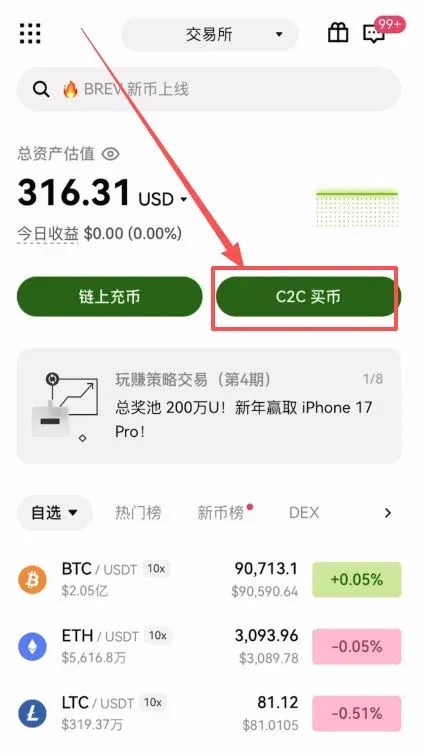
- Open the OKX APP and tap 【C2C Buy】 on the home screen.
- Enter the purchase amount (e.g., $140, roughly equivalent to CNY 1,000), and select 【Alipay】 as the payment method.
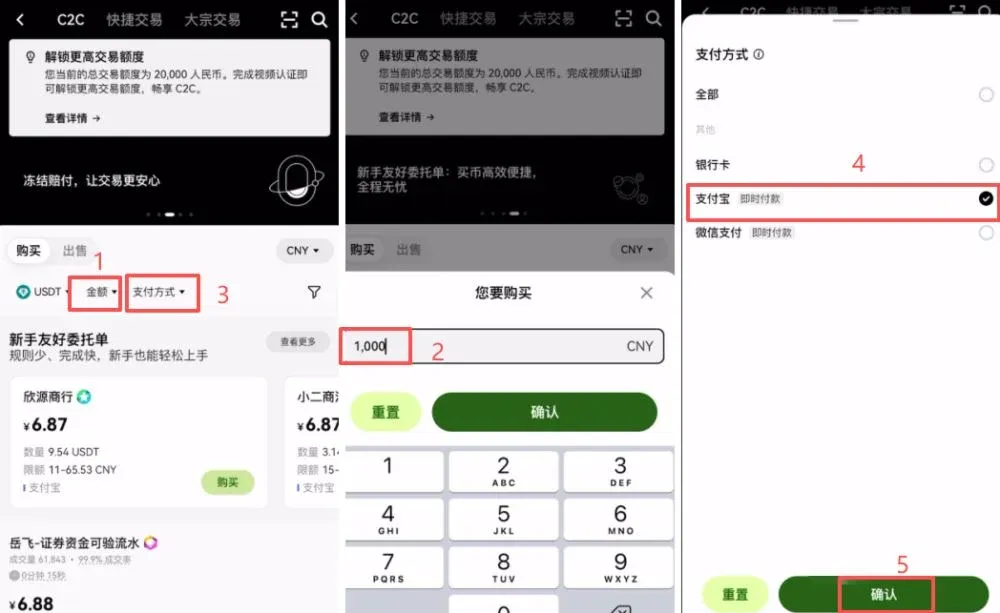
- Tap the funnel icon at the top‑right corner and enable “Show only non‑verified orders” and “Beginner‑friendly listings.”
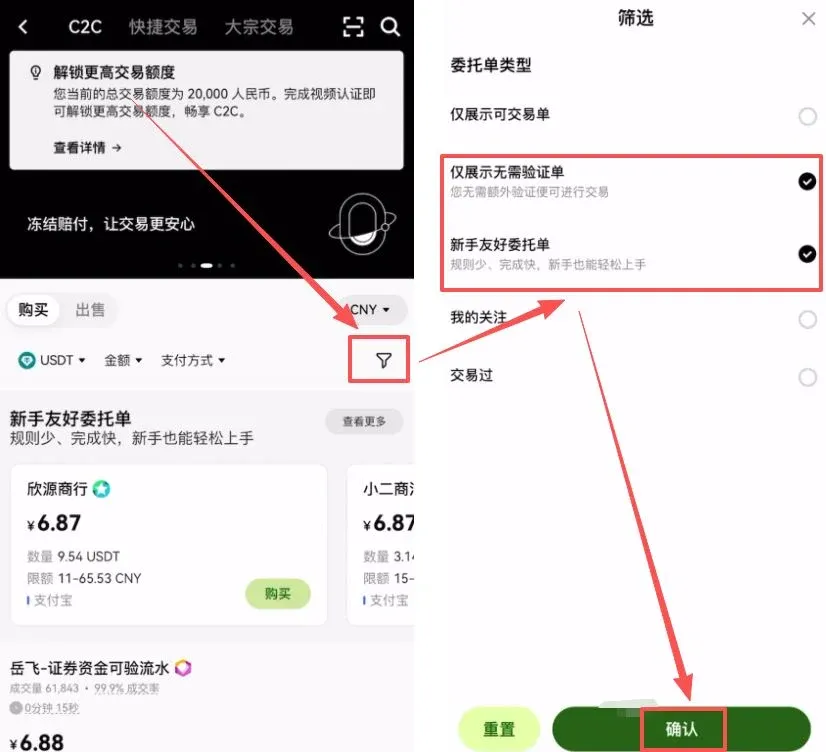
*Purpose*: Skip the cumbersome transaction‑record verification step while filtering for reputable merchants who accept beginners.
Step 2: Spot trustworthy merchants at a glance
In the merchant list, besides price, pay attention to the following hard metrics:
| Metric | Evaluation point |
|---|---|
| Order volume | Merchants with high volume and high fulfillment rates are more reliable |
| Registration time | Open the merchant’s profile and check **【Merchant Since】**. Prefer merchants that have been registered for **at least six months**; the longer the track record, the higher the safety |
Rationale: A longer‑standing account indicates stable assets and a history of trouble‑free trading, making it far safer than a brand‑new account.
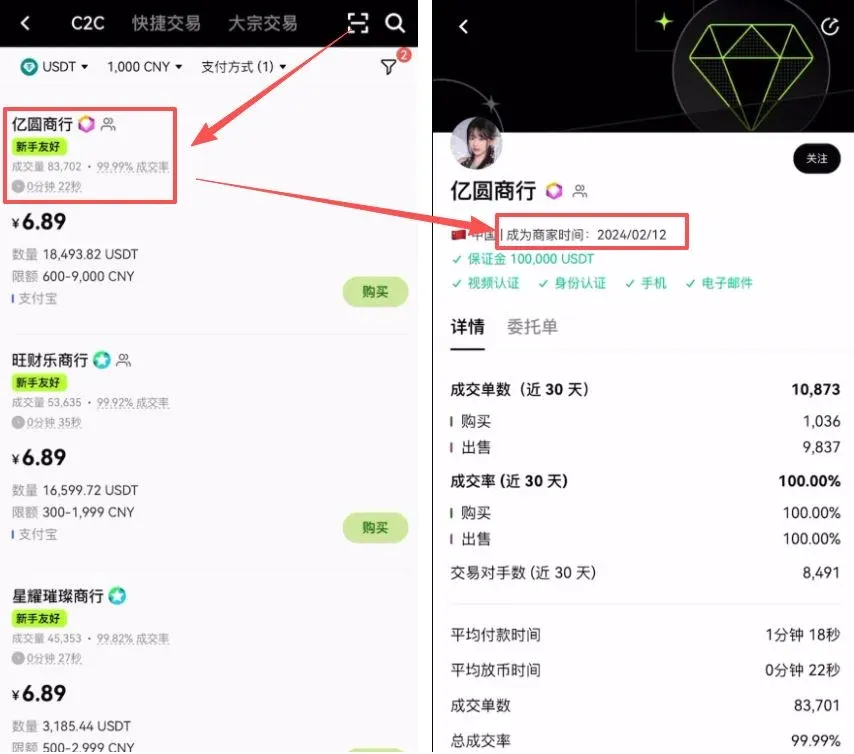
Step 3: Order placement and payment details
- After selecting a merchant, tap 【Buy】, enter the amount, and choose 【0 % Fee Purchase】.
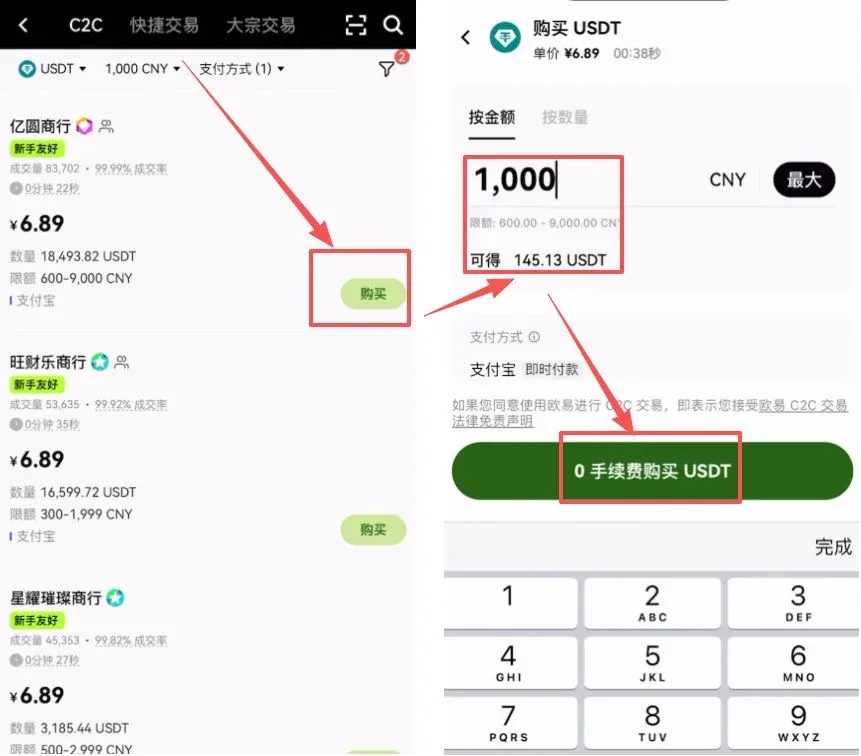
- Once the order is generated, keep these points in mind:
- Chat window: Sellers usually request “real‑name payment,” “no delayed settlement,” and prohibit the use of keywords such as USDT, BTC, etc., in the order notes.
- Obtain payment details: Tap 【Get Payment Details】 and copy the seller’s Alipay account.
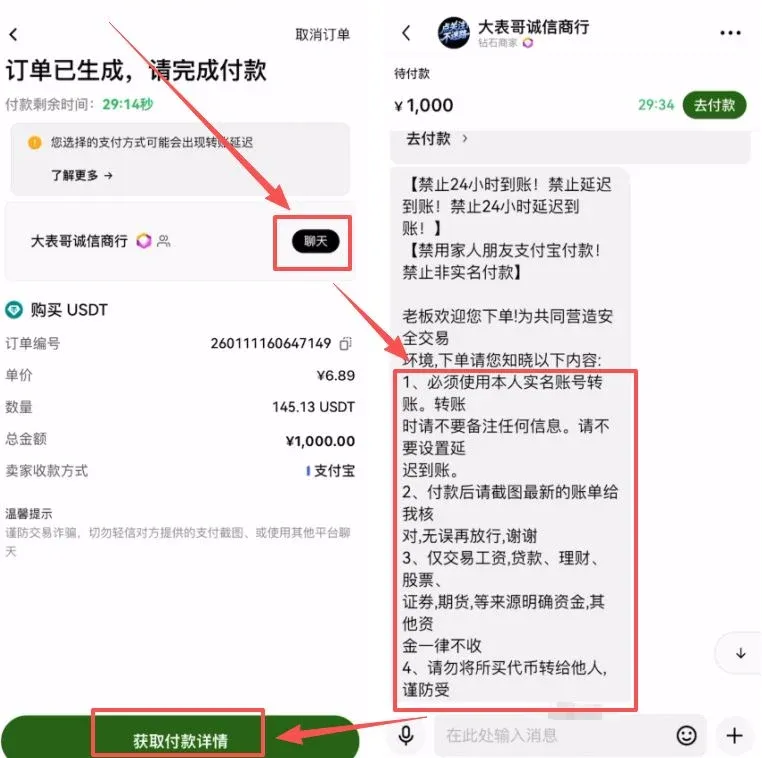
- Execute payment: Open the Alipay APP, search for the copied account, and complete the transfer.
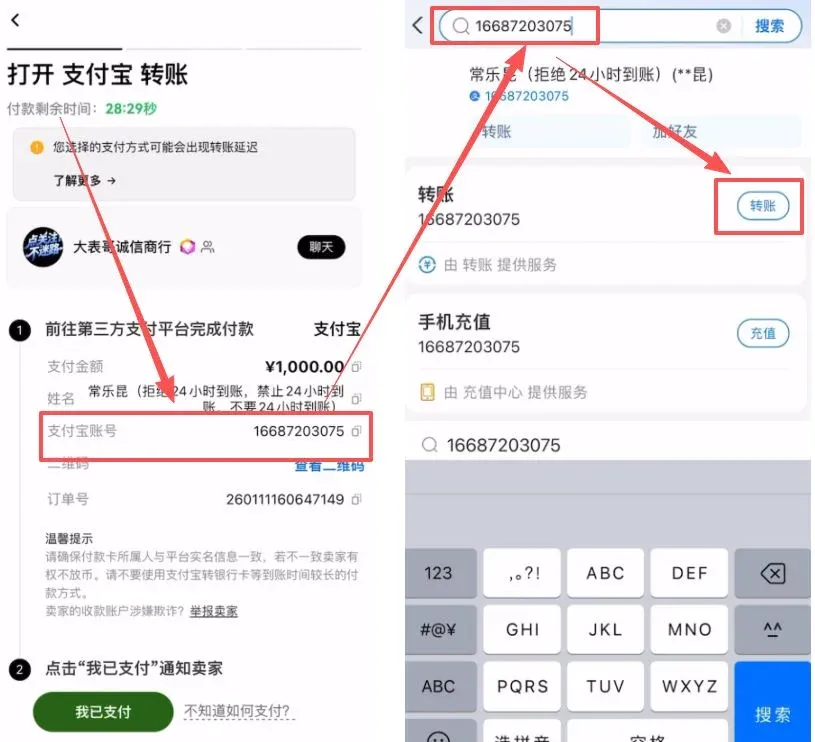
Step 4: Complete the transaction and release the coins
After the transfer, return to the OKX APP and tap 【I Have Paid】 to notify the seller. Once the seller confirms receipt, the USDT will be released instantly. If any doubts arise during the process, communicate directly with the seller through the chat window.
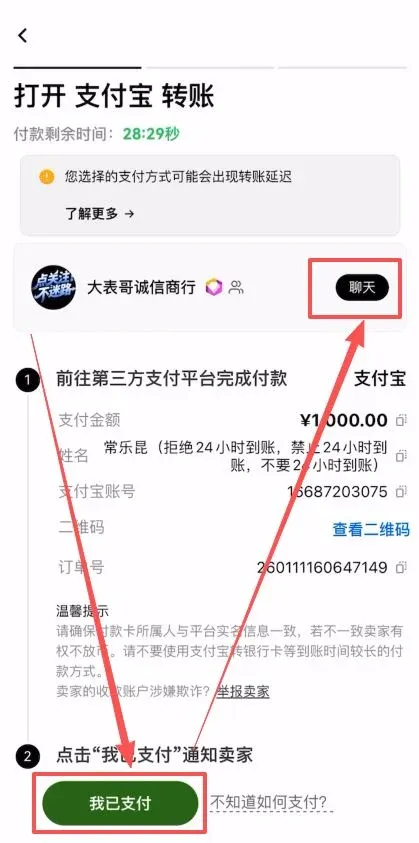
How to claim fee‑rebate rewards
If you did not receive a fee discount at registration, you can obtain a 20 %–60 % fee rebate by registering on the listed exchanges through the links below and using the corresponding invitation codes. Complete the registration first; the rebate becomes active only after the code is applied.
| Exchange | Invitation Code | Rebate Percentage |
|---|---|---|
| **OKX** | `B2345` | 20 % |
| **Binance** (use **Binance.US** for U.S. residents) | `B2345` | 20 % |
| **HTX** (Huobi) | `b6yq8223` | 20 % |
| **Gate.io** | `VLIWUGTFAA` | 20 % |
| **Bybit** | `B2345` | 20 % |
| **Bitget** | `good9999` | 20 % |
All links above lead to official registration or download pages. Using them can save a noticeable portion of fees over the long term.
---
This article answers the question “Will buying USDT on OKX with Alipay freeze my card? The correct method for purchasing USDT on OKX with Alipay.” For more details on OKX, Alipay, and USDT purchases, follow Bitaigen for additional related articles.
*Note: Crypto gains may be subject to tax in your local jurisdiction. Please consult a tax professional to understand your obligations.*
Related Reading
- Binance vs OKX: Which Crypto Exchange Is Better in 2024?
- Binance vs OKX: Which Is Better for Chinese Users?
- OKX Guide: Register, Verify, Buy USDT, Trade Spot & Futures
💡 Register on Binance with referral code B2345 for the maximum trading fee discount. See Binance complete guide.



