
 Bitaigen Research
 We, the Bitaigen editorial team, have carefully compiled a step‑by‑step guide for transferring USDT from OKX to Binance across different blockchains. The article delves into the fee structures, speed, and security characteristics of the three major networks—TRC‑20, ERC‑20, and BEP‑20—and reminds newcomers to ensure that the withdrawal and deposit chains match, otherwise funds may become stuck or be lost.
Part 1: Must‑Read for Beginners – Why Choosing the Right Channel Matters
When withdrawing USDT from OKX to Binance, we recommend using the TRC‑20 chain (TRON network) on both sides to achieve the lowest possible fees and fast settlement. You may also choose ERC‑20 or BEP‑20, but you must keep the withdrawal network identical to the deposit network.
Faced with multiple chains such as TRC‑20, ERC‑20, and BEP‑20, beginners often do not know which one to pick. Selecting the wrong route can result in high fees, delayed arrival, or even permanent loss of assets. This article compares the three mainstream networks in detail to help you pick the optimal chain.
Part 2: Core Principle – The Chains Must Match
Before executing any transaction, the deposit network and the withdrawal network must be the same.
- If the recipient (deposit) chooses the TRC‑20 network, the sender (withdrawal) must also select TRC‑20.
- Only when both ends use the same network can the assets be successfully recorded on‑chain and credited.
- A mismatch typically leaves the funds stranded on the blockchain, and recovery can be extremely difficult.
Part 3: In‑Depth Comparison of the Three Major Networks
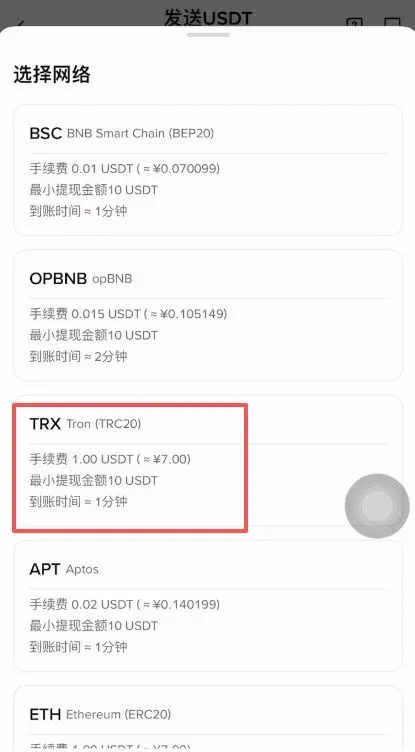
1. TRC‑20 (TRON Network) – Preferred for Everyday Transfers
- Characteristics: Extremely fast confirmation times and the lowest fees (often just 1 USDT).
- Ideal Use Cases: Small‑value daily transfers, moving funds between different exchanges, offering the best cost‑performance ratio.
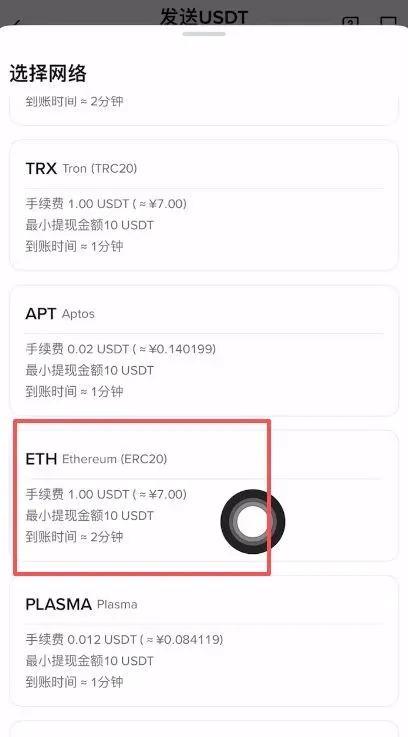
2. ERC‑20 (Ethereum Network) – The Safe Harbor for Large Amounts
- Characteristics: Highest security level and the most mature ecosystem; however, during network congestion fees can spike to 5‑20 USDT and transaction speed slows down.
- Ideal Use Cases: Storing large sums, moving funds to cold wallets, or interacting with DeFi (decentralized finance) protocols.
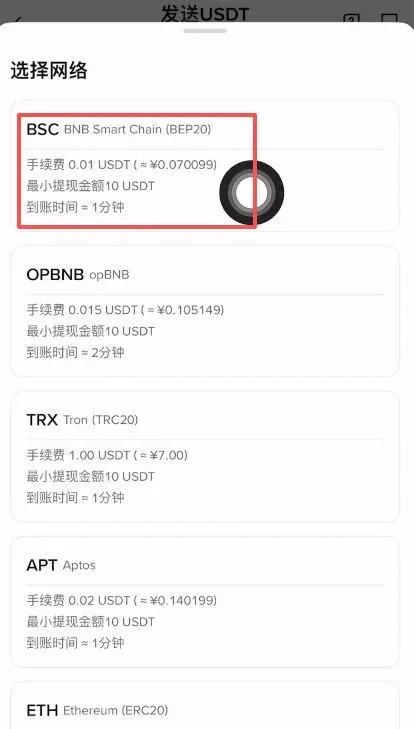
3. BEP‑20 (Binance Smart Chain) – Tailored for the Binance Ecosystem
- Characteristics: Fast transaction speed and low fees.
- Ideal Use Cases: Operations within the Binance ecosystem, or interactions via decentralized wallets such as Trust Wallet.
Part 4: Practical Walkthrough – Transferring USDT from OKX to Binance
Note for U.S. users: Use Binance.US instead of the global Binance platform.
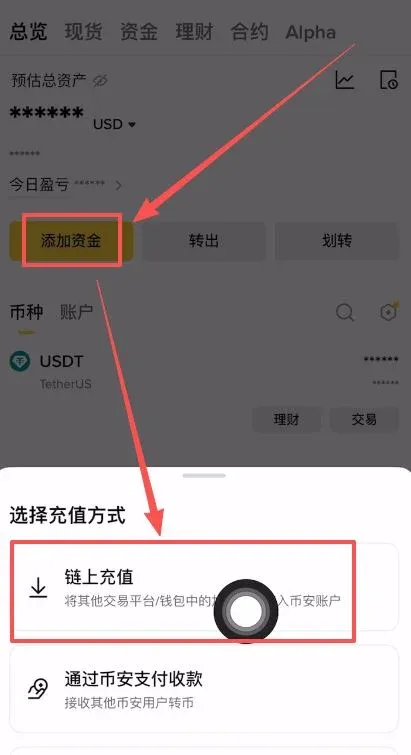
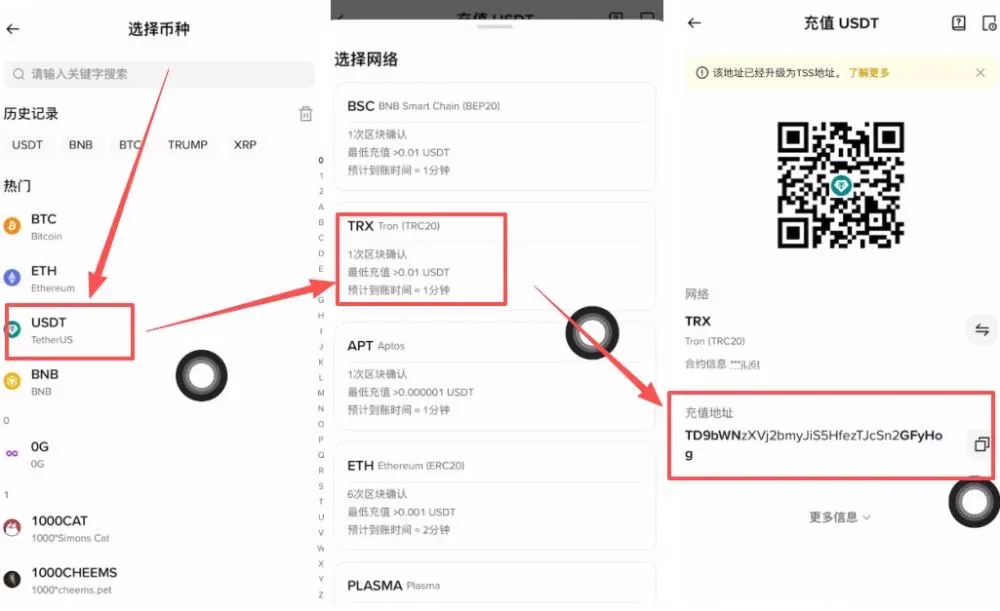
Step 1: Obtain the Deposit Address (Binance Example)
- Open the Binance website or app, go to Wallet → Deposit.
- Choose Deposit on Blockchain, locate USDT in the list of assets.
- In the Network dropdown, select TRC‑20 (recommended). The platform will generate a corresponding deposit address—click Copy and keep it handy.
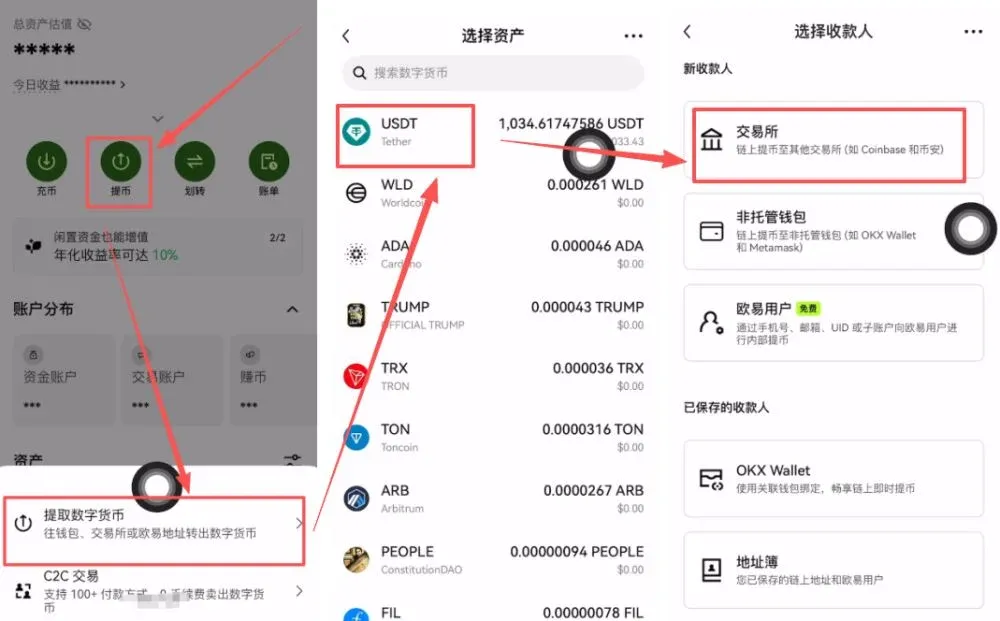
Step 2: Initiate the Withdrawal (OKX Example)
- Log in to OKX, navigate to Assets → Withdraw.
- Choose the asset USDT, then select Blockchain Withdrawal.
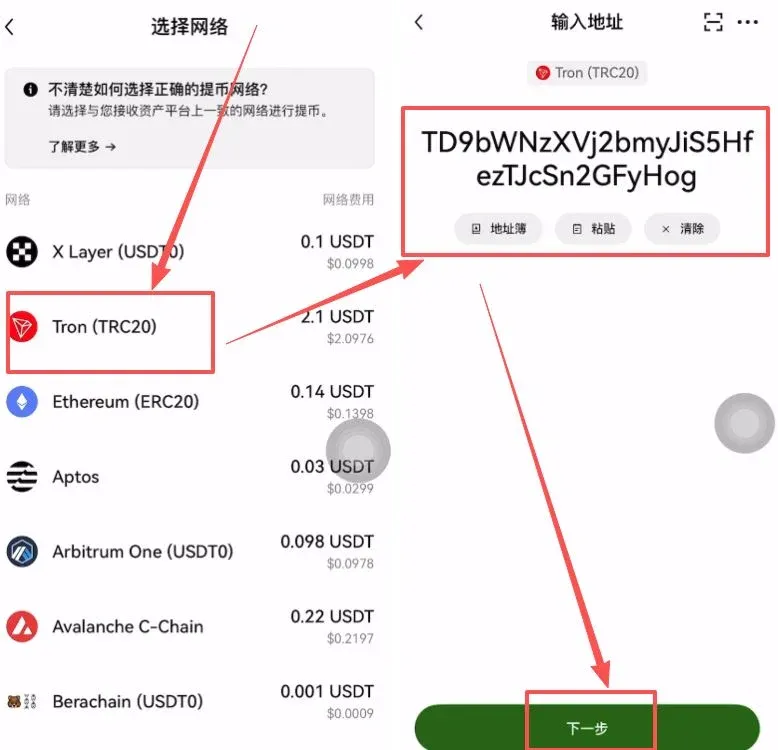
Step 3: Verify the Network and Confirm the Transfer
- Make sure to select the same TRC‑20 network you used for the Binance deposit.
- Paste the Binance deposit address you copied earlier, then click Next.
- Enter the amount you wish to withdraw; the system will automatically display the fee (e.g., approximately 2.1 USDT). Confirm and submit.
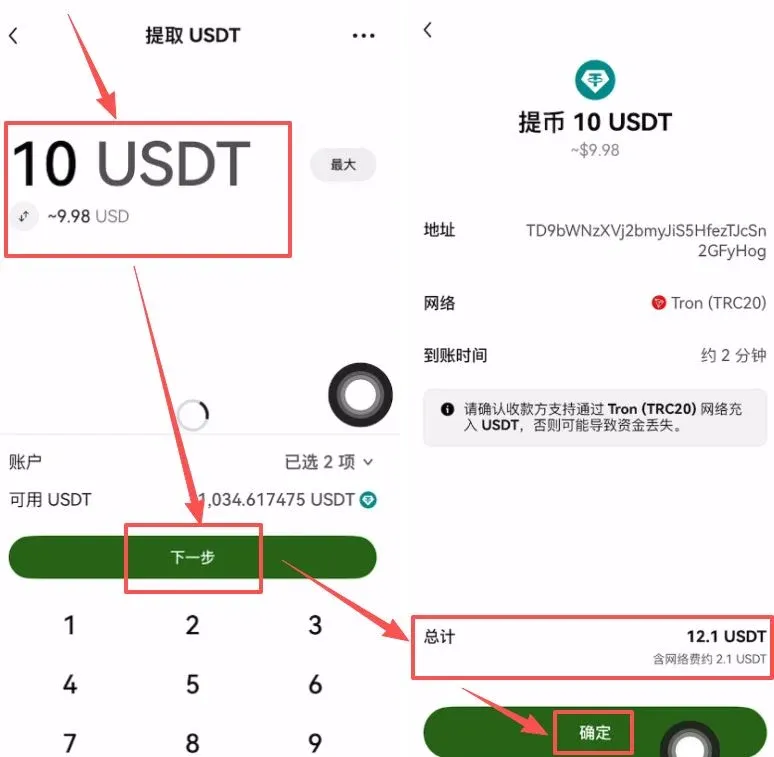
Tip: Mismatching the withdrawal and deposit networks will cause the assets to become stuck on the chain, and recovery costs are high. Always double‑check before confirming.
USDT Network Fee Comparison Table
| Network | USDT Token Standard | Approximate Fee (USD) |
|---|---|---|
| **TRON** | TRC‑20 | 0.315 |
| **Ethereum** | ERC‑20 | 1.5 |
| **Binance Smart Chain** | BEP‑20 | 1.0 |
*Fees shown are only the on‑chain transaction costs; actual out‑of‑pocket expenses also depend on any additional charges imposed by the exchanges. Always check the latest fee schedule for the selected network before transacting.*
Fee Details
- TRC‑20: Capable of processing roughly 1,000 transactions per second, congestion is rare, and fees are usually under 0.5 USD.
- ERC‑20: Handles about 15 transactions per second; during peak periods fees can surge to 30 USD or more.
- BEP‑20: Designed for high‑throughput use cases, typical fees range between 0.05‑1 USD.
How to Reduce USDT Transfer Costs?
- Avoid peak periods: Initiate transfers when overall blockchain activity is low; fees drop significantly.
- Prioritize low‑fee networks: TRC‑20 and BEP‑20 generally cost less than ERC‑20.
- Leverage TRON Energy: On the TRON network, you can stake TRX to obtain “energy,” which can be used to offset transaction fees.
By selecting the appropriate network and factoring in exchange‑specific fees, you can maximize cost efficiency for your transfers.
Bonus: Platform‑Wide Fee Rebates
Important Reminder: You must complete the registration process on each platform to qualify for the 20 % rebate. Below is a non‑exhaustive list of exchange invitation codes and their respective rebate percentages (for reference only):
| Exchange | Invite Code | Rebate % |
|---|---|---|
| OKX | `B2345` | 20 % |
| Binance (or Binance.US for U.S. residents) | `B2345` | 20 % |
| HTX (formerly Huobi) | `b6yq8223` | 20 % |
| Gate.io | `VLIWUGTFAA` | 20 % |
| Bybit | `B2345` | 20 % |
| Bitget | `good9999` | 20 % |
---
Tax Note: In many jurisdictions, gains or losses realized from cryptocurrency transactions—including transfers that incur fees—may be subject to taxation. Consult a tax professional or your local tax authority to understand your obligations.
This concludes the comprehensive tutorial titled “How to Withdraw USDT from OKX to Binance? Which Chain Should You Choose?”. For more practical tips on moving USDT from OKX to Binance and other cross‑exchange operations, follow Bitaigen and explore our other articles.
Related Reading
- What is WLFI Token? Tokenomics, Future Outlook & How to Buy
- OKB Utility Token: Benefits, Trading & Staking Overview
- ERC-20 2026 Guide: Core Concepts, DeFi & Governance Use Cases
💡 Register on Binance with referral code B2345 for the maximum trading fee discount. See Binance complete guide.



