
 Bitaigen Research
 Arbitrum has officially entered the mainnet public testing phase, and the latest version of imToken now natively supports this ecosystem. Users can perform cross‑chain transfers and interact with DApps directly within the wallet.
In this article we walk you through how to get started with Arbitrum on the imToken wallet—from bridging assets and switching networks to DApp interaction. Full‑screen screenshots accompany each step, helping newcomers configure everything quickly and efficiently. If you want to experience on‑chain scaling benefits, keep reading to master the process.
Deposit / Bridge Assets
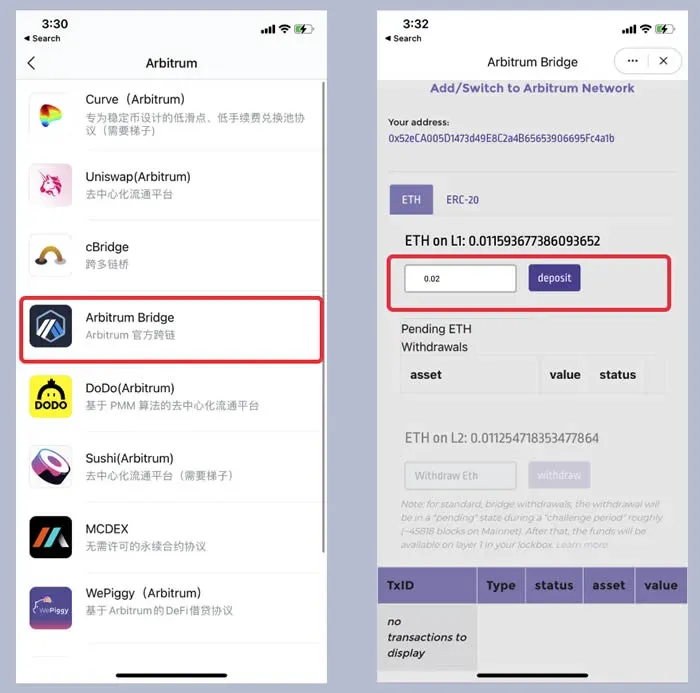
Before you can execute any transaction on the Arbitrum network, you first need to move your assets from the Ethereum mainnet onto the Arbitrum chain. Open imToken, tap Browse, and type Arbitrum Bridge into the search bar to open the corresponding page. Choose the token you wish to bridge, enter the amount you want to deposit in the input field, review the details, and then press Deposit while paying the required miner fee. The cross‑chain deposit will be completed once the transaction is confirmed.
Switch to the Arbitrum Network and Explore DApps
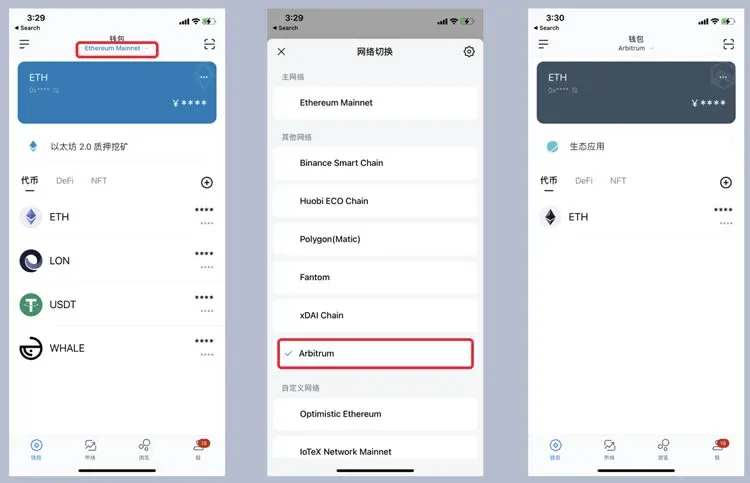
After the deposit succeeds, return to the ETH Wallet asset page and tap the Ethereum Mainnet label beneath the wallet header. In the pop‑up network list, select Arbitrum. Once the network switch is successful, the assets you just bridged will appear in the interface.
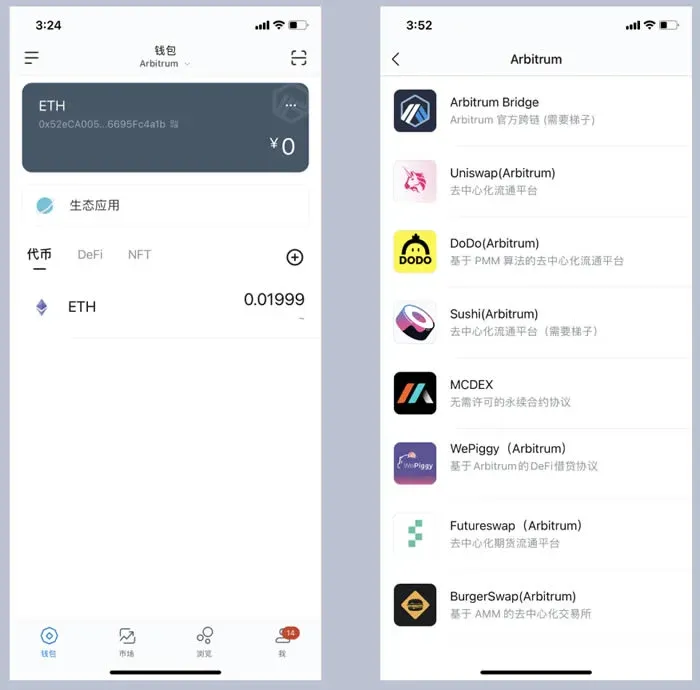
On the asset home screen, the Ecology Applications section will automatically showcase the most popular DApps within the Arbitrum ecosystem. Clicking any of these entries takes you straight to the application, where you can start using major DeFi protocols such as Aave, Uniswap, Curve, and others that have already been deployed on this layer‑2 chain.
Withdraw / Bridge Back to Ethereum
If you need to move your assets from Arbitrum back to the Ethereum mainnet, go to the asset home page, locate Ecology Applications → Arbitrum Bridge again. In the withdraw field, input the amount you wish to retrieve, double‑check the details, and tap Withdraw while covering the applicable miner fee. The bridging process will initiate, and the assets will start flowing back to Ethereum.
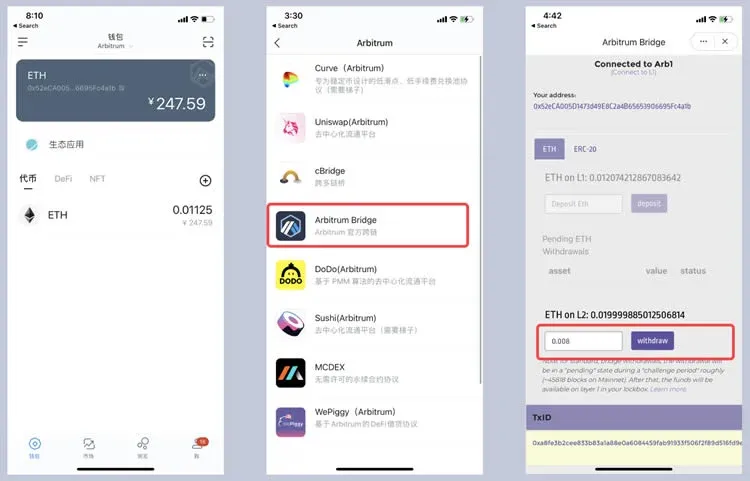
Once the withdrawal is confirmed, return to the wallet’s main screen, tap the network switch button beneath Arbitrum, and choose Ethereum Mainnet again. Your tokens will now appear in the Ethereum asset list, ready for further use or for conversion to fiat.
Note for Global Users: If you wish to convert your crypto holdings to fiat currency, you can use services that support USD withdrawals via SEPA or SWIFT. Users residing in the United States should use Binance.US rather than the global Binance platform to stay compliant with local regulations.
Tax Reminder: Crypto gains may be subject to taxation in your jurisdiction. It is advisable to keep records of all bridging and trading activities and consult a tax professional to ensure proper reporting.
What Is Arbitrum?
Arbitrum is a Layer 2 scaling solution developed by the Offchain Labs team, built on an Optimistic Rollup architecture. By employing multiple rounds of interaction between the rollup and Ethereum, it boosts transaction throughput while preserving security and significantly reducing gas costs. Since its testnet launch in May of this year, Arbitrum has attracted a wide range of DeFi projects, including Aave, Uniswap, Curve, MakerDAO, SushiSwap, CREAM, dForce, DODO, and many others.
---
For more in‑depth coverage of using Arbitrum within imToken, follow Bitaigen (比特根) for the latest updates and insights.
💡 Register on Binance with referral code B2345 for the maximum trading fee discount. See Binance complete guide.



