
 Bitaigen Research
 How to Import a Private Key & Mnemonic Phrase into the Bitpie Wallet to Retrieve Assets?
Bitpie’s HD (Hierarchical Deterministic) functionality can recognize a wide range of on‑chain assets, including BTC and its forks (such as BCH, SBTC, BCD, BTV, BCX, BTW, BBC), CDY, ETH (and the entire ERC‑20 token family), EOS, USDT, DASH, DOGE, ETC, QTUM, and more.
---
In this article we detail the step‑by‑step process for importing a private key or a mnemonic phrase into the Bitpie wallet, helping users securely and quickly retrieve multi‑chain assets. The illustrated guide helps you avoid common pitfalls and complete the asset migration smoothly. Continue reading for the full procedure.
Overview of the Asset Retrieval Process
Before performing any import operation, ensure that your Bitpie app version is 3.3.3 or higher. Then, based on the type of key you hold (private key or HD mnemonic phrase), choose the appropriate entry point to reach the import screen.
Note for fiat conversions: If you plan to convert your crypto to fiat, deposits can be made in USD via SEPA or SWIFT channels. Users residing in the United States should use Binance.US rather than the global Binance platform.
---
Importing a Private Key (BTC Example)
- From the wallet’s home screen, you can open the private‑key import interface via two routes:
- All → Import Private Key
- Me → Gear icon (top‑right) → Import Private Key
This entry also supports importing private keys from the older Bitpie wallet and BIP‑38‑encrypted private keys.
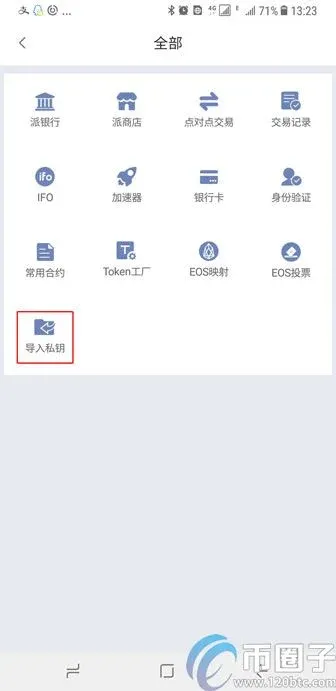
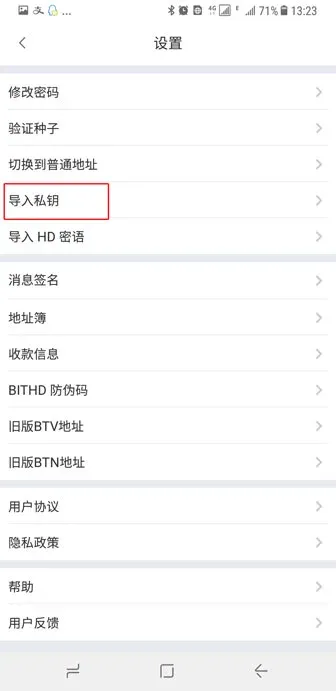
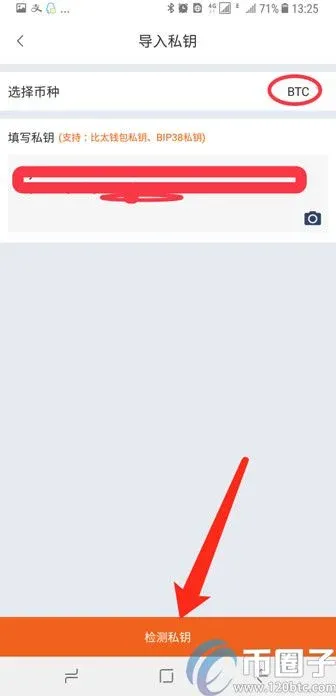
- In the pop‑up page, first select the target currency BTC, then paste your backed‑up BIP‑38 private key into the “Private Key Input” field. After completing the entry, tap Detect Private Key.
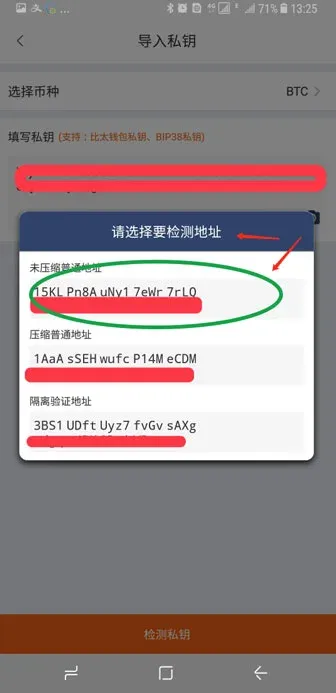
- The system will display a list of addresses derived from that private key. If any address holds a balance, the interface will show the detected amount of BTC and an estimated miner fee.
---
Importing an HD Mnemonic Phrase (BTC Example)
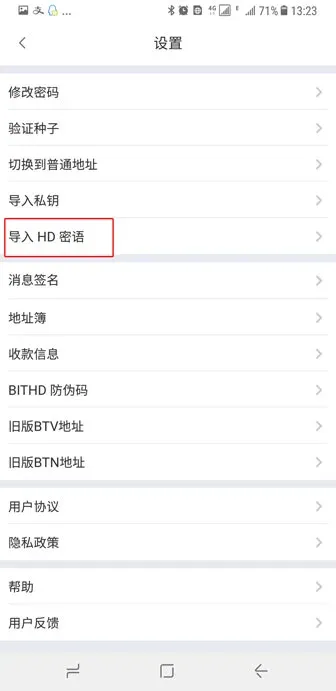
- Again, make sure the client version is 3.3.3 or newer. Open the path: Me → Gear Settings → Import HD Mnemonic, then in the dialog choose either “From HD Mnemonic” or “From Bitpie Legacy QR Code”.
- After selecting the currency BTC, enter the 12 mnemonic words one by one (click Confirm after each word). These words may have been generated by Bitpie or exported from another wallet.
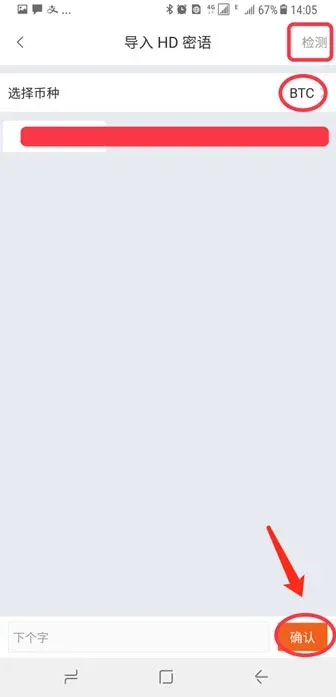
- Once all words are entered, tap Detect in the upper‑right corner. If the derived addresses contain assets, the system will display the detected BTC amount and the required miner fee.
---
By using either of the two methods above, you can safely transfer the digital assets stored in a private key or HD mnemonic phrase into your Bitpie account. For more tips on using the Bitpie wallet, stay tuned to subsequent articles from Bitaigen.
💡 Register on Binance with referral code B2345 for the maximum trading fee discount. See Binance complete guide.



