
 Bitaigen Research
 Exploring Binance Convert’s Latest Features
This article primarily examines the newest capabilities of Binance’s Convert tool (official registration: https://accounts.binance.com/register?ref=B2345 | official download: https://www.bitaigen.com/binance/download).
Binance Convert is a utility on the Binance platform that enables rapid swapping of crypto assets. It now supports setting Take‑Profit (TP) and Stop‑Loss (SL) orders directly on the Convert page, allowing automatic profit taking or loss limiting.
In this piece we systematically outline the brand‑new advanced functions of Binance Convert, focusing on how to configure TP/SL directly on the page, as well as practical tricks such as Convert recurring purchases, limit‑order rewards, and more. The goal is to help users improve operational efficiency and risk management. Subsequent sections walk through the steps in detail, so a careful read is worthwhile.
Key Takeaways
- Fully leverage Binance Convert’s advanced features, including recurring Convert purchases, limit‑order yield bonuses, and TP/SL orders.
- Use Convert Recurring Purchases to build positions steadily, with weekly or monthly automatic contributions.
- Allocate idle funds to the reserved assets of limit orders to earn annualized rewards from the Earn wallet.
- The built‑in TP/SL function enables automatic profit realization and risk control.
What Is Binance Convert?
Binance Convert offers newcomers an ultra‑simple entry point for trading: only three steps are needed to swap assets.
- Choose the asset you want to trade (minimum $0.01 USD).
- Retrieve the current real‑time quote.
- Verify the quote and confirm the transaction.
The latest version keeps the streamlined experience while adding recurring purchases, limit‑order rewards, and TP/SL advanced settings. It is still not a full‑featured spot‑trading terminal.
How Binance Convert Works: Step‑by‑Step Guide
- Select the source asset – decide which cryptocurrency or fiat you want to convert from.
- Select the target asset – decide which cryptocurrency or fiat you want to receive.
- Get a real‑time quote – the system displays an instantaneous Convert rate and starts a countdown.
- Confirm the trade – confirm before the quote expires and the assets are transferred instantly to your Spot wallet.
The whole flow requires no order‑book view or technical chart, making it ideal for users who prefer a quick, intuitive process.
Binance Convert vs. Binance Spot Trading: Why Choose Convert?
| Comparison Dimension | **Binance Convert** | Spot Trading |
|---|---|---|
| User Interface | Clean and intuitive | Requires chart and order‑book interaction |
| Minimum Order | $0.01 USD | Varies by asset |
| Fee Presentation | Real‑time quote, price locked at execution | Potential slippage |
| Slippage Risk | Negligible thanks to deep liquidity | Can occur when liquidity is thin |
| Ideal Users | Newcomers and rapid‑rebalancing traders | Experienced traders, deep‑strategy users |
1. Simple Execution
Binance Convert supports hundreds of assets and completes a swap with a single click, suitable for users of any experience level.
2. Zero Entry Barrier
The minimum transaction size is only $0.01 USD, allowing micro‑investors or beginners to get started effortlessly.
3. Transparent Pricing
Quotes are locked instantly; you can see the exact amount you will receive before confirming, and even large trades retain the quoted price.
4. No Slippage
Thanks to the platform’s deep liquidity, Convert generally avoids slippage in most situations.
Use Cases
Large Orders
Big trades can impact market depth and cause price deviation. Convert provides a real‑time quote and a fixed execution price for each transaction, making it suitable when you need to exchange a large amount.
Fast Trades
A few clicks are enough to rebalance assets or convert fiat, eliminating the need for a lengthy order‑placement process.
Implementing DCA with Convert Recurring Purchases
“Long‑term holding beats market timing.” Dollar‑Cost Averaging (DCA) smooths the entry price by investing a small, fixed amount at regular intervals, reducing timing risk.
Convert Recurring Purchases (also called “conversion cycles”) revolve around three core settings:
- Maximum Execution Period – can be set for several weeks or months, enabling a “set‑and‑forget” approach.
- Price Range Limit – execution only occurs within a predefined price band, ensuring purchases meet your strategy.
- Investment Cap – defines the total amount allocated to the plan, preventing overspending.
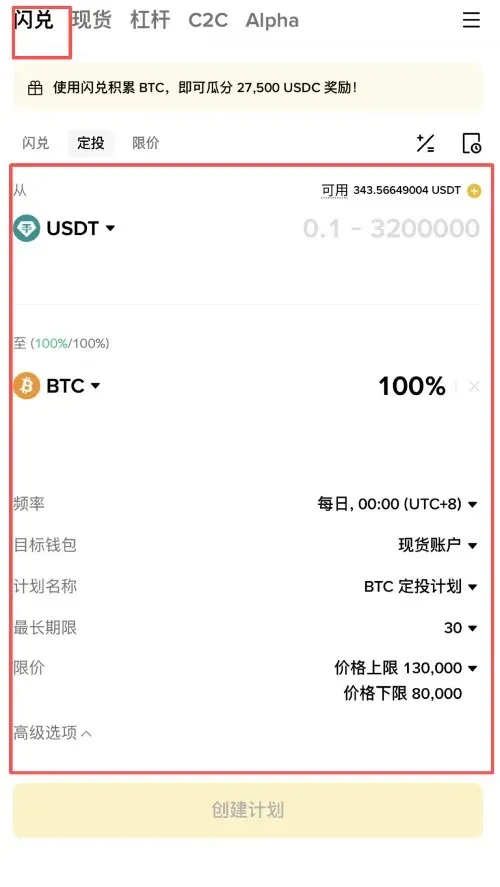
Convert Recurring Purchase Simulator: Test Before You Commit
Before allocating real funds, you can use the Convert Recurring Purchase Simulator to estimate costs, potential yield ranges, and how different configurations behave over time. By comparing scenarios (e.g., weekly vs. monthly, tight vs. wide price bands, varying caps), you can fine‑tune parameters to match your personal risk tolerance.
Stacking Limit‑Order Earnings: Earn While You Wait
Traditional limit orders lock up capital until they are triggered. Convert Limit Orders let you place the reserved assets into the Earn wallet, where they continue to generate an annualized yield:
- Assets earn interest automatically while the limit order is active.
- When the order fills, the system draws the required amount directly from the Earn wallet.
- If the order is cancelled or expires, the assets keep earning until you withdraw them.
This mechanism delivers a “locked‑funds + passive‑income” double benefit, eliminating the opportunity cost of idle capital.
Adding TP/SL to Convert Orders
Continuously monitoring markets is unrealistic for most users. The Take‑Profit (TP) and Stop‑Loss (SL) functions let you lock in gains or cap losses in advance, removing emotional bias.
Steps to Create a TP/SL Order
Step 1: Open the advanced settings on the Convert page and tick “Enable TP/SL”.
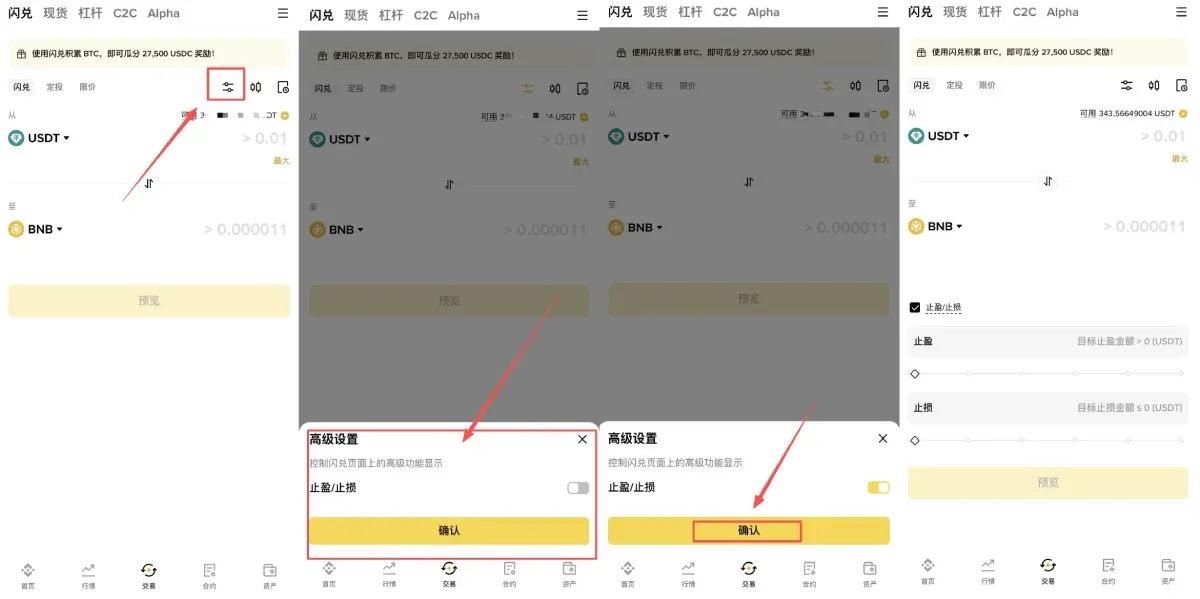
Step 2: Input your target take‑profit price and stop‑loss price.
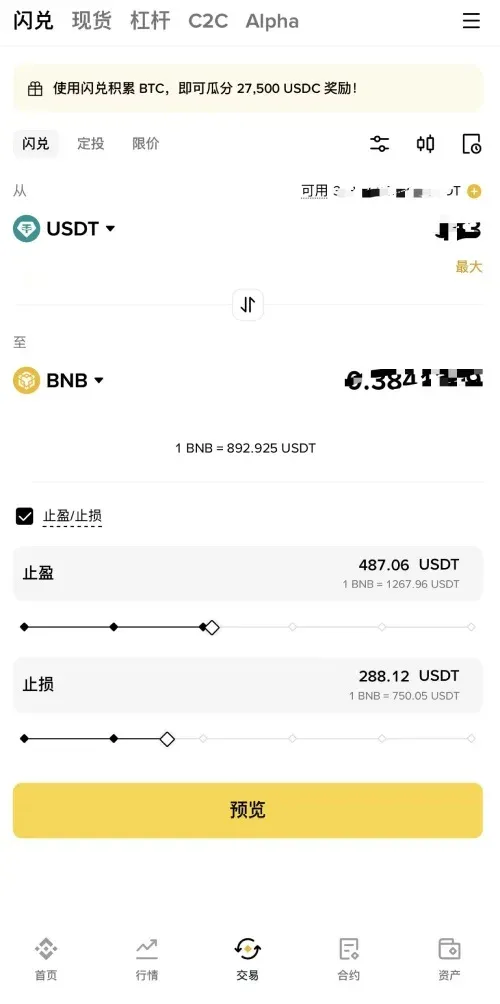
Step 3: Preview the quote, verify everything is correct, and submit the trade.
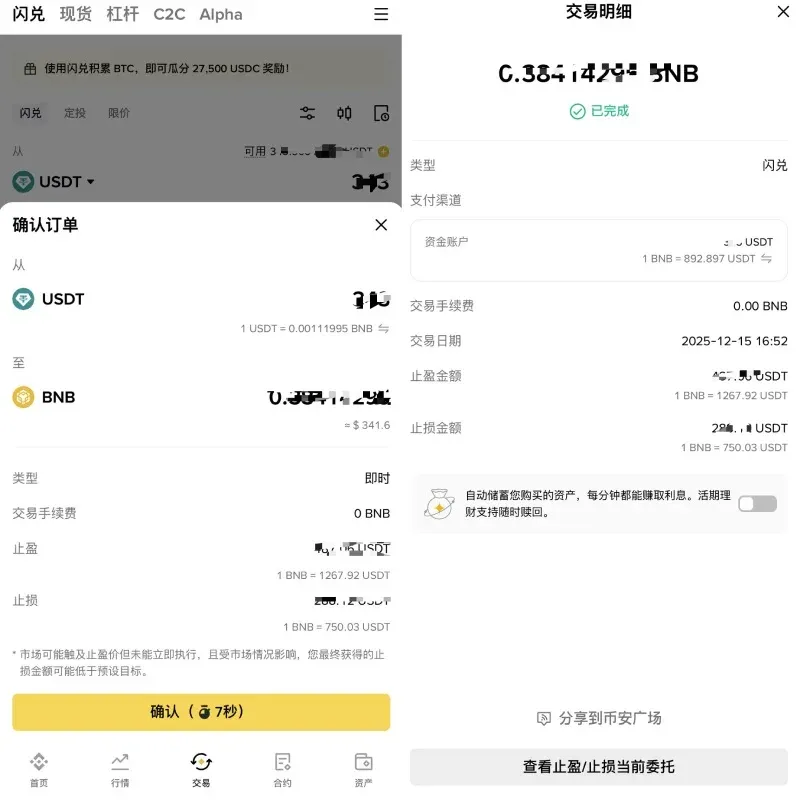
The system will automatically execute the corresponding action once the market price reaches the preset thresholds.
Frequently Asked Questions
1. What is Binance Convert?
Binance Convert is a tool that removes the order‑book step, allowing instant swaps between different assets. It is designed for users who prefer a straightforward workflow.
2. Who can use it?
Any Binance account that has completed KYC can access Convert. After logging in, you can view quotes and perform swaps immediately. (U.S. users must use Binance.US, not the global Binance platform.)
3. How do “Convert,” “Recurring Purchase,” and “Limit” modes differ?
- Convert mode: Executes an instant swap at the current market quote.
- Recurring Purchase mode: Sets up automatic periodic swaps for DCA.
- Limit mode: Executes only when the market price falls within your specified limit range; execution depends on market depth and liquidity.
4. What are the advantages of Convert?
No complex trading interface is required; you receive a competitive quote and an immediate swap without additional fees.
5. How can I view my transaction history?
After logging in, go to [Orders] → [Convert History] to retrieve records for any desired period (single queries are limited to 90 days).
6. Are crypto gains taxable?
Crypto profits may be subject to tax in your jurisdiction. Consult a local tax professional to understand your obligations, especially when using Convert for frequent trades.
Summary
Binance Convert offers newcomers and high‑frequency rebalancers a low‑threshold, price‑locked, deep‑liquidity solution for instant asset swaps. Whether you need to handle large conversions, execute rapid rebalancing, or take advantage of recurring purchases, limit‑order rewards, and TP/SL automation, everything can be managed on a single page with simple steps and controllable risk. You can start right away with as little as $0.01 USD and experience a smooth crypto‑asset conversion workflow.
For more Binance Convert‑related material, search Bitaigen (比特根) for past articles or continue browsing the recommendations below.
Related Reading
💡 Register on Binance with referral code B2345 for the maximum trading fee discount. See Binance complete guide.



