
 Bitaigen Research
 Binance Spot Market Bitcoin Sell‑Order Tutorial: Limit Orders, Market Orders, Take‑Profit/Stop‑Loss Orders, Trailing Stop Orders, OCO Orders
Introduction
When selling Bitcoin on the Binance platform in the spot market, the most common order types are limit orders, market orders, take‑profit/stop‑loss (TP/SL) orders, trailing‑stop orders, and OCO (One‑Cancels‑the‑Other) orders. This guide is divided into three main sections—pre‑trade preparation, step‑by‑step execution, and frequently asked questions—to give you a systematic view of how to complete a Bitcoin sell on Binance.
From a practical standpoint, we will walk through every spot‑sell order type available on Binance, explain the associated trading fees, required account setup, and common pitfalls. The step‑by‑step instructions, accompanied by screenshots, help beginners get started quickly, while more experienced traders can refine their order‑placement skills.
---
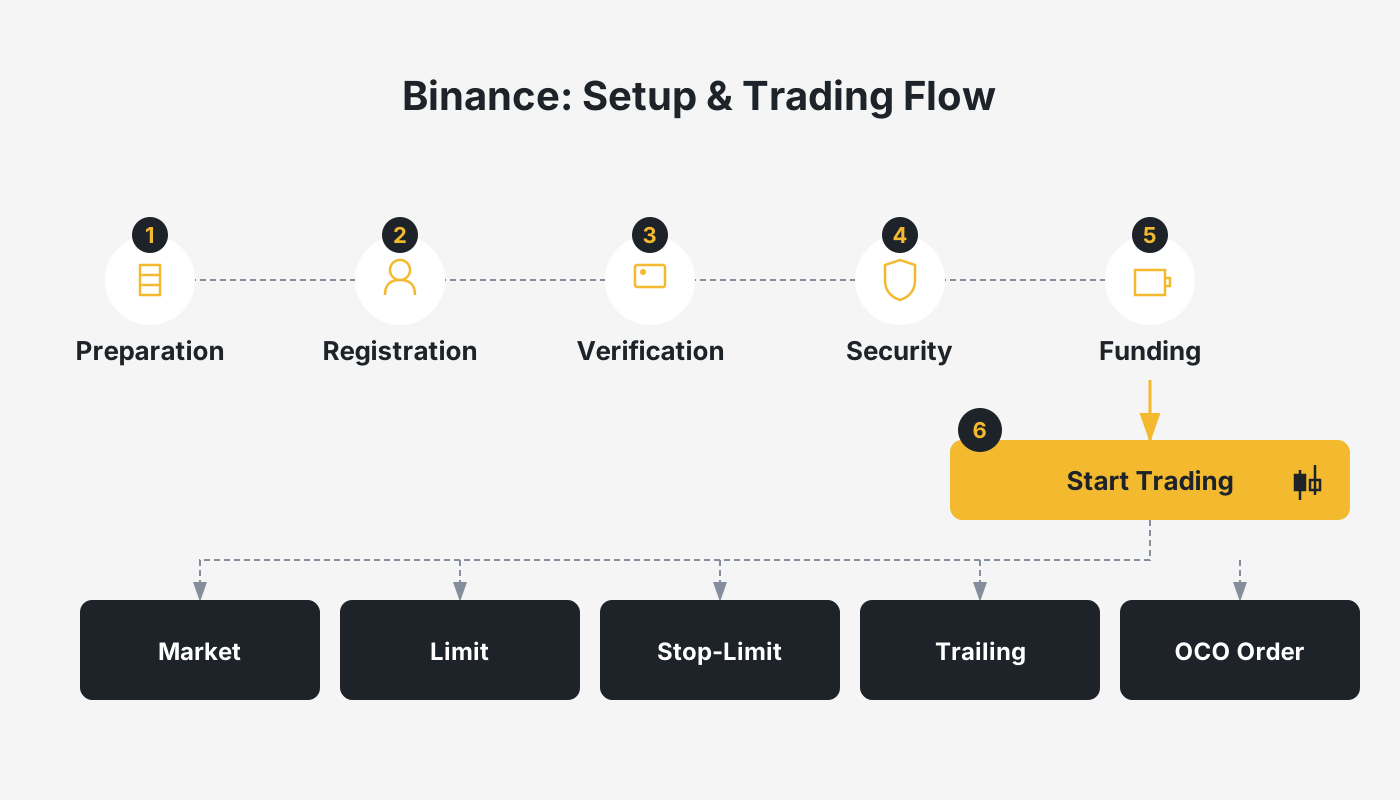
How Much Does Binance Charge for Spot‑Market Bitcoin Sales?
Binance applies a 0.1 % maker‑taker fee to all spot orders. If your account has been upgraded to a VIP tier, the fee percentage decreases according to your level; consult the official fee schedule for exact rates. By registering through the referral link in this article you can also receive an additional 20 % fee rebate on each trade.
Important: The rebate only becomes active after you complete registration and activate the referral link.
---
Binance Official Website + App Download + Referral Code + Tutorial
If you do not yet have a Binance account, you can use the links below to register, download the official client (available for both Android and iOS), and complete the KYC verification. The tutorial has been personally tested by the author and walks newcomers through every step—from account creation and deposit to buying, selling, and identity verification.
- Official website: <https://www.bitaigen.com/binance> (Referral code `B2345`)
- Official app download: <https://www.bitaigen.com/binance/download>
- Android tutorial / iOS tutorial (click the appropriate link for detailed instructions)
Global‑market note: Users residing in the United States must use Binance.US (the U.S.‑compliant version) instead of the global Binance platform. Fiat deposits/withdrawals are typically handled via SEPA, SWIFT, or local ACH depending on your jurisdiction.
---
Selling Bitcoin on Binance Spot Market: What to Prepare
Because the Binance Lite version has limited functionality, this article uses the Binance Pro interface for all demonstrations. After entering the spot‑trading screen, you can submit a sell order using any of the following five methods:
- Limit order – for traders who have a clear target price
- Market order – the fastest way to execute a trade
- Take‑profit/stop‑loss order – sets profit‑taking or loss‑limiting thresholds
- Trailing‑stop order – automatically moves the stop price as the market moves
- OCO order – places a limit order and a TP/SL order simultaneously, achieving a “one‑of‑two” effect
Below is a detailed explanation of each order type.
1. Limit Order – Place an Order at a Specific Price
A limit order only executes when the order price reaches or improves upon the price you set. For example, if you bought 1 BTC at 36,000 USDT and want to sell when the price hits 38,000 USDT, simply enter the following on the sell screen:
- Order price: 38,000 USDT
- Quantity: the amount of BTC you wish to sell
When the market price touches 38,000 USDT, the system automatically sells your BTC. If the price never reaches that level, the order remains open.
Advantages
- You control the exact execution price
- Practically no slippage
Disadvantages
- The order may stay unfilled if the market never reaches your price
- Execution speed is slower than a market order
2. Market Order – Immediate Execution
A market order does not specify a price; it is filled instantly at the best available price on the order book. Use it in the following situations:
- You have already secured a satisfactory profit and want to lock it in immediately
- The market is falling rapidly and you need to stop loss as fast as possible
Advantages
- Order is filled instantly, providing the fastest possible execution
Disadvantages
- The execution price cannot be predicted and may suffer from slippage
3. Take‑Profit/Stop‑Loss Order – Protect Gains or Limit Losses
A TP/SL order consists of two components: a trigger price and an order price. When the trigger price is hit, the system places a limit order at the order price, thereby automating profit‑taking or loss‑cutting.
- Take‑profit example: Current price 35,000 USDT, purchase price 34,500 USDT. Set a trigger price of 35,050 USDT and an order price of 36,000 USDT. Once the market passes 35,050 USDT, a limit sell order at 36,000 USDT is automatically placed.
- Stop‑loss example: If you fear a pull‑back, set a trigger price of 36,159 USDT and an order price of 36,000 USDT; the order will fire if the market drops below the trigger.
Advantages
- Enables precise control of profit and loss, fitting a wide range of strategies
Disadvantages
- Execution depends on market liquidity, and the setup is more complex than a simple market order
4. Trailing‑Stop Order – Auto‑Adjusting Stop Price
A trailing‑stop order moves the stop price upward (for a long position) as the asset’s price rises, based on a predefined trailing percentage. Typical parameters are:
- Trailing percentage (e.g., 3 %)
- Activation price (optional; defaults to the current market price)
- Order price (the limit price that will be placed once the stop is triggered)
Example: You hold 1 BTC bought at 364,000 USDT. Set an activation price of 40,000 USDT, a trailing percentage of 3 %, and an order price of 37,400 USDT. When Bitcoin climbs to 40,000 USDT and continues upward, the stop price follows. If the price then falls to 40,000 × (1 – 3 %) = 38,800 USDT, the system sells your BTC with a limit order at 37,400 USDT.
Advantages
- Automatically follows the market, eliminating the need for constant monitoring
Disadvantages
- If the trailing percentage is set too tight, the stop may trigger prematurely
5. OCO Order – Combine Limit and TP/SL
An OCO (One‑Cancels‑the‑Other) order simultaneously places a limit order and a TP/SL order. Whichever order fills first causes the other to be automatically cancelled, providing “profit‑on‑rise, stop‑loss‑on‑fall” protection.
Example: Purchase price 34,500 USDT, current price 36,000 USDT. Set:
- Limit order: Order price 36,500 USDT (sell if price rises to this level)
- TP/SL order: Trigger price 36,000 USDT, order price 35,500 USDT (sell if price falls below the trigger)
No matter whether the market moves up or down, you will either capture profit or limit loss.
---
Binance Spot‑Market Bitcoin Sell Tutorial: Mobile App Illustrated
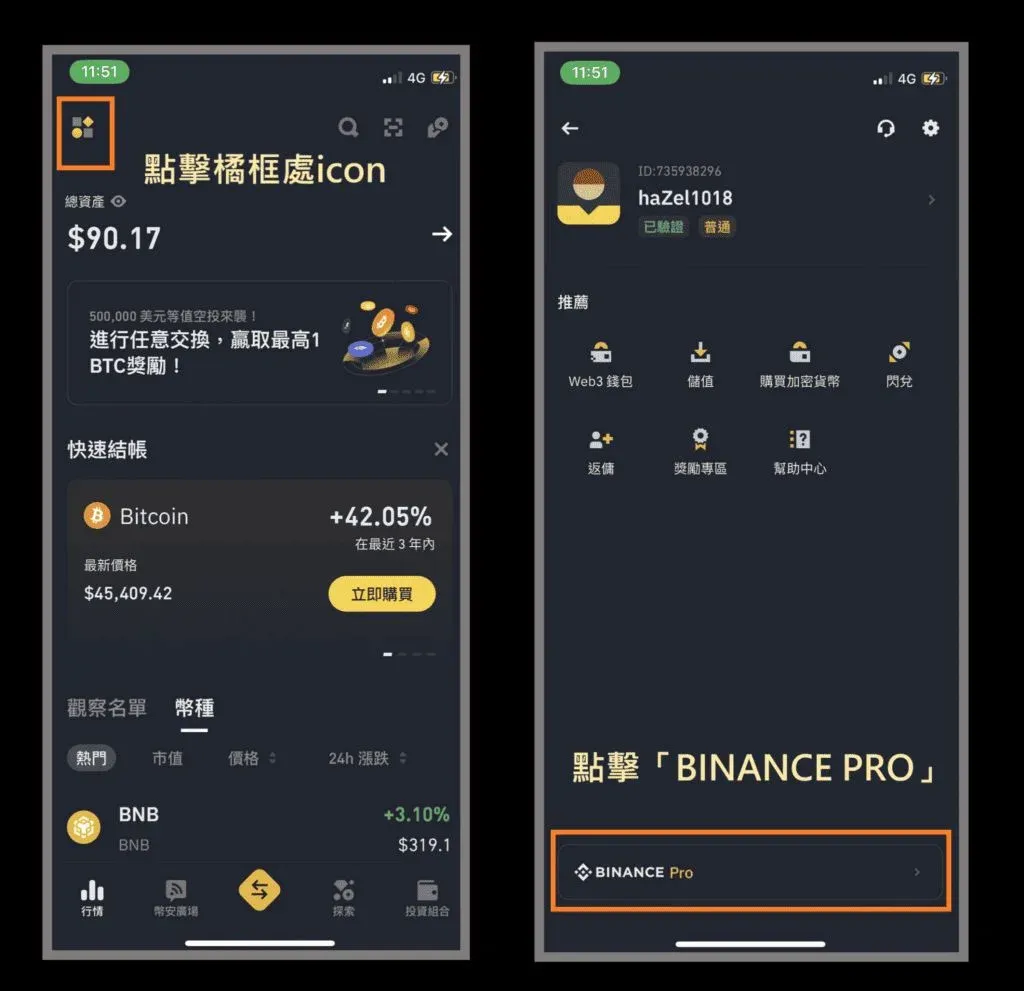
1️⃣ Preparation: Switch to Binance Pro
- Open the Binance app → tap the avatar in the top‑left corner to enter account settings.
- Locate the “BINANCE Pro” button at the bottom of the screen and tap it to switch.
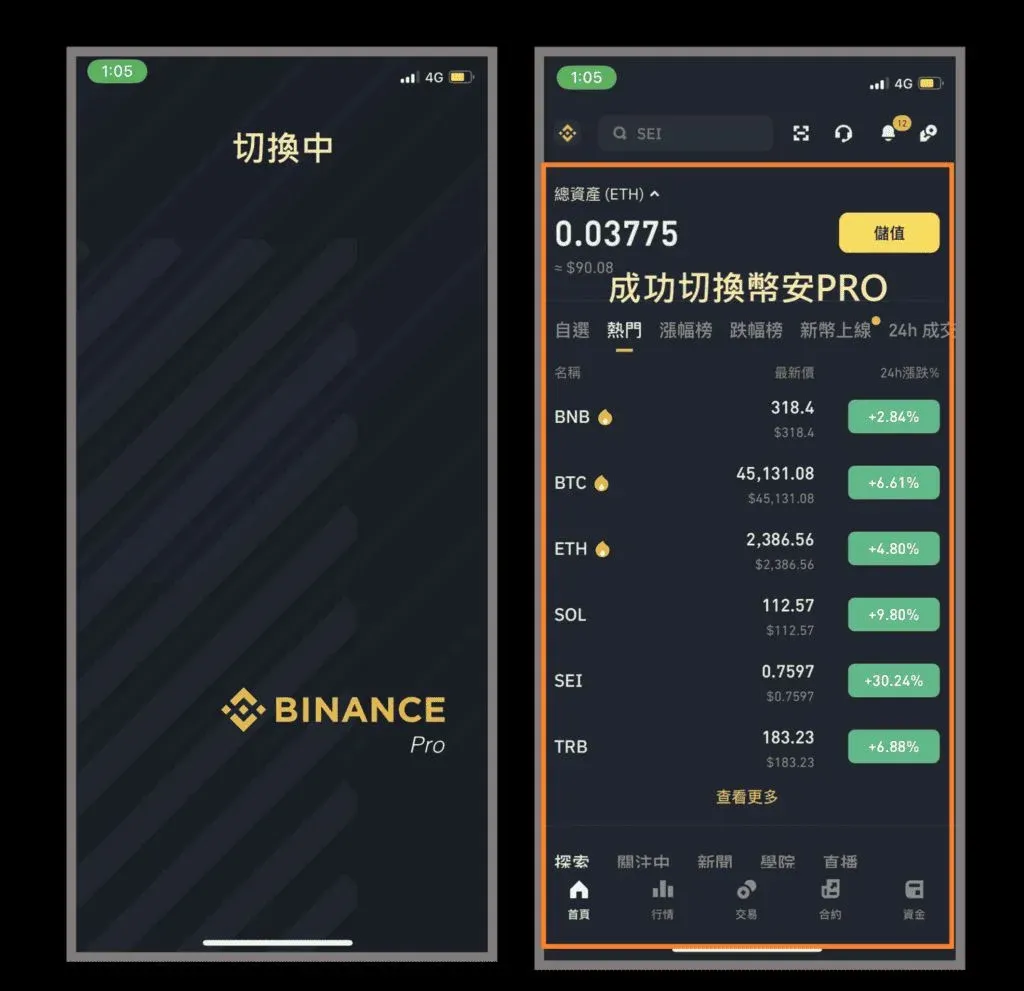
- After switching, tap the “Trade” button in the middle of the bottom navigation bar to enter the spot‑trading interface.
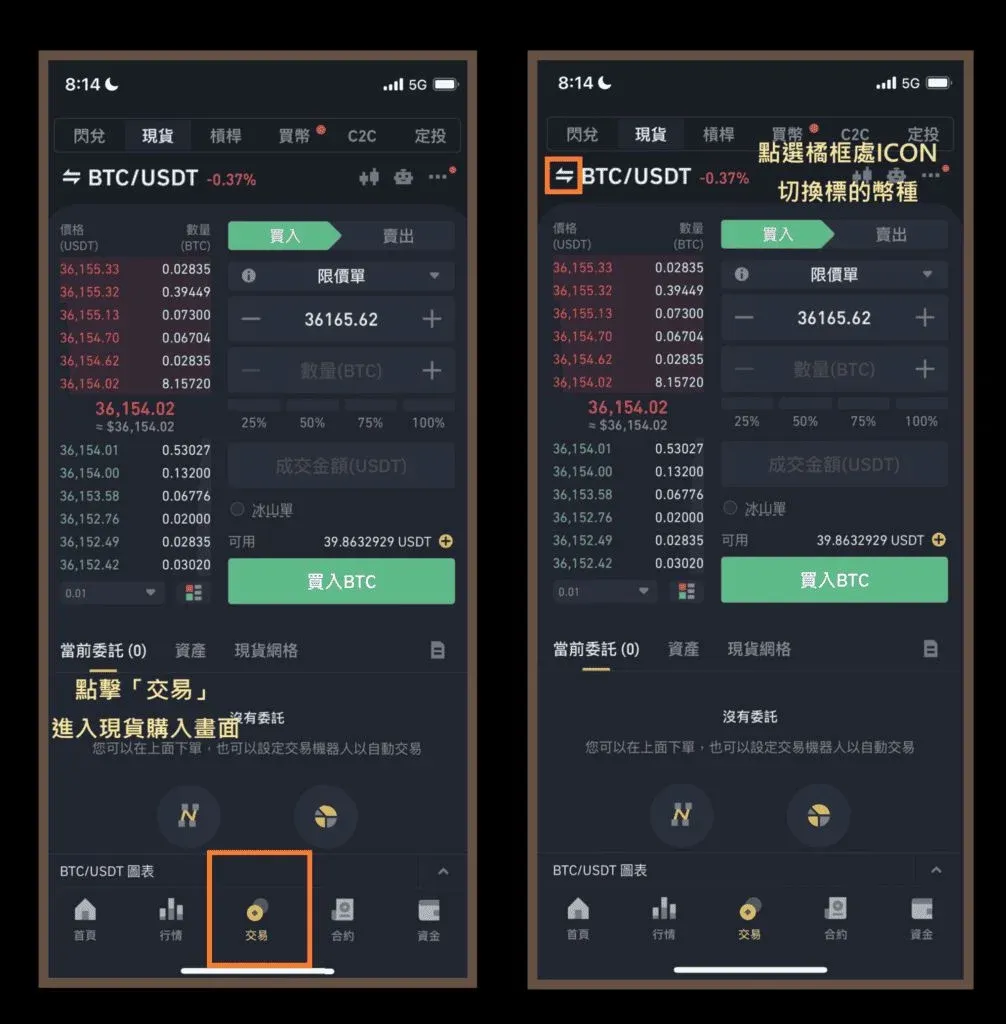
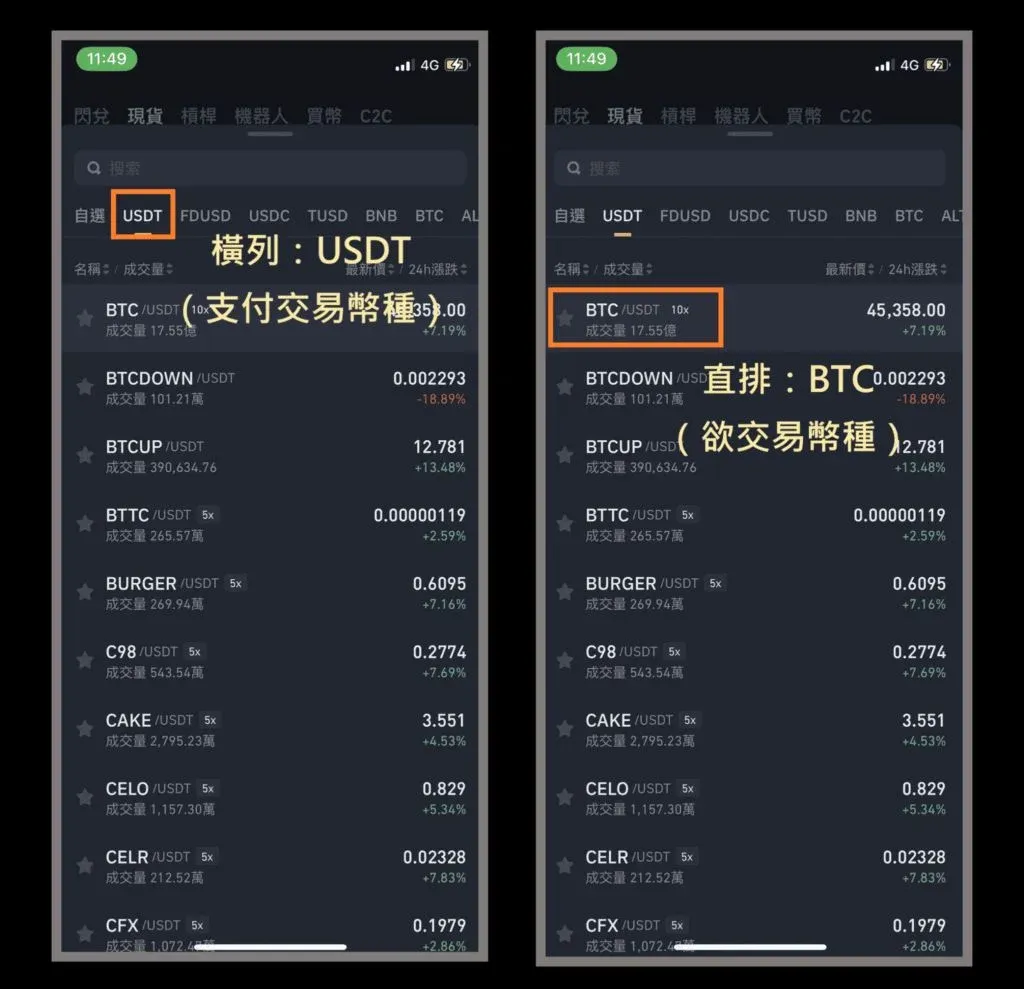
- On the left side of the trading page, select BTC/USDT (you may switch to BUSD or BNB if you prefer to receive those assets after the sale).
- By default the panel shows “Buy”; tap the “Sell” tab at the top to switch to the sell side.
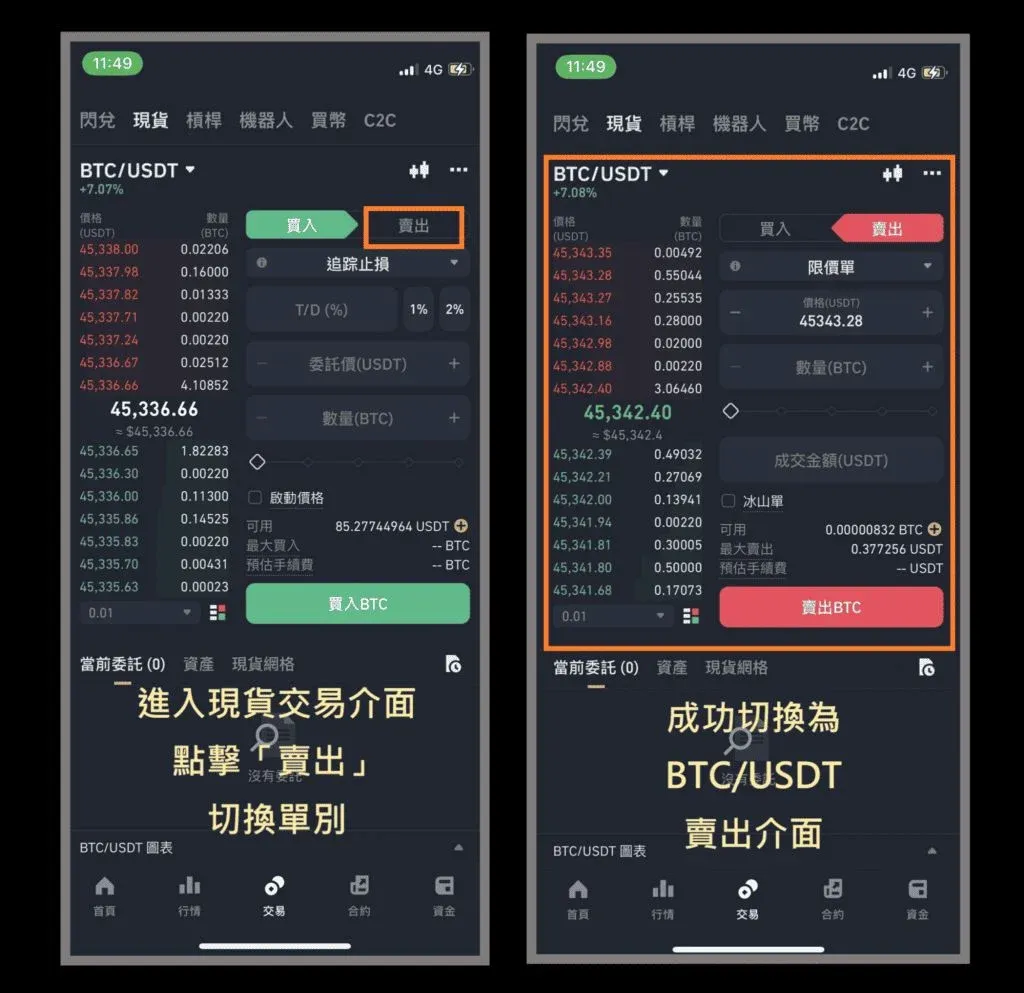
Tip: The “10x, 5x” labels next to the asset name refer to leveraged borrowing. Do not enable them for ordinary spot trades.
2️⃣ Limit Order – Hands‑On
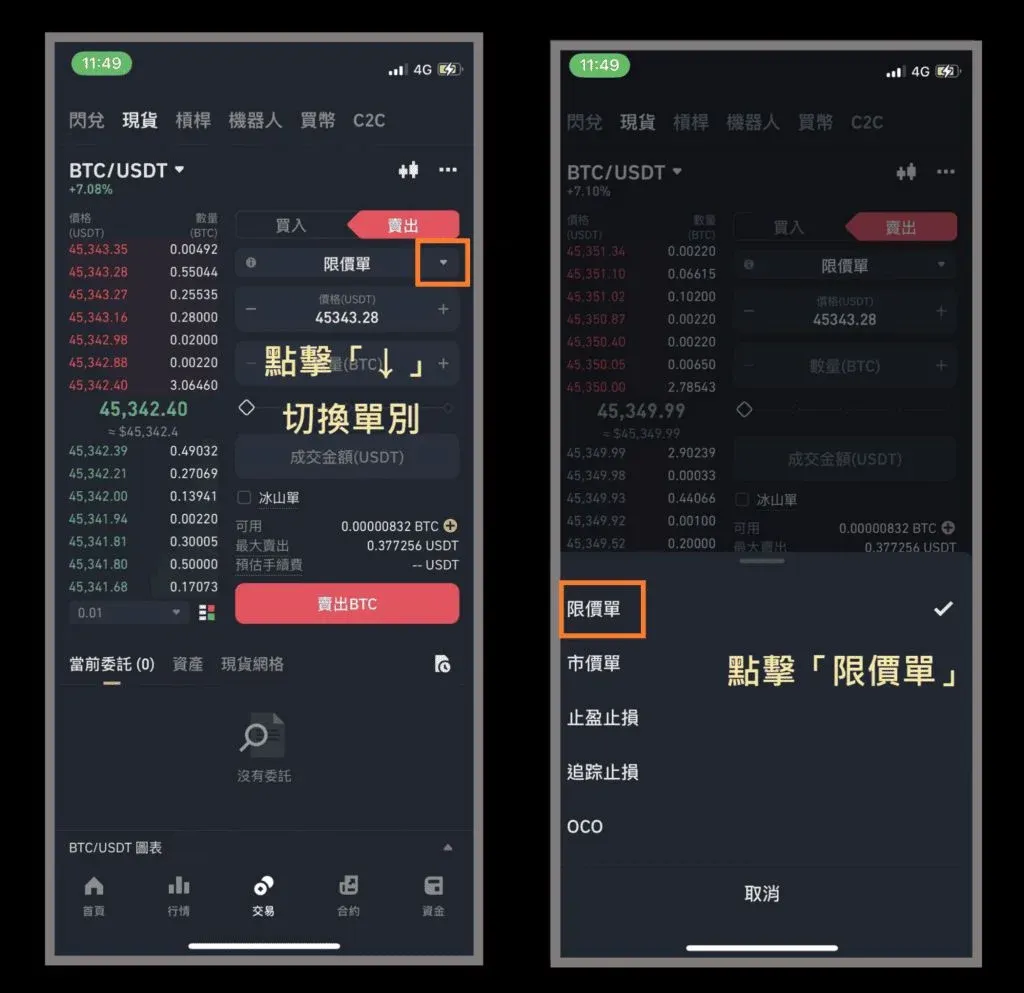
- In the sell panel, tap “Limit” (if it is hidden, use the drop‑down arrow to reveal it).
- Enter the order price and quantity (e.g., 45,500 USDT and 0.00011 BTC). The system will automatically execute when the market reaches that price.
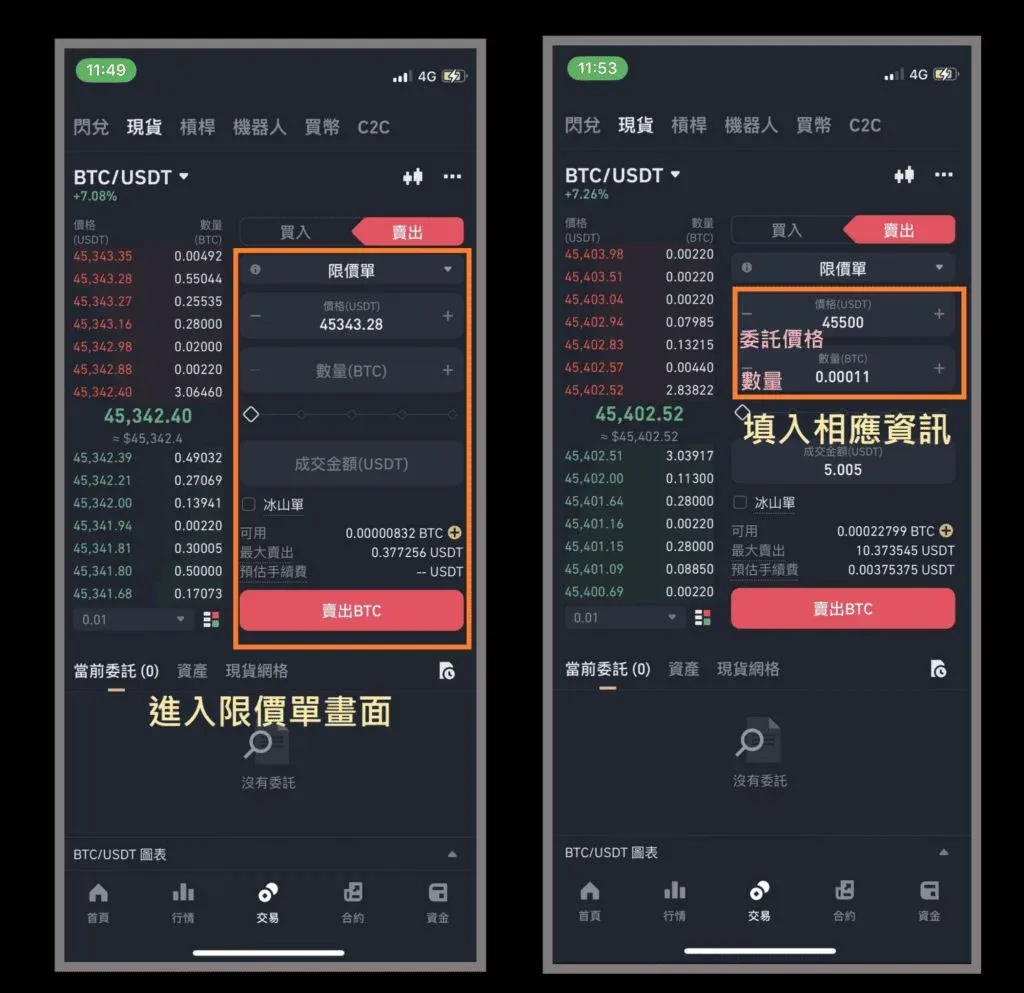
- After confirming the details, press “Sell BTC”. A gray dialog stating “Order placed successfully” confirms that the limit order is now live.
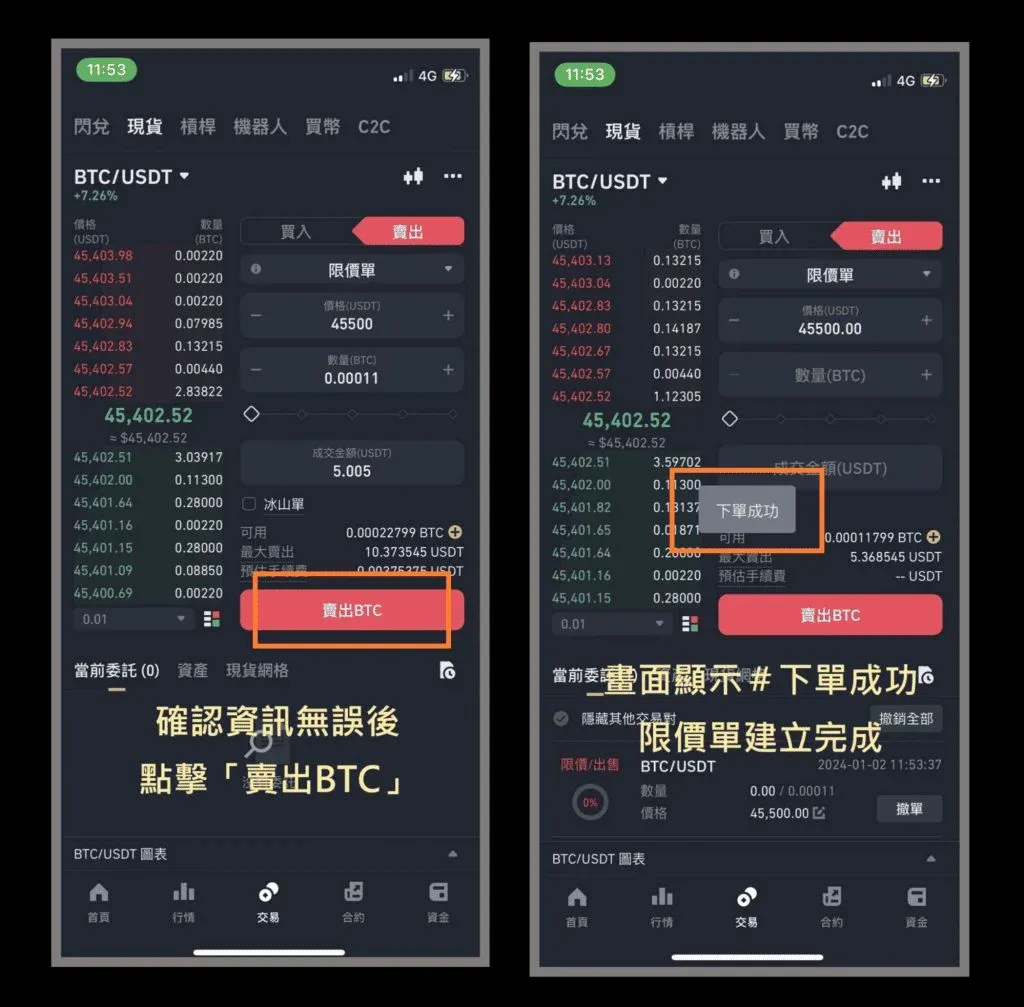
Each spot trade must have a minimum notional value of 5 USD (or the equivalent in USDT). The order will only fill when the market reaches the trigger price.
3️⃣ Market Order – Hands‑On
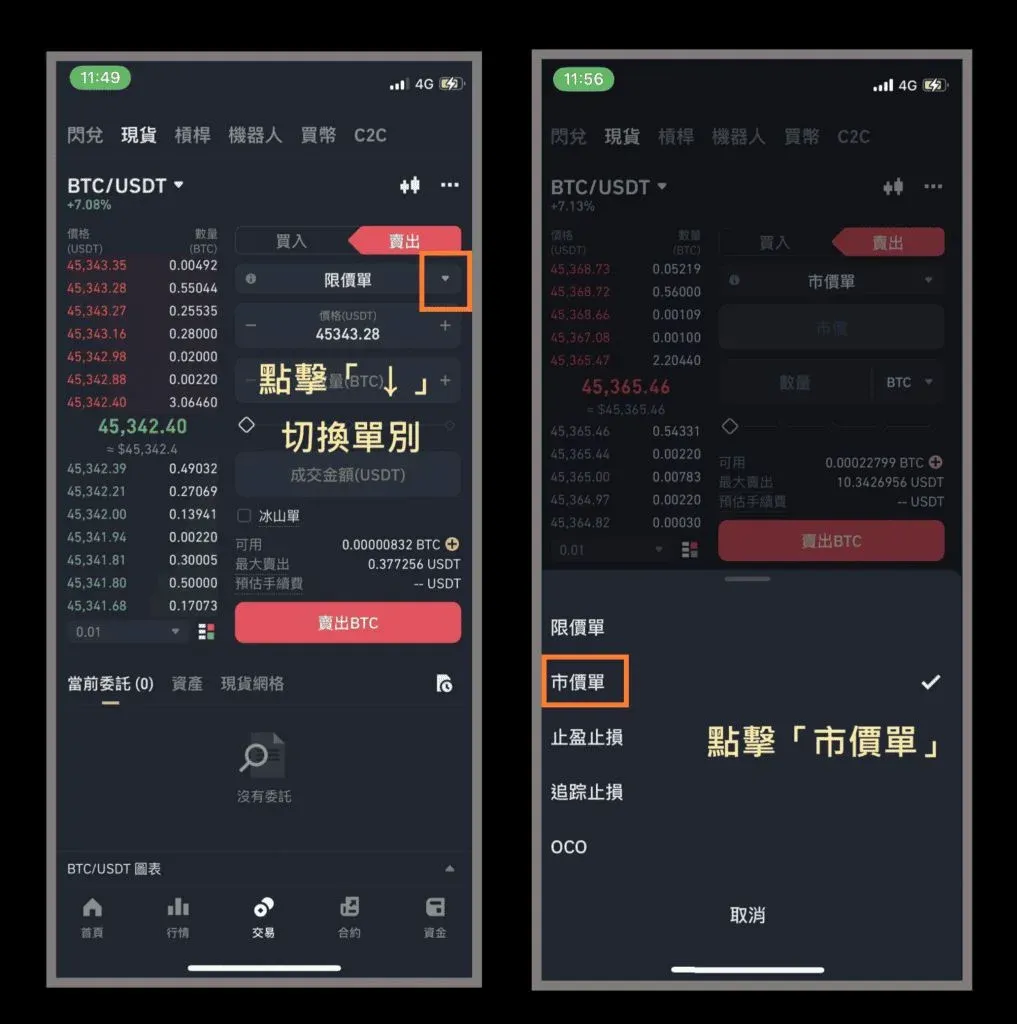
- Switch to “Market” using the drop‑down selector.
- Input only the quantity (e.g., 0.00015 BTC). The system will instantly sell at the best available price.
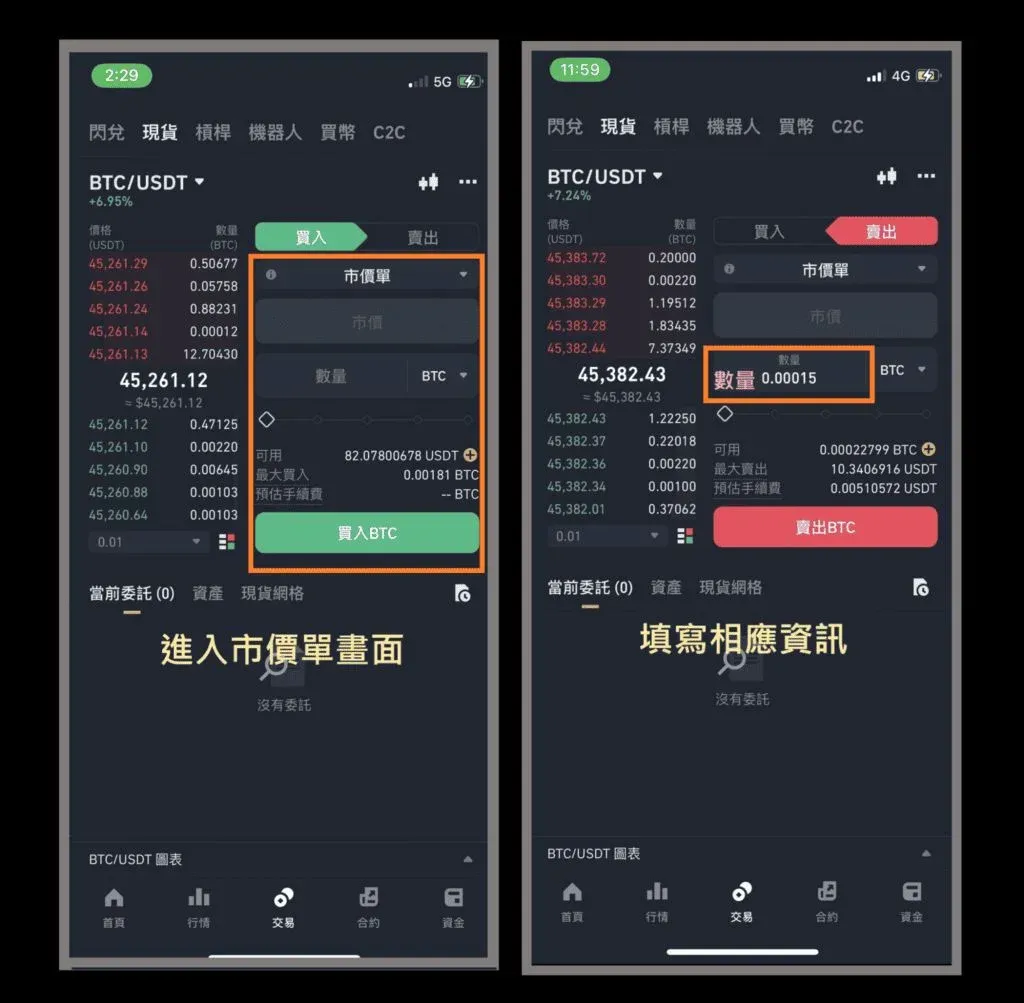
- Tap “Sell BTC”; the “Order placed successfully” popup confirms the trade.
Market orders execute immediately and cannot be cancelled.
4️⃣ Take‑Profit/Stop‑Loss Order – Hands‑On
- Choose “Take‑Profit/Stop‑Loss”.
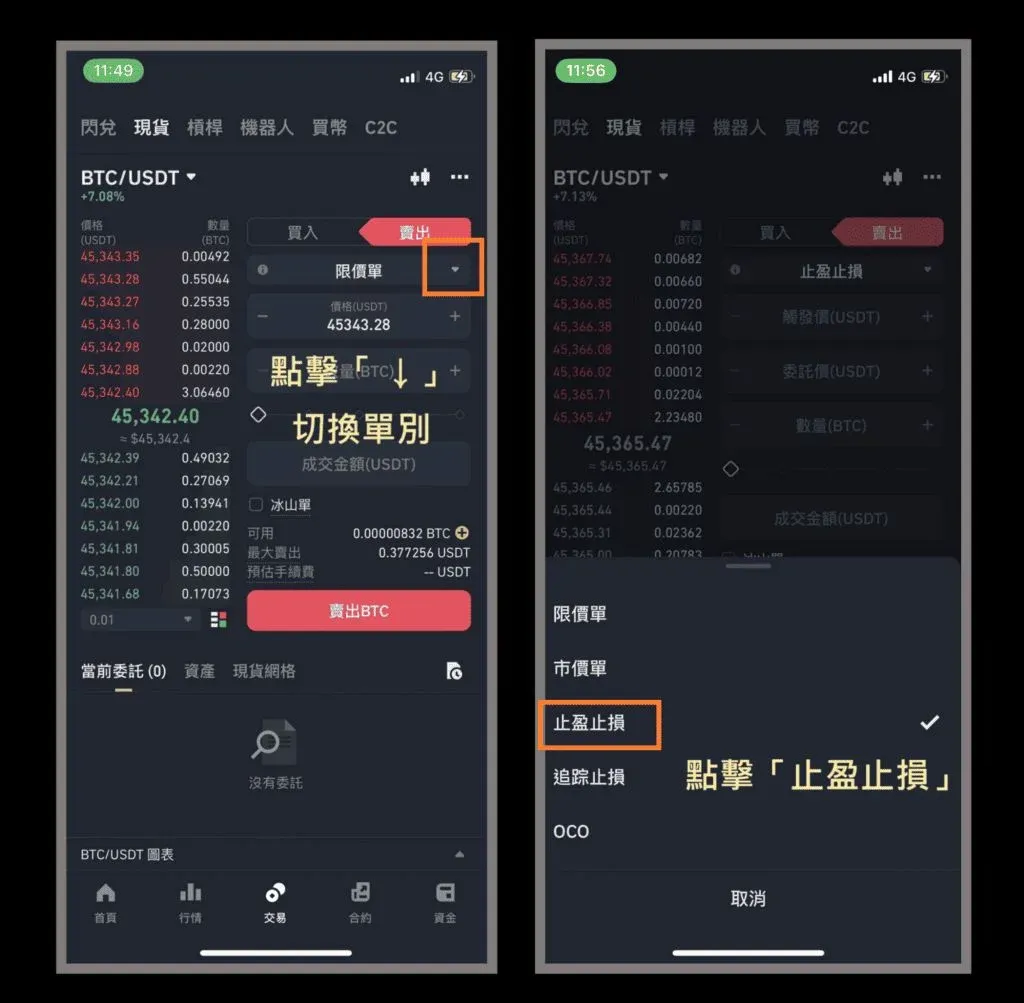
- Fill in the trigger price, order price, and quantity (example: trigger 45,200 USDT, order 45,000 USDT, quantity 0.00012 BTC).
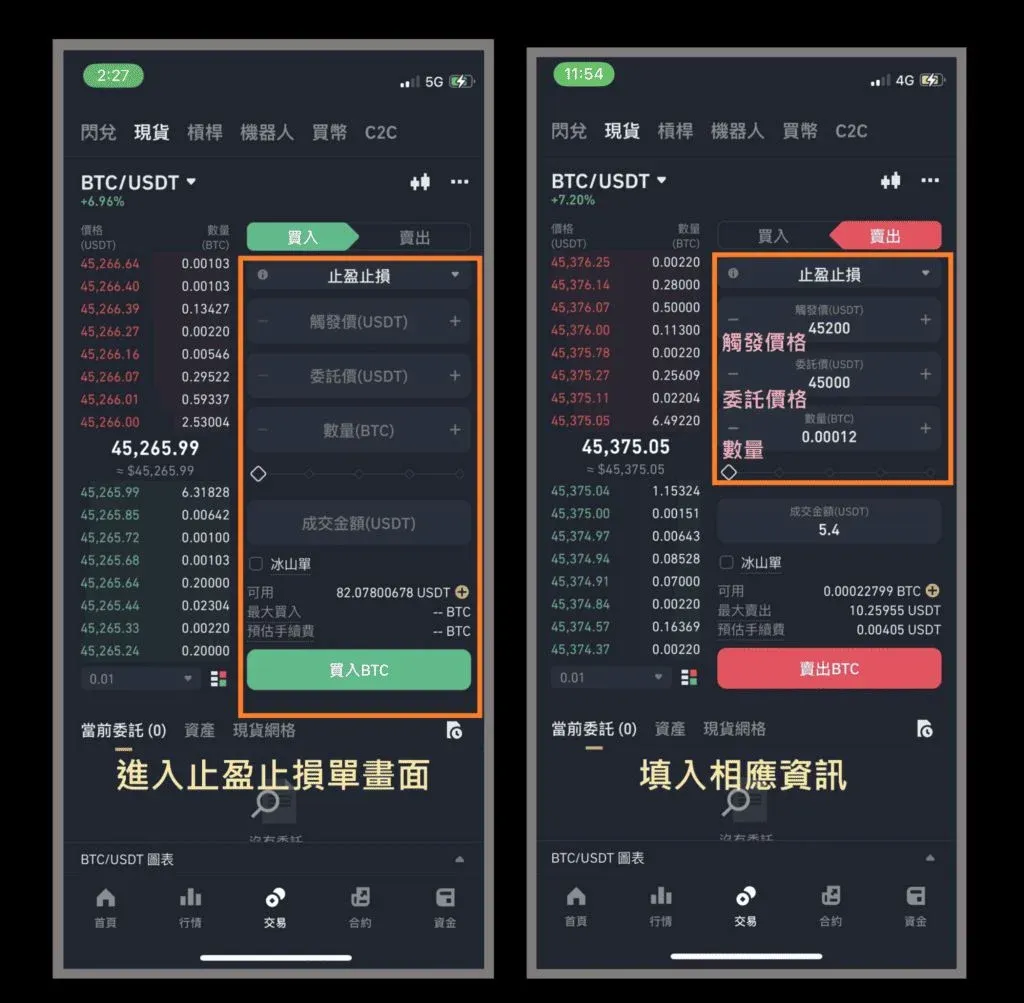
- After pressing “Sell BTC”, a secondary confirmation window appears. Review the details and tap “Confirm” to place the conditional order.
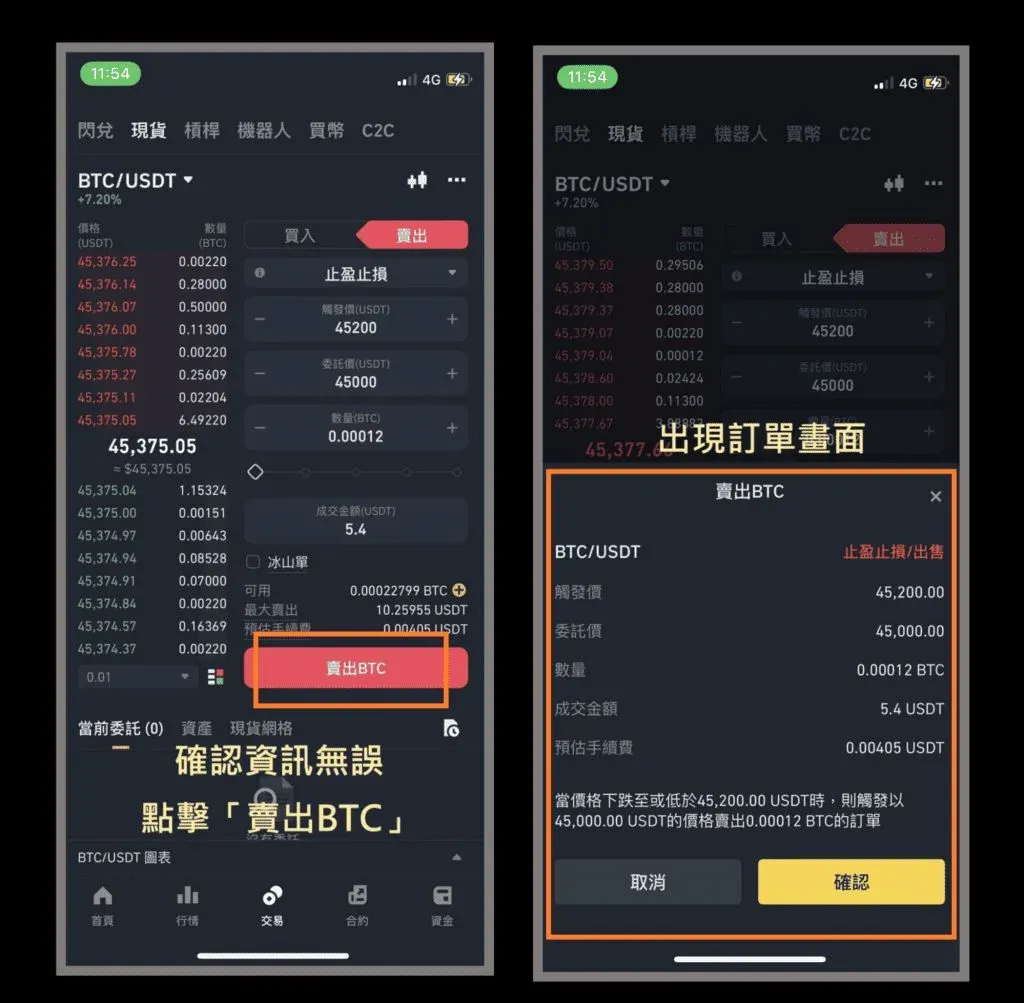
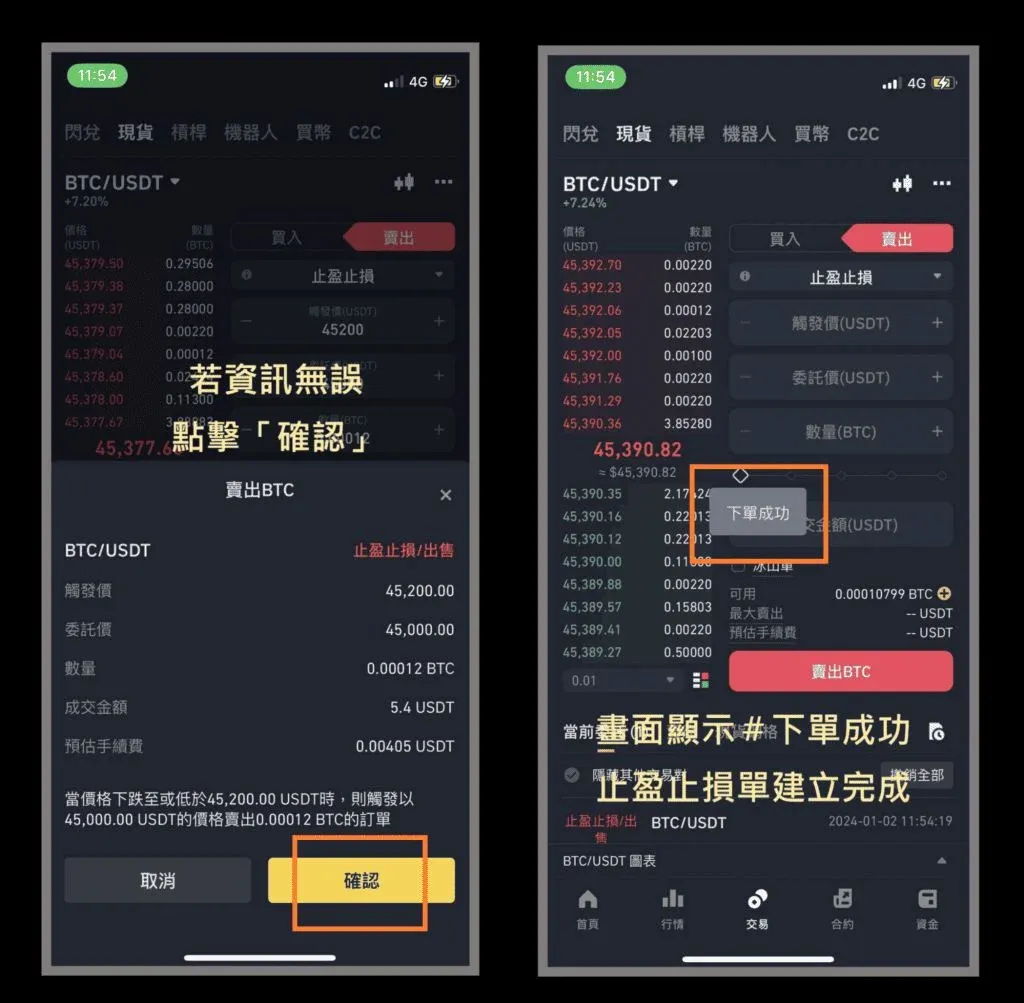
TP/SL orders also require a minimum notional of 5 USD. The limit order will only be generated after the trigger price appears on the market.
5️⃣ Trailing‑Stop Order – Hands‑On
- From the drop‑down menu, select “Trailing Stop”.
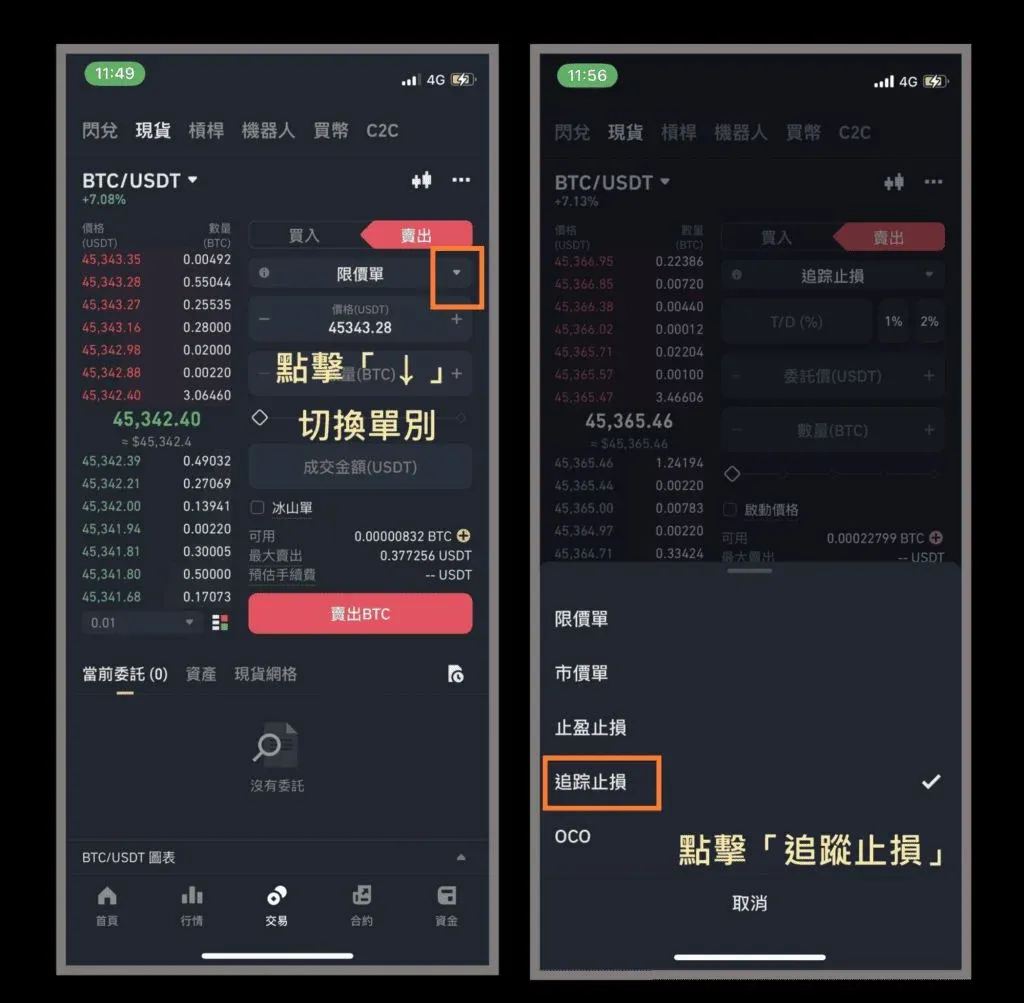
- Enter the trailing percentage, order price, and quantity. You may also set an optional activation price (if left blank, the order activates immediately).
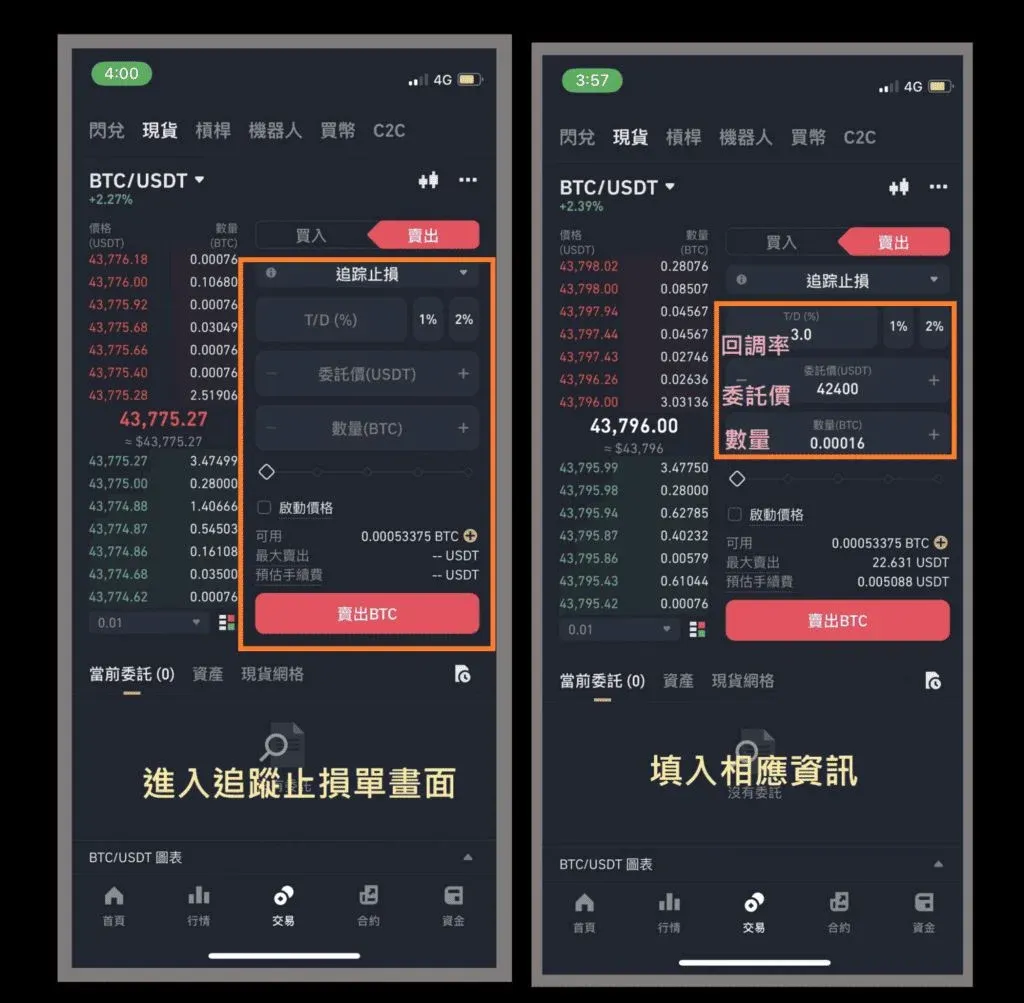
- Press “Sell BTC” again; a second confirmation screen will appear. Verify the information and tap “Confirm”.


